Leaderboard




Popular Content
Showing content with the highest reputation on 08/17/21 in Posts
-
Though it really hasn't helped you all that much has it?4 points
-
Done!3 points
-
But that error I posted has dozens of topics as to me it was a defect in Windows, but I never had this issue. And the only fix is the regedit.2 points
-
2 points
-
Fixing the table sorting was actually super easy barely an inconvenience I just added the episode index number to the table row as a data attribute, then used the old "x > y" sorting algorithm.2 points
-
indeed. 3,400 posts of problems from @crusher11. 3.68 a day. quite a problematic guy2 points
-
and a disable option to not "prompt up" any dialogues about Intro Skip (prob in same area as Cinema Intros/Play next episode)2 points
-
sorry.. i should drink more coffe.. You´re completely right. Missed this drop-down. Thanks a lot!2 points
-
@ebr I think the request is to have this configurable server side so a user isn't inadvertently using up all the server's resources. I'd like this too.2 points
-
I am looking to see if a SAML2/OAuth plugin is something others would use. I myself would love this feature to share Emby publicly with family members and friend and worry a little less about insecure passwords that some may use. I personally am a big advocate for security as I work in IT and see how a lack of good security can cause havoc. I love Okta and what it offers. Anyone can sign up and use it for free under 1000 users if you sign up as a Developer. That is just plain awesome. Let's see who else is interested. I am excited to find out! Thanks1 point
-
Hi, Please remove the information for the physical path the files on the detail side of movies . This information should be able to see only admins . Greetings Taurec1 point
-
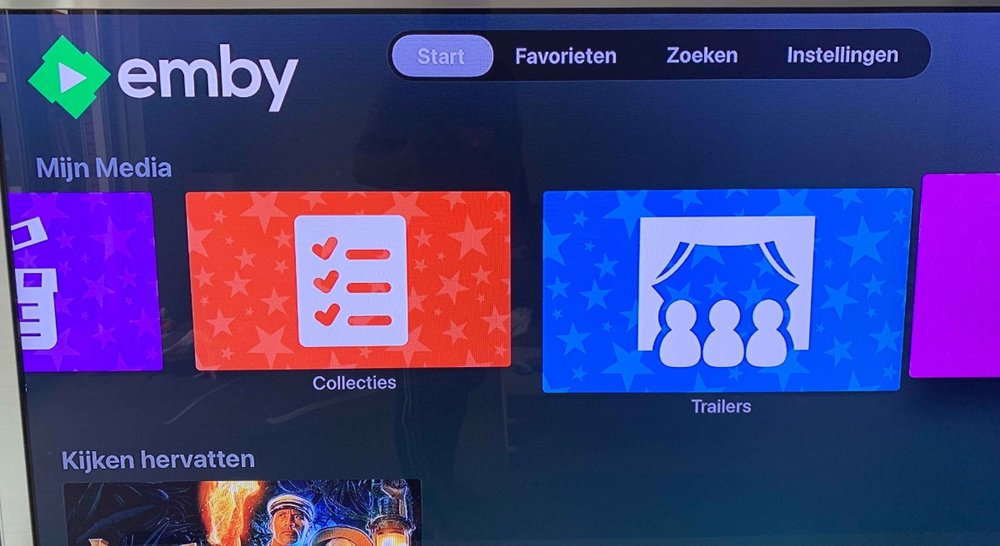
The TRAILERS icon (for the My Media section on the homescreen) is bigger then the rest of the icons (of the other libraries). It doesn't have to do with 'selecting the icon' because when you select it, the icon will even increase in size. This happend both with the latest STABLE release and also the latest BETA release.....
 1 point
 -
OK, thanks for the help. I played with the API a bit and I now know how to tag channels. It's not hard to do. I just need to carve out some time to do it. Give me a few weeks and it will be done. I may be able to get to it earlier. I just don't know. Vic1 point
-
LiveTvChannel target = (LiveTvChannel)source; Never thought of such a simple thing like casting and LiveTvChannel instead of ChannelInfo. Working. Thanks!1 point
-
A 20 minute default seems like a good idea especially if it’s fast. Personally, I think using a percentage could be even better, but it may be slightly harder to implement. So it’s probably best to keep it simple for now. I’m really looking forward to seeing just how much faster it is by using only FFmpeg.1 point
-
Once this is done, some work needs to happen to make it useful. Hopefully it doesn't sit too long..1 point
-
When I set the intro encoding length to 20 minutes, I got almost every title sequence missed at 15 minutes. I think the default needs to be 20min. The good news is the scan is really fast because we are only using ffmpeg, so it will be hardly noticeable. In fact we probably don't need to log the successes anymore, only the failures, and that will keep plugins log writing minimal.1 point
-
That is certainly a lot of memory being used by the Emby server. Are you using ramfs, tmpfs, /tmp, /dev/shm or any other memory backed filesystem in your Emby config? The logs show your server is not idle. There are multiple clients connected and all appear to be remote. I count 8 of them across your posted logs. Also Ombi is trying to do something there. The detected graphics adapter looks ancient and HW transcoding is not an option so all work is being done with software in CPU. If your graphics adapter is that old is your server just as old? It might explain why it looks so busy on the CPU usage.1 point
-
Shall look forward to it1 point
-
God I hope it's not the drive. The 2nd drive I tried was an external garbage drive, always failed after a few seconds when trying to read anything. I just sent it back. The blu ray disk literally always failed at the exact same spot, when ripping the same file, so I tend to think the disk itself is bad, since it's new and perfectly clean. Only 1 file on the disk gave me problems, the rest ripped fine. I guess we'll find out in a few days when I get the replacement disks. I'll update this thread.1 point
-
Everything works now. Thanks!1 point
-
https://superuser.com/questions/1252575/unable-to-install-clickonce-application-due-to-security-settings-windows-10 You need to adjust the registry to allow click once app installs.1 point
-
You mean error similar to this? Unable to Install ClickOnce Application due to Security Settings (Windows 10) - Super User Not necessarily, as there were lot of topics awhile ago one this Windows config.1 point
-
You can follow this guide for example. rclone Systemd startup mount script | JamesCoyle.net Limited1 point
-
Hi. Under your user menu (user icon at top) in the app, there is an option to Unlock App. You would purchase the unlock from there.1 point
-
I have the same setup as the OP. I just wanted to show my findings. When starting the stream via local lan (Direct Stream). Then launching the same channel on IOS mobile device using cellular it will only direct stream. If I start the stream on the mobile device first on cellular, then open it on the local lan. The mobile device will transcode and the local lan will direct stream. I checked the HDHomerun tuner status after doing the second test and both streams are coming off the same tuner. Which is good as I would not want to tie up 2 tuners on the HDhomerun. Using latest Emby Theater for Local Lan and latest Emby version for IOS on cellular, with Emby server Server 4.6.4.0. Its really not an issue for me, but it would be cool, if it can be figured out.1 point
-
No worries. The config is for creating your remote (the location of your files on the cloud for rclone to read it). If you already created a remote you just need to apply the rclone command, I advise you to run it as a service, so in the event rclone crash or you restart the machine the rclone mount command will be automatically invoked.1 point
-
No. Rclone doesnt download automatically any files, dont know why you have this conception, the only way rclone download the files is in the event you have the vfs cache activated and modify the files on the mount, rclone will download the files to your local computer for cache purpose and after being uploaded again it will be deleted. The command for mounting is rclone mount --allow-other remotename: /path/to/directory/1 point
-
Exactly, and thats why the problem you are having. On linux you need to specify the flag: --allow-other The reason is that without this flags other applications won't have access to the mounted directory.1 point
-
Could the alpha picker be made to utilise full height of the page and have a bit larger letters? Or is there a particular reason for it to be so condensed and the letters so small? Years haven't been exactly kind on my eyesight, and I would assume I ain't the only one.1 point
-
If you had this media in your library before that could do this. You may also want to check the settings you have set here: Library-Advanced Tab->Date added behavior for new content:1 point
-
@cayars was able to remote into my machine and fix the issue, thanks a lot and now I am able to stream remotely again1 point
-
Glad you got this working. Thanks for the update on your status.1 point
-
If you are having trouble figuring out how to change the 2nd router to an AP or want some help with this send me a PM and I can do a remote session with you and give you a hand. Send me a PM if this is something you want to do. Carlo1 point
-
for right now if forward to next file, the playback speed will set back to normal, hope can keep the same as the previous, or even can open a option to set a preferred speed, like 1.5x, 2x.1 point
-
Yes, unless you want to swap out ffmpeg. I also removed all the image requests for the config UI. It is now just a table, and it makes it load faster. There are a couple more things I learned from auto organize that I can add to the plugin to make the configuration better.1 point
-
I agree, was just pointing out in case that extra port needed to be utilised.1 point
-
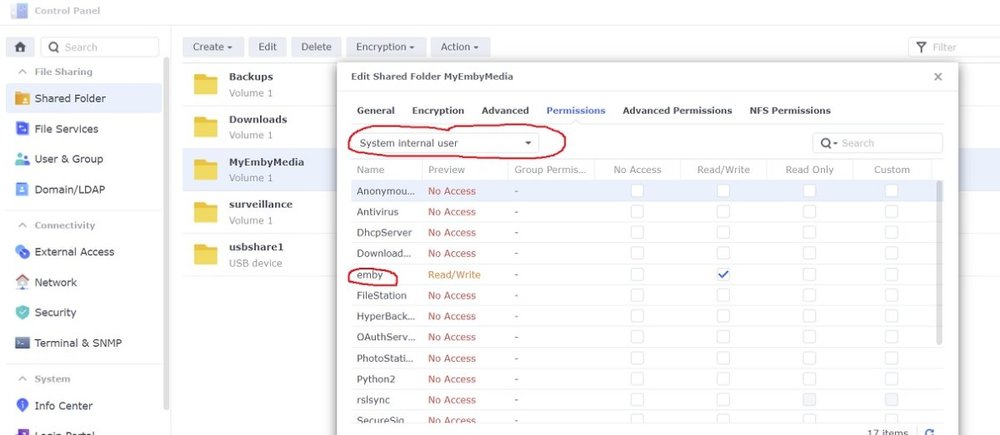
You need to use the drop down and change to System internal user. See my pic1 point
-
It's important to understand what Ethernet ports on the devices were used to connect to what. If you you have just connected the 'LAN' ports together, then you have effectively just extended the LAN - this is ok. If however, you have connected a LAN port from the first 'Router' to the WAN port on the 2nd router - then that is a bad setup as you'll have double NAT, double DHCP and all sorts going on. If you can turn the second 'Router' into just an Access Point and disable DHCP - then I believe we are good. ie Arris Modem > [[WAN Port] TP Link Router, DHCP on, [Any LAN Port]] > [[Any LAN Port] on second TP Link Router, DHCP off, AP Mode]] This will then give you two AP's, plus all Ethernet interfaces on both TP Links will be on the same subnet. Note the port types - this is important. Emby can be connected to any Ethernet (or wifi) - as it's a flat network and port forwarding (on the first TP Link Router) should work. Note second TP Link is no longer a Router at this point.1 point
-
Sounds like you missed the last section of the guide Emby is now a System internal user under DSM 7. The pic below is how your media shares should be setup
 1 point
 -
In typical troubleshooting fashion, this hasn't happened again since I decided to ask about it.1 point
-
Awesome thanks for the info. I am migrating my emby server over to a M1 mac mini & will leave the files over on my windows server. I really like the responsiveness of it.1 point
-
It doesn't make sense to me that this is controlled on the client side.1 point
-
Hi, just open the emby server web interface, click the settings gear icon in the top right. Then in the left menu click Library. Please let us know if this helps. Thanks.1 point
-
Tout est OK en suivant minutieusement la marche à suivre1 point
-
Thanks for reporting back. Yes, we will put out a release on Amazon soon.1 point
-
This is a defect in the system you have Emby installed on and the Coverart plugin. You do not see a issue if you disable treatment or uninstall CoverArt plugin, correct? Devs may need to see a server log also. https://emby.media/community/index.php?/topic/88207-my-movie-primary-images-all-turned-grey1 point
-
If its the case that this forum cant do it i would be even willing to do a website for just voting and keep it fully updated with all links to emby to original posts, whats been completed by emby and whats in progress with emby on the features side only. literally made this in less than 10mins just to show one post but would make it look good on all pages and information too https://onyxcorplimited.wixsite.com/embyvote/group/mysite-200-group/discussion and a link on the top of this forum can be for the website for voting purposes just a thought1 point
-
Hey guys! I was just fiddling around with my emby server currently running on Ubuntu. I was getting annoyed at having to convert my pem encoded certificates to a PFX format, so I made a little bash script. pretty simple scripting, but maybe it can help others. Keep in mind, this assumes that you have a folder called "certs" at your root, as well as a folder called "old" inside. So you have /certs/ and /certs/old The script is pretty simple and does three things ... moves and appends the date to your current PFX certificate called emby.pfx to a directory called old Assigns variables to the correct path and converts the cert to a PFX to the directory /certs restarts the emby server to load the new certificate. A couple things to note as well... Make sure to chain emby.domain.com to the correct domain name I am also using Ubuntu 16.04, so you may have "certbot" instead of "Letsencrypt" This needs to be ran AFTER your letsencrypt/certbot renew (Can also be easily added to this script) Would recommend a cronjob to run every so often Make sure to create the /certs and /certs/old directories Finally make sure the advanced portion of emby is set to use /certs/emby.pfx #!/bin/bash today=`date +%Y-%m-%d` mv /certs/emby.pfx /certs/old/emby.$today privkey=/etc/letsencrypt/live/emby.domain.com/privkey.pem cert=/etc/letsencrypt/live/emby.domain.com/cert.pem chain=/etc/letsencrypt/live/emby.domain.com/chain.pem openssl pkcs12 -export -out /certs/emby.pfx -inkey $privkey -in $cert -certfile $chain -password pass: service emby-server restart1 point
-
the way ive seen it work on netflix, is that it is show specific. so shows that have cold openings, or the intro is delayed after part of the actual show dont utilize this feature. i assume it works something like chapters.1 point