Leaderboard




Popular Content
Showing content with the highest reputation on 08/07/21 in Posts
-
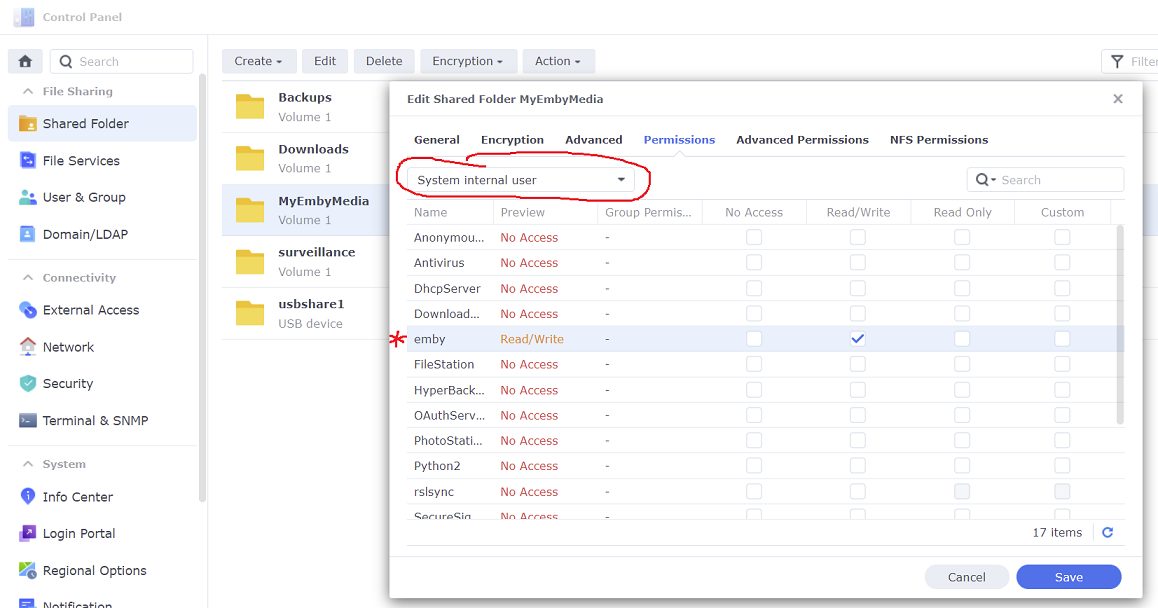
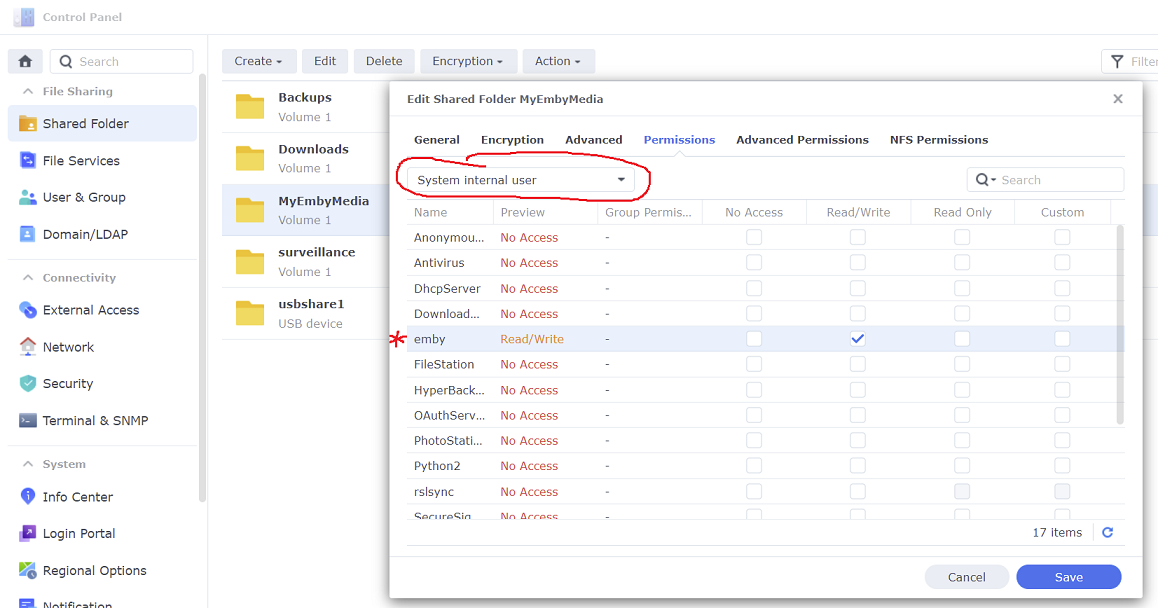
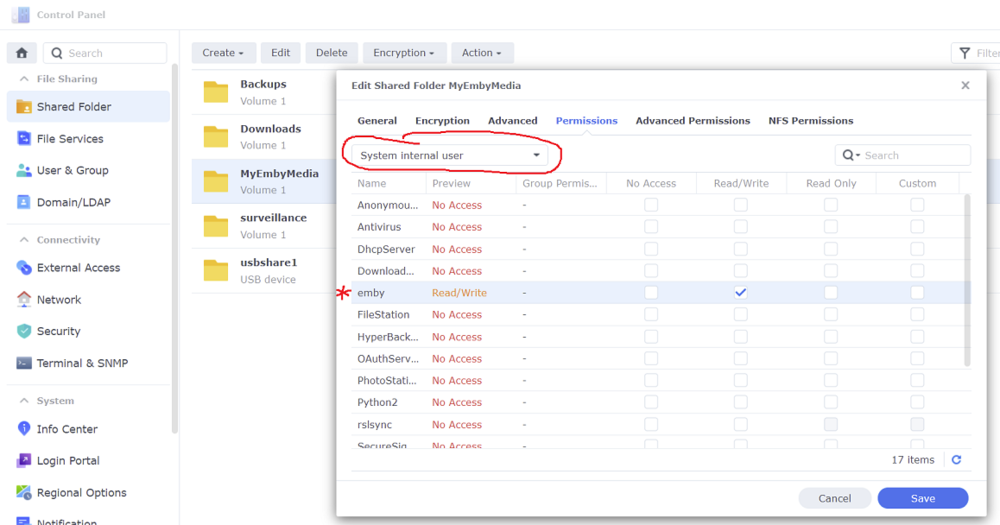
@FrostByte That was the PERFECT shove. I did NOT give the EMBY folder access in the System Internal User drop down as shown in your jpg. Thank YOU!!!2 points
-
Hey All, Firstly, excellent work! secondly, I noticed that this has stopped working in Emby 4.6.4.0, I have forked the repo and fixed if anyone is interested. (Have PR out for main repo) https://github.com/ShanePe/Emby.SmartPlaylist.Plugin/ Sorry also, I have made an update, if the playlist has NOT yet been generated, it will generate it, regardless of the playlist schedule trigger. So one no longer need to 'manually' run first to initialize the playlist if it falls outside of playlist generation schedule. (Make sense !?!?!?!) Version 2.4.0.3 Feature Create a copy of a playlist. (Duplicate) Decluttered UI by adding a pop up menu to playlists New Criteria: Added Audio Stream Codec Criteria (Stream: Audio Codec) Added Audio Stream Language Criteria (Stream: Audio Language) Added Audio Stream Display title Criteria (Stream: Audio Display Title) Added Subtitle Stream Language Criteria (Stream: Subtitle Language) Added Video Stream Codec Criteria (Stream: Video Codec) Added Video Stream Display title Criteria (Stream: Video Display Title) Updated Criteria: Parental Rating: Now uses official rating under the hood Resolution Height: Now uses video streams to determine the available video heights rather than the metadata. Resolution Width: Now uses video streams to determine the available video widths rather than the metadata. Added Monitor Mode to shuffle playlist type. Meaning that the playlist will be destroyed and recreated on a schedule, but between scheduled executions, media item changes will be batched and monitored for inclusion/exclusion. (So .... combination of live and shuffle modes but could have a perf hit on larger playlists, experimental) Collapsible sections in the playlist editor that keeps state, for more UI real estate. Added the ability to add notes to a playlist (limited to 256 chars). If there are notes assigned a pop up is displayed when hovering over a playlist (2 second delay). Order all selection lists on criteria with dropdowns alphabetically. ------------------------------------------------------- Releases Here -> (See change logs in this thread .... way down) Plugin for Emby Server 4.8: SmartPlaylist-2.5.0.4810.zip1 point
-
I mentioned it in another thread, but thought I'd put it here since this looks like a new section--just for posterity. Would like to have a bulk meta data editor function. For example, if I have 750 videos whose producing studio is the same, I want to select those videos and apply the name of the studio to those videos. Similarly, if there is a custom tag I want to apply to a subset of those movies, I want to be able to select them in bulk and apply the tag to those videos (instead of selecting them one by one).1 point
-
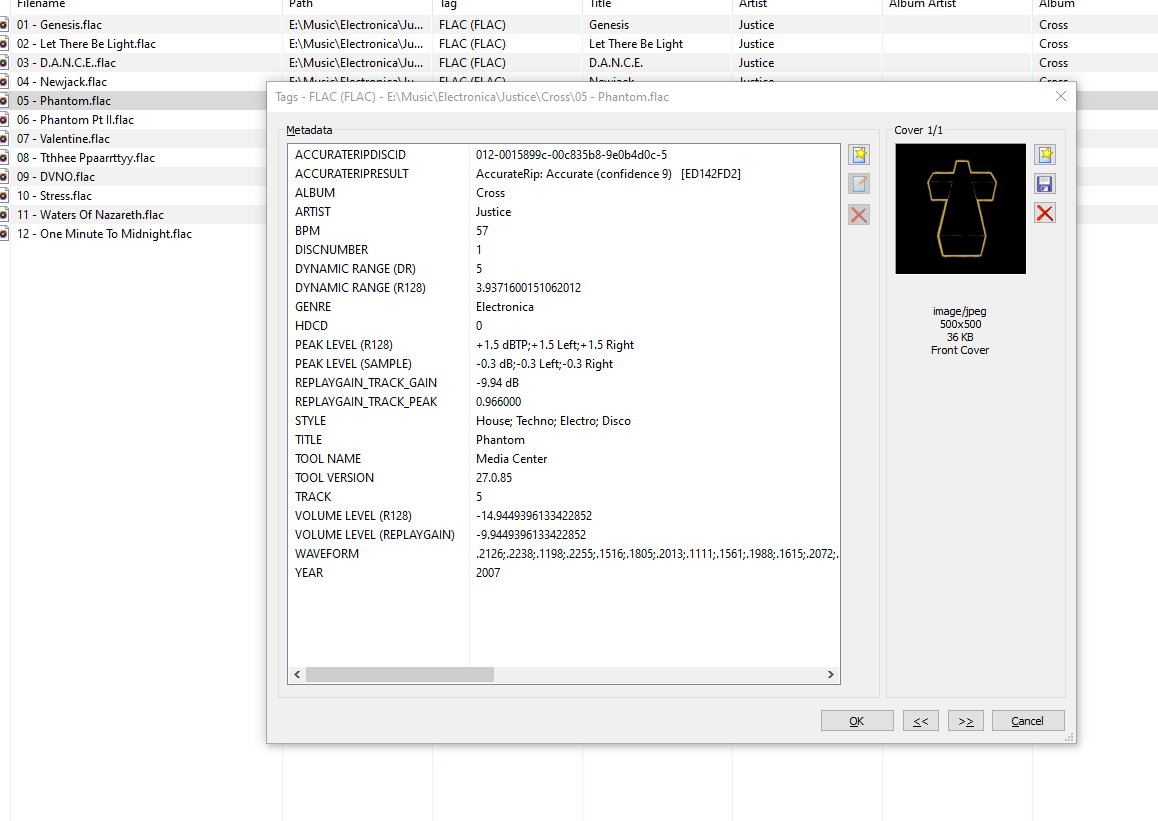
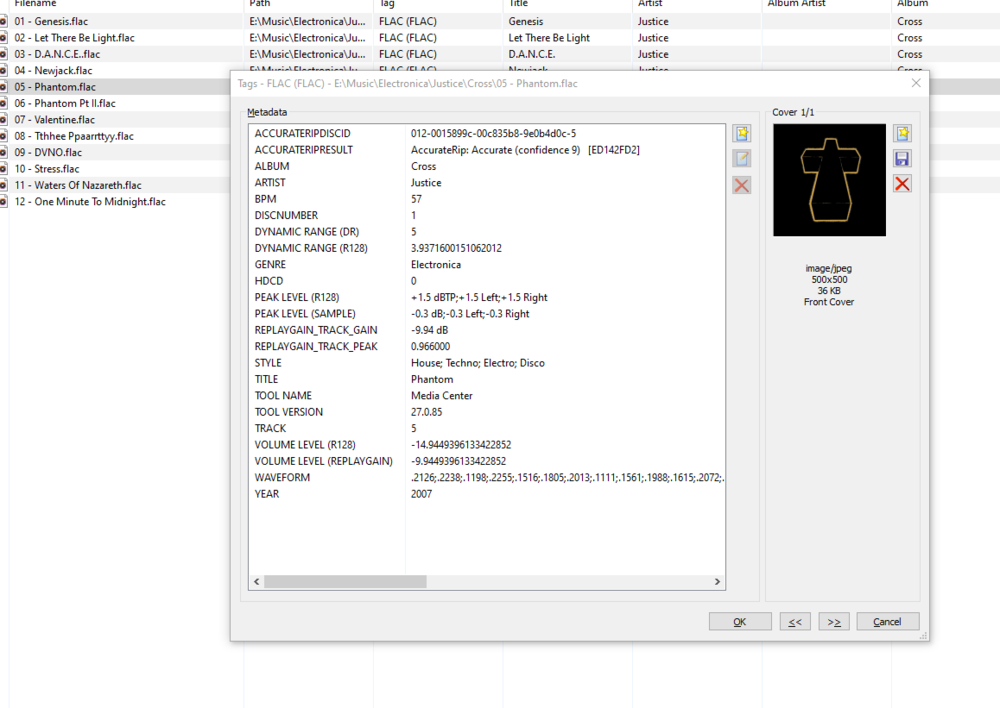
My apologies if this has been asked already. Could the Style tag in embedded music metadata be filterable in the Genre area? For example, I could select 'Electronica' within genres, and then a filter option would allow me to filter House, Disco, Trance... This could prevent genre cluttering for large collections
 1 point
 -
I suggested in a totally different thread a bit ago about possibly adding Discogs as a meta fetcher... https://emby.media/community/index.php?/topic/79280-duplicate-music-artists-entries-how-to-get-rid-of-them/ That thread has had a few +1 reply posts. As such i figured adding it to the feature requests was the proper way to gauge interest. If you have used MP3tag you should be familiar with Discogs. Its a GREAT alternative to Musicbrainz.1 point
-
Two-ish feature requests: 1) A "Back to Top" button - at least for the live TV guide. It's kind of annoying once I get to the bottom of the guide to have to hit the up or Rewind button so many times to get back to the top of the guide, either to select an earlier channel or to browse recordings etc. Could we add a small button at the bottom of the guide to jump back to the top with one click? On that same note: is a Previous Channel feature possible? Perhaps on the mini guide it could lock the previously viewed channel to the top of the list for easy flipping? 2) I do graphic design and have spent waaaay too much time making custom logos for my live TV guide and I like to see them. Once I select a channel and am watching the stream, the channel logo shows in the top left corner of the screen on web/android, however on my Roku app, the logo only shows if I tab over to "Info" - would it be possible to display the channel logo on the initial display once I tune to the channel? You guys are truly amazing, thank you for all that you do. I have never loved a service so much - I feel like I am always learning something new that I can do to further customize my experience and I love it! Plex can suck it.1 point
-
It sounds like you may not have given emby access to the shared folders using the new DSM 7 system internal user
 1 point
 -
A little tip: Recording is something you can delegate to other users. So based on that you can assume this type of thing will be in the end user UI and not in admin.1 point
-
Looks like there's two flags they referenced disabling/enabling but no such luck. Thanks for the community/forum info though. I'll just use another web browser or play direct internally for the time being edge://flags/#d3d11-video-decoder [No longer available] edge://flags/#disable-accelerated-video-decode1 point
-
Here is a pic of my movie folder within Emby
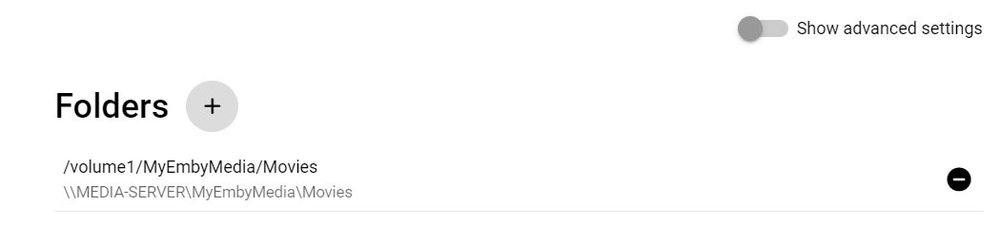 1 point
 -
Did you accomplish the last step of the procedures to give Emby access to your shared folders? This has changed in DSM 7 and you need to use the system internal user now
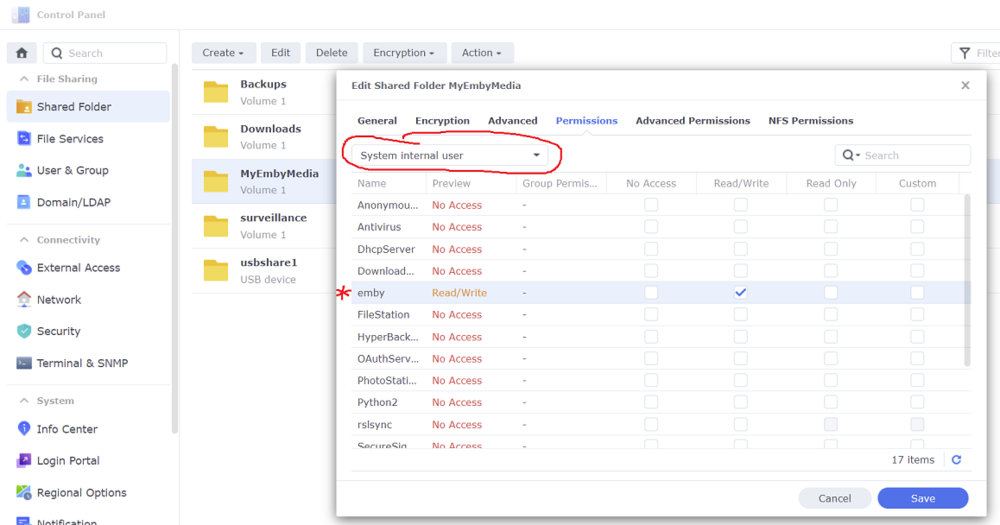 1 point
 -
Would a 4K or HD indicator be possible for show folders the same as how they work for movies? It would be nice to know if the show is in HD, SD or 4K format.
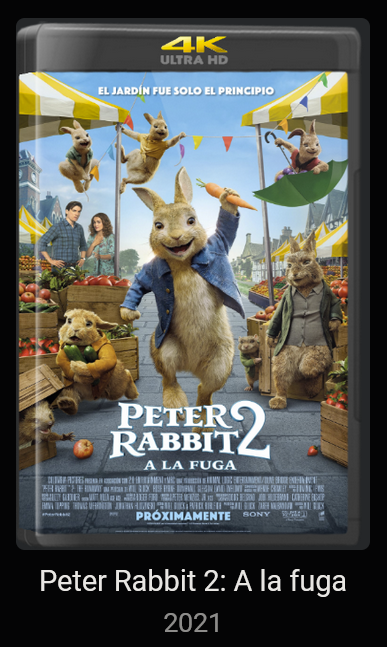
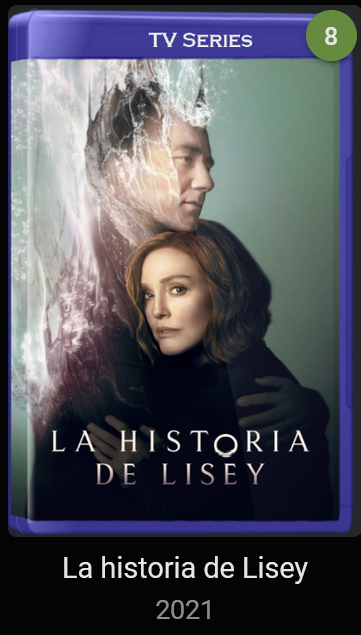 1 point
 -
Thanks a lot for info.1 point
-
Okay videoproc 2-pass h.264 software only ran about 37 minutes, got the file all the way down to 2.5gb 3930kbps. Quality is surprisingly good. Source: 17.7gb mkv (makemkv file from blu ray 1:26:42 firefly episode 1 serenity) I'll have to run handbrake again, using same settings. Still waking up, more coffee then I should write all of this down. Maybe I'll turn up an ftp server somewhere, and upload all of these files, if anyone wants to check them out.1 point
-
Thanks, I'll check it.1 point
-
Unfortunately Kodi or EmbyForKodi breaks during SERIES Sync with version 6.0.3 build 100 (ex15). When restarting it wants to continue the sync, but even then it breaks off at the same point. Attached is a Kodi debug log. kodi.log1 point
-
Thanks, it's windows 10, I got it working, I had grabbed the wrong .net package: the console, instead of desktop runtime.1 point
-
Thanks. I'll PM you. Another thing is that Live TV recordings are not showing up in the Recording library. They are in the folder that the library is pointing too, but new recordings do not appear in Emby1 point
-
In the Extra script I use for NextPVR based originally on locast2plex the recaptha change is still working. I do think it is matter or time though. Martin1 point
-
I don't want this to come across the wrong way but it probably will anyway. It's imperative when running any type of unix/linux environment to completely understand how permissions work for users, user accounts and groups. It's the one thing you really want to Google and read up on to fully understand if nothing else on these OSes.1 point
-
Got it. Thanks for your patience. Have a nice day and enjoy your coffee1 point
-
You can remove Putty, but honestly I'd leave it as it likely won't be the last time you will need it over the course of using the Synology NAS. But you can always reinstall it later if needed so choice is yours!1 point
-
@cayars Thank you again for helping me over the remote connection. You are a genius! I'd wish every tech-support would be this helpful. The last thing I've forgot to ask you, can I delete Putty now or do I have to keep it? Greetings from Germany1 point
-
Thanks for the feedback. I pushed an update to our Chromecast receiver app.1 point
-
Hi @kaj the migration didn't copy all files correctly. You should redo the migration steps in putty/SSH again. Shutdown Emby Server via DSM package center. Make absolutely sure after doing the sudo -i that you have the "root" prompt (putty/SSH). After coping the files do this as well before restarting Emby Server: cd /volume1/@appdata/EmbyServer rm *.db-shm rm *.db-wal Restart Emby Server and have a look now. If that doesn't work, send me a PM and I can remote via AnyDesk and give you a hand.1 point
-
Oops. Mea culpa - I was thinking the effect of tags was set per library, which it isn't. I wrote that too late at night... Paul1 point
-
It's a Huawei option to turn the Android navigation off, yes. I did that specifically for the reason in the OP here - I couldn't use the Emby bottom navigation because the Android one took precedence. (There was a previous thread in this forum which brought up the same complaint, and I found my way out in that.) Paul1 point
-
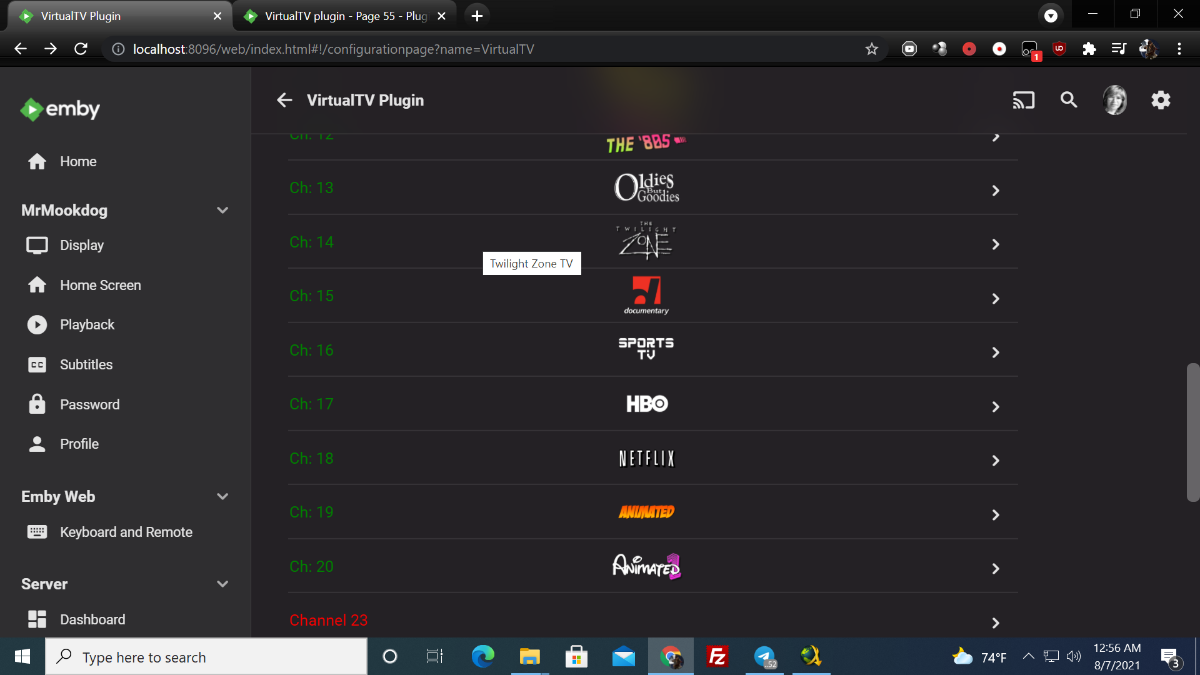
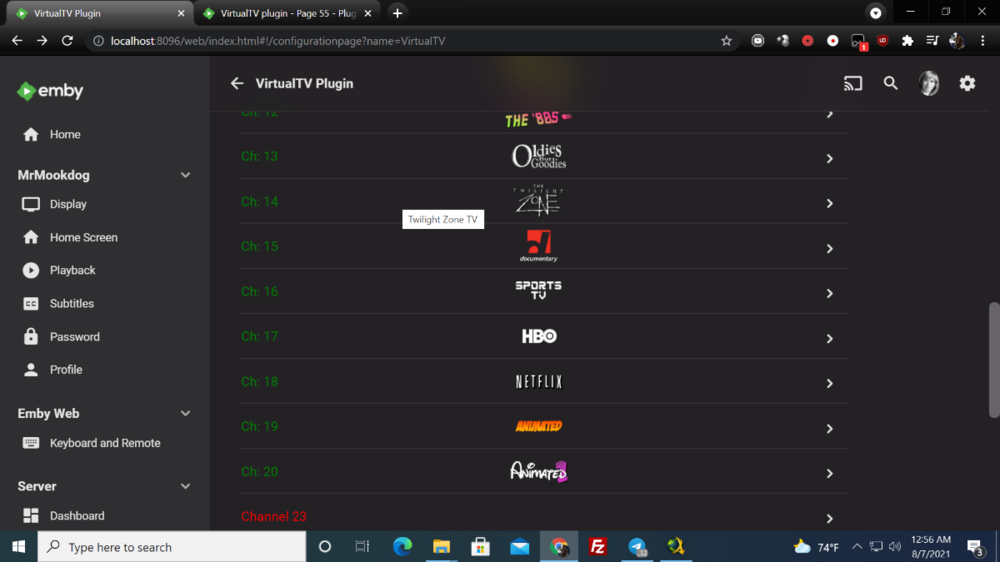
I finally got my logos working woohoo. I figured it out thanks for all the help guys. This forum is the best Mook
 1 point
 -
https://techcommunity.microsoft.com/t5/discussions/hevc-main-10-video-playback-is-heavily-stuttering/m-p/1959752 https://techcommunity.microsoft.com/t5/discussions/hevc-video-decoding-broken-with-b-frames/m-p/20772471 point
-
got it working w00t!!! I see what you mean, lots of options, that's cool. Better to have too many options, than none at all. Thanks all!1 point
-
yeah that's the "other" download page I originally tried this one: https://dotnet.microsoft.com/download/dotnet/5.0/runtime1 point
-
I will look into selecting folders for Photos. Vic1 point
-
Most likely when you have a wall of movies and you hover/3dot/delete. It can take a bit for the wall of movies to update. That's one spot I've noticed that can be a bit slow to update.1 point
-
I hope so. But the truth is i'm still on Emby 4.5 so it's not urgent for me and i rather spend my limited private time for my other plugin.1 point
-
Why no, I hadn't I knew there had to be an easy way, just hadn't paid attention to the tabs. Thanks! I apologize for not being more thorough.1 point
-
I think this was written by @wouterdebie if I'm not mistaken who should get the credit for this. I'd love to see the readme give example setup for Windows along with Linux/Mac as well if possible for those with an aversion to running docker.1 point
-
Thanks. Put in my vote to provide multi-channel support for .dsf files. Most of the surround sound stuff I have is on DVD-Audio or Blu-ray discs and I can rip these to flac conveniently. However, for a few albums, the only multi-channel versions are on SACD and it would be nice to play these through Emby.1 point
-
Everything appears to running as it should now1 point
-
Another heads up. The fix I posted yesterday only worked for about a half of a day before it stopped working and generating the login errors again But as is all to common around here, Cayars saved the day by finding another script written by an Emby forum member that is working now and its even easier to install and setup than the locast2plex script. You can find it here: https://github.com/wouterdebie/locast2tuner1 point
-
Look into the addon Kodi Logfile Uploader, never used it myself but that should allow you to upload the log somewhere.1 point
-
please send me a kodi.log. Also you can try 6.x experimental versions, but it still has a bug with distributed content (other thread).1 point
-
I'm working on a fix for distributed content over multiple folders. This could probably solves wakeboarder141 issue too. His example showed distributed content AND multi version. I'm not that far with my tests.1 point
-
If you give this try and get stuck, hit a snag or anything like that, install AnyDesk (www.anydesk.com) on your PC and then send me a PM and I'll jump on with you to give you a hand. I can do this in my sleep at this point. LOL But once you get going, it's not as hard as it may seem. Each step is easy to do, but there just happens to be many steps. We are here to help, so don't be afraid to ask for assistance if needed.1 point
-
Thanks! I think they might be missing in more Live TV subcategories as well, I was a bit baffled when none of them had the same sorting options as the main Live TV view.1 point
-
Hey All, I’ll have a look at this, I’ll create a 4.7 branch in my repo and just merge it to master in 4.7 is released.1 point
-
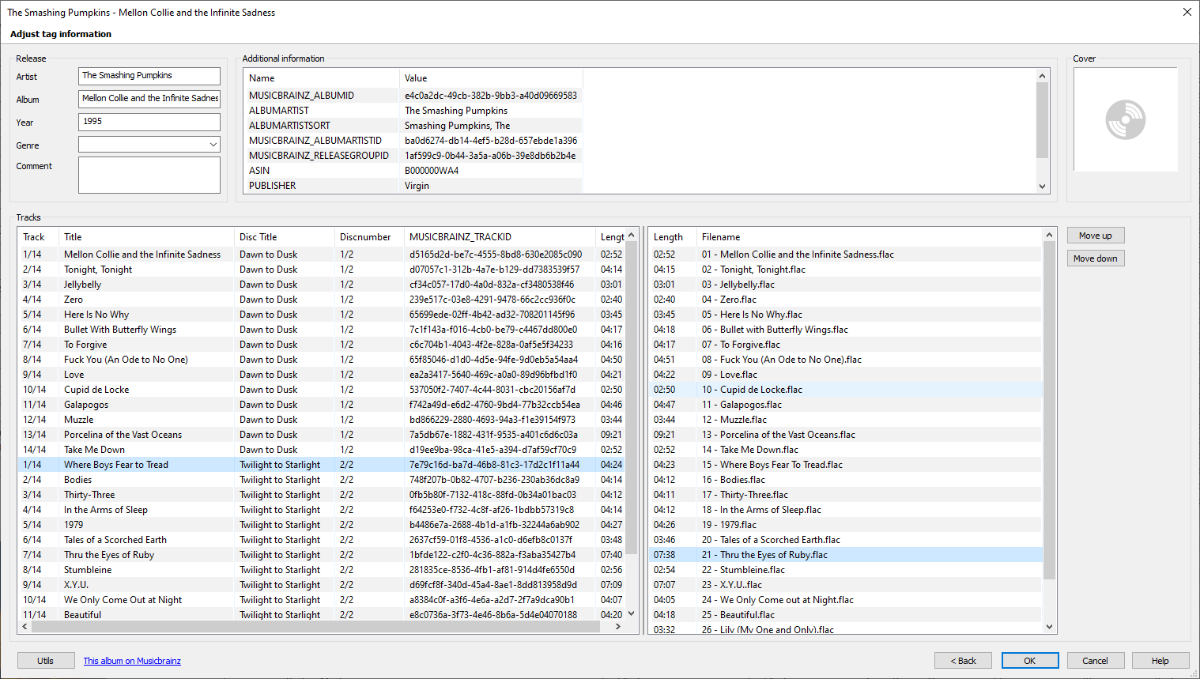
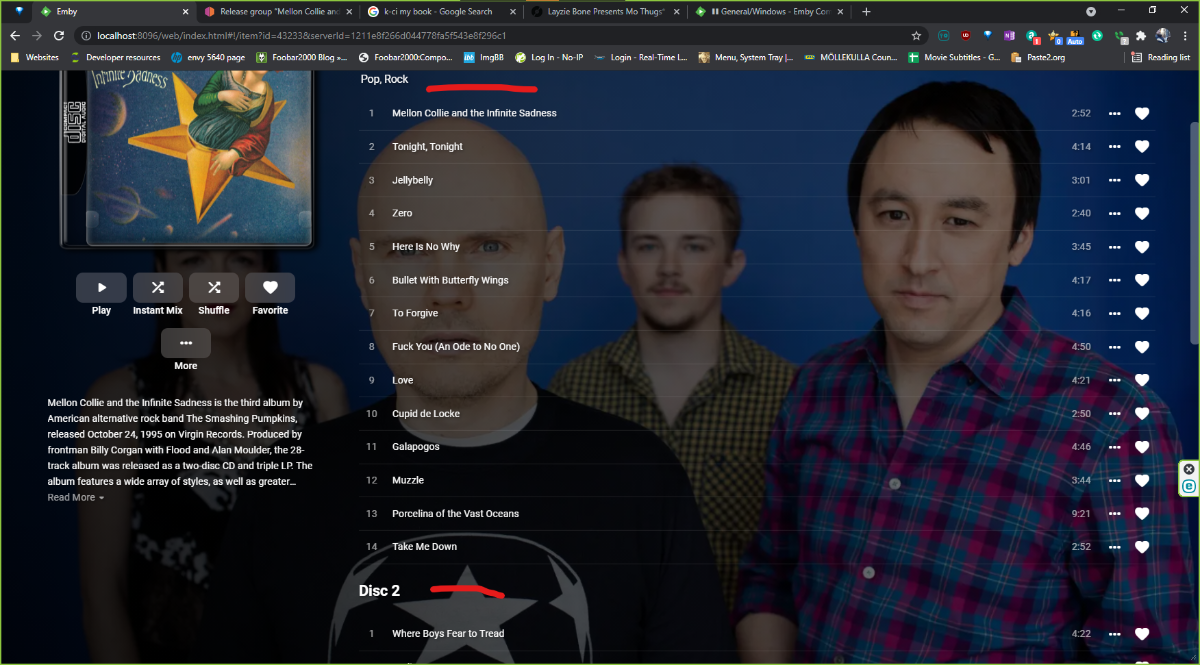
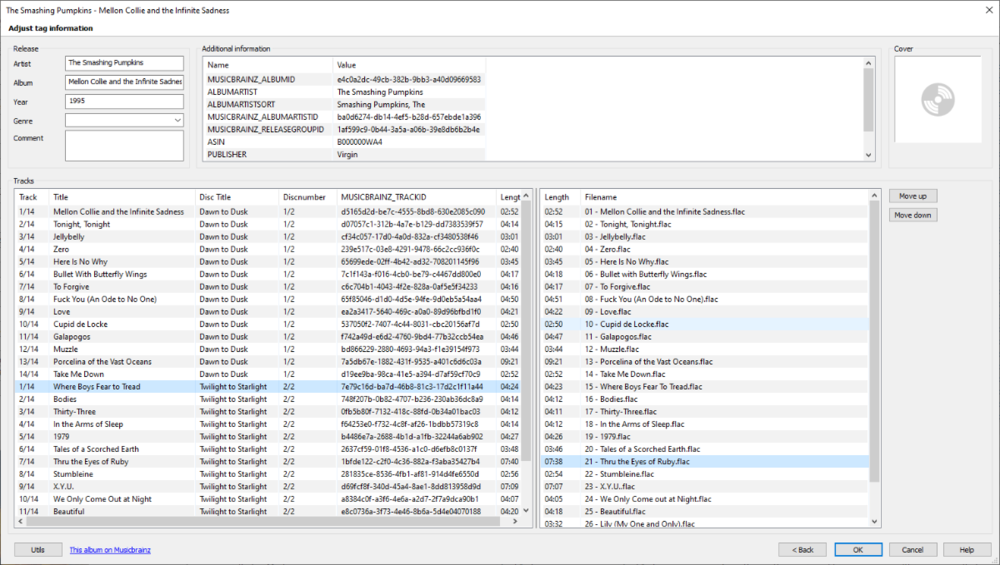
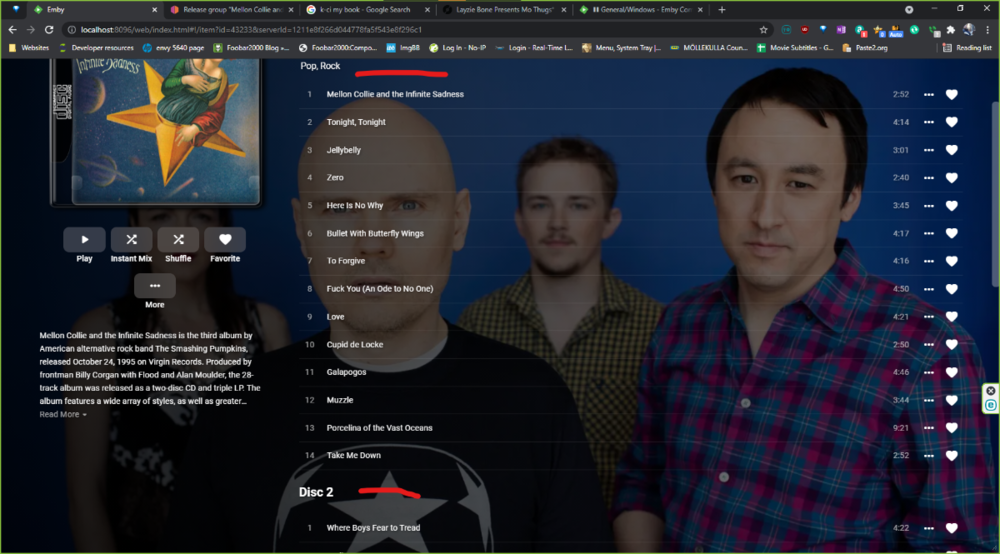
As you can see in the screenshots, this album's discs have titles. Could this be added to the display along with displaying "Disc 1" when there is more than one disc even if there are no titles? Looks a little off, to me, without the "Disc 1" label.
 1 point
 -
The thread I linked to has these instructions in it. Instructions for upgrade from dsm6 to dsm7 (beta!!!) with keeping library: - make sure, you have dsm6 and dsm7 Emby (beta) package for same version. At post creation it was: 4.6.0.35 Link for lastest versions from first post: https://github.com/MediaBrowser/Emby.Releases/releases - update Emby to 4.6.0.35 dsm6 package - start Emby and check if update went good - stop Emby - goto Emby share clean cache, logs, transcoding-temp (with filestation) - uninstall Emby - update DSM to v7 - install Emby 4.6.0.35 (dsm7 version) - stop Emby - remove emby_pkg user and video group - enable ssh in Synology settings - connect with Putty to Synology, login with admin user and get root rights with: sudo -i - copy files from old Emby share to new data location: cp -r /volume1/Emby /volume1/@appdata/EmbyServer - adjust owner from copied files: chown -R emby:emby /volume1/@appdata/EmbyServer - close putty - add emby user and emby group to your shared media folder in Synology - start Emby Emby should work fine now with old library/users. As last step, you can remove the old Emby share.1 point
-
Following above from plugin developer, and number of posts in this and other threads around the forum, I thought that quick run-down of Tagging system might be of some assistance, or even give some incentive to delve into, for those that haven't made use of it until now, in addition to KB article: https://support.emby.media/support/solutions/articles/44001848783 which often gets ignored, either because TL;DR or RTFM applies. Tags are extremely versatile tool that allow targeting items or manipulating queries for items in your library to a higher level than pure Name alone. You can think of them as an equivalent of sticking a "Post-It" note or color marker on any item in your Library. One item can have a single tag or multiple tags assigned. Same tag can be assigned to a single item or multiple items. They can be used in various scenarios: marking items, access control, 'grouping' items, various plugins implementation. Tags are not exclusive to VirtualTV plugin (nor any other plugin, althouh multiple plugins make use of them; top of my head, of those that I personally use: VirtualTV plugin, SmartPlaylists plugin, Iconic plugin, Automated Tagging plugin). Being part of Emby core (and with recent Search improvements in latest versions of the server, they get their own tab in search results, making them even more usable), they are created/assigned through Metadata Editor or Edit Metadata dialog on any item in your Library. For Movies, it can be done on Movie/Extras level. For TV Shows, it can be done on Series/Season/Episode level. Hierarchy is respected, i.e. tag at Series level will encompass all seasons and episodes beneath - tag at Episode level will apply to that episode alone, not encompassing other episodes in the same season, nor other episodes/season(s) nor Show in question. Example of Tags handling: Item 1: TagA, TagD Item 2: TagB, TagD, TagF Item 3: TagC, TagF Search for TagA returns Item 1 only; ditto for TagB and TagC, Item 2 and Item 3 respectively. Search for TagD returns Items 1 and 2. Search for TagF returns Items 2 and 3. That allows for specific targeting and/or multiple-results on a single argument query. That said, on to VirtualTV implementation. While setting the single Tag Channel condition is pretty straightforward (following above, hopefully), the GREAT inclusion of conditional logical operators in Tags (and Genre - heck, I might even use Genres for the examples as they might be more familiar, same logic applies) fields gives extreme versatility - but makes things somewhat more complicated, as they need to be carefuly evaluated else loop is created or results returned are not as expected. Inclusion of operator NOT just makes it much more so. Due to language limitations our thought processes don't necessarily translate exactly as we intended to (God knows I've failed to express myself countless times, as I beleive there ain't a single person living that hasn't) - or they do TOO WELL. An example: thought "I want my Channel to include only Crimes and Thrillers." Natural syntax that comes out of that is 'Crime && Thriller' (Crime AND Thriller) - and is incorrect, as that would return only items that have BOTH Crime and Thriller genres in their metadata. Operator OR (||) needs to be used here ('Crime || Thriller'), as that will direct the plugin to pull items from either (both) Crime pool or (and) Thriller pool. Again, just replace genres with Tags and same applies. Exclusions are done via NOT (!) operator whose use, again, when used alone, is clear enough: !Drama. In multi-argument syntax, not so much. Example (one I've had to cope with more times than I can count): "I want Romance in any combination, but NOT Romance/SciFi." As condition 'Romance' if used alone would return ALL Romance movies (Action/Romance... Drama/Romance... Comedy/Romance...) including SciFi/Romance, and condition '!SciFi' if used alone would return ALL other genres (Action, Drama, Thriller...), including Romance, they need to be combined into single expression: 'Romance && !SciFi'. That will grab from the Romance pool only, but exclude those that have SciFi in addition. I suppose that wraps it up, generally speaking. Guess it has been a long one, eh? As English is not my native language, I'm aware that I don't manage to express myself exactly as I wanted to every single time, yet I hope someone might find some useful info in all of the above, and any additional input from community members would be more than welcome, I might've had just as well ommited something I'm unaware of presently (or got it wrong, for that matter) and, as always, two heads know more than one. Cheers1 point
-
I think extras should be displayed ABOVE the cast and crew. Usually extras contain content about the movie and is more important than knowing the casts.1 point