Leaderboard




Popular Content
Showing content with the highest reputation on 08/06/21 in Posts
-
That's not what this function is for, it ain't access control, it is only for hiding that user from login screen on any device he hasn't signed in before. That means he has to login manually the first time. After that, on every subsequent login from that same device he will be listed in login screen in addition to Manual login and Forgot password fields2 points
-
Ah, found it, thank you. I have used "remote", but my local proxy is ... always "remote". I feel like a moron now Thank you both.2 points
-
I have obviously posted in the wrong thread by mistake and not done that on purpose. I will repost it in the right place.2 points
-
The Google release is out now.2 points
-
Hi, unfortunately because of the way DSM 7 is implemented and it's new security model we can't do the migration for you during install so the instructions provided in this thread are about as simple as it will get. There is even a video you can watch and follow along with. I'm not sure how we can make it any simpler at this point. With that said, if these instructions are beyond your level or comfort we can assist you with a remote session and remotely do most of the migration for you while explaining the steps and showing you how to set permissions for Shares under DSM 7. Send me a PM if this is something you would like to do and we can arrange this.2 points
-
Hi, yes I agree that improvement is needed in this regard. Thanks for the feedback.2 points
-
Complicated ASS subtitles can also cause visual delays and stuttering in extreme cases. This is highly client dependent. I transcode most of my anime to h265 10-bit for economy of storage and bandwidth. If this does not direct play, then it transcodes smoothly (it's the h264 10-bit which causes most trouble). Paul2 points
-
Cool - I found it. Thanks! I didn't know about the arrow on the top corner. Looks like I was only 15 pages away from finding it on my own! lol Looks like I got it working now. To accomplish what I wanted, it needed to be "Thriller && !Horror". Things that make this a little harder to grasp in the beginning, is that to combine items with Titles (using Thriller and Horror as an example again) there are no spaces used (ex: Thriller|Horror) where as using the "conditional logical operators" such as for genre's, you need to have a space between each function (except the NOT function). I did try using the "and" command (&&) before the "not" command earlier, but I didn't use spaces, so I'm sure that was confusing it too. So if anyone else stumble across this, here's a quick cheat sheet for different functions with "conditional logical operators" using my example of Thriller and Horror. "Thriller || Horror" will add anything with "Thriller" or "Horror" "Thriller && Horror" will only add things that contain both "Thriller" and "Horror" "Thriller && !Horror" will add all "Thriller", but will not add content that has "Horror" Thanks again @GrimReaper76 for the help!2 points
-
Look like a really long folder name as Series name would not include seasons, a guess could you be running into max_path issues?2 points
-
2 points
-
https://emby.media/download.html Auto-Start Locate the autostart file: ~/.config/lxsession/LXDE-pi/autostart If LXDE-pi is missing then copy it from: /etc/xdg/lxsession/ Add this line to the end of the autostart file: @emby-theater1 point
-
I'm a plex life time member, but I have been using Emby for over six years continuously, but there is a feature which I have always thought is missing in Emby which I would like and encourage the developer to consider including especially in this dispensation where families can social or commingle due to COVID 19. Today, I received a notification from Plex about it new feature titled Watch together you can read about it here https://support.plex.tv/articles/watch-together/ The feature allows friends and families at distance to watch same movies together instantly, you simply invite all your buddy, once they signed to the system which can be seeing in the server then play and pause as needed, this I think is cool feature should be added to emby. Let's here your though if Emby developer should consider adding this feature to our beloved Emby Media https://www.bing.com/news/search?q=Plex+Watch+Together&qpvt=plex+watch+together&FORM=EWRE1 point
-
I am looking to see if a SAML2/OAuth plugin is something others would use. I myself would love this feature to share Emby publicly with family members and friend and worry a little less about insecure passwords that some may use. I personally am a big advocate for security as I work in IT and see how a lack of good security can cause havoc. I love Okta and what it offers. Anyone can sign up and use it for free under 1000 users if you sign up as a Developer. That is just plain awesome. Let's see who else is interested. I am excited to find out! Thanks1 point
-
I would like the ability to adjust the playback speed of my videos and recordings. YouTube.com does this and i think it is a very convenient feature to have.1 point
-
When I do a search the results are presented in an apparently random order. I just did a search for the movie "Pi" and got every movie that started with "pi"... eight rows of seven titles, and the movie I wanted was at the end of the sixth row. I would like to be able to select the display to sort by title, as I can on a library display. Sorting by year might be convenient too.1 point
-
I was laid up with an illness (not COVID!) for about a week, and spent some time cleaning up my libraries, including setting up collection. I've now got almost 300 collections, and most of that is just from my Horror library. I haven't gotten to Action, Thriller, or SciFi/Fantasy yet. This is all great until I want to add a movie to a collection, then there's a lot of scrolling to get down to "Werewolves". It would be great to have the alphabet jump list on the right side, as us done on the Collections display.1 point
-
Okay, I think that handling movie and tv watched folder should be silent. Instead of telling the user the two inputs can't be the same, I'll just put code in place to check, and only act on one of the paths if they are. Trying to explain the monitoring of the same folder twice causing duplicate activity log entries, adds extra text in the UI and it doesn't really affect the overall user experience, and could be confusing.1 point
-
Hi, Let's see if this helps. For auto-created collections (not manually created by you). Collection info comes from one of the meta-data providers listed in your library. So as a movie is identified in any of your libraries it gathers this info from the provider and if you have the import collection enabled for that library it will pull in this collection info and save it with the Movie in the database and write it out as a "set" command in the movie's NFO file (if enabled). This collection information is tied to the movie itself and not to any folder structure on disc. So it would not matter if you have all 3 Back to the Future movies in one folder or each in it's own folder. Does that help? If not what questions do you still have that aren't clear?1 point
-
ahh didn't see it earlier, got it, thanks I like that we can add any genre we want, that's good.1 point
-
My god, it seems that all my movies are saved for some reason 5 days ago. So when I use 2021-08-04 I only get 4 movies which makes sense. Thanks for the reply!1 point
-
Hi there, I have one feature request for emyb which I didn´t find in the forums. Im missing the feature to toggle on/off "Suffle" in the current queue. Yes, I can shuffle a whole album or playlist, but I think thats not enough. My use-case (and I think many would agree with me) is building a queue (not a playlist!) from many different albums/locations/playlists, and then I sometimes want to toggle shuffle on and off. I would be very happy, if someone could implement this (basic - in my opinien) feature Thanks, Junias1 point
-
It could be the format of the date. Make sure it's in iso utc format.1 point
-
Here?1 point
-
That looks like you have a library pointing to The Office Folder. The problem is The Office should be a subfolder of the library, not the parent folder. As the library reads the tv shows as subfolders of the parent folder given. For example You are pointing the library to C:\The Office\ so you only can see subfolders of the office, to be specific the Seasons folders. You have to point the library to something like C:\TV Show\ And The Office folder should he inside that parent.1 point
-
Hi, yes we can look at trying to increase it. Thanks.1 point
-
Thanks for the chapter skip/info screen in version 1.1.0. Looks excellent. Also, looking forward to the timeline slider using bifs you mentioned will come eventually1 point
-
Sure, they're all PseudoTV logos out of link that @Dibbes shared:1 point
-
This is just a side effect.1 point
-
@Luke Thanks so much for your response. I've been working extensively with this. I set it up on other machines. I tried with different sized playlists. I eventually brought it back to this same machine and so far so good. I have a feeling it was bogging down because of the way I was working with it. I'm not quite sure what it didn't like. I'm not renumbering the channels this time and am just changing the EPG mapping for all channels from the IPTV provider to Emby data. I am also waiting for the EPG to fully load before doing any further editing. And I did follow @cayars advice as well. Fingers crossed... Thanks a lot folks.1 point
-
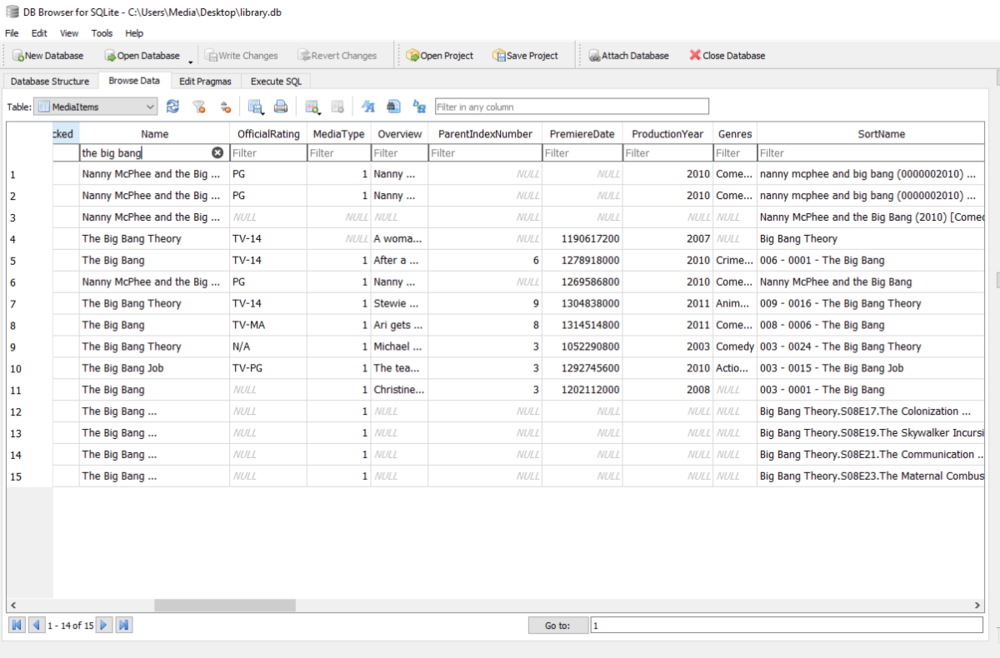
If you do not write nfo files it will only be in the database.
 1 point
 -
The store vs desktop version can be a bit confusing.1 point
-
oh wow, this just blew my mind. ive been using the windows store one thinking it was that one, i knew something was wrong about it. PS when using bing/edge/windows start menu search, the windows store one is the first to come up, you guys should either take that off the store or put some work into it in my opinion, the standalone one makes the store one look like trash. holy crap1 point
-
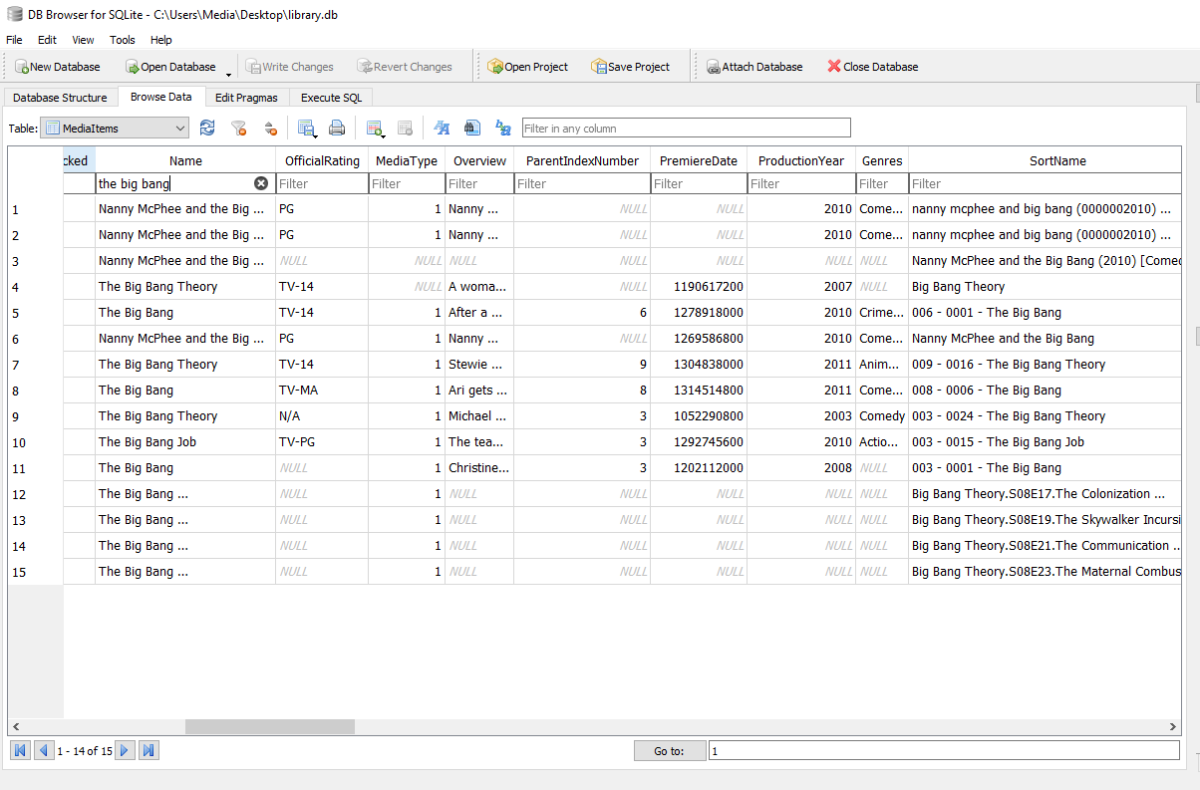
Hi, that should be in the database. library.db Try looking at the SortName column in the MediaItem table.1 point
-
??? is that not what im using? edit: oh, it isnt!1 point
-
Well you can do this series and adjust library setting back afterwards. Then I would lock the series once finished.1 point
-
As long as your episodes are in that order click the three dot menu on the series, edit metadata, change display order to DVD, Refresh all on the series w/replace images. Note you will need TVDB to be the first provider for images and metadata on the library.1 point
-
This series comes up often. Is TVDB dvd order correct? Firefly - DVD Order - Season 1 - TheTVDB.com1 point
-
Hi, no this isn't isn't a built in feature as a Emby isn't designed to be an open system but a personal server for you, your family and possibly close friends that you setup give access to.1 point
-
And the code edit did work! Here's how to get your locast integration working again: Find this code in your LocastService.py file at around line 68: loginReq = urllib.request.Request('https://api.locastnet.org/api/user/login', ('{"username":"' + username + '","password":"' + password + '"}').encode("utf-8"), {'Content-Type': 'application/json', 'User-agent': 'Mozilla/5.0'}) Replace with this code: loginReq = urllib.request.Request('https://api.locastnet.org/api/user/login?client_id=CqhAMsBw%2BnxTXSJMLGqyOw%3D%3D', ('{"username":"' + username + '","password":"' + password + '", "captcha": "anything"}').encode("utf-8"), {'Content-Type': 'application/json', 'User-agent': 'Mozilla/5.0'}) Open a terminal from that directory and type: python3 main.py, or just reboot your computer and your Locast service should be working again. The api client id is hard coded and could change at some point in the future, but at least for now this does work.1 point
-
The id3 tag values are not stored under those descriptive strings that you see in a tag editor. The values are stored under fields with a special id, for example TPE2 is used for "Band/Orchestra/Accompaniment", or better known as "album artist". It's up to the software to give that id a meaningful name. And unfortunately every software does it different.1 point
-
That worked perfectly, thanks so much for this!!!!1 point
-
YES! I think I fixed it. Thank you @Ryan_vl DOWNLOAD: Emby.AutoOrganize.zip I mistakenly returned after the movie was not found in the library, instead, I needed to let the Organizer go and possibly fail! Perfect.1 point
-
I would like to see a global speed limit too! This way you can ensure there is bandwidth left over for other uses and have the allotted Emby bandwidth shared among streaming users. Thanks1 point
-
Yea looking at it I'm surprised we don't already have it in there as a supported extension. It should be easy enough to throw it in.1 point
-
A small update to our 4.6 release is currently rolling out to address a few minor issues that came up. Here are the highlights: Resolve cause of sporadic database locked errors Fix graphic subs burn-in with tone mapping on qsv You can learn about the original 4.6 release here: View the full article1 point
-
Hi, thanks for reporting. It's resolved for the next update to the Emby iOS app.1 point
-
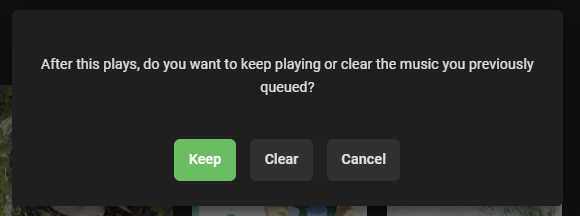
Is there a way to disable this message when playing music, or at least set a default selection? It didn't used to show this when selecting a different song.
 1 point
 -
The thread I linked to has these instructions in it. Instructions for upgrade from dsm6 to dsm7 (beta!!!) with keeping library: - make sure, you have dsm6 and dsm7 Emby (beta) package for same version. At post creation it was: 4.6.0.35 Link for lastest versions from first post: https://github.com/MediaBrowser/Emby.Releases/releases - update Emby to 4.6.0.35 dsm6 package - start Emby and check if update went good - stop Emby - goto Emby share clean cache, logs, transcoding-temp (with filestation) - uninstall Emby - update DSM to v7 - install Emby 4.6.0.35 (dsm7 version) - stop Emby - remove emby_pkg user and video group - enable ssh in Synology settings - connect with Putty to Synology, login with admin user and get root rights with: sudo -i - copy files from old Emby share to new data location: cp -r /volume1/Emby /volume1/@appdata/EmbyServer - adjust owner from copied files: chown -R emby:emby /volume1/@appdata/EmbyServer - close putty - add emby user and emby group to your shared media folder in Synology - start Emby Emby should work fine now with old library/users. As last step, you can remove the old Emby share.1 point
-
Channel logos that were passed on to me by @@shorty1483 which I'm shamelessly abusing: https://github.com/PseudoTV/PseudoTV_Logos1 point