Leaderboard




Popular Content
Showing content with the highest reputation on 08/02/21 in Posts
-
My introduction to this forum was the first week of July after my brother and I bought an LG tv, having verified (via Emby’s homepage) that they had an LG WebOS app. When I couldn’t find Emby in the App Store, I found this forum and have since read every post dated since January. I’ve since waited patiently hoping that “soon” meant about 5 months. Takeaway: YES. Take down the LG WebOS page on the Emby website. If LG is a shit company who doesn’t support Emby, then let’s not give our Emby community a reason to buy their TVs. And, more LG users is just going to make this problem worse. Today, I stood up a Plex instance to run beside my Emby instance. Thought I would try it out, see how their service works, and my brother can be the pilot user since he doesn’t have Emby on his TV. Yes, this is true; but sadly, Plex I’ve found to be garbage (sadly because as users we have only one option, one hope). While their apps can be polished and some functions might work better than Emby, Plex is just not as functional for self-hosters. Plex is going the way of Pluto tv and other free-Ad-based services. Also, when grandpa forgets his password, I’d like to be able to reset it for him (local accounts, LDAP support, etc). I think Emby has the capability of building us the features we want while Plex has other motives. Takeaway: Emby is the best platform for self-hosted content out there. Yes, it has it’s quarks and areas for improvement, but it’s the only platform that will ever give it’s users the freedom, features, and cohesiveness our community is looking for. Note to Devs: Don’t copy the bad parts of Plex! That being said, I think we need to support our Emby Devs more regularly (I prefer using a donate button over subscriptions). Because I want to see continued support, new features, etc. To note; I don’t know how much staff Emby has, and when I visit forums, I can tell how much work it is to keep up with all the posts, questions, etc. We get what we get, but we can only get it from them. @Luke, @ebr, @chef Thank you for all the work you do to keep the community around for another day; It’s a lot of work and I/we truly appreciate it. DM me anytime for coffee. Looping back around to the topic at hand; while I too want the Emby app on the LG App Store, I’m not sure there is anything we can do but wait and support our Emby staff in the meantime. I’m just hoping the Emby team has our best interest at heart and knows that if they need our support (i.e. building leverage in the LG forums, money to support more dev time) that they communicate that to us effectively.4 points
-
Or just don't scrape it in the first place, untick "Movie set" in Settings>Scraper Options>Metadata Scrape Defaults.3 points
-
Hi. There is a button on the screen labeled "All Items". Press that and you will get a grid of everything in the collection.2 points
-
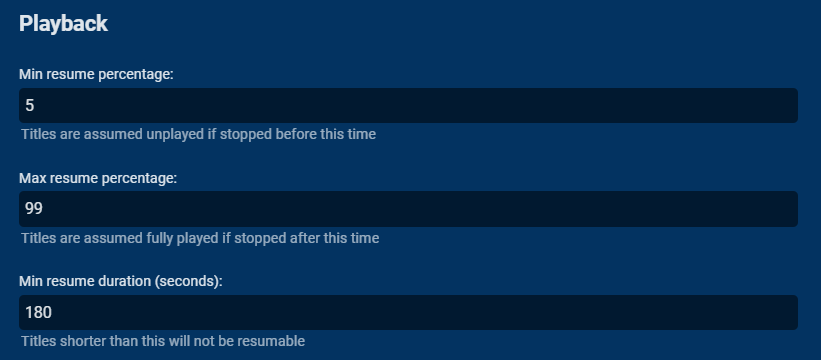
Emby also allows you to set your resume points on each library which is a really nice feature. If you're only playing something for a minute, it may not be saving the resume point, because it's too short a time to save. Check your Playback settings for the library where your missing the resume points and see what the resume percentages are set to.
 2 points
 -
Hey guys, I think it took me one year to release a new beta version but it's finally here. It has been a long and hard year. We are on version beta.26, you can download it here: https://github.com/mregni/EmbyStat/releases. You didn't miss beta.25 I just made 2 releases on the same day because beta.25 needed some more fixing first. Biggest change is that I reenabled the show pages and the missing episode list. It's still not 100% but it's something to start with. Also I did some redesign stuff and changed the filters on the movie page. I hope you like it! Next up is cleaning my GitHub issues section so I can have a clean restart of the project again. Have fun testing!2 points
-
I can verify this happens when I play FLAC to Roku. It converts FLAC to MP3, completely plays the track, but never clears the transcode folder. However since this doesn't happen to others, it must be a figment of my imagination.2 points
-
It would be great if emby can advance over the typical media servers by offering an animated hover thumbnail to videos. maybe in m3u8, webm, mp4 or gif format? There are several libraries on github that can do the task of generating the files needed for the thumbnails with a quick google search I found the following: https://github.com/grafov/m3u8 , https://github.com/tjenkinson/hls-live-thumbnails , https://github.com/video-dev/hls.js/, https://github.com/flowplayer/flowplayer-thumbnails I think it is up for the user to use these libraries to generate animated thumbnail on the video. What emby should do however is give support to animated video or gif on hover. I have not seen this feature implemented at another media server. I am aware that emby has the animated backdrop support to some extent. But this different. Netflix currently uses this feature on a tvshow/movie level and not on each single episode. I know the emby developers here are against animated thumbs.. Imagine browsing through your library with all thumbnails animated.. it will be distracting and messy! thats is why I think animatition on mouse over (or on selection in case of tv apps) would be the best idea to satisfy both sides.1 point
-
I would love the option to store Emby's database in MySQL - I have a setup that serves around 30 people and I feel that there would be real performance gains by using a proper relational backend over SQLite (I'm presuming). On top of this it would make life easier for me when reporting on watched status a cross users.1 point
-
I was able to install Emby on Docker with NVIDIA hardware acceleration without too much fuss, though I had to rely on a few different instructionals. Below are the steps I took get it to work (assuming you already have docker installed) on Ubuntu 19.04, for any other noobs trying to piece this all together: Step 1: Install container directly from Docker Hub (assuming Docker is already installed) docker pull emby/embyserver:latest Step 2: Install nvidia-container-toolkit and nvidia-container-runtime curl -s -L https://nvidia.github.io/nvidia-docker/gpgkey | sudo apt-key add - curl -s -L https://nvidia.github.io/nvidia-docker/ubuntu18.04/nvidia-docker.list | sudo tee /etc/apt/sources.list.d/nvidia-docker.list sudo apt update sudo apt install nvidia-container-toolkit nvidia-container-runtime Step 3: Register the nvidia runtime with docker sudo tee /etc/docker/daemon.json <<EOF { "runtimes": { "nvidia": { "path": "/usr/bin/nvidia-container-runtime", "runtimeArgs": [] } } } EOF Step 4: Restart Docker daemon configuration sudo pkill -SIGHUP dockerd Step 5: Create directories that will host the Emby container's directories sudo mkdir -p /opt/docker/volumes/emby/config Step 6: Create Emby container docker container create \ --name="emby-server" \ --network="host" \ --volume /opt/docker/volumes/emby/config:/config \ --volume /mnt/media:/mnt/media \ --device /dev/dri:/dev/dri \ --runtime=nvidia \ --publish 8096:8096 \ --publish 8920:8920 \ --env UID=997 \ --env GID=997 \ --env GIDLIST=997 \ --env NVIDIA_VISIBLE_DEVICES=all \ --env NVIDIA_DRIVER_CAPABILITIES=compute,utility,video \ emby/embyserver:latest Step 7: Start the Emby container docker start emby Step 8: Create /etc/systemd/system/docker-emby-server.service file with the following text: [Unit] Description=Docker Emby Container Requires=docker.service After=docker.service [Service] ExecStart=/usr/bin/docker start -a emby-server ExecStop=/usr/bin/docker stop -t 2 emby-server Restart=always RestartSec=2 [Install] WantedBy=default.target Step 9: Give the docker-emby-server.service file execute permission: sudo chmod +x /etc/systemd/system/docker-emby-server.service Step 10: Enable docker-emby-server.service sudo systemctl enable docker-emby-server Notes: Step 2: curl -s -L https://nvidia.github.io/nvidia-docker/ubuntu18.04/nvidia-docker.list |sudo tee /etc/apt/sources.list.d/nvidia-docker.list 'ubuntu18.04' was originally $(. /etc/os-release;echo $ID$VERSION_ID), but ubuntu19.04 is a no-go, so I forced it to ubuntu18.04. Step 5: You can create this directory wherever you want, it doesn't have to be exactly what I used Step 6: --name="emby-server" This names the container on the host for easy identification. You can call it whatever you want. --volume /opt/docker/volumes/emby/config:/configThis maps the directory (on the physical system) on the left side of the ":" to the directory (on the docker container) on the right side. This is the same directory you created in Step 5, and is absolutely required. --volume /mnt/media:/mnt/mediaSame concept as above. In my case, this is where all my media is stored. --env UID=997This is the UID of the 'emby' user on my system --env GID=997This is the GID of the 'emby' group on my system --env GIDLIST=997Same as above Steps 8-10: These are optional and only used to ensure my emby-server container starts on boot. I decided to go the route of a systemd service because for all intents and purposes, Emby provides a service and is therefore a service. If you don't want to go this route, you can instead add --restart unless-stopped \ somewhere into Step 6.1 point
-
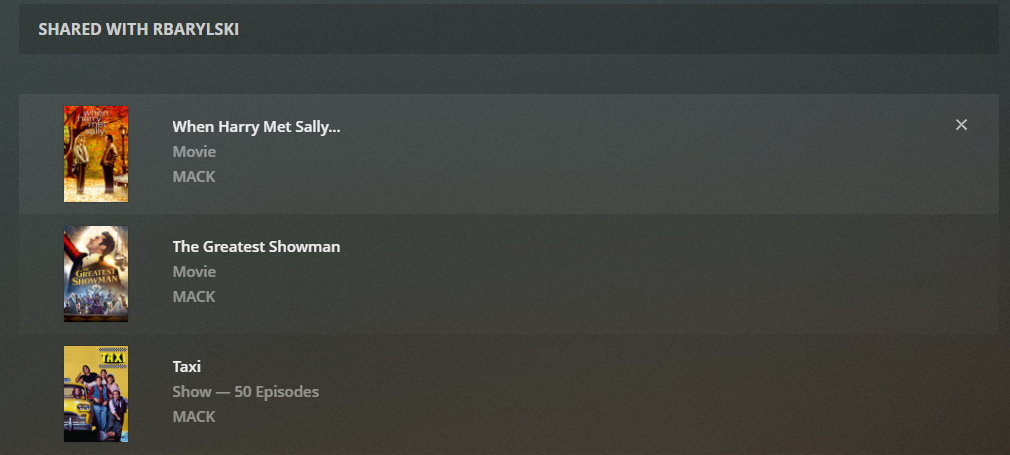
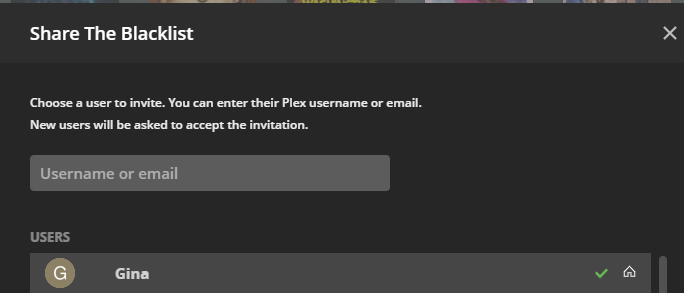
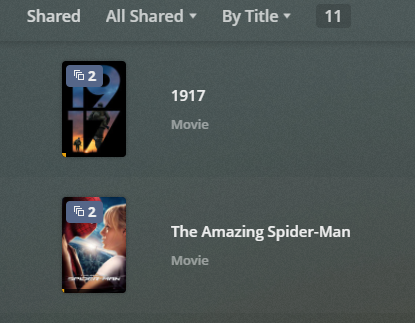
There's obviously a lot of capability to share content in Emby, but I came across a few limitations recently and would like to request a few improvements. Change Restrict Items with Tags in parental access controls to per library rather than ALL libraries. The way it is now, if I use "Restrict or Allow" I have to tag EVERYTHING, to either get it to show or hide. Some libraries I want to share everything (like photos) and others I only want to share 1 thing (like Movies). Also, parental controls actually functions much more broadly than just parental controls, so maybe splitting out the additional functionality into a different tab would be more appropriate. Change Share function in more menu to select an Emby user to share with, so the content appears on the users home page when logging in. Right now it's just a link directly to the file on the server with no way for a user to get back to it. Allow ALL versions of a video to show when tagging and using the Allow only items with these tags function. I believe some changes like this would need to be made anyways to get this feature request (Multi-Cast Support - Feature Requests - Emby Community) working. At least, to get it working in a more user friendly way. I can't imagine trying to start a Watch Party by having to send every user a URL that they need to click on in order to start the watch party. It's easier to just add shared content so the end user can just go to their home page and start the Watch Party. To borrow an example of how this could work, Plex has implemented something similar, although they stick everything in a Shared view. The function to share is good, but the function to access the shared content isn't so good. IMO, the shared content should just appear in the library. Similar to how it would show up if using Allow only items with these tags. I'm curious how Jellyfin has implemented Watch Party and sharing too, but my only reference is Plex. Here are a couple of screen shots just for example. After clicking share in Plex, users on the server can be selected to share with or outside users that aren't on your main server can be selected. Then, managing the shared media is simple as I can see everything shared to each user in 1 place. When I want to take shared access away, I just click x and the user no longer has access. And the end user see's this, which is decent, but as an end user I'd much rather see the shared content within the actual libraries.
 1 point
 -
Are you sure you're looking at a movie that is currently part of a collection?1 point
-
Glad you got it working. Yes this has been reported before. There is a glitch somewhere when adding missing items and the real item does not properly remove the virtual missing item. I have seen a missing and real item be merged and you are given a "Split Apart" option. Unfortunately this Missing option is one feature Luke dislikes.1 point
-
Well, I realized that the problem was only happening with the series that already had some season in my library, so when I put the episodes of the missing seasons Emby joined the metadata he already had with the new ones, so I just need to uncheck the option to display missing episodes in the library and separate version by version that wasn't showing. In the end it wasn't a problem in the library, or anything but versions.1 point
-
just to clarify. in the uk we have three options: dvb-t - Freeview, over the air terrestrial aerial. need to use a hd homerun or a tv tuner card with a 3rd party backend such as next pvr dvb-s - freesat/sky satellite dish. need to use a tv tuner card with a 3rd party backend such as next pvr dvb-c - virgin cable. cannot (easily) be used with emby1 point
-
To be fair, that article is about the machine running Plex, not the router (it explicitly says that at the top). The question really is whether you want to rely on Plex to act as a relay, and trust their security and performance, or prefer (the Emby way) to be responsible for your own system and its working. Paul1 point
-
No, I'm referring to your last example of apps using the method you are requesting. That one is not.1 point
-
@tomnjerry74 Completely agree. I've proposed this before, but it didn't get any traction. I don't know why we can't use the left navigation method when so many other services use it. I believe last time I suggested it, users didn't like it because it was like Plex. As for the mobile settings, I believe @Luke didn't want to do this because he didn't think users would know that they could get to settings through the user profile icon. One other change to make on mobile is to get rid of downloads on the main page. It's already on the bottom, it's not needed on the home page too. It's a waste of space.1 point
-
Hi. Billing support addressed your issue. Thanks.1 point
-
I didn't think so. But always best to ask the one that knows. That one is not the very biggest deal. For the little bit of extra work, the end result will be worth it. Thanks a lot.1 point
-
I am on 4.6.4.0 so there could be something there.1 point
-
@cayars Sorry I didn't get back to you sooner. Had to head out yesterday. Your solution is exactly what the doctor ordered. I can't believe this is the same app. Thank you so much. I can now continue to be blown away with what Emby can do. I'm visualizing my best IPTV experience ever.1 point
-
You can always lock People section or complete item to prevent changes on metadata refresh.1 point
-
Very cool! I don't know how I missed this one... Here's two more variations: A generic mecha and a not-so-generic Saitama

 1 point
 -
It's likely related to running it as a service. The shutdown should still work, but you shouldn't use it. Instead, go to services and find the service that you created. I called mine EmbyServer. From services, just right click the service and choose restart.1 point
-
Hello, In order to save my sanity, could you please have the Emby app added to the official Samsung app store in Canada (I Have a Samsung Q70r) so I can stop using the USB load method? It is problematic to keep the app updated due to the fun of getting a USB stick into the ports on the back. I realize this topic has been raised before, but frankly I am trying to generate noise so the app gets pushed in :)1 point
-
Hi, there are two options to buy premiere on the page: PayPal and card. Which of both you pay less service fee? I want to use the one you get more1 point
-
Hi. Thanks for your consideration. Direct to card costs us less in fees at this time. PayPal just raised their fees yesterday1 point
-
I did the remove all add-in ,then add it one by one ,found the issue with add-in DLNA. unselect all options from DLNA ,the issue fixed. embyserver-63763339997.txt embyserver-63763339020.txt hardware_detection-63763340263.txt embyserver-63763342834.txt1 point
-
Kodi has a setting that allows you to override ASS subtitle formatting and use whatever font you have installed while keeping the positioning data. I would like this functionality added to the Android TV app so that I can use the default sizing and font of the Emby app instead of the font and sizing information from the ASS/SSA subs without the need for transcoding. This will allow me to replace the ASS/SSA subtitles in situations where the provided font is hard to read or the size is too small.1 point
-
Sorry just noticed this post. Performed these tests and items remained in Custom Collection after item Refresh in both scenarios.1 point
-
@ebr @speechlesI reproduced this and would guess it may be related to reported playback method I reported in this topic as there server says they are Direct Playing. Not positive if it will be a client or server issue if it need to be moved. https://emby.media/community/index.php?/topic/100397-why-is-flac-shown-as-direct-play-on-the-server/&do=findComment&comment=10516051 point
-
I would have to say media specific as I do not see this behavior on my UHD 630. But I leave mine on Advanced with only QuickSync Intel(R) UHD Graphics 630 - D3D11 options enabled as I RDP into my headless servers a lot and mess up the yes option.1 point
-
Allow the ability to tag an entire library as well. I have a similar problem in that I want to share only some Movies with my parents, but allow them to see all Photos. Unfortunately that scenario isn't possible because as soon as I tag a Movie to share with them, I can no longer share the photos unless I tag EVERY photo. Vic's bulk tagger is decent, but it still requires going into hundreds of folders and manually tagging. Not exactly ideal just to share photos with family.1 point
-
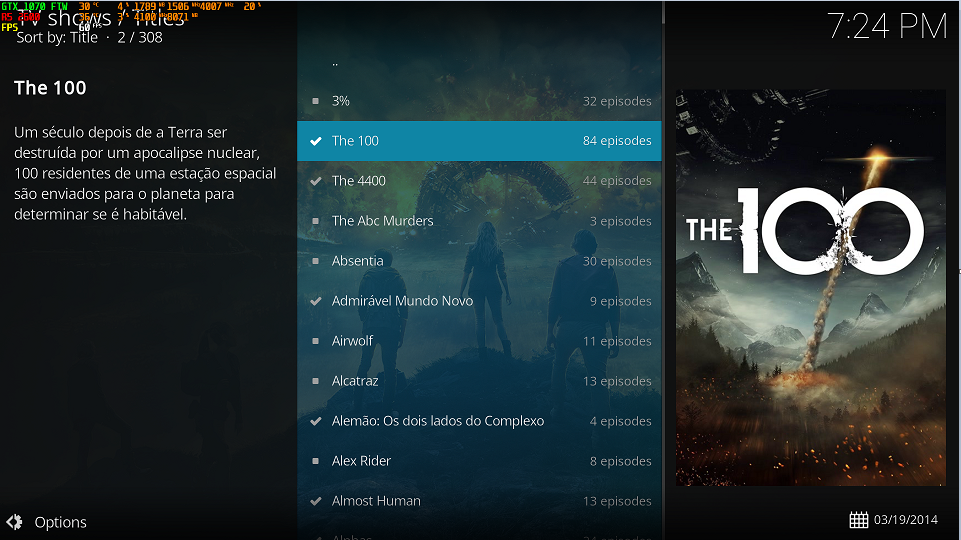
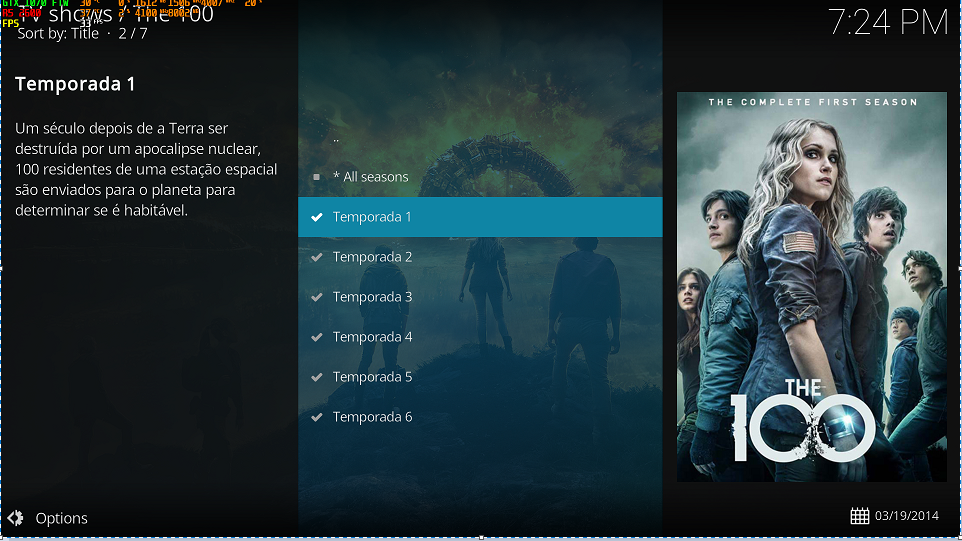
I have tested the new update and now it seems to be working 100%, I will be looking for some bugs to continue helping the development. I used the same parameters and tv show as the previous post to show functional now. Thanks for everything and let's get going. TKS @quickmic
 1 point
 -
Take a look at the Folder Sync Plugin - this effective allow you to create a folder (your SD card) that you can use as a 'Download To' destination from within Emby. You can copy the original, or even convert to a more storage optimised version. You can batch the copy, so just select your 'Favorites from the Opening Menu' - select them all, then use the 'Download To' function to download them all at once. Once copied, them remove the SD Card and use it in your travel router - the file structure will be the same as Emby. So TV shows saved in TV for example. I'm not sure if it copies the metadata or not - I haven't used it in a while. https://support.emby.media/support/solutions/articles/44001162190-folder-sync1 point
-
New version available: 6.0.3 build 23 (ex3) this version will initiate a FULL DB RESYNC! Delta changelog: - fix artwork for pooling tvshows - additional fixes for live tv - configuration files changed (reset required) - several minor bugfixes - Added additional nodes (SD, HD, 4K) - fixes for item updates and item removal - improvement for multiselection blueray iso files1 point
-
Hi. Is this via DLNA on the TV? How have you configured the DLNA in your Emby server?1 point
-
Hi. We have that kind of thing planned for the future at a system-wide level.1 point
-
I'm one of the lucky ones who's LG App is still working - but in all honesty, I have given up on the App and moved on about a year ago and rarely use it now. With the magic remote, my personal view is it is (was) still superior to the current Android App in pure navigation (point and click) but of course it is now missing many bells and whistles the Android App has. Again, my personal view is they should remove it as a 'supported' app - or at the very least clearly state this when it is installed and on the 'apps' page on the website (along with a 'this is not supported on 2021 LG TV's ...). 18 Months without an update on any software means it is no longer in active development - it may 'work' but you take your chances with it, and I agree Emby should be transparent about this. I would much rather they say development is 'on hold due to circumstances outside of their control' rather than 'it's in the pipeline, repeated' for 18 Months. LG are not that slow - I've had multiple updates from many other apps in those 18 months..1 point
-
Sure Brian- Open 'System Preferences' and select 'Users and groups' (first item in the second to last row generally). Select your user and you'll see two options at the top of your pane- 'Password' and 'Login Items.' Select 'Login Items' and the pane displays all your apps that run when you log in. To add Emby (or anything else) to this list you'll hit the + at the bottom of the window showing login items. Navigate to your Emby Server App and double click on it. That will add it to your list. Keep in mind you may have to click on the lock (lower left of the window) to make changes which requires you enter your password. For whatever reason my System Preferences window took a while to SHOW that I added Emby. When I switched back to see all the preference options and selected Users & Groups it was there. I can add screen shots if you need them.1 point