Leaderboard




Popular Content
Showing content with the highest reputation on 07/13/21 in Posts
-
I submitted the work on GitHub. But I am absolutely the worst at properly submitting a pull request, so I submitted the work to Luke directly, as well. There were some other feature requests from users, so maybe if there is time, I'll look at those as well.3 points
-
I have the exact opposite experience. I set Emby and forget it and it just works for me. With Plex I constantly have to tweak something. Keep in mind I know both platforms pretty well so this isn't a favorite thing at all on my part. One of the "golden secrets" to having a good streaming media server is having your files in a format good for streaming such as mp3, flac, mp4, mkv with common codecs that players can use without needing special treatment. Follow those steps and streaming life is so much easier.2 points
-
I'd strongly recommend against dragging your issue into this thread. You're likely to confuse the support of your own problem. You have what appears to be a WMA-specific issue where Emby most likely doesn't recognize one or more WMA tag names. That's almost certainly got nothing to do with this thread as it's not related to moving from Plex unless the OP is also a WMA user. Statistically, that's not likely.2 points
-
'Attention' maybe? But honestly don't think it matters.2 points
-
Just for clarifications there are 2 Emby Android apps that will work on the Shield. The most appropriate one is the Emby for Android TV app, for Android TV devices, such as the Shield, Mi Box, Nexus Player and Amazon Fire devices. The one I suggested above, is the normal Emby for Android app for phones and tablets, although it will also work on the Android TV devices. So for the Shield, people should really be using the Emby for Android TV app as it has been curated for the platform, but if anyone has problems with it, the Emby for Android app can be used as a comparison. Hope that makes sense.2 points
-
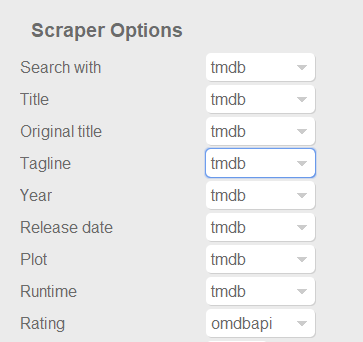
Dont know if this was already posted. For example something like the capture below at least for ratings, to use omdb or another scraper as first priority for this field, and similar for tvshows with the available scrapers for that library type of course. Also It would be nice and handy to have some language options per field, at least for Title, Tagline, Plot, Episode Title, Episode Plot and Genre fields. Handy if you want to have your tagline/plot/episode-title/episode-plot in spanish for example or your native speaking language but want to use the title of the movie or tvshow in english for english movies, or the title on the native language of the movie (spanish, french, german, etc). With the current setting you get absolutes, english: everything english, spanish: everything spanish. And would be nice to apply this language options to images too. I scrape my data with TMM before adding it to emby to have this type of settings, but I would be really good if emby could handle some of this variables. Update: Also, give the option for "None" to skip scraping for this field and "NFO Only" as @picotrain1 suggested.
 1 point
 -
So I've seen an increasing number of threads highlighting the limitations of LG's (and other manufacturers) decision to only use a 100Mbit Ethernet port. While this provides perfectly acceptable throughput for internet based 4K streaming, on high quality native (REMUX) 4K movies streamed locally from Emby - this bandwidth is sometimes not sufficient. My C8 only has USB 2.0 (again, on a very expensive 2018 TV - really LG?) but even on half duplex, this should be ~200 Mbps, better than the 100 Mbps of the Ethernet. So I purchased an Anker USB 3.0 to Gig Ethernet adapter (Model A7610) - plugged it into the USB 2.0 Port on the TV, turned on the TV and it worked first time ! Ethernet connection is now 1 Gig, but of course as the TV only has USB 2.0 - an nperf/fast.com speedtest is only getting 170 Mbps down - but that is still a significant improvement over 100Mbps Ethernet which only gets about 94 Mbps on the same speedtest. Interestingly, you have to turn OFF both the wifi and ethernet (disable the port/unplug) for it to work - but everything works just fine thus far. I'm about to download the jellyfish 4K bitrate files to see at what point it breaks - but @ 170 Mbps - I think I'll be safe for a while. I'll update this thread with the results.1 point
-
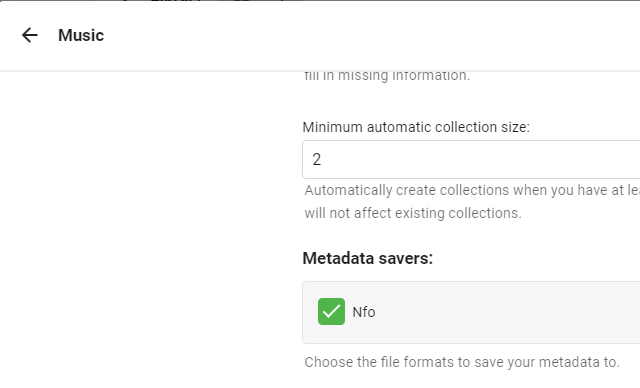
Emby version 4.6.4.0 Emby is not saving nfo files within the audio file folder nor is it reading nfo files. It works for video files, but not audio. The library is set as Music. Add: It is also not saving images in the file's folder.
 1 point
 -
HI, I added the ability to put resolution in the naming and saving of the AutoOrganize plugin. This will allow you to create multi-version items. It allows you to deal with Multiple version of the same Movie/Episode. Here is the complied test version: Emby.AutoOrganize.zip and here is the entire project, if someone wants to check my work: Emby.AutoOrganize-master.zip1 point
-
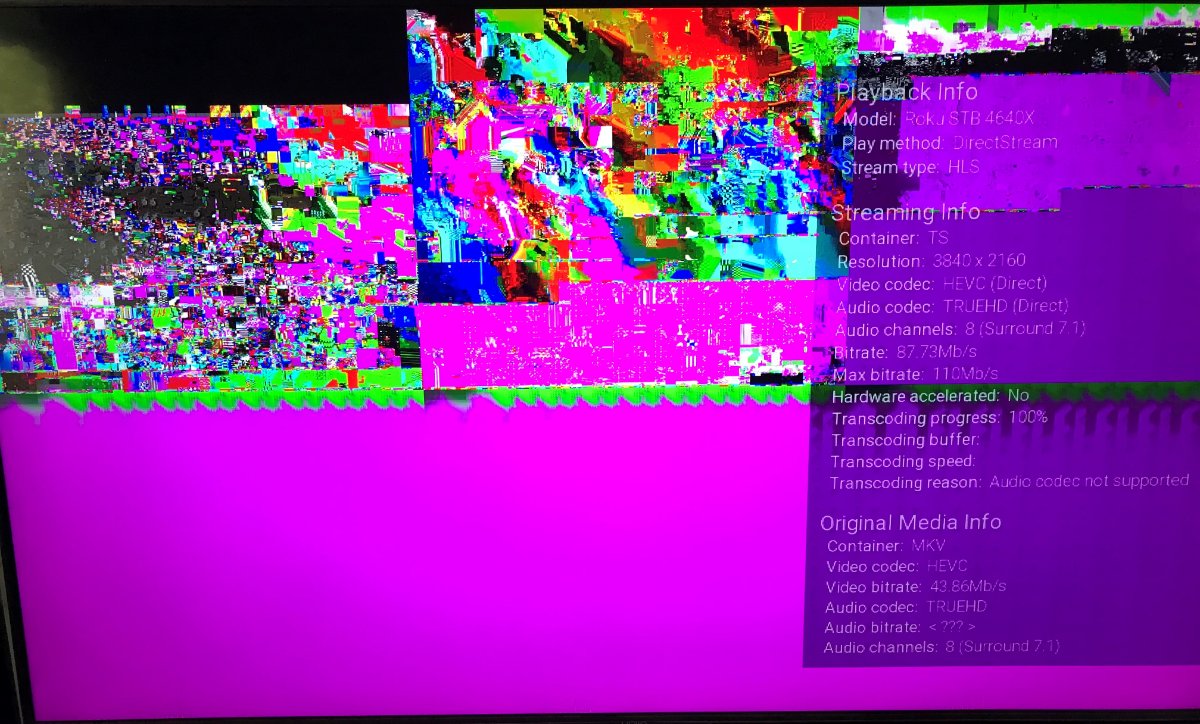
This is the problem: 17:35:38.862 Stream mapping: 17:35:38.862 Stream #0:0 -> #0:0 (copy) 17:35:38.862 Stream #0:1 -> #0:1 (truehd (native) -> aac (native)) Plex has fixed this using fMP4 or MKV segments.1 point
-
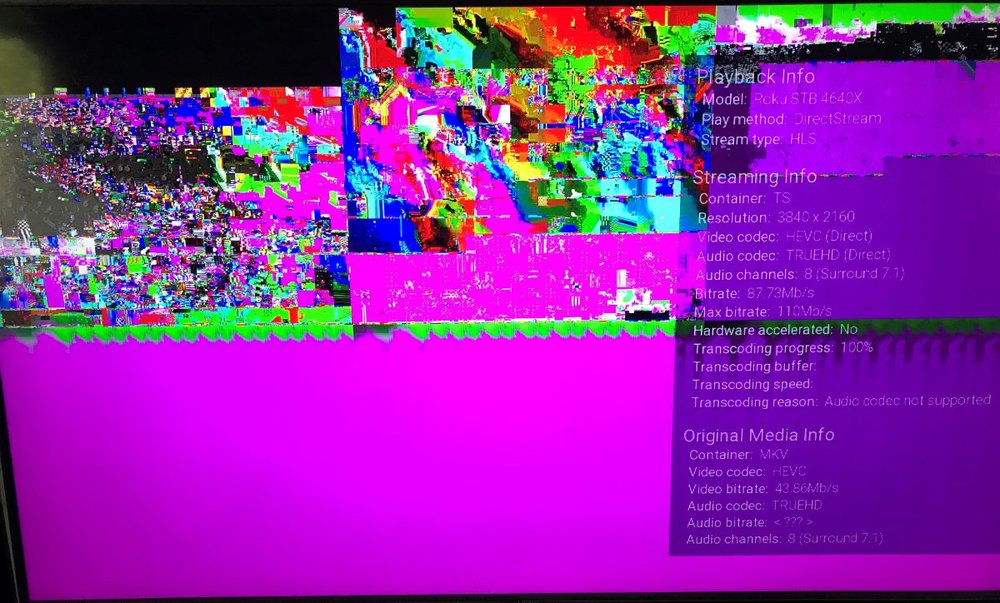
I am guessing this is what you are talking about from my Roku Ultra. Directstream chocking on HEVC in HLS.
 1 point
 -
Most clients will not play well with remuxed HEVC do to HEVC and HLS do not play well together. So if does not DirectPlay there most likely will be issues.1 point
-
I believe my issue was resolved. I probably didn't need to nuke everything, but I figured, why not. I've watched about 10 episodes of Castle a few episodes of Family Guy and they are playing back to back as expected.1 point
-
Creo que no es posible agregar directamente peliculas en archivos m3u a una biblioteca de medios, pero lo que si puedes hacer es usar archivos .strm que contengan rutas web apuntando a tus contenidos en linea consulta aqui como hacerlo : https://support.emby.media/support/solutions/articles/44001159147-strm-files. Otra opcion que puedes probar es agregar la lista m3u como "Sintonizadora de TV" de manera que cada item se muestre como un canal de TV puedes consultar mas informacion sobre eso aqui: https://support.emby.media/support/solutions/articles/44001848795-m3u-tuners Haz las pruebas y nos cuentas como te fue.1 point
-
This page states that the log file location is: Windows: %appdata%\Emby-Server\logs it isn't, it is %appdata%\Emby-Server\programdata\logs1 point
-
Try this. It should fix the problem. Vic emby-tag-tool-15.html1 point
-
These are all cleared now @chef - bbc iplayer and thetvdb episode numbering does not match, so I just need to rename to thetvdb naming and all is good. Thanks for the much needed refresh of this essential plugin.1 point
-
Wow! I can't believe my luck finding this thread, I was just getting ready to post a question on the forums, asking is there any way to get locast to work from within Emby. You guys rock All I want is a few local channels (I'm already a locast donor in a supported city). We just want to watch local news in the morning, don't need anything else like recording shows etc. My biggest concern is ease of use, my mom is in her 80's, and she struggles switching between the Emby app and other apps. If I can add a "News" option to our main Emby page, she should be able to handle that, after I show her how to do it a few dozen times. I'll make another pot of coffee, then re-read this thread again, then try to figure out all of this stuff I'll post my progress here. Thanks1 point
-
MBZ is not required. You can manually tag in any tag editing program for example. MBZ is a decent source for metadata you can use to automatically tag tracks, that's all. The issue in the post you reference appears to be specific to WMA files and those are, to put it mildly, a very small percentage of audio tracks in existence. What DOES matter as it pertains to MBZ data is that, if it exists, it should match the other equivalent tags. So if your Album Artist or Artist tags don't match the MBZ Album Artist or MBZ Artist tags you can get some surprising results since you're feeding the system contradictory data.1 point
-
Thanks for all the help guys!1 point
-
Ok... So, I went into the 'Library' and selected 'Edit' from the ellipses menu. And from there I saw a 'Music folder structure' drop down and selected the 'Perfectly organized into artist/album folders, with tracks directly in the album folders.' option. I then went back to the album, did a scan, and voila... the artwork is displaying. Is there a way to run a scan for all the albums? I would hate to run a scan for each individual album in my library.1 point
-
Please attach the emby server log from when you tried to display the images. Thanks.1 point
-
Thanks for the kind words. The suggestions from everyone have made the tool much better. I fixed a few things that broke while I was adding code. My to do list is now empty Vic emby-tag-tool-14.html1 point
-
Emby can't use the info pulled down by Plex as it's stored differently. Emby will only be pulling down graphics and text so it's not going to need lots of bandwidth to do this. What I would suggest is setting up your Movie library and only that first and let it scan. That way it's only 800 items and you can see the bandwidth used. Then add your TV Shows, etc. For your music make sure you have good tagging of the tracks as this is what Emby will pull from to recognize your music library.1 point
-
@Luke /Cayars, just now seeing your response. I haven't tried your solution yet but will implement as soon as I get home and report back results. Thanks for info. Ed1 point
-
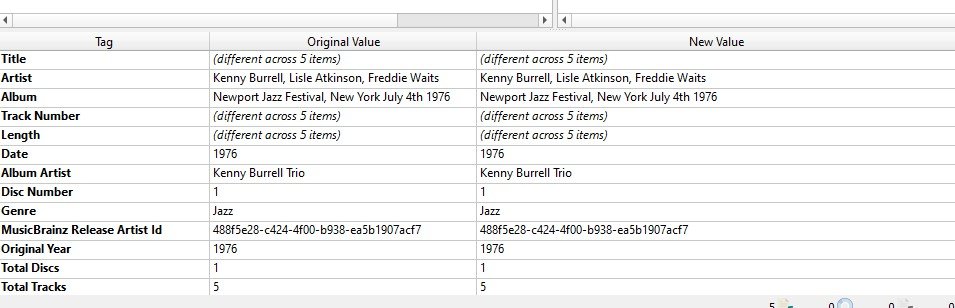
Must be an issue with wma (?) This album is not on MB and I just updated it and it displays in emby correctly. flac file sorry I don't have any other suggestions
 1 point
 -
My guess is that it is reading WM/Year because the mbz id for the digital media release of Eric Clapton's album August is 2012. I always override the year of the release though with the original year because I hate the way Emby displays the year. When I look at this album in Emby it shows 1986. So the only place it could have gotten 1986 is from WM/Year. I think Input #0, asf, from '01 - It's In The Way That You Use It.wma': Metadata: WMFSDKNeeded : 0.0.0.0000 DeviceConformanceTemplate: M1 WM/WMADRCPeakReference: 32767 WM/WMADRCAverageReference: 5847 WMFSDKVersion : 12.0.10011.16384 IsVBR : 1 track : 1 WM/Track : 0 album : August (HDtracks) WM/Year : 1986 genre : Blues Rock album_artist : Eric Clapton MUSICBRAINZ_ALBUMID: 07aaf91d-aa52-4e4c-a689-9c0f5d2cabbf MUSICBRAINZ_RELEASEGROUPID: b7758489-3a12-3389-b76b-8cf80a105013 title : It's In The Way That You Use It artist : Eric Clapton comment : HDtracks Duration: 00:04:10.33, start: 0.000000, bitrate: 320 kb/s Stream #0:0: Audio: wmapro (b[1][0][0] / 0x0162), 48000 Hz, stereo, fltp, 384 kb/s1 point
-
yep - gimme an hour or so and I'll happily test - thanks1 point
-
Yep that solved it! WOW That looks SO SO MUCH BETTER and it WORKS! GREAT WORK! You need to roll this out to everyone it's so much better!1 point
-
Yes, that's a good idea. I will look into it. vic1 point
-
@muzicman0 one thing to try "password=$password" needs to change to "pw=$password" this was a change made awhile ago since the above was posted i have not been through the rest of the code as dont use bash but that jumped out at me as needing to be changed see how you go1 point
-
to be honest it is a pain in the ass to have to keep both Kodi 18 and Kodi 19 add-ons current, I would like to drop Kodi 18 (python2) but there is not enough full support in systems like Libreelec etc to do that. If it all looks good in a few days I will merge it to the matrix branch and do a Kodi 19 release.1 point
-
The Latest Movie (20) limited item count list should be working correctly in the latest 1.9.116 Beta for Kodi 18 I am still looking into the Latest TV Show list returning fewer than expected items for the global list. I am not sure when Luke will get around to improving it on the server side so I might try a few things on the client to get the full list. Not sure yet if I can make it better but will have a go at it.1 point
-
Nothing as userdata/played/resume are tracked by providerid not path. Only items that do not have providerids will loose this information as they are tracked by a internal id that does change with the move as it is removed from the database and re-added.1 point
-
Will have to wait for the dev to comment as this grouped series view is new for Mixed Content as it use to show each episode as they were imported.1 point
-
the problem is file permission! on the synology side you can't give emby read permission you need to do it on the webdav drive side. you need to give everyone read/write permission where the files are stored on webdav server side since there is no emby user on the webdav drive side it works but is slow!1 point
-
Hello Happy2Play.... I just checked mixed content and it now works. I also tried books and it may be working. It did open but I don't have any e-books. Let me know if things work. Vic emby-tag-tool-12.html1 point
-
It was removed from the database, but that has nothing to do with what is showing on the screen at that time.1 point
-
So you are deleting a item from the itemsdetails page and not from library level correct? But many factors could be at play depending on what the server is doing at the time you chose to delete something. But it sounds like a screen refresh issue from what you have currently described.1 point
-
Have a look here https://emby.media/community/index.php?/topic/90160-45050-thats-just-lovely-is-there-a-option-to-toggle-navbar-expansion-closed-by-default/1 point
-
Yes this has been brought up before as it is coded to be expanded by default. https://emby.media/community/index.php?/topic/91395-4604-add-to-collections-and-playlists-with-drag-and-drop/&do=findComment&comment=9426651 point
-
Just to add a bit to the info in this thread. I have noticed that I get the jump to start when, as an example, I choose to edit a particular movie by say changing the poster. After changing the poster the main screen does not update with the new poster (but it will in the next few minutes) I then scroll down the library further. I believe that, when the update actually happens, that is when the screen resets to the first item. I have seen the behavior at other times but the refresh after an update that changes the main screen is the only one where I am pretty sure what is happening.1 point
-
Thank you for everyone who helped me fix this issue! Finally fixed. This thread is what helped as well! I was really surprised.1 point
-
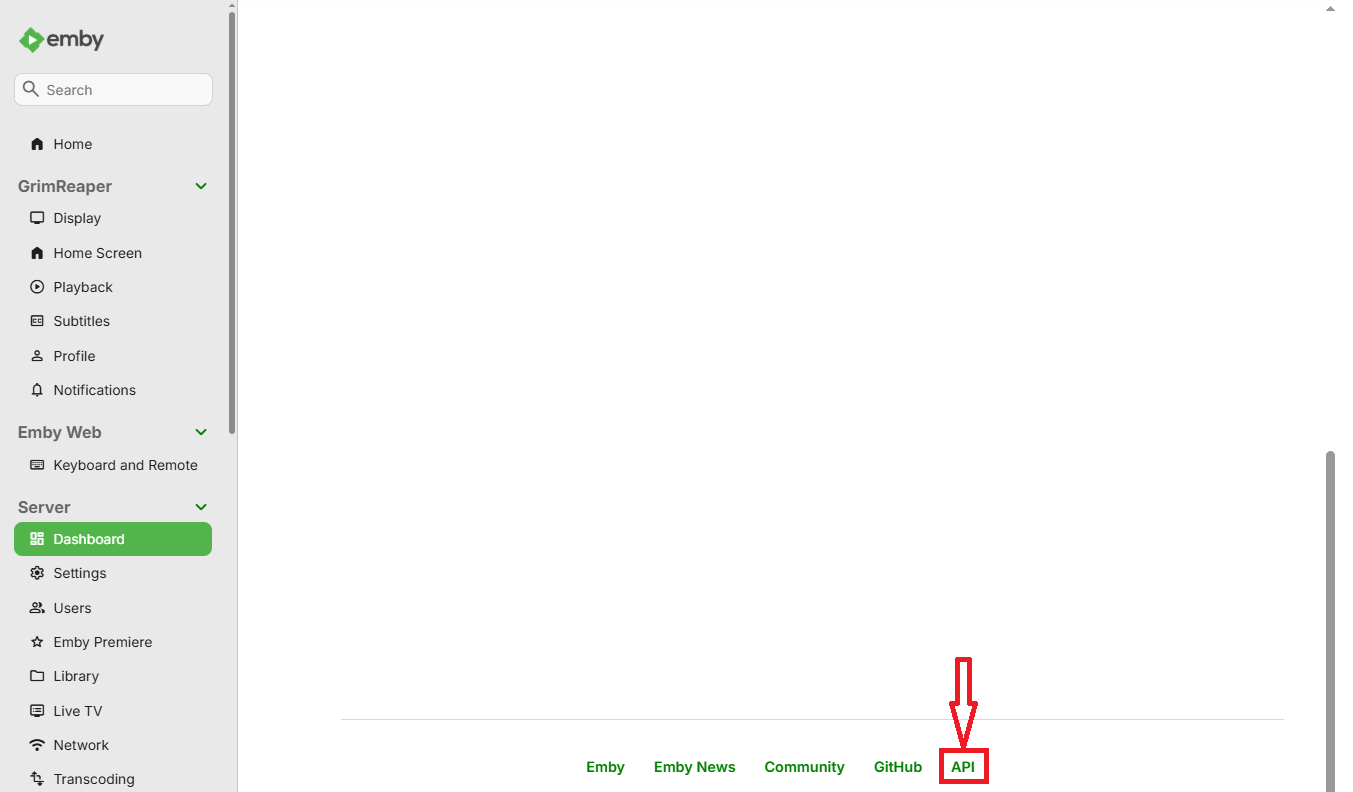
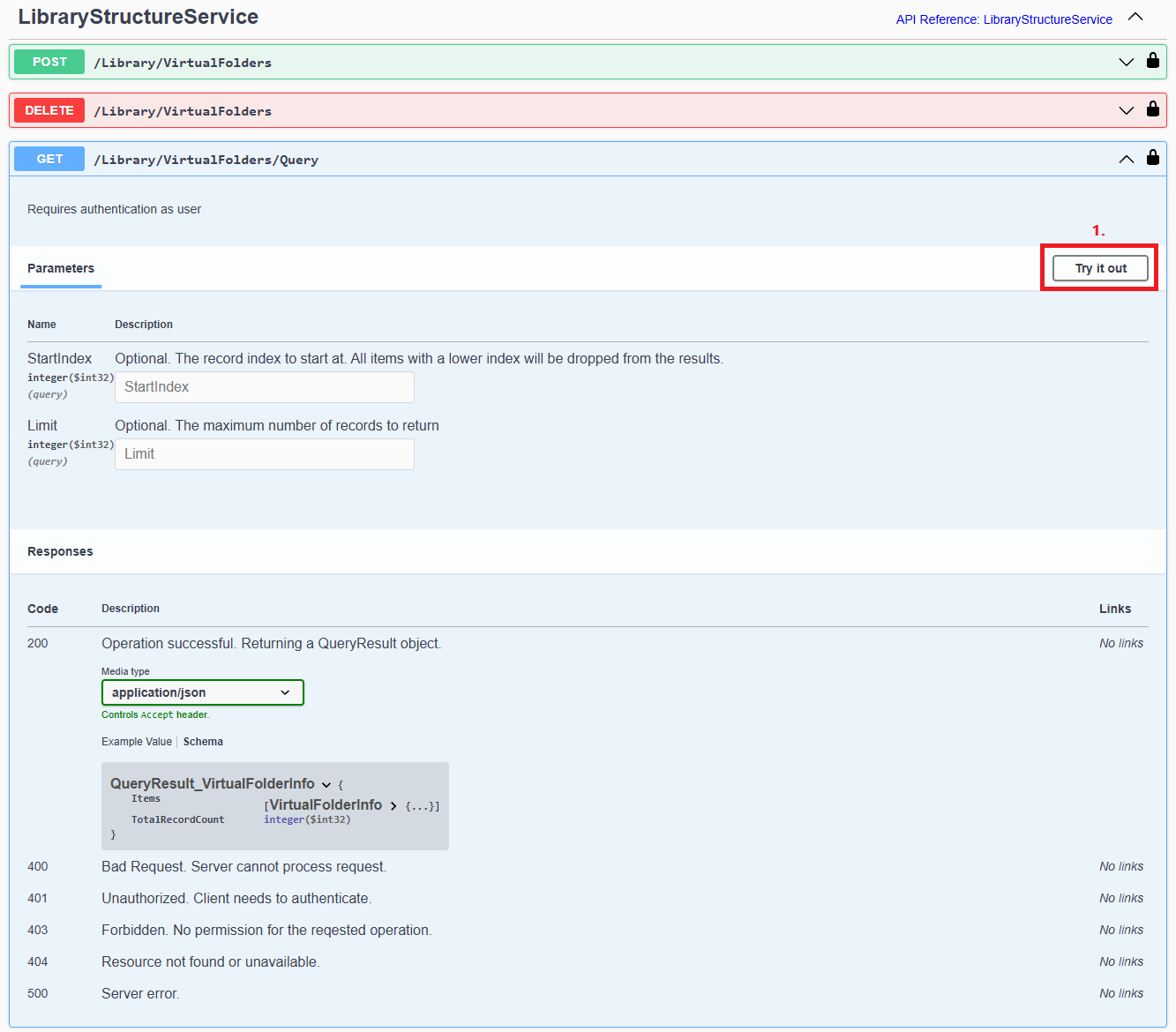
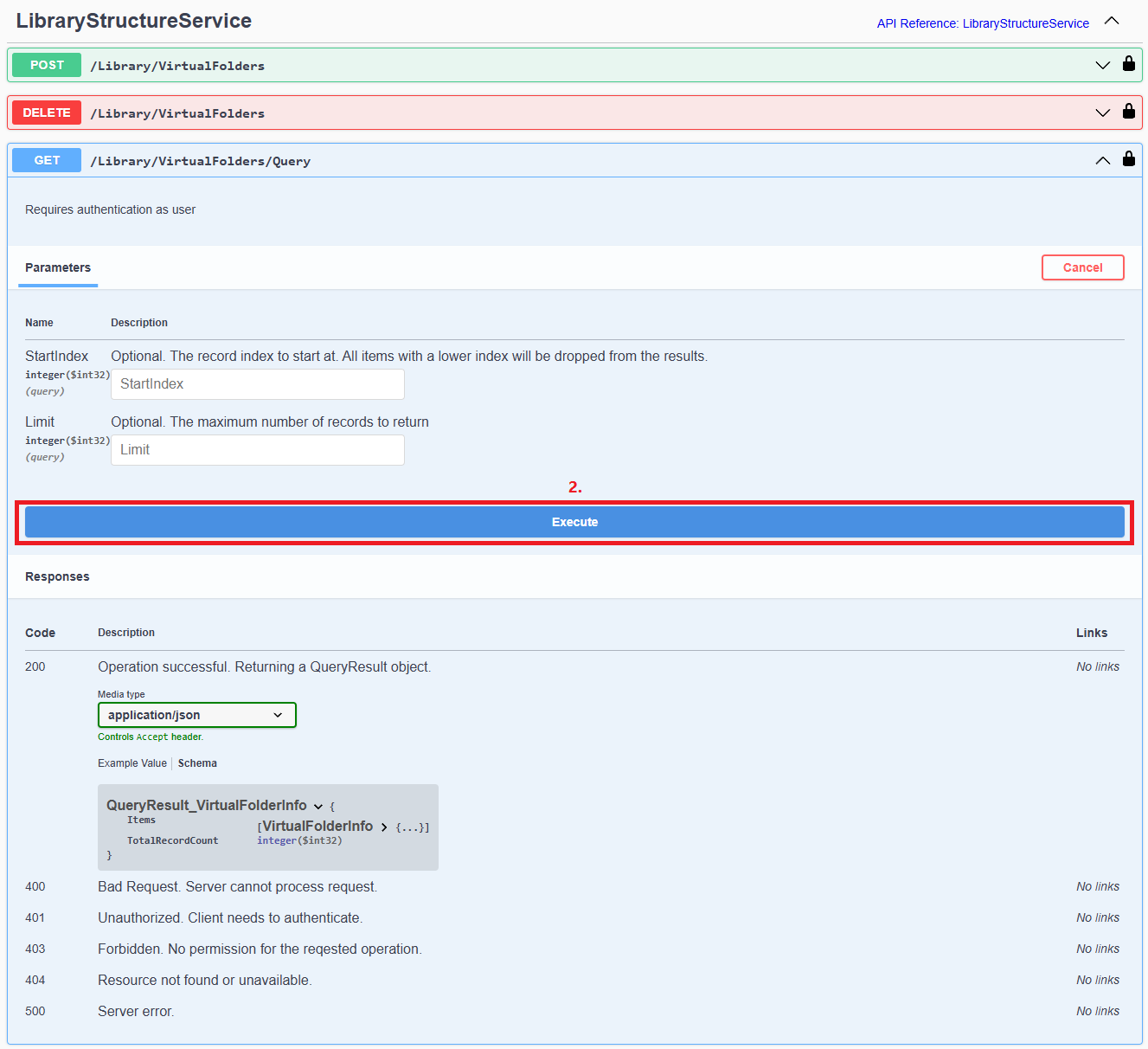
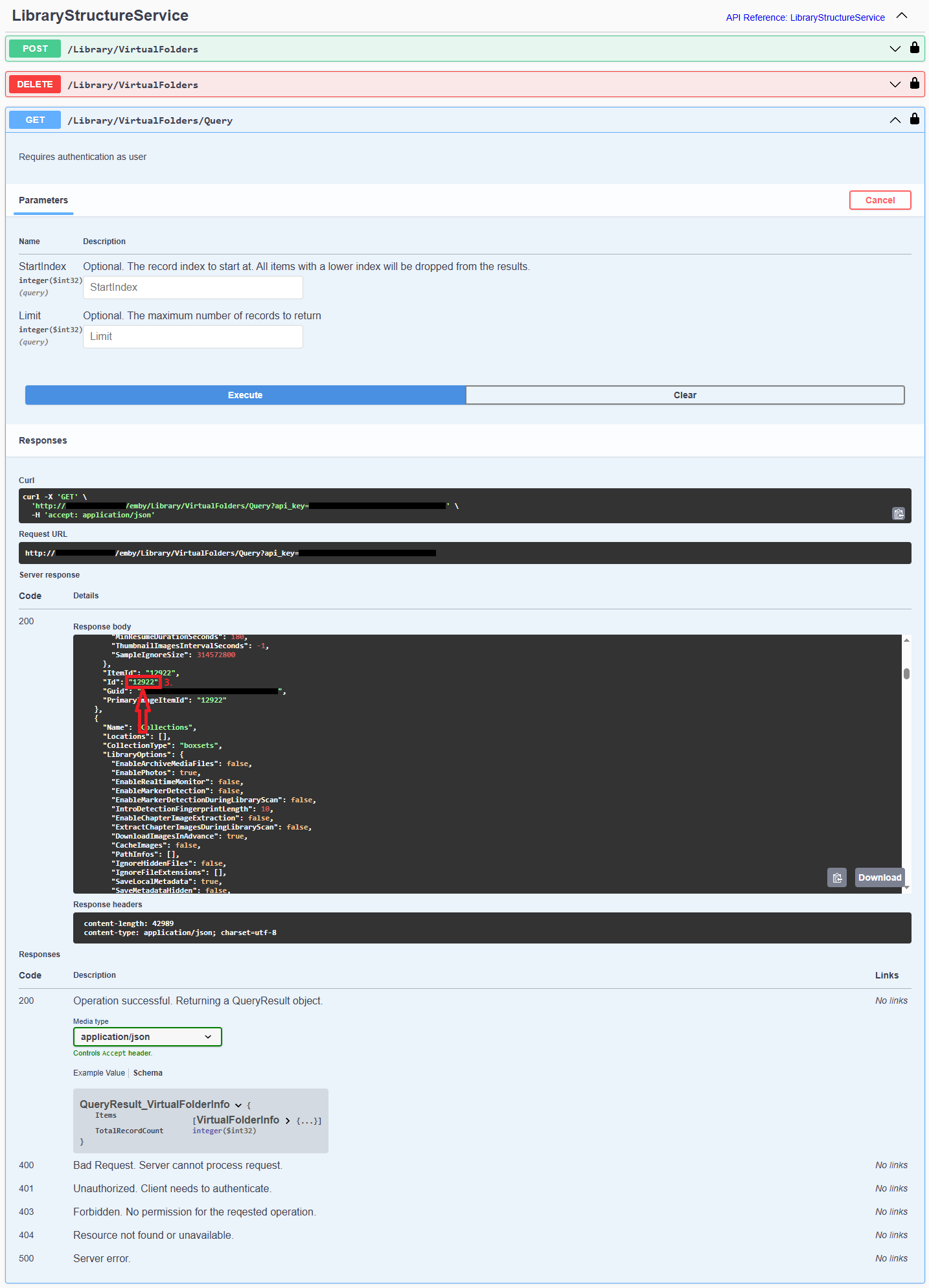
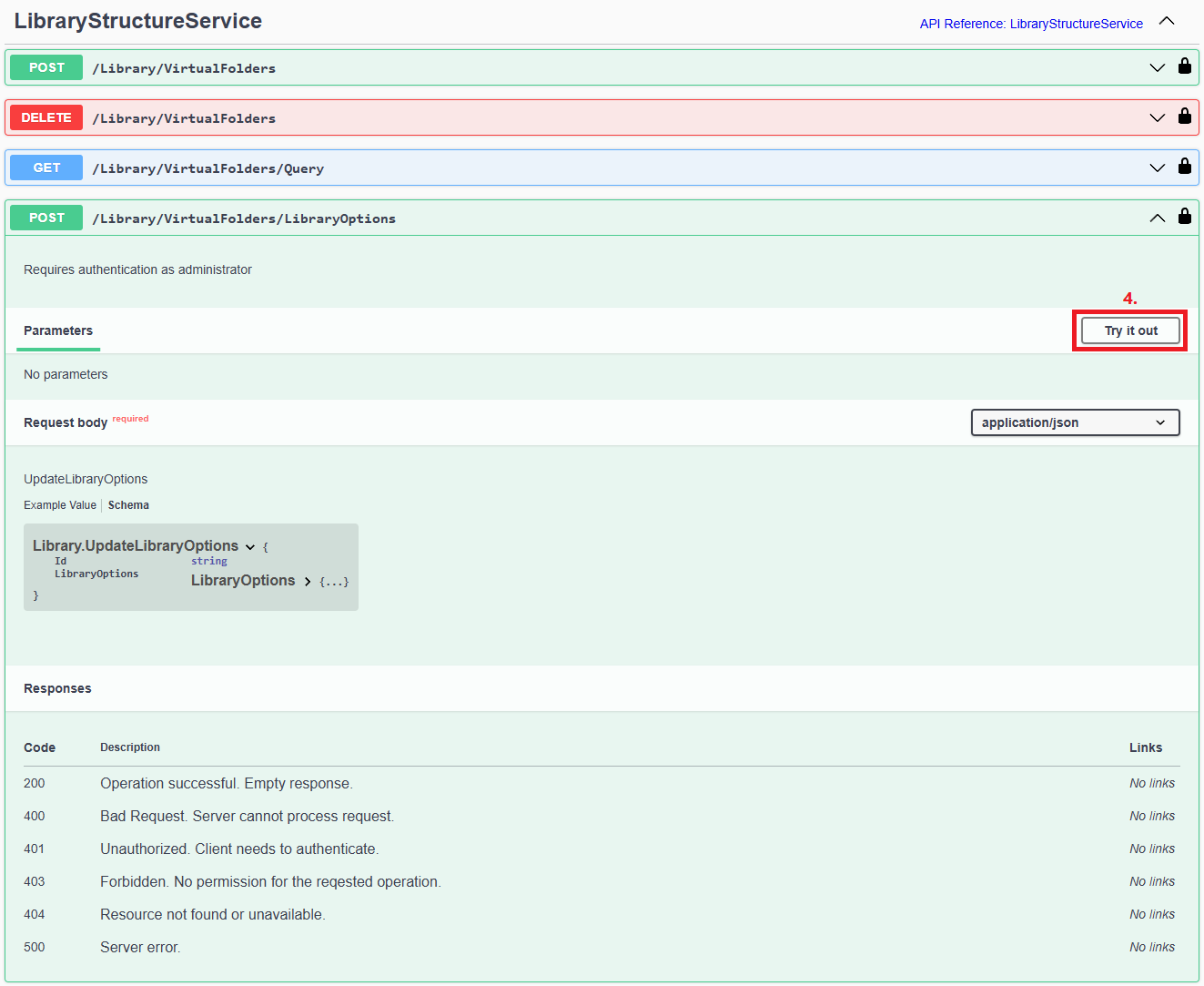
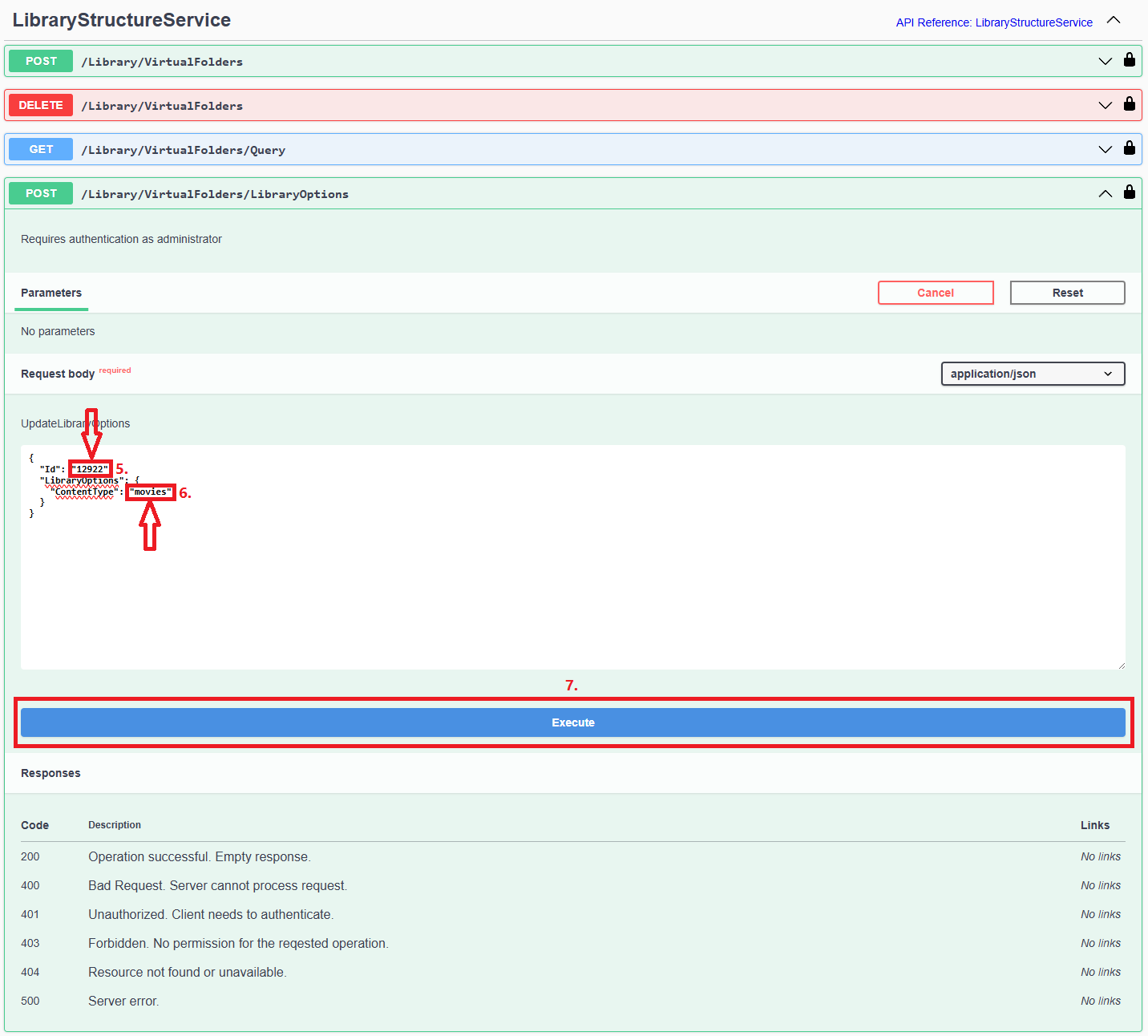
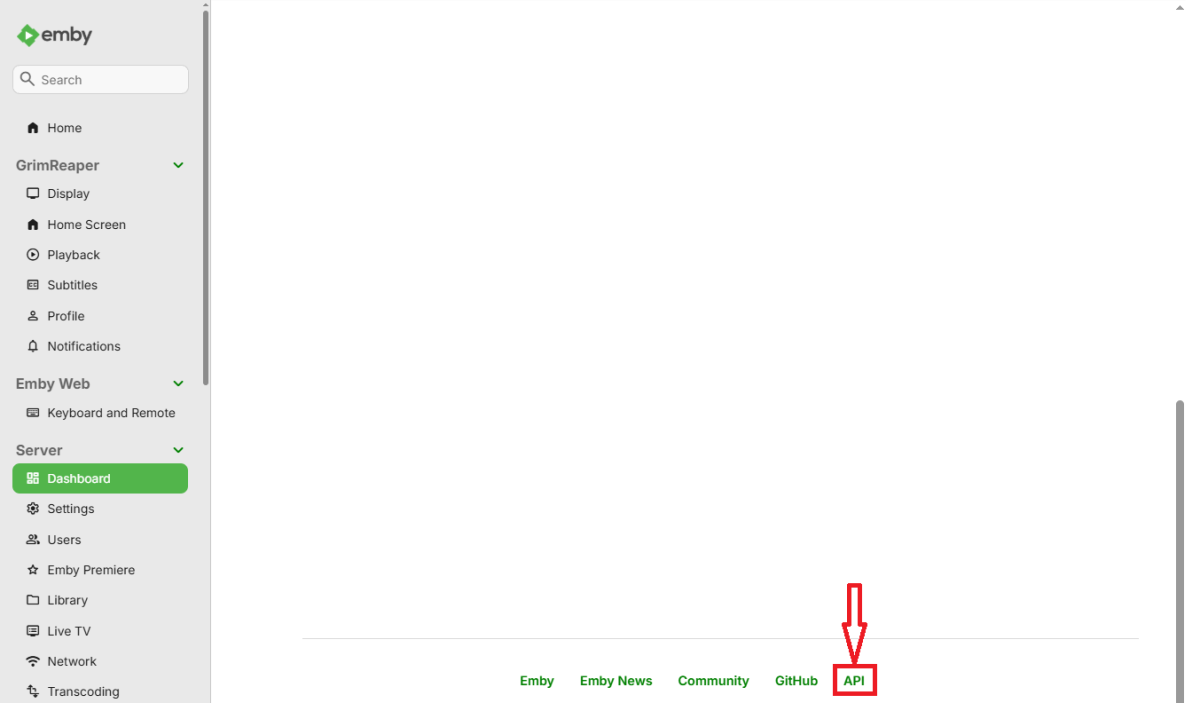
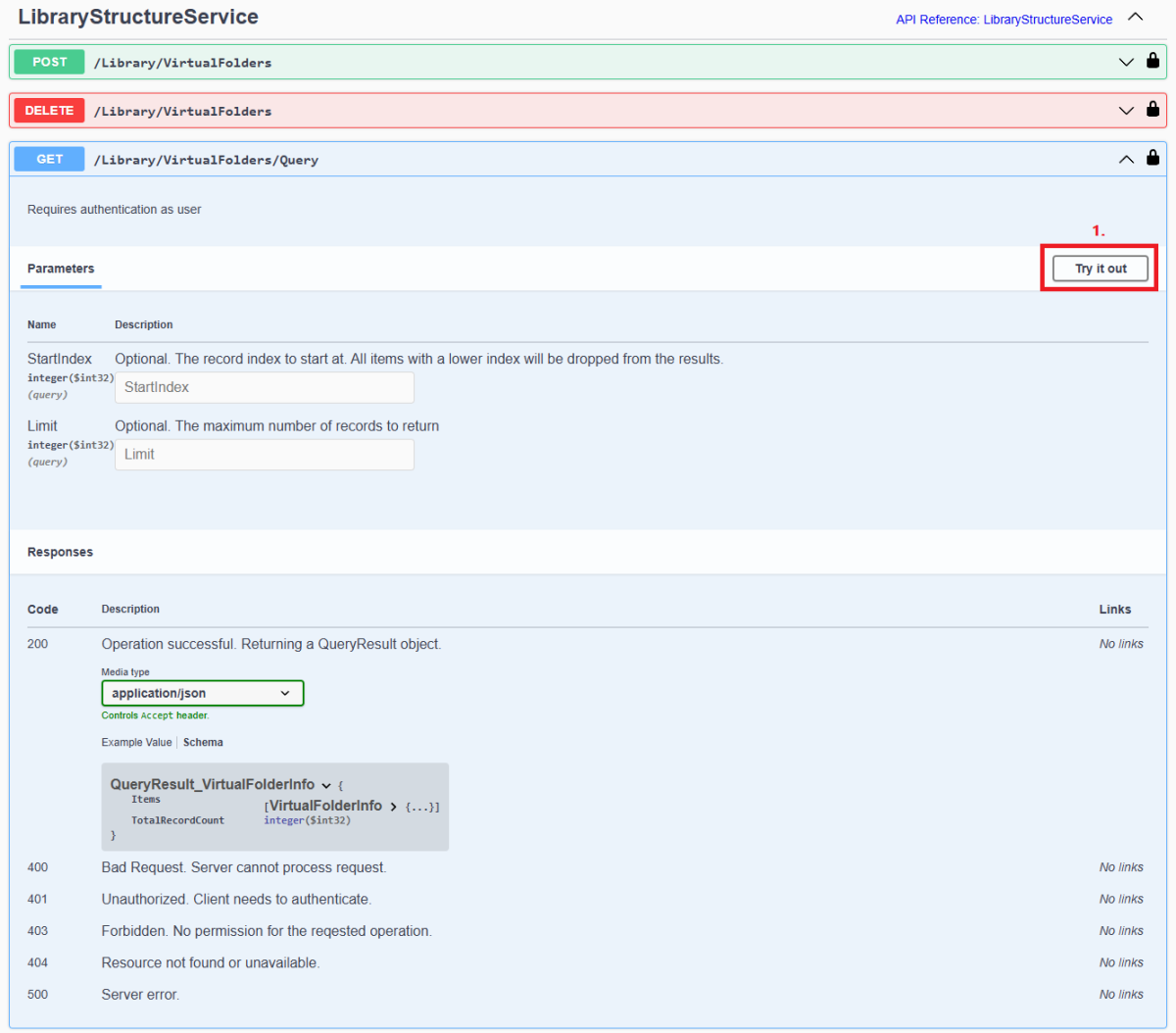
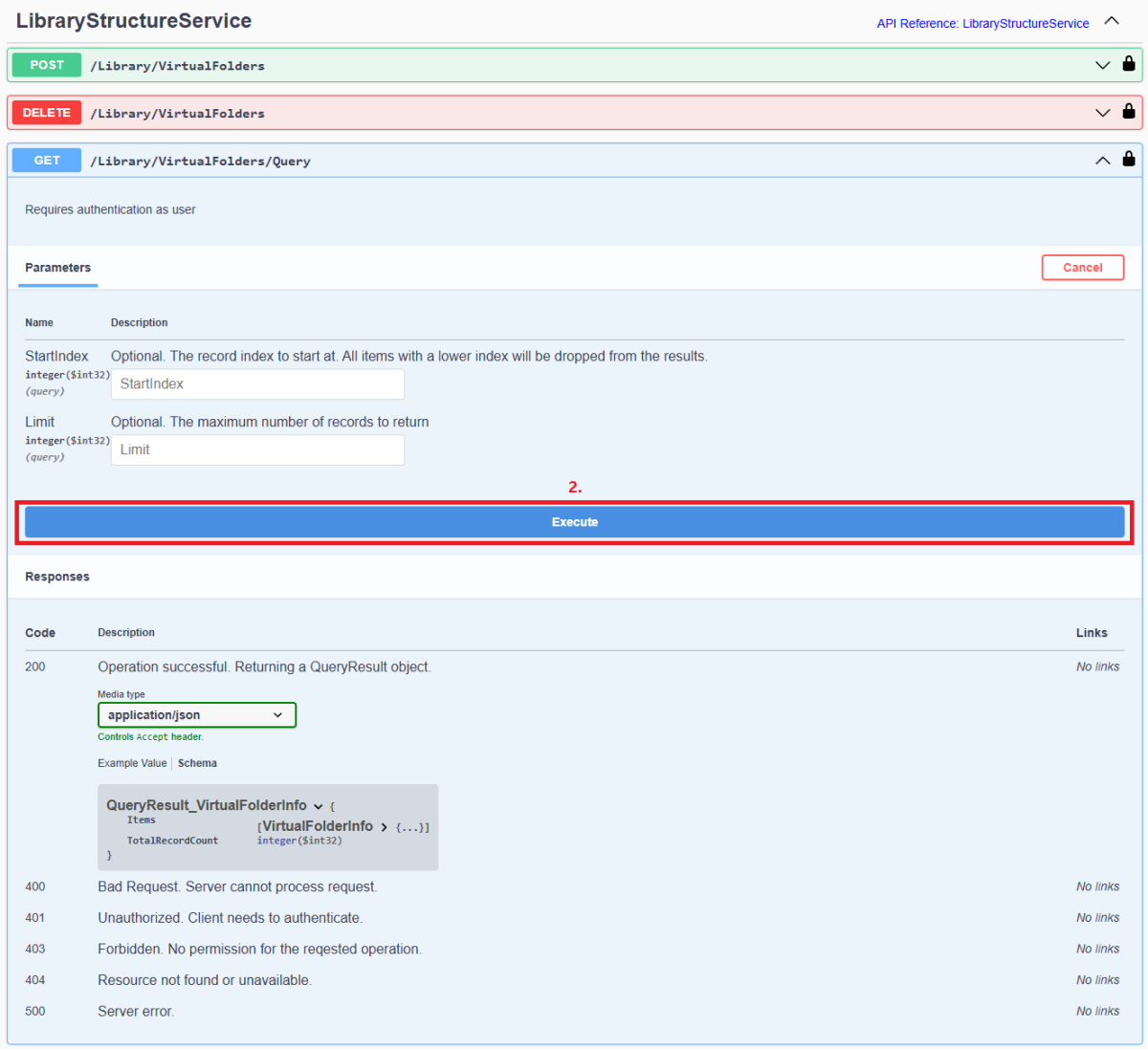
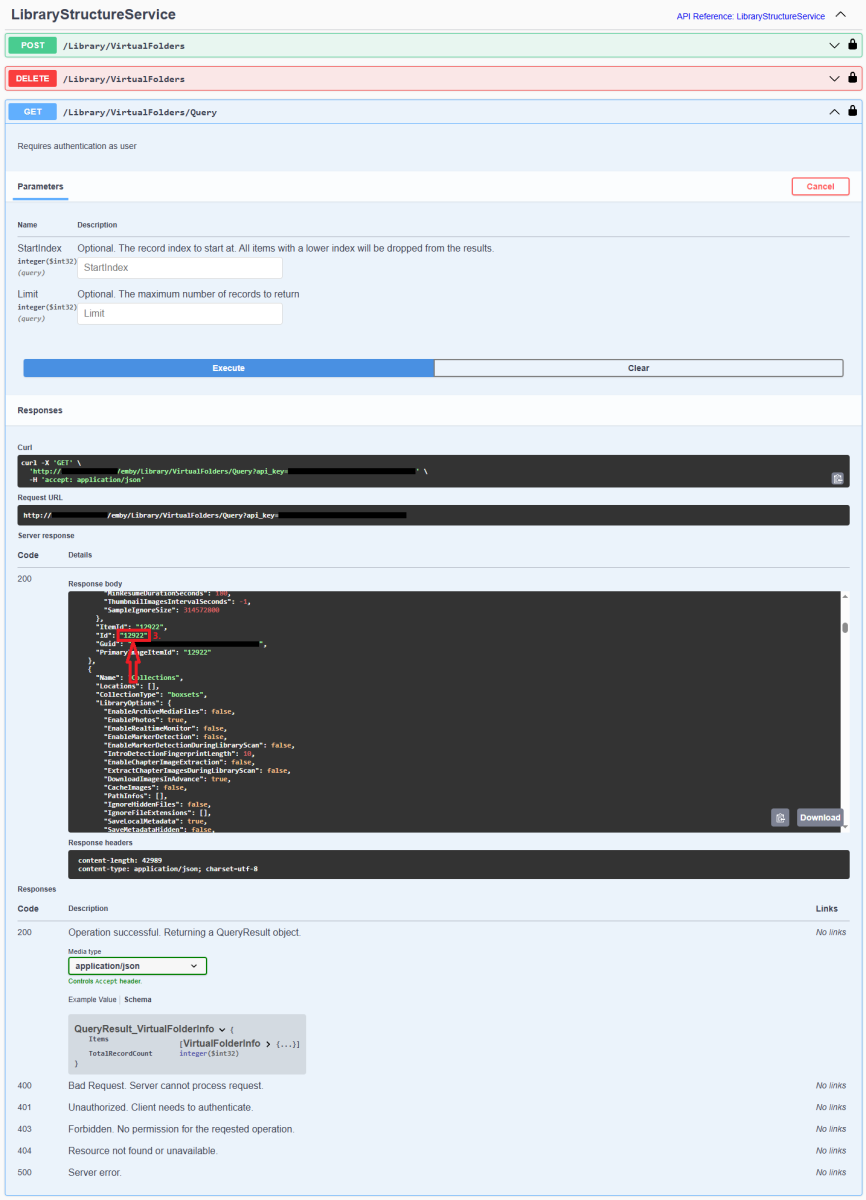
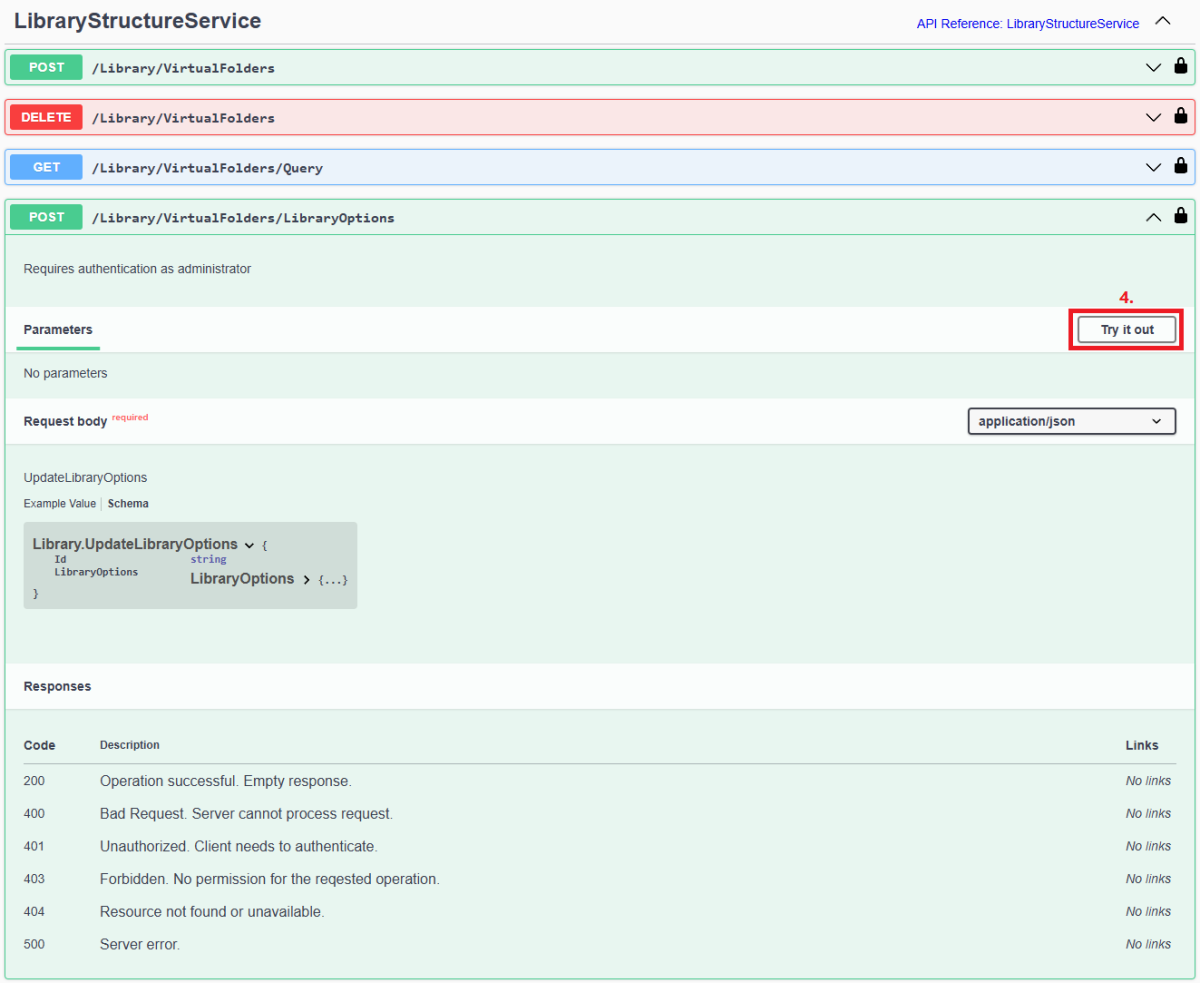
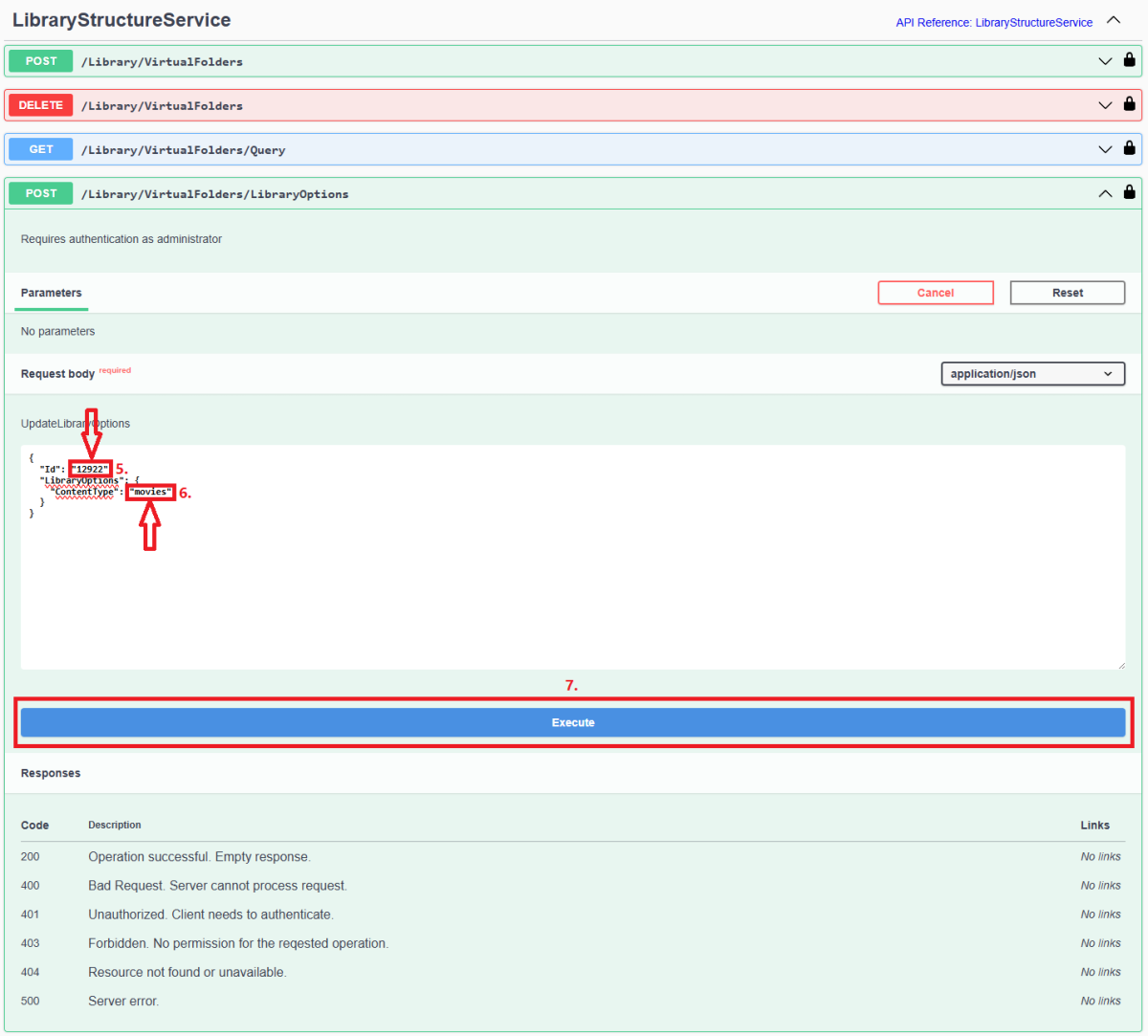
Since server version 4.8+, all library options (including library Content Type) are db-only and any desired changes need to be done via Emby Server REST API service (previous method of changing options via options.xml files is deprecated). Method below describes using Swagger: 1. Access Swagger by navigating to your Dashboard>scroll to the bottom of the page>select "API" hyperlink 2. Obtain library "Id" from /Library/VirtualFolders/Query endpoint: Find relevant library "Id" in the response: 3. In /Library/VirtualFolders/LibraryOptions, change "Id" to the one obtained above and "ContentType" to desired type (valid ContentType strings listed below). Execute. 4. You can check Settings>Library tab or query /Library/VirtualFolders/Query endpoint to confirm Content Type change Valid Content Types Audio books "ContentType": "audiobooks" Camera Uploads "ContentType": "homevideos" Collections "ContentType": "boxsets" Home videos & photos "ContentType": "homevideos" Movies "ContentType": "movies" Music "ContentType": "music" Music Videos "ContentType": "musicvideos" Playlists "ContentType": "playlists" TV shows "ContentType": "tvshows"
 1 point
 -
Hi Ruttus, I had been using erdsigns for the past few years also, until the downloader stop functioning. Also, like suggested I found the github m3u2strm converter. I had no knowledge of python when I started this process and through watching many youtube videos on learning from the free modules on this link (Free Online Tutorials and Courses (tutorialspoint.com) It took me several weeks to get to a point of understanding and able to use the m3u2strm python script. The script is very simple to use, but the instructions provided by the creator is pure garbage! An idiot could have explained how to use this script better than this guy did and I hope he reads this message or someone forwards it to him. Ruttus, if you need help with the script, pst me and I'll have you up and running in 5 minutes. Once I show you, you'll be able to replicate the process as needed. Using the script is better than using erdesigns site. I have setup the script to use with windows scheduling and now my m3u parse at midnight and I no longer have to do anything. Well, I'm 99% there. I'm having one issue that I'm about to post help for, regarding automated parsing of one my my series m3u with "#Black" tv show. "#" in python means to comment out, so when the parse gets to this line, it stops the process on this m3u. For this m3u I have to edit the show "#Black" to just "Black" and rerun the script. I'm seeking an alternative to ignore "#Black". I'll post a new thread for this issue, but let me know if you need help with the python script. Once I get the # issue resolved, I'll also post complete instructions on Emby for anyone else who wants to use the script and also setup script to run automatically at a set time.1 point
-
Hello, first of all I apologize for not responding sooner. I have had a lot of problems with my new house and I had to disassemble everything, computer, raspberry, tv, etc ... and I could not look at anything, only today I could finish assembling the computer, I will try to get some time when I can and get with it, but right now my house and life is chaos!!!! :( Greetings and I hope soon to upload the log and fix my backup. Translated with www.DeepL.com/Translator (free version)1 point
-
Hi. If a long press isn't working for you, just use the "cog" button on the OSD and turn off the "Stats for Nerds".1 point
-
Yes. It will be in a future LiveTV update.0 points