Leaderboard




Popular Content
Showing content with the highest reputation on 07/11/21 in Posts
-
I commend the people trying to help, you are all very patient. If everyone agrees can the last six pages of this thread get split into a separate one? All of the "troubleshooting" is junking up this How To. Edit: @Happy2Play?4 points
-
A TV screen is 1.78:1, so if the movie is 1.78:1 it's already filling the screen. There's nothing more to be done.2 points
-
Hey All, Firstly, excellent work! secondly, I noticed that this has stopped working in Emby 4.6.4.0, I have forked the repo and fixed if anyone is interested. (Have PR out for main repo) https://github.com/ShanePe/Emby.SmartPlaylist.Plugin/ Sorry also, I have made an update, if the playlist has NOT yet been generated, it will generate it, regardless of the playlist schedule trigger. So one no longer need to 'manually' run first to initialize the playlist if it falls outside of playlist generation schedule. (Make sense !?!?!?!) Version 2.4.0.3 Feature Create a copy of a playlist. (Duplicate) Decluttered UI by adding a pop up menu to playlists New Criteria: Added Audio Stream Codec Criteria (Stream: Audio Codec) Added Audio Stream Language Criteria (Stream: Audio Language) Added Audio Stream Display title Criteria (Stream: Audio Display Title) Added Subtitle Stream Language Criteria (Stream: Subtitle Language) Added Video Stream Codec Criteria (Stream: Video Codec) Added Video Stream Display title Criteria (Stream: Video Display Title) Updated Criteria: Parental Rating: Now uses official rating under the hood Resolution Height: Now uses video streams to determine the available video heights rather than the metadata. Resolution Width: Now uses video streams to determine the available video widths rather than the metadata. Added Monitor Mode to shuffle playlist type. Meaning that the playlist will be destroyed and recreated on a schedule, but between scheduled executions, media item changes will be batched and monitored for inclusion/exclusion. (So .... combination of live and shuffle modes but could have a perf hit on larger playlists, experimental) Collapsible sections in the playlist editor that keeps state, for more UI real estate. Added the ability to add notes to a playlist (limited to 256 chars). If there are notes assigned a pop up is displayed when hovering over a playlist (2 second delay). Order all selection lists on criteria with dropdowns alphabetically. ------------------------------------------------------- Releases Here -> (See change logs in this thread .... way down) Plugin for Emby Server 4.8: SmartPlaylist-2.5.0.4810.zip1 point
-
It would be useful if the server (or perhaps clients) could cache most (if not all) content images (posters, backdrops, logos, etc) for movies, TV series and seasons. This would mainly be of benefit when a portion of someone's content is offline but the users would still like to view the content to know what exists. I think caching on the server would be preferable, then all clients could make use of the same cached images. if you think this would be a useful feature, please click the "Like This" button on this post.1 point
-
Ideally there would be a optional setting to ignore scraping if a .nfo file exists Just disabling the metadara downloaders and enabling nfo reader on library options should do the trick.1 point
-
...probably never be able to happen, but would love a one-stop shop where I can log into all my different streaming services (Netflix, Hulu, D+, HBO Max, YouTube, Amazon, etc) and just watch the content from Emby. This, of course wouldn't bypass any monthly charges from said services..just some way to access them and put them as channels under a Streaming Services Tab, maybe... ..probably way more complicated than I'm imagining...but would be pretty cool. Thanks.1 point
-
Seeing as there hasn't been a new beta for weeks, I'm sure we can assume this will be one of many things being added...1 point
-
Every device has different playback capabilities so a TV and Roku could play the item differently, but server log and ffmpeg logs if present would show this or checking Stats for Nerds on each device during playback.1 point
-
@SamEShas mentioned in other topics that devices choke on excessive subtitles. So as @FrostByte mentioned you could remove some subtitles. Will look for previous topics and attach if I find one.1 point
-
Is it possible the file you got has a bad header? I've had no issue playing any of the Marvel shows or movies from Disney+ and they all have DD+ w/Atmos. However, I've always remuxed them first taking out all the garbage I didn't want which would have created new headers. I'm using the latest .99, but have watched Black Widow twice now with no issues.1 point
-
@cayars is the issue this step?1 point
-
Thanks for this. We will see what we can do to make this more seamless. Even if it means tracking model numbers. Detection on some things Roku makes very difficult. We have to proceed accordingly. Thank you for the help. Playback issues are show stoppers. Please never feel you need to wait to yell at us. We enjoy feedback. Even if it is criticism. You cannot do better without knowing where you are doing worse. If we mess up call us on it. We need users to be more upfront with us about when they discover issues or problems. Thanks again.1 point
-
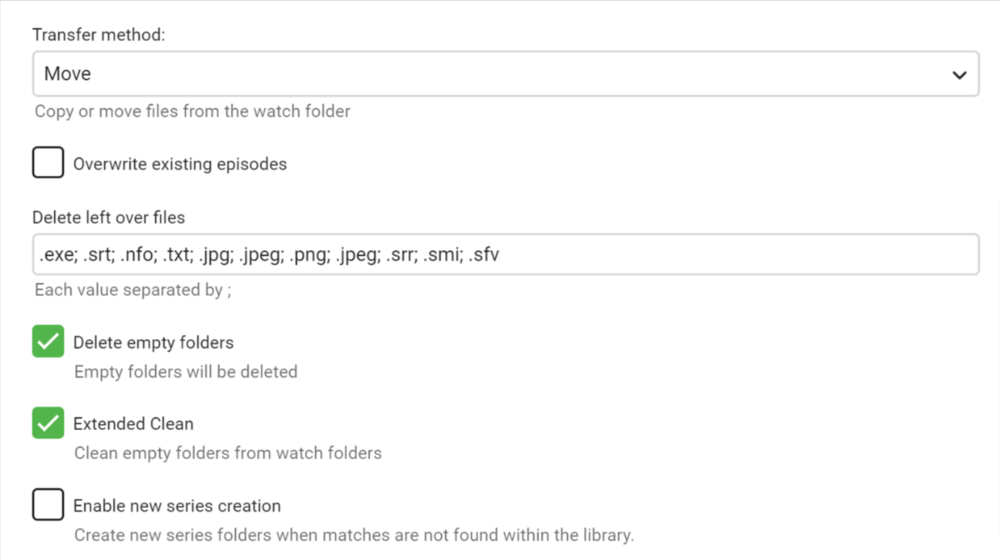
Okay here is where its at. There is now three buttons available on the Item when it is marked as "Existing/Skipped". 1. Opens the Identify Editor - Incase we need to edit and Identify the item (this will fix the current issue) 2.. Will open the "Organize" modal - The one we see already open when an item is skipped. This way if the "Destination" folder in the table looks correct, you can simply press this button and the file will be moved. 3. Delete the entry from the table. I've gotta run a couple more tests here, incase there are bugs by changing this much code. But I think we got it. I'll be back. I'm going to try and move an entire series around and see what happens.1 point
-
Yes thats's correct.
 1 point
 -
@Lukein the meantime you might consider creating a sticky thread abut the below. It's a workaround that works PERFECTLY. https://chrome.google.com/webstore/detail/check-range/kcfmannklpnoilbdlaabnfolfepmpmfj/related1 point
-
This is one thing that Emby has lacked since the very beginning and has refused to implement for years. I do not understand why Emby is so reluctant to provide this basic functionality for all browsers. It seems like they have intentionally turned it off but I know they probably did not. I can not understand at all what could be so hard. I could really us that functionality in FireFox but I am not holding my breath waiting for it. It has been missing for so long that I have adapted and actually gotten used to it. I do not really need to use shift or control + click anymore because I have just used the single click at a time and a lot of time to create the collections I have needed to and now my library is pretty much set. However if I ever do need to select 20 or more movies again I will again miss this basic functionality. It just seems that this is one place where Emby fails to provide basic needed functionality.1 point
-
You are a lifesaver. I was a cat's whisker away from moving back to Plex after realizing this very basic and obvious feature was missing until i tried your workaround. Thanks. Hope the devs can prioritize bulk selections. With over 15,000 titles there's no way on earth i was going to sit and click on each one to create categories composed of thousands of titles; and the select from 'library' option mentioned above has limitations.1 point
-
I can agree with you if the thread has clean indicated subject, let me till you something: From every new registration, we have like 10% immediately asking for account removal, the reason for that, they find out that Emby is simply a software media management. Not media services, so they came here as a guest and they thought if they register they can see some section for that. Now, let take this thread subject as example with the new guest browsing our community forum looking for getting media download for any kind, they will not for example read Luke reply here, they just confirm thier thought about it. I will pin a good thread explain what Emby is, true Emby is simply a software for "your" media collections managements.1 point
-
Sorry late reply a bit busy lately. Yes, IINA (Mac OS only?) and VLC (4 beta) both do it. Though they are of course desktop and don't have to deal with streaming in the backend which might not support multiple subtitles at the moment. You can give lots of options. One of my favorite is having them just right on top of each other at the bottom. If you adjust the size usually they can fit easily. Attached file shows it in action, but on a big tv it's not as bad and if you could adjust the size it would be just fine. It seems like it would be annoying but for many shows it's much nicer especially when you're in a multi-language house.
 1 point
 -
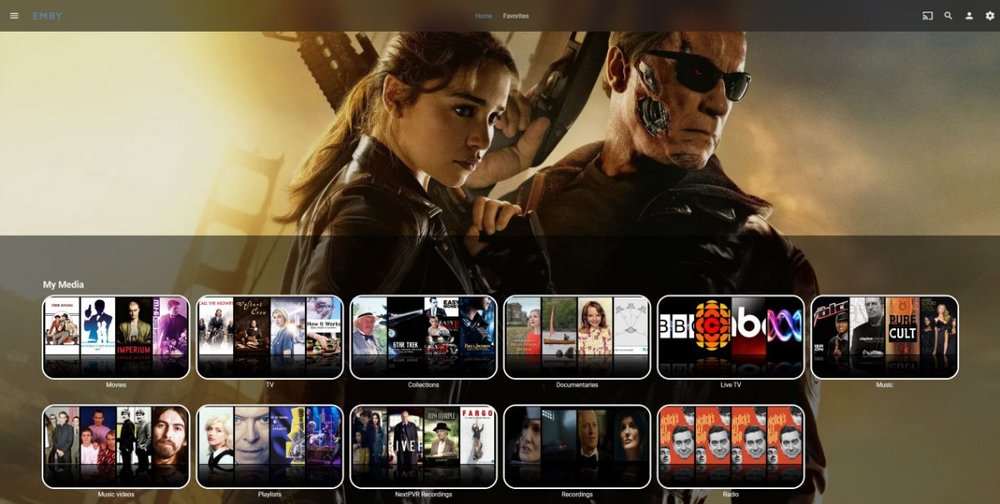
Nothing exciting, but might appeal to someone somewhere (hopefully I've copied the right stuff) - /*Move My Media down and add grey background*/ div.scrollSlider.flex-grow.padded-top-page.sections.scrollSliderY.homeSectionsContainer {position: relative; top: 38em;} div.scrollSlider.flex-grow.padded-top-page.sections.scrollSliderY.homeSectionsContainer {background: rgba(0, 0, 0, 0.5);} Just move stuff down a bit while ticking Enable Backdrops - If there's a more elegant way to do it feel free... (Course, with the wrong, low res picture, it can look terrible)
 1 point
 -
Also delete the .kodi/userdata/addon_data/plugin.video.emby-next-gen/temp/* content. Library artwork is cached in the temp folder.1 point
-
Ok, I will try.1 point
-
7241 and 4343 You are using non standard ports Try http://domainname.com:7241 or https://domainname.com:43431 point
-
All you need is ".homeSectionsContainer". /*Move My Media down and add grey background*/ .homeSectionsContainer { position: relative; top: 38em; background: rgba(0, 0, 0, 0.5); } I can assume your are removing opacity in another line.1 point
-
Do you have a rogue server instance running somewhere? What does device.txt from the Emby-Server/programdata/data folder show you? What is the string inside (that would be your serverId)? And did you try to actually login to that 8096 one? Edit: To clarify, that seem suspicious like another instance with default settings and UPnP enabled; since it is on another port, it will happily co-exist with your main server.1 point
-
Yea, saw this on the original repo and fixed it, this has been checked into my master branch on my forked repo, if you want to grab it. Or ... here's the DLL. I see from the thread that there are a few calls for smart collections, so investigating this and trying to understand the code base more... so watch this space SmartPlaylist.2.0.0.0.zip1 point
-
My question is: If port 8096 is not forwaded in router why does it work?1 point
-
Hi, we plan to revamp playlist permissions in future updates. thanks.1 point
-
Ideally you wouldn't change the title of an artist. That value comes from the embedded value within your audio files. That would be a better place to change that.1 point
-
Hi, it's not gone. Have you explored the lock buttons next to certain fields?1 point
-
@ng4ever Really some of your threads had no point at all.1 point
-
Wanted to say thank you for such a great plugin! I'm currently using it to indicate foreign languages and eagerly awaiting the ability to add more icons to tag movies I have on streaming services, Google, Vudu, iTunes, etc. Thanks again for your time and efforts in this!1 point
-
I have tried to install a ssl certificate, not sure if it is installed properly? I think not. I have also forwarded port 8920 but it does not appear to be open. I am familiar with port forwarding and use it for many devices that I have so maybe the port isn't showing open because of something on the mac server. Again ssl certificates I am NOT familiar using, though I do have them installed on my synology nas and working, but that is an easy task as synology does most of the work. I probably really need to find someone to do this for me and pay them, which I am willing to do. Plex is soooo much easier.1 point
-
Hey guys, this works for me https://chrome.google.com/webstore/detail/check-range/kcfmannklpnoilbdlaabnfolfepmpmfj Just restart browser after installing plugin and then shift-click will work1 point
-
Ok, worked it out. In docker, first stop then export your docker configuration for your Emby container. Then rename the docker container to something like emby-old. Edit the exported .json file. Change the line that reads "devices" : null, to: "devices" : [ { "CgroupPermissions": "rwm", "PathInContainer": "/dev/dri/renderD128", "PathOnHost": "/dev/dri/renderD128" } ], Make sure that the UID, GID and GIDLIST match your system's Emby user or admin. Save the file. Import it into back into docker and you are good to go. You can now enable VAAPI in the docker instance of Emby.1 point
-
what in the world. it seems to have fixed itself! edit: nope never mind0 points