Leaderboard



Popular Content
Showing content with the highest reputation on 07/09/21 in Posts
-
5 points
-
I remember someone saying that sideloading was so easy that even @crusher11 could do it, that folk was wrong.4 points
-
Install any file explorer/manager app on your Shield copy the apk to a thumb drive stick drive in Shield From Shield use file explorer to navigate to the apk on thumb drive Click/Install2 points
-
Can take days and even longer to stay up to date with the latest beta via the Play Store. (Google's fault) Hence why it's always recommended that you sideload the latest .apk if you need to stay on the most recent beta release.2 points
-
https://www.displayspecifications.com/en/model/7492de3 That might be the TV you are mention. Biggest advantage of Roku TV. There are no HDMI issues. There is no HDMI cable from the Roku to the TV. The Roku is_in the TV. It just works. There is an E-ARC HDMI output. The Roku OS makes switching inputs like switch apps. It is so easy. There is one remote for both the TV and the Roku. The downside is you cannot update the Roku inside it. It is like the TV/VCR combo units. When one goes dead the other goes with it. If you brick the Roku (near impossible) you lost your TV. I have never had a problem with either Roku TV I own nor any Roku device I have ever had has been bricked. So you are safe with the combination. Biggest advantage of streaming box/stick. You can use it on any TV and take it to a friends house overnight. You can travel with it and use it at a hotel/motel. It is very hard to lug a Roku TV around and look like a normal person.2 points
-
Throttling is a checkbox in the transcoding settings page, on or off. If enabled it transcodes just enough to keep the playback buffer full and "rests" in between. If you're not having problems then don't worry too much about bitrates until you get a better feel for what your new server can handle, then make adjustments. If system resources or bandwidth are an issue you'll find out sooner or later. Now, there was a known problem with playback on Chromecast that did not throttle even when enabled but that was a few minor releases ago and possibly fixed by now. Others can confirm.2 points
-
Dashboard-Transcode Enable throttling Emby will dynamically adjust transcoding speed based in order to reduce CPU utilization. Depends on how fast the media can be processed by the system whether throttling can happen. If the system can process faster then playback then throttle pause can happen instead of transcoding the entire video all at once. So with throttling is should stay about 120 seconds ahead of playback.2 points
-
I use a 4K TCL Roku TV (50S425) to develop on. Depending on RAM available is what will be the limiting factor of the Roku TV. A series 4 (512MB) will be a little slower than a series 6 (1.5GB). But the look of the UI, the navigation speed, and the quality of the video streams and elements on the screen UI will be identical. The Roku TV has all the TV functionality through the Roku remote. You won't need to juggle two remotes as often. You just need the one.2 points
-
Just tried it again and everything is working now. 20 min of troubleshooting and now its back to normal. I even tried to have it email me my key and it would just spin. Oh well thanks Edit: Noticed my PiHole was blocking mb3admin.com and that seemed to be blocking Premier from validating.2 points
-
Per your video there is no such thing as a Season level logo\backdrop and there is no provider (ie FanArt.tv) that has logos/backdrops for anything besides Series level. Season view inherits logo and backdrop from Series level. But yes you can manually apply backdrops and logo to season level if you like but the will not come from any provider automatically as they don't exist.2 points
-
Love the app! But I have one thing that keeps me from turning my back to Plex. I use the web app watching my content and do so from the couch as I have the computer connected to the TV. To do this I use a gamepad in combination with Controller Companion to make it act as a mouse. However, when doing so it seems that some buttons are hard coded to do specific keyboard shortcuts and I can't seem any way to disable this. I would be happy to lose all keyboard shortcuts if there was a option to disable them.1 point
-
 With quick test if user has Access restrictions a New Library will be denied. But adding folders to Existing Libraries will not be denied. @Lukeis there a way around this so added folders are denies also like new Libraries for users with Access restrictions?1 point
 -
4.6 was a complete rewrite of music so it is now 100% reliant on embedded tagging. But @Lukewould have to comment on priority but believe priority is irrelevant as these fields are linked in the database to present everything except the Folder View tab. So one Album Artists can not equal two MBZAlbumArtistids.1 point
-
A question would be why isn't Artist and Album Artist split like Artists? To me Artist and Album Artist are improperly tagged.1 point
-
OK -- problem fixed -- give it a try and let me know if it's fixed properly. Vic emby-tag-tool-03.html1 point
-
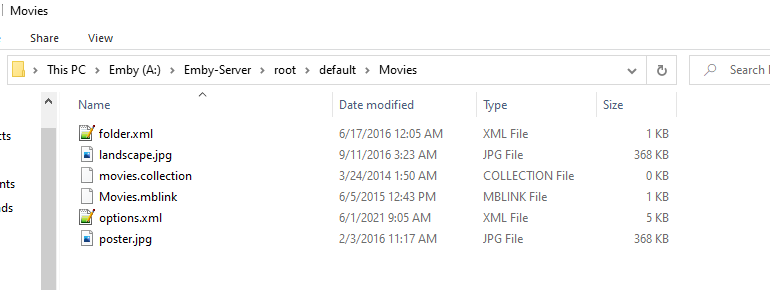
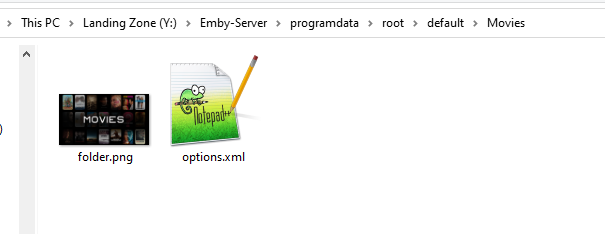
You should be able to just delete the movies.collection, movies1.mblink, folder.xml as they are obsolete and self contained in the option.xml now. So a guess it this leftover garbage may be causing issues.1 point
-
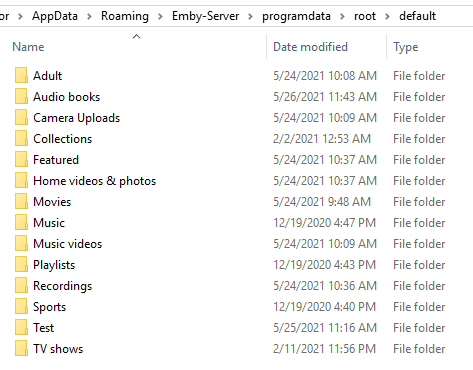
This problem must have something to do with old setups as @Happy2Playsuggests, the last library I created was a '4K' folder for my 4K movies and there's only a single file in that library folder - 'options.xml' All my other library folders that are at least 5 years old have at least half a dozen files inside each of them and a couple of folders too! Thought I'd post a picture of my 'Movies' libray folder just in case it helps determine if there's a file that could be causing this behaviour! Thanks again for your help guys, greatly appreciate it - I've edited the options.xml files on all my affected library folders and I'm going to restart the Emby server to see if it's helped! Will report back if there's any issues. Oh and big thanks to @cayars for the very useful tutorial! My library folders were incidently located at C:\Users\username\AppData\Roaming\Emby-Server\root\default where as @cayars listed the location his were located at as being C:\Users\username\AppData\Roaming\Emby-Server\programdata\root\default Thought I'd mention it in case it helps anyone else trying to locate them on their PC!
 1 point
 -
hot damn, tightvnc server installed as a service too w00t, now I can run it headless1 point
-
It'd sure be nice to shake my wife from her Netflix addiction but you have to pick your battles sometimes.. She wanted to watch Real Housewives of NYC from the beginning and for the life of me I could not ascertain Season 5 and a couple of episodes from Season 4 so for that, Prime is getting a few bucks. To me it is a waste of money but happy wife.. happy life!1 point
-
For some reason some setups are doing this and Luke has not figured out why. My guess would be these OLD setups have additional files in the library folder (but just a guess) as I have not experienced it yet. vs the new The server config backup plugin use to do the same when doing a restore but was fixed.
 1 point
 -
Thanks @Happy2Play. Seeing the increased frequency of this same issue occurring, maybe that @cayars's post should be pinned and/or KB updated for easier reference?1 point
-
Actually @cayarsprovided all the steps. https://emby.media/community/index.php?/topic/98712-how-to-play-entire-album/&tab=comments#comment-10307631 point
-
You said you have a 100/100 connection. So are you connecting to a remote server? Try to manually adjust video quality instead of Auto.1 point
-
Therein lies the reason your movies are showing thumbs instead of posters in the AndroidTV app.1 point
-
Just go to Dashboard>Library tab, and under "My movies" thumb you will see library type and path underneath.1 point
-
Is your movies library Movie type library or Mixed-content?1 point
-
Stopped paying for therapists and put money into buying discs and HDDs. Much better now. LOL1 point
-
I know a good therapist is you need one??? LOL1 point
-
It does not do anything in my case then or I am doing something wrong. Selecting a tagged item then Delete all just refreshed the screen for me. But this looks like a issue in v2 as v1 delete tags does remove all tags.1 point
-
Same here. all of the titles of my playlists show up but when I click them they are empty. I've copied these two parts of other posts and am going to try and fix the issue when I get home today. I'll post after I try it out. I found the playlists in this folder: C:\Users\<user>\AppData\Roaming\Emby-Server\programdata\data\playlists The actual playlist.xml files contain music tracks in them. However Emby won't show any of this data, all of the playlists just show as empty. I was able to fix the playlist by manually fixing the XML file. Your parsing is broken, or there is something wonky with permissions here. My old playlists had this section at the bottom that the new ones didn't: <Shares> <Share> <UserId>1</UserId> <CanEdit>true</CanEdit> </Share> </Shares> <PlaylistMediaType>Audio</PlaylistMediaType>1 point
-
4K is UHD. 1080P is FHD. 720P is HD. There needs to be an FHD and UHD, along with HD. 720P and 1080P are lumped together presently under HD. Eventually there needs to be "4K UHD" and "8K UHD" available to separate those variety in UHD format. The Olympics are going to be broadcast in full 8K UHD.1 point
-
That CPU includes Intel HD Graphics 500 which doesn't support VAAPI native tone mapping. Please install the Emby Diagnostics Plugin and choose Extra-T for VAAPI tone mapping.1 point
-
I'd expect good things from this setup as well as it's basically very similar to my Synology 920+ which also handles things quite well. Wait till you play 4K HDR media and let it tone map for you. That little box will become even more impressive!1 point
-
Me too, I was just trying to apply KISS1 point
-
You don't necessarily have to modify the source of the channels. If you can reduce the number of channels that you import by disabling the ones you don't need in Emby Server channel management, then the refresh guide process will be faster.1 point
-
1 point
-
If you sideload the app it will replace your current Emby app so there should be no looking around for it. The apps all show the same way regardless of how they were loaded (store or sideload).1 point
-
I can do that. Yah i have a few shows that are not on the right date and other on going shows (less popular educational ones) that do not appear at all. Guess it would be nice to have a schedule that could be manually edited locally, maybe i will create a request, but i agree it would be beneficial to the entire community to fix the source. My mind is slipping more and more every day and now utilize upcoming more than ever.1 point
-
Try Notification in the Synology Control Panel. Should get you most of what you want.1 point
-
Great, thanks for that this was the problem. It was enough to copy the data into the new directory and set the permissions via SSH.1 point
-
"- From Control Panel go to Shared Folder and edit each share that is used by Emby Server. Click the share, then EDIT, go to permission tab, select internal system user from drop down, grant emby user read/write access." If I only read your instructions more carefully two hours ago... Again, many thanks. Solved1 point
-
Hi. Yes, simply paste your key into the new server. However, be sure the new server is configured correctly to access the internet.1 point
-
@softworkz Can we have your words of wisdom on this?1 point
-
Hi, only some? Can you please go over an example? What model LG?1 point
-
Shutdown Emby Server. Do not do any part of this with Emby Server running. Your library info will be stored in a path similar to this on Windows. Change the bolded text to be the username Emby runs under. C:\Users\Administrator\AppData\Roaming\Emby-Server\programdata\root\default. If you need help locating this path on another platform ask. You will see a folder for each Library on your system. Here is an example: To change the content type for a particular library enter the folder and you will find a file called options.xml (copy it to have as a backup, just in case). Open options.xml in a text editor. Scroll down until you find "ContentType". If you wanted to change the content type to a Music library the line should be <ContentType>music</ContentType> After changing the content type, save the file and restart Emby Server. Note: if the content line is missing, you can add it but take care in doing so. Valid Content Types Audio books <ContentType>audiobooks</ContentType> Camera Uploads <ContentType>homevideos</ContentType> Collections <ContentType>boxsets</ContentType> Home videos & photos <ContentType>homevideos</ContentType> Movies <ContentType>movies</ContentType> Music <ContentType>music</ContentType> Music Videos <ContentType>musicvideos</ContentType> Playlists <ContentType>playlists</ContentType> TV shows <ContentType>tvshows</ContentType>
 1 point
 -
Or possibly -
 1 point
 -
Right now, only icons from Google's Material Design Icon Rounded font set are available. I do hope to offer users the ability to add their own icons in the future. This is how that feature would work:1 point
-
It would be awesome to have some sort of Milkdrop integration when playing back music! +11 point
-
OMG.....okay thanks!!!! EDIT: I finally got it working, i just installed the root ca and the inter ca certificate of my certificate chain on to the fire tv. Thats quiet easy: First save the root and inter certificate to your computer Than upload it to googledrive On fire tv download the es file explorer Once opened the file explorer choos cloud storage and login into your googledrive choose the rootca first to download, fire tv will automaticly prompt with certificate installation, so you just need to give a name and press install proceed with the inter certificate the same after that i was able to login with https on my fire tv! Thanks for the hint @@Luke, because the app does never show any error about certificate issue may you can prompt the certificate issue when trying to connect...1 point