Leaderboard




Popular Content
Showing content with the highest reputation on 07/07/21 in Posts
-
Can you test beta 2.0.31? There's a new setting "Theme Volume" that may help you. BTW % symbol is shown twice in the volume picker (10 %%) I don't know if it's a localization issue.3 points
-
DSM7 Upgrade for Emby.mkvEDIT: The instructions assume default Synology install volume of /volume1. If your location is different use that instead! This is based on the release version of Emby which at the time of writing/video creation was 4.6.3. The video will become dated so just use the latest DSM 6 Emby version from the website https://emby.media/synology-server.html. If you happen to be running a beta version update to the latest beta version before the DSM 7 update. The idea is to do any updates on DSM 6 first before installing DSM 7. Since the creation of the video Emby Server is now availing in the Emby Package store (release version) so you can install Emby on DSM 7 now from that. ----------------------------------------------------------------------------------------------------------------------------- Attached is a quick video of upgrading DSM 6 to DSM 7 with Emby Updates. The video will show only browser items and not the PUTTY/SSH commands but everything done in browser is recorded. The SSH commands are included below. I converted this to MKV/H.265 to make it small enough to download and view offline. DMS7 Upgrade for Emby.mkv21.57 MB · 78 downloads Instructions used were: Download and have ready DSM 7 package for update. https://www.synology.com/en-us/DSM70 (I will be downloading both a virtualDSM 7 & for 920+) Download and have ready Emby Server 4.6.3 for both DSM 6 & DSM 7 https://emby.media/download.html - update Emby Server to current release of 4.6.3. - restart Emby Server and verify your on the latest release version. - uninstall Emby - update DSM to v7 - install Emby 4.6.3 (or same version that was running above (dsm7 version) - You can now install the DSM 7 version directly from the Synology Package store! (still on our website too) - stop Emby - remove emby_pkg user and video group - enable admin account if needed - enable ssh in Synology settings (Terminal & SSH menu) Not shown in video: - connect with Putty to Synology, login with admin user and get root rights with: sudo -i - copy files from old Emby share to new data location: cp -rv /volume1/Emby/* /volume1/@appdata/EmbyServer - adjust owner from copied files: chown -R emby:emby /volume1/@appdata/EmbyServer - close putty Shown again in video: - From Control Panel go to Shared Folder and edit each share that is used by Emby Server. Click the share, then EDIT, go to permission tab, select System internal user from drop down, grant emby user read/write access. - start Emby Notes: You can now disable the default admin account as well as SSH. You may also want to rename /volume1/Emby to /volume1/Emby6 as well. This will help make sure you don't have anything referencing the old directory. If you don't notice any issues in a week or two you can delete this old folder/share to free up space. DSM7 Upgrade for Emby.mkvDSM7 Upgrade for Emby.mkv2 points
-
Could it be possible to implement this? For example: I use nfos for movies/tvshows and from time to time I update the ratings on them, after that I do a refresh (replace all metadata) to reflect that on emby, but this process is unnecessarily long because emby is reading all the metadata fields even episodes in the case of tvshows (in my case have a large remote library on cloud), when the only thing I have changed is the rating on each movie/tvshow, it would be much faster just to look up the rating field on nfo files when refreshing (by field refresh).2 points
-
work like a charm don't forget to change custom cache, temp sync folder etc, I got a shared folder called Emby and the migration process deleted it from the share folder list2 points
-
I don't think we've ever said this was a bad idea. Its just that it is a major piece of work (and we don't have the venture capital you spoke of) so very hard to commit to at this point because it would mean not doing a lot of other stuff in that time. So, we make suggestions to try and get you closer to what you want with what is already there. And I'm going to make another one - just in case you haven't thought of it . What if you created some separate users for your wife and daughter like "wifemusic" and gave those users access to ONLY the music library. Then, on their phones, they could log in to that user and, if they don't use them for anything else, just stay logged in and only see music.2 points
-
It constantly refresh the changes made to the cloud, but for example the real time monitoring feature of emby doesnt work with rclone mount filesystem. I have almost a year running the server with rclone, tried that test countless of times, changing nfos, doing scans long after the changes but emby seems unable to pick them up through the scan library option. But regardless of my specific case/inconvenient with rclone, I think that the Refresh metadata by field is a perfectly valid request, not just for me but for people that use emby to scrap from the online providers directly without third party scrappers/nfos.2 points
-
Thanks Happy, yes I forgot about that anomaly - I'm spoilt as all my devices play DTS directly or I have inserted an AAC track to make them compatible .. If it were me, personally I would just insert an AC3 track and make it default (offline) and play that instead because any video transcoding is going to reduce quality, lose HDR, need tonemapping etc2 points
-
Not entirely true since HEVC and HLS do not play well together on most devices, if audio need converting it will more then likely require a full transcode.2 points
-
You've grown up with watching live tv but on television only runs garbage? You have a big library but don't know what to watch next? Then this for you: "VirtualTV" - my new live tv plugin that allows you to create custom channels based on conditions of your Emby library content. What's missing: Maybe codec conditions Known problems: Needs Emby Premier to work (Playback) Emby's live tv and playback api is very limited, so i've had to make some detours to get things working. The plugin has two general playback modes: "continous" and "playlist" playback. With "continous" mode you can also choose between "live", which bahaves like real live tv or "archive", which plays the videos from the start. In "Continuous" mode multiple videos are queued and concatenated to one big file with the help of ffmpeg. To make this happen every video in the queue has to have some common features (video and audio codec). That's why it often happens that the video also has to be transcoded by ffmpeg. For transcoding the plugin relies on Emby's internal transcoding engine. If there's a problem, not uncommon with hardware acceleration enabled, the plugin also has a problem. Nothing i can do about it. The availability of subtitle tracks is mostly dependant of the Emby user playback settings. In continous playback mode only one (the default) subtitle track can be used and this one has to be burnded into the video (transcoding takes place). In "Playlist" playback mode the videos are pushed as a playlist to the Emby clients. It's like you would play your videos directly from your libraries. This way you get all the features you are used to. Audio and subtitle selection, pause, skipping around and similar things. "Native" playback method was created by the Emby Devs. Similar to Playlist playback it will play the real library videos, but with the big difference that playback is purely initiated by the client app, without any remote command execution. This is why it also works for Roku devices on a WAN network. And although the real videos are played, the whole thing is treated like live TV. This means that channel zapping is possible and no dialogs for playing the next episode are displayed. Unfortunately, the new playback method does not yet support all features. As the name "Archive" suggests, it will currently always start all videos from the beginning. In addition, only very few Emby apps automatically advance to the next video. If you want it to be improved even further, each of you should raise your voice in this thread. To get things started install the plugin via Emby's plugin catalog and restart Emby. Setup your channels with a name and number and choose your playback mode. In the channel conditions you'll have to select an Emby account. This account is used to get library access, respect parental rating, reading watched states and selecting the stream language. At least one textual input field of the conditions has to be filled to get some program data. Fields with an asterisk are either evaluated with an "AND" or "OR" condition among each other. Finally, if you've chosen "Continous Playback" for one of you channels, take a look at the transcoding settings. Save your channel line up and manually trigger a "Guide Refresh". Now have fun! Version History: After a plugin update, always clear your browser cache. If your settings still don't load in the config screen, you have to move the "VirtualTV.xml" out of ...\plugins\configurations and restart Emby. Start from scratch. 2.0.0.0 Unlimited number of channels; New playback method "Native (Archive)"; New security concept for the Export API 2.0.2.0 Performance improvements to Guide Refresh; Preview for Add/Edit Channels; Option to disable Program indicators 2.0.3.0 Fixed missing Playlist sort order for some Content Types; Added support for Seasons with Content Source Collections 2.1.0.0 Selectively enable channels for specific users; Create copies of existing channels; Ordered unwatched episode playback 2.1.5.0 Added option to (auto)enable channels on a specific date range; Bug fixing1 point
-
Is there a reason why animated gifs dont work as a poster for ex a movie? Can we have support for them please? Thx1 point
-
Hello, can you please add GIF support, i have an idea that you could use gifs as movie posters and user photos. Thank you. example:
 1 point
 -
It would be nice to have the option of displaying the login screen (who's watching?) when you load up the app while also remembering the login details of accounts logged in before on that device. This way the user is asked who's watching without having to keep putting in their password on that device. Thanks1 point
-
Hi all, I'm new here, been using Emby Server for only a few weeks, so i'm still a noob, still learning. Thank you for your patience! The web client is displaying correctly, when I select "Movies" or "TV Shows" from web client home screen, goes straight to folders. PERFECT! However, the Roku app (current) on Roku Ultra (current), no matter what I set on emby server or the roku settings, every time I select movies from home, it goes straight to suggestions. How do I force it to default to Movies or folders instead? The problem is, my mom is over 80 years old, so I have to simplify the interface as much as possible. She says the screen is too busy, and she gets easily confused. I turned off every option to simplify. The main/home screen only shows button for Movies, TV Shows and Music Videos. Press a button, like Movies, I want it to go straight to folder, so she can browse the collection. Same with TV shows. Instead, they both default to suggestions. From there, she can't remember to "go down" to see the rest. She keeps watching the same "you were watching" stuff over and over again, and she is frustrated, and will stop using it soon, if I can't make it easier to use. The web app displays fine, but it's the roku app (current) on the new Roku Ultra (also current) that won't cooperate. I'm hoping this is a simple setting that I have overlooked. Thank you for reading, and I appreciate any help!!!!!1 point
-
Yes it is a per user Home Screen setting. User icon-Home Screen and scroll down to the library and set the Default screen per library.1 point
-
I added a note section right under the tagging section https://emby.media/support/articles/Music-Naming.html Let me know if that is ok or if it should be changed.1 point
-
And what do you know? Added as a single channel m3u into emby and it plays Just hope the link doesn't change in the future1 point
-
OK i see what you mean. Previously if you added a song to a playlist or collection, then the album detail screen would show those lists in included in. That's something that got lost during 4.6 development but it's something we can look at. Thanks.1 point
-
Damn gremlins! I learned a long time ago that when it comes to computers and apps, some things just aren't meant to be figured out and you can be driven crazy trying too. You may be able to get that channel to work on the NAS by doing the same thing you did with the Laptop; add a new M3U tuner with just that one channel.1 point
-
Auto play is off for everything. This is the last log, hopefully there is still something in there from last night. https://paste.kodi.tv/yefabawuqo1 point
-
AFAIK I have autoplay next episode disabled. But I will check when I'm back home to be sure.1 point
-
Once we become listed in the Flatpak repository, yes, and we are working on that. But for now with the manual downloads, no.1 point
-
You may also want to try manually downloading subtitles for one or two videos just to give it a test run.1 point
-
Super, glad you got things working and got your migration behind you. Happy streaming!1 point
-
There is failed authentication coming from Kodi, so something must have been done on the server to invalidate it, e.g. changing password, deleting the device, etc.1 point
-
At first I had trouble getting it to work by following the instructions on the first page. But then followed video on the second page, mainly didn`t set the permissions right at first, but after setting the permissions the way it was done in the video loaded up emby and everything is exactly the way it was, even the watched status and all, thank you!1 point
-
yep, could be related to the same cause as the delete issue.1 point
-
Currently, the Quality Selection doesn't mean anything about the resolution. This information is confusing because the server decides what resolution is streamed. F.e. in tests: - 4K - 60 Mbps: streams the video in 1080p instead of 4K - 1080p - 6 Mbps: streams the video in 720p instead of 1080p I'd wish that the resolution will be removed from any "Quality Selection". Just print the bandwidth.1 point
-
Logs would be the place to look for them. Scheduled Tasks->Download subtitles is the easy way to run this job. If you want run the rotate log job first then this one and it will make it easy to view the log since it will be mostly sub downloads at that point.1 point
-
I did open that thread, but only because @Luke told me to do it, i did not know this existed, i am just saying that support dor gifs would be good for everyone or maybee no one but it's nice to have the option to use them or not, i just want to do something magical like when pictures move in HP, would be nice if posters or user pictures moved, it would make a better experience for some.1 point
-
Just need to get everyone else interested, to +1 your OP.1 point
-
I'm terrible to quote by heart.... "ac3/aac/mp3" should be "aac, mp3, ac3". You can select "aac", which is selected on default, "mp3", "aac, mp3" and "aac, mp3, ac3". This checks if there is a track by language in one of these formats and keeps it. Otherwise, it will convert to "aac". Looks really great and is really fast. The video stays the original, just the audio changed. AAC is 320kbit/s at 5.1 which is really enough (for me) xD No matter how annoying the entry was for me, I will order lifetime premium this evening. Thank you all for enlightening and teaching me! Hints are always welcome. Maybe anyone can see any inconsistencies in the sent logs.1 point
-
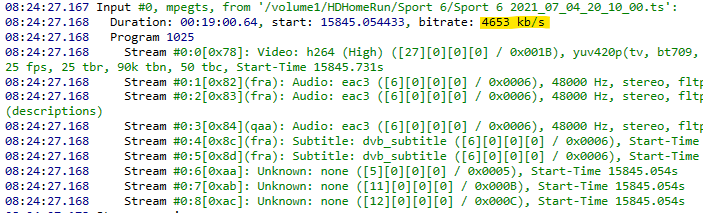
You're welcome! The recording has a total bitrate of about 4.6 Mbps: That means that it won't transcode when you are setting 8 Mbps because it's already lower than 8, but it will transcode when setting 4 because it is greater than 4.
 1 point
 -
I keep going back to Plex and every time I do it's a very frustrating experience. Not because I run into issues... which I do, but I run into issues with Emby too... it's that I feel I have nowhere to turn when it happens. Plex pushed out a bad build once, which broke my Plex install, which is bad enough but when I when I reinstalled it botched media playback for a number of files (for some reason it was transcoding AAC to FLAC on my Roku Ultra which broke seeking in and resuming files) and a forum post and several bumps later, I couldn't get a single damn response. This time around, I couldn't get the Play/Shuffle buttons to work on a g-damn Collection, and I get errors just trying to log into their forums. That's the gold standard? The fact I can come on here, post any number of bug reports (even the stupid stuff that ends up being something obvious or that I did wrong) and actually get a response, whether I like the answer or not, is everything for me. I hate to sound like a shill sometimes but that's what it boils down to and I'm very happy with Emby in regards to accessibility and support. Maybe Jellyfin would be good for that too, I feel no urge to find out... but I can't shake the feeling there'd be a lot of "the source is right there, go fix it yourself" responses flung my way lol. Like it's great for impatient frugal coders that want to fork a fork of a fork, but it's nice there's something like Emby between that and the soulless husk that is Plex.1 point
-
"Scan Library Files" will do the trick there, very quickly, no Refresh/Replace metadata necessary.1 point
-
Well, that's it. I cannot be both connected to the data and the local WiFi. I swapped to the LAN and could start a movie from my phone. This is a great news ! So this is the message that is not correct in the app, at least in French, because it refers to something misconfigured on the server side. I tried to connect to the Wi-Fi from my Xbox but it does not allow to be both connected to a wired and an unwired network, so I will do that tomorrow (it is more than midnight here), just the time for the app to check the Premiere license because it will then not be able to connect to Emby server. Nothing is simple Many thanks for your help, @Luke and @cayars! B. R. Eric1 point
-
Hi, Emby apps do not need a constant internet connection in order to validate Emby Premiere, but they will need it occasionally.1 point
-
Until you can get internet again to check premiere status it likely won't work. Do you have the ability to use your cell phone as a wifi hotspot for a few minutes? You could try using a web browser to play back media and maybe, just maybe could cast to the TV or xbox. I'd give that a try.1 point
-
Hi. There was a link in my request but I guess you've found it now .1 point
-
Send it to me privately and I'll be happy to take a look at this for you.1 point
-
Hi, not sure why the device crashed on 4K -160 setting. We likely need to investigate this further looking at some logs to see if we can discover why that crashed but 100 didn't. Likely it to high a bitrate for the client but you would think it would happen with both the 100 and 160 setting. That setting of 1080-6 is just a rough guide. Typically with transcoded 1080 material it would have stayed 1080 but with 4K media you have many more pixels and will need more bitrate to hold the quality. The server sees the 6Mb and knows it can't produce a good 1080-6 version so instead creates a 720-6Mb version to hold the quality for the given resolution. That setting as a whole is more about the bandwidth limit then the resolution. Auto by default tries to use a low bandwidth setting most of the time if it can't direct play. IMHO this could use a bit of love to better adjust so for now I'd say you are best off tweaking this setting once for each client to get the bandwidth usage that fits the environment. Hope that helps.1 point
-
Hi, thanks for the info !1 point
-
You should check out Vantage Point plugin: https://emby.media/community/index.php?/topic/98465-vantage-point-big-screen-experience-intros/ Cheers1 point
-
Y'all know this is the very first time I have heard anyone complain that their ASS was too small. Sorry, I could resist taking a swing at that low hanging fruit.1 point
-
When you first land on the grid: ( information icon here ) Tip: Did you know? You can set a default landing tab on this "grid screen" by using the Star (star button icon here) on your remote. Try it. [ Got it button here ] [ Never show these again button here ] The Roku app lacks "Did you know" and we need to include them. Have a setting where users can disable "Did you know" and they can permanently disable them in the dialog itself. The "Did you know" would only appear once or twice on each screen and once a user saw them they would not appear again. It would be the visual clue. Without these visual clues users never discover these unless they push every button. We can do better.1 point
-
omg I'm a dork, didn't see the "set default tab" LOL Working now, thanks!!!!! btw gratz on Emby, it's amazing, I subscribed to premiere, even though I don't need those features1 point
-
Make sure you are on the grid. Enter the "Movies" or "Shows" or "Albums" view tab. Now press "Star" and you can find it. Apologies again we are lacking. We try to understand how users discover these things. But sometimes we need to point the way. We will do better. We have to do better.1 point
-
When logged in as that user and on the grid screen you can press the "Star" button on your remote or navigate to the little gear/cog in the top right corner by the clock. It will produce a menu. Inside are choices for "Application Settings" or "Set Default Tab". You want to choose set default tab and you can choose your landing. After making this change it will act as you desire. We need to have some kind of dialog box prompt users that they can perform this action. You have to just press buttons to discover this. We need some text probably to explain. Apologies we aren't more intuitive in this regard.1 point
-
Yes we should probably add that inheritance. Thanks for the feedback.1 point