Leaderboard




Popular Content
Showing content with the highest reputation on 07/03/21 in Posts
-
I'm currently helping a couple of people but if you can wait about 1 to 1.25 hours I can do a remote session with you and try to help you get straightened out. Send me a PM if you would like to do this. Otherwise we can try and help you here in the forum.3 points
-
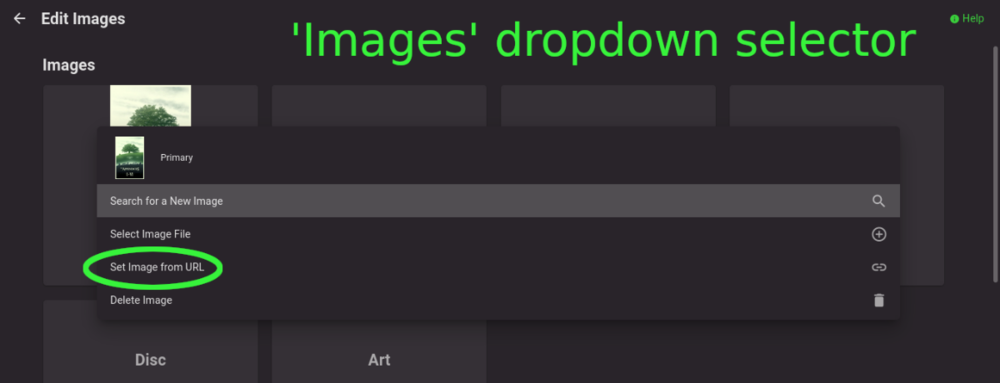
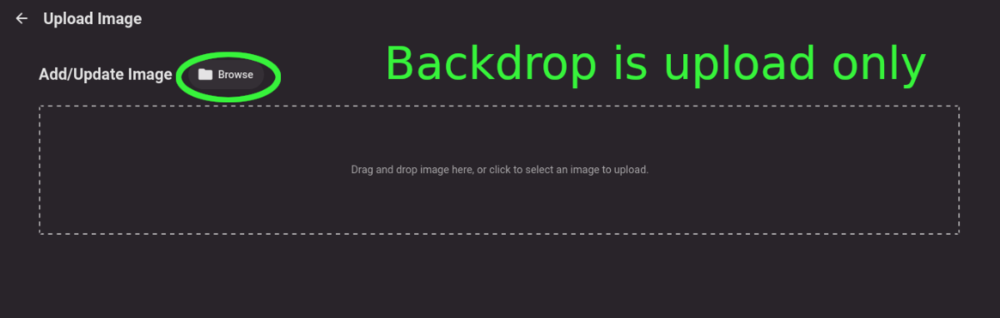
Title describes what I want but also here are some web app screenshots: The Image editor for all the types under 'Images' has a wonderful selector that includes a 'Set Image from URL' option: The Backdrops section only allows for adding images by file upload: I'd like to add Backdrops from URLs please.
 2 points
 -
Sounds like it's permissions issue. For each Shared Folder you're using with Emby click...Edit...Permissions. Then change the drop down to "System internal user" and give read/write permissions to "emby" there.2 points
-
Could you allow users to customize the order of movies in collections instead of only having it by alphabetical or by release date? Example: I want to have a collection of Batman movies, both animated and motion pictures but want the motion pictures together followed by all the animated ones. With the current order options, this isn't possible. Thanks!1 point
-
Hoping for support for the new apple shareplay feature being released in the fall for FaceTime on all apple devices! Would be awesome to be able sync playback with family members to watch movies and shows together without being in the same location1 point
-
Nevermind I found it, thanks all.1 point
-
Does the above look familiar? That is because that style of UI was designed for gaming. That big spotlight image in the middle is using scale to zoom (ScaleToZoom) and will crop. This type of UI is 2008. It is 13 years old and an angst filled teenager. https://www.theverge.com/2020/2/26/21152674/xbox-design-history-360-one-series-x-console-dashboard You can argue it is cute. It can be fixed. But it really should be replaced. This is not the future any longer. It is the past.1 point
-
That happens when the width of the browser isn't enough to fit that extra info in. I used to get this all the time on my old notebook. What you can do is hover your mouse over the image to get the channel number or use the Channels tab up top instead for specific channels.1 point
-
Yes thanks, I could just let Emby Server do it's thing. It just seemed from the earlier posts that there was a potentially easier way to just change the paths Emby server had for a given library. So as far as the server is concerned so to speak nothing has changed. Wanted to avoid a complete rescan of the entire library. I have in the past has to do a lot of rearrange of librarys across a number of drives. Given the size of the libraries; the amount of scanning and time taken for Emby Server to 'adjust' seems needlessly excessive despite the fact that I have metadata stored locally in the folders. Any method I could apply to streamline that process and avoid the many hours of scanning etc is simply more efficient. Less server resources being used, less hard drive work, less potential disruption for family members who wish watch something on the server an so on. It would also make it much easier when considering whether or not it is worth making major changes at a given time, and simplify the planning process to boot. No matter. Thanks again for taking the time. I'll work it out eventually. Cheers.1 point
-
I don't really do what I would call remote management and my usage is very basic. My NAS also isn't reachable beyond my network and is only used for Emby and as a NVR for my IP cameras to feed into Emby. I manage my server from a web page (nothing to install) or the Synology apps on my phone when connected to my wifi or WinSCP, but that's about it. You could probably use those same tools outside your network, but someone a lot smarter than myself I'm sure would be more helpful. The only person that comes to mind is @cayars who remotes into other people's Synology to look at their porn, I mean assist with their problems.1 point
-
1.0.97 was actually just released in the store for 2021 models.1 point
-
As it stands, when I click on a movie, I can see the main movie poster, and then a long row of the cast and crew. If I don't scroll down, I don't know there are Extras for that particular movie. Since very few of my movies actually have extras, I don't always think to check and see if they are there. Extras should be similar to "Additional Parts" in the sense that they should be listed ABOVE the cast and crew. There needs to be a visual break in the uniformity if there is something extra, so that the user knows it is there and not just another single file movie. There is currently no visual indication (other than scrolling down) to show that a movie has extras. EDIT: What it looks like now: https://imgur.com/SpnRbIh What I am describing: https://imgur.com/Ek5okca If there are no extras for the movie, it will look exactly like the first picture, with the cast and crew at the top. Would you rather see at a glance that there are extras, or would you rather have the bottom of your screen filled with foreheads?1 point
-
Why don't you shut down Emby, move the data to the new disc, then set that new disc to the same drive letter you had before? That way Emby will not know anything changed.1 point
-
Yes........1 point
-
You won't have a problem with that. But in general to keep instructions straight and to the point without bringing in other factors I try to tell the person to use the same version for the migration, then update after if needed. Or do the upgrade on the old setup first to match what you will use on the new one. That way is the exact same version. I wouldn't want to try 4.5 to 4.6 for example during a migration. That could get interesting to say the least.1 point
-
Yeah a flash drive would allow me to keep the windows MBR unchanged. Do that first, for testing purposes. Great idea. Thanks!1 point
-
4.6.4 applied OK for me on DSM 7 (with Emby for DSM7 4.6.3). Assumed a small bug fix release, don't usually apply till release notes... Was fairly quick to apply.1 point
-
Pm'd for remote support assistance. EDIT - however, after turning Metadata Readers back ON and expecting the problem to return, it didn't! I'm not sure what's going on at this stage! Here's my current settings: Animated Movies library - Metadata Readers (ON nfo), Import Collection Information (OFF), Metadata Savers (ON) Collections Liibrary - Metadata Readers (ON nfo), Collection Metadata Downloaders (Off TheMovieDb), Metadata Savers (ON nfo) Everything appears to be working correctly now. Perhaps it was when I changed the Metadata Readers setting from ON, to OFF, rescanned, and then turned it back on again? Anyway, thank you for your help cayars, I just wish we found something more conclusive!1 point
-
Thanks. Weirdly enough I do not notice much extra ram usage. Seems about the same to me thankfully! Does feel faster though which is a good thing!1 point
-
Dealt with.1 point
-
Would you like to do a remote session? I could take a look at the setup and we could test it together this way. Send me a PM if you would like to do this.1 point
-
Sounds like Emby got installed in the same share as media1 point
-
Synology just released DSM 7 so we need to be a bit patient with them as this is a big release. As Luke mentioned they had put reviews on hold until after DSM 7 is released.1 point
-
That's the same processor that runs my Synology 920+. If you pick this up and want to play a bit before installing Linux Mint on it try XPEnology on it. That could be quite interesting. This is a much better buy then the ATOM based unit mentioned earlier by far and worth the difference in price.1 point
-
Any update on this now that DSM 7 is released?1 point
-
It was only beta because DSM was labeled beta. So if DSM is Final then Emby's label will have to change. But there is nothing beta about Emby it was beta per Synology DSM.1 point
-
No as DSM has changed structure from my understanding that is why on has to copy stuff if changing from 6 to 7.1 point
-
Hello Do you mean panoramic viewing? If so, it doesn't currently do that.1 point
-
I reported this to our provider so they are aware of the new channel. Hopefully it won't take long1 point
-
If you select the 2nd option for shared devices the person should only be able to cast to devices they have previously logged in as as far as apps go. Then there is DLNA and Chrome casting as well on the local LAN. But that should stop them from casting or downloading (syncing) to devices they've not logged in on.1 point
-
That's really the key to any "server" platform. Don't use it as a daily driver where you're constantly using the machine for different purposes. Don't use the browser on them unless absolutely needed but instead download elsewhere and move files across the network after scanning, etc. A little prudence goes a long way in keeping things running smoothly and rather "locked down" from problems.1 point
-
Thank you FrostByte!1 point
-
As of right now they are all manual. After the first manual install you will get update notifications in the dashboard, but that's about it. However, they are working with Synology to add the package to the official store. Once it's in the store it should update like any other store app. I haven't seen when they expect that to happen.1 point
-
My Windows-based streaming box is tucked away out of sight (in the attic) with no monitor, keyboard, or mouse. It is not notably vulnerable to viruses and the like because I ensure that only appropriate access to it is possible. Paul1 point
-
Unless you want to be hamstrung right off the bat I recommend starting with a fairly recent Intel CPU with iGPU, like 8th gen and newer. Even low-end and low-power ones like Pentium and Celeron have UHD graphics which can handle transcoding.1 point
-
This was exactly it. I've had to re-add the folders to the library, but after that we're back to normal. Thanks Luke.1 point
-
Why not run them through ffmpeg or something and make them louder? You could batch process them.1 point
-
If you get stuck at any spot or are unsure of exactly how to do just send me a PM and I can jump on a remote session with you to help with any steps. Don't fear the update as long as you follow it. Watch the movie while looking at the steps done. The only thing not shown is the two commands used in putty/ssh for copy and chown but the lines are in the instructions. I'll help you any way I can if you need it.1 point
-
We are good no issues. But I don't quite agree with your analogy. We are not looking for proof/receipts/etc from Emby team that they have submitted their S/W - I'm confident they have. What Emby are not telling us is what's happened since (apart from repeatedly telling us that they have submitted it) . They (Emby) just need to stop this conversation by coming clean say that they intend to develop the LG App further or not. We then just move on. I know I have.1 point
-
Let us know how you make out. If you can't figure it out send me a PM and I can remote in and give you hand.1 point
-
Can also use free app WinSCP with easy to use GUI to manage folders and files. It also has a command line by pressing the icon in the app to run linux commands. I login as root in WinSCP app, as I had already changed its synology password via SSH (google for that).1 point
-
i would also like to have this feature, especially for us Direct Play folks. i think editable fields is the way to go! https://github.com/MediaBrowser/Emby/issues/36911 point
-
I deleted the library and added it using the ip address so rather than smb://archer_vr400/buffalomusic(sda1)/ I used \\192.168.1.1/BuffaloMusic(sda1) It's currently cataloguing but the spot checks I have done so far allow me to play songs within the Emby Server UI. I have also tried to play the same songs via the DLNA media player (not Emby - LG's own) on the TV - and successful there too. Doesn't look like I have to create a local share to map the network drive to as suggested - which is handy 'cos less gubbins to mess up. I'll let it finish building and do some more testing before I sign this as solved, but hopeful ...1 point
-
I stripped out the parts that aren't relevant to how I have it handling things currently but I'm pretty sure I got everything Just make sure you change the emby host/api details and adapt variables as necessary for your own config I should probably also add that I run my emby server on a linux host so it uses sh scripts, should be easy enough to convert to windows though ScripterX > onMediaItemAdded Run /var/lib/emby/scripts/MediaItemAdded.sh using /bin/bash "%item.isvirtual%" "%item.id%" "%item.path%" %item.isvirtual% (to make sure it only handles episodes that actually exist on disk) %item.id% (tells emby exactly what item to refresh) and, for me at least, %item.path% (only used because of a sonarr change file date configuration) #!/bin/bash virtualitem="${1}" # %item.isvirtual% itemid="${2}" # %item.id% itempath="${3}" # %item.path% if [ "$virtualitem" == "False" ]; then if [[ "$itemtype" == "Episode" ]]; then touch -r "${itempath}" "/var/lib/emby/scripts/addeditems/${itemid}" # I use this because sonarr changes file date to air date and this copies that information to the temp file # touch "/var/lib/emby/scripts/addeditems/${itemid}" # Use this one instead if the above doesn't work for you fi fi ScripterX > onScheduledTask Run /var/lib/emby/scripts/AutoRescanItems.sh using /bin/bash No variables needed for this one #!/bin/bash embyip="127.0.0.1" embyport="8096" apikey="123" # Change +5 to amount of days to wait before refreshing the item for filename in $(find /var/lib/emby/scripts/addeditems -type f -mtime +5) do #=============================================================================== itemid=$(basename $filename) # Tell Emby to refresh items metadata curl --data '' \ "http://${embyip}:${embyport}/emby/Items/$itemid/Refresh?Recursive=true&ImageRefreshMode=FullRefresh&MetadataRefreshMode=FullRefresh&ReplaceAllImages=true&ReplaceAllMetadata=true&api_key=${apikey}" # Remove itemid rm /var/lib/emby/scripts/addeditems/$itemid done And lastly Emby Scheduled Tasks > Emby ScripterX Scheduled Task Triggers: Every hour It's nothing fancy by any means and can probably be handled in better ways but for me it works until a similar feature can be implemented1 point
-
v2.2.9 is now available for 2012+ models : Release 2.2.9 · MediaBrowser/SamsungSmartTV (github.com) and hosted at 173.230.139.54 Samsung Orsay SmartTV (2011 - 2015) Community app Install Instructions - Samsung Smart TV - Emby Community1 point
-
Apologies for the misunderstanding. We are looking at improving it. Thanks for the feedback.1 point
-
The root of the trouble is that Specials are being used for two very different things: episodes that don't fit into a regular TV season, and random stuff like featurettes and deleted scenes. I understand this is has been the way things are done for a long time ever since TVDb came up with it. But, has there been any discussion of separating the two? Something like support for an optional "Extras" folder -- with contents excluded automatically from "Up Next" -- in addition to the "Specials" folder could help a lot...1 point
-
This should all be fixed in 2.2.9. I'll try and release it next week.1 point
-
Once you have the Playback reporting plugin installed set up the Notifications in Emby under the notifications menu in Emby. On the Notifications setting page look for the "Playback Reporting" section and enable the "New Media Report" notification and set up your preferred notification action, in your case email. On the Scheduled Tasks setup page in Emby check the "Playback Reporting" "New Media Notification" schedule is configured to run.1 point