Leaderboard




Popular Content
Showing content with the highest reputation on 07/02/21 in Posts
-
What you seem to be missing is the fact that Emby themselves have NOT stated CLEARLY the problem they are having with LG. Emby have NOT being transparent with us the Community. You are assuming it's LG who is holding things up BUT what we have NOT seen is Emby telling us honestly why LG are delaying. If there are legal issues, all Emby have to tell us is that "...we are in discussion with LG and for legal reasons we cannot discuss the matters on open forums". That is, we (the community) cannot possibly help if we do not know the root cause of the problem between Emby and LG.3 points
-
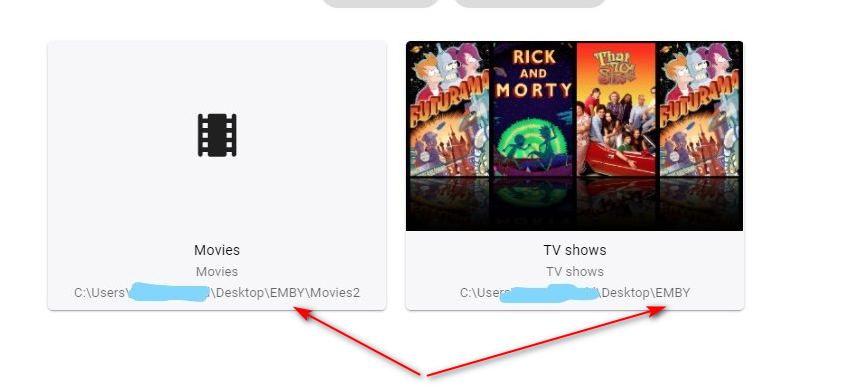
Looks like you've inadvertently used the 'EMBY' root folder for your TV Shows (which has a subfolder of Movies also, hence why you see them there) Adjust your 'TV Shows' library path to be: C:\Users\<username>\Desktop\EMBY\TV Shows
 3 points
 -
If you get stuck at any spot or are unsure of exactly how to do just send me a PM and I can jump on a remote session with you to help with any steps. Don't fear the update as long as you follow it. Watch the movie while looking at the steps done. The only thing not shown is the two commands used in putty/ssh for copy and chown but the lines are in the instructions. I'll help you any way I can if you need it.2 points
-
Same thing. When it works i am happy. But i think more and more with LG TV updates something can get broken. And sometimes it is not wise to omit security updates. When i made decision to buy LG TV for my father it was on price of the tv and my information at the time that app is supported and updates are coming. I have some issues for time to time with LG TV and Emby app and i was promised that is fixed in new update. But as we all know no new updates for very long time. It generally works and its use is like once per week sometime once per month. Do i regret to buy LG TV ? Yes i do. If i buy more expensive with Android i think i will be more worry free. It is bad it cant be sideloaded like on Android TV i think it will solve some problems. Knowing what is going on will be great. I believe team Emby that LG for some reason reject their submissions but a little voice in the back of my head whisper to me thats not all to that. I can accept ugly truth that LG is not supported any more but we are still told that updates are coming. In my country is proverb (in loose translation) : trust but verify. So Emby team please be honest with us. I think we all can accept truth whatever it is without bad emotion. Thank you and remember we users are on your side.2 points
-
About your nonsense.2 points
-
doh! Glad you got it sorted !2 points
-
Sorted, i had added the G: drive to tv shows and this was causing the problem, thanks for any help and ideas2 points
-
Attached is a quick video I made of upgrading DSM 6 to DSM 7 with Emby Updates. I had instructions off to the left but the screen capture program only recorded the browser. So you won't see me downloading or PUTTY/SSH commands but everything done in browser is recorded. I converted this to MKV/H.265 to make it small enough to upload. Let me know if this helps or if you think I missed any crucial steps. DMS7 Upgrade for Emby.mkv Instructions used were: Download and have ready DSM 7 package for update. https://www.synology.com/en-us/DSM70 (I will be downloading both a virtualDSM 7 & for 920+) Download and have ready Emby Server 4.6.3 for both DSM 6 & DSM 7 https://emby.media/download.html - update Emby Server to 4.6.3 (or latest release) - restart Emby Server and verify your on 4.6.3 - uninstall Emby - update DSM to v7 - install Emby 4.6.3 (or same version that was running above (dsm7 version) - stop Emby - remove emby_pkg user and video group - enable admin account if needed - give read/write permissions to your login ID and add Emby - enable ssh in Synology settings (Terminal & SNMP menu) Not shown in video: - connect with Putty to Synology, login with admin user and get root rights with: sudo -i - copy files from old Emby share to new data location: cp -r /volume1/Emby/* /volume1/@appdata/EmbyServer - adjust owner from copied files: chown -R emby:emby /volume1/@appdata/EmbyServer - close putty Shown again in video: - From Control Panel go to Shared Folder and edit each share that is used by Emby Server. Click the share, then EDIT, go to permission tab, select internal system user from drop down, grant emby user read/write access. - add emby user and emby group to your shared media folder in Synology - start Emby2 points
-
Be able to create playlist based on a certain criteria, like genre and or year, in order to create a dynamic playlist that it refreshes automatically when new content is added. This way you can for example, create a tv comedy playlist from the 90's, or a new sci-fi Movies playlist. Some other criteria for rules could be the rating, watched/unwantched, score, tags, language, audio codec, etc The possibilities could be endless1 point
-
Hi It would be helpful to me and perhaps others if the IPTC description could be shown when viewing photos. Thanks really enjoy Emby and you have helped me a lot so I have signed up to Premiere. John1 point
-
Please go here for info, bugs, issues and feature requests Been working on a plugin that bring the big screen experience and is user driven. Introducing Vantage Point Plugin for Emby. It can be downloaded in the Emby Server Plugin Catalogue. the order is pretty much set at the minute, But so far I’m happy with how it works. At the minute these are the following sections Personal Bumper Trivia Section intros, funnies and adds, select upto a max of 50 intros from your selected folder - good to use while your movie guests get drinks, popcorn, hotdogs etc, Personal Bumper Coming Soon Bumper coming attractions, select number of trailers to play from various sources. Courtesy intro - be quiet or mobile phones off. Only 1 is selected Personal Bumper audio codec intro matched to feature presentation audio track, only 1 is selected Feature Presentation Bumper countdown to feature presentation, only one is selected MPAA, BBFC, etc - certification screen which is matched to the MPAA rating tag in the nfo file. Feature Presentation Starts. For Bugs and Issues, please post them in the below thread Vantage Point - Big Screen Experience Intros - Plugins - Emby Community1 point
-
juste une minute je change le fichier et je te l'envoi pour test.1 point
-
No need for Application path: /opt/emby-server as that is what you have already re-installed the server application folder. All you need to do is replace the Data path folder as it contains everything from your previous setup. Data path: /var/lib/emby1 point
-
That means something is holding onto the current install folder and the updater can not close/move it so it can not update. There are dozens of topics on this. If you restart the machine it updates properly, correct?1 point
-
I have no issues with any of my NAS boxes from WD or Synology but I don't put them on the Internet either unless it's a single port, just as I would do for any program running on Windows. Windows of course is vulnerable to virus and malware so it's not really any safer than anything else with a CPU in it. It also likes to reboot itself when doing updates (if you don't adjust this). I'm not sure I'd agree a PC is cheaper than a NAS and certainly isn't when it comes to daily electric costs. A NAS can be tucked away, out of site as it doesn't need a monitor, keyboard, mouse or other interface so that can be a plus for some people. With that said I still run Emby on Windows Server (and I'm not worried about electric costs) as I think it's the most flexible environment and because it's the predominate Emby package for running beta or test versions. I can drop in my GPU of choice. No doubt a PC can be a lot more flexible! One of the plusses I think for the average user of using a NAS is the built in drive protection with parity which you typically don't get with Windows and you likely don't want to use windows for this as it kind of sucks at this for our video purposes and isn't very flexible. NAS and PCs are different beasts with some overlap in what they can do. Emby Server is one of those programs that is happy working in either environment so pick your poison. LOL1 point
-
Hi. CoverArt doesn't support treatments for photos at all. This is for performance/memory reasons because most photos are very high resolution (compared to metadata images). It will treat the thumbs for home videos but may or may not recognize a folder within a home videos library.1 point
-
I think we all understand what you are saying. What we're saying is this is a design style by choice in that particular presentation. I understand you don't like the choice but there isn't anything to be "fixed" but, perhaps, it will change in the future.1 point
-
It's in the settings for each user.1 point
-
Check out this guide for some good info"1 point
-
The only thing was before copying the Emby folder over to @appdata/EmbyServer I made a backup of the existing.. ie. cd /volume1/@appdata mv EmbyServer EmbyServer_old oh and using ssh instead1 point
-
There are band names starting with a dot, as I recall, so ignoring all files starting with dot was changed to accommodate them. Try instead putting a file in the folder with the name ".ignore" (with the dot!). Paul1 point
-
Done!!!! i've take the courage and i'll make it. Everything seems ok at the moment. Really thanks cayars for your fantastic guide!!!!!!!1 point
-
@cayars Thanks for your video and tutorial. Upgrading/Migration to DSM 7 went without problems. I would suggest you make this public. Thanks best regards Ekomax1 point
-
I am not questioning the integrity of anyone from Emby. That's is not what I said. What I said is that we have not seen any clarity of the issue. Let's do an analogy. If you deposited some money in your bank account and your bank told you they received it. BUT you do not see the amount in your monthly statement, then you do not wait over a year and assume that the bank will eventually deposit the actual amount. No, you would start a discussion immediately with your bank and ask them what is the problem and try to resolve the problem. If I then came to ask you "hey what happened to that money you deposited", all you have to say is "thanks MacNB for asking but I am in discussion with my bank to resolve the problem and that is all I can say at the moment and thanks for asking". Now, did I question your integrity ?1 point
-
I'm one of the lucky ones who's LG App is still working - but in all honesty, I have given up on the App and moved on about a year ago and rarely use it now. With the magic remote, my personal view is it is (was) still superior to the current Android App in pure navigation (point and click) but of course it is now missing many bells and whistles the Android App has. Again, my personal view is they should remove it as a 'supported' app - or at the very least clearly state this when it is installed and on the 'apps' page on the website (along with a 'this is not supported on 2021 LG TV's ...). 18 Months without an update on any software means it is no longer in active development - it may 'work' but you take your chances with it, and I agree Emby should be transparent about this. I would much rather they say development is 'on hold due to circumstances outside of their control' rather than 'it's in the pipeline, repeated' for 18 Months. LG are not that slow - I've had multiple updates from many other apps in those 18 months..1 point
-
I don't have access to that stuff. But since I have an LG with WebOS, I'm in a position to help in anyway I can.1 point
-
Thanks, I was hoping that was a good move, it's more than I wanted to pay, but does satisfy my frugal and pragmatic requirements, so I'm okay with it. Will be drinking diet water for a while1 point
-
Most of mine are ripped from the soundtrack so I appreciate the lower volume. In fact, it could even be lower.1 point
-
Wow I knew it had to be something simple! Thank you so much!1 point
-
Thanks, I'll check it later1 point
-
Yes, thanks1 point
-
Thank you for the step by step and video cayers. Indeed a pin for this guide would be good. I have just completed the DSM 6 to 7 update and used your guide for Emby. All went well, I was concerned and had originally planned to leave the DSM upgrade alone for a couple of months. I took the plunge this afternoon after testing the upgrade on a virtual dsm setup. One thing I would say is to add a note mentioning that uninstalling emby (whilst in DSM6) will not erase your config settings as I thought may be the case. After testing in virtual DSM was happy to proceed. Happy to also report all my virtual machines are intact. (I did backup all my data first!) Thanks again.1 point
-
Thanks for the feedback. Apologies for the disruption.1 point
-
If the playback devices support HDR directly then perhaps not.1 point
-
@ebr I think the request is to have this configurable server side so a user isn't inadvertently using up all the server's resources. I'd like this too.1 point
-
1 point
-
You've pointed the plugin to your channel logo image files, so you're the only one who should know where they are. You have to make a backup of your original files!1 point
-
Weird I set tone mapping to hardware only now and it is working great! I don't get it.1 point
-
Hi, we don't have or sell any subscriptions services for content. We only have software for you to build your own system.1 point
-
Not only that, you'd need multiple tuners, a server farm with servers capable of transcoding multiple streams simultaneously and 10 gig upstream internet.1 point
-
Hi. Just so you are aware, the offset functionality will require transcoding (and possibly burn in) in order to achieve it on the Roku when we get to it.1 point
-
We're still looking into these. Thanks for reporting.1 point
-
I can agree that anime are little different. I try same aproach and trust me it isnt worth it. Just scrape it from tvdb or tmdb and be done with it. Then i just use collections to get things like movies and tv series together. I waste so much time to organize it by anime standarts but so many bugs and mistakes in correct metadata.1 point
-
I suck at marketing and you guy's have to figure out the bottom line, but with so many Plex users getting more and more fed up each day with bloatware, it might be a fun promotion, and a little public ribbing, to accept Lifetime Plex passes for a discount on an Emby Premiere lifetime subscription? What you do with all the Plex passes is anyone's guess, but maybe get them a ticket on Bezos' spaceship and send them as far away from this planet as possible? Just a thought....1 point
-
Hi Luke, I know, it's not what Emby currently does, that's why I wrote this post To me it makes no sense and significantly reduces the usability to get all titles of an album, if not all titles match the selected artist or genre. And I know at least one DLNA server that does exactly what I would expect, it filters the list and only shows the matching titles. To get all titles of that album, you have to select the album directly (from the list of albums). Music apps only access the DLNA server and let you browse through the data structure provided by the server. What I'm talking about is not related to the app, it's related to the DLNA server and how it provides and groups the media files. I don't say it's completely wrong what Emby does and don't ask you to simply change it, because someone else might like it the way it is now. That's why I suggested a possible solution that let you choose between a complete list or a filtered list. It shouldn't be a problem to add another level of selection between the album name and the list of titles, where you can choose between a complete list of titles or a list filtered by the selected artist / genre. It would be perfect to have a configuration option in the DLNA part of the dashboard, where you can select one of the following options: - Show all titles, even if they don't match the selected artist / genre. - Only show titles matching the selected artist / genre. - If not all titles match the selected artist / genre, add another level of selection to let the user choose between the complete list or the filtered list of titles. The first option is the way it is now. The second is how it makes more sense to me and like I have seen it with another DLNA server. The last is something I have not seen yet, but should be possible and provides a way to choose between both title lists (this would be a nice and useful feature).1 point
-
Looks like you might have multiple instances of Emby running, your database is locked.1 point
-
If that's the reason for including both, the best solution would be to use unwatched and then switch to using watched in the case that there is not enough to populate the recommended list.1 point
-
Hi, It would be nice to be able to browse/filter photos by taken date, people tag and geo location - similar to what Synology Photo Station offers. Thank you for considering the feature in advance!1 point
-
I wrote this guide up to try and help @@t^2 understand the images and their place(s) and thought it might also be helpful to anyone new to this and scratching their head. So here we go: Movies Movie Art - are images of a movie logo/name including characters of the movie with a transparent background Movie Backdrops – are high quality backdrops of the Movie Movie Banner - are images containing the movie characters including the movie logo/title Movie Disc - are original movie disc images with a transparent background Movie Logo – are images of a movie logo/name with a transparent background Movie Thumb - are images containing the movie characters including the movie logo/title TV TV Art- are images of a TV show logo/name including characters of the TV show with a transparent background TV Backdrops – are high quality backdrops of the TV show TV Banner - are images containing the TV show characters including the TV show logo/title TV Logo – are images of a TV show logo/name with a transparent background TV Thumb - are images containing the TV show characters including the TV show logo/title TV Seasons TV Seasons Backdrops – are high quality backdrops of the season, usually displayed in the background when the related season is selected TV Seasons Banner - are images containing the TV show characters including the TV show logo/title and season number TV Seasons Thumb - are images containing the TV show characters including the TV show season number Music Artists Music Artist Thumb - are high quality thumbnail images of an artist or band Music Artist Backdrops - are high quality backdrops containing the artist/band Music Artist Logo - are images of an artist or bands logo/name with a transparent background Music Artist Banner - are images containing the artists including their logo/name Music Albums Music Album Cover - are images of the original album Music Album Backdrops - are high quality backdrops containing the artist/band Music Album Disc - are original music disc images with a transparent background What Do They Do? Firstly you will notice that covers for TV and Movies are not listed, this seems to be a given that you want them and they are fetched providing an image does not already exist in the folder (folder.jpg or folder.png) When changing/adding cover images using they WebUI they are referred to as ‘primary’ but will be saved as a folder.jpg Music Albums cover fetch can be enabled and disabled along with the options listed above, cover images for music will be extracted from tags if it exists, if it does not and there is no folder image then providing it is enabled MBS will download one when available. Please bear in mind most of the artwork is subject to what client and skin you are using and can vary as to how it is implemented, this is just a general idea for those new to MB and the world of Home Theatre. Art - used while browsing your media centre library to show next to the poster/banner or as a recognizable navigation item. Backdrops - used as a background while browsing your library and as a background slide show on skins that support this feature Banner - used while browsing your media centre library as a recognizable navigation item Disc - used while browsing your media centre library to show the original disc next to the cover also used while playing the movie in a media centre for skins that support it. Logo - used while browsing your media center library as a recognizable navigation item Thumb - used while browsing your media center library as a recognizable navigation item All of the above images are stored locally in the folder containing the media by default, making them easy to find and replace/delete or edit or you can browse for and replace/delete images via the MBS WebUI > http://YOURSERVERNAME:PORT/mediabrowser/dashboard/edititemmetadata.html You can also enable/disable which of the above images are fetched via your MBS Dashboard > Metadata > Image Downloading. But wait there’s more…. Collections - Collections in essence are navigation menu defined by you the user and created as you desire when you add your media. They can also have an image associated with them, these images are usually created by users and can found here on the forums or you can make your own. The easiest way by far to add/change these is using the WebUI > http://YOURSERVERNAME:PORT/mediabrowser/dashboard/index.html …click on one of you collections > edit > upload your image Box Sets – We all know what these are and yes they can have images as well, MB is just that cool Most Box Set images are easily obtained from TMDb, although MB doesn’t find it so easy at the moment and the manual process is the best option, so the easiest way for that, again go to your WebUI > http://YOURSERVERNAME:PORT/mediabrowser/dashboard/boxsets.html > select one your boxsets > edit > now scroll down and look for the TheMovieDB Id: in the field beside it add the collection number from TMDb > click save > click refresh and all your metadata and images (including any fanart.tv images) should be populated. C’MON! How do I get the tmdb id? Head over to TMDb.org and search for your movie(s), on the left menu select collections, select and click the right collection if more then one, now look at the URL in your browser (eg. http://www.themoviedb.org/collection/2326-underworld-collection), so for our Underworld Collection the TMDb id needed is 2326. Media Browser also makes use of images for Artists, People, Studios, Genres (TV/Movie, Music and Game), Years and even General for those they couldn’t think of, they are however stored deeper inside the MBS folders on your server. More info on those and their location can be found here ... got all that? feel like having a go at making your own? ....well i'll even give you a hand there, here is a list of recommended resolutions and formats, they are not set in concrete for personal use, although if you wish to share your creations they are, and if you wish to share on fanart.tv i would suggest you head over there and read their guidelines, they have a very strict criteria to make sure only the best quality art appears on your tv screens. Art - Resolution: Hi 1000x562 or Low 500x281 / Format: png or jpg Backdrops - Resolution: 1920x1080 / Format jpg Banner - Resolution: 1000x185 / Format jpg Disc - Resolution: 1000x1000 / Format: png Logo - Resolution: Hi 800x310 or Low 400x155 / Format: png Thumb - Resolution: 500x281 / Format: jpg Movie / TV Covers - Resolution: 1000x1426 / Format: jpg Music Album Covers - Resolution: 1000x1000 / Format jpg For Disc art a template can be found here and a tutorial for using it with GIMP here Hope that helps some to get their head around all the pretty pictures and terms used for them. Thank you to fanart.tv for their general descriptions and awesome artwork and of course to the Media Browser team cos they rock1 point