Leaderboard




Popular Content
Showing content with the highest reputation on 06/25/21 in Posts
-
Hey @Luke Thanks for getting back to me After reviewing the log file after the uninstall, every path referenced in the first 15 lines is gone after completing those three actions. 2021-06-25 17:11:25.428 Info Main: Application path: /volume1/@appstore/EmbyServer/system/EmbyServer.dll 2021-06-25 17:11:26.150 Info Main: Emby Command line: /volume1/@appstore/EmbyServer/system/EmbyServer.dll -programdata /volume1/Emby -ffdetect /var/packages/EmbyServer/target/bin/ffdetect -ffmpeg /var/packages/EmbyServer/target/bin/ffmpeg -ffprobe /var/packages/EmbyServer/target/bin/ffprobe -nolocalportconfig -ignore_vaapi_enabled_flag -pidfile /volume1/Emby/EmbyServer.pid -updatepackage emby-server-synology_{version}_x86_64.spk Operating system: Linux version 3.10.105 (root@build3) (gcc version 4.9.3 20150311 (prerelease) (crosstool-NG 1.20.0) ) #25556 SMP Thu Mar 18 12:57:43 CST 2021 Framework: .NET Core 3.1.13 OS/Process: x64/x64 Runtime: volume1/@appstore/EmbyServer/system/System.Private.CoreLib.dll Processor count: 4 Data path: /volume1/Emby Application path: /volume1/@appstore/EmbyServer/system 2021-06-25 17:11:26.151 Info Main: PID file: /volume1/Emby/EmbyServer.pid 2021-06-25 17:11:26.269 Info App: Application version: 4.6.3.0 2021-06-25 17:11:26.274 Info App: Loading assemblies 2021-06-25 17:11:26.337 Info App: File /volume1/Emby/plugins/Emby.Server.CinemaMode.dll has version 1.0.38.0 2021-06-25 17:11:26.338 Info App: File /volume1/@appstore/EmbyServer/system/plugins/Emby.Server.CinemaMode.dll has version 1.0.38.0 Logging in with root via WinSCP, I couldn't find... /volume1/@appstore/EmbyServer /volume1/Emby /var/packages/EmbyServer So, yeah, as best as I can see, an uninstall through Package Center, then deleting the Shared Folder ("Emby") and User ("emby") from within Control Panel does the trick, nothing else is left. Thanking you kind sir. Kind regards, Dodgy Bob3 points
-
We should be able to update the image saving to make this happen.3 points
-
Because it's broke maybe? Why not go complain in the beta group where people are crying about thumb sizes being slightly off2 points
-
Okay, then you admit you don't need the STOP button. You just proved my case there are other ways to STOP without that button being there I'll be looking forward to your other idea though if you say it's better2 points
-
Thanks for the tips, just used MKVToolNix to try and merge one and it all looks and sounds good, it even reduced the filesize with 300mb oddly enough. Thanks again!2 points
-
Agree, just change the STOP to CANCEL. We already have a STOP. The more I think of it Opt-in will make a lot of people mad also2 points
-
IMO the update is an aesthetic upgrade for the home screen in general. One banner at the top of your device screen advertising some upcoming or current movie or series really doesn't ruin anything for me. In fact, it makes it look better and there have even been multiple occasions where I saw something there and ended up seeking it out and liking it.2 points
-
.. use the 'Disable' account option - he'll soon change them ...2 points
-
always been confusing, i've just never cared that much about watching the credits to complain2 points
-
Status update: I'm still working on 6.0.0 version and I hope I can release it in the next days, probably a week. Main new feature will be multiservers support. Also I'm still working on music sync code. Previous versions had issues with multiple (music) libraries. e.g. Artist are not tagged for a specific library. Under the hood are multiple changes and lots of (performance) improvements, therefore and due to multiserver support a complete setting and db reset is mandatory. Also I'm still not convinced that the current Kodi nodes approach is best. I assume yes, but let me know if you guys have a different opinion. Current nodes are created by library name. This means if you have two 2 different libs on Emby server (or multiple Emby servers) with the same lib name, they will be sort of merged. I think that's better than a restrictive approach by Library ID which is always unique.2 points
-
I think I was suffering brain overload yesterday and not completely understanding. This morning looking at it fresh, I realised better what you were saying. I could see the MBZ tags at the far right column (way off my screen) when I scrolled to far right. Then I could use the column headers to sort by the various MBZ tags, highlight all the ones that had values, Alt-T for extended tags, and delete the dodgy ones. Not all issues are resolved - there appears to be an ARTISTS field that has "rtists" in it on some tracks. Currently cleaning all that up and I have now set ALL MBZ fields to <blank> - not just the ones with dodgy values but even the ones with correct MBZ values in them. When this has all saved, I should have NO MBZ tags anywhere in any track. That's just completed so I shall scan the library, refresh the metadata and see what happens. ... I have reached a daily post limit so editing this one. Re-scanned the library, didn't refresh metadata as I thought i would see what the effect had been. All duplicate artists seem to have vanished. I haven't looked for the non-existent album that started all this, but the fact duplcate artists have gone has to be a very encouraging indicator...2 points
-
Be able to create playlist based on a certain criteria, like genre and or year, in order to create a dynamic playlist that it refreshes automatically when new content is added. This way you can for example, create a tv comedy playlist from the 90's, or a new sci-fi Movies playlist. Some other criteria for rules could be the rating, watched/unwantched, score, tags, language, audio codec, etc The possibilities could be endless1 point
-
Hello, Perhaps I am not the first one to ask this question but it will be very cool if this feature could be implemented. I have 2 servers one at home and the other at work. ( and soon a third one...) So I have a movies library called movies on each server. I would like to see all the movies from a single 'virtual server location' when I use the app (ios or android ) where I will see only one movies library containing movies informations from the movie library at work and the movie library at home. It's an aggregation of movies informations from the movie library at work and the movie library at home. In fact when a user have multiple servers it will be perfect if another choice in the server list called "all servers" for example appears automatically with a merge of media informations from librairies with the same name on different servers.1 point
-
As I mention in a related post, I love the additional subfolders for Movie Extras (eg, Shorts, Scenes, Interviews, etc.)! It would be awesome to extend this functionality to TV Series as well. Specifically to add support for many/all of the same folders supported for Movie Extras, eg, extras specials shorts scenes featurettes behind the scenes deleted scenes interviews trailers As well as any additional folders that get added in the future (eg, hopefully Galleries). Support Placement of "Extras" Folders Within Each Season Folder, Plus A Naming Scheme to Link A Particular Extras Folder with a Specific Episode (eg, "\Season 1\E1 - Deleted Scenes\" for episode 1 deleted scenes): I want to clarify that it would be great if these various "extras" folder types could reside within each Season folder. So for example, within a Season 1 folder we could then have an "Extras" folder, a "Deleted Scenes" folder, a "Featurettes" folder, etc. And furthermore, that we could designate a particular folder to refer to a specific episode (eg, "\Season 1\E1 - Deleted Scenes\" for episode 1 deleted scenes). See more below, particularly why I think this would be so useful: https://emby.media/community/index.php?/topic/55915-emby-server-theater-additional-extrasspecial-folder-types-for-tv-series-similar-to-movies/&do=findComment&comment=587195 Thanks for your consideration! PS - If this is something you might like to see implemented, be sure to "Like" this top/first post (as well as any subsequent posts in this thread that highlight particular aspects of what you are interested in) -- "Liking" the top/first post helps the Devs to know how much interest there is in a given Feature Request.1 point
-
Making this official now: Can we find a way of either reading already created playlists eg for WMP or iTunes or import those playlists into MB.1 point
-
As far as I know, emby "only" uses the tag-field "year". My suggestion is integrate the "Original release date" (maybe in brackets behind the date). lots of albums are remastered and I always get confused, though emby does not show the original date.1 point
-
HI. I'm pleased to say that by deleting all libraries... renaming my root folders, and then adding back all the libraries... resolved my issue. Everything is now appearing as it should. I then redid all the users in order to get permissions and related set up and everything appears to be good. I really don't have this set up any differently than before other than i have a few less libraries. I did also delete my users and started over since that was only a few extra steps. Thanks all for the help. T1 point
-
I don't know if I would purposely avoid something I saw there purely out of spite but considering everything they're showing me is something I'd go out of my way to avoid even if it wasn't being thrust in my face against my will, we may never know. I'm not getting suggestions for things I might possibly care about seeing, that's for damn sure.1 point
-
It would be very nice, but it doesn't look like we will be getting it any time soon. The only solution I have that is working for now is to remove any directories in my camera upload folder that aren't my device as a nightly task. Works well enough, shouldn't need to be done though for something as simple as a damn toggle switch on the user settings page. Toggle on user settings page -> Allow Camera Uploads Mobile clients make a request to an API which tells them whether or not they have permission to upload images, if they do, let them enable it, if they don't, turn it off and prevent future uploads. A bit oversimplified but it's really not that large of a feature to implement1 point
-
Yes, I echo what badwhip said. This is 99% of how I use Emby now. Thank you.1 point
-
Nice, so OP has two ways to achieve desired result.1 point
-
That looks exactly like mine except you turned on more channels1 point
-
However, if ebr wants to work on the Samsung OSD I would welcome that too1 point
-
Thank you! Good to know for the future!1 point
-
If the year in the TMDB is wrong, you can change this, which I have already done.1 point
-
The dynamic status update is not fully implemented yet and currently will always stay at 0% until the download is complete. It's something we are working on improving. Thanks.1 point
-
My receiver does a good job with this with stereo sources and has various DTS and Dolby preset modes to choose from. It pulls crowd sounds into the surrounds while leaving the dialogue in the front for example. But Emby or whatever app isn't involved in the process other than delivering the source audio as is.1 point
-
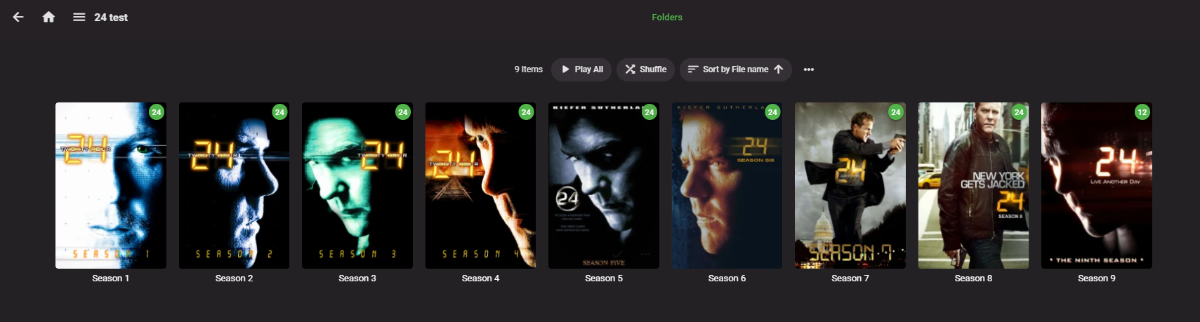
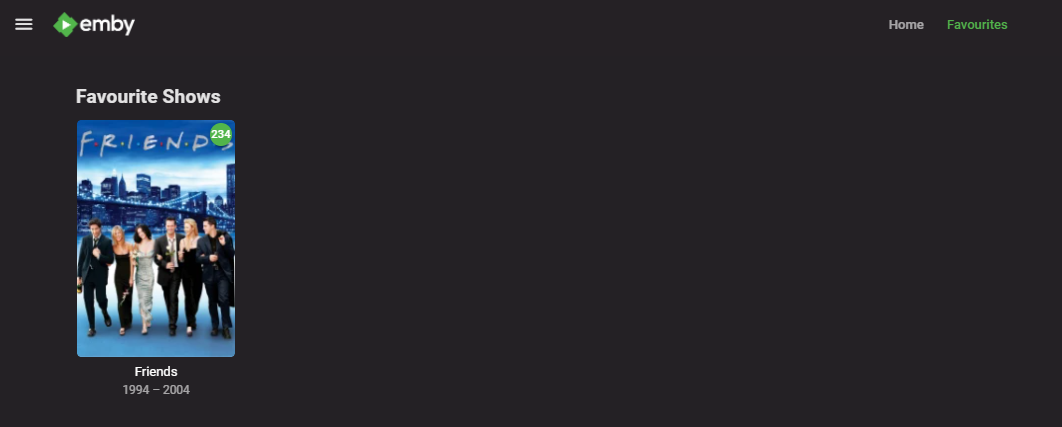
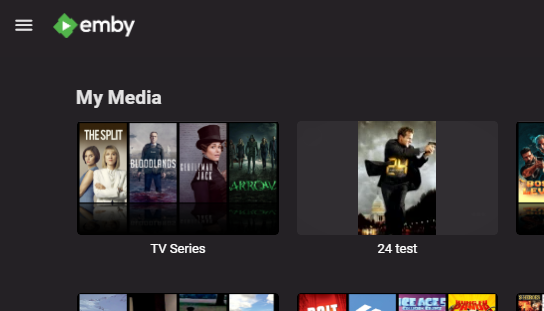
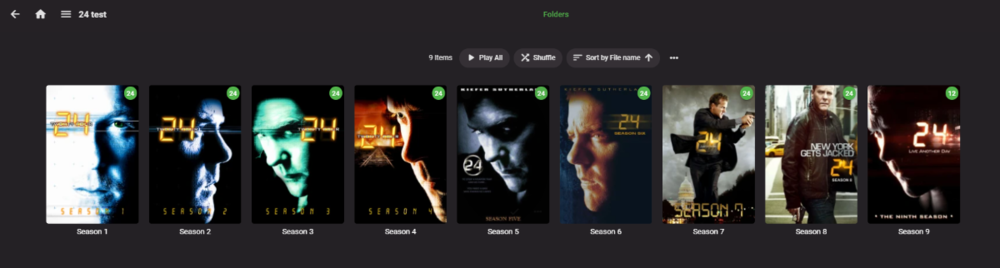
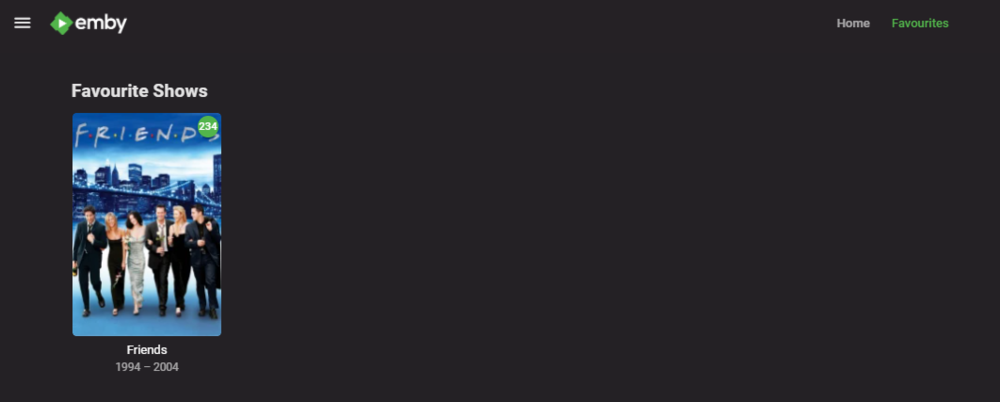
I don't have any issues setting this up - maybe I'm missing something ? I setup a new Library called '24' (the first tv series on my system ..) and created it as 'Mixed' - I turned off all metadata providers. Library setup is from a share - \\MEDIA\TV Series 2\24 (2001)\ My main TV Series library has the same share (amongst many) - except one subdirectory down - ie \\MEDIA\TV Series 2\ (yes I can edit the 24 graphic to whatever I wanted to - this is just a test..) So if I want to quickly get to '24' - I just click it and then am presented with all of the Seasons for 24 ... Is this what you needed ? edit - From a USER perspective - then a quick way to get to Friends is to simply 'Favourite' the top level item - and then select 'favourites' from the top menu to get to all those items - you can have TV shows, Films, Channels etc - they are all listed here. In the example below - It now shows Friends at the top level.
 1 point
 -
That would be awful for lazily laying on the couch binging episodes, though. Or Virtual TV and the like. "Are you still watching?" exists as an option, which I've disabled, and that ought to be sufficient. There's already a 'stop' button as well, though, so having one on the overlay seems a bit pointless. And its presence on the overlay makes it seem like it relates to the overlay, and the playing of the next episode, which is why I first thought it might be a 'continue this episode but don't play the next one' button.1 point
-
Hi, yes it's a good idea and possible for the future. thanks.1 point
-
Again - the simplest option is to just un-check the setting to use the direct file path. In 99% of cases, this is not going to buy you anything except for these headaches of access you are dealing with now.1 point
-
Just FYI for readers, this is in the current beta of the app and will be in the next release.1 point
-
I can give a better example. On the Roku they only support 5 languages. Only those 5 are stored in the locale. But the Emby app on Roku supports 27 languages. There are 22 languages which only exist on the Emby app on Roku which means we cannot use locale for those. We must write our own translator and tokenizer entirely along with everything required. But it is worth the effort to do this to get better language support for users. So we went and did this. We want you to view your media your way. Not the way the device manufacturer wants you to view your media. We want users to be able to view their media their way in their language. That is why I am sure this request will be possible. It just makes sense.1 point
-
You know your only issue is a missing "/" in one of your line breaks. The one for your alphapicker section is in. Then of course uncommenting the color. here as this starts breaking the code below it. * ---------------------------------------------------------------------------------------------------- */ /* Movie and Series List */1 point
-
punktchen that did fix the problem thanks love this plug in! i use it more then anything else on emby or plex.1 point
-
yes, waiting couple of hours made it work, thank you.1 point
-
ah ok, got it. now the playlist item is on my homescreen. thanks.1 point
-
That would be ideal. Thanks.1 point
-
New version 0.9.8 in the starting post: Channels: Added audio and subtitle channel rule Added more controls to bumpers Changed "Include/Exclude these named movies or tv shows" to always, independent of "All channel rules have to be true" Changed handling of channel logos from file path to url path for better exchange of images Unfortunately this will delete your local channel images with the very first guide refresh, so make a backup of you logos Playback: Removed "Single" Playback options, because they won't work in future Emby server versions Fixed some rare exceptions in Continous Playback mode Changed handling of "Remove shows from Continue Watching" so it hides only shows if they weren't present before playback Changed handling of "Set Watched after..." for Continous Playback with Emby apps to use the logged in user by default to keep in line with Playlist Playback mode1 point
-
Hi @FrostByte I am not sure what mp3tag uses. I use picard. this is the output of ffprobe for a random track { Input #0, flac, from 'file:D:\xxxxxxx\Tommy Emmanuel & John Knowles\Heart Songs\13 Turning Home (Live).flac': Metadata: MUSICBRAINZ_RELEASEGROUPID: 509f9eb7-84b4-4c57-a8d6-173414de28bb ORIGINALDATE : 2019-01-11 ORIGINALYEAR : 2019 RELEASETYPE : album MUSICBRAINZ_ALBUMID: 18fc3822-1bce-4830-8d69-f278f84e37e1 LABEL : CGP Sounds CATALOGNUMBER : CGP0071 RELEASESTATUS : official ALBUM : Heart Songs MUSICBRAINZ_ALBUMARTISTID: 50c629c6-6f22-4bf9-a3c2-f2855e6704be;f4004a34-4078-439e-a01a-c95f7ed587d1 album_artist : Tommy Emmanuel & John Knowles ALBUMARTISTSORT : Emmanuel, Tommy & Knowles, John DATE : 2019-01-11 SCRIPT : Latn ASIN : B07JR2GNYN RELEASECOUNTRY : XW TOTALDISCS : 1 disc : 1 TOTALTRACKS : 14 MEDIA : Digital Media MUSICBRAINZ_TRACKID: 03112ce7-ed3a-4077-adc8-c7e46468c1e8 TITLE : Turning Home (Live) MUSICBRAINZ_ARTISTID: 50c629c6-6f22-4bf9-a3c2-f2855e6704be;f4004a34-4078-439e-a01a-c95f7ed587d1 ARTIST : Tommy Emmanuel & John Knowles ARTISTSORT : Emmanuel, Tommy & Knowles, John ARTISTS : Tommy Emmanuel;John Knowles MUSICBRAINZ_RELEASETRACKID: 61a18736-5822-41a4-9b3d-9c570517ee6a track : 13 GENRE : Folk;Jazz TRACKTOTAL : 14 DISCTOTAL : 1 Duration: 00:02:22.60, start: 0.000000, bitrate: 691 kb/s Stream #0:0: Audio: flac, 44100 Hz, stereo, s16 Stream #0:1: Video: mjpeg, yuvj420p(pc, bt470bg/unknown/unknown), 500x500 [SAR 1:1 DAR 1:1], 90k tbr, 90k tbn, 90k tbc Metadata: comment : Cover (front) "streams": [ { "index": 0, "codec_name": "flac", "codec_long_name": "FLAC (Free Lossless Audio Codec)", "codec_type": "audio", "codec_time_base": "1/44100", "codec_tag_string": "[0][0][0][0]", "codec_tag": "0x0000", "sample_fmt": "s16", "sample_rate": "44100", "channels": 2, "channel_layout": "stereo", "bits_per_sample": 0, "r_frame_rate": "0/0", "avg_frame_rate": "0/0", "time_base": "1/44100", "start_pts": 0, "start_time": "0.000000", "duration_ts": 6288660, "duration": "142.600000", "bits_per_raw_sample": "16", "disposition": { "default": 0, "dub": 0, "original": 0, "comment": 0, "lyrics": 0, "karaoke": 0, "forced": 0, "hearing_impaired": 0, "visual_impaired": 0, "clean_effects": 0, "attached_pic": 0, "timed_thumbnails": 0 } }, { "index": 1, "codec_name": "mjpeg", "codec_long_name": "Motion JPEG", "profile": "192", "codec_type": "video", "codec_time_base": "0/1", "codec_tag_string": "[0][0][0][0]", "codec_tag": "0x0000", "width": 500, "height": 500, "coded_width": 500, "coded_height": 500, "has_b_frames": 0, "sample_aspect_ratio": "1:1", "display_aspect_ratio": "1:1", "pix_fmt": "yuvj420p", "level": -99, "color_range": "pc", "color_space": "bt470bg", "chroma_location": "center", "refs": 1, "r_frame_rate": "90000/1", "avg_frame_rate": "0/0", "time_base": "1/90000", "start_pts": 0, "start_time": "0.000000", "duration_ts": 12834000, "duration": "142.600000", "bits_per_raw_sample": "8", "disposition": { "default": 0, "dub": 0, "original": 0, "comment": 0, "lyrics": 0, "karaoke": 0, "forced": 0, "hearing_impaired": 0, "visual_impaired": 0, "clean_effects": 0, "attached_pic": 1, "timed_thumbnails": 0 }, "tags": { "comment": "Cover (front)" } } ], "format": { "filename": "file:D:\\XXXXX\\Tommy Emmanuel & John Knowles\\Heart Songs\\13 Turning Home (Live).flac", "nb_streams": 2, "nb_programs": 0, "format_name": "flac", "format_long_name": "raw FLAC", "start_time": "0.000000", "duration": "142.600000", "size": "12327167", "bit_rate": "691566", "probe_score": 100, "tags": { "MUSICBRAINZ_RELEASEGROUPID": "509f9eb7-84b4-4c57-a8d6-173414de28bb", "ORIGINALDATE": "2019-01-11", "ORIGINALYEAR": "2019", "RELEASETYPE": "album", "MUSICBRAINZ_ALBUMID": "18fc3822-1bce-4830-8d69-f278f84e37e1", "LABEL": "CGP Sounds", "CATALOGNUMBER": "CGP0071", "RELEASESTATUS": "official", "ALBUM": "Heart Songs", "MUSICBRAINZ_ALBUMARTISTID": "50c629c6-6f22-4bf9-a3c2-f2855e6704be;f4004a34-4078-439e-a01a-c95f7ed587d1", "album_artist": "Tommy Emmanuel & John Knowles", "ALBUMARTISTSORT": "Emmanuel, Tommy & Knowles, John", "DATE": "2019-01-11", "SCRIPT": "Latn", "ASIN": "B07JR2GNYN", "RELEASECOUNTRY": "XW", "TOTALDISCS": "1", "disc": "1", "TOTALTRACKS": "14", "MEDIA": "Digital Media", "MUSICBRAINZ_TRACKID": "03112ce7-ed3a-4077-adc8-c7e46468c1e8", "TITLE": "Turning Home (Live)", "MUSICBRAINZ_ARTISTID": "50c629c6-6f22-4bf9-a3c2-f2855e6704be;f4004a34-4078-439e-a01a-c95f7ed587d1", "ARTIST": "Tommy Emmanuel & John Knowles", "ARTISTSORT": "Emmanuel, Tommy & Knowles, John", "ARTISTS": "Tommy Emmanuel;John Knowles", "MUSICBRAINZ_RELEASETRACKID": "61a18736-5822-41a4-9b3d-9c570517ee6a", "track": "13", "GENRE": "Folk;Jazz", "TRACKTOTAL": "14", "DISCTOTAL": "1" } } } Maybe you can check and see if yours are different -vicpa1 point
-
@fbrassin I just released RPDB Folders v0.1.4 which includes the options to set a default language for the posters. I will continue by adding this new feature to the dedicated media server plugins too.1 point
-
This was the rare occasion when I pushed an update straight to the store without TestFlight. Most of the time we're not doing that.1 point
-
Yes we need this also a way to make a constant message or a repeated message at certain times.1 point
-
Hi. This will be addressed in the next release of the app.1 point
-
The script is working on my system. looking to your logs it seems that your static directory is corrupted There could be several resons for that, if your system is very slow probably the timer of 5m used in the systemctl service is too low, try to increase it to 10m. Practically you have to change the systemd service as follow: [Unit] Description=Emby Server is a personal media server with apps on just about every device. After=network.target [Service] TimeoutSec=10min EnvironmentFile=/etc/emby-server.conf WorkingDirectory=/opt/emby-server ExecStartPre=/opt/emby-server/bin/emby-data_sync.sh ExecStart=/opt/emby-server/bin/emby-server ExecStopPost=/opt/emby-server/bin/emby-data_sync.sh RestartForceExitStatus=3 User=emby [Install] WantedBy=multi-user.target But now you have to manually fix your folder. The simpler action could be to run just this command sudo chown -R emby:emby /var/lib/emby1 point
-
Then maybe you should put in a real solution instead of ignoring this for years. How hard is it to add a permission to check if the user uploading is allowed to upload or not? This is why I've abandoned this forum; you talk and talk but rarely actually consider solutions to peoples problems. Downloads are a half baked god awful mess, you still cant shuffle now playing like every other music player in existence, there's no control as an admin over uploads, users constantly get 'no streams available' with absolutely no reasoning or steps for a solution just wait and hope, xbox updates happen constantly with no actual progress and locking up the whole app while in use.1 point
-
This is building on what I've mentioned previously ( https://emby.media/community/index.php?/topic/41937-questions-about-media-stubs/ ). Being able to create custom Media Stubs ( https://github.com/MediaBrowser/Wiki/wiki/Media%20stubs ) would be ideal, but I realize that is probably unlikely. So what I propose instead is a new Media Stub called Online, which could be indicated by ".online" instead of ".disc" (or even ".disconline" would be fine). I think with more and more media moving to an online context (ie, Vudu, iTunes, Disney Movies Anywhere) there is a place for having this kind of Media Stub. Now, would could then provide a relatively easy way that users could define their own online providers via Media Stub be allowing for the following naming convention: ".provider.online". So the user could just use ".online" or they could enter whatever continuous (ie, between ".") string they want to identify a given online provider (eg, "Terminator (1984).vudu.online") and then Emby would parse that and add it to an internal list of online providers. Then, using my other feature request of custom messages for Media Stubs ( https://emby.media/community/index.php?/topic/44010-emby-theater-external-player-custom-messages-particularly-for-media-stubs-and-tags/ ) Emby could provide a way to pick from the list of any Online Providers using the same UI I described for selecting Tags) when setting up an External Player of type "Media Stubs". Or, we could skip all that and just allow the user to manually enter strings to match of off (eg, ".vudu.online") -- this would basically be allowing Externally Players (in this case to display a custom message, per the other feature request) to be matched by arbitrary filename string patterns. In some ways that might actually be the easiest way to go (ie, the least work). And personally, I could live with that as I could then just create my own naming scheme using the existing Media Stub structure (eg, "Terminator (1984).vudu.online.disc") and match off of that for my custom messages (once the other feature request is implemented). Thanks! PS - If this is something you might like to see implemented, be sure to "Like" this top/first post (as well as any subsequent posts in this thread that highlight particular aspects of what you are interested in) -- "Liking" the top/first post helps the Devs to know how much interest there is in a given Feature Request.1 point
-
Somewhat related to this prior request ( https://emby.media/community/index.php?/topic/44010-emby-theater-external-player-custom-messages-particularly-for-media-stubs-and-tags/ ) it would be nifty and useful to add support for the Kodi Media Stub embedded data, which would then be displayed when a user tries to Play a Media Stub item. From http://kodi.wiki/view/media_stubs <discstub> <title>Alternative Title</title> <message>Message to be displayed</message> </discstub> Thanks! PS - If this is something you might like to see implemented, be sure to "Like" this top/first post (as well as any subsequent posts in this thread that highlight particular aspects of what you are interested in) -- "Liking" the top/first post helps the Devs to know how much interest there is in a given Feature Request.1 point
-
It's possible for the future. Thanks.1 point
-
Correct. I linked to that in my post. I'm proposing an addition to the spec. Based on our prior conversation in another thread (linked to above) you indicated there was currently no way to customize media stubs beyond the current schema. This FR is exploring some different ways of expanding the current schema.1 point