Leaderboard




Popular Content
Showing content with the highest reputation on 06/21/21 in Posts
-
Yes you can install Emby on Ububtu without having to put it in Docker. I have it installed on a Linux Mint machine that runs 24/7. @LukeI believe that zachattack83 is asking if the Emby Guide can correctly map channels provided by the M3U from xTeve, and while I know in the past that unless the channel streams were numbered the same as in the guide data provider used it could not, that may have changed some with the channel management functionality that you recently introduced. @zachattack83Even if the Emby Guide is unable to correctly map the channels automatically, you can assign them manually, which isn't a major undertaking if you're not trying to pull in hundreds or thousands of channels. I've narrowed down my M3U list to about 50 channels that I actually might watch.2 points
-
1.9.0.3 should fix the pie chart size issue2 points
-
I'll re-add this function and also review the sync code.2 points
-
@TeamBThanks for the quick fix!2 points
-
Thank you for taking a look, no need for apologies @quickmic, we appreciate your ongoing efforts and support with this!!2 points
-
I'd really like to have 2 Factor Authentication added to the login screen. It's just this (optional) extra layer of security to help secure the server (which, especially if people use camera uploads) contains pretty private data. There are for every type of programming language quite a few libraries available, so implementation on a server shouldn't be too hard to realise1 point
-
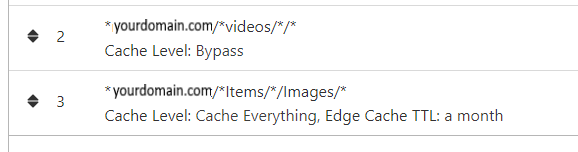
NGINX and emby Config Version 1.0.4 Last Update 1-1-2024 Update by Pir8Radio Why Use NGINX reverse proxy ahead of my application servers like emby? With NGINX or any reverse proxy ahead of an application server you have more control over your setup. You can do things the application servers were not built to handle, have better control over your security and logging, replace lines of code without editing the application server code, better control of caching, etc, etc.... One of the main reasons is so that you don't have to open a new port on your firewall for every application server you host, all you really need to open is 80 & 443 and the internet can reach all of your different servers through one entrance. Will NGINX work on my OS? Most likely, you can find various versions of NGINX for most OS's and they come in different flavors, with options baked in, or just the bare NGINX that you need to compile. See below for download links to get you started. Will NGINX break things on emby? Absolutely if you don't configure it correctly! I HIGHLY suggest when choosing a scheme to setup your domain URL you choose SUB-DOMAIN and NOT sub-directory, more below. Also if you come to the emby forum with things not working, or issues you have and you use a Reverse Proxy, PLEASE make sure that is one of the first things you mention in your forum post. ESPECIALLY if emby works on one platform or client, but not another. So many times people complain "but it works on chrome, so I didn't think it was the reverse proxy". Mention you have a Reverse Proxy please. If the reverse proxy is setup correctly it should be totally transparent to the user and the application server (emby). I'm not going to go into how to purchase and setup a domain name. Lots of how-to's on that out there. Once you have a domain name and its pointed to your IP address, you can go to that domain name and hit your server then continue on.... Sub-Domain vs Sub-Directory: Lets say your domain name is: domain.com there are two main ways you can direct traffic from the internet to your backend application servers like emby. One is sub-directory, something like domain.com/emby or domain.com/other-server This is doable in nginx, but there are some catches and you need to know how your reverse proxy and application server work in detail.. This often breaks different features in emby and other application servers.. To keep with our "Totally Transparent" goal sub-directory doesn't work well, it requires a lot of rewriting and work-arounds to make it work smoothly, if you choose sub-directory you will run into issues you will need to address. The other option is Sub-Domain, this is the cleanest, most transparent, easiest to setup and maintain, it's also what I highly suggest you setup. A sub-domain looks like: emby.domain.com or other-server.domain.com The below config is based on Sub-Domain I will include a sub-directory example as well. NGINX Downloads: Official nginx downloads(LINUX): nginx.org Official nginx downloads(Windows): nginx.org WINDOWS users I suggest this version: nginx-win.ecsds.eu download links are at the bottom of the page. This Windows version has lots of cool features compiled into it already, and is optimized for windows. They keep up with updates, its a FREE (for non-commercial) third party build that I highly recommend. Additional Links: Content Security Policy info (CSP) (For Advanced Users): A CSP WILL break your server if you don't know what you are doing, I suggest reading up, lots of googleing, and understand what a CSP's function is and is not prior to venturing into this area Example NGINX Reverse Proxy Config: 3-29-2020 - ADDED A LINE FOR CLOUDFLARE USERS SO THAT THE X-REAL-IP HEADER IS CORRECTED. THIS ONLY EFFECTS Cloudflare USERS. 4-11-2020 (V1.0.1) - MOVED proxy_buffering off; FROM LOCATION BLOCK TO SERVER BLOCK 12-18-2020 (V1.0.2) - ADDED 301 SERVER SECTION TO FORCE ALL TRAFFIC TO SSL. 9-23-2021 no nginx config change, but cloudflare changed how they cache video files, so emby users that use Cloudflare now need to add a rule like below to make sure video is seekable and playable. 8-18-2022 - added a line for photo sync to cover large uploads of videos and images. (client_max_body_size 1000M;) 1-1-2024 - changed http2 setting per @weblesuggestion in this thread post # 1309363. ** The below "Page Rules" are only needed for Cloudflare CDN users, otherwise ignore. worker_processes auto; error_log logs/error.log; events { worker_connections 8192; } http { include mime.types; default_type application/octet-stream; server_names_hash_bucket_size 64; server_tokens off; ## The below will create a separate log file for your emby server which includes ## userId's and other emby specific info, handy for external log viewers. ## Cloudflare users will want to swap $remote_addr in first line below to $http_CF_Connecting_IP ## to log the real client IP address log_format emby '$remote_addr - $remote_user [$time_local] "$request" ' '$status $body_bytes_sent "$http_referer" ' '"$http_user_agent" "$http_x_forwarded_for" $request_time $server_port "$http_x_emby_authorization"'; log_format default '$remote_addr - $remote_user [$time_local] "$request" ' '$status $body_bytes_sent "$http_referer" ' '"$http_user_agent" "$http_x_forwarded_for" $request_time $server_port'; sendfile off; ## Sendfile not used in a proxy environment. gzip on; ## Compresses the content to the client, speeds up client browsing. gzip_disable "msie6"; gzip_comp_level 6; gzip_min_length 1100; gzip_buffers 16 8k; gzip_proxied any; gzip_types text/plain text/css text/js text/xml text/javascript application/javascript application/x-javascript application/json application/xml application/rss+xml image/svg+xml; proxy_connect_timeout 1h; proxy_send_timeout 1h; proxy_read_timeout 1h; tcp_nodelay on; ## Sends data as fast as it can not buffering large chunks, saves about 200ms per request. ## The below will force all nginx traffic to SSL, make sure all other server blocks only listen on 443 server { listen 80 default_server; server_name _; return 301 https://$host$request_uri; } ## Start of actual server blocks server { listen [::]:443 ssl; ## Listens on port 443 IPv6 ssl enabled listen 443 ssl; ## Listens on port 443 IPv4 ssl enabled http2 on; ## Enables HTTP2 proxy_buffering off; ## Sends data as fast as it can not buffering large chunks. server_name emby.domainname.com; ## enter your service name and domain name here example emby.domainname.com access_log logs/emby.log emby; ## Creates a log file with this name and the log info above. ## SSL SETTINGS ## ssl_session_timeout 30m; ssl_protocols TLSv1.2 TLSv1.1 TLSv1; ssl_certificate ssl/pub.pem; ## Location of your public PEM file. ssl_certificate_key ssl/pvt.pem; ## Location of your private PEM file. ssl_session_cache shared:SSL:10m; location ^~ /swagger { ## Disables access to swagger interface return 404; } location / { proxy_pass http://127.0.0.1:8096; ## Enter the IP and port of the backend emby server here. client_max_body_size 1000M; ## Allows for mobile device large photo uploads. proxy_hide_header X-Powered-By; ## Hides nginx server version from bad guys. proxy_set_header Range $http_range; ## Allows specific chunks of a file to be requested. proxy_set_header If-Range $http_if_range; ## Allows specific chunks of a file to be requested. proxy_set_header X-Real-IP $remote_addr; ## Passes the real client IP to the backend server. #proxy_set_header X-Real-IP $http_CF_Connecting_IP; ## if you use cloudflare un-comment this line and comment out above line. proxy_set_header Host $host; ## Passes the requested domain name to the backend server. proxy_set_header X-Forwarded-For $proxy_add_x_forwarded_for; ## Adds forwarded IP to the list of IPs that were forwarded to the backend server. ## ADDITIONAL SECURITY SETTINGS ## ## Optional settings to improve security ## ## add these after you have completed your testing and ssl setup ## ## NOTICE: For the Strict-Transport-Security setting below, I would recommend ramping up to this value ## ## See https://hstspreload.org/ read through the "Deployment Recommendations" section first! ## add_header 'Referrer-Policy' 'origin-when-cross-origin'; add_header Strict-Transport-Security "max-age=15552000; preload" always; add_header X-Frame-Options "SAMEORIGIN" always; add_header X-Content-Type-Options "nosniff" always; add_header X-XSS-Protection "1; mode=block" always; ## WEBSOCKET SETTINGS ## Used to pass two way real time info to and from emby and the client. proxy_http_version 1.1; proxy_set_header Upgrade $http_upgrade; proxy_set_header Connection $http_connection; } } }

 1 point
 -
Guys, The ebook side of Emby/MediaBrowser has been long stalled or rather stagnated. I would like to offer up a couple of suggestions. Many people use calibre as an ebook/comic book tool for scraping data and general management of their collection already. This program is absolutely astonishing in its ability to pull metadata from post calibre scans, as well as draw in metadata from the file source and/or directory structure. http://vaemendis.net/ubooquity/ Its a self contained .jar server/reader combination. And honestly I am very impressed by it's small footprint and wide range of abilities. The other option is COPS , which was written specifically with calibre in mind. It is open source, so making it work with emby I would think would be fairly easy. https://blog.slucas.fr/projects/calibre-opds-php-server/ Ever since the original release of MediaBrowser's bookshelf I have always wanted something that would allow me to 'read' my collection, rather than being basically nothing more than a place-set for images of books I own. I am sure that those who mainly have audiobooks are thrilled with bookshelf , but it's nothing more than an extension of the music library IMHO, not new features. We can have both right? Here I give you two suggestions free of charge.. Just because I love you, and Emby Personally I plan on running the Ubooquity Server along side of Emby from now on, just because of it's massive functionality and tiny footprint. But I sure hope that someone decides -- "yeah, ebook support should be in here too" and do something about it - rather than allow this now very very ancient issue to continue to remain an issue. And so I don't have to have 20 different ports open, some with SSL support - some not, because Emby isn't delivering the 'complete package'. (Please take some of this with humor, I know you have your hands full with improvements/bugs/suggestions/requests)1 point
-
One thing that I would like to see implemented is the abilty to display lyrics in all of the apps. For those of us who have libraries with lyrics embedded in the actual files, it would be trivial. Simply scrape the lyrics from the lyrics tag and display them. As far as scraping from online lyrics databases, I don't see that working very well as just about every app that I have seen use it either doesn't get the correct lyrics or they are truncated with an add for the website.1 point
-
As I mention in a related post, I love the additional subfolders for Movie Extras (eg, Shorts, Scenes, Interviews, etc.)! It would be awesome to extend this functionality to TV Series as well. Specifically to add support for many/all of the same folders supported for Movie Extras, eg, extras specials shorts scenes featurettes behind the scenes deleted scenes interviews trailers As well as any additional folders that get added in the future (eg, hopefully Galleries). Support Placement of "Extras" Folders Within Each Season Folder, Plus A Naming Scheme to Link A Particular Extras Folder with a Specific Episode (eg, "\Season 1\E1 - Deleted Scenes\" for episode 1 deleted scenes): I want to clarify that it would be great if these various "extras" folder types could reside within each Season folder. So for example, within a Season 1 folder we could then have an "Extras" folder, a "Deleted Scenes" folder, a "Featurettes" folder, etc. And furthermore, that we could designate a particular folder to refer to a specific episode (eg, "\Season 1\E1 - Deleted Scenes\" for episode 1 deleted scenes). See more below, particularly why I think this would be so useful: https://emby.media/community/index.php?/topic/55915-emby-server-theater-additional-extrasspecial-folder-types-for-tv-series-similar-to-movies/&do=findComment&comment=587195 Thanks for your consideration! PS - If this is something you might like to see implemented, be sure to "Like" this top/first post (as well as any subsequent posts in this thread that highlight particular aspects of what you are interested in) -- "Liking" the top/first post helps the Devs to know how much interest there is in a given Feature Request.1 point
-
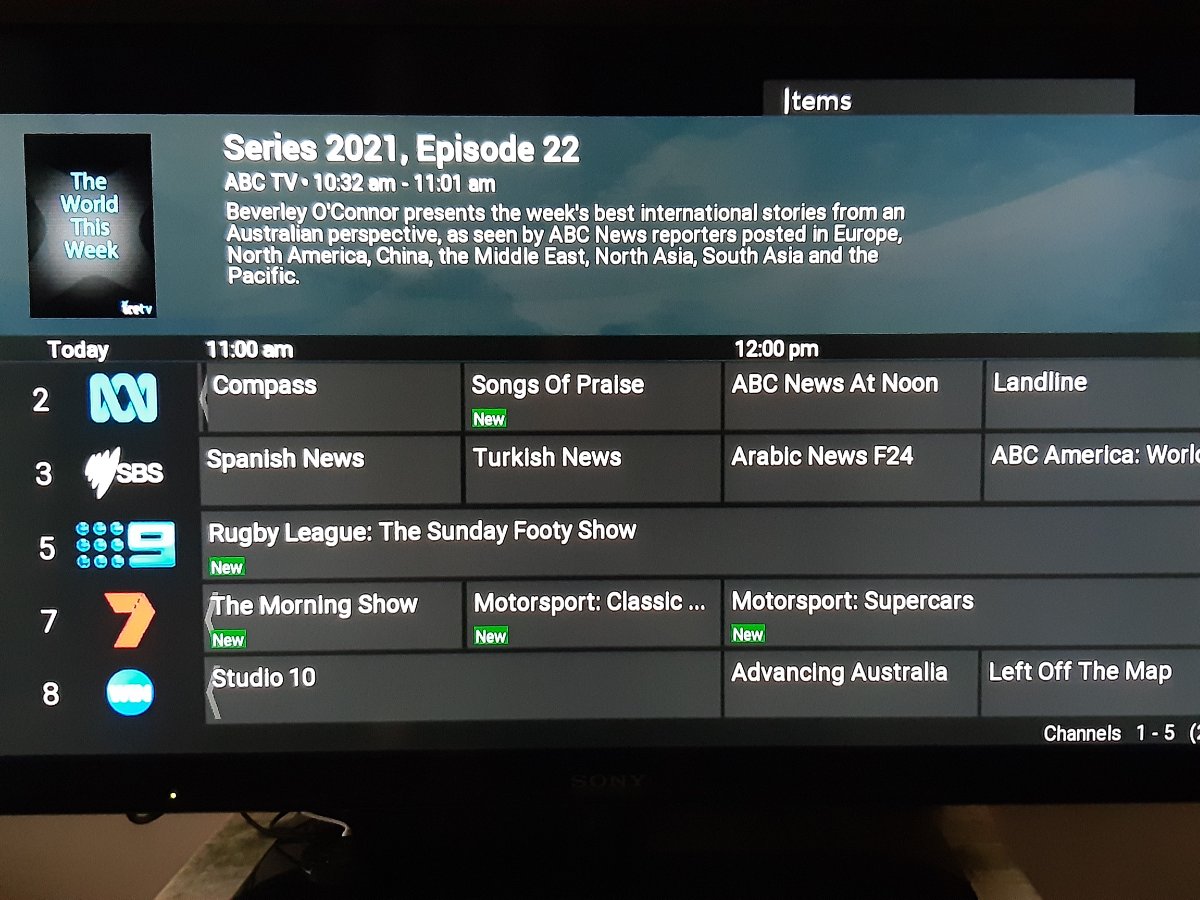
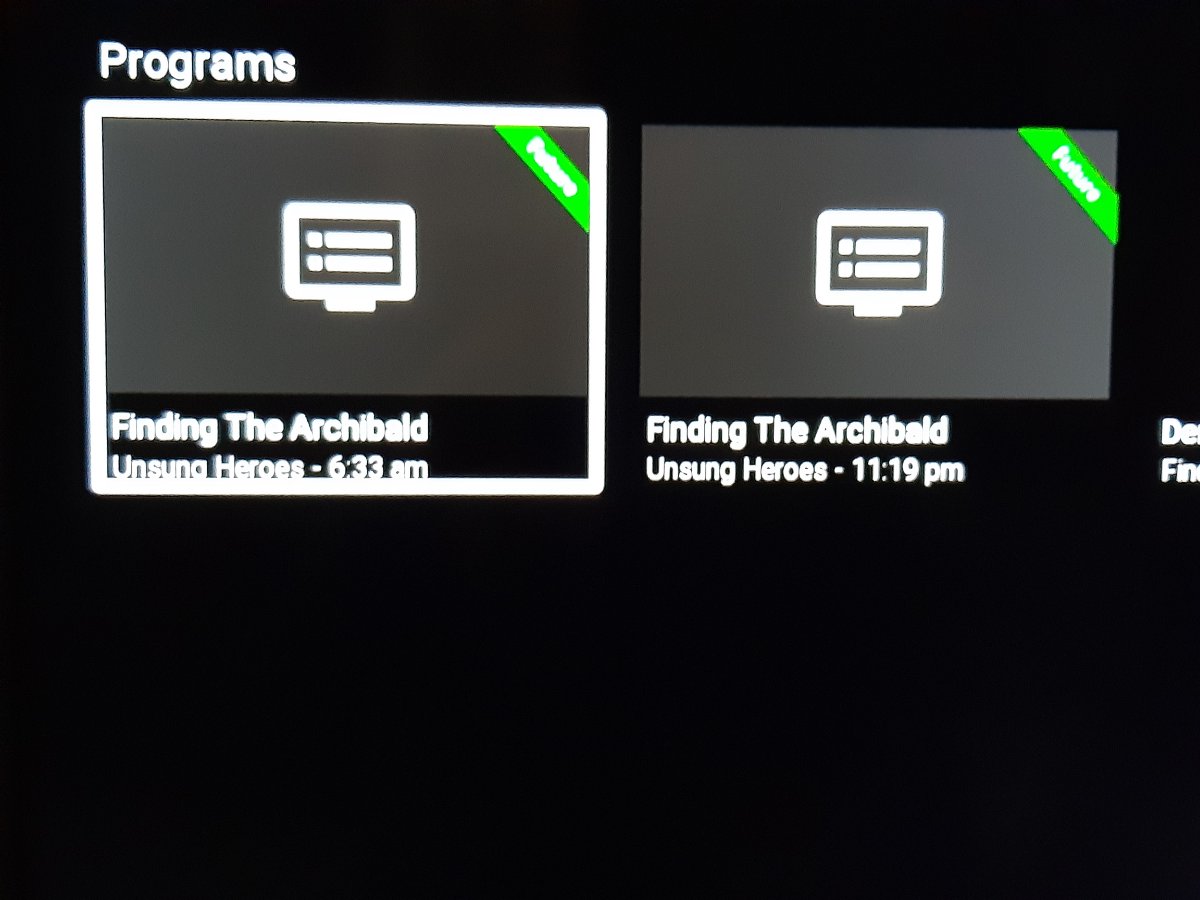
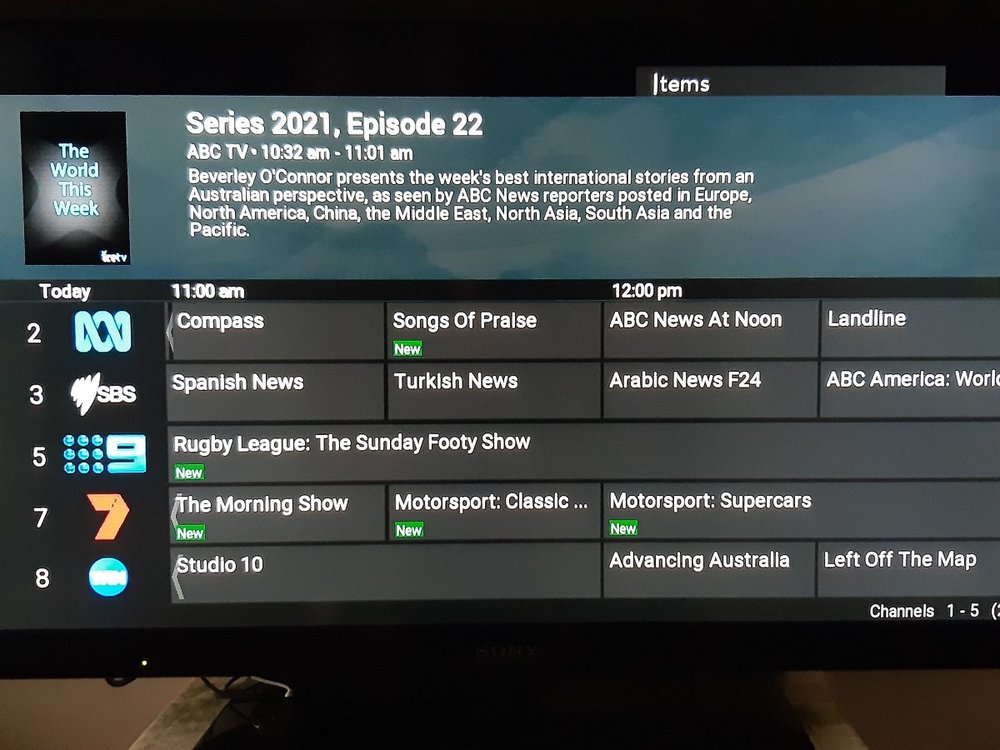
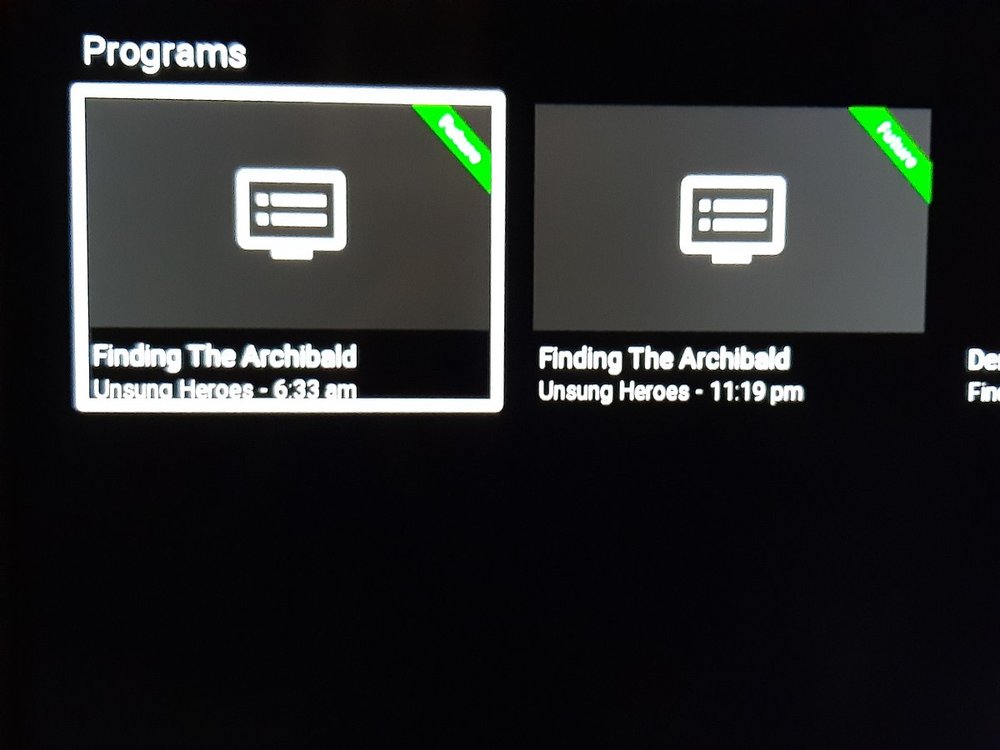
Pic 1 is an attempt to search with the guide on screen - the search selection box is hidden behind the guide. Pic 2 is a search result - program times are not in my local timezone time ie first one should be 8:33pm (Australia +10).
 1 point
 -
Time setting is correct. Time everywhere else in emby seems to be correct - it is only in the search results for a program that it is not. Clicking on the program from the search result goes to a page that has the correct time.1 point
-
So much effort is being wasted on a thread with no logs. Martin1 point
-
Hey, any update on what you found looking into this? I've reset my database and started from scratch several times and it still refuses to sync after the initial library import.1 point
-
Hi, yes we are looking into improving this. Thanks for the feedback.1 point
-
Hi Luke No reply back from Trakt support yet. I will reply on here IF they contact me back1 point
-
The Shield will use the audio capabilities of what it's directly hooked up to My setup uses the following and thus I get the benefits of what the soundbar supports. Soundbar plays the audio and only passes video to TV. Gigabyte Switch --> Shield (HDMI in 1) / Xbox (HDMI in 2) --> Samsung Soundbar --> Samsung TV However, if I set it up like below then the Shield detects the TV's audio capabilities and I lose DTS:X and Dolby TrueHD Atmos which will need to be converted unless I chose an alternate audio track before clicking play. Shield --> TV --> Soundbar1 point
-
Hi, has this resolved your issue?1 point
-
Got it, thank you. Is the home screen the only way to access TV Show collections for the time being then? Not a huge deal, just wanted to bring it to someones attention as a potential update for the future I guess, if it weren't something I could address.1 point
-
Hi, this isn't something you can do. I was trying to say a dev will need to add this tab/functionality to the software.1 point
-
Generating some good vibrations to motivate another round of extras development.1 point
-
Hi. External PGS subs are not supported at this time. Under what circumstance do you have these? Yes, this can be a limitation with graphical sub formats - they will need to be burned in when ffmpeg has to enter the picture. However, you can set the app to locally decode the audio so that this won't happen. With a Shield and a receiver that can accept MCPCM, you should get full sound.1 point
-
I think I fixed this issue with a keycode in button mapper. For some reason my new remote select button for Nvidia Shield was not recognizing the action as a select or enter button. Recoding it fixed this issue.1 point
-
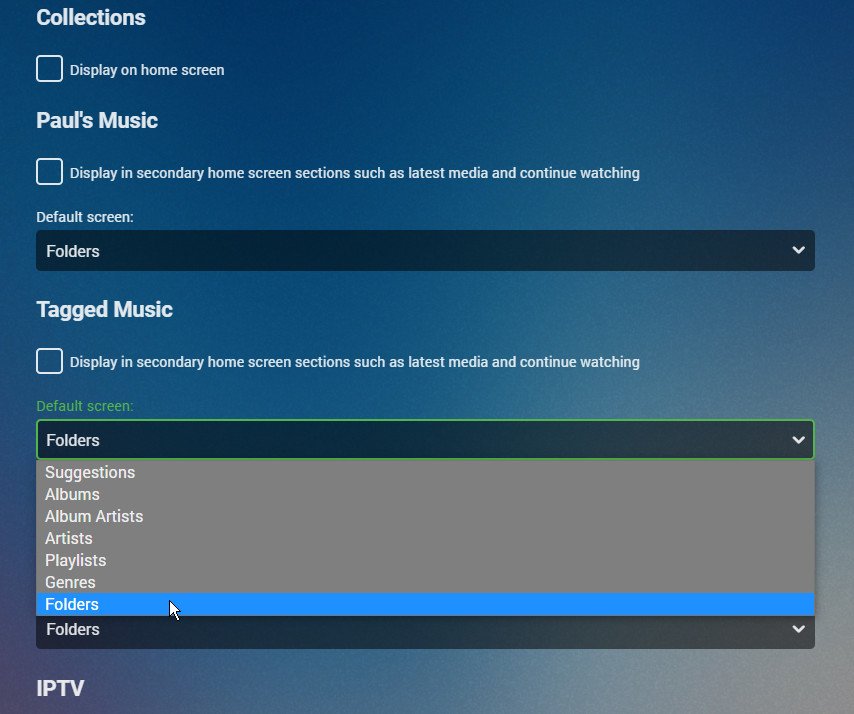
If I understand you right, you simply want the folder view to open immediately by default. This is a per-user choice, and is set up in the home page settings of each user. Paul
 1 point
 -
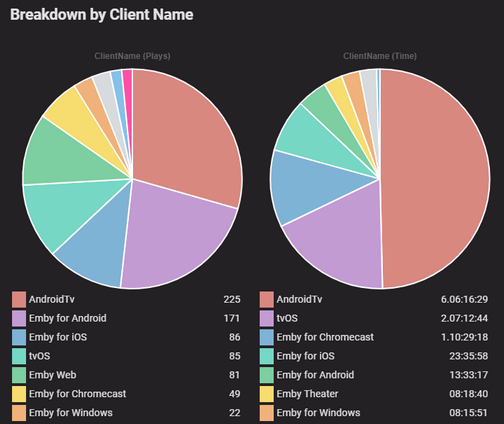
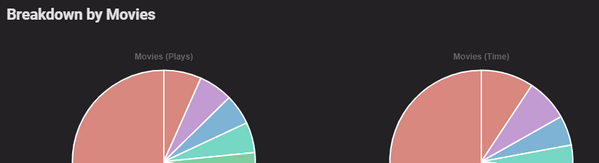
The size of the charts are good now, however at the risk of sounds really pedantic - the spacing between the 2 charts is still really tight Unlike the spacing that they used to have in previous 1.8.x.x versions Appreciate your work
 1 point
 -
Exactly and why I was hoping the Op would have come to that conclusion as well. For Emby Server this specific i5 CPU is better.1 point
-
Sorted. A restart of the computer fixed it.1 point
-
The issue was solved by APP ver.2.0.81 point
-
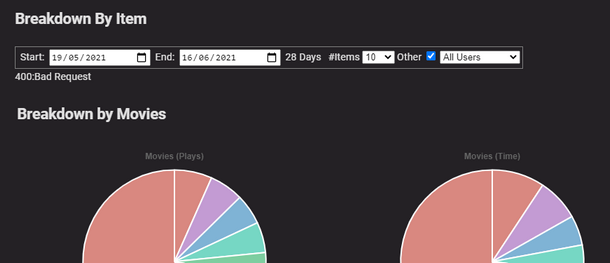
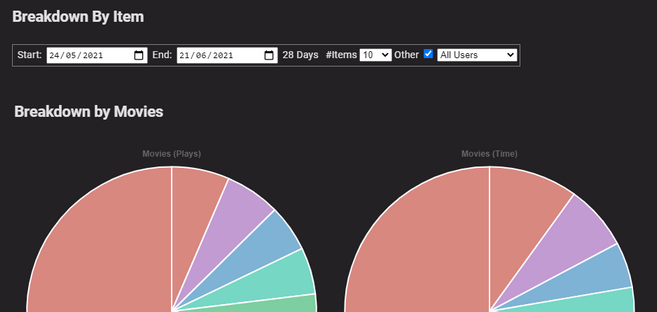
Everything appears to be working fine in 1.9.0.2 The only noticeable UI difference I can see is the size of the pie charts, updated version are much larger than previously. Previous version: Updated version: Functionality wise, they all appear to be working correctly thanks.
 1 point
 -
@FrostByte Thanks for the clarification, I asked becouse the KB for Fire TV explicitly mentions PGS and PGSSUB whilst the Android TV only mentions PGS leading me to think that the two extensions are different from one another. Last question, which I assume is rather useless but just to be sure, PGS subs are supported as internal and external right? In any case yeah I do prefer them to SRT since passing OCR to all my movies would be suicide and languages other than english are sometimes tricky to handle to various degrees. Are there any limits to the support for PGS subs? By this I mean if I am transcoding audio (this happens often since I don't have a DTS capable set up at the moment although this will change eventually) will this cause the video to also transcode if PGS subs are selected (similarly to how transcoding audio causes VC-1 codecs to be transcoded to h.264 on Samsung TV). Thankl you once again for your time!1 point
-
fixed in version 1.9.0.21 point
-
They are the same, it's just that some apps like Mediainfo identify them as PGS and others like ffmpeg identify them as PGSSUB. ATV supports PGS/PGSSUB as I prefer them over SRT and use them all the time with my 4K remuxes on my Shield Pro. According to this page in the KB PGS is supported with ATV Emby Android TV : Emby However, if you found another link which is wrong/outdated then maybe @cayars can fix it1 point
-
Never mind figured out you can have multiple Movies and TV Shows sections listed now in libraries!1 point
-
I've noticed that the option to refresh "Movie Collections" is missing. Collections are only able to get updated by manually refreshing the complete movie library. Auto-Update doesn't seem to work. Maybe has something to do with the integration of the Auto-Box plugin in Emby server since version 4.6.x.x Using: Embuary skin Emby next gen version 5.3.3 Emby server version 4.6.3.01 point
-
What do you mean know how to apply correct data? What data?1 point
-
***DISCLAIMER - ALWAYS SNAPSHOT YOUR JAIL BEFORE FOLLOWING INSTRUCTIONS FROM RANDOM STRANGERS ON THE INTERNET*** Once you build emby yourself in a jail you will have to perform the following steps in the shell of the jail to update: service emby-server stop pkg upgrade pkg add -f ***link from https://github.com/MediaBrowser/Emby.Releases/releases/ of the exact version you want to upgrade. In this case you would want to find the freebsd11 and copy link to the txz*** service emby-server start An alternative to creating the second pkg command is to go to: https://emby.media/freebsd-server.html and copy just the pkg add -f line from the version that matches your TrueNAS major version number. At least that is how I do it. This is due to the fact that you are running the beta version via a pkg add install. If you switch to the stable release train installed via "pkg install emby-server" you can update via the TrueNAS GUI or just typing pkg update as the stable version of emby is eventually available from the FreeBSD pkg manager. Since you are currently on a beta version that is older than the currently released stable version (4.6.3) you in theory could jump over to stable by doing: service emby-server stop pkg upgrade pkg remove emby-server (type Y to agree to removing the current Emby server install. This will not destroy your config) pkg install emby-server service emby-server start However, running the stable channel from package to get the GUI update button to work may mean you will be behind on updates as it can sometimes take weeks for the FreeBSD package manager to update to the latest stable after it's release. This is why most people either do the plug-in option or the manual pkg add install (this lets you choose which version you run and lets you update as fast or slow as you want).1 point
-
Can you go to scheduled tasks and run the rotate log job. Then schedule something for recording and once it fails upload the new server log?1 point
-
Sure if you want the app/client banned from the store that provides it.1 point
-
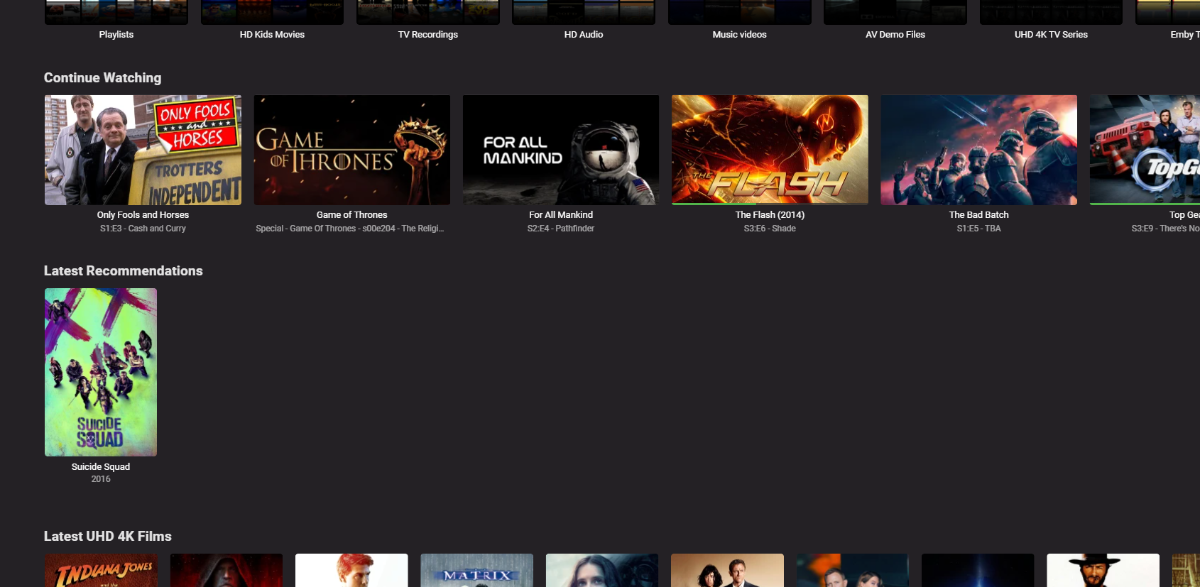
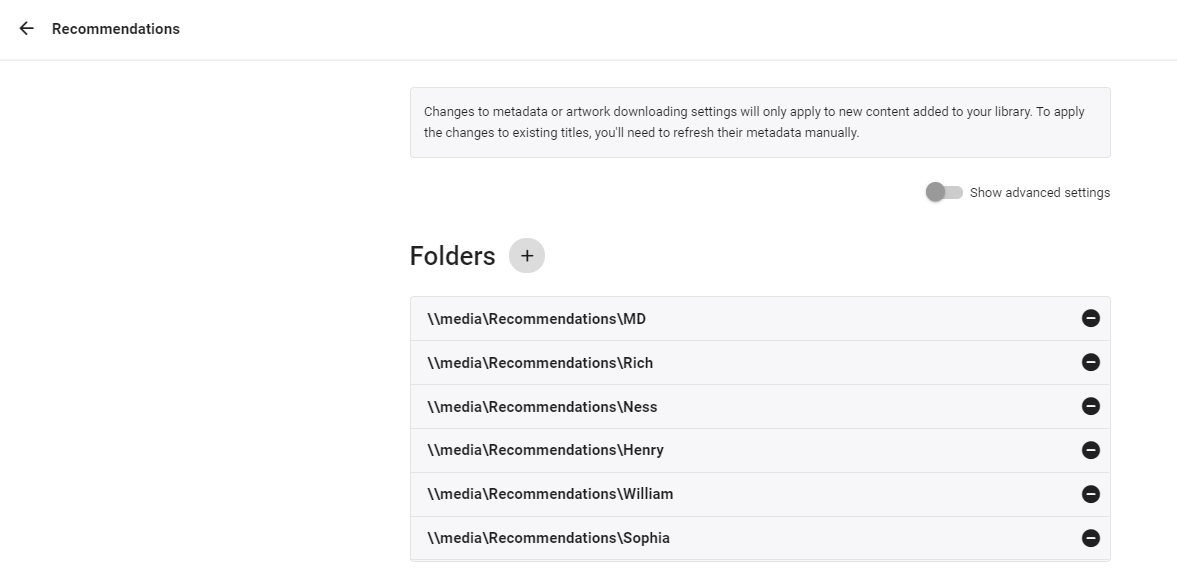
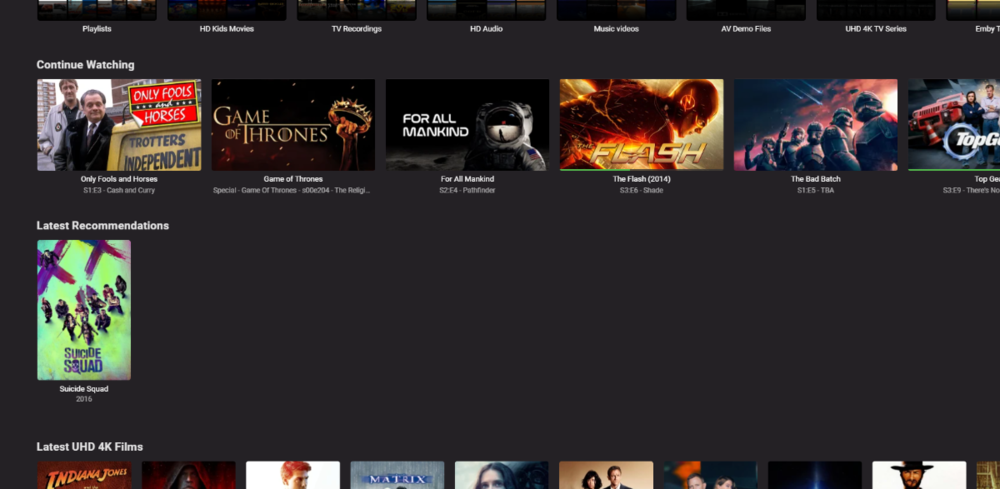
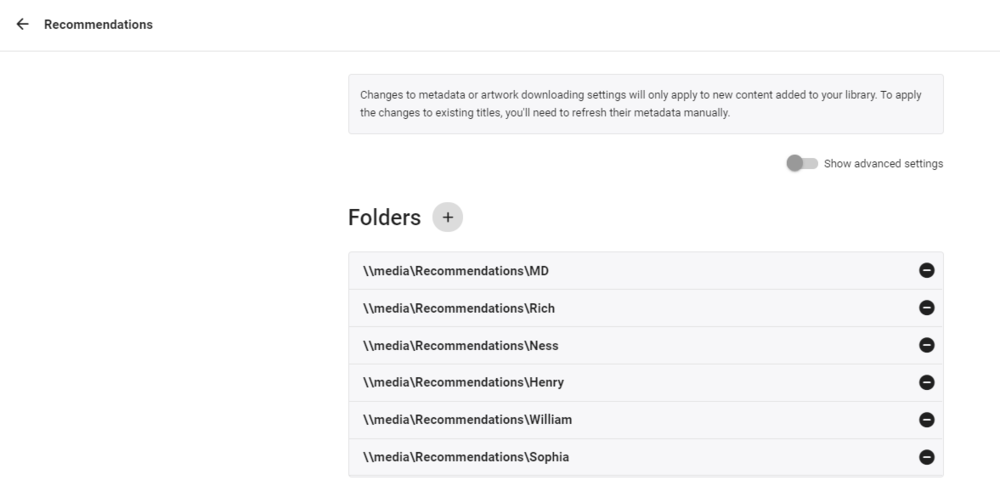
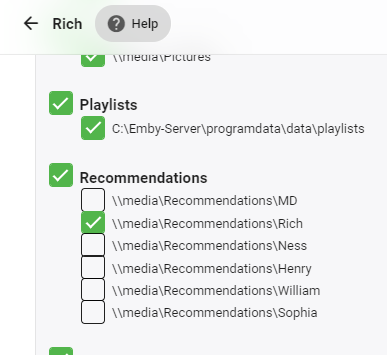
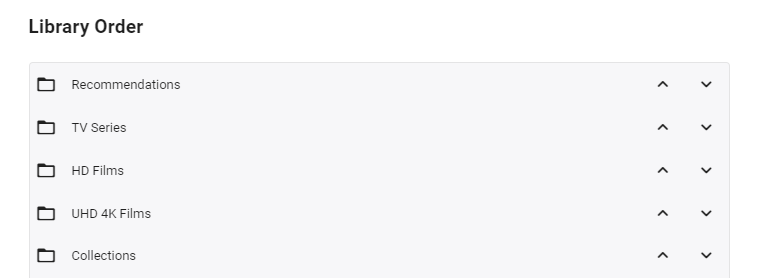
So I've been working on a solution to this in the background as a few weeks ago, my parents asked for recommendations as they say there is too much to choose from haha. Currently my solution is manually but it's working ok - I'm now trying to automate it by reading a defined playlist and building the recommendations from that, as currently there is no way to tag a 'recommendation'. As of now - it uses a 'Recommended' library, with sub folders / permissions - one folder per user. In these folders are strm links to the actual recommendation - be be a movie or tv series. Because the 'Recommended; library acts just like any other library on the 'latest' view - you simply need to put 'Recommended' to the top of the list for each user - and up pops the Recommendations for that user (and only that user).. resulting in ... The strm files are just links to the real video files (+ copies of metadata) - each user having their own folder in the library so they can be individually permissioned .. .. permission for each 'recommendation' folder is configured for each user. There is nothing to stop you having 'Generic' recommendations - simply add to the permissions - or if all are ticked, the user will see all the recommendations across all users .. As the user watches an item in the 'Recommendations' list - then it drops off the list (as it's a played item) which is neat - and of course also tags it as played in the main library. As I said - this is all great, but it's manual as I need to create the STRM files (which is easy enough, but it's not possible to do this via the emby GUI). So my thoughts are to read a predefined users recommend playlist xml file - which can be added to by simply selecting the playlist and 'add' - and use that to auto generate the strm links in that users recommended library. This should be easy enough to do, I just haven't got around to it yet. So it's not perfect by any means - and is a workaround until it's done properly in the db - but instead of tagging a film as 'recommended to user X' - you simply add that film to their 'recommended playlist' instead (or multiple recommended playslists) and it will then show in their 'Latest Recommendation' (library) list following the next schedule. I'll keep you updated on progress - likely in the 'tools' section of the forum.
 1 point
 -
Yes it's possible for the future. Thanks for the feedback.1 point
-
I would be SUPER HAPPY .. just to see 4/6 or 2/3 .. on the Collections page even if it doesn't know "What" movie is missing OR if it is an upcoming movie that is unreleased.. simply that.. the Collection ID listed/associated with the movie, realizes something is missing and it deserves another look. Surely the API of the themoviedb.com "Should" show that movie "count" per collection ID? -- Of course, then it has to be able to display in Collections and work with the custom display for Covers addon. I can only hope it happens.1 point