Leaderboard




Popular Content
Showing content with the highest reputation on 06/20/21 in Posts
-
Hi I would really like to be able to send some custom notifications to my users For example, i would like to be able to send a notification like : -"What content would you like to see added on Emby this week ? https://www.strawpoll.me/#####" -"Blabla Season3 is coming next week !" -"Server will be down for maintenance tonight" A little notification icon on the top right corner would be awesome. I looked in the Feature Requests list but i did'nt find anything like that. Thanks for reading, and for this amazing software.3 points
-
Have they ever worked? This app is no longer in development, so I’m really just keeping it running in cases where a server update breaks an existing function. I’ll have a quick look and if it’s not significant and I have time I might consider it for .10 My LiveTV has not worked right for a long time so I am not sure but it seems to me that they did work way back, like a few years ago. I am already starting to use this again since you fixed it so having those buttons would awesome but I understand the situation. I'll keep my fingers crossed and I greatly appreciate all you have done . Thank you very much!2 points
-
To display as a single album you need to have the "Album Artist" metadata the same in all tracks as well as the album name. For a compilation album, the usual value would be "Various Artists" - the individual track artists are stored in the "Artist" metadata field. Paul2 points
-
Excellent, thanks for confirming. Frame rate was the issue. @FrostByte, all the logic for fps by model already existed to determine DirectPlay or transcode, so I have changed that. The issue was that when the fps was too high, there transcode command wasn’t actually setting a frame rate limit. Now it does. Yeah, I didn’t change it for the test. I’ll roll this change in to 2.2.10 at some stage, but I’m not planning anything soon unless others are also having this issue. You can keep using the version I sent you until then. Have they ever worked? This app is no longer in development, so I’m really just keeping it running in cases where a server update breaks an existing function. I’ll have a quick look and if it’s not significant and I have time I might consider it for .10 This is really just dependent on your tuner and how long the server takes to transcode enough of the stream. There isn’t really much we can do about that.2 points
-
I'm not sure of the actual time point when the snapshot is taken - but by looking in the logs, it's pretty easy to re-create the syntax and then specify when you wish the thumbnail to be created. As an example - find "Info App: ProcessRun 'extract-image' Execute:" in the log file. C:\Emby-Server\system\ffmpeg.exe -ss 00:00:04.315 -f mp4 -threads 1 -i file:"\\media\HomeVideo\2016\Various\215.mp4" -an -sn -threads 0 -vframes 1 -vf "scale=trunc(min(max(iw\,ih*dar)\,min(600\,0*dar))/2)*2:trunc(min(max(iw/dar\,ih)\,min(600/dar\,0))/2)*2,thumbnail=24" -f image2 "C:\Emby-Server\programdata\cache\temp\caa4c71e-3dcb-4adb-812f-3ce1c13341bc.jpg" The red section is the time it jumps to when it takes the snapshot, blue is the media file and the green section is the resulting jpg. So just modify the path for where ffmpeg is for your system, and swap out the values above to create your own jpg - then simply do an edit image in the metadata, and replace with your custom created image.2 points
-
I'd really like to have 2 Factor Authentication added to the login screen. It's just this (optional) extra layer of security to help secure the server (which, especially if people use camera uploads) contains pretty private data. There are for every type of programming language quite a few libraries available, so implementation on a server shouldn't be too hard to realise1 point
-
Feature Request: Have User Groups and all settings applied at the Group Level That way you can just assign users to the appropriate Group and all settings will be inheritated.1 point
-
Please click "Like this" and share it if you want to support this feature. Thank you ! Hello, There is a Kodi addon call "gdrive" from ddurdle who can read videos (original and transcoding version) directly from Google Drive. Why not build on this idea to integrate Google Drive as source directly in Emby Server ? In addition, Emby could generate automatically the STRM files from one or many Drive folders. And transcodings are already available with Drive so no need to transcode with Emby server. What do you think ? ------------- Three reasons why this feature will be useful and awesome: 1. Cloud is the future and today the cost is affordable. I have a Google Drive Unlimited for $50/month (ie $600/year) and I have unlimited space that is secured against crashes. Knowing the cost of hard drive and the cost of power consumption, its a very good deal. 2. Google Drive transcode video file. This provides different stream quality like Youtube (1080p, 720p, 480p and 360p) and the "image quality/compression ratio" is very satisfying. I can play 720p video on my poor 4 Mbits DSL. 3. You don't need to have a big server. Personally, I opted for a little dedicated server (Kimsufi 2G) for the cost and I can leave it run 24/7! Furthermore, me and my friends can watch movies from anywhere! Basics features that should be included: GOOGLE APPS OAUTH2 for activation and permission playing transcoded version (MP4 360p, 480p, 720p & 1080p) directly into Emby's app playing original file (avi, mkv, mp4) directly into Emby's app import embedded subtitles porwerful script module for multiple folder scanning and STRM generating1 point
-
Hi, currently the playback of iso files is basically experimental. Is there any chance that you are able to implement the capability of the VLC player for iso handling? Because under windows the VLC player is already perfect for handling iso files respectively DVD menus... Under Android / FireTV even VLC player cannot handle the .iso DVD menu correctly. Would be great if emby can reach this goal as first media server which is able to playback complete DVD collections properly. Thank you! Br, Florian1 point
-
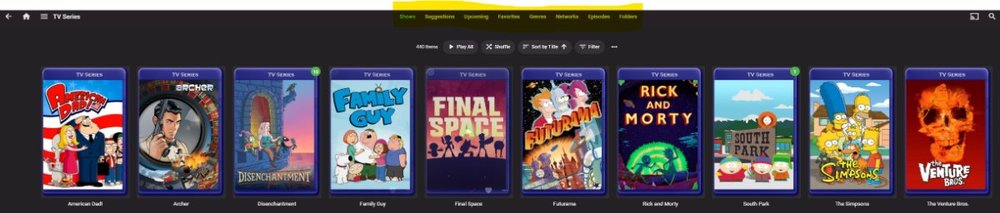
Greetings, I'd like to have the ability to turn off headers on a per user basis. I think this should be an administrative power accessible only in the admin panel --OR-- users should also be able to opt to turn if off in the user panel. The reason I think both options should exist is because the Admin may wish to opt, SPECIFICALLY to not allow users to see the folder structure. I've also found "episodes" to be problematic at times too. Users who have given access to this may also opt to not want to see it too. Additionally, while we are talking about header changes, could we toss in a section for Tags (which already exist) and/or Collections for Series? Thanks!
 1 point
 -
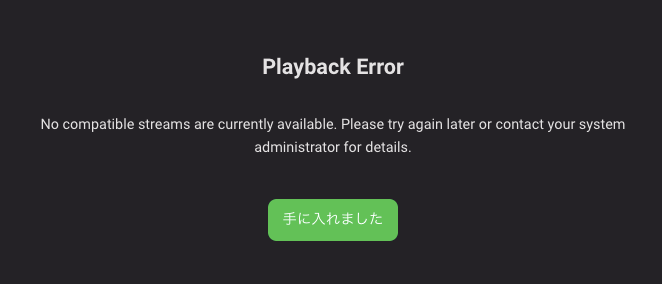
I get an error and all my local files (flac mp3 mkv mp4...) can't be played. (I have them stored on QNAP). Stream format can be played. (Web Radio) >> ThrottleBySegmentRequest: Initialize - TargetBufferSize: 120s 2021-06-20 13:17:40.267 Operating System: Linux version 5.4.0-73-generic (buildd@lgw01-amd64-038) (gcc version 7.5.0 (Ubuntu 7.5.0-3ubuntu1~18.04)) #82~18.04.1-Ubuntu SMP Fri Apr 16 15:10:02 U OS/Process: x64/x64 Emby Server version: 4.6.3.0 Operating system: Unix 5.4.0.73 Command Line: /opt/emby-server/system/EmbyServer.dll -programdata /var/lib/emby-server -ffdetect /opt/emby-server/bin/ffdetect -ffmpeg /opt/emby-server/bin/ffmpeg -ffprobe /opt/emby-server/bin/ffprobe -restartexitcode 3 -updatepackage emby-server-deb_{version}_amd64.deb App: Emby Web 4.6.3.0 Chrome macOS http://192.168.3.4:8096/emby/videos/4707882/hls1/main/0.ts?DeviceId=08cd3cfa-4474-4a42-80cb-d04e72265138&MediaSourceId=825ac255420758824eb430863e7552fc&PlaySessionId=7cb3546f1f22407686e142e81c2b0d08&api_key=4c8286cf41074b2ba27a46394d3a50cd&VideoCodec=h264&AudioCodec=mp3,aac&VideoBitrate=139616000&AudioBitrate=384000&AudioStreamIndex=1&TranscodingMaxAudioChannels=2&SegmentContainer=ts&MinSegments=2&BreakOnNonKeyFrames=True&ManifestSubtitles=vtt&h264-profile=high,main,baseline,constrainedbaseline,high10&h264-level=52&TranscodeReasons=AudioCodecNotSupported,DirectPlayError&allowVideoStreamCopy=false&allowAudioStreamCopy=false {"Protocol":"File","Id":"825ac255420758824eb430863e7552fc","Path":"smb://192.168.3.6/Movie/蜷肴爾蛛オ繝斐き繝√Η繧ヲ/蜷肴爾蛛オ繝斐き繝√Η繧ヲ_t00.mkv","Type":"Default","Container":"mkv","Size":36802452772,"Name":"_t00","IsRemote":false,"RunTimeTicks":62672610000,"SupportsTranscoding":true,"SupportsDirectStream":true,"SupportsDirectPlay":true,"IsInfiniteStream":false,"RequiresOpening":false,"RequiresClosing":false,"RequiresLooping":false,"SupportsProbing":false,"MediaStreams":[{"Codec":"h264","Language":"eng","TimeBase":"1/1000","CodecTimeBase":"1001/48000","VideoRange":"SDR","DisplayTitle":"1080p H264","DisplayLanguage":"English","NalLengthSize":"4","IsInterlaced":false,"IsAVC":true,"BitRate":46977399,"BitDepth":8,"RefFrames":1,"IsDefault":false,"IsForced":false,"Height":1080,"Width":1920,"AverageFrameRate":23.976025,"RealFrameRate":23.976025,"Profile":"High","Type":"Video","AspectRatio":"16:9","Index":0,"IsExternal":false,"IsTextSubtitleStream":false,"SupportsExternalStream":false,"Protocol":"File","PixelFormat":"yuv420p","Level":41,"IsAnamorphic":false},{"Codec":"dts","Language":"eng","TimeBase":"1/1000","CodecTimeBase":"1/48000","Title":"Surround 5.1","DisplayTitle":"English DTS-HD MA 5.1 (Default)","DisplayLanguage":"English","IsInterlaced":false,"ChannelLayout":"5.1","BitDepth":24,"Channels":6,"SampleRate":48000,"IsDefault":true,"IsForced":false,"Profile":"DTS-HD MA","Type":"Audio","Index":1,"IsExternal":false,"IsTextSubtitleStream":false,"SupportsExternalStream":false,"Protocol":"File"},{"Codec":"dts","Language":"eng","TimeBase":"1/1000","CodecTimeBase":"1/48000","Title":"Surround 5.1","DisplayTitle":"English DTS 5.1","DisplayLanguage":"English","IsInterlaced":false,"ChannelLayout":"5.1","BitRate":1536000,"Channels":6,"SampleRate":48000,"IsDefault":false,"IsForced":false,"Profile":"DTS","Type":"Audio","Index":2,"IsExternal":false,"IsTextSubtitleStream":false,"SupportsExternalStream":false,"Protocol":"File"},{"Codec":"dts","Language":"eng","TimeBase":"1/1000","CodecTimeBase":"1/48000","Title":"Stereo","DisplayTitle":"English DTS-HD MA stereo","DisplayLanguage":"English","IsInterlaced":false,"ChannelLayout":"stereo","BitDepth":16,"Channels":2,"SampleRate":48000,"IsDefault":false,"IsForced":false,"Profile":"DTS-HD MA","Type":"Audio","Index":3,"IsExternal":false,"IsTextSubtitleStream":false,"SupportsExternalStream":false,"Protocol":"File"},{"Codec":"dts","Language":"eng","TimeBase":"1/1000","CodecTimeBase":"1/48000","Title":"Stereo","DisplayTitle":"English DTS stereo","DisplayLanguage":"English","IsInterlaced":false,"ChannelLayout":"stereo","BitRate":768000,"Channels":2,"SampleRate":48000,"IsDefault":false,"IsForced":false,"Profile":"DTS","Type":"Audio","Index":4,"IsExternal":false,"IsTextSubtitleStream":false,"SupportsExternalStream":false,"Protocol":"File"},{"Codec":"dts","Language":"jpn","TimeBase":"1/1000","CodecTimeBase":"1/48000","Title":"Surround 5.1","DisplayTitle":"Japanese DTS-HD MA 5.1","DisplayLanguage":"Japanese","IsInterlaced":false,"ChannelLayout":"5.1","BitDepth":24,"Channels":6,"SampleRate":48000,"IsDefault":false,"IsForced":false,"Profile":"DTS-HD MA","Type":"Audio","Index":5,"IsExternal":false,"IsTextSubtitleStream":false,"SupportsExternalStream":false,"Protocol":"File"},{"Codec":"dts","Language":"jpn","TimeBase":"1/1000","CodecTimeBase":"1/48000","Title":"Surround 5.1","DisplayTitle":"Japanese DTS 5.1","DisplayLanguage":"Japanese","IsInterlaced":false,"ChannelLayout":"5.1","BitRate":1536000,"Channels":6,"SampleRate":48000,"IsDefault":false,"IsForced":false,"Profile":"DTS","Type":"Audio","Index":6,"IsExternal":false,"IsTextSubtitleStream":false,"SupportsExternalStream":false,"Protocol":"File"},{"Codec":"dts","Language":"jpn","TimeBase":"1/1000","CodecTimeBase":"1/48000","Title":"Stereo","DisplayTitle":"Japanese DTS-HD MA stereo","DisplayLanguage":"Japanese","IsInterlaced":false,"ChannelLayout":"stereo","BitDepth":16,"Channels":2,"SampleRate":48000,"IsDefault":false,"IsForced":false,"Profile":"DTS-HD MA","Type":"Audio","Index":7,"IsExternal":false,"IsTextSubtitleStream":false,"SupportsExternalStream":false,"Protocol":"File"},{"Codec":"dts","Language":"jpn","TimeBase":"1/1000","CodecTimeBase":"1/48000","Title":"Stereo","DisplayTitle":"Japanese DTS stereo","DisplayLanguage":"Japanese","IsInterlaced":false,"ChannelLayout":"stereo","BitRate":768000,"Channels":2,"SampleRate":48000,"IsDefault":false,"IsForced":false,"Profile":"DTS","Type":"Audio","Index":8,"IsExternal":false,"IsTextSubtitleStream":false,"SupportsExternalStream":false,"Protocol":"File"},{"Codec":"PGSSUB","Language":"jpn","TimeBase":"1/1000","CodecTimeBase":"0/1","DisplayTitle":"Japanese (PGSSUB)","DisplayLanguage":"Japanese","IsInterlaced":false,"IsDefault":false,"IsForced":false,"Type":"Subtitle","Index":9,"IsExternal":false,"IsTextSubtitleStream":false,"SupportsExternalStream":false,"Protocol":"File"},{"Codec":"PGSSUB","Language":"jpn","TimeBase":"1/1000","CodecTimeBase":"0/1","DisplayTitle":"Japanese (PGSSUB)","DisplayLanguage":"Japanese","IsInterlaced":false,"IsDefault":false,"IsForced":false,"Type":"Subtitle","Index":10,"IsExternal":false,"IsTextSubtitleStream":false,"SupportsExternalStream":false,"Protocol":"File"},{"Codec":"PGSSUB","Language":"jpn","TimeBase":"1/1000","CodecTimeBase":"0/1","DisplayTitle":"Japanese (PGSSUB)","DisplayLanguage":"Japanese","IsInterlaced":false,"IsDefault":false,"IsForced":false,"Type":"Subtitle","Index":11,"IsExternal":false,"IsTextSubtitleStream":false,"SupportsExternalStream":false,"Protocol":"File"}],"Formats":[],"Bitrate":46977399,"RequiredHttpHeaders":{},"ReadAtNativeFramerate":false} >>>>>> User policy for zabuton EnablePlaybackRemuxing: True EnableVideoPlaybackTranscoding: True EnableAudioPlaybackTranscoding: True >>>>>> Affected codecs Encoder libx264 Software Encoder Profiles: Baseline Profile (Level 6.2), Main Profile (Level 6.2), High Profile (Level 6.2), High 10 Profile (Level 6.2), High 4:2:2 Profile (Level 6.2), High 4:4:4 Predictive Profile (Level 6.2) >>>>>> FindVideoEncoder - Media: h264, UseHardwareCodecs: True, Mode: NoHardwareCodecs Info Checking: 'libx264 Software Encoder' Info Check successful - selecting 'libx264 Software Encoder' >>>>>> FindVideoDecoder - MediaType: h264, Mode: NoHardwareCodecs Info Checking: 'Automatic software decoder' Info Check successful - selecting 'Automatic software decoder' >>>>>> Processing Plan Info Name CanDoInHardware WillDoInHardware Reason Info Automatic software decoder >> False False Software Codec Info VideoInput >> False False Not a hardware decoder Info VideoOutput >> False False Not a hardware encoder Info libx264 Software Encoder >> False False Software Codec >>>>>> Projected Processing Formats Info Previous HW-Context Format SW-Format Size Next Info h264 >> - yuv420p yuv420p 1920x1080 >> /opt/emby-server/bin/ffmpeg -loglevel +timing -y -print_graphs_file "/var/lib/emby-server/logs/ffmpeg-transcode-b97b84f4-9a66-45c2-9abf-7fd229b010c9_1graph.txt" -copyts -start_at_zero -f matroska,webm -c:v:0 h264 -i "http://127.0.0.1:8096/Items/File?Id=smb%3A%2F%2F192.168.3.6%2FMovie%2F%E5%90%8D%E6%8E%A2%E5%81%B5%E3%83%94%E3%82%AB%E3%83%81%E3%83%A5%E3%82%A6%2F%E5%90%8D%E6%8E%A2%E5%81%B5%E3%83%94%E3%82%AB%E3%83%81%E3%83%A5%E3%82%A6_t00.mkv" -map 0:0 -map 0:1 -sn -c:v:0 libx264 -g:v:0 72 -maxrate:v:0 46977399 -bufsize:v:0 93954798 -sc_threshold:v:0 0 -keyint_min:v:0 72 -pix_fmt:v:0 yuv420p -preset:v:0 veryfast -profile:v:0 high -level:v:0 5.0 -x264opts:v:0 "subme=0:me_range=4:rc_lookahead=10:partitions=none" -crf:v:0 23 -c:a:0 libmp3lame -ab:a:0 192000 -ac:a:0 2 -metadata:s:a:0 language=eng -disposition:a:0 default -max_delay 5000000 -avoid_negative_ts disabled -f segment -map_metadata -1 -map_chapters -1 -segment_format mpegts -segment_list "/var/lib/emby-server/transcoding-temp/04A373.m3u8" -segment_list_type m3u8 -segment_time 3 -segment_start_number 0 -individual_header_trailer 0 -write_header_trailer 0 -segment_write_temp 1 "/var/lib/emby-server/transcoding-temp/04A373_%d.ts" 13:17:40.277 ffmpeg version 4.3.0-emby_2021_02_27 Copyright (c) 2000-2021 the FFmpeg developers and softworkz for Emby LLC 13:17:40.277 built with gcc 8.3.0 (crosstool-NG 1.24.0) 13:17:40.277 Execution Date: 2021-06-20 13:17:40 13:17:40.316 [http @ 0x6e0ec0] HTTP error 500 Internal Server Error 13:17:40.316 http://127.0.0.1:8096/Items/File?Id=smb%3A%2F%2F192.168.3.6%2FMovie%2F%E5%90%8D%E6%8E%A2%E5%81%B5%E3%83%94%E3%82%AB%E3%83%81%E3%83%A5%E3%82%A6%2F%E5%90%8D%E6%8E%A2%E5%81%B5%E3%83%94%E3%82%AB%E3%83%81%E3%83%A5%E3%82%A6_t00.mkv: Server returned 5XX Server Error reply 13:17:40.316
 1 point
 -
Ok thanks, i will look into it.1 point
-
There are not content type grouping options. But this would be a server option not a client option if there were.1 point
-
H264 Hi10p has no hardware decoding support, period (literally nothing will decode it in hardware, not even a Shield). You will need to re-encode the files to something that your TV can play natively, or force the server to transcode them on the fly. This is an old "bug" that has been around forever and it affects Emby/Plex/Jellyfin as Hi10P is only used for anime, by a very select few groups who haven't moved on to HEVC, and fixing it may not be possible.1 point
-
Asking for a copy protection scheme is very different than asking for the original file to be hidden from downloading.1 point
-
I've noticed that the option to refresh "Movie Collections" is missing. Collections are only able to get updated by manually refreshing the complete movie library. Auto-Update doesn't seem to work. Maybe has something to do with the integration of the Auto-Box plugin in Emby server since version 4.6.x.x Using: Embuary skin Emby next gen version 5.3.3 Emby server version 4.6.3.01 point
-
Not sure if intended but your Movie library is mixed content now also. The biggest difference will the header tabs. But here is the file hack to change the content type if you do not want to remove and re-add library.1 point
-
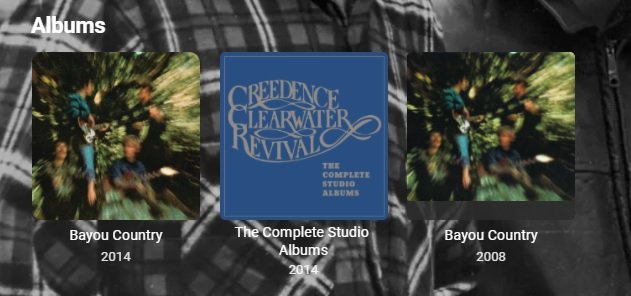
This will happen to all same name albumartist/albums, already identified in testing. Possible workarounds is musicbrainz has versions you would need to ensure each album has a different mbzalbumid. Not sure if this can be don't without mbzids. In my example there are 20 versions of the Bayou Country album. 71f9d4f7-a7eb-4c08-bf05-7d71dca91a38 a2b47f68-b249-46f1-94cb-f8df1bcf78a1
 1 point
 -
I came to this forum searching for a solution to the same problem - it worked fine day 1 but failed to connect the next day. I looked at the Emby server details running on my Windows 7 laptop and I found a link to troubleshooting connectivity. The source doc says to create a new firewall rule to open up 2 ports over TCP ("private" network option on rule). I did that and restarted the Emby server and can now connect with the same app on my LG tv - I did not have to reinstall either the server or the app. Other info: I have an LG NanoCell 90 Series LED 4K UHD TV. Emby server is running on my 64-bit Windows 7. Both are hard-wired ethernet connections. Auto port mapping selected upon installation. Emby server version 4.6.3. I hope this helps.1 point
-
As an update to anyone interested, i created a new blank nfs share and set emby to record there and it did start a recording so i am currently transferring all my data and will see if that works1 point
-
Hi, Most likely the best thing you could do is convert the 10 bit AVC to AVC 8bit or HEVC. AVC 10bit is not going to have great support on different hardware.1 point
-
You are right, because the answers were too general and I DID specifically ask about UNLOCK in one of my bulleted questions in answer to EBR< On 6/18/2021 at 6:00 PM, > GrimReaper76 had the answer that was the best one .In this case I still didn't understand that the unlock fee was to Amazon and not to Emby, and I didn't know what "small fee" meant either. In retrospect I have to thank all for your heartfelt help!!!! If I said anything that dissuaded you from providing help, I apologized. In any event I typically use EMBY to locally stream my Movies and TV shows on my ROKU fed TV. I really don't see the point of watching a Movie on my Android tiny screen. I rather read a Book! BTW: There is a similar topic on this forum that EBR answered. The answer to my question was quite clearly answered, but I hadn't found that topic at the time. Lets call this topic as CLOSED!! Thanks, Jim1 point
-
Mine is located here /volume1/@appstore/EmbyServer/bin/ffmpeg Also, I think this script converts ts to mkv, but you might need to modify paths, etc Post Processing Script - Working Example - Powershell - Tools and Utilities - Emby Community1 point
-
After updating to 1.9.0.1 the pie charts on the Breakdown screen appear to be okay (i.e. the pie charts on the left show number of times played and the ones on the right show total time played). But the information listed below the ones on the right is number of times played instead of play time.1 point
-
Otherwise, use the ip you add in developer mode, then browse to http://<ip address>/widgetlist.xml Then get the .zip path and download it1 point
-
Hey @rbjtech Many thanks for the thorough how-to! In the end it is just a handful of files so instead of scripting around, I ended up taking a screenshot of a preferred scene and uploading that manually But maybe @Luke can use this as a simple starting point to implement a "Shuffle thumbnail" button in the "Edit Image" menu by randomizing the -ss parameter timestamp Cheers, EmblemJD1 point
-
Great work @SamES thanks for keeping this old community built app on life support after the developers left1 point
-
@eatmykeyboard thanks for creating the feature request. I will let you know when I start developing on support for other library types. I might need you as a test server since I don't have any home made video's :-) @julianb and @Sammy I still didn't find any good way to detect duplicate movies. Some people convert them to a lower bit stream and then I don't have to flag it as duplicate for example. There are some more edge cases that needs to be analysed before I can enable the duplicate check again. I'm currently moving between two places but I'm planning to start working next week.1 point
-
At least VLC on Windows does a great job in playing *.iso Kind of pitty that it's not possible to take the code from VLC and use it with emby?1 point
-
Found the issue, for whatever reason "refresh guide data" flashed up grey and then went away it never showed the green progress bar. I reinstalled EMBY (Beta), cleared any browsing data on the off chance, and set it up, the green progress bar appeared. Now I have what I expected, result!1 point
-
I use xTeve for m3U tuner management, and you can incorporate multiple M3U files and XML guides, then sort which channels to include in the M3U it produces and channel numbering and order. I used a paid online service in the past that included guide data, and even though xTeve does not provide its own guide data, I far prefer xTefve and using Emby Guide Data.1 point
-
Cool. Glad it's working and you're welcome.1 point
-
Roku won't do anything as there is no problem with playback from legit services. They absolutely will not care about it being broken with "pirated" materials (as in most countries it is still illegal for you to break the copy protection on your bought media and make backups).1 point
-
No need to. Your analysis is accurate.1 point
-
Awesome, that doesn't seem to complicated at all. Everything seems to be working with it as it is set up. I think your mention of the ACLs on the OMV really helped, also with changing the GID for the emby group/user to match. The ms uid may not match, but its part of the emby group, so I think it is getting permissions that way? Either way, everything seems to be working correctly, you've been a great help.1 point
-
But you can host both apps on your server and install them both at the same time1 point
-
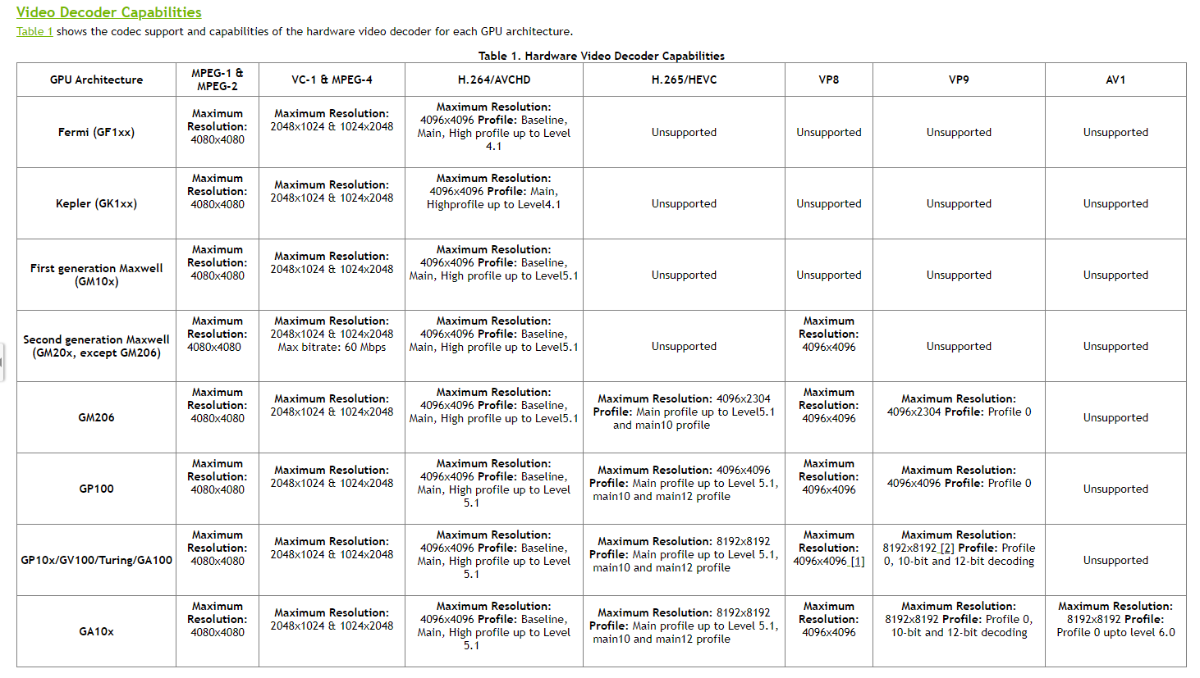
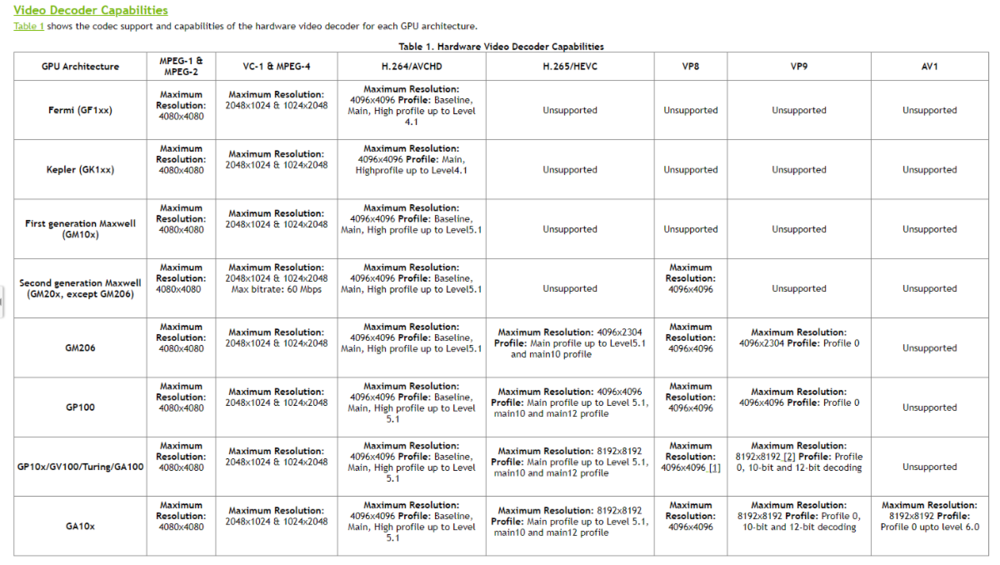
Well, HW acceleration is enabled, but it would seem your Turing 2080 does not support High 10 profile: >>>>>> Affected codecs Encoder NVENC NVIDIA GeForce RTX 2080 - H.264 (AVC) Adapter #0: 'NVIDIA GeForce RTX 2080' ComputeCapability: 7.5 Frame Sizes: max 4096x4096 - Width Alignment: 2 - Height Alignment: 2 Profiles: Baseline Profile (Level 6.2), Main Profile (Level 6.2), High Profile (Level 6.2), High 4:4:4 Predictive Profile (Level 6.2) Decoder NVDEC NVIDIA GeForce RTX 2080 - H.264 (AVC) Adapter #0: 'NVIDIA GeForce RTX 2080' ComputeCapability: 7.5 Frame Sizes: 48x16...4096x4096 - Width Alignment: 2 - Height Alignment: 2 Profiles: Constrained Baseline Profile (Level 6), Baseline Profile (Level 6), Main Profile (Level 6), High Profile (Level 6), Constrained High Profile (Level 6), Progressive High Profile (Level 6) >>>>>> FindVideoEncoder - Media: h264, UseHardwareCodecs: True, Mode: Automatic Info Checking: 'NVENC NVIDIA GeForce RTX 2080 - H.264 (AVC)' Info Check successful - selecting 'NVENC NVIDIA GeForce RTX 2080 - H.264 (AVC)' >>>>>> FindVideoDecoder - MediaType: h264, Mode: Automatic Info Checking: 'NVDEC NVIDIA GeForce RTX 2080 - H.264 (AVC)' NoMatch Codec does not support profile 'High 10 Profile' Info Decoder does not match Info Checking: 'DX11VA NVIDIA GeForce RTX 2080 - H.264 (AVC)' NoMatch Encoder is not compatible with 'D3d11va' decoders Info Checking: 'Automatic software decoder' Info Check successful - selecting 'Automatic software decoder' >>>>>> Processing Plan Info Name CanDoInHardware WillDoInHardware Reason Info Automatic software decoder >> False False Software Codec Info VideoInput >> False False Not a hardware decoder Info Scaling >> True True Info ColorConversion >> True True Info VideoOutput >> True True Hardware encoder Info NVENC NVIDIA GeForce RTX 2080 - H.264... >> True True Hardware Codec Anyway, @softworkz might revert on this one.
 1 point
 -
It looks like UID, ownership and permissions are handled for existing media though no ACLs. If you have multiple applications with different users creating media files and directories then I think the link below is what you need and the next step for you to be all set. You don't have to create a new group if the other users are already members of an existing one like ms or emby. https://support.emby.media/support/solutions/articles/44001962818-linux-unix-permissions1 point
-
I just tested "Auto Movie Version Grouping" without issue 4.6/4.7. Did you download download the one label 4.6.0.22 as it will not auto update?1 point
-
Sorry for the late response, I was on a business trip. ... The log file reported an issue which probably prevents a sync. I'll try to fix it, but not sure if it solved the problem. It's really strange that a repair sync doesn't fix the issue (as a workaround).1 point
-
A small update to our 4.6 release is currently rolling out to address a few minor issues that came up. Here are the highlights: Fix web app playback regressions of videos that successfully played in previous server version Fix sporadic cases of audio playback stopping in the web app Fix sporadic cases of subtitle burn in not working Update sort by date last episode added to not be affected by virtual items in the database Fix Synology dashboard showing Emby Server as stopped when it is still running Fix album items being added to playlist alphabetically Fix transcoding audio channels for converted files using the convert media feature You can learn about the original 4.6 release here: View the full article1 point
-
Hi. This is not an Emby limitation, it is a device one. It will support atmos tracks but only if the underlying audio is DD+ - not TrueHD. And it should support DV for single-layer profile 5 when direct played. Unfortunately, ripped media will virtually never meet those specifications. Media streamed from places like Netflix do.1 point
-
v2.2.9 is now available for 2012+ models : Release 2.2.9 · MediaBrowser/SamsungSmartTV (github.com) and hosted at 173.230.139.54 Samsung Orsay SmartTV (2011 - 2015) Community app Install Instructions - Samsung Smart TV - Emby Community1 point
-
Just FYI to anyone reading this, another work-around is to just create a custom widget and point it to the EmbyCon Widget NextUp node.1 point
-
+1 A way to send notifications via Emby apps would be great1 point
-
Tried the fix from http://www.gonnalearn.com/2018/10/04/your-administrator-has-blocked-this-application-because-it-potentially-poses-a-security-risk-to-your-computer/ ?1 point
-
Any chance for the launcher to support the https port? It doesn't seem to like the certificate used by my proxy. Thanks!1 point
-
Hi, if this were 2010 we might make this a high priority, but alas, it's 2021 and not many people are using .iso files anymore. So the reality is, while we never say never, this is unlikely to happen. I would suggest converting to mkv video files for the best possible experience.0 points