Leaderboard




Popular Content
Showing content with the highest reputation on 06/18/21 in Posts
-
According to Android Police. https://www.androidpolice.com/2021/06/17/nvidia-shield-tv-is-getting-a-google-tv-like-facelift/2 points
-
OK I see the issue, thanks.2 points
-
Ok I will create a postscript using CCEEXTRACTOR then FMMPEG to Remux to MKV and not use the EMBY built in conversion. VLC has no Problem playing CC in MKV.2 points
-
Gulp....If your PC is 10 years old, I would say it's too old.2 points
-
A small update to our 4.6 release is currently rolling out to address a few minor issues that came up. Here are the highlights: Fix web app playback regressions of videos that successfully played in previous server version Fix sporadic cases of audio playback stopping in the web app Fix sporadic cases of subtitle burn in not working Update sort by date last episode added to not be affected by virtual items in the database Fix Synology dashboard showing Emby Server as stopped when it is still running Fix album items being added to playlist alphabetically Fix transcoding audio channels for converted files using the convert media feature You can learn about the original 4.6 release here: View the full article2 points
-
I'm running Emby on a Synology DS416play, which can transcode H.264 4K, but not HEVC 4K. I believe many systems are similar in these capabilities. Currently, if a user tries to transcode a 4K HEVC video, my entire system will hang. It would be brilliant if it was possible to disable 4K HEVC transcoding, and only allow direct streams for this format.1 point
-
Please, create separate events for "Playback Events". I need an event to turn off the lights when I play/resume a movie/show and another to set a scene when I pause/stop a movie/show. Right now, I can only have a webhook to turn on/off the lights when there is a change in a "Playback Event". This may cause the opposite effect if I play a movie and the light was already turned off and viceversa. Please!!! Francisco1 point
-
Which user created the folder? The creator will typically be the owner. The ACLs will take care of the access by other users. I don't know if forcing ownership is an option, would have to look into that. I noticed the recursive option is disabled in your ACL screen shot above. I think that should be enabled to handle subdirectories and files.1 point
-
i can confirm that update to 4.6.3 fixed it for me thx1 point
-
Is your music library organization set to "Perfectly organized"?1 point
-
Are those ACLs defined on OMV (is that the OMV GUI)? If so then they WOULD work IF the emby and ms UID/GID were consistent between OMV and your VM. If you make the VM match OMV then the access should be effective immediately.1 point
-
Making changes on the OMV box looks like a no-go. Those look like core user/group I wouldn't touch. But check the UID of 1003 on the emby VM, it might be a good candidate. It's not absolutely necessary but it does make life easier when you have multiple hosts sharing storage and the file/directory ownership is consistent across machines. If you happen to chown or chgrp something you want predicable results. If you feel like tackling the change on the emby VM you can modify the emby UID and GID to 1003. Shutdown the emby server first. Then have to chown all the files owned by emby to match the new UID:GID. And would also have to modify users that are group members but not primary. I see the setgid on /media/ms/storage/emby which should take care of the group ownership for any new files/directories there.1 point
-
As per: Emby Premiere Feature Matrix : Emby After trial period ends, you can either Unlock app (one-time fee) or subscribe to Premiere to enable Full playback. Edit: As per same matrix, Roku app does not require same.1 point
-
It's been almost a day since I've upgraded back to 4.6.2 again and there has not been any issues so far. All is well now1 point
-
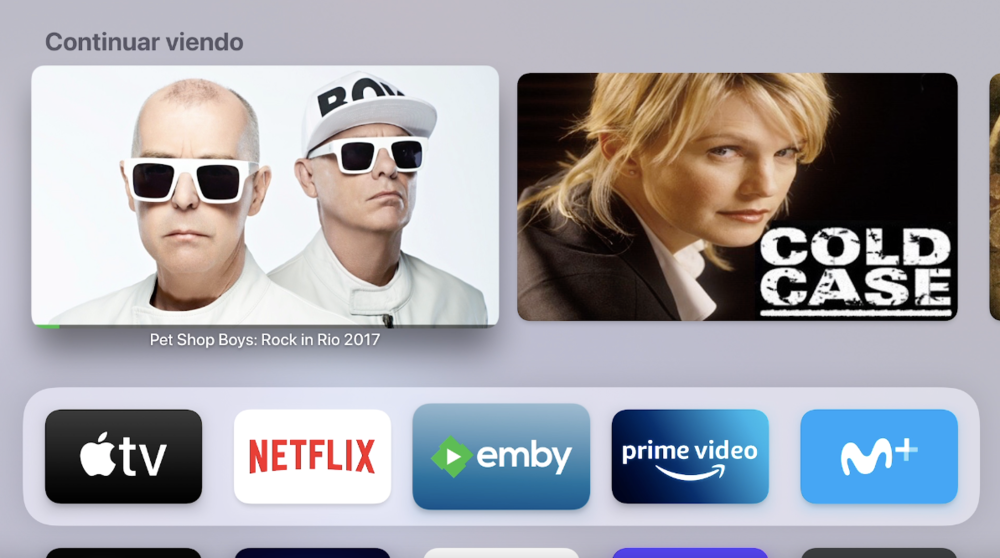
Fixed in the latest beta:
 1 point
 -
Excellent !!! Get that person a drink and piece of cake !!! lol Update .......... It works !!!!! Thank you to all that helped !!!!1 point
-
Right now you don't because we don't host through Synology (which is coming soon).1 point
-
We've only touched the surface in differences or what may be considered better. What I can say is we get a lot of people crossing over to Emby.:) Yes the 220+ has a Intel Celeron J4025 which we can use for Tone Mapping. If you still only have 2GB of memory I'd up it to 6 which will cost about $30 or so if you pickup the memory chip on Amazon (what I did).1 point
-
Scroll down a bit to "HDR Tone Mapping When Transcoding". Not only do we have it but it's about 3 to 4 times faster. So here is where I see some major difference. Plex will work remotely out of the box if this is something that's important to you. In some cases they use tunnels they provide when a server can't establish itself on the Internet by itself. For Plex pass users they get a 2Mb pipe while non plex pass users get a 1Mb pipe which can be quite limiting. Emby can use your router's UPnP ability to automatically setup port forwarding but if this doesn't work you need to setup port forwarding manually which isn't hard and we can even assist with a remote session if needed to setup. But once Emby is setup for remote use it's much easier to use with your own domain, with reverse proxies, with CDN Networks, etc. So Emby may be slightly harder to setup for remote access but once setup is typically faster and has way more options (Emby does in general for control). All users on an Emby server reside on your server not some central server. That means you can have a user named "Dad", "Mom", "Bob", "Sally" and not have to choose something like Bob1984 because "Bob" is already in use on someone's system who grabbed it first. All users are on your server where you control their access rights, their passwords, etc. In Emby you can have a lot of control over a user, from what libraries they have access to how much bandwidth they can use to time limits or even parental ratings to make viewing safer for kids.1 point
-
Emby Server supports hardware accelerated HDR tone mapping.1 point
-
I created a batch job that uses CCEXTRACTOR to create the srt then use FMMPEG to remux to MKV inserting the srt file in the MKV. CD /d "%~dp0" MOVE "%~f1" "%~dp1" if %ERRORLEVEL% NEQ 0 exit set filein="%~f1" if "%~x1" EQU ".ts" set fileout=%filein:.ts=.mkv% if "%~x1" EQU ".ts" set sortout=%filein:.ts=.srt% set ext=%~x1 DEL %fileout% ccextractorwinfull.exe "%~f1" ffmpeg -i %filein% -i %sortout% -c copy %fileout% SET FFMPEG=%ERRORLEVEL% IF %FFMPEG% EQU 0 DEL %filein% exit1 point
-
CCEXTRACTOR will do the job.1 point
-
I was thinking the same, maybe the computer doesn't have enough power to move Emby. Maybe performance has been gradually degrading over the years, it usually happens with Windows.1 point
-
Hi, yes we plan to support this in future updates. thanks.1 point
-
I should have said "doesn't have a hi-end audio system". You are correct it's fine for 5.1 or lower.1 point
-
Ok the 4.6.3 server release is also rolling out and includes a fix that may help with this.1 point
-
Hi there, yes subtitles are supported when converting. Let's look at an example: Thanks.1 point
-
Hi @leefarber, the native apple audio player doesn't support this unfortunately, so we're going to have to embed a custom audio player in order to do this. It is on our to do list for the app. Thanks for reporting.1 point
-
Hi. Only SRT subs will support the position and only external SRT when direct played can be adjusted for time.1 point
-
It's gonna be just like the Chromecast, I suspect. Knew this had to be coming. Note the subtext on that article... lol1 point
-
That should be fine. The CPU is 10th Gen which is good. WHile memory is pretty cheap you really won't need 32GB if just running the OS and Emby. 8 or 16GB would be plenty but there's something to be said for never running out of memory assuming you aren't running VMs or other things. If you do plan on running VMs I'd up the CPU to an i7. One of the best things you can do is get an M.2 1TB drive for the OS and Emby which will hold all your meta-data. Emby runs much faster from any type of SSD. I also use a 2nd SSD I use for temp transcoding and for all my DVR Recordings before I process them.1 point
-
Yes you're correct, I can reproduce this on 4.7.0.3 as well. @Luke1 point
-
Yeah, I think I'll only drop it for E and F series, assuming it fixes the issue of course.1 point
-
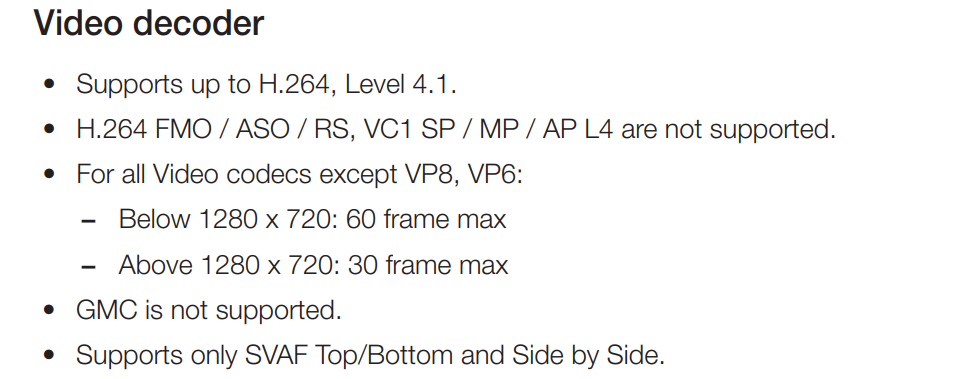
This is from the EH5300 manual. Can someone smarter than me please tell me the supported fps for 1280 x720
 1 point
 -
Does it play ok if you disable the subtitles - as that is currently the reason it is transcoding - it says so in the log and on your SFN screenshot ... Failing that, the MKV may be a dual layer DV rip and it needs to be a single layer. Can you provide details for the 'media info' screen on emby - does it have 2 VIDEO tracks or just one ? btw - what the streaming apps play will be irrelevant - as they will be using a lower DV profile and EAC3 Atmos (compressed) - this rip will be using a disk based DV profile and TrueHD Atmos (uncompressed audio). To further add - your Max bitrate on the Roku is 35Mbit (auto) - this is a 52Mbit/sec source file, so you need to get your Roku to accept more bandwidth - at least 70Mbit/sec to give you some headroom. Are you on wireless or wired (does the Roku have wired Ethernet?)1 point
-
Use MTR tool on linux or WinMTR on windows to check connection and possible pocket loss from your client to your server. This sounds just like pocket loss on some point towards server. MTR tool will display real time statistics for every point in communication.1 point
-
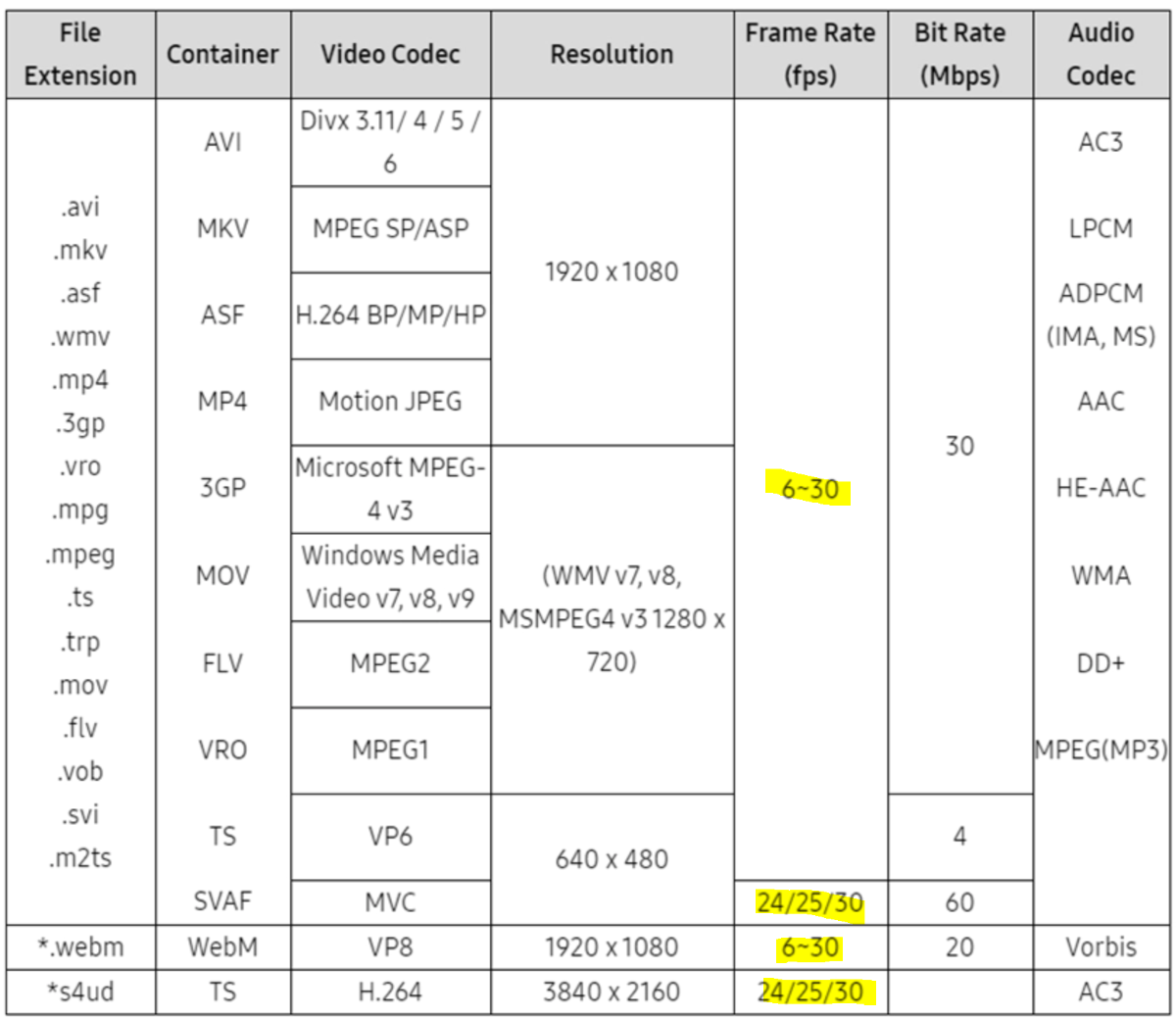
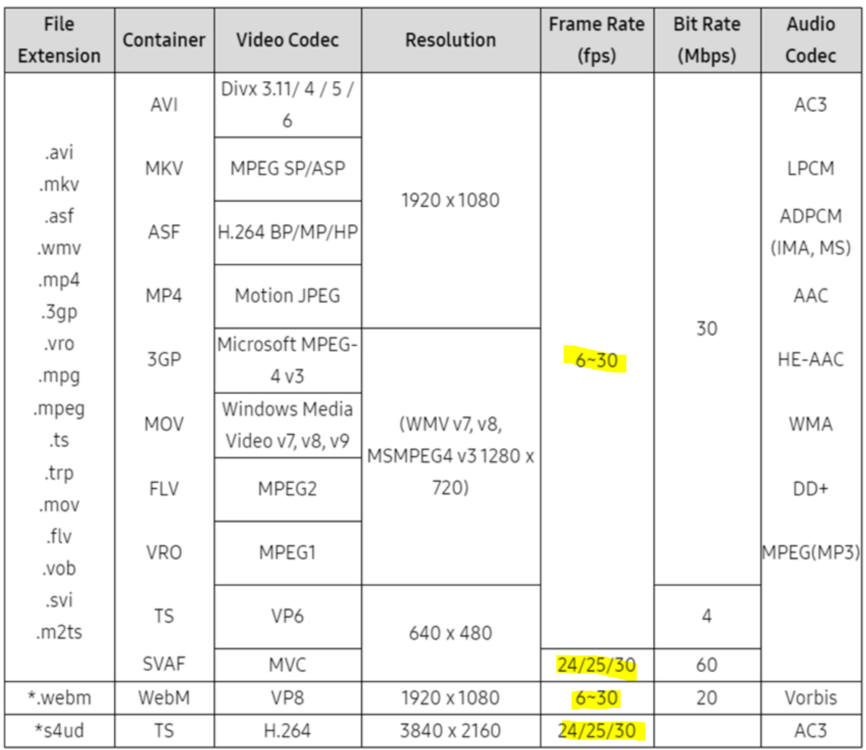
Based on 2013 specs, I expect 60fps is not supported What Media Files Are Supported In Most 2013 Smart TV? | Samsung Philippines @Sirbyteme, what model is your TV? If I give you another version to try, do you have a local web server that you can load it from? Alternatively I can give you another way to host an install it without having to install a server if you don't already have one running. @FrostByte do you remember the supported fps limit from your H series? If I limit this to 30fps in the legacy app, do you think this will cause a problem? If it can't do 60fps, then I doubt it can do 50fps. Looking at this article, I suspect 60fps was introduced in 2014 so depending on Sirbyteme's model, I might just limit it for < 2014 models Samsung's 2014 TV line-up - with prices - FlatpanelsHD
 1 point
 -
1 point
-
Merging Next Up and Continue Watching row has broken the Top Shelf. Before that, Continue Watching and Next Up were displayed as thumbs and latest media as posters. After merging, Continue watching are showed as thumbs, Next Up as thumbs cropped as posters and latest media as posters. The Apple TV app has not yet been aligned to version 4.6 of the server. Legacy Next up, is not supported yet. I guess by aligning the app with server 4.6, they will fix this. The development of the application for Apple TV is very slooooow.1 point
-
The nice thing about 720 or 1080 over 4K for sporting events is you don't "see" your home team suck as bad when they lose. LOL1 point
-
Yes that's doable. Thanks for the feedback.1 point
-
Hi, this would likely be because you're trying to playback HEVC on a client that can't play it back so the server has to transcode it to AVC. Likely you do not have GPU assisted transcoding so it's done on the CPU which makes it run hot and of course kick in the fans. What client are you currently using?1 point
-
I suck at marketing and you guy's have to figure out the bottom line, but with so many Plex users getting more and more fed up each day with bloatware, it might be a fun promotion, and a little public ribbing, to accept Lifetime Plex passes for a discount on an Emby Premiere lifetime subscription? What you do with all the Plex passes is anyone's guess, but maybe get them a ticket on Bezos' spaceship and send them as far away from this planet as possible? Just a thought....1 point
-
OK yes we can look at supporting chapters in audio files in future updates. thanks for the feedback.1 point
-
The situation is regrettable to say the least. The truth is that there are things that no longer stand on their own. And I am almost certain that things are being hidden. I feel sorry for @SamES and @Luke, but they have lost part of my trust. You have been going on since before January with the same story, you are asked for a little transparency and you are back to the same thing. You don't give details, you blame LG and that's it.Well, nope. Sincerely I begin to think that something else is going on here, and the truth, I was waiting to buy the premiere subscription with this update release, but I'm almost sure I'm going to stay with the desire.1 point
-
Editing post: Ignore the rest of this post below if all you care about is the group write permissions for the emby user. That can be fixed with either umask or ACLs. The stuff below is to make ownership of the files created by emby consistent between the server and OMV, so that files and directories will be seen as owned by emby on both sides. If you have emby:emby (user:group) on both hosts then life is easier if the UID and GID match across systems. You mentioned giving rwx permissions to emby on OMV? Did this create ACLs on the NFS export path? What does ls -l on the NFS path look like on each host? What about the ms user, is this one also on both hosts? I don't know what the OMV web control panel allows for user/group management so start with getting the user and group details. You want to find the UID and primary GID for the emby user on the emby server host then find the same on the OMV host. The goal is to change OMV to match the emby server but there's a chance the UID/GID could be in use by another user/group on OMV. Emby user UID and GID, check on both systems. $ id emby Check on OMV host to see if UID and GID are free. $ getent passwd <emby host UID> $ getent group <emby host GID> If one or the other are not free and are different from the emby host then stop. Will have to figure out if the conflict is major or minor and decide how to go forward.1 point
-
Right now, only entire shows can be Identified. This means that if TheMovieDB has the wrong episode order, you are out of luck. This does actually happen frequently, and it won't be changing any time soon. TMDB has a policy that they maintain the episodes in the order they originally aired. If that's not the order the creator intended, then you are out of luck and have to do everything manually. Also, sometimes episodes just don't get aired for political, cultural, or current events reasons. As far as those databases are concerned, those episodes don't exist. For an example, look at Cowboy Bebop, the order is quite different from the intended order seen on Wikipedia, because it aired out of order. I'm not away of any other databases with a policy to use the Blu-ray / DVD ordering. Therefore it seems that the best solution is to allow episodes to be manually identified as a specific episode. Identifying individual episodes automatically rather than series might even make a better default. For any show that everything matches up, you'd never know the difference, but it would make it much easier to fix broken things.1 point
-
Hi, i'm using this software on my main PC, but i do have a Jetson Nano that i'll be happy to use as a Media Server, but for now, it only does transcoding from the CPU, not the GPU, is there any plans to support this hardware?? (it have great response time, better that i expected, but the HW encoding is missing, and does not have a bad GPU)1 point
-
@Luke Since your last response to this topic, another one and a half year passed away and we get no information about a release or available beta for german yet. You have also not said whether and how you can be supported in this. This is very frustrating. This topic was opened in October 2017. Nothing happens in the last 3 and a half years!1 point
-
as an aside, i set my tagger to copy 'originalyear' tag to the standard year tag, so albums show in more meaningful order. (by original year).1 point