Leaderboard




Popular Content
Showing content with the highest reputation on 06/11/21 in Posts
-
No, it is simply interpreting bad inputs in a different (more proper) way.6 points
-
Asked and answered at least a dozen times in this thread. I'm done here for now as there is nothing more I can offer if suggestions aren't going to be heard or used to try and improve or fix the situation. If and when you decide you would actually like help and want to try what we suggest feel free to send me a PM and I'll help you. Otherwise I wish you best of luck, but I'm done as there is nothing more for me to offer.5 points
-
On the contrary, I've been following this thread with interest and have been incredibly impressed with the Emby Support folks' patience and politeness. As a former Plex user for many years, I'm very happy with my choice to switch to Emby due to both technical reasons and developer responsiveness.5 points
-
I've been away for a day, and there's too much of this thread to read every page of. But I noticed a mention of anime, and specifically of Monogatari. First off, there is no systematic problem with anime; name your files to match your metadata provider's expectations (TVDB in my case) and it will all be fine (trust me, I've got a lot, and I know). Except... Monogatari is royally messed up in TVDB (and the other providers, too). You have to do something manually to get a sensible display. I have described elsewhere how I got Monogatari the way I wanted - basically by doing what the OP of this thread did (but without NFO files). It worked OK in 4.5.4. However, every time I described what I did (to help others) I mentioned that it was unsupported, and might break. So comes 4.6, and guess what? - it broke. One aspect of it was quickly improved, but now to get what I want I have gone through the following process: (1) Let Emby use the TVDB names to get the metadata, but then put it together in TVDB's nonsensical manner; (2) Create the necessary Season folders, and move the files where I want them (but Emby still displays them "wrong"); (3) Go through the episodes editing the metadata to specify the season and episode numbers I want, and lock the metadata for each episode as it's changed. Result - the files still have the TVDB-matching names, but are now both contained and displayed in non-matching season folders, as I wanted, with no fuss because I locked them there. Describing that took less than twelve pages of posts, and should be as adaptable to the OP's requirements as to mine. Paul4 points
-
Fine, so stay with what you have and stop going on that it's broken. As previously stated, you are exploiting a bug in v4.5.4, which has been fixed in v4.6, so deal with it. The amount of time you have spent posting in this thread, you could have amended your metadata so that it conforms to v4.6. You're also wasting other people's time by not listening to them. Why not test in v4.6 what people have told you to do and then come back and report your results, with evidence. Have a good day.4 points
-
I feel for you @cayars, repeatedly going round in circles @gokuz You need to amend your metadata so that it will work with v4.6 and all versions going forward, as you are not going to get the fix you want, as there is nothing to fix. You was fortunate to exploit a bug that has been in Emby for many versions, which Luke has now fixed in v4.6, so you need to fall in line with the new standard. There is no point continually bleating on about it needing fixing, as there is nothing to fix. I have not tested with v4.5.4 and will not, but having read all 10 pages of this thread so far, it's clear where the problem is. Have a good day.4 points
-
It's not the blender's fault you're trying to put rocks in it.3 points
-
Ya know how you're constantly telling people they aren't the developer, they don't speak for the developer, and they should shut up about whether or not it's broken because that call is up to the developer? EBR is one of the developers. He just told you they don't consider it broken. You've got your answer. You've got directions for how to fix it and an offer from the tech support team to implement it for you. Your call on what to do, but you've been answered.3 points
-
No not at all and that shows us you haven't read our guides or listened to what's been said many times. Can you go back and re-read the thead from the beginning, concentrating on solutions given, not what you think should work? Put yourself in the place of listening to the solutions given to you, not how you think it should work or what version of the server is used. Completely remove any thought of version of software used and just concentrate on how the media should be setup.3 points
-
We've all taken solving your issue more seriously than you have.2 points
-
After some time the artist images and album covers have appeared. The database needed time for navel gazing, contemplating the universe, going out for a snack, walking the dog, etc. The library looks much more friendly with images! Thanks!2 points
-
Search and replace with Notepad++.2 points
-
Yes for example you are adding Season 2 episodes (with season 2 numbering identification inside the nfo) into Season 1 folder and expecting emby to show it on Season 1, so you want emby to ignore the indication of the nfo file, and show the episode by folder structure when they are mismatched, or am I wrong?2 points
-
What I said is what I use on every single version on emby, if you bulk rename your episodes in accordance to tvdb aired order and then scrape them with tmm or emby you will get everything matching. Is the file structure matches the metadata there is no conflict, emby just reads thr nfos there is no mystic there.2 points
-
Thanks both for your input, those are both valid workarounds - but workarounds nonetheless. But we're not talking about some niche-case usage here nor breaking existing logic but reading a properly formatted Kodi nfo, conforming to all standards. And it is my belief that no MacGyver-ing should be needed there. And I don't want to pull "Team Orange" argument as an example how it should be done.2 points
-
Click your user icon and go to Playback and scroll down to the Chromecast streaming quality. These user playback settings are a per device setting.2 points
-
I think this is the key line here. It makes it easier to pirate, and (imo) crosses the line to actively supporting piracy. If, like myself, you use Emby with personal rips and toss the DVDs in the attic (which is what officially speaking you're meant to do), chances are that our md5 hashes will not match. Now, sure, in theory if we both ripped Stargate Atlantis S01e01&2 with the identical settings in MakeMKV and Handbrake, then they might match. But realistically speaking there'd be hundreds (thousands) of potential md5 hashes as everyone has their own setting combos/ app versions/ etc when they rip). Some people would statistically have the same file, most wouldn't. So there'd have to be a huge hashtable somewhere centralised, which wouldn't necessarily be quicker to search, or easy to transfer, and would force you to be connected to the 'net. Processing files locally may take a little longer, but it's a reliable local solution. The only place it would be guaranteed to be quicker is on episodes that were, *ahem*, acquired off the internet. And if you're creating a feature that just improves the life for pirates (vs. just scanning), then that's saying Emby is a place for pirates. I quite like emby, I'd rather they didn't get hit by lawyers. tldr; supports piracy, doesn't offer legit advantages, imo.2 points
-
Version 4.6.2.0 = blood sweat & tears Great work emby team!!2 points
-
How to fix this so it works moving forward. 1) Create a working folder outside of your Library called "Detective Conan" 2) Copy all media files from your current setup to this new "Detective Conan" folder so all episodes are in this folder 3) Optionally, verify file names are correct using a tool such as BulkRenamer or Filebot. This new folder now will only contain media files such as mp4 or mkv with no graphics, no NFO files and no season info so there is nothing to contradict the file naming. Remove the old version of Detective Conan you have and rescan the library to remove all references to it. Move this new Detective Conan folder to your TV library set to write NFO files. Rescan library. Once scanned in all graphics and season layout will match what you see here https://thetvdb.com/series/detective-conan Now go into the meta-data manager and adjust your season/episode positions to be what you want them to be. https://emby.media/support/articles/Metadata-manager.html Done You can then pick up that folder and copy it to another machine, install 4.5, 4.6 or any newer version of Emby and it will be read in correctly and use the season/episode position you give it. There is no conflicting information because it's all been removed. If at that point it doesn't load correctly in a new version you have a BUG that will be fixed because you followed our naming guides, you used our tools to edit the data and Emby wrote the correct NFO files. It really is as simple as that to bulletproof your setup and make sure it works in all versions.2 points
-
If we can't test something that is setup valid and break it there is nothing to fix. Why would we ever want to test a file names S02E01 put in a Season 1 folder with an NFO that's not written correctly that has multiple season and multiple episodes written to it? The NFO has both a season 2 and a season -1 and an Episode 1 and -1. What kind of test is that? It doesn't matter if it ever worked in any version prior because it's invalid info that's contradicting. The proper test is to put S02E01 either in the series folder if no season folders are used or in Season 2. The NFO file should not have redundant season/episode data so only the pure "season" and "episode" are used and would be set to 2 and 1 respectfully. then After Emby has read in information from the meta-data providers correctly you test changing the season & episode position using the tools Emby gives you which is the meta-data editor. You then change the season/episode numbers to reposition them where you want them to be and check to see if Emby displays them in the new edited position. As you edit the meta-data Emby will update the NFO file as well. then Once everything at this point is still working correctly and displaying the changes correctly you move the series out of the library scan to remove all reference and put them back followed by a scan and it should go right back to where the user edited it. OR You copy this series to a brand new installation and reload a library and it should load this series the same way you edited it to appear. What I just described from "What kind of test is that?" above is how I tested this and it works for me in both 4.5 to the present 4.7.0.2 version. The reason I never had a problem is because I followed the naming guide which means: 1) don't use any season folders but put all series episodes in this parent series folder. 2) do use season folders, but put all episodes (as per tvdb) in the folder they show in which means all S01Exx goes into Season 1, all S02Exx go into Season 2, all S03E03 go into Season 3 folder, etc 3) Edit season/episode using the meta-data editor.2 points
-
I absolutely have not put an episode with a filename and nfo that says Season 2 in a folder that says Season 1 in any version of Emby and have absolutely zero plans to do something that nonsensical.2 points
-
A small update to our 4.6 release is currently rolling out to address a few minor issues that came up. Here are the highlights: Fix incorrect season 0 content showing in series next up list Fix queries by album ids not respecting user library access Fix sessions getting dropped from active devices display when the server admin has restricted their own remote control access of other devices Fix detail screen for light themes Fix legacy next up not respecting library access Fix incorrect horizontal scroll position after using metadata editor Fix year not showing in search results Fix special episode sorting Fix sporadic duplicated backdrop image Improve support for following redirects when downloading xmltv Improve release date sorting You can learn about the original 4.6 release here: View the full article2 points
-
Request No. 1: Implement Metascore rating for movies, from Metacritic.com, in Emby. OMDb api provides this information. Request No. 2: Also, fix an option in settings to enable or disable a ratings source according to the user's choice.1 point
-
I'm running Emby on a Synology DS416play, which can transcode H.264 4K, but not HEVC 4K. I believe many systems are similar in these capabilities. Currently, if a user tries to transcode a 4K HEVC video, my entire system will hang. It would be brilliant if it was possible to disable 4K HEVC transcoding, and only allow direct streams for this format.1 point
-
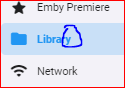
@cayars now don't go confusing me again At first I thought you were saying from a library, but now I think you mean the Library page. This leads me to a logical bug in the admin area. This should be "Libraries", as it contains more than one library and it itself is not a library (as Emby understand libraries).
 1 point
 -
Thank you, I was looking for a command line low resource fast solution So if anyone is interested this is the command (linux) find . -name *.nfo -exec sed -i 's/rottenTomatoes/tomatometerallcritics/g' {} \; It scans recursively on every movie folder with .nfo files search for rottenTomatoes entry and replace it with tomatometerallcritics1 point
-
Yea, Notepad++ is great for search and replace across files!!!1 point
-
Awesome. I was just going to show my options vs synology shares but you got it figured out with @rbjtech's help.1 point
-
Hi, what is a WISP?1 point
-
Wait, this is fixing nfo all over again which I'd like to avoid. I'll stick with 4.5.4.0 until devs fixes this.1 point
-
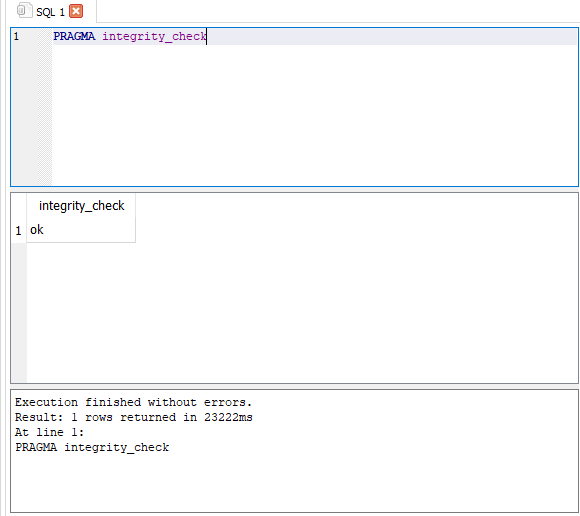
Thank you, looks like the DB is good, so hopefully the file removal fixed it. Thank you for your help!
 1 point
 -
4.6 is not broken - it has broken your expectations. The behaviour of 4.5 with unsupported input suited you; the behaviour of 4.6 with unsupported input does not suit you. What you want was never supported, and now you see what that means. Is finding things using the TVDB seasons so hard? If, for instance, what you are missing is the year, or a story arc name, it is not a big job to edit the season metadata to add those to the title. Paul1 point
-
Finally updated today. Confirmed this is resolved. Many thanks!1 point
-
You want emby to ignore nfo files season numbering, when the episodes are on a different season folder, because in old versions it worked this way. But you dont want emby to ignore the rest of metadata content, just ignore the season numbering inside the nfo files when the files are in different season folders. For example you want to have a custom file distribution with season 2 episodes inside season 1 folder, but as emby reads the nfo content to distribute the episodes between seasons, now is ignoring your distribution and using the indication of the nfo files. So you want to have a mismatch with nfo contents and file naming and distribution between folders and still wanting that emby ignores the nfo contents when this happens. The nfo metadata and conventions arent invented by emby you know. Take a short read please https://kodi.wiki/view/Naming_video_files/TV_shows1 point
-
Hi, I resolved everything and I was able to migrate data to a new installation. What I would suggest is to copy all the data in "emby-server"1 point
-
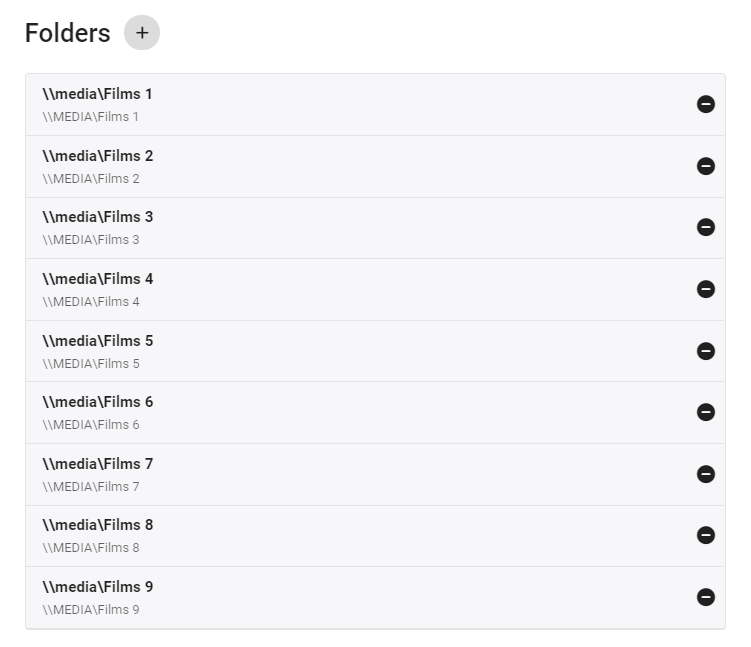
I believe you are confusing local storage with network shares - the physical drive/volume/disk/partition (whatever you want to call it) is not used on a UNC share name - you should just need the machine name and the share name So as an example on my system (a windows box), all my storage is directly attached - so I could use drive letters (disks/volumes) but I use the UNC 'share' name instead to make it portable - the 'grey' reference underneath - is the same UNC share but this time as an 'optional' item - note the CAPS file server name. THIS is what my Shield uses to get a direct File playback. I hope this helps ..
 1 point
 -
Honestly, I'm not crazy about this. When you start "highlighting" multiple different types of posts they cease to become a highlight and you're never exactly sure why they are different.1 point
-
This project is no longer active from my end, because I got tired of changes in emby breaking the code, but if someone makes a PR that gets it working and tests it properly, I will keep on updating it.1 point
-
It was a sellers' market but then inventory just dried up making it even harder to buy. We're being picky and can wait for the right house at the right price which I think may happen soon as more houses are on the market longer now and more are not going for huge amounts over asking price. It's starting to get better now because people can spend their money on things other than housing.. like traveling.1 point
-
Before they start with something complex like a central db for this, I would already be happy if this would be implemented at all. Assuming that many of the servers are running 24/7 does it really matter if it would a day or two or even a week? We've been waiting for this now for at least a year, so I don't think it really would. Maybe this is the "big thing" for 4.7 like tone mapping was for 4.6...1 point
-
You could always get logos at https://www.lyngsat-logo.com/ You can add the tag in m3u8 file with the logo tag #EXTINF:-1, Discovery Channel tvg-logo="https://www.lyngsat-logo.com/logo/tv/dd/discovery-channel-east-us.png" I added my own logos problem solved.1 point
-
I would like the next version to be developed to be able to hide/show libraries for all members. Because I don't want to go into one member at a time because my list has many members.1 point
-
Again and test what? You want me to setup a file named S02E01, put it in season 1, have a corresponding NFO file that also says Season 2 Episode 1 as well as season -1 and episode -1 and verify it loads in season 1? Why? It's ridiculous to expect any outcome at all. It could load in -1, 1 or 2 and any of those choices could be considered correct because you have some information saying that. So you essentially want me to intentionally to break things about 4 different ways to prove 4.6 handles it different than 4.5? I'm sure it does. I'm also sure if you install a brand new 4.5 install on another machine and copy that folder over and scan it in, you have a high likely hood of it being different as well. But even that proves nothing because except maybe the same version interpreted the mass of conflicting information the same way incorrectly. We have been over this time and time again. Regardless of what it did on your system this isn't something we are going to support or even attempt to support. It's a wall of conflicting information full of ambiguity. Fix YOUR data. Spend the 10 to 15 minutes it takes to fix it and be done with it. The problem in not in 4.5, 4.6 or any Emby version but in the setup of the series. Why can't you just cleanup your files, do things proper as has been said over the last 10 pages, in our KB articles, by devs, moderators, tech support and every user who has commented? Why do you insist on trying to use data that is around 4 way conflicting and wrong? It was a fluke if it ever worked. It didn't work by intention or by design. It surely won't be supported on purpose no matter how many times we go in circles here. It's just a wrong setup that is easy to correct The issue is the data itself. Clean up your data with the 10 to 15 minutes it will take. Clean up YOUR files so they make sense and don't have conflicting information and the world be right again for you regardless of Emby Server version you run. Maybe we need to add a fix to upcoming server versions so when conflicting meta-data is encountered during a scan the media is rejected and logged with an explanation. This way the user must fix the problem before the media will load.1 point
-
PM'd user steps to activate user account as admin to fix inaccessible previous admin account.1 point
-
There's one thing I learned from this mess of a post: use 'e-mail once a week' when selecting a following option! My e-mail sucked up my monthly allowance of data!1 point
-
I applaud everyone who wants to help but honestly, you're all just repeating yourselves because the person you're talking to is not listening to you. The solution was identified in the first handful of posts. Neither the suggested solutions nor the poster's refusal to listen to the solutions has changed in any way since the start of the thread. At this point I'd say just lock it. For future people reviewing this thread who do not like how TVDB and THEMOVIEDB handle anime, you have a couple solutions: Suck it up and live with their organization. Name your files to match what they've done, put them in a TV library, let Emby scrape the data, and just leave it be. Use their data as a starting point and then edit it. Name your files to match what they've done, put them in a TV library, let Emby scrape the data, and then use the Emby metadata editor to change anything you don't like. You can move things around to different seasons, change titles, whatever. Just do it in the metadata editor and be sure to save your metadata locally and back it up so you can't lose it. Don't use the metadata providers at all and do it all by hand. Name your files however you want. Either put them in a TV library with all metadata providers disabled or put them in a home video library. Enter your metadata by hand and make sure you save it locally. Back it up so you can't lose it. That's it. That's what you have to choose from unless 'do it contrary to the design of Emby and be perptually unhappy' counts as an option 4. You could also consider creating the metadata with third party tools but, as has been highlighted in this thread, those files may be full of garbage data that Emby can't predictably handle. Better to stick with the Emby editor if Emby is the tool that's going to actually play this stuff back.1 point
-
You can use emby kodi beta repository from here: http://kodi.emby.tv/ 5.3.2 will be the next stable version.1 point
-
And 4.6.x.x, 4.7.x.x, 5.x, 6.x etc will all work going forward if you fix your library. Stop trying to argue that your unsupported library should for some reason be supported. The amount of effort you are spending to argue this, you could have fixed it already1 point
-
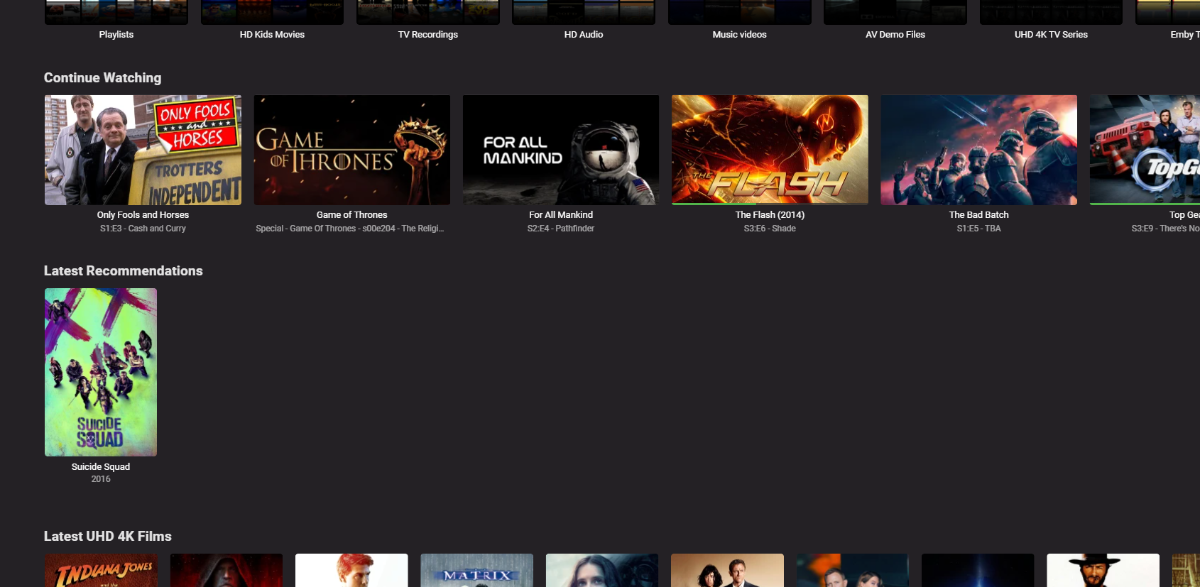
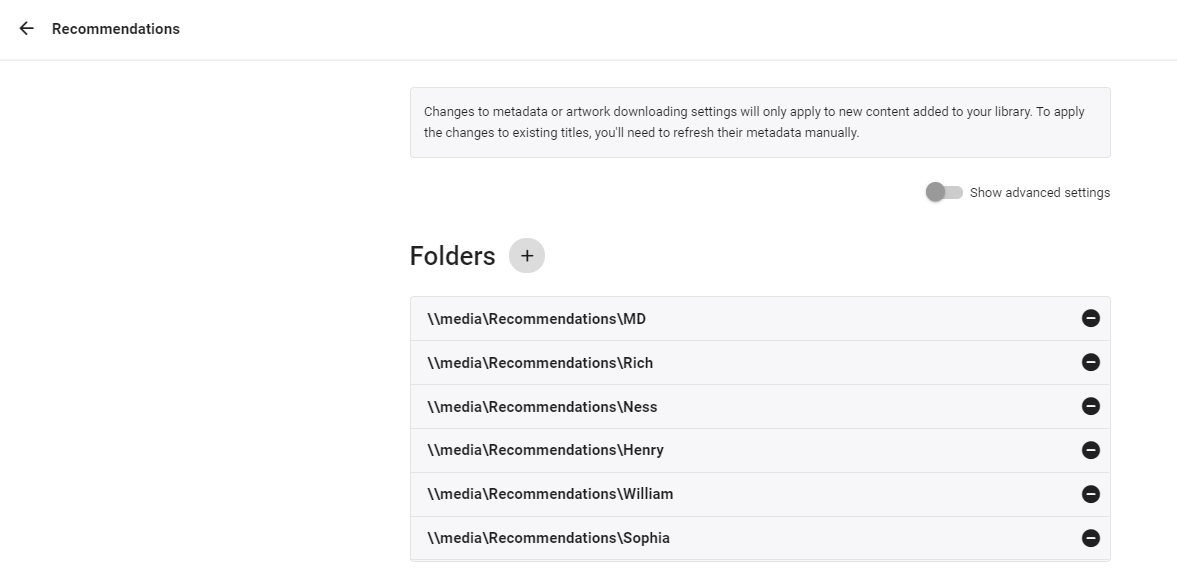
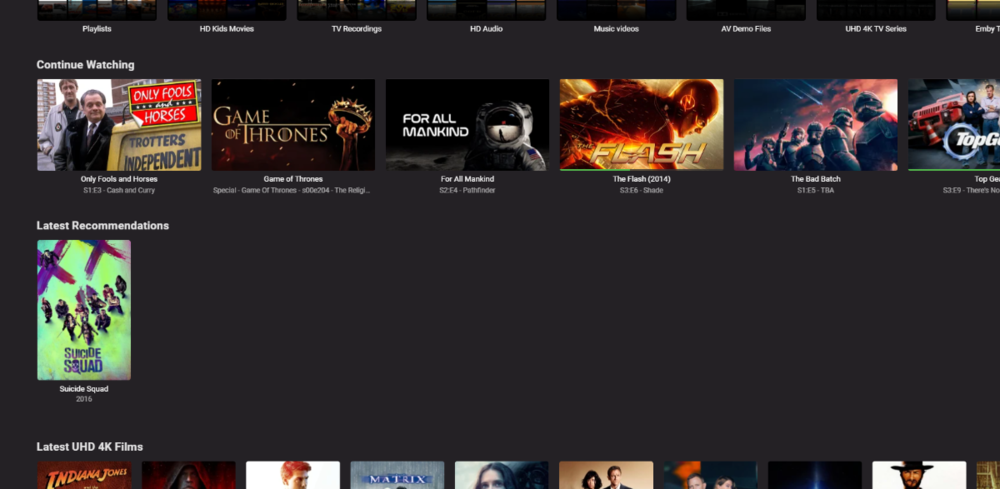
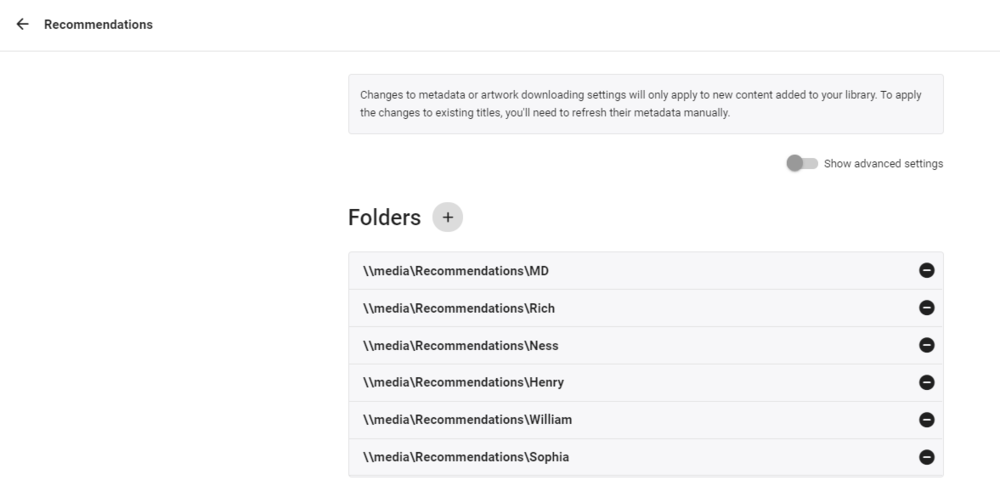
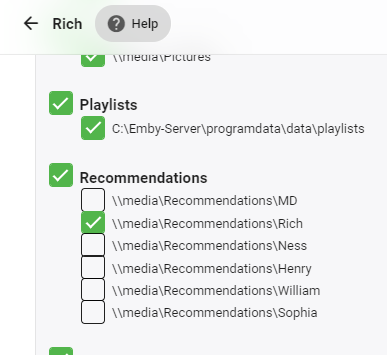
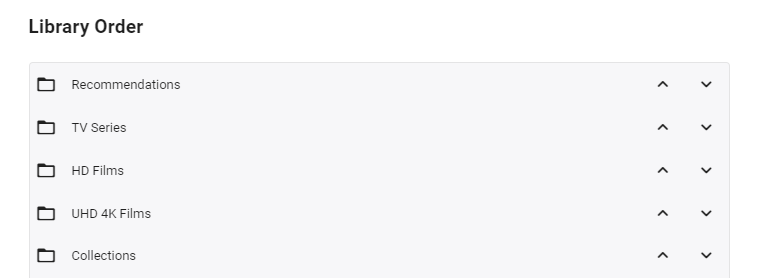
So I've been working on a solution to this in the background as a few weeks ago, my parents asked for recommendations as they say there is too much to choose from haha. Currently my solution is manually but it's working ok - I'm now trying to automate it by reading a defined playlist and building the recommendations from that, as currently there is no way to tag a 'recommendation'. As of now - it uses a 'Recommended' library, with sub folders / permissions - one folder per user. In these folders are strm links to the actual recommendation - be be a movie or tv series. Because the 'Recommended; library acts just like any other library on the 'latest' view - you simply need to put 'Recommended' to the top of the list for each user - and up pops the Recommendations for that user (and only that user).. resulting in ... The strm files are just links to the real video files (+ copies of metadata) - each user having their own folder in the library so they can be individually permissioned .. .. permission for each 'recommendation' folder is configured for each user. There is nothing to stop you having 'Generic' recommendations - simply add to the permissions - or if all are ticked, the user will see all the recommendations across all users .. As the user watches an item in the 'Recommendations' list - then it drops off the list (as it's a played item) which is neat - and of course also tags it as played in the main library. As I said - this is all great, but it's manual as I need to create the STRM files (which is easy enough, but it's not possible to do this via the emby GUI). So my thoughts are to read a predefined users recommend playlist xml file - which can be added to by simply selecting the playlist and 'add' - and use that to auto generate the strm links in that users recommended library. This should be easy enough to do, I just haven't got around to it yet. So it's not perfect by any means - and is a workaround until it's done properly in the db - but instead of tagging a film as 'recommended to user X' - you simply add that film to their 'recommended playlist' instead (or multiple recommended playslists) and it will then show in their 'Latest Recommendation' (library) list following the next schedule. I'll keep you updated on progress - likely in the 'tools' section of the forum.
 1 point
 -
this has been requested by myself many years ago and again recently. ebr just ignored the last request. for myself its not just virtual tv, i want to be able to bring up the guide whatever i'm watching, but most often when i am watching recorded tv and i see a trailer for something thats on in future. i want to schedule the recording from the guide but there is no way to bring it up to do that. lets see if he responds this time1 point