Leaderboard




Popular Content
Showing content with the highest reputation on 06/06/21 in Posts
-
It is indeed! Looking forward to seeing this feature implemented, @Luke!2 points
-
HI, it's planned for a future release. Thanks.2 points
-
I got them permissions sorted now If i add a new movie its fine, its just random films i add, ill keep an eye on it and report back if it happens again. Thanks for all your time mate2 points
-
Have you confirmed in the logs that your licences have taken? When you run up the task the licence is checked and confirms if you're licenced or not1 point
-
Yes I did thanks!1 point
-
You have three options with TV series. Put it in a TV library, enable metadata providers for that library in EMBY, and match the episode naming and numbering to your chosen metadata providers. Put it in a TV library, disable all metadata providers for the library, and organize things how you like but all metadata will be entered manually. Put it in a home video library and all metadata will be entered manually. It sounds like you're mixing 1 and 2. That won't work. It never should have in the first place.1 point
-
That sounds more like 4.5 was broke than 4.6 not handling this correctly.1 point
-
Thanks I knew it was something stupid and obvious.1 point
-
Yes, Thank you so much. Woking now!1 point
-
The 4.6 release includes support for filtering multiple years.1 point
-
Hi. No, that is not correct. Our beta is just another app but it is only available by direct link. That link can be found on our website.1 point
-
Down - no it won't be good, it will be very bad I had a Plex license long before they merged to a single view perspective for multiple servers. To me it was their biggest mistake. They dumped features like play lists and watch later to do this. The home screen is an absolute mess because you had to choose a server and a library as a view line so if you just have two servers you double the rows to scroll to to find new content. Or you need to click three levels of menus to check a server. The one benefit, and this is the only thing I would recommend emby do is to provide a search across servers the user has access to. When a user selects a movie their context should be switched to that server. Another reason this doesn't work well is playlists ( or watch later). Currently a playlist is attached to a server, if you tried to do this globally the only feasible way would be to have emby servers to do it. That would add up... Having a list sync across all the servers the user has access to could be a possible way around this, but as with everything it has potential for synchronization issues I have gotten to the point where I am migrating my media from Plex to Emby, please don't make me regret this. Ty Nz1 point
-
Gotcha. We don't have the ability to install betas of Roku apps unless we've enabled development on our particular device, correct? I develop UC software...so I'm well acquainted with the joys of bot mitigation. I just didn't realize reputation on the forum counted in the behavior of the search here. Since I'm still new to the forum, I guess the search is gonna hate on me for a while. Sucks for new users to the platform, but I totally understand the need. TheWebMachine has been my alias for over 2 decades.1 point
-
sorry for the late reply, yes, i had to delete the image from every channel then they was refreshed to the correct ones! looks ace now1 point
-
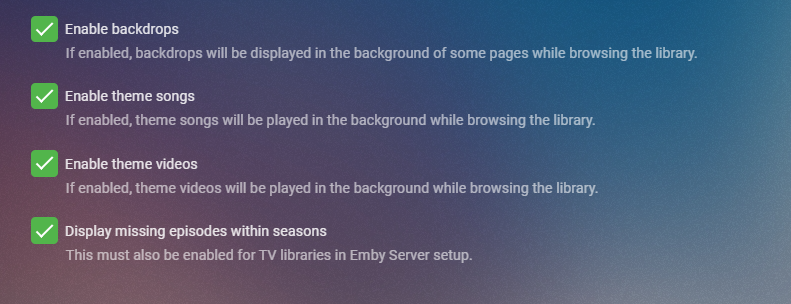
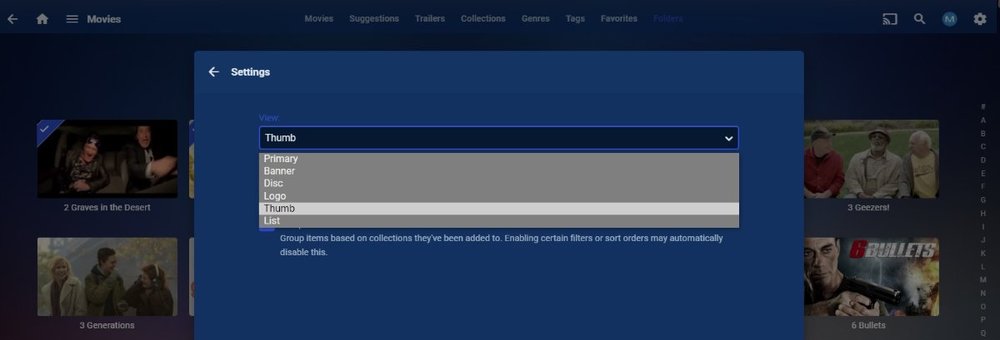
From the display menu check out these options on each client
 1 point
 -
I know it's an old post but I found a solution to have the good path of folders whatever the drive letter is. I use a simple bath file placed at root of the usb key with "Subst R: ." that mount virtually the drive at R letter and then launch Emby server with "start R:\system\embyserver.exe". The media path is, with that, always the same. With batch to exe you can pimp this script with Emby icon! Advantage of Subst command : it works in user mod (for non admin!) Emby.bat1 point
-
Album Artist should have a single value. You can put multiple values in the Artist and Artists tags, though I only use the former. The Album Artist value would depend on what album the track was ripped from. For example, if it was the Three Musketeers soundtrack I'd put Original Soundtrack in that tag as that's how I group my soundtracks. Others would put Various Artists as it's a compilation or Michael Kamen as that's what Picard shows for the album since he appears to have written all the other tracks.1 point
-
Hi, if you edit the metadata of the collection you can choose between sort title and release date.1 point
-
Thank you for reporting the issue on your Roku. Reference: Fix #1121: [GeneralMetadata] getProgramDisplayTime - respect local time This will be fixed in the next Beta for Roku. As far as the search function these forums are abused by bots. To stem the abuse you must be logged into the forums to search without crippling limits. If you search as a guest you may get disrespected because the forum does not know who you are. Once you identify yourself (..and grow a post count) the problem with search should solve itself.1 point
-
@cayars Thank you very much for your considerations. In fact, the DVB tuners (AVM Fritz!Box 6490 and AVM Fritz!Box 6591) also provide M3U files so that I can feed them directly into Emby without using NextPVR for Live TV access in Emby. However, the disadvantage is that Emby cannot process the embedded EPG information. So for the Live TV access, I ended up by directly accessing the RTSP streams (M3U file) from the DVB tuners and adding an xmltv service for retrieving EPG independent from the DVB tuners. Clearly, as my DVB tuners are located in different networks connected via a VPN, I encounter some quality issues when watching a stream from a distant DVB tuner. Therefore, I prefer to have local NextPVR instances, each beside the respective DVB tuner, so that there is a short path between NextPVR and DVB tuner for recording particular videos. Either I will primarily store recordings on a drive local to the NextPVR instance to avoid any disturbances across network boundaries, or I will mount a storage via VPN if NextPVR's buffering capabilities allow this. So the idea is to have recordings in best possible quality as the DVB tuner has a short way to NextPVR instead of having one centralized solution where all RTSP streams need to be sent in real time, resulting in degraded quality because of packet loss. The only limitation I see is that the recording are not automatically managed like when having the NextPVR Plugin in Emby. So I am looking for a sound solution where I can somehow manage the recordings available from more than one NextPVR instance, including the metadata.1 point
-
There are addons for ffmpeg that will show some of the additional information. HDR10+ was one of them that can be added to ffmpeg, not sure if all of them can be added though. I believe Luke was looking at doing this before1 point
-
Is there any way to clean up 'orphan' files in metadata (xml and jpg) files, where the original media file has been replaced with one with a different name? Metadata is being kept locally and I hadn't noticed these files were being kept, after deletion or replacement.1 point
-
ok guys thanks a lot got it working , i was just missing the static ip address of my unraid server in the incoming rules of my router ! id added the 8096 but the wrong ip address .....many thanks problem solved !1 point
-
Hi, Do you have multiple different ports setup for remote entry for each server? Can you show us what your port forwarding looks like in your router?1 point
-
At present, the following fields aren't able to be locked: Original title Community rating Critic rating Tagline Overview Release date Year1 point
-
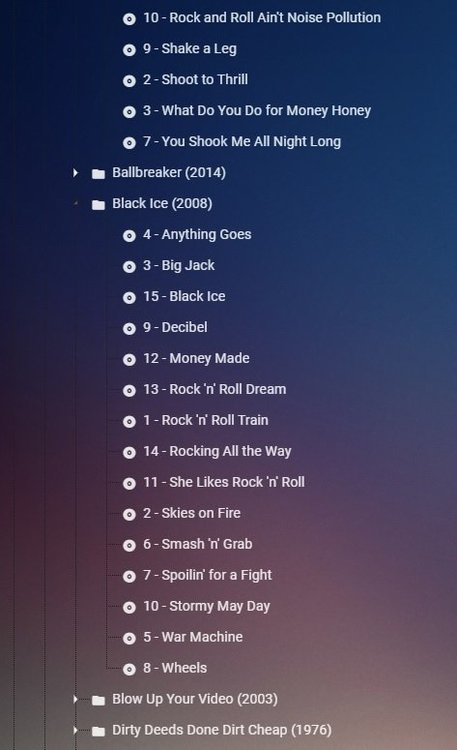
@LukeYes Metadata Manager is sorting wrong for Music. Both release and beta. But MM is presenting a folder so should it be by track number or title?
 1 point
 -
Of course!1 point
-
Fixing this in MP3Tag will take just a few minutes. Open all the albums in question in MP3Tag. Select all the tracks with no Album Artist value. Put 'Various Artists' or 'Compilation Album' or something like that in the Album Artist field and save. After a library scan the problem will be solved.1 point
-
Hi, those boxes are for the programs, not the channels. Since you have no program images, that's why you see the icons. But we can look at improving this and use the channel icon in this situation. Thanks for the feedback.1 point
-
@Luke Currently what emby displays is technically 'correct' - however, people want to see the full layer of detail for the stream. ie for Audio - they want to know if its Dolby Atmos if TrueHD or EAC3 and DTS:X if it's DTS-HD (plus other flavours of DTS:ES for example). for Video - they want to know the HDR profile used - HDR10 (the default/fallback), Dolby Vision (+ profile), HDR10+, HLG etc In fairness, a users AVR or TV will show them these details when they hit play .. but having them on the emby screen as filterable objects and to therefore know what to expect before you hit play should be made available. However, ffmpeg/ffprobe does not provide this info - The only product I'm aware of that can get this extra info (through 'unofficial means') is Media Info/CLI - as Dolby nor DTS have released publicly available tools to analyse the streams. MediaInfo CLI works well, and I have scanned my entire library to grab the details, but storing this info in emby metadata/db is proving to be a challenge as while I could store in the 'codec tag' fields - these are not currently used/displayed - so fairly pointless.1 point
-
We already did solve that member issue when he pm us. @GiGo He told us about this by PM.1 point
-
From a personal perspective I disagree about adding the extra level of grouping by artist... I want to get to the album as quickly as possible from the genre screen to be able to play it... So I suspect a change like this will definitely polarise opinions But the option of being able to sort the current view by Artist I see as a good option1 point
-
Hi anyone, this is my last try to get back the very usefull metadata "original aspect ration" in emby server software. Till to the beta version of emby server 4.1.0.8 there was it possible to enter on each movie title a manual "original aspect ration" in the metadata editor. After that version the field was deleted without any announcement. I am convinced that this data will not get in conflict with any other features of the software. Emby will safe that information at the nfo-data and kodi has the possibility to work with it. Any Skin on Kodi supports that in the nfo, so if you got a movie with 16:9 aspect and black stripes you can switch it to the real format with that entry. If you have an aspect working movie screen which supports different aspects, you can turn that screen into the right aspect ration with that option. In my homecinema it works perfectly till the version 4.1.0.8. After that it wont and I have to switch the screen manually. So pls vote this post and stand with me for getting this little spot back! THX 4 your SUPPORT1 point
-
The problem with relying on chapters is that it’s a "permanent" solution. What I mean is that once they’re in there, Emby can’t really take them out or change them since it doesn’t know with certainty which chapters are the added intro points other than by their name. So you have to hope the detection goes right, because relying solely on the name of the chapters is a bad idea. Also, not to mention the fact that I think people generally don’t want Emby modifying their files, since you never know if something could go wrong, even with simple operations like this. Though, I definitely agree that this shouldn’t be a closed system, but I think that the safest approach should be taken here. Then again, I’m not the Emby devs, so it would ultimately be up to them to decide how they would implement such a feature as intro skipping.1 point
-
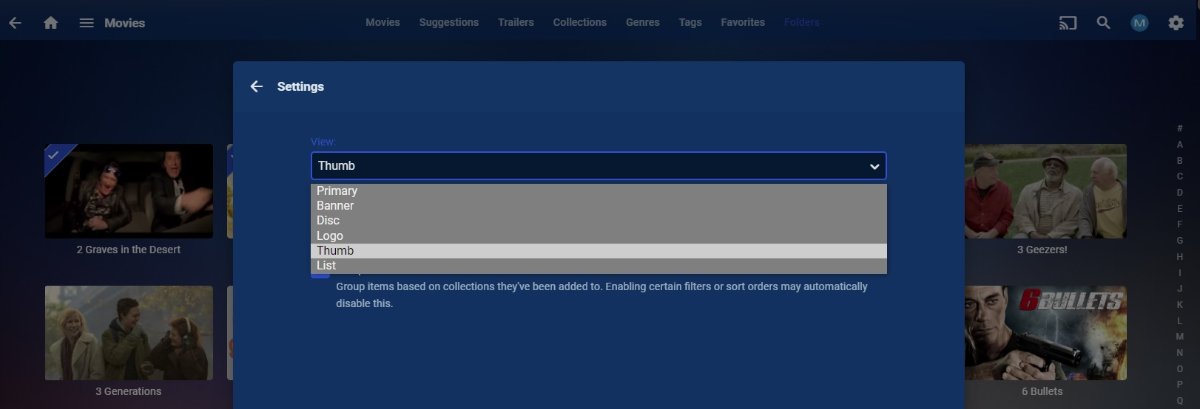
Pretty sure this is not in every client yet and has to be set at every folder level. Per library and per tab, doesn't apply to Home Screen.
 1 point