Leaderboard




Popular Content
Showing content with the highest reputation on 05/07/21 in Posts
-
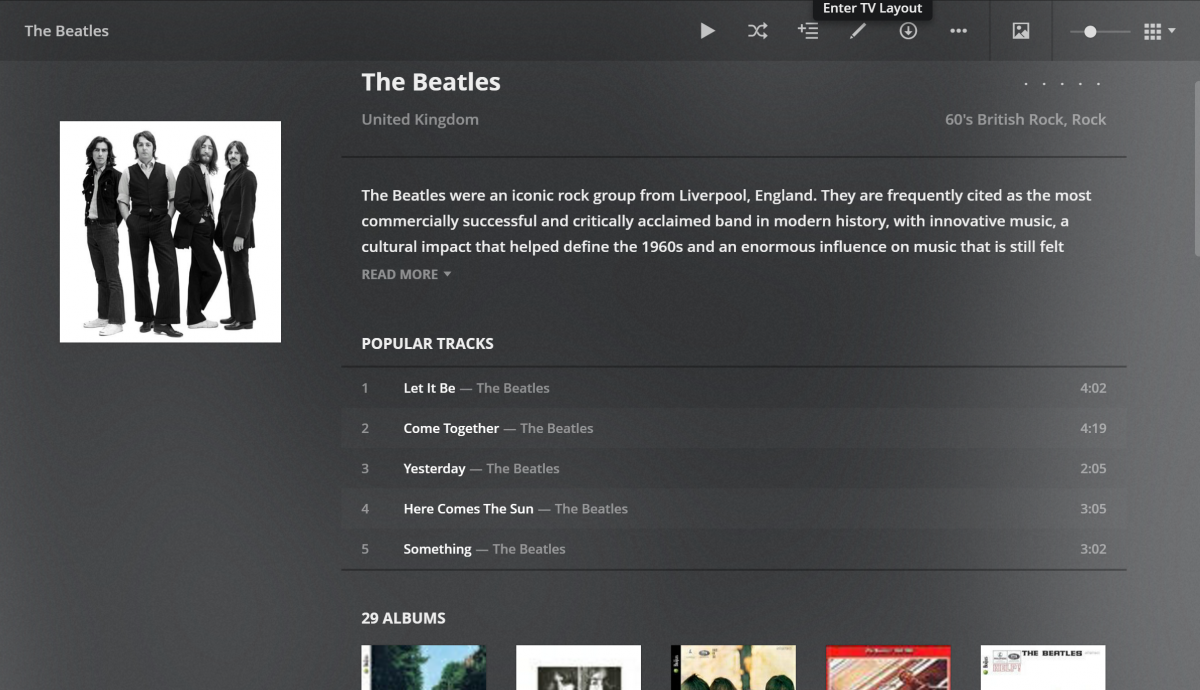
I was just checking out Plex and noticed a feature in Music that I love (see screenshot). In Music when you open an Artist it shows popular songs. This comes in real handy when you don't know all the names of the songs or what albums they are on. Can we please add this to Emby? Thanks
 2 points
 -
Wrong. The premiere key is installed in your server(s). It enables the use of various server facilities, but also enables some clients to be used without separate payment. Paul2 points
-
Tried to search for this feature request but couldn't find it. It would be very good to be able to sort and filter the content of collections. I have some collections with a lot of movies (1001 movies you have to see before you die, Criterion collection, etc). As of today you can sort and filter the collections themselves but you can't sort and filter the content. So if I want to find an unseen movie from my 1001 collection I will have to scroll through a lot of movies. In the collection view you also separate categories (movies, tv, ...) and it would be great to be able to choose to not separate them also.1 point
-
I nearly always have issues with embedded subtitles and always try to get external ones (the language I want is never embedded anyways) so it would be great to be able to disable embedded subtitles so it will only show external ones or none at all if they don't exist. Thanks a bunch!1 point
-
Also, It would be cool if we have various m3u lists and have the option to choose/assign each m3u list for each user.. Example. In user settings we can choose which library to give them for VOD so this shouldnt be hard enough to do it for live tv too no? USER 1 - Playlist 1 - Playlist 2 - Playlist 3 USER 2 - Playlist 3 USER 3 - Playlist 1 - Playlist 3 Etc etc.... *** Delete this message from another topic I opened because I posted it by accident there1 point
-
For clients that can use 3rd party remotes (ie Android TV) I'd like the ability to use a remote of my choosing and be able to map my remote to functions in Emby. We should be able to keymap all important functions such as EPG popup in video, stats for nerds, RW, FF, jump back 10, 30, 60 seconds, jump forward 10, 30, 60 seconds, etc. We should be able to use the number keys to enter 3 or 4 digit channels for TV channel changes. Basically any function available in the UI should have a key mapping associated with it so we can use it with advanced remotes. The remote is our gateway to using Emby and the more functionality we have to customize this for our use the better and easier it is for us to use. Being able to map your own remote is a long standing tradition with many other system and is a long overdue addition needed in Emby. If you agree, don't forget to like this post.1 point
-
Unless I'm totally missing something, there's no way to add a row to the homescreen that displays the newest releases of movie library(ies). Would be a great, useful addition to latest media to have an option that sorts by release date instead of date added.1 point
-
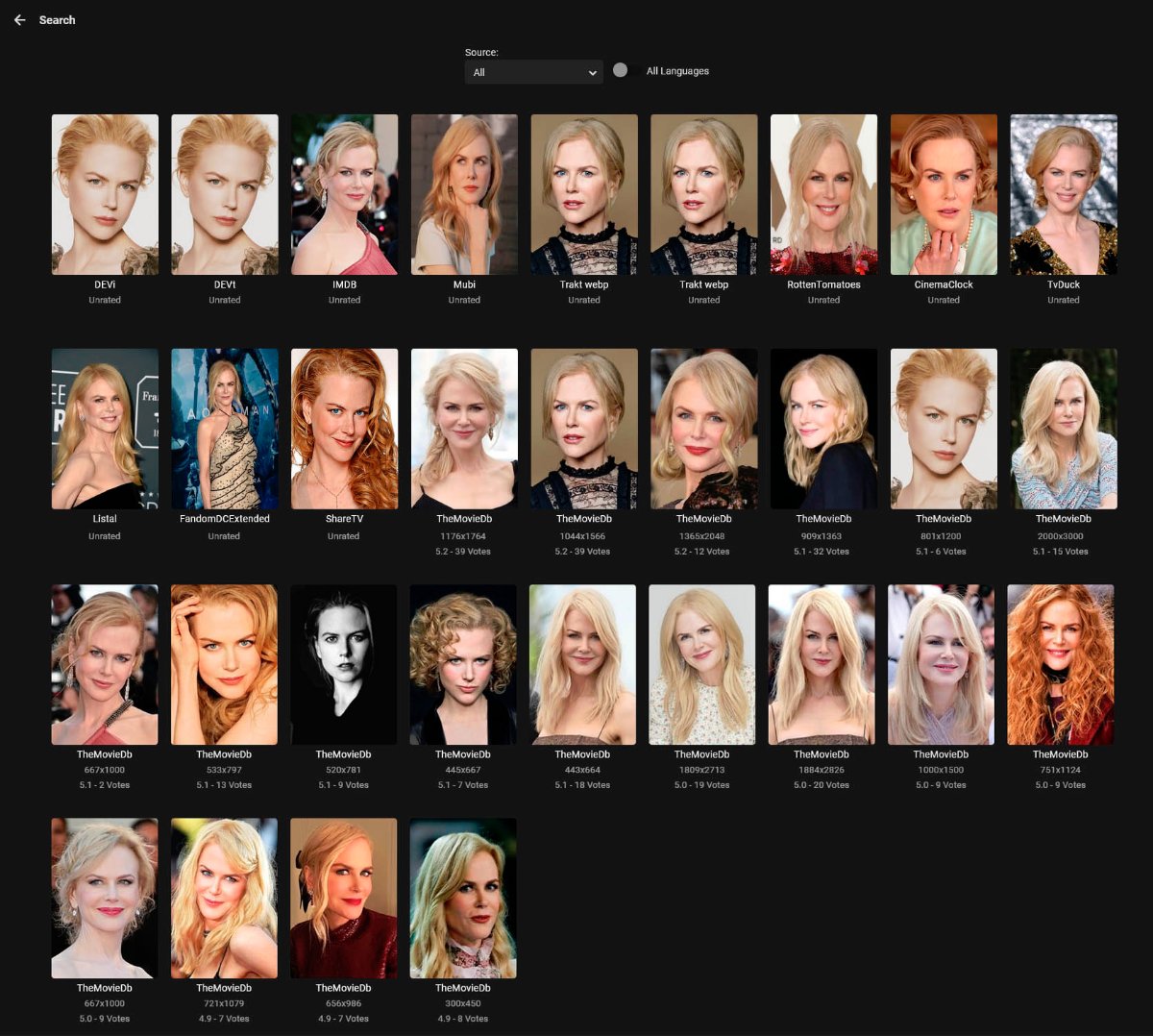
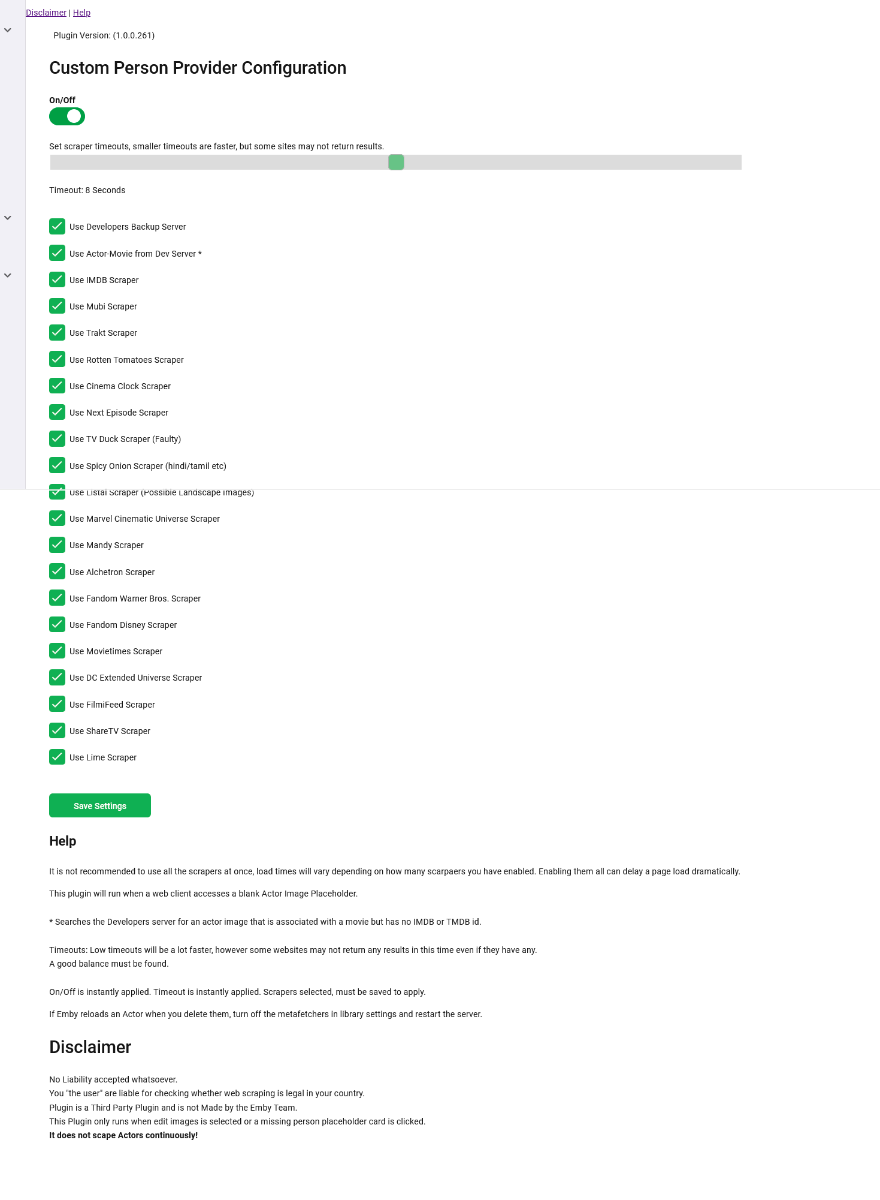
** UPDATE ** There are two seperate plugins on this page - you will need to read the thread to see which one (or both) is best for you. The original plugin (Actor Web Scraper) works at the server dashboard, it cannot be used or accessed by clients. This is my first proper working attempt at this. Its a bit clumsy but works. I may revisit this one and update it, but for now it is what it is. The newer plugin (Custom Person Provider) is internal and works when you click an Actor card, it is also triggered by clients. (but configured from the dashboard which they cannot access). This plugin can quickly be turned on/off in the config page. ----------------------------------------------------- This is the first working beta release - special thanks to @roaku for their help getting the javascript on the webui working It only scrapes one actor at a time, im not going to do one that hits these websites continuously for the whole lot in one go so don't ask. Please feel free to try it, test it whatever. Built with net standard 2.0, so should be compatible with most emby releases. I have added linux support but have no way to test it - so let me know if it works Feel free to suggest anything it lack or improvements that could be made. Enjoy There is another plugin lower down in this thread, "custompersonprovider" which uses the internal Actor image system, its in Alpa stage, and it works seperately from this one. Please read the blub if you are going to try it. As always the blurb: I accept no liability for anything - use at your own risk Custom Poster Provider ** Updated 5 feb 2021 *** Added a few more scrapers, but also added the ability to pull images from other Emby servers ** UPDATE 25 JAN 2021 WITH FIXES ** *** NEW 3rd Feb 2021 *** Added Internal Image Search Scraper Plugin. This is seperate to the Actor Web Scraper. This is Called Custom Person Provider because it works when you click the actor image inside Emby. Try not to use all the scrapers as it will actually slow down load times for your clients who click on Actors that DO NOT have an image already. I have added a config page so that scrapers can be turned on /off. Trakt images are webp , they work well but may cause image processing error in the log from emby when it tries to resize it as it acesses it. I am currently not sure if all "client" app support it either, all of my tests do, but thats not all devices. ActorWebScraper.zip ActorWebScraper-server 4.6.0.20.zip CustomPersonProvider.zip
.thumb.png.cb53c1371d991ad20af7d0f079169261.png)
.png.9166297e244c1890d029d1d82ca9a6f6.png)
.thumb.png.6cb9880f042f4e910b35029e52faf997.png)
.thumb.png.c70ea02b6794b681fa810e37688aba41.png)
.thumb.png.319417685fb83dc7af37c76436395b5a.png)
.thumb.png.0cd3bb536bed155dddec60ddea97c840.png)
.png.41015b52e97ef688ee401ad8a5643b7c.png) 1 point
1 point -
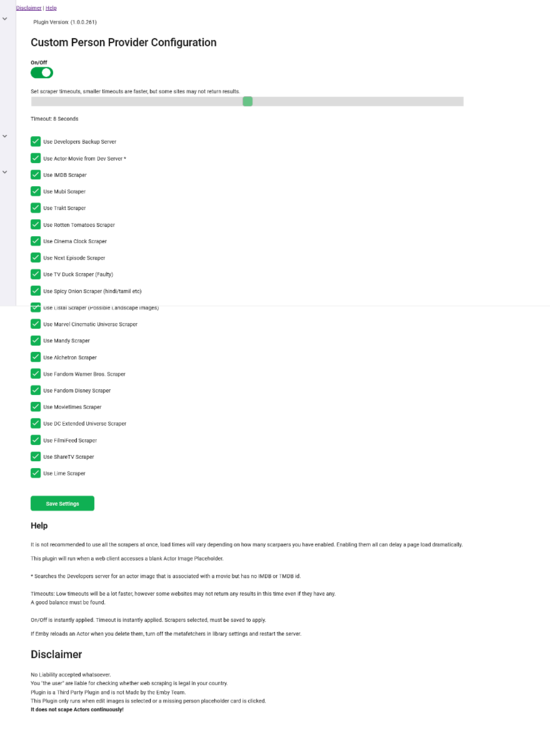
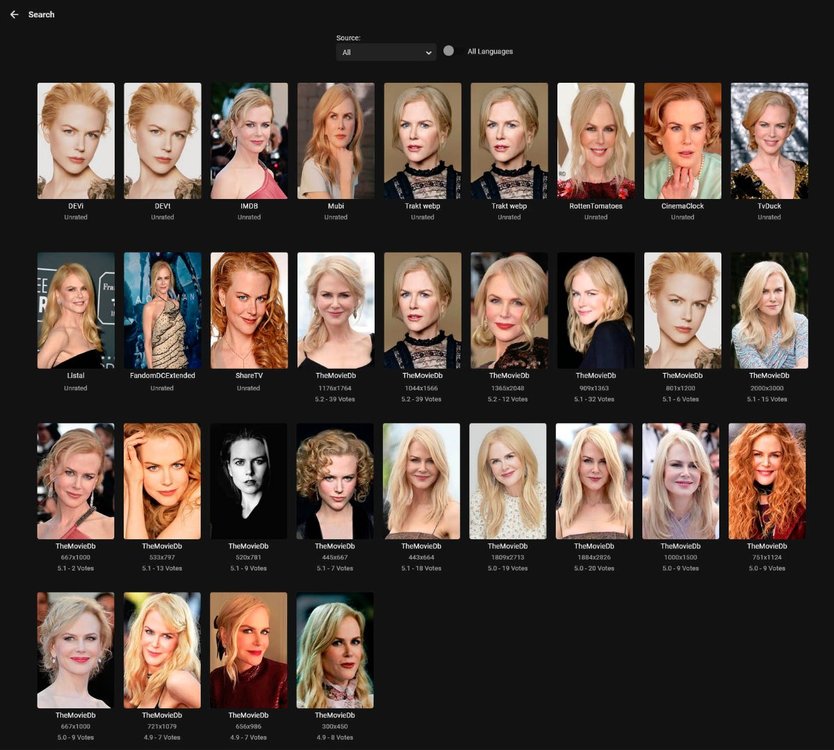
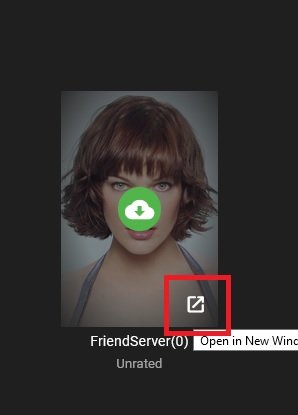
I think this is polished enough to be labelled a beta now. Original thread is here I have started a new thread to seperate this plugin and the confusion with another plugin I made. There are two seperate plugins in the original thread. This thread will carry the newest version of this plugin. What this plugin does. +++++++++++++++++ It sits in the Emby system and is called when: 1. A User or client clicks on an Actor (Movie or TV Series) that does not have an Image. 2. An Admin enabled user or client clicks on Edit Image (Even if you already have an image) What this plugin does not do ++++++++++++++++++++++ 1. Scrape web pages continuously updating you Actor Images. 2. Fetch Actor Images automatically when an item is added to your library. 3. Fix issues in your Actor thumbnails (However >this plugin< will fix bad thumbs, corrupt files etc and re-enable Emby to update properly) The Main configuration page can be found in your server dashboard Plugins. It is recommended that you do not use all the scrapers at once. This will slow page load times down dramatically even for clients. (only the Actor Info Page). If you can use a friends server, or a second server, I would recommend doing that. It will pull images from that too if it has one you need. You can do just alone that if you wish by dissabling all the scrapers but leaving the plugin turned on. If you do come accross any that do not load a thumbnail in the preview, click the bottom right of that blank image to open it in a new browser window and see if it can be accessed. I have left "TV Duck" in there but it probably will not work, so I recommend that is turned off unless you use it to open in another url and download the image manually. I currently don't know why Emby cannot download from there yet, but it can access the image. Maybe a TLS problem? Emby may create a corrupt file from TV Duck. Use the on/off toggle if you cannot delete an image, because of Emby re-fetching it. Trakt Images are Webp, If you can avoid them do so at them moment, they work in Emby, but Emby cannot currently resize them so shows an Error in the logs. If you find you dont like an image fetched, click the search icon (admins) and there may be a few to choose from depending on the scrapers selected. Some of IMDB images are cut off with half a face etc, some others may have two or more people in them, but generally most images are correct. CustomPersonProvider-beta4.6.0.22.zip CustomPersonProvider-stable4.5.0.28.zip
.thumb.png.5027e309b348f5fa5d92bedecfc44770.png)
.png.8df10dcaccd48694c654dca0efa448f5.png)
 1 point
 -
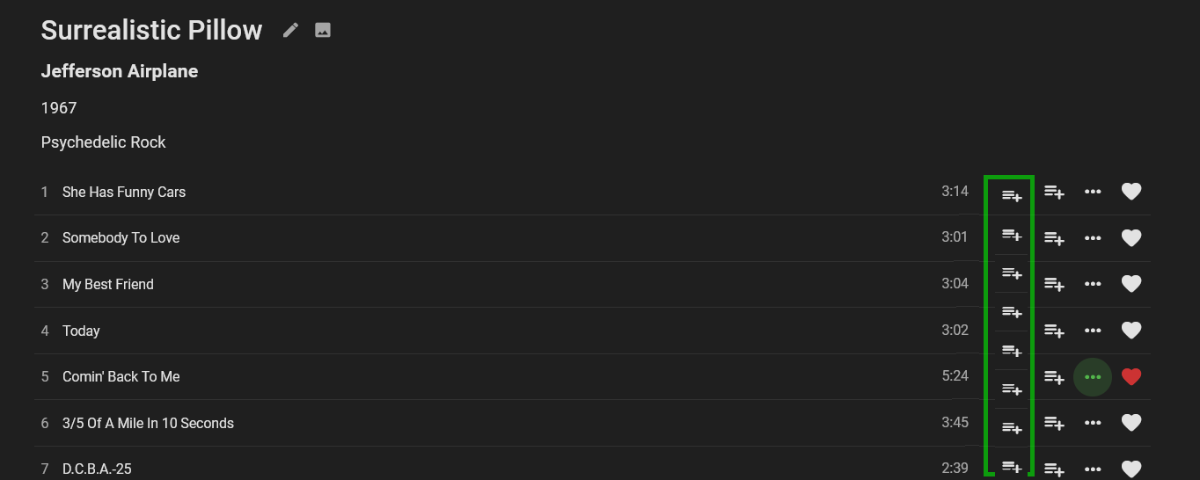
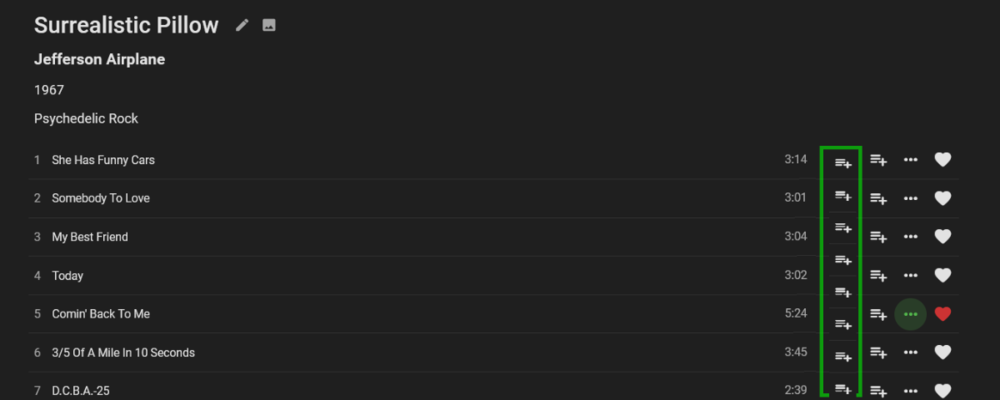
Hello Emby Devs, hello community members (my first post, though i am a very *very* happy emby user for over 1 year now) i have performed a date search for this request and didn't find this (please don't shoot me if i missed an existing thread) A nice to have feature request would be for the "add to play queue" control to also be made available when browsing album song lists. In other words, for "add to play queue" to be available as a one click widget in a column, right beside "add to playlist" and not hidden behind the elllipses (it can still stay there too). please also forgive the very rudimentary graphic (i'm using paint on a work computer during work time. ..oops!) thank you Devs for an excellent product and for your considerations
 1 point
 -
At present, the following fields aren't able to be locked: Original title Community rating Critic rating Tagline Overview Release date Year1 point
-
MKVs files allow to define a Display Size, this is very usefull to re-scale some videos to an specified resolution. The most normal case, strange resolutions like 1920x1078 or 1910x1080. MKV Container allows to define a Display size inside to make small corrections and convert to full screen those strange display sizes but Emby is ignoring it. Most of players, as well other Media Servers (let's not say any name ...) support that and re-scale the video to the Display Size defined on Matroska container but Emby don't. Any possibility this will be implemented ? Thanks1 point
-
Would be nice, like YouTube, to see the history of a user in a simple list with thumbnails of the videos and headed by dates. Apologies if this has been requested.1 point
-
@chef I really like the images for movies, tv shows etc. Are they available anywhere? Thanks!1 point
-
Yes, the Shield has support for bitstreaming TrueHD. I'm pretty sure it is the only Android device that does at this point. Unfortunately, no. The built-in Android in the TV cannot send the raw TrueHD stream. To confirm all of this you could send a log from the app right after starting playback of one of these items on the TV.1 point
-
While I agree that "series" has more use in the UK than "season", I'm certainly happy with season (I prefer it, logically), and I'm sure I'm not alone. Paul1 point
-
Thanks, Cayars . I didn’t see anything like this in the feature request thread, so I have added it as a new request.1 point
-
This is exactly what I did. If my wife isn't confused by it, your mother won't be!1 point
-
Yep so no issues since then. So I think that 2nd IP I had on the server must have been messing with it. Thanks againf or your help ebr and cayars1 point
-
Go for it and create a FR for it here: https://emby.media/community/index.php?/forum/98-feature-requests/ We all use Emby a little differently so it surely can't hurt to ask.1 point
-
hooo I understand... my SSL certificat expired LOL LOL damned ! I'm so sorry. I need to recreat a .pfx1 point
-
It would because sometimes the guides are just wrong OR a show is on multiple times a day and you don't want every version but just X time on Y channel.1 point
-
That is not just strange - that is beyond the capabilities of full HD (defined as a max of 1920x1080). So, by definition, it is beyond full HD which classifies it as 4K.1 point
-
Not originally but, at some point, we went ahead and allowed it optionally for TV at the server end so we should enable it in this app too.1 point
-
Yeah where I work our product localizes the UI to the languageCode-countryCode (i.e. en-US versus en-GB) because there are different spellings (color vs colour) and well as what this thread is about.1 point
-
That's right, yes. Series sounds right to me being from the UK.1 point
-
.. They are probably from the UK - Series is commonly used over here to describe what you describe as a 'Season' ie Series 1 of Only Fools and Horses is equally correct (to us) than saying Season 1 of Only Fools and Horses .. https://english.stackexchange.com/questions/27090/season-vs-series#:~:text=In%20the%20US%2C%20%22series%22%20refers%20to%20the%20entire,in%20a%20run%2C%20usually%20in%20the%20same%20year.1 point
-
Audio is stream copying. It is de-interlacing on the server. Assuming that you don't have the options turned on to force this, the next server release should allow it to remux or direct play instead.1 point
-
Never mind, I fixed it under settings in Shield.1 point
-
Hi, you are likely just fine doing this and it won't be a problem. As rbjtech mentioned the TOTAL devices will be tracked across both of your servers running your Premiere key. Just to clarify how this might work, lets say you have 2 Android phones and 2 iOS tablets besides other devices. If you use these Android phones and iOS Tablets on both your home server AND your VAN system they are still seen as the same 4 devices and will only be counted once each. Any devices that connect to both systems are just one license count. Hope that helps.1 point
-
1 point
-
Sharing the key will be fine (you own your house & mini van ) - but the device limit will be shared across the servers. ie if 4 devices were used in the mini-van, then this would be 4 less devices you could use at home. In reality, for a typical user - this is not a problem at all given you have a 25 device limit overall.1 point
-
Yeah, that would be nice. Just keep in mind: The next-gen LiveTV was firstly teased over a year ago and is yet to hit beta. Just don't get to excited about that until it's really there otherwise you might get disappointed...1 point
-
I really dislike mrmc, always has way too many bugs and it looks terrible imho. I try it every 6 months or so. But since I rarely use livetv, and, timers are a rare thing and I do it while watching a recording anyway on iPad, I don't miss those functions at all in Infuse. For me, it is (in essence) all in one. With Infuse, I am not missing a thing afaiak.1 point
-
No but I think having the ability to limit downloading to certain formats is not a bad idea.1 point
-
Hi, yes it's possible for the future. It has been requested more than once before.1 point
-
Yep, totally agree but frame rate matching is rather important too.1 point
-
Accessing a GPU device and interacting with its data, like copying video frames or textures back and forth between system ram and gpu memory, requires an appropriate API to do so. Intel MSDK/QuickSync hw codecs use D3D9 and DXGI/D3D11 on Windows VAAPI on Linux Intel VAAPI hw codecs use VAAPI context on Linux AMD AMF hw codecs use D3D9 and DXGI/D3D11 on Windows Vulkan on Linux Nvidia hw codecs use Nvidia CUDA on Windows Nvidia CUDA on Linux That's why Nvidia hwa is not affected by D3D/DXGI behavior on Windows. What would still be affected on your system, are the Nvidia DX11VA decoders (not that it would be crucial to have them, but sometimes they are useful when a regular Nvidia decoder exposes some buggy behavior)1 point
-
Na dann... Als Tuner-Quelle in Emby: http://127.0.0.1:8089/channels.m3u?tags=120&favonly=1 Als XMLTV-Quelle in Emby: http://127.0.0.1:8089/api/epg.html?xmltv=1&xgrab=&favonly=1&download=1 Bei den Web Einstellungen im DMS sicherstellen, dass "Passwort auch für LAN/WLAN" deaktiviert ist! Die IP's oben musst du natürlich anpassen, falls der DMS und Emby nicht auf dem selben Rechner laufen. Und das DVBViewer Plugin in Emby vorher deinstallieren.1 point
-
No problem, glad I could be of help! Chalk another Synology user up for this being an issue @Luke1 point
-
Version 2.0 of our popular Android TV and Fire TV apps are rolling out to stores now. This version brings many internal improvements for playback and also supports the new features in the upcoming 4.6 release of the server. Your device should update automatically when available. Improved Subtitle Support These apps can now natively render most types of advanced subtitles (Dual Layer PGS/SSA etc.) with full formatting and multiple sub placements without requiring the server to transcode or burn in. With supported external subtitles you can also adjust the placement and time offset of the subtitle display. Improved Playback We've implemented several customizations to the Google player the app utilizes that provide us with even more direct play in more situations and also simplified some of the playback options to allow you to choose how your media plays. Tags View You can now see tags for movies and albums on their detail page and also view other items with the same tags by clicking on them. Tags are also returned in search results. Artist Songs Directly view and access songs right from an artist page. 4.6 Server Support Version 2.0 of these apps fully support some of the new features coming in the 4.6 server release like channel grouping, improved channel logos and an improved Continue Watching display. Other Enhancements and Fixes In addition to the above, many more improvements and small fixes have been made. Including: Fix play from grid when folder browsing music Increase size of cast on OSD Tweak default background Update translations Fix stream copy for interlaced content (requires server 4.6) Increase playlist and album limits to 1500 No longer try to auto play from "Play Next" channel Fix series date display in folders Fix bad price display in purchase screen Add send logs to video playback menu Force player interface to LTR presentation Group by tags in channel grid (requires server 4.6) Implement filter by tags in TV guide (requires server 4.6) Simplify filter selection (fewer clicks) Fix shuffling video playlist Implement playlist and collection tabs in library for 4.6 server Remove collections from individual genre display Align EQ animation with other apps Improve list screen in Apple TV theme Allow screen saver during pause (except for live TV) Implement new search Improve hi-res flac audio Add a default poster size setting Make library prefs a popup for better navigation (can back out) Make library cog button a menu for app or library settings Add "All Items" button to Collection screen Add music videos to Artist view Allow converting dts-hd and not plain dts Indicate https in SFN when using SSL Implement play options from music genre Improve spinner layout Adjust home screen layout settings for server 4.6 Fix DTS HD badge not always showing properly Indicate in SFN when software audio decoding is occurring Clarify display HDR support labels RTL fixes Fix play first unwatched on some series Implement subtitle offset (external subs only) Improve play next up button when no next up episode Improve usability of DTS options Simplify audio option Fix crash on startup on non-standard boxes Add new "Extra Info" option and reduce clutter by default View the full article1 point
-
I would also like to see all the sort options that are available in the main library to be available for sorting while in a collection.1 point
-
Sorting and filtering within a collection would be awesome! For some collections alpha sort is better than a chronological sort. If too complex to design something that can be resorted on the fly because collections are their own category. Couldn't a new meta tag (or tags) be created within the collection that declares the sort order for the xml? From what I can tell the current collection xml file is reading: <DisplayOrder>PremiereDate</DisplayOrder> when it loads. Perhaps have it read something along the lines of <DisplayOrder>custMeta1</DisplayOrder> for single level sort or <DisplayOrder>custMeta1,custMeta2</DisplayOrder> for multi-level sort. By declaring the sort in the meta, it make the process dynamic. Personally I see a lot or value in users deciding how they want to see each individual collection. Some collections can be by premiere, some by title, etc.. It doesn't need to be one size fits all. Theoretically, something similar can be also applied to playlists. I've seen a few requests/posts requesting different views for collections and playlists. I think using the meta data as the driver would satisfy a number of those requests.1 point
-
I didn't understand that. But I'm looking for a different sort in collections than in the main library. The custom or chronological sort would be unique to each individual collection.1 point
-
The Sort Name field affects how it sorts everywhere, though, not just in a collection.1 point
-
@ebr I don't see anything in here about custom sort. This feature suggestion seems a bit different than the one I'm suggesting. I'm asking for adding a custom sort option here, so the order of movies will show up in chronological order when opening the collection.
 1 point
 -
Hi, Collections, playlists or a separate Library you can use for different Holidays is the way to go. I've got 680 Christmas movies and growing at present (a lot recorded from Hallmark and Lifetime channels) so I use a Library. I use a setup similar to this on disc: \Holiday\Christmas \Holiday\New Years \Holiday\Valentines \Holiday\Easter \Holiday\Patriotic ( I use this for Labor Day, Memorial Day and Independence Day) \Holiday\Halloween \Holiday\Thanksgiving I then mount \Holiday as a Holiday Library. Then using Folder access security I can pretty easily switch this library security wise to control what's shown. I prefer this over multiple Libraries for each "Holiday" as it takes up less homepage space. Here's a knowledge base article on Folder Access: https://emby.media/support/articles/Folder-based-Access-Control.html1 point
-
I absolutely agree that movies should not start playing right away within a playlist. Clicking on a movie in a playlist should take you to the movie's info page. Simple.1 point
-
I think beside the native Android keycodes @@ebr you really should implement some simple pc keyboard keycodes. And with simple i don't mean something like F3 that only one user requested! Something like this: H -> Homescreen G -> Guide I -> Info C -> Contextmenu P -> Play/Pause R -> Record S -> Subtitle Track selection A -> Audio Track selection L -> Last Channel Page Up -> TV Channel up Page Down -> TV Channel down Left -> Skip Back Right -> Skip Forward Ctrl+Left -> Previous Chapter Ctrl+Right -> Next Chapter Alt+Left -> Previous Track Alt+Right -> Next Track This could also be used then in Emby Theater.1 point
-
For users with Samsung Tizen SmartTVs (2015 - Present) who want to test the latest version of the Emby client app before it's submitted to Samsung for release in their app store. These installs should be considered beta until approved by Samsung, however they are the same ones submitted to Samsung monthly for inclusion in the Samsung store. Samsung's policy is that the only official way to distribute apps is through the Samsung store and that usb installs should be used for testing purposes only. Because of this policy Samsung has mandated that usb distributed apps must expire within 30 days of compiling. To help with testing you will be remined to update to the latest beta release as the app expires to ensure you are using the latest version when reporting issues. This install will also work for those who don't have access to the official client app in the Samsung app store. However, the same rules must be followed as indicated above. Release notes and version number For the latest release notes and version number click on this post https://emby.media/community/index.php?/topic/31461-emby-for-samsung-smarttv-release-notes-tizen-orsay/ Installation instructions Download this zip file: https://github.com/MediaBrowser/Emby.Releases/raw/master/tizen/tizen.zip Format a USB 2.0 stick using FAT16 (some larger USB 3.0 hard drives have been found to not work) (newer models may support other formats, check your users manual) Copy the tizen.zip file to the root of your USB stick Extract the contents of the tizen.zip file to the root. (This should create the folder 'userwidget' in the root of the USB stick and the folder should contain the two files needed) Turn on the TV Make sure your TV is connected to the Internet Plug the USB stick into the TV's USB port. Installation should start automatically. (There will be 3 quick messages in the upper right corner of the TV) Click 'OK' once the installation is complete. Optional, add the Emby app as a shortcut to Home Start the app from the Smart Hub or installed apps section of your TV. Troubleshooting If the installation does not start automatically, then please ensure your TV firmware is up to date and try again. If you get an installation error, try the process again with the USB stick formatted ass FAT32. We've received reports from users that installing from USB 3.0 hard-drive devices does not work, so please make sure to use a USB 2.0 thumb-drive device. Also, make sure the thumb-drive is unlocked/writable before plugging it in. The TV will need to write to your thumb-drive. Users with 2015 Samsung SmartTVs may experience an issue where the USB version of the app deletes itself upon restart of their TV. This is a security measure implemented by Samsung in which we have no control. If this is the case you may have to leave the thumb-drive in the TV and reinstall upon reboot, or install the latest release version of the client found in the Samsung app center. Updating from a previous USB install The app will notify you when an update is available. To update a previous USB install just repeat the instructions above. Notes: Certain Samsung SmartTVs have an issue where the app won't upgrade from USB drive if there is already a USB version installed. If this is the case you'll simply delete the old version before inserting the USB and then repeat the same installation process to install the new version. Also, try power cycling your TV after deleting the previous version if you have problems.1 point





.png.fcf8e6f34a3ba4b4aa03c647343d2353.png)
.png.50b9f3b8d82cc36d56ab656cf7a72625.png)
.png.93b11e0d91c2bde645fcfd5de83e4bfb.png)
.png.07e8150d68ec98c7db334dda8fcf2d5e.png)
.png.a5cf24dcb5c9f922d8ed05c0ad9179be.png)
.png.6ba52f3cbbe67ff43524c97d18d63949.png)