
Leaderboard




Popular Content
Showing content with the highest reputation on 05/06/21 in Posts
-
Version 2.0 of our popular Android TV and Fire TV apps are rolling out to stores now. This version brings many internal improvements for playback and also supports the new features in the upcoming 4.6 release of the server. Your device should update automatically when available. Improved Subtitle Support These apps can now natively render most types of advanced subtitles (Dual Layer PGS/SSA etc.) with full formatting and multiple sub placements without requiring the server to transcode or burn in. With supported external subtitles you can also adjust the placement and time offset of the subtitle display. Improved Playback We've implemented several customizations to the Google player the app utilizes that provide us with even more direct play in more situations and also simplified some of the playback options to allow you to choose how your media plays. Tags View You can now see tags for movies and albums on their detail page and also view other items with the same tags by clicking on them. Tags are also returned in search results. Artist Songs Directly view and access songs right from an artist page. 4.6 Server Support Version 2.0 of these apps fully support some of the new features coming in the 4.6 server release like channel grouping, improved channel logos and an improved Continue Watching display. Other Enhancements and Fixes In addition to the above, many more improvements and small fixes have been made. Including: Fix play from grid when folder browsing music Increase size of cast on OSD Tweak default background Update translations Fix stream copy for interlaced content (requires server 4.6) Increase playlist and album limits to 1500 No longer try to auto play from "Play Next" channel Fix series date display in folders Fix bad price display in purchase screen Add send logs to video playback menu Force player interface to LTR presentation Group by tags in channel grid (requires server 4.6) Implement filter by tags in TV guide (requires server 4.6) Simplify filter selection (fewer clicks) Fix shuffling video playlist Implement playlist and collection tabs in library for 4.6 server Remove collections from individual genre display Align EQ animation with other apps Improve list screen in Apple TV theme Allow screen saver during pause (except for live TV) Implement new search Improve hi-res flac audio Add a default poster size setting Make library prefs a popup for better navigation (can back out) Make library cog button a menu for app or library settings Add "All Items" button to Collection screen Add music videos to Artist view Allow converting dts-hd and not plain dts Indicate https in SFN when using SSL Implement play options from music genre Improve spinner layout Adjust home screen layout settings for server 4.6 Fix DTS HD badge not always showing properly Indicate in SFN when software audio decoding is occurring Clarify display HDR support labels RTL fixes Fix play first unwatched on some series Implement subtitle offset (external subs only) Improve play next up button when no next up episode Improve usability of DTS options Simplify audio option Fix crash on startup on non-standard boxes Add new "Extra Info" option and reduce clutter by default View the full article3 points
-
I suggested in a totally different thread a bit ago about possibly adding Discogs as a meta fetcher... https://emby.media/community/index.php?/topic/79280-duplicate-music-artists-entries-how-to-get-rid-of-them/ That thread has had a few +1 reply posts. As such i figured adding it to the feature requests was the proper way to gauge interest. If you have used MP3tag you should be familiar with Discogs. Its a GREAT alternative to Musicbrainz.2 points
-
Yes we'll get that resolved. Thanks for the feedback.2 points
-
Ok so assuming you already have wiring in place using cat 6/RJ45 then you will not be looking for sfp+ or other types of adapters and likely won't want to be purchasing used/refurb or other equipment off ebay. Besides the NICs you still need other equipment like a smart switch as well. This is likely where you'll have most of your money invested in the upgrade. But it still comes down to NEED. If all of your devices are just common PCs used for house hold needs or video playback devices then it won't need anything above 1Gbit. Heck most devices might be WIFI only. That would leave you only the "core network" as 10Gbit. Again, what is the need once things are setup? How fast do you need to move files from a NAS/File Server to an Emby Server? Are you going to get any speedup from the increase in bandwidth? In most homes, no, not at all. The fact is, if you're not moving large amount of files around like full daily backups then you have little need for more than 1Gbit adapters in a typical Emby setup. Hell you might be better off moving to direct attached storage then a seperate network box anyway which really makes this even less worth while an upgrade. Is 10Gbit nice to have? SURE Is it needed? Not by most people and actually will do very little for the average person.2 points
-
Thank you! I'm signed up. Also thanks to ebr and everyone at Emby. I really appreciate all the responses here and how responsive you are in general to the community. You all are the best!2 points
-
Has there been any further considerations on this? Hitting ok is annoying yes but not the end of the world. The issue I run into is when it displays at the same time as making a selection like selecting the user for example. The notice is displayed but the button is grey (instead of green) and can’t be selected. Sometimes pressing back, select, or the directional buttons on the remote multiple times gets me out but usually I have to force close the app. From there, run the app again but and wait for the notice before trying anything. I started just updating at the beginning of every month before the notices start showing but that can’t be the only solution. Thanks.2 points
-
BTW I forgot to mention that as long as we have enough bandwidth, using Infuse we have direct play of any kind of content including DTS, DTS-MA... HDR passthrough and if necessary (our display does not support HDR) HDR to SDR tone-mapping perfect.2 points
-
So basically this. I have TV Shows, Movies, and Anime libraries. For anime; I'd prefer to set the default to Japanese with Subtitles. For movies, English and no subs unless forced. For TV Shows, the same. However, Emby only allows one overall setting this for this, for all libraries, instead of just one. I think it'd be a pretty nice little feature.1 point
-
I would love the option to store Emby's database in MySQL - I have a setup that serves around 30 people and I feel that there would be real performance gains by using a proper relational backend over SQLite (I'm presuming). On top of this it would make life easier for me when reporting on watched status a cross users.1 point
-
It would be great to be able to configure channel groups in LiveTV, which can be selected in the guide view (maybe as tabs) so that we can more quickly navigate to preferred channels using the d-pad. Perhaps start with Favorites by default, but be able to add custom groups (similar to collections) which we can add channels to (Network, Premium, Basic Cable, Kids, News etc.).1 point
-
It would be useful if the server (or perhaps clients) could cache most (if not all) content images (posters, backdrops, logos, etc) for movies, TV series and seasons. This would mainly be of benefit when a portion of someone's content is offline but the users would still like to view the content to know what exists. I think caching on the server would be preferable, then all clients could make use of the same cached images. if you think this would be a useful feature, please click the "Like This" button on this post.1 point
-
Please read this post first. I was wondering if it would be possible to add something that would allow you to skip the intro to shows automatically while binge watching. When watching Netflix it does this for some shows, and im not sure if thats a feature of Netflix itself or a Chrome extension i use called "Flix Assist" but it would be a nice feature to have within Emby as well. and possibly even create a custom timed skip for specific shows1 point
-
Hi, Would it be possible to post a USB install file for Tizen that will not prompt the user to install the new version the following month? The prompt keeps appearing daily. The reason I ask is that Emby is not on the Australian Samsung App Store and from the the start of each month I receive a daily prompt to update my install of Emby. It keeps appearing until I manually update it to the latest version, going through the USB install process again. I currently have the premiere version of the server, although I don’t think that makes any difference. One of the reasons I upgraded to premiere was to remove the prompt advising to upgrade to premiere. Thanks, Henry1 point
-
No special format - just tell Emby to use the embedded names instead of making up its own (on the Advanced tab of the main Library settings): Paul
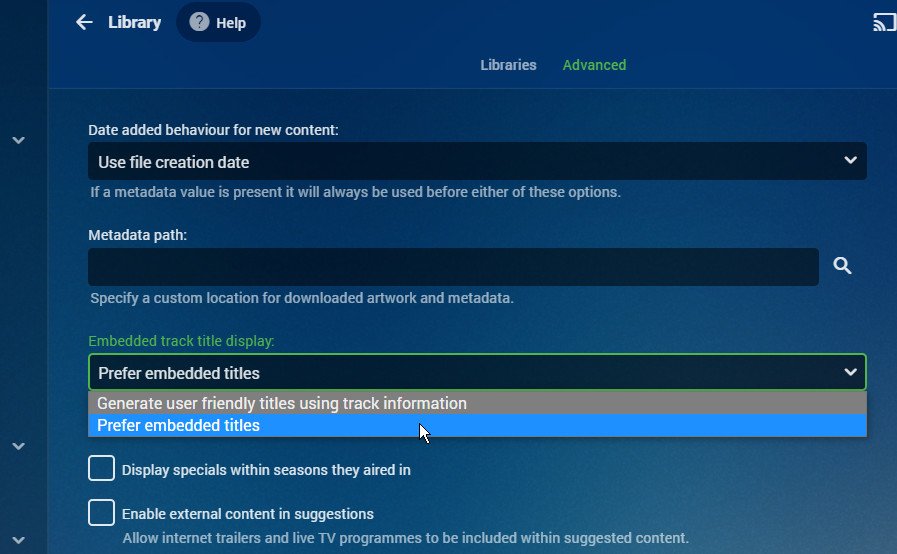 1 point
 -
Yes, I had it set to Direct Play and as said if disable it, the channels play fine. I took a couple of photos of one channel, where in emby it shows it's transcoding while plex/channels it's playing direct no transcoding for the same channel I'll try to get a couple more and post them up tomorrow1 point
-
If your full subtitles do not have the foreign parts also that would be a defect in the subtitles itself to me.1 point
-
Yeah, that box is running a phone OS. I think the next beta may solve this issue though.1 point
-
Have you check to see if the issue has anything to do with CoverArt plugin? Temporarily uninstall or disable treatment per media type.1 point
-
Accessing a GPU device and interacting with its data, like copying video frames or textures back and forth between system ram and gpu memory, requires an appropriate API to do so. Intel MSDK/QuickSync hw codecs use D3D9 and DXGI/D3D11 on Windows VAAPI on Linux Intel VAAPI hw codecs use VAAPI context on Linux AMD AMF hw codecs use D3D9 and DXGI/D3D11 on Windows Vulkan on Linux Nvidia hw codecs use Nvidia CUDA on Windows Nvidia CUDA on Linux That's why Nvidia hwa is not affected by D3D/DXGI behavior on Windows. What would still be affected on your system, are the Nvidia DX11VA decoders (not that it would be crucial to have them, but sometimes they are useful when a regular Nvidia decoder exposes some buggy behavior)1 point
-
Correct as the entire system folder gets replaced. I create a script file I run with every update. Then make minor tweaks when Luke changes this around.1 point
-
The API is very powerful .. just be careful as it can also cause a lot of damage if used incorrectly As another example which may be useful for those looking to use the above script example - you can also list all the folder ID's as follows :- curl -X GET "http://<emby>:8096/emby/Library/SelectableMediaFolders?api_key=<your_api_key>" -H "accept: application/json" This is likely quicker than finding them all manually if you have lots of libraries. edit - combine the two.. and you have the start of a Plugin where you could select the libraries you want in the external scan ..1 point
-
How does that jibe with what you said before - that the forced track should be played no matter what? Are all the subs supposed to play at the same time? Of course not but that is an example of why the statements you found just aren't realistic. I've actually never seen those statements anywhere before but, if I as a user set the subtitles to "None" then I expect that to be exactly what I get - no subtitles.1 point
-
Following your script, got it working. Had to fix IP and port in the URL. I put a few of these in one batch file. This will be helpful for libraries I keep on a NAS, which does not recognize Emby's RealTime monitoring. I will add the batch file to the Windows Task Scheduler. Also to clarify, I added a new API key using the name of the library and inserted the API 32 character code it generated into your script. Then used the ParentID from the URL in the library page in your script after /emby/items/ Now I don't need a full scan that often anymore. Changed the scheduled task in Emby to 7 days. The only reason for me to do a full scan anymore is to update any metadata. Libraries that reside on the Emby server use realtime monitoring to update the database, and now with this script, I can update the libraries on remote devices that are unaffected by realtime monitoring. This is the reason I needed something like this. Thanks!1 point
-
Sorry, I'll get the information tonight. Thank you for your suggestion, sadly, my phone has 50GB used out of 128GB and 4GB RAM in use out of 12GB, also this only happens with the one TV show, so I'm pretty sure it has to do with the files and not the systems.1 point
-
Bei mir war noch das Plugin Next Pvr installiert. Nach dem deinstallieren, Server Neustart waren dann die alten TV Listen endlich weg und sind nach Neuanlegen auch nicht mehr aufgetaucht! Danke!1 point
-
really appreciate! I update to Beta 4.6.0.43 seems fix this problem already!1 point
-
In addition to the Emby Premiere question from @FrostByte , if you do have Premiere and had Emby installed with transcoding working prior, did you recently upgrade your DSM firmware? If so, that appears to cause Emby to lose the ability to see hardware accelerators for transcoding. This is a bug that hasn't been addressed or acknowledged. If this is the case, reinstalling the same Emby .spk release file or upgrading to a newer beta version seems to be the only way to solve this issue. See the following threads on that:1 point
-
Roku is a pretty simple interface. I think if it's going to be an issue with Roku, it's going to be an issue with any system.1 point
-
So close to the end! I'm thinking a 4k UHD TV at 75". However, I'm not going to get a smart TV, because I have a Fire Cube.1 point
-
Hello, I've tried the beta version. It correct the bug, I'm now connected every time. But I not seen my connected avatar in the upper right corner with embuary and on parameter page user and server address are not show. But I think it's due to beta version. Many thanks for the help and your very good job.1 point
-
Are you sure you know what those words mean? 10G is very realistic and isn't at all expensive. I've got a whole bunch of it. I've even got a dual 10G NIC in my pfsense box. And I've even got spare 10G parts. I was thinking about upgrading, just for the hell of it. @chef ebay is your friend. If you choose to use sfp+ instead of RJ45, the NICs are much cheaper (not that 10G RJ45 are expensive). Here's a lot of 8 for $199. I mean, what a deal! Even Linus says it's cheap (and this was in 2019) meh1 point
-
Thanks for reminding me about that setting...because that was the issue. Theme playback is restored on my Rokus with both MP3s and FLACs. I had theme playback enabled previously but it was somehow disabled again and I didn't think to check its current state. I upgraded routers a few days ago, so maybe it happened then. Thanks again.1 point
-
Have you went to the api and entered the parentid? Look at the returned result and or log entry when you run the command. For me I would put this is a script file and click it to run a scan on that library any time. C:\Windows\System32\curl.exe -X POST "http://homeserver:8096/emby/Items/b1ad04b1336537bcdad1e2f7e35a4d17/Refresh?Recursive=true&MetadataRefreshMode=Default&ImageRefreshMode=Default&ReplaceAllMetadata=false&ReplaceAllImages=false&api_key={enter api key}" -d "" But url is obviously environmental (LANIP, Localhost, WANIP, DDNS)1 point
-
Usually the problem is, he removed it from Emby Live TV sources, but he also has a live tv plugin installed, and the data is coming from the plugin. Or vice versa, removing the plugin, but still leaving it in Emby Live TV sources. So I would check both.1 point
-
This is getting overly complicated. If you want to only scan Movies folder you can (my parentid in example). http://localhost:8096/emby/Items/f137a2dd21bbc1b99aa5c0f6bf02a805/Refresh?api_key={apikey} This scans a library.1 point
-
I wasn't able to get this working either. You did however give me an idea and lucky enough, there is a way to do this via API. In the UI if you go into the media library and go to Folders, you can click on the "options" of the folder and scan. Turns out, this scans that particular folder for new content while ignoring the others. So I grabbed the API call and simplified it a touch (It may be able to be further simplified) but I got this: curl 'http://EMBY-IP/emby/Items/FOLDER-ID/Refresh?Recursive=true&ImageRefreshMode=Default&MetadataRefreshMode=Default&ReplaceAllImages=false&ReplaceAllMetadata=false&api_key=API-KEY' -X 'POST' -H 'Connection: keep-alive' -H 'Content-Length: 0' -H 'Accept: */*' --compressed --insecure While this is not as intuitive to customize as your example, it's not an extreme task to get the info needed. Of course, replace EMBY-IP with your instance IP address and API-KEY with your API key. The hard part is the FOLDER-ID. What you'll need to do is browse to Emby, and go into the library in question. Select the Folders tab and click on the folder you want to scan. Look at the URL, you should have something like this: http://IP-ADDRESS/web/index.html#!/list/list.html?parentId=49264&serverId=SERVERID The parentID in the URL is your FOLDER-ID In my tests I put an empty file named for The Mask (1994) into "New Movies" folder and The Wolfman (2010) into my "Static Movies" folder. When I scanned using the "New Movies" FolderID I got The Mask in my library moments later but The Wolfman did not appear. I repeated this for about 10min and The Wolfman never appeared. Then I changed to the Static Movies FolderID and ran the curl command once and instantly The Wolfman appeared in my library. Could somebody a little better with curl and APIs maybe strip the command down a bit to be less of a mouthful?1 point
-
I came to the forums looking for this very idea. I 100% want this1 point
-
Sadly I catch myself using Plex more and more because of all of that. I don't love Plex by any stretch, but on the Apple TV devices, I do catch myself using Plex a lot more. So I do have to run Emby and Plex side by side. I'd love for there to be a bigger focus on Apple TV. Plex has uniform apps across all their devices including Apple TV. Emby seems to say Apple TV won't allow that somehow. Still have yet to figure out why the Apple TV experience is so different on Emby when using the Apple TV versus an android based device or Roku.1 point
-
@cayarsfor sure that would make sense. But we all know about Emby's development speed because resources are tight. So we can't really expect one of these features in the next months, probably not even in years. The features you were referring to already came up years ago and didn't make it to Server yet. This development is nice and gives us very valuable info. I'd personally love to see this added as a third party metadata provider, so we can also sort and filter by the ratings and I do not expect the features provided here being added to emby server natively within the next 2 years. So if there's any chance about some kind of collaboration, is it good that @jaruba told you to be willing to.1 point
-
Ok, figured out how to do what I want: First, real time monitoring with rclone mount is not possible so a scan is needed indeed. Second this is what I'm doing: 1. Disable any schedule library scan 2. you will need something running scripts on linux, I have an unraid box running user scripts. 3. install curl 4. Example: curl -d '{"Updates":[{"Path":"/movies/movies/TV Shows Recent/","UpdateType":"Created "}]}' -H "Content-Type: application/json" -X POST http://serverip:8096/emby/Library/Media/Updated?api_key=YOURAPIKEY 5. In bold are the things you need to change for your particular setup.1 point
-
The trouble stems from the fact that multi versions are being used for two different things. If they are used (as designed) for different encodings/resolutions of the same film, then having a single tracker makes sense - as when you decide to continue viewing on a different device a different "version" may be optimal and so Emby should use it. But if the versions are being used for different cuts or edits, then a shared tracker is entirely wrong, as you will wish to continue in the same "version", whatever Emby thinks. Basically Emby needs a way to tell or be told which kind of versioning is in use. But then, what if you have two "technical" versions each of two different cuts of the film? You can make a collection of the two cuts - but what then if the film (whichever cut) is part of a collection itself? It's actually a complicated mess, and I quite understand why Emby hasn't yet found a solution. Paul1 point
-
I really don’t understand how, something that is at the core of the media server experience, has been set aside for so long. It’s really strange how it has not really received many improvements over the last few years, while many third-party apps have received improvements in this area. I understand that there might be obstacles in getting to that point, but it really feels like Apple TV users are being ignored.1 point
-
Indeed, I think Emby has given up on Apple TV users, most of the users who used to post on Apple's forums have pretty much disappeared completely. Yes, it is true that the application has improved, but not enough.1 point
-
Not only the Infuse App ,MrMC and Plex can do it as well. For me it looks like, that Emby had no focus on Apple TV. In my opionen is that a big fault. The Apple TV Hardware and Software is much better then the most of the Android Boxes. I had a lot of those Android Devices in the past, but they are only good for Kodi, Plex and so on, but if you like to have Netflix, Prime and so on also in 4K without any Problems, they all runs into big problems I´m thinking about to switch back to Plex. everything works for now in abo pricing modells. And paying two apps monthly for one function feels not right.1 point
-
I prefer to navigate via the view which has the episode summaries, thank you. I also (with what I consider sufficient reason) sometimes view using a different account, so the next up is not necessarily accurate. Just to be clear, there are things I dislike in Netflix, iPlayer, etc, which I still dislike when they appear in Emby (though fortunately not all of them do). I don't expect Emby to change to suit my personal taste, but I will continue to use it the way I want rather than someone else's way; and making this season display consistent with the other clients is a help in that, thanks. Paul1 point
-
I use the season view constantly (we're all different it seems!). This is probably a situation in which opening the season with the first unwatched item highlighted would save a lot of scrolling (as I may have mentioned before... ). Paul1 point
-
This request is still getting likes almost three years after I posted it.1 point
-
Just a little bump to say I'd love to see this feature arrive at some stage It would be nice if you could manually toggle a series to be flat. I think this would work well for dailies, news programs like '60 Minutes' or talk shows Graham Norton or Jimmy Fallon where there's not really a need for all the seasons to be separated. I'd usually have episodes for the latest 2 or 3 seasons and don't need to drill down into seasons when viewing them.1 point
-
Just keep it simple. If the series does not use folders OR there is only one season (one folder) then flatten. If there are two or more seasons or a season 1 plus a season 0 (two of more folders) then don't flatten. AND/OR have an option: include special folders (Season 0) in folder count so the admin can decide on a per series bases. This way if you only have a couple of files in season 0 you can still flatten it.1 point
-
Currently we let windows decide when the background transfers occur but yes we can look at adding a setting for this in a future update. Thanks.1 point

























