
Leaderboard




Popular Content
Showing content with the highest reputation on 04/08/21 in Posts
-
Feature Request. A present I have several user accounts setup for family members. When we sit down together to watch a movie we currently log into one account (Mostly mine), so obviously only this account gets the watched status. What happens then is everyone uses my account because there's isn't up-to date and it's "just easier". This results in my account telling me I've watched something when I haven't... I would like the ability to log into my account and select/deselect which other users are present so that when a movie/TV episode is watched together, their watched statuses are updated accordingly? The next time you log in again all other users would have been deselected. It could be implemented so each user account can do this, or only select user accounts can. Even a special "Family" user account, or multiple viewers button as long as everyone's watched status is correct. Even just ticking the users present on the login screen before login into an account.2 points
-
Hey pguillot69 - your are far ahead of most simply because you understand the problem, and you can configure and run your own in-house services, things like Emby and Home Assistant that do not track you.2 points
-
Hi, I’d love that audio and subtitles choice would be saved per show, according to what you select on the last episode you watched. The main audio/subtitles parameters is a good point but there are many cases it is not enough and you need to adjust audio and subtitles at the beginning of every episodes. For example i like to watch Casa de Pale in Spanish with french subtitles, The Big Bang Theory in English with french subtitles, French TV shows in french without subtitles, ....1 point
-
With the old trakt plugin we had the option of rating something after it was over, it would be nice to see that brought back. Something very simple and maybe as easy as selecting the rating by hitting the number on the remote.1 point
-
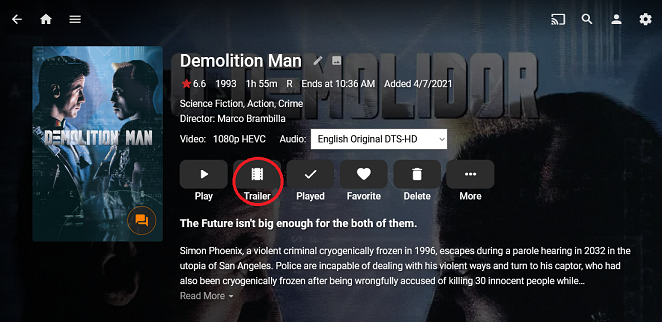
Emby should provide administrators with the ability to opt out of all playback of externally hosted content. One example of this behavior is when a metadata provider includes a link to a trailer in its metadata: There is no way to distinguish between a locally hosted trailer and a remotely hosted file that will trigger external playback. The Metadata Manager provides no mechanism to control how the 'trailer' field is populated. And again, there's no way to opt out of that external playback.
 1 point
 -
When I am browsing my library (Using FireFox or Chrome on Windows 10) and I choose to add a movie to a collection (as well as many other actions but not all) and I click on the three dots and choose "Add to collection and add the selected movie to a collection instead of returning to the movie list where I left off (at the movie just before or after the one I selected) I am jumped to the top of the current page and I have to scroll back to where I was to continue browsing my movies. It seems to me that after almost any action I should be returned back exactly where I left off and any other action is counter intuitive. Even if I choose to refresh the screen I should stay where I am in whatever list I am in and not be returned to the very first page. That is currently if I am browsing at the letter "M" (or any other letter) and I refresh the screen, say to show a newly set poster, I am returned all the way back to the "#" at the very first of my library. I do not think either behavior that jumps me to another location well away from where I am is at all correct. Of course I understand that this is probably a case of "That is the way it has always been done" but I cannot conceive of any justification other than "it is easier on the programmer." I would request that this behavior be changed to be more intuitive or at least the first action I mentioned be fixed. Thank You.1 point
-
Just got a Roku premiere today to replace my dying Roku 4. Can confirm some things for you. Automatically updated me to Roku 10.0.0 build 4165-C2. I have just disabled the beta update option so I won't get anymore Roku betas. Emby (4.0 build 18) splash screen comes up for a couple seconds and crashes to the Roku homescreen. Doesn't seem to even log in. On my server it only shows the beta app logging in. Emby Beta (4.0 build 22) works perfectly. If I try to cast from my pixel 4xl it opens the Beta app and works fine.1 point
-
There's no barrier, it's just a matter of getting to it.1 point
-
Quick test this would appear to be fixed in moviedb plugin update v1.4.5. Reidentified 2001 Space Odessey and got only the 3 trailers.1 point
-
It is still there. I just edited it to encourage people to help us test our fix in our app.1 point
-
@PuffyToesToo @Spaceboy I'll pm you a test version this weekend with some extra logging about the max runtime option for MusicVideos. @PuffyToesToo If you play something on your Roku (preferable a channel without bumpers), take a look at Emby's transcoding folder. A text file "VirtualTV#_#######.txt" should be there. Please open it and tell me how many lines starting with "file" are there? No i'm using a Fisher-Yates variant with a random number generated by System.Security.Cryptography: public static void Shuffle<T>(this IList<T> list) { int n = list.Count; while (n > 1) { n--; int k = RandomNumberGenerator.GetInt32(n + 1); T value = list[k]; list[k] = list[n]; list[n] = value; } }1 point
-
It's a fudge, but if you copy an empty trailer.mkv into the folder - it will use this instead. I created a blank mkv with 1 blank frame - you click on the trailer icon now and it immediate returns you to the menu again - effectively ignoring the trailer button...1 point
-
I just NEVER want to be forced, like I was on one of my Rokus, to use beta software if I am not informed of it and choose to participate. Being placed in Roku's beta without notice is unacceptable in the extreme. I was however never without Emby on my Roku. The release version of Emby seemed to work in all cases and I keep both the release and the beta on my Roku at all times so I could easily switch when and if I need to. I was actually thanking Emby for providing info as to how to check which server I was using for Roku updates and how to change it if desired. It seemed to me that Emby was providing a public service since Roku was forcing an undesired situation on many folks. No, it is NOT Emby's fault, it was Roku's but Emby reacted to it very well. No, it is NOT Emby's fault or responsibility to police ethics in the streaming world but I hoped the post showing how to get out of using Roku's beta server would remain accessible even if it was not the real solution. It was good info that Roku does not share. BTW: Just because you are on Roku's beta server does not mean you will or did get Roku's beta firmware. In fact Roku can use either server to update any Roku or group of Rokus they chose to any version of their firmware. Many many years ago I was in Roku's beta for a particular feature and I uncovered a bug and they updated just my Roku to test the fix. It worked so Roku updated everybody in the testing group. Roku can also run several different betas at the same time using slightly different firmware. At one time they were running six different known betas at the same time. Shortly after that time was when Roku started screwing up their betas by ignoring their testers and generally not really "testing" their firmware. They released firmware with bugs that had been reported in the beta for months with several/most of us withdrawing from the program. I love my Rokus but Roku(the company) has dropped way down on my list of favorite companies. (It should be noted that their policies also drove several of their community relations people to quit the company and go elsewhere. Roku started out as one of the best companies I have ever dealt with and they descended down the integrity ladder until they became where they are now; A company with no real morals that does not care about their users. One more time: I applaud Emby for providing info that exposes just one more way Roku looks to screw their users.1 point
-
Hi. This issue was not Roku not wanting our app. It was just a change they made in their new firmware that we had to adjust to. Thanks.1 point
-
Assuming you have a transcoding bottleneck (the only real emby workload using the CPU), then the best bang for your buck by far will to purchase emby premier and a suitable GPU. It doesn't matter how many cores/threads or fast a CPU is, it is not as fast as dedicated hardware accelerated media decoders/encoders on the GPU silicon. You can't of course find any GPU's out there at the moment lol, but when they are available at mrrp, then this is your best - keep everything else as is.1 point
-
Will do. It will be a different version with some improvements around the transcoding implementation (which is what caused this problem in the first place) Probably some time next week1 point
-
More then likely it was on .20/.21 as beta has updated a couple times since the then. Roku Beta Release Notes - Roku - Emby Community Doesn't look like .22 has made it to the list yet.1 point
-
Hi, sorry for the late reply. actually i did what Luke the admin said. apparently when i put the URL in the web browser, the response is "404 not found" so I contact the IPTV provider and wait for their reply. didn't know you guys have a remote session!! it's great!! good to know. you are the best. thanks1 point
-
Yeah, I like either a +/- offset or the ability set a time zone. The problem with a time zone is that you then also need to consider daylight saving. LG tv’s have an additional quirk where the time returned by the OS to apps applies the correct time zone, but not the daylight savings offset. In this case, having just a tz selection wouldn’t be enough. That’s why I prefer just a direct +/- offset, which would need to be in 30 minute increments.1 point
-
Do you have the right files, the private key, site cert and chain certs? Openssl doesn't seem to recognize the given file as the private key.1 point
-
You need to adjust the C:\Users\username\AppData\Roaming\Emby-Server\system\dashboard-ui\modules\emby-elements\emby-itemscontainer\emby-itemscontainer.js1 point
-
It seems that your statement in the first post of this thread: "As you can tell, I have only basic skills and do not understand anything other than very simple steps" was a little misleading! Your setup is a lot more segmented than I have bothered with, actually - but I can't see anything you've done which I couldn't set up in my single router (Draytek Vigor 2860ac). Before I retired I ran the networks, including security, for a university medical research department doing clinical trials. My experience there showed that there is no way to stop people knocking at the door - it's all about ensuring that your system doesn't respond when it shouldn't. At least I was never in the position of the person from a different department who had his stuff in the rack next to mine in the server room. He got a call from GCHQ (UK equivalent of NSA for you in the US) telling him that his Linux server cluster had been compromised - which he hadn't known - and, alarmingly, asking him (well, telling him, actually) to leave it untouched as what the hack was doing was very interesting to them, and they wanted to be able to study it without letting the hackers know that they'd been discovered! Don't listen to people who tell you that running Windows is a security risk that running Linux avoids - it's not that simple! Paul1 point
-
How would this explain the same issue occurring for those already on beta having to update to a newer beta version just to remedy this problem? The common denominator is clearly DSM updates impacting Emby's ability to see Synology's hardware. Allow me to illustrate using my timeline: Emby server 4.5.4.0 working fine on DSM firmware 6.2.3-25426 Update 3. Update DSM firmware to version 6.2.4-25554. No changes to any Emby settings before, during, or after the DSM update. Immediately notice CPU spiking to 99%. Find that all hardware encoders/decoders are missing from the Transcoding screen. Update to Emby server beta version 4.6.0.30. All encoders/decoders return to normal, without any other intervention other than updating to Emby beta. Update DSM firmware to version 6.2.4-25556. No changes to any Emby settings before, during, or after the DSM update. Immediately notice CPU spiking to 99%, again. Find that all hardware encoders/decoders are missing from the Transcoding screen, again. Update to Emby server beta version 4.6.0.36. All encoders/decoders return to normal, without any other intervention other than updating to a newer version of Emby beta. Just as a means of showing that the DSM update is the culprit, I also updated to Emby server beta version 4.6.0.37 today and none of these issues arose again. I am by no means a developer of any platform, but I am unsure why these DSM updates, both major and minor, are not being highlighted as the culprit behind these problems that other users and I are experiencing.1 point
-
There's a more up to date version here for testing, FYI:1 point
-
Hi, regarding playback, you should be able to solve that by lowering the quality setting in the app. But you're saying that general browsing is also slow? Where exactly?1 point
-
Don't feel bad, many people here have both a Plex Pass and a Premiere license for the same reason of switching over to Emby. In case you not aware of what Premiere gives you: https://emby.media/support/articles/Premiere-Feature-Matrix.html Keep in mind you don't have to get a lifetime license and you could always do a monthly license at least to use as a test for a month or two. Congrats on switching to the green side.1 point
-
It has been some time since I worked on the project because I'm working 2 jobs at the moment and a lot of other stuff. I'm currently not working on the shows pages because I still didn't like the memory and CPU consumption of EmbyStat. So what I started building is a new Emby plugin that will calculate everything and send the statistics to EmbyStat. This way I can work with the Emby internal library events (so no nighty job and no more full db sync). I do have to redo some stuff to get it working properly in the plugin. As well as creating some kind of settings sync between the plugin and EmbyStat. I really hope that this change will make it possible to get EmbyStat lightweight again. Sorry for all the delays, I never though a project of this size would be this amount of work1 point
-
He confirmed it is resolved now via PM. Thanks for the feedback.1 point
-
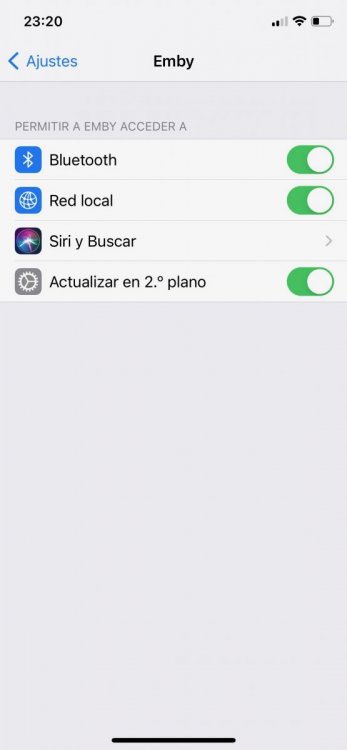
After upgrade to iOS 14 or padOS 14, you have to go to Settings - Emby - Enable Local Network Access Permission. If that setting is not enabled, then you are stuck in loop, no compatible streams are found.
 1 point
















