Leaderboard




Popular Content
Showing content with the highest reputation on 04/04/21 in Posts
-
I wish it were that easy. You have to do it through their web form to request partner support. Then you can escalate your device and get the Beta firmware. The problem is Roku is adopting users into the Beta firmware that have never asked to be part of that program. They do not have enough Beta testers. So they go about silently adopting users and updating their devices. This caused the problem. We had to deduce okay it was a firmware update. Then figure out.. okay if you just use the Emby app they do not adopt you. They must have issues in some major app and if you use that app often enough you get adopted into the Beta firmware to help chase down issues as they watched your device crash. I am assume Netflix. People adopted in without being asked must use Netflix often. Roku wants to chase down crashes on Netflix using firmware version 10 they need users who use Netflix. That is my assumption and we get caught in the cross fire because Roku changed parts of their video capability reporting. The response of the CanDecodeVideo has changed. It no longer works like it did before. That caused the problem. We have firmware 10 now. The Beta application has been updated. What a wild bumpy ride it has been. A pot hole followed by a flat tire. It is our fault the tire went flat but it is Roku fault the road had the pot hole. If they had told us the pot hole was coming we would've fixed our tire. But this is all water under the bridge. History. We can now go back to comfort of watching on our Roku.2 points
-
I'd really like to have 2 Factor Authentication added to the login screen. It's just this (optional) extra layer of security to help secure the server (which, especially if people use camera uploads) contains pretty private data. There are for every type of programming language quite a few libraries available, so implementation on a server shouldn't be too hard to realise1 point
-
VERSION 6.2.22: Download link for manual update: https://github.com/MediaBrowser/plugin.video.emby/archive/refs/tags/6.2.22.zip Release Notes: https://github.com/MediaBrowser/plugin.video.emby/releases/tag/6.2.221 point
-
Is it possible to add a bitrate for users that are direct(whatever) something? It's good info, and readily available. Thanks1 point
-
So I did spend some time with source code and comparing with older versions definitely can tell there has been a major rework and a lot of previous code has been rewritten. I am curious why you do not want to update the playpath dynamically from the Websocket server as parameter data. While i understand this may break 3rd party plugins due to playlist situations there is also the perspective that this plugin does not have to play nice with those external features in this scenario. Really my ability to choose between a 4k Disc and 1080 Disc ISO from the popup (or any other version such has MP4 for the matter) being vastly different from old behavior is my primary concern. I was doing the multi entry approach in Kodi before but does that sure make library view very cluttered. In fact going with that approach there is no reason not to go back to Kodi Native adding a remote directory to scan.That does decentralize your DB but there is some tweaking for that as well. I am not entirely sure how the plugin is picking which version to insert into Kodi DB even though the video entry has both 4k and 1080 based ISOs. Maybe first item in the list based on alphabetical order which could be the 4k or 1080 disc. This is why the old plugin approach hit that sweet spot.1 point
-
I can't reproduce the progress update problems anymore, either.1 point
-
Same, backdrops issue seems to have been fixed with the experimental update.1 point
-
That was what I was asking. There has been a back and forth here about having ffmpeg as a separate pkg in the jail plugin .json and if you go into the jail shell at run "pkg install ffmpeg" and restart emby with a "service emby-server restart" and let me know if that fixes it. People seem to have it work fine when they install ffmpeg from pkg but I am being told that installing emby-server should pull it automatically but it doesn't seem to be doing so.1 point
-
I tried to help someone else out with this same issue. We couldn't figure it out, they ended up switching to nginx reverse proxy and all worked well. I do not use apache so i have not spent the time to install, learn, then troubleshoot why or what the fix could be, I just don't have time. But as a last ditch effort the other person switched to nginx and I helped him set up his config, no issues. I think he ended up switching his setup to nginx. Sorry, that's probably not the answer you want to hear, but we were troubleshooting for like 3 days off and on.1 point
-
Hi. Is there something about the labeling of the option that led you to believe that? That is not how that parameter behaves. It is the maximum simultaneous streams. The global limit will still apply here as it is designed to limit the load on the server.1 point
-
I would love it if Emby would abbreviate the names for my non-canonical television episodes. For example, if I have a special named "Show Name - S00E101 - Episode Name.mp4" Emby shows: "Special - Show Name - S00E101 - Episode Name" But I wish it would simply show "Special - Episode Name" I realize you can manually change the name, in Emby, but I have entire series that are divorced from TVDB, so that's a few hundred (maybe thousand) episodes.1 point
-
Para montar a estrutura da forma que você deseja, vou informar como eu faço aqui. Pasta: Filmes Dentro desta pasta crie uma pasta, por ex: Itália Dentro da pasta Itália cria as pastas com o nome dos filmes. Após esse procedimento, crie a biblioteca e indique a pasta que vc quer que apareça. Após o término do escaneamento, acesse o menu do Emby e faça o processo: 1 - Tela de Inicio 2 - Procure pela Opção Filmes 3 - Em Tela Padrão coloque a visualização como "Capa". (Conforme a foto) Agora irá aparecer para você por País. Espero que seja isso que esteja querendo fazer. Ficará parecido com esse formato
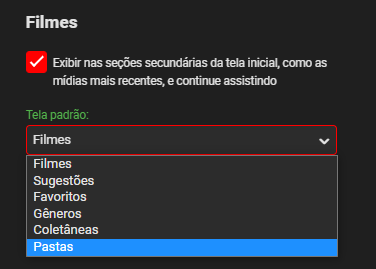
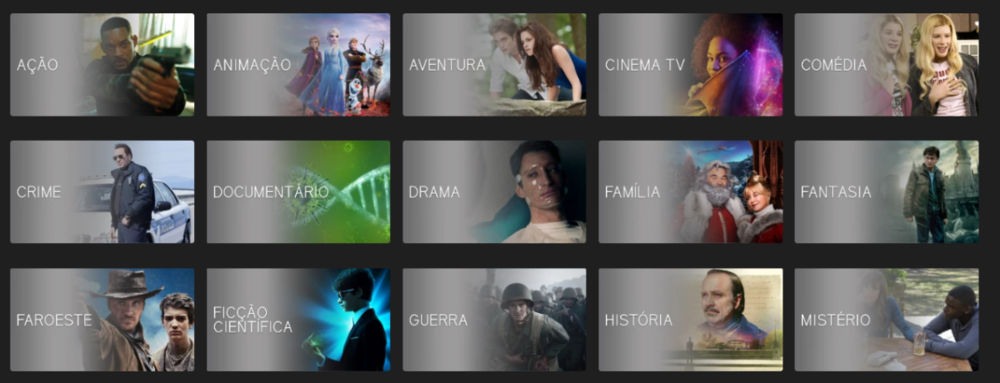 1 point
 -
That's odd. I have a pixel 5 and pixel first generation for testing and I'm able to tap the minus button. I'll try to chase it down. Thanks.1 point
-
For android devices that don't support av1 we embed a software decoder for it. We're going to switch to a different one that may perform a little bit better on android.1 point
-
Thanks for the update...it worked right away and updated from the server without even restarting Kodi. I will monitor and let you know how it goes if any issues. Is it just me, or is this faster then the .05 beta version? Seems like my screen is a bit more snappy...but maybe it is just me. Thanks.1 point
-
That is the dumbest thing I've ever heard! Poor design considerations from these manufacturers. Thanks for the great answer! I do have a follow-up question. Is it possible to install emby directly on my Denon avr? Or is there a emby only tv stick I can buy? I don't want all the smart apps in two different places.1 point
-
My preference would be that everything stays as it is now, except a fully watched TV show would get the check mark indicator like movies instead of nothing.1 point
-
I don't think 2FA needs to be a one stop solution to securing emby. An incremental step forward to support 2FA for those users who have already secured their servers through SSL certs etc would be a step in the right direction. I'd vote against any plex style domain / certificate process personally.1 point
-
For anyone that doesn't want to make the updates, here I have attached the updated addon.xml which you can copy into your skin folder on your box and re-load kodi. For anyone that needs to install fresh, here is the zip with the entire skin with the modified xml already baked in, where you can just install from zip file. All I did for this was download the zip from fred's repo, add in the modified addon.xml, and re-zip. No other changes. I take no credit for this or the skin, just helping out fellow users. Mods, if this is inappropriate, please let me know and I will delete. https://drive.google.com/drive/folders/1L4EFdrSSEoZvHMlMsbp2uZAWKsfkjt3f?usp=sharing1 point
-
As someone has already written here, Emby has/had (depending if you are on stable or beta server) some sort of 2FA as you are/were able to additionally restrict access by device. So, even if someone has the credentials he cannot login if the user is restricted to his devices only -> If someone tries to login from a unknown device he will not get in. But: With the next stable this is also gone, as the devs thought they needed to "improve" (in this case make it worse would suit better): https://emby.media/community/index.php?/topic/94474-46020-revamped-device-access-control/1 point
-
No, as soon as LG release it1 point
-
This request is still getting likes almost three years after I posted it.1 point
-
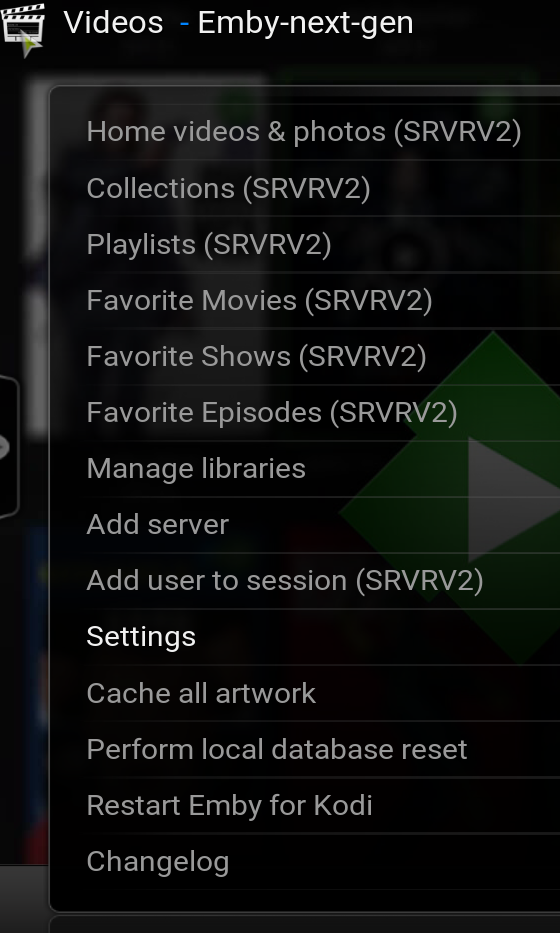
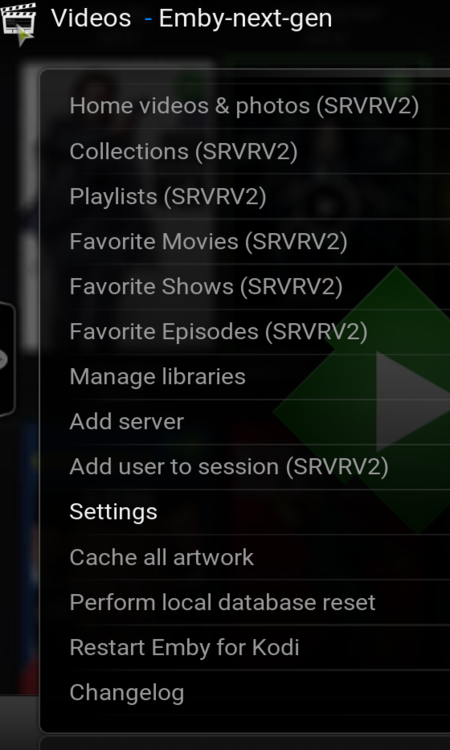
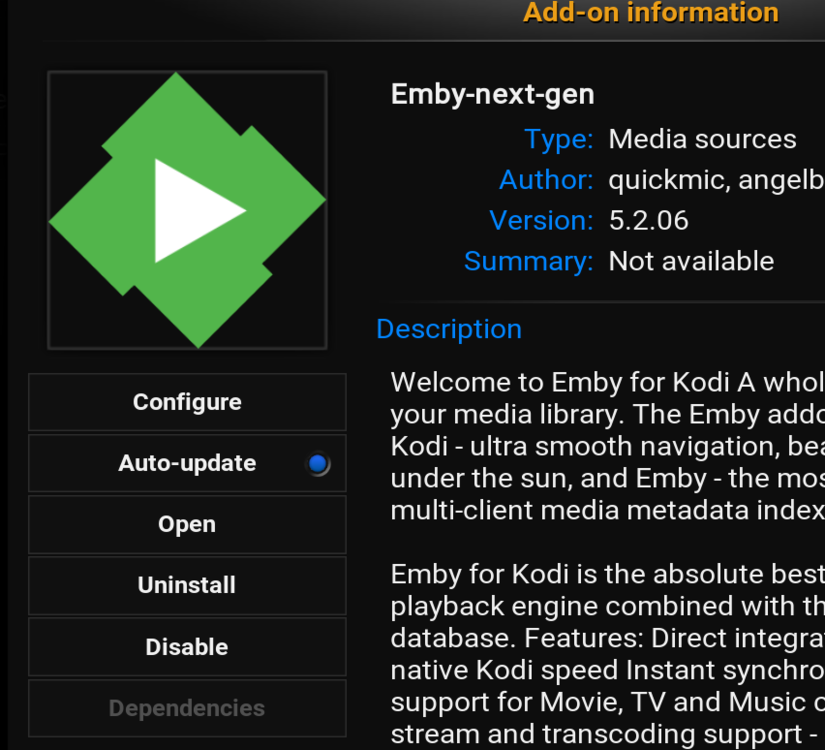
quickmic already acknowledge Settings button unresponsive and already commited to have a look/fix. Workaround is instead of going to Settings from this path (1st pic), go for addon info/configure (2nd pic)
 1 point
 -
Feature request: Roadmap/Development transparency In scrolling through the current feature requests, and having put in a few myself, I'm curious: How many upvotes does a feature request need to get before you guys actually start working on it? Is there a certain number of votes per period of time, or how do you decide what actually gets worked on? I ask because I often see a feature request, and the response is generally something along the lines of: If the Emby Team already agrees with the user, the script goes: Emby team - "It's something we'd like to do in the future, thanks." But no timeline is given. A year goes by and it still hasn't been implemented, so the user asks again, and gets a response similar to: Emby team - "We are working as hard as possible to make everyone as happy as we possibly can. Thanks." User gets frustrated, asks for an ETA, response is like: Emby team - "Hi. We have never stated this feature was slated for any particular release. It is planned for the future but not under active development yet." 2.5 years have gone by for this feature request, with almost 30 upvotes, and active development isn't even on the horizon. If the Emby Team disagrees with the user request, the script goes something like: Emby team - "This is why we think the way we are doing things is right, thanks" Users - "Hey, I see what you are saying, but here are 9 reasons I disagree" Emby team - responds to 1 point of the 9 made to tell the user they are wrong, or that that 1 little point isn't relevant, ignores the other 8 points User - gets frustrated, keeps pushing Emby team - "This thread is here to gauge user interest, we will see how many upvotes it gets and may implement it in the future" Years go by, thread gets upvoted, feature never gets implemented. The highest upvoted feature request right now in the top 20 pages of this forum has 63 requests (not even counting how many similar threads may have been locked for being duplicates), and it's not even under active development at this time, despite being created by a developer and being over 2.5 years old. To get ahead of some of the responses I'm sure I'll get, let me just say: -I absolutely appreciate that Emby exists, and I appreciate and respect the time that goes into its creation and development. I know that developing a program takes time. -Yes, I am a premiere subscriber -No, I'm not just trying to complain about this. I am simply asking for realistic responses that actually have usable substance and transparency. Some actual follow through or a roadmap so that users know if their requests are even being considered for active development, rather than waiting for ages only to be told that the item they thought was getting worked on or had a chance at being worked on isn't anywhere on the horizon. -Yes, I do really love Emby, and I want to see it grow and get better, which is why I have chosen to give you guys my money, and why I recommend it to people. Unfortunately, that doesn't negate my frustration with this current process.1 point
-
here: IntroSkip.zip It should be mentioned that the new version of emby will use ffmpeg to detect intros. So things will change again. If you install this, please be aware that it is still in it's infancy. It saves data in the plugin configuration folder which is not ideal, and will most likely change in the future. If you aren't sure about how the inner workings of emby folder structures are laid out, I would probably skip trying this out.1 point
-
Hi, I join this request. I've got this multimedia chain: Chromecast HDMI 2.0 -> HDMI 2.0 -> TV Panasonic HX1000 HDMI 2.0 ->HDMI 1.4a ARC -> Onkyo TX-NR709 HDMI 1.4a Chromecast with Google TV supports: Dolby Digital Dolby Digital Plus Dolby digital Plus + Dolby Atmos DTS (not officially, but it supports it) DTS-ES Discrete y Matrix (not officially, but it supports it) AAC PCM Multichannel Panasonic 1000HZ TV supports: Dolby Digital Dolby Digital Plus Dolby Digital Plus + Dolby Atmos AAC PCM Multichannel Onkyo TX-NR709 AVR supports: Dolby Digital Dolby Digital Plus Dolby TrueHD DTS DTS-ES Discrete y Matrix DTS-HD PCM Multichannel The multimedia chain limits the supported formats to those that are common to all the elements of the chain, so the formats that reach my AVR are: Dolby Digital Dolby Digital Plus PCM 2.0: sending the signal by HDMI ARC, ARC limits to PCM to only 2 channels (stereo). Emby beta got an option that if marked, it transcodes every not supported format to AC3 (at 640kbps I supossed), it's a very usefull option, but it could be great to be able to select the best supported format with most possible quality in each case (AC3, EAC3, multichanel PCM) In my case what I do when necessary is to convert with ffmpeg the best track with audio in my language to Dolby Digital+ (EAC3) at 1536mbps and 5.1 channels and adding it as the default track. I use EAC3 because is the best multichannel codec my AVR can playback in my multimedia chain (better than AC3) and I encode it at the highest secure bitrate to maximize quality. I can't go beyond 5.1 channels because it's a limitation ffmpeg has. Thanks.1 point
-
I see, so if I want to test other video files I need to change that. It does seem that allowing an "unlimited" bitrate is producing the results I'd like though. With what I know about h264 encoding, I suppose that's not unexpected. I guess my next question is - is there a settings file somewhere where I can override this behavior on a global level, until such time that the Emby team is willing or able to incorporate a true solution for users managing transcoding via local playback from their media library? Does the diagnostic plugin support wildcard operators? Frankly, I just want to see the videos I have in the quality I have them encoded them in. I wouldn't call myself completely ignorant of the processes in place here, but if I see a setting available in the dashboard, I expect it will do exactly what it says it does, and not assume I don't know what I want and override my choices. That's why I picked Emby in the first place over, say, Plex - for the transcoding flexibility. I realize it's a niche power user use case, and I can't say I don't understand the need to protect novice users from themselves sometimes (because let's face it, many people do), but this issue does have me a little frustrated, not gonna lie.1 point
-
I still like this idea, just saying. Changing to this would temporarily set this plugin backwards in terms of supported features, but in the long run it would reduce the dev effort and make two features more robust together at the same time.1 point
-
1) A fellow Canadian made this but even better one fairly close to me ( Lindsay ) 2) THANK YOU!!! this has been a pet peeve of mine for so long and I've not been so happy to see a plugin since.....well who knows but again THANK YOU.1 point
-
You can find the original posters (and plenty of others) without the bluray border there : https://theposterdb.com/poster/9772 I hope that one day tpdb will be available as an agent for emby!1 point
-
I would find it useful to be able to select multiple items (eg, multiple videos) at a time in the Metadata Editor and Edit/Add values to them in bulk simultaneously. For example, to be able to select multiple items and add a Tag (or Person, Genre, etc.) to all of the items at the same time. Thanks for considering my request! PS - If this is something you might like to see implemented, be sure to "Like" this top/first post (as well as any subsequent posts in this thread that highlight particular aspects of what you are interested in) -- "Liking" the top/first post helps the Devs to know how much interest there is in a given Feature Request.1 point
-
Hi, I've done this to myself a couple times.... I have a MB restart pending or add a plugin and do a manual restart. However, I fail to notice if a user is currently using the server (or live tv is recording currently) and it stops recording or playback for the user. When clicking on restart from the admin account on the web UI, could Emby check for current activity (or recording scheduled within X minutes so it doesn't fail to record during the restart process) and warn/show a list of current activity and a "are you sure" kind of message. Would have saved me a couple times from myself... Thanks, Erik1 point