Leaderboard




Popular Content
Showing content with the highest reputation on 03/29/21 in Posts
-
Request No. 1: Implement Metascore rating for movies, from Metacritic.com, in Emby. OMDb api provides this information. Request No. 2: Also, fix an option in settings to enable or disable a ratings source according to the user's choice.2 points
-
Just spend about 40 minutes trying to get artwork to fail, no luck. Why when you want an issue to appear it never does. I will try again tomorrow.2 points
-
You can whitelist by tag as well as blacklist. But, in this case, you'd be better off using the custom/parental rating field in the Metadata Manager, instead of tags. This lets you display the real rating in the apps but the system will use the custom rating to decide access.2 points
-
Here is the latest list of versions for Emby software across the server and clients. Emby Server Stable: v4.9.5.0 (2026/05/18) Release Notes Beta: v4.10.0.14 (2026/06/04) Release Notes For other platforms, please refer to the download page. Emby for Android TV Google Devices Stable: v2.1.23 (2025/12/27) Beta: v2.1.46 (2026/04/15) Amazon Devices Stable: v2.1.23 (2025/12/27) Beta: v2.1.46 (2026/04/15) Stable Release Notes Beta Release Notes Universal Android app Stable: v3.5.16 (2026/01/26) Beta: v3.5.36 (2026/05/10) Release Notes Download the latest Beta here. Emby for Kodi See here for the latest information. Emby for Roku Stable: v4.1.63 (2026/05/04) Release Notes Beta: v4.1.64 (2026/05/13) Release Notes Emby for Windows (Windows Store for PC & Xbox One) Stable Release Notes Beta release notes Emby for Linux Beta Release Notes Emby for Samsung Smart TV (Orsay) E-series to H-series TVs only Release Notes Emby Theatre for Samsung Smart TV (Tizen) Release Notes Emby Theatre for LG Smart TV Stable: 1.0.50 (2026/01/19) Emby for iOS Stable: v2.2.53 (2026/05/16) Stable Release Notes Beta: v2.2.52 (2025/04/11) Beta Release Notes Emby for Apple TV Stable: v2.0.3 (2025/12/26) Announcement Beta: v2.0.6 (2026/04/11) Release Notes Emby for tvOS (Apple TV) Stable: 2.1.6 (2022/12/23) Release Notes - TBA Beta: 1.5.1 (10) (2021/03/02) Beta Release Notes Emby For MacOS Stable: 2.1.6 (2022/05/09) Details here. I will keep this post up-to-date as much as possible, but please send me a PM about anything I haven't updated, or is missing. Special thanks to @Borskfor supplying a lot of the updated information. Thanks.1 point
-
I am switching over from a Win7 box running MBC to Chromecast dongles. With the Win7 box I had a HDMI to Cat6 setup that allowed me to stream to up to 4 displays/TVs simultaneously. It was great while it lasted, but involved stapling cables to the ceiling to run it from room to room - plus it has borked Can there be an option to multi-cast to several receivers at once? i.e. simultaneously play to Chromecast dongles in my office and living room and kitchen simultaneously so i can walk from room to room without stopping and restarting the movie or show all the time? I realize that bandwidth could POTENTIALLY be an issue, but i have a fill gigabit network and a multi-port NAS so that really is the least of my worries... Thank you!1 point
-
Is it possible to have a banner on the front page, and/or popup to announce maintence going on with the MediaBrowser service. It would be nice to be able to announce a maintenance to family and my kids who are at their moms. Anyone else think this would be neat? thanks!1 point
-
No way! I am a nerd who absolutely loves this thing! Totally worth it in my opinion1 point
-
The Roku app has working WOL support too. Could get one of those relatively cheap too and just use it as an Emby client the same as Android. You have options.1 point
-
I have to apologize because I noticed other strange things happening in the hd and in the end there were so many bad sectors (I don't know how). This did not allow Emby Server to work, the version or the latest update has nothing to do with it, it was my hd damaged. Inserted the same media in another hd everything worked perfectly, as always. Thanks and sorry.1 point
-
Right now I have a cron task running on my server to move over movies/tv shows that are holiday related into my current media folders. I did try symbolic links but Emby didn't seem to want to play those, so I'm literally moving files from folder to folder. It would be nice to have a feature built into Emby that allowed you to add a "time based" folder to your library and have Emby just add it when the time comes. This would eliminate moving of files on the hard drives periodically throughout the year.1 point
-
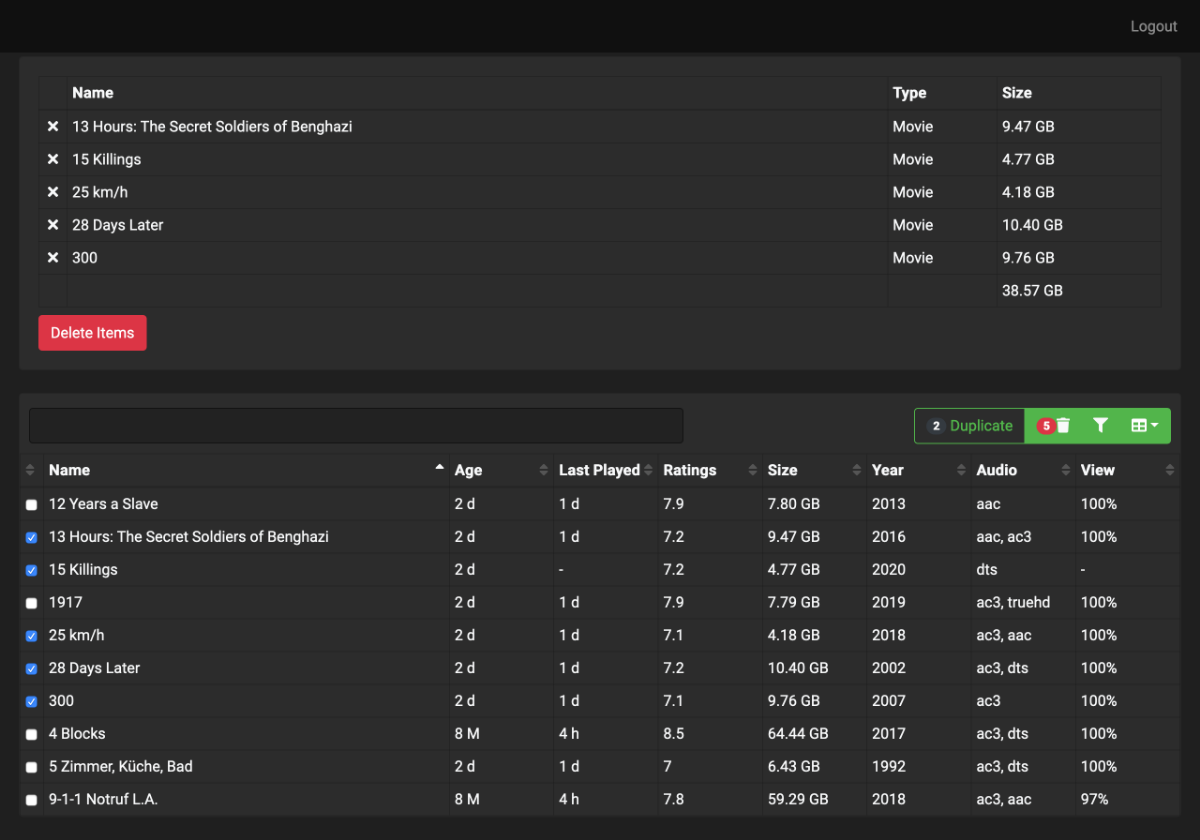
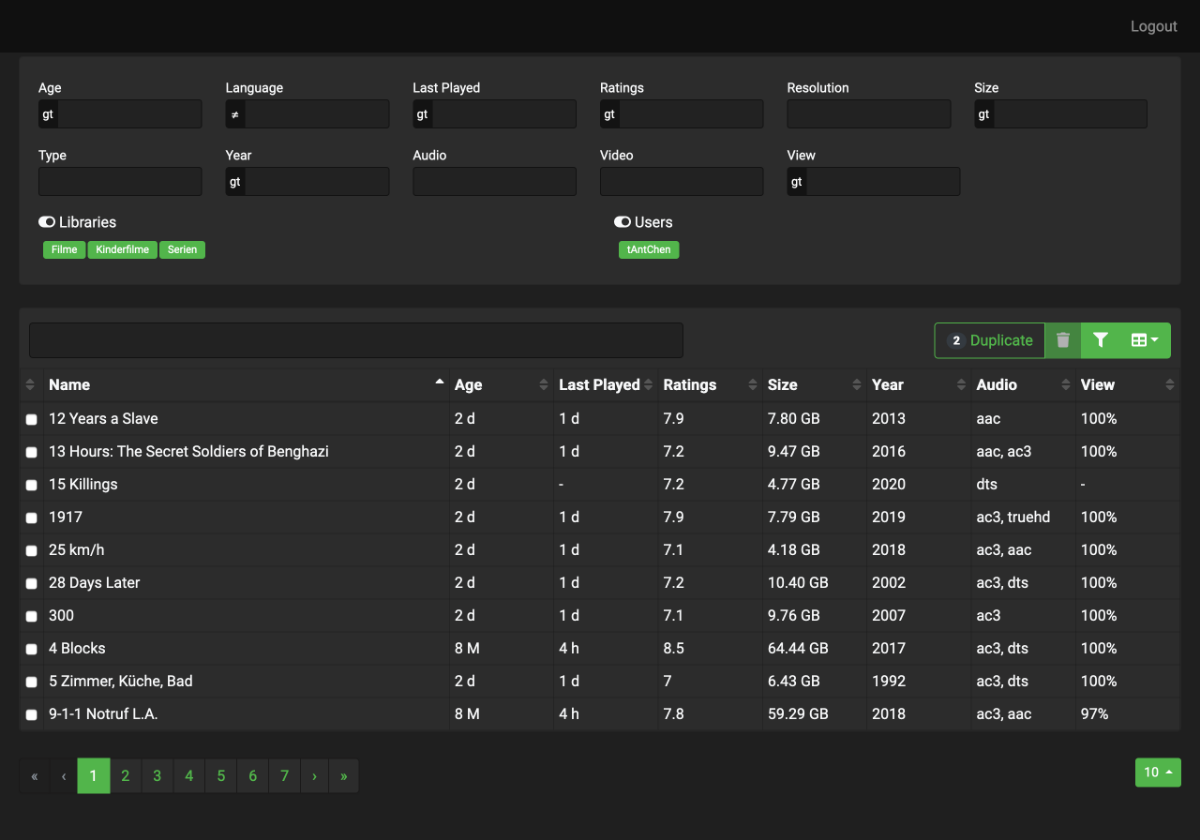
Hi All, over the years we added thousands of videos and series to our remote-server, but every disc becomes full. Then it is difficult to decide which content can be deleted. So i have create a little angular tool that collects the video items from the emby-api and shows it in a table. There you can filter and sort the items by several properties. Today i pushed the project to github.com because like to share it with the community. https://github.com/tantchen/emby-library-browser
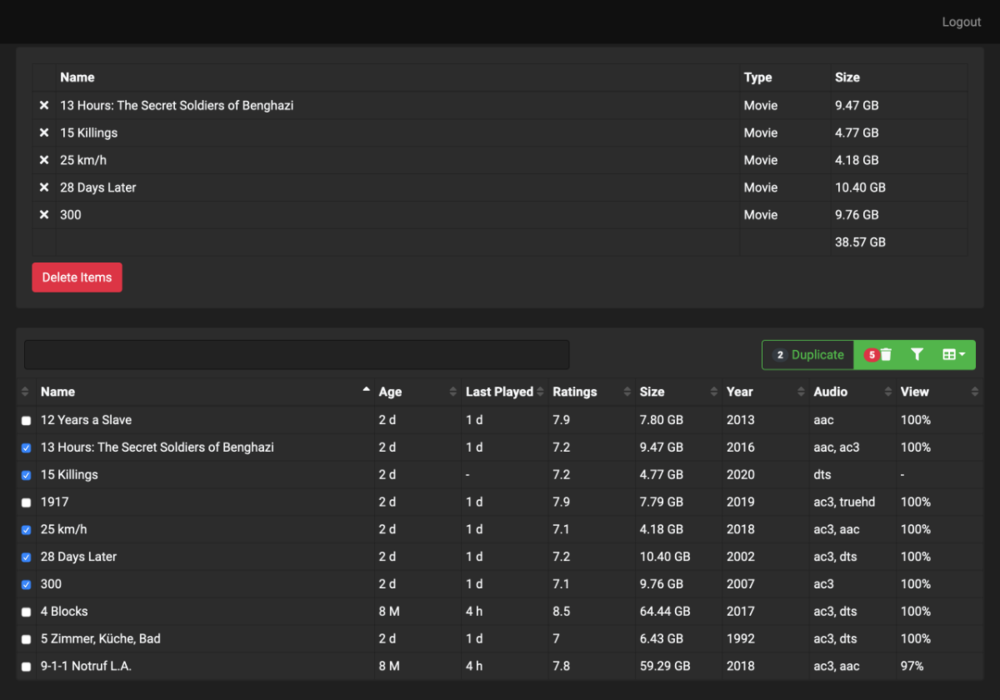
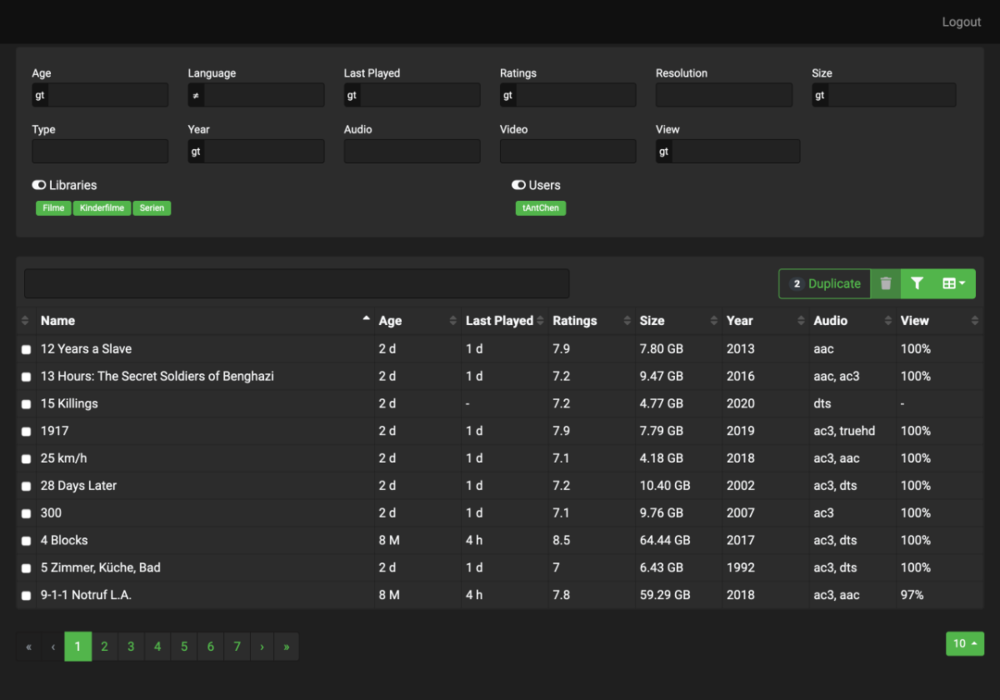 1 point
 -
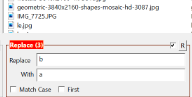
You dont have to rename it manually. As mentioned by Happy2play, it is highly recommended to use software that can rename multiple files in a single click of a button. I myself too use Bulk Rename Utility. A small guide for how to do it:(as a begineer it is somewhat overwhelming) Ur file are named as -> Camera Cafe 1 Stagione - Ep. 100 What u can do is add this in Replace -> Ep. Add this in With -> S01E then select all ur file that u want to rename, then click rename button. Then it is preferred to refresh ur metedata. OR (best alternative) This is highly preferred from me, (coz am lazy) Installed deluge, jackett and sonarr on my server. Then i let sonarr automatically add the shows i need. It search automatically all the torrents in Jackett's list for my show and starts downloading the show in Deluge and renames it later as per the format i set. Emby server does the rest of job. (still i didnt provide many information, as there is lot of guide online). https://www.cuttingcords.com/home/ultimate-server/getting-started https://www.htpcguides.com/ultimate-windows-home-media-server-guide/ .
 1 point
 -
This is funny, you disappointed because it did not fail ps: I get what you mean by this, but it still is amusing to read This is the classic "sorry doc, it doesnt hurt anymore"1 point
-
Thanks for the feedback.1 point
-
Hi I can confirm that the subtitle enabled/disabled option works as it should be, based on Kodi settings But, the preferred subtitle language is not automatically selected. My srt file names are Movie.ENG.srt Movie.SPA.srt Old plugin selected the English (preferred language in Kodi settings) subtitle, but new plugin seems not to recognize it and keeps the Spanish subtitle selected. Thanks!1 point
-
When i have some time tomorrow i will see if i can force an artwork failure and test this.1 point
-
Well I think both issues (after initial sync) and the update Artwork has the same core. The problem is, artwork is piped through local http-Websocket. This socket is initiated after Emby connection is established. Unfortunately, the skin sometimes queries Artwork before socket is online. This is no problem, cause once cached all good. Sometimes it seems Kodi caches invalid Artwork (before socket was online) and skin reload will not force a new query. To test this hypothesis, please don't reset the database. Just delete all cached artwork in the Kodi thumbnails folder and restart Kodi. If this fixes the issue, it's the cache.1 point
-
Hi Luke, I have a Spectrum tech coming out today to check my problem. I'll know more after that and let you guys know one way or the other. Thanks and sorry about not following up.1 point
-
Once I put all the movies into their own folders, everything worked brilliantly. In addition to playing the local trailers on the web interface, the Trailer Icon appeared on the Roku, and that plays my local trailers as well. All is right in the world, thank you.1 point
-
We'll revisit this and see if we're able to enable it. Thanks guys.1 point
-
@Luke still occurring on the Martian extended running server .35 and 2.0.01rc2 on both my NVidia shield pro 2019.1 point
-
 Ok, I switched gears a bit. Doing some research, I decided to sell my old projector and picked up an Epson projector with lens memory. Also am selling my 16:9 110" screen and bought a 2:35 127" screen. Going to set lens memory to remember the 16:9 setting and have black bars on the sides and a 2:35 / 2:40 setting to zoom that format fit the screen (with black bars outside of the coverage area). I might make some press in side black out panels for 4:3 and 16:9 if that bothers me too much. No motors, no headache, and will be a cleaner set-up once I build the false wall to put my speakers behind (it's an accoustically transparent screen)1 point
 -
I've just read this whole thing from start to finish. Did I miss the promised mockup?1 point
-
Thanks for posting that here. I don't have a TV running the latest Samsung so I was handicapped trying to help you.1 point
-
I had started a thread about this live TV issue in the Emby Server section. After troubleshooting and trying different apps, such as the Roku app and Xbox app, it was suggested by @cayarsto create a post here. I don't want to go into everything again since it's all been stated, videos provided, etc so here's the original thread. Here's the video example at least: https://1drv.ms/u/s!AmxAd68BNmv4wPZjJVUE48tF_0YBnw?e=2M7L6i This is occurring even while direct playing & not transcoding. The TL;DR: Tested on Roku using Wireless (2.4 & 5 Ghz), tested on Xbox One X (ethernet), and tested on Samsung TV (2.4 & 5 Ghz). Playback was smooth on the Roku & Xbox apps, but not Samsung when testing the same channels. Emby version 4.5.4.0.1 point
-
For the longest time marking seasons played was not a feature in emby. I recall some time ago that i asked if this could be incorporated. I just never noticed that the feature was added as i was depending solely on the ... of the season folders. When i jumped back from plex it was a feature that i was sorely missing.1 point
-
Don't know if it will work but have you tried this? But it would appear platform developers are trying to get more information.1 point
-
https://support.emby.media/support/solutions/articles/44001159601-network-hosting-settings So it's the local port(s) that you would want to change.1 point
-
I'm good now. Thank you @cayars1 point
-
Thanks for the feedback. We'll be publishing a 3.0.15 update very soon.1 point
-
But this is not Emby Automatic multi-version grouping as it does not conform to Emby's naming scheme rules. Multiple versions of the same content can be stored in a single movie folder. /Movies /300 (2006) /300 (2006)/300 (2006) - 1080p.mkv /300 (2006)/300 (2006) - 1080p-trailer.mp4 /300 (2006)/300 (2006) - 4K.mkv /300 (2006)/300 (2006) - 720p.mp4 /300 (2006)/300 (2006) - extended edition.mp4 /300 (2006)/300 (2006) - directors cut.mp4 /300 (2006)/300 (2006) - 3D.hsbs.mp4 Each version must begin with the folder name, followed by " - ". As for folder name I don't believe it matters, but will test again. In addition to extras, several other sub-folder names are supported: extras specials shorts scenes featurettes behind the scenes deleted scenes interviews trailers1 point
-
Hi. Looks like you put your extras in a folder called "Featurettes" not "Extras".1 point
-
Technically there is a third way to do this with multi-select on the season card also.1 point
-
Yep Dashboard-Users select user, then "Edit this user's profile, image and personal preferences." link1 point
-
Hi. You can change other user settings now from the user configuration screen. There is a link that says "Change this user's settings" near the top.1 point
-
It's worth checking their DNS name resolution of your domain. If you had a power outage, then your WAN IP may have changed, and DDNS would have updated it - but it may take a while for the change to replicate to the DNS servers around the globe. It's possible, the non-working client has a slow DNS update from their ISP. Just do an 'nslookup <your emby domain>' on their computer - and see if it matches your WAN IP.1 point
-
We will continue to look at providing more data to android auto so that it can display more features for sorting, filtering, etc. Just keep in mind, that's not our user interface.1 point
-
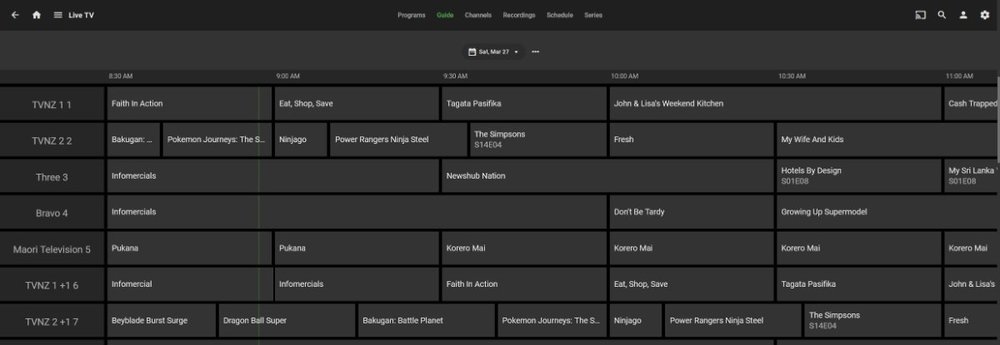
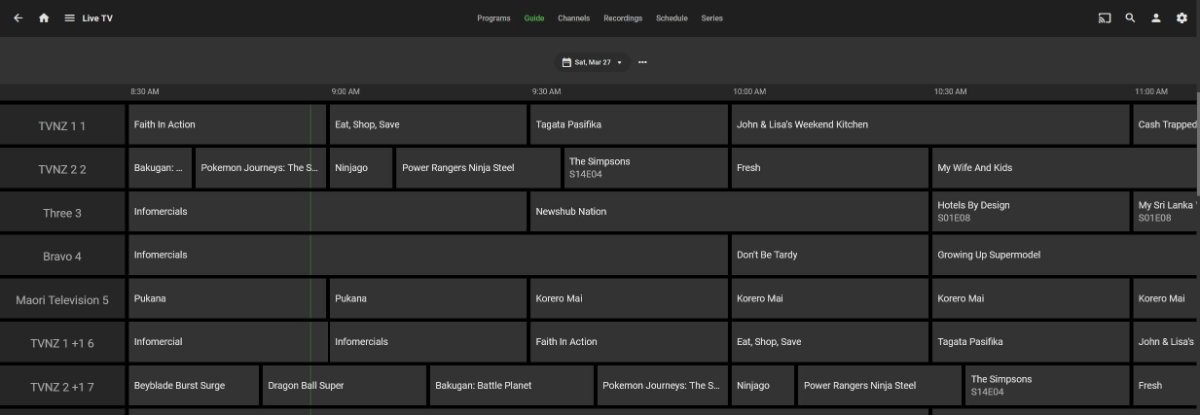
Erm, only a few random thoughts really - I guess you mostly copied over the stuff I messaged you so maybe you added other stuff that interferes or stuff of mine you didn't copy made something not work. Mine was only really for the dark theme, which I wouldn't have thought make a difference, but you never know I'm always on the latest beta. Not sure if thats significant. Don't think this has changed - /* ---------------------------------------------------------------------------------------------------- */ /* TV Guide */ /* Enlarge Text for Program Names in Guide */ div.guideProgramNameText { font-size: 125%; } /* All Guide Entries Gray20 */ div.tabContent.flex.flex-direction-column.flex-grow.padded-top-page.is-active { background: #333333;} /* Top Left Corner of Guide Only Gray15 */ div.channelCell { background: #262626 !important;} /* All Channels Left Hand Side Gray15 */ button.channelCell.channelCell-mobilefocus.itemAction { background: #262626 !important;} /* Row of Times in Guide Gray15 */ div.timeslotHeaders { background: #262626;} /* Adjust Colour and Width of Current Time Indicator */ div.guide-currentTimeIndicatorDot {width: 3px;} div.guide-currentTimeIndicatorDot {background: var(--myblue);} /* Add Border to Program Cells Vertical Only */ .programCell { border-width: 0px 4px 0px 4px!important; border-color: rgba(0,0,0,1) !important; } /* Add Border to Program Cells Horizontal Only */ div.virtualScrollItem.epgRow.flex { border-width: 4px 0px 4px 0px!important; border-color: rgba(0,0,0,1) !important; } /* Add Right Hand Border to All Channels Left Hand Side */ button.channelCell.channelCell-mobilefocus.itemAction { border-width: 0px 4px 0px 0px!important; border-color: rgba(0,0,0,1) !important;; } /* Make Premiere New etc Blue */ div.mediaInfoProgramAttribute.mediaInfoItem {background-color: var(--myblue);} span.premiereTvProgram.guideProgramIndicator {background-color: var(--myblue);} /* Make TV Program pop-up Poster Almost Black and White */ img.recordingDialog-img {filter: grayscale(3%);} /* Row of Times in Guide Bottom Border */ div.timeslotHeader { border-width: 0px 0px 8px 0px !important; border-color: rgba(0,0,0,1) !important; } /* Top Left Corner of Guide Only Bottom Border */ div.channelCell.firstChannelCell { border-width: 0px 0px 4px 0px !important; border-color: rgba(0,0,0,1) !important; } /* Make Top Left Empty Box Wider */ div.channelCell {width: 240px !important;} /* Make Channels Column Wider */ button.channelCell.channelCell-mobilefocus.itemAction {width: 240px !important;} /* Remove Channel Logo */ div.guideChannelImage {display: none !important} /* Make Program Text Bigger */ div.guideChannelText.secondaryText {font-size: 150% !important;} /* Try to Re-align Timeline to Correct Position */ div.guide-currentTimeIndicatorDot {margin-left: 16.5em;} If I delete all css except the guide stuff it still works, except it changes the timelime back to thin green for some reason - Not forgetting I just try to find a command that seems to work, which is unlikely to be the best command, think unintended consequences etc...
 1 point
 -
What a workout, but we got @user101xy his needed Guide Data. We did have to jump through hoops to get it unfortunately and tried a couple of different providers. The one we ended up using needed an m3u file to process (unless you want to manually find/select 150 channels) so we scripted a little program to create the m3u file from the HDHomeRun in the format it wanted. So this is now available for the next person who needs it. I'll be adding the script to the knowledge base with instructions in case anyone else needs it. Thank you for your patience @user101xyand working with me on this. Your setup will help the next person a lot once I document it. It certainly has helped me a lot for anyone I'll offer remote assistance to in the future as I now know exactly what to do and what not to do.1 point
-
Disregard.... I decided I would restore a backup from a few days ago instead of when I thought it stopped working. That did the trick. Guess something got mes up somewhere.1 point
-
I use Bulk Rename Utility to rename all 478 episodes at once. But yes some naming schemes are problematic.1 point
-
so then propose a bounty for all and not a per licensing deal.. Ask me for $1k license to make this happen and I'll tell you to walk into the ocean.. throw up a $1k bounty to make this happen for the whole community and I might just give you a big chunk of a Stimulus check.. You'll catch more flies w/sugar, but I'm getting a feeling analogies are not your strong point. I dont think you guys have the insights into what 99% of your users are doing, unless you are spying on everyone I didnt see any option to opt out of any telemetry.. how many features have been implemented already that 1% of people use? Webhooks? LDAP Auth? Legacy MediaBrowser XML Metadata? IPTV? STRM Files? I'd wager the average emby user has no idea wtf any of that is but you guys implemented it. Clearly Emby has been catering to power users with its feature set, you guys made it easy to run behind a SSL terminating load balancer, give us fine tune control over our bandwidth and users, you let us do creative things you didnt intend for in many areas of the application.. I simply dont get the resistance to an external database, especially since all of us know this is not a technically challenging request that would require massive man-hours to implement. This is not a feature going to be used on accident, people are not going to intentionally opt out of the bundled sqlite backend for an external database on accident or without intention and understanding.1 point
-
The original feature request just asks for external database support, specifically MySQL. The high availability stuff is really another request altogether.1 point
-
1 point
-
I know of very few companies that come close. Emby does an exemplary job in the support department. I just hope that as they grow that does not change. The only company that I know of the got big and retained good support, at least from my point of view, is Amazon. Most companies have their customer service degrade when they get big. As an example we have Roku. I have had Rokus since it was called "The Netflix Player" (N1000) and from then until a couple of years ago they were great to deal with. Then at some point it seems they reached a critical mass and imploded and now they have some of the worst customer service in the industry. We, in dealing with Emby, get spoiled and expect that level of support from everybody. It is a lot like the usual marriage: "Men marry women in the hope that they will never change and women marry men in the hope that they will change. Both are doomed to disappointment." Expecting Emby's level of customer support from other companies is doomed to be a disappointment.1 point
-
As I have said the interface matters very little to me except as it interferes with my ability to find and play my media. However the posters are all so big that they do interfere by limiting how much can be seen on the screen. My eyes are not very good but, even for me, those huge posters are much larger than needed. YouTube is too large and Emby is too large and almost all sites I deal with are too large. What I want to see is more posters and more titles not larger posters and titles. Fortunately that is easily fixable in the web interface by simply adjusting the zoom percentage. But there is no such adjustment available in the clients I use to watch my media. It is a misconception that everyone wants to see large pictures on the screen when what a lot of us want to see is more information. In fact I would be perfectly happy with just titles in a grid on the screen. Something web designers do not seem to realize is that most people can read and the pictures are just eye candy. I think there should be three modes: 1: What we see now 2: A small picture mode 3. A minimalist mode that is almost all text. I know that every designer thinks they know what the user wants but that simply is not true. What users want is very personal and designs should reflect that as much as possible.1 point
-
Sorry dude, didn't mean anything by it... I'm sure your guests love it!1 point
-
Thanks Luke, i would vote for a Global Limit, but only for External Users.1 point
-
Hi, I just want to show you how I did my setup. Port forwarding for 443 and 80 on my router to the synology disk station On Synology, I have setup a reverse Proxy and a virtual host: Reverse Proxy setting: Then, the Virtual Host settings: And the .htaccess file for the virtual host: This setup will allow me, that the connection will always use the secured https connection, even if I just try to connect on http. I have several other urls in my reverse Proxy - for different applications. This setup allows me to use differend subdomains and only need to forward port 80 and 443 on my router. I don't need to care about different ports and things like this. I only have my Subdomain, my let's encrypt certificates and the reverse proxy will do everything. My Setup in Emby for this is just as simple: No settings for certificates, or other things needed in emby. I don't even need the settings for "allow remote connection".1 point
-
Have a look at the API (link at the bottom of the dashboard). See SystemService options1 point















.thumb.png.225edb9636a79b10cd220c27f59990f3.png)








.png.a45e58572d8d0aca8256dcaf223c596a.png)