Leaderboard




Popular Content
Showing content with the highest reputation on 03/25/21 in Posts
-
My ability to create youtube videos has much to be desired. Putting my terrible video production abilities aside, I am putting together some tutorials on how to setup a development environment to create plugins for emby, on youtube. This is video 1. Like I say, I'm not very good at video creation, but since the world still doesn't seem to need to employ chefs full time, this seemed like a fun time to try it out.2 points
-
I had issues with my TV 2019 and 4k MKV. It would commonly have issues when first starting the movie. A reboot of the device usually fixed it and then I could play the movie all the way through without issue. But it was annoying to know most the time I'd have to restart within the first 10 mins of starting a movie when it exhibited this issue. Since it seemed to be a memory/performance issue, I opted to get the Shield Pro and I haven't had any issues since.2 points
-
It would be useful if the server (or perhaps clients) could cache most (if not all) content images (posters, backdrops, logos, etc) for movies, TV series and seasons. This would mainly be of benefit when a portion of someone's content is offline but the users would still like to view the content to know what exists. I think caching on the server would be preferable, then all clients could make use of the same cached images. if you think this would be a useful feature, please click the "Like This" button on this post.1 point
-
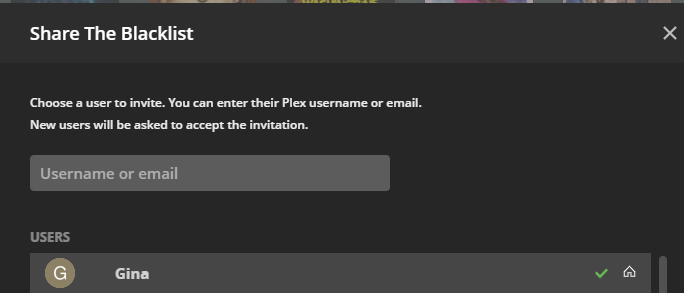
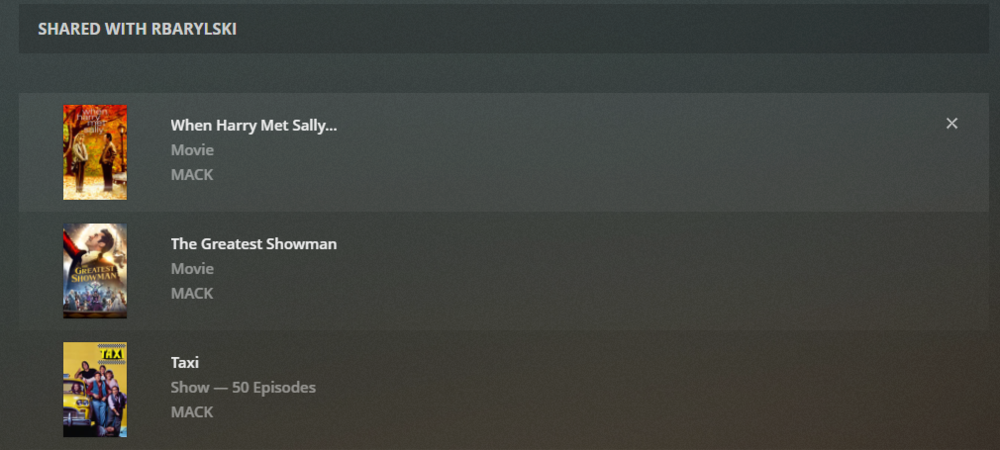
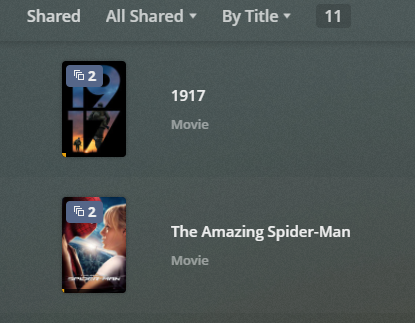
There's obviously a lot of capability to share content in Emby, but I came across a few limitations recently and would like to request a few improvements. Change Restrict Items with Tags in parental access controls to per library rather than ALL libraries. The way it is now, if I use "Restrict or Allow" I have to tag EVERYTHING, to either get it to show or hide. Some libraries I want to share everything (like photos) and others I only want to share 1 thing (like Movies). Also, parental controls actually functions much more broadly than just parental controls, so maybe splitting out the additional functionality into a different tab would be more appropriate. Change Share function in more menu to select an Emby user to share with, so the content appears on the users home page when logging in. Right now it's just a link directly to the file on the server with no way for a user to get back to it. Allow ALL versions of a video to show when tagging and using the Allow only items with these tags function. I believe some changes like this would need to be made anyways to get this feature request (Multi-Cast Support - Feature Requests - Emby Community) working. At least, to get it working in a more user friendly way. I can't imagine trying to start a Watch Party by having to send every user a URL that they need to click on in order to start the watch party. It's easier to just add shared content so the end user can just go to their home page and start the Watch Party. To borrow an example of how this could work, Plex has implemented something similar, although they stick everything in a Shared view. The function to share is good, but the function to access the shared content isn't so good. IMO, the shared content should just appear in the library. Similar to how it would show up if using Allow only items with these tags. I'm curious how Jellyfin has implemented Watch Party and sharing too, but my only reference is Plex. Here are a couple of screen shots just for example. After clicking share in Plex, users on the server can be selected to share with or outside users that aren't on your main server can be selected. Then, managing the shared media is simple as I can see everything shared to each user in 1 place. When I want to take shared access away, I just click x and the user no longer has access. And the end user see's this, which is decent, but as an end user I'd much rather see the shared content within the actual libraries.
 1 point
 -
I would like to be able to mark individual media items or even perhaps entire libraries to be excluded from media scans. If I have retrieved all the metadata and images I want for a particular TV series or Music collection and I know that the files will never change and the metadata should never change, I would like to be able to exclude it from scans to a ) reduce scan time b ) decrease the likelihood of unwanted changes being made c ) reduce network utilization I've noticed that even with series that have not had any new episodes in years (and no changes have been made in my filesystem) there is still information being downloaded from metadata providers. I suppose that is to check to make sure it is current/complete, but it is a waste of my network resources which are not plentiful. Perhaps this could be implemented by adding the option to not rescan media that has been marked as locked.1 point
-
I recently released a service that adds ratings to Emby (and many other media center apps) by burning the ratings on posters directly. You can see some screenshots of how this looks here. I also created an app to easily integrate the service with any Emby server in order to auto-download these posters for the entire movie / series library and for newly added items as well. If you want to learn more, check out the RPDB website. I'm giving away free Tier 1 API Keys for 2 months (they will expire on the 7th of May) for the first 300 people that DM me asking for one. I am very interested to hear your opinions!1 point
-
Thanks for the feedback.1 point
-
Until today, no more kills of the kodi database. So, it seems that really either the Netflix addon or the backup addon has caused the problem. Family is pleased again Now, next task is to find out which addon causes the kill of the database. Many thanks to quickmic for the hint with the schedule task. That led me to the 2 addons1 point
-
@quickmic I have 2 "new" issues to report (using latest E4K): 1 - Using Mixed Libraries and adding new content (in my case, series) it's not causing E4K to trigger incremental sync. The only way I get Anime TV Shows synced is if I go into the addon properties inside KODI and manually issue "update library". 2 - (can you try and reproduce this?): Creating a widget inside KODI and pointing it to Recently Added TV Shows but using the nodes from inside the Emby for KODI (so, going into "Addons > Video Addons etc) instead of "Video Library" does not make it work correctly, episodes are badly named (random numbers only instead of titles), almost as if we were browsing a playlist. I found this out yesterday, since I create TV Shows and Anime menu entries in my KODI, and point them to the 2 dynamic listings seen by E4K when using widgets. PS: This was working before, not like the current status. PPS: If you need print screen of what I'm explaining, please say. But it can be easily reproduced. EDIT: @quickmic After some more research in my KODI, the incremental sync not triggering (according to my point number 1) is only happening with Anime TV Shows. So, Movies in the same mixed library (on the server) do trigger incremental sync (and go into my KODI "Movies" menu entry as expected). But new Anime TV Shows don't go into my "Anime" menu entry, I have to manually issue a library update. What's even more funny is, for example: I add a new Anime on Emby Server. I go into Movies inside KODI and link a movie to the Anime TV Show (added on the server but not yet incrementally synced) it actually shows the TV Show to link, but it does not exist in the library view. Only after I issue the said library update manually. I don't know what is going on.1 point
-
Yes it pays to explore the options that are available to you.1 point
-
Not on a 1st gen Fire stick I'm afraid - depending on what the stick is plugged into.1 point
-
Hello, testing emby-next-gen with Kodi 19 on Windows. I have a mixed content library (Documentaries). It contains some single file documentaries in the root along with some multi part documentaries in the usual TV series directory format. Previously this was displayed in the Kodi 18 emby add-on as a single playlist called Documentaries (dynamic), and selecting it would show everything in it. In emby-next-gen it's shown as Documentaries (Movies) and Documentaries (TV Shows). The (Movies) shows the files in the root, and the (TV Shows) shows the files in the various series. Is this a bug, or the new behaviour? Surely the point of a mixed content library is that it should be displayed as one list? Thanks1 point
-
Should work or you can use custom nodes.1 point
-
OK, I think I have one idea. Let me try tomorrow and see1 point
-
I can do this already on the web client and Android, which platform are you talking about?1 point
-
The issue is coming up from those installing using the community plugin (https://raw.githubusercontent.com/ix-plugin-hub/iocage-plugin-index/master/emby-server-stable.json). For a period, it was installing ffmpeg as a dependency which would overwrite the bundled version from the repository. So when he says "removed ffmpeg" it's in reference to the dependency to the .json. Realistically, the only pkg that should be needed for the community plugin would be emby-server. All the dependencies should be installed automatically1 point
-
Change the transcoding parameters to make for faster transcoding. The h264 encoding settings can be adjusted to make it faster but less quality. With a slower processor you have to decide what is more important. Suffer loss of quality but get much faster transcoding and no buffering. Or get better quality and slower transcoding and occasional buffering. With VC1 that codec is process heavy. That means it might take 3-5x as much CPU as transcoding mpeg4->h264 especially during high motion scenes. You have to decide where the "sweet spot" is by adapting those encoding settings to fit your experience you want. We cannot decide how grainy a video is acceptable to you. You do not want to use "Auto" as you already know how that handles things. Changing the CRF to 25 or 28 will help too.1 point
-
We're actively monitoring this for community feedback. Thanks.1 point
-
Check out the next version, should be a bit brighter. Also check with multiple different videos. The current is a quick and lightweight solution. It has taken great effort to achieve the quick image extraction that we have and I don't want to unnecessarily load it with something that adds again. We'll see how it works out and revisit this subject if it doesn't. BTW: HW acceleration for image extraction is totally pointless (for our quick-image-extraction at least). I've explained the background somewhere here in the forums.1 point
-
just downloaded it again and it still aint working.0 points