Leaderboard




Popular Content
Showing content with the highest reputation on 03/22/21 in Posts
-
Hi, If you ever wondered how you could install Emby into a docker container from a brand new vanilla CentOS 8 Linux install, then this video is made for you! Enjoy!2 points
-
Hi, I created a python script that will look for all watched content for a specific user. If the last played date is past the cut off date it will delete the file. I built this for myself and it works good enough for me, but I have only tested it on my system (ubuntu 18.04) with my server. So no guarantee it will work for everyone, and since it can delete files have a backup to be safe. By default it does not delete files until you modify the config file to be safer. It first lists all the files, then will list the files that will be deleted. On first run it will ask you some questions to generate the config file, or you can create it manually Here is the script if anyone else is interested in trying it out: https://github.com/clara-j/media_cleaner1 point
-
Kind of wish I found this forum and this topic before I started down this road myself, but anyway I finished my tool and so if there's any interest I can throw the docker on docker hub (that's how I'm calling it in my env) or I can make the executable jar available on github or something (it's a java command line app). Basically it does what the other tool does: finds items in your emby library and deletes them. I'm using it to cleanup watched tv episodes for the other users in the house who aren't nearly as diligent as me about cleaning things up. Anyway, not sure if this provides any more value than the other existing tool (I probably would have just used it if i came looking here first), but if anyone is interested let me know and I'll package it up and make it available. EDIT: Removed examples and command line options, etc. Instead, refer to the project wiki, which will be kept up to date.1 point
-
I did a search, and the only request that I saw similar was included here: https://emby.media/community/index.php?/topic/76011-music-queue-list-improvements/?hl=%2Bshuffle+%2Bmusic That discussion seemed to be more focused on lyrics rather than the shuffle piece, so I figured I would create a separate FR. One of my biggest pet peeves with using the web interface (when listening to music at my desk) and the android app is my inability to to select a song from a playlist and have emby shuffle the playlist after the current song ends. The current behavior is that after the song I selected finishes, the next song in the playlist is played (which in my case is alphabetical order). The native android music players (the app retro player in my case) allow me to select a song from my playlist, and then click on the shuffle button on the now playing screen and my playlist queue is automatically shuffled. I realize that the simple answer is to just use the shuffle button to randomly start a playlist and shuffle the songs, but sometimes I just want to start listening to one song, and then listen to the rest of my playlist at random. Additionally, when listening to music with my kids, they ALWAYS want to start with a specific song, and then don't really care what happens after that. This causes me to have to select the song they want to listen to, then when that song is over, go back and hit the shuffle button, which is annoying to have to do. Hopefully my ramblings made sense - and thanks for your consideration.1 point
-
hey what I'm really missing is support for audiobooks. Simply saving the resume point for those mp3s would be absolutely enough, no need to fetch metadata etc.1 point
-
I think I set this up correctly but for some reason even though I have it set for 90 it does not play the next episode. is there anything else I have to do?1 point
-
I found the issue. It's resolved for the next build. Thanks for reporting.1 point
-
Only common thing should be the transcode-temp folder as the remux is written there also. C:\Users\BANE\AppData\Roaming\MediaBrowser-Server\transcoding-temp As for the transcode it would appear software encoding is not keeping up with playback. As the GPU does not have any encoding capabilities only decoding.1 point
-
So that leads me to believe that the issue is somewhere in the codec implementations in this "unofficial" build of Android. Exo would be using the internal codecs whereas something like VLC may not. That is a lot of guessing on my part at this point though.1 point
-
Ok so it's doing it's thing, slowly. "Processing updates kodi" on 0% for a while, but the addon eventually fixes itself and removes Anime TV Shows and Anime Movies from the dynamic listing and only shows (as intended) the new mixed library "Anime" (dynamic listing). Im waiting for the progress bar to finish (no idea what it is doing since It doesnt remove the previous library) and I will add the new mixed content next. I think this could be looked at. As it is, seems a bit messy and confusing. Specially having a TV Show library only for TV Shows, and adding a new one on the server for mixed content and remove that previous library on Kodi and importing the newly modified one. It's messy1 point
-
Emby supplies guide data for US, Canada and the UK. So I guess it's going to matter what European country you are in. If Emby doesn't have data for your country you will want to check out: https://support.emby.media/support/solutions/articles/44002149110-other-sources-of-epg-guide-data1 point
-
No idea, actually. First time trying this because I wanted to start to store Anime movies and shows on the same library. But hold on. I went into the living room and its now showing "Anime (MyServerName" (dynamic listing) and removed those 2 entries I mentioned above. So it's picking it up from the server it seems. I probably didn't wait long enough for the addon to do its thing? Its syncing my Animes in the top (no idea why or what) but I will wait till everything finishes up and add the Mixed Content properly to the .db and see how it goes.1 point
-
I managed to make on show on estuary but i need to check how i did that. I will get back to yoi asap.1 point
-
@quickmic you can access that information in Estuary if you open the "information" page for a movie for example. (But displaying that info maybe depends on the skin.) Every movie that doesn't has a tagline instead shows a "0" below the movie title. Tagline on the movie Avatar in Germany is for example : "Betritt die Welt von Pandora"1 point
-
Hi, yes I would agree with this. Thanks for the feedback.1 point
-
Sorry I also answered to him. He's using the same skin as me. It's skin related, not addon related. I have that "0" on homescreen widgets, it exists to show unwatched episodes of a TV show, but it's also showing if the Widget is related to movies. I didn't know the "0" also shows in some views inside the library. I will report this later in the kodi.tv skin page.1 point
-
Will do. Reporting ASAP. Will install it on my 3 Nvidia Shields and report.1 point
-
Sorry what do you mean by "how do you access this information" ?1 point
-
@ebr and @softworkz Did you have time to test it yet? Thanks.1 point
-
smb -> Yes, if you have access via network share (and login credentials) Anyway I know it works. It also works with Emby server, but also mentioned. It's not that easy with Emby server. This is not a drag and drop thingy if you wanna access Emby server via links from Kodi.1 point
-
It's a Leia skin. I had to bump the version to load it. Here's the modded zip and the change I made to get it to load in Matrix. 3- edit the addon.xml file and change the line that has addon="xbmc.gui" version="5.14.0" to version="5.15.0" https://www.dropbox.com/s/482iqiq0yjpc30b/skin.arctic.zephyr.2-matrix.zip?dl=01 point
-
Just tried with Emby Android app. Could not reproduce the behavior. Episode disappeared from "Continue Watching" section correctly.1 point
-
New version released (page 1 of this thread). It fixes two issues. -(realtime) update season sync -remove items on sync1 point
-
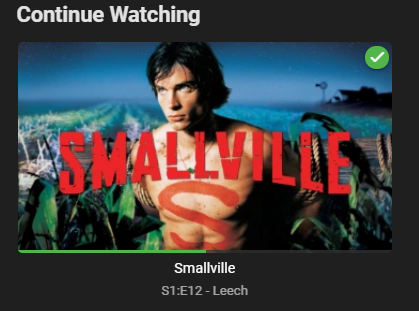
I am experiencing a minor issue with the current version regarding the update of watch progress. If I start a video in Kodi and pause it midway through, it correctly appears in the "Continue Watching" section in Emby web interface, but when I then finish watching it in Kodi, progress is not correctly updated in Emby. It is marked as watched as expected, but it remains under "Continue Watching" and with the progress it had when it was first paused. It then looks like this:
 1 point
 -
yeah, i fall back to the kodi DB without Emby and it works perfekt. of course i must manupulate the path. from image://https://image.tmdb.org/t/p/original/mGVrXeIjyecj6TKmwPVpHlscEmw.jpg/ to https://image.tmdb.org/t/p/original/mGVrXeIjyecj6TKmwPVpHlscEmw.jpg i removed the "image://" and the "/" at the end. i try it with emby again.1 point
-
Speedtest has download at 212mbps and upload at 235mbps I will do the play test you requested in a bit and respond1 point
-
Please send me a log via PM, and I'll have a look.1 point
-
It would seem your router has integrated dynamic dns and openvpn. I would recommend you go that route instead and cut emby connect out of the loop. You can also do as I have done and buy your own domain name for a few bucks a year. For me the security of a vpn is worth the resulting lower bandwidth due to encryption. On my phone the difference between direct playing and a restricted 720p@3mb is pretty minimal. Make sure you add the ip range assigned by openvpn to the local networks list in emby. https://www.myopenrouter.com/article/how-set-openvpn-and-dynamicdns-netgears-nighthawk-r7000-wi-fi-router1 point
-
I could see how this type of PIN could be useful. Fifty Shades of Grey comes to mind in the same way as Unfaithful. A whole lot of movies could be similar. This way even if you have setup both an adult and child account the adult has a bit of extra security so when they forget to logoff the client the child can't slip in and watch certain things. To be effective however, you don't want a PIN entry console where a person can watch what you type in so besides a PIN code you would likely want to be enter UP, UP, RIGHT, DOWN, UP code type thing as well where no indication is shown on screen.1 point
-
I hacked together a quick and dirty version of a Python --> C++ typemap which takes a Python dict and turns it into a generic C++ data type (which we also use to store parsed JSON data). There are a few restrictions on the Python dict, i.e. it must contain string keys and the values cannot be tuples or sets since those aren't supported by JSON either. Based on that I wrote a new ListItem.setInfoFromDict() which is approximately 50 - 60% faster than the original ListItem.setInfo() + ListItem.setCast(). I'll have to discuss this approach in the team.1 point
-
I'll expand on that a little and say no one wants to release an expensive movie when they know it's going right to stream. They better figure to a way though as I suspect attendance in theaters is going to syay lower than what it was pre-covid so maybe paying a single actor $30 Mil a movie isn't a stellar idea1 point
-
Judging by what I experienced lately, quickmic will find a fix, maybe not right now, but soon. We're in good hands, I am not worried.1 point
-
Resetting the local db brought it back in sync and updating in Kodi is working again (as long as I don't delete anything)1 point
-
Good day, IPS after they promise to fix it, they then inform me they reject the fixed, I had big talk with them but did not lead to anything that help. I add a plugin, test it and I you know what I mean, if you both like it, let me know and I will added here. My best1 point
-
I am not particular about the nextaired, it was just several addons that comes with Titan Skin which itself is still at the development stage ( Thanks for pointing to araes which need to change for Emby _nest_gen to work properly). I just did a play back and it's fast one can't expect more that this especially on wireless, I will have to test on Libreelec Kodi 18.9 later in the week, I will continue to probe it the new version and report any issues as they emerged. Thanks1 point
-
OK, my skin did install a bunch of prereqs... I have installed the skin on my fresh install and will see what happens. If it fails, I'll try disabling them. I don't use any next aired functionality so hopefully it doesn't affect my skin.1 point
-
Not sure why it freezes, on first start. There should be a msg that says, network timeouts modified, Kodi needs to reboot. No DB restet is required, you can keep it. Just perform some playback tests and check if everything is fine. If this works, you can try installing nextaired addon. I think it will crash again. If so, Ill start a review.1 point
-
Nope I will and report my findings1 point
-
@alscaldasTurns out building Rockchip RK3399 is a bit more involved than Generic and Ras Pi 4. It actually builds for 10 different boards. Anyway here you go. Have fun. LibreELEC-RK3399.arm-10.0-devel-20210321180917-c5d7822-rockpro64.img.gz1 point
-
Okay, then let's look at this fresh after the next release of the app which should be fairly soon. Thanks.1 point
-
Yes, it's been requested. @Luke has told us it's on the list, but no ETA yet.1 point
-
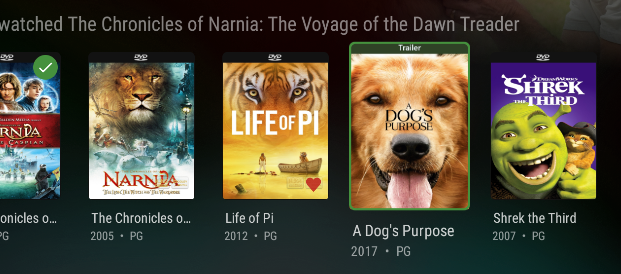
As for your original request (an indicator on the image), CoverArt can do this for you.
 1 point
 -
"it will be damn fast" was mostly addressing the playback initialization. There is still lot of room for improvement. Currently I focusing on stabilization releasing a new stable version in the next weeks. I hope the next beta will be a big step into that direction. I think most of the known bug will be fixed (not the current limitations). There are still several pending.1 point
-
TVMaze, in my opinion, is a much better fetcher than TVDB. Seems like there are many series where TVDB has episode # while tvmaze has the correct episode name. Things off the beaten path tvmaze is the clear cut winner at retrieving the correct information. The downfall is it's english only...1 point
-
 All of them. to log-in. when identifying. on every screen it would scroll to the bottom. I unplugged my racing wheel. it was the culprit. never had any issue on any other site in the years i've had it1 point
 -
Which setting have you set exactly?1 point
-
Here is my Unraid Docker setup. You should see something similar if you go to "Settings" for your docker. The part I have circled is the path to my media. The host path (Unraid) is on the top, and then the bottom is the container path, or how the container appears to Emby (/media). Hopefully that helps point you in the right direction.1 point
-
So currently when downloading a playlist for offline mode, you get the songs individually instead in a playlist. So I was wondering if it was possible to fix that and download a playlist for offline in the order that it is in. So that it’s just as when online, just press and play the songs in order.1 point
-
Hey @@G1zm0 Thanks so much for the super detailed step-through! More than I was expecting, thanks for taking the time really helped for a linux novice like myself!! Just a few corrections to the above should @Marchel1808 or anyone else wish to also do this. Step 3: I needed to add a -R option to get it to copy cp -R /volume1/@appstore/EmbyServer/var/data/ /volumeUSB1/usbshare/Emby/data/ Step 5: I needed to remove the / at the end to link the folder ln -s /volumeUSB1/usbshare/Emby/data /volume1/@appstore/EmbyServer/var/data Step 6: Slight typo in the user chown -R embysvr /volumeUSB1/usbshare/Emby/data/ Everything is up and running, and hopefully I now see a performance improvement Cheers mate, Dewey1 point