Leaderboard




Popular Content
Showing content with the highest reputation on 03/09/21 in Posts
-
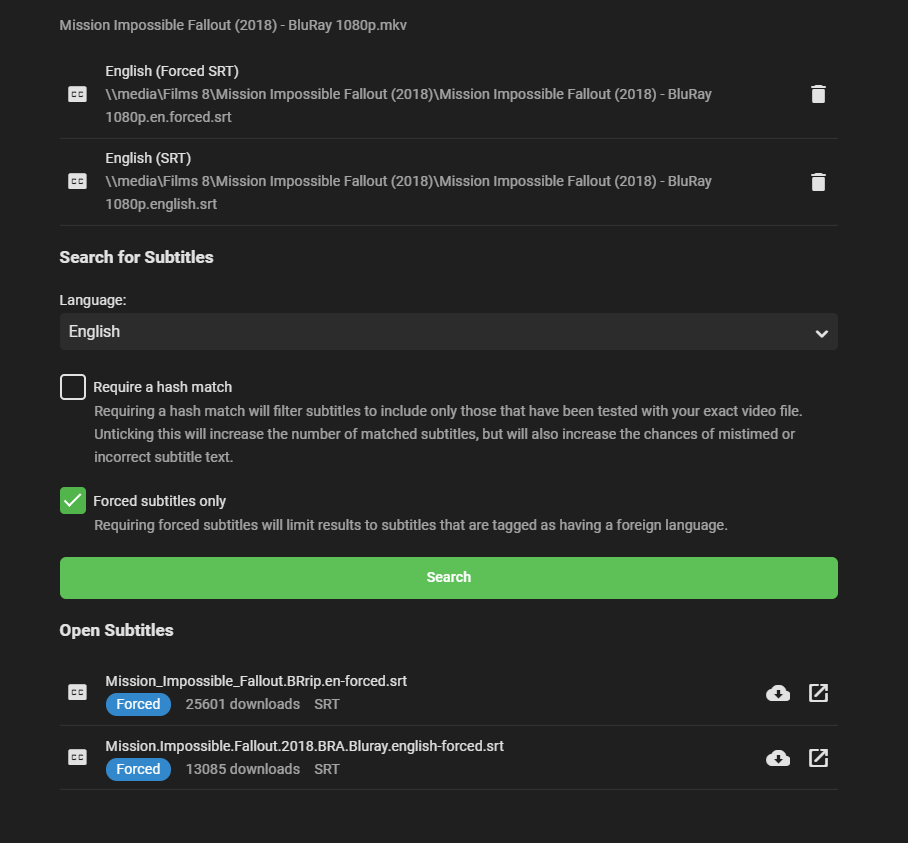
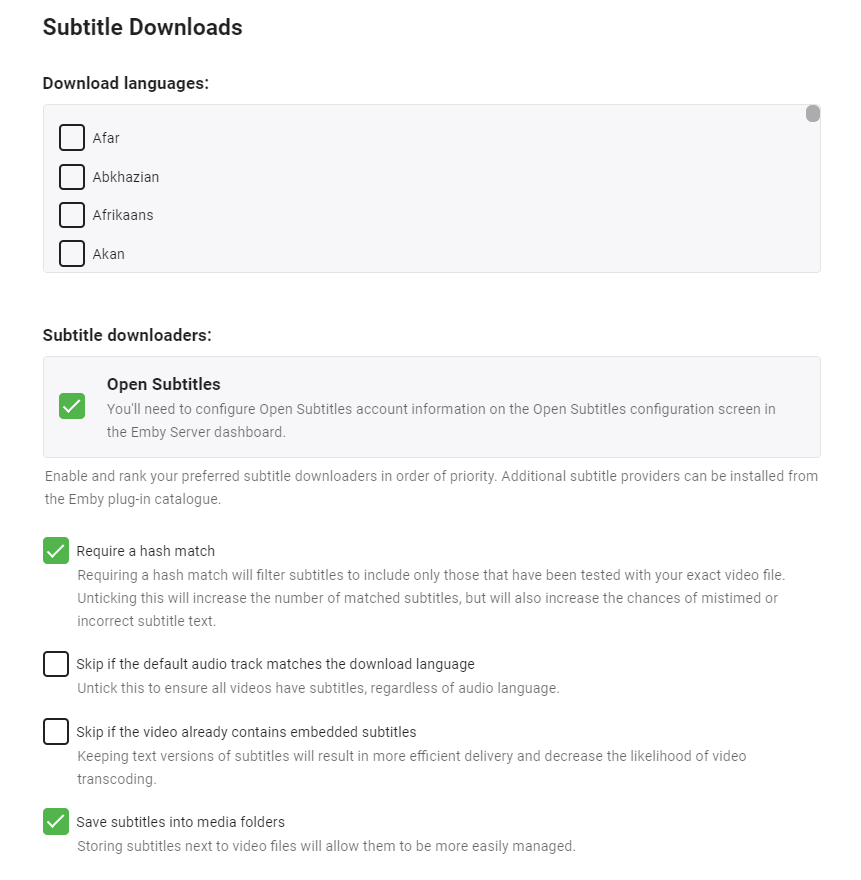
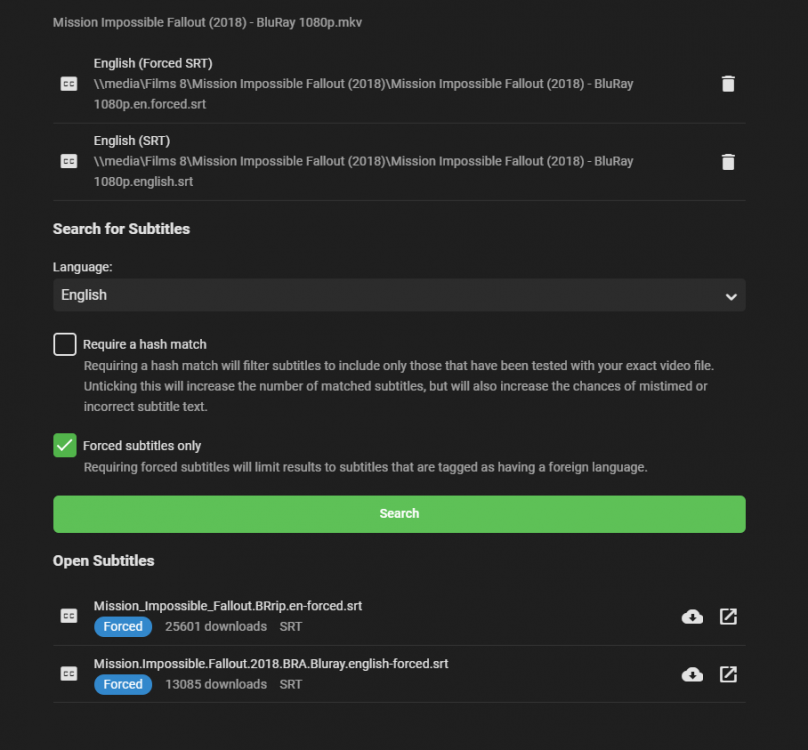
If you go to an individual Movie or show, and click on Edit subtitles, there is an option to return only Forced subtitles. This option is not available in subtitle configuration in the Library section. Would be great if this could be added there, so only download forced subtitles for shows/movies. Or better would be to add it as an option of "Forced subtitles for language matching audio language". Seems most of this functionality is already in place, just needs to be linked up. If it helps, I would like to offer a bounty on this option. I can personally add $100 to bounty for it.1 point
-
I suggested in a totally different thread a bit ago about possibly adding Discogs as a meta fetcher... https://emby.media/community/index.php?/topic/79280-duplicate-music-artists-entries-how-to-get-rid-of-them/ That thread has had a few +1 reply posts. As such i figured adding it to the feature requests was the proper way to gauge interest. If you have used MP3tag you should be familiar with Discogs. Its a GREAT alternative to Musicbrainz.1 point
-
as a new user to emby and from what i can gather liveTV is a relatively new feature; first up, great work so far so please don't take this as an unhappy post, i'm very happy with emby after a week of use! Not sure if this is worth a single post in feature requests, but i'd like to give some feedback with the current system. Scheduling needs to expand on filtering & search method: ability to filter based on program length. Some shows have 2 types, a highlights version (say, 30 minutes) and live stream (say, 2 hours) but they appear as the same title in EPG. having a way to specifically target that longer 2hour slot ability to define a recording schedule without the program currently being present in the guide. This would be helpful for those 'coming soon' program adverts that dont yet have an entry in EPG or too far in the future for the EPG to have it visible. add keyword search. for example i want to record anything with 'motorsport' in the EPG info which could range from F1, Touring car, various rallies or Formula E etc Record type; 'new episodes only' appears to match any new episode that emby has not currently recorded, rather than those listed as new in the EPG (i assume new episode = missing the 'repeat' flag from EPG data) Expanding on 'new episodes only' above, this should also allow the ability to target the first showing of a new episode rather than a rerun at a later time. Priorities. for users with limited tuners then conflicts are likely. a way to prioritize certain recordings higher than others would be hugely beneficial. Could maybe further expand by having channel priorities where schedules will prefer HD over SD. Recordings: if creating a schedule with a currently broadcasting match, then emby will start recording immediately even though its missed X minutes. This then counts to your max recorded limit. imo if a program has already started broadcasting then emby should exclude it unless explicitly told to record that episode.1 point
-
I'm new to Emby, from Plex. In the middle of my trial, using a fire stick. So far I'm a fan and plan to upgrade my account. On the server, files within collections scroll vertical on the fire they scroll horizontal. For smaller collections that's fine. I have a [comic book movie] collection that has 100+ files in it, scrolling right to left is a bit much. Any chance scroll can be vertical once there's a certain number of files within the collection? Also, release year shows on the server within a collection, but doesn't show on the fire app. I'm able to turn year on and off in the movie media folder, but not in the collections. In the movie media folder a decade filter would be pretty valuable. I saw a request for it already, never hurts to ask again . Lastly, it would be nice to view movies and collections in the movie media folder when sorted by title. Right now now it looks like it's an or option.1 point
-
That makes sense, thanks to you all for clearing that up, appreciate it @cayars @Happy2Play @FrostByte1 point
-
Hi, yes it's not a bad idea as many users don't bother to put the language in the subtitle file name. Thanks for the feedback.1 point
-
go to the Add-Ons section in Kodi, find Emby-Next-Gen, click on it, and information will be shown1 point
-
Yea, that would be nice, but it isn't possible to cast to a Receivers zones. You can only cast to the main zone.1 point
-
I know this isn't ideal, but I solved the issue with the Channels DVR XMLTV listings by making a little python script to parse the "onscreen" field and create an "xmltv_ns" field which Emby will recognize. I scheduled it in cron to run a couple times a day, and I point Emby to this new XML instead. #!/usr/bin/env python3 import requests URL = "http://192.168.1.6:8089/devices/TVE-Suddenlink/guide/xmltv?duration=604800" tve_xml = requests.get(URL) xmlOutput = "/var/www/html/xmltv/xmltv_ns.xml" with open(xmlOutput,"w", encoding="utf8") as fileOut: for line in tve_xml.text.splitlines(): fileOut.write(line+"\n") if '<episode-num system="onscreen">' in line: season_episode = line.replace('<episode-num system="onscreen">','').replace('</episode-num>','') if "S" in season_episode: season = ((season_episode.split('S'))[1].split('E'))[0] episode = ((season_episode.split('S'))[1].split('E'))[1] fileOut.write(' <episode-num system="xmltv_ns">' + str(int(season)-1) + '.' + str(int(episode)-1) + '.</episode-num>\n')1 point
-
Hi! Currently the subrip subtitles are extrated on the fly when playing from, for example, an MKV container. the process is slow, don't show the subtitles from start, and if the file is 4k/1080p on a slow server (ej Rpi) it could timeout and leave us without subtitles. What I am thinking about: - When searching for subtitles on open subtitles, etc, if there is no standard (srt) file found extract it using something like this: mkvextract tracks video.mkv 3:video.srt I'm currently manually running this for each file with subrip embedded subtitles and it works like charm, and I'm sure that the subtitles are correct. There are multiple tools that get the job done, I choose this because it's open source and currently maintained. https://mkvtoolnix.download/ Thanks!1 point
-
OK, so I have been able to manually update Emby on all my devices and now have the subtitle offset. It works ok which is useful, but it's quite basic in that it only allows adjustment in 1 second increments. Is it possible for it to be changed to 0.5 second increments? That would allow users to get it much more accurate. Can that be added to the features request/adjustments list? Presumably it should be fairly easy to change from 1 to 0.5? I don't know what percentage of users use subs, but for us that do subs out of sync can be quite irritating! Thanks!1 point
-
1 point
-
ah, I see now why I lost1 point
-
It was the original pic used for the cover of Rush's Permanent Waves album One of my all time favorite albums.
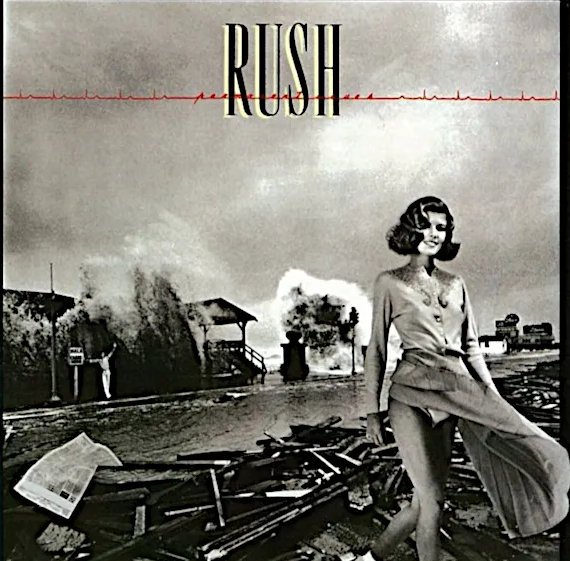 1 point
 -
BTW @cayars I like your "avatar"1 point
-
No we don't. There is no limit to the number of people or time limit. However the types of clients you can use for free is more limited without having Premiere. Without a Premiere License you won't have some of the advanced Server features nor access to clients like Theater which are Premiere clients only. This link to our Premiere Feature Matrix might be useful to you: https://emby.media/support/articles/Premiere-Feature-Matrix.html1 point
-
If you're like a lot of users, you listen on your commute, which means you have to use the online version to save your progress and you're eating your data. So now the download feature is useless because it just starts over each time. I've been doing what Chyron has been doing which is adding /sdcard/Android/data/com.mb.android/files/Download/Music to my Listen Audiobook library, so that the books show up. I tested A11 a couple weeks ago, or whenever I posted that previously, that no books would show and when I went into FX explorer it said that it didn't have access to /sdcard/Android/data so I looked it up and found that it's a thing. Now I downgraded back to A10 because of that because thankfully my rom (crdroid) is maintaining A10 for now. But once time keeps on we are basically going to have to connect to the server on LAN via smb in order to copy our books over old school. I mean I get that we are the lone dozens compared to the movie/tv users but I would think the fact that we are promised a certain functionality that fundamentally does not work would take at least some resemblance of a priority. It was kind of a kick to the dick for me because that was the main reason I got premiere then surprise I had to work around downloading to use in an external player. I mean that is something at least, had I not been able to do that I may have submitted a request for a refund. But hey it's a lifetime license so hopefully it will be resolved by 2030.1 point
-
How do I update my credit card : Emby1 point
-
@quickmichi, I just registered to first thank you for spending your time to develop such a nice addon and of course to give you some feedback about the knowing bugs. Addon version 5.2.01 installed on fire tv stick and fire tv cube syncs fine using the default estuary skin, also after restart there comes the welcome notification. However using .xml modified version of the embuary skin, sync after restart doesn't work. There also doesn't come up the welcome popup messsge. Maybe it is the sleep-mode issue but I think it is something skin related, cause switching back to estuary, problem is gone. Don't know if you can look at it maybe together with sualfred.1 point
-
Hi there, please email billingsupport@emby.media Thanks !1 point
-
@Abobader1 point
-
It's already on the list. I'll add it in the one of the next versions.1 point
-
Well, I've been using Emby to organize/sync audiobooks and Sirin Audiobook Player to play them. But now I've been hearing that Android 11 doesn't allow apps access to the "Android" folder. So that ruins that idea for the future.1 point
-
Does the Shield need to be rooted to access these directories? Scratch that, got it! It's a hidden directory. Edited and working now \\SHIELD\internal\Android\data\org.xbmc.kodi\files\.kodi\addons1 point
-
As Frontbyte and Happy2Play both mentioned this is a different app and different store. It's no different then a iOS purchase and a Android TV purchase through Google Play store. Two different stores and two different accounts. The very best solution is with an Emby Premiere membership which unlocks features plus 25 devices (any).1 point
-
Yes is about the online store account, so different stores means you pay at each store. But all devices from specific store are covered with your store account. And remote users will have to unlock their devices as they are not linked to your specific online store account. You have to get Emby Premiere for the server is you wish to unlock remote user devices. Standard Premiere unlocks 25 devices. But it is about the client as browser connections do not require premiere/unlock mostly but is feature dependent. Emby Premiere Feature Matrix : Emby1 point
-
I don't believe your account on the Google store is the same as the account in the Amazon store.1 point
-
OK, this can not be all that hard for the developer. If you change the audiophile extension from .mp3 to .mpg , make a new library and add your audio files as TV shows (you must make your own thumbnail's ... if you want that) it will play and resume perfectly. The only problem is the screen will not timeout and go dark. Once that happens playing stops. Emby doesn't give a crap about audiobook support cuz they see it as a perk. I don't understand why this is called a media player (take your media anywhere) when its really just a video player with some audio support. This shouldn't be considered a wish list item because it is media. You know the thing you say I can access and play .1 point
-
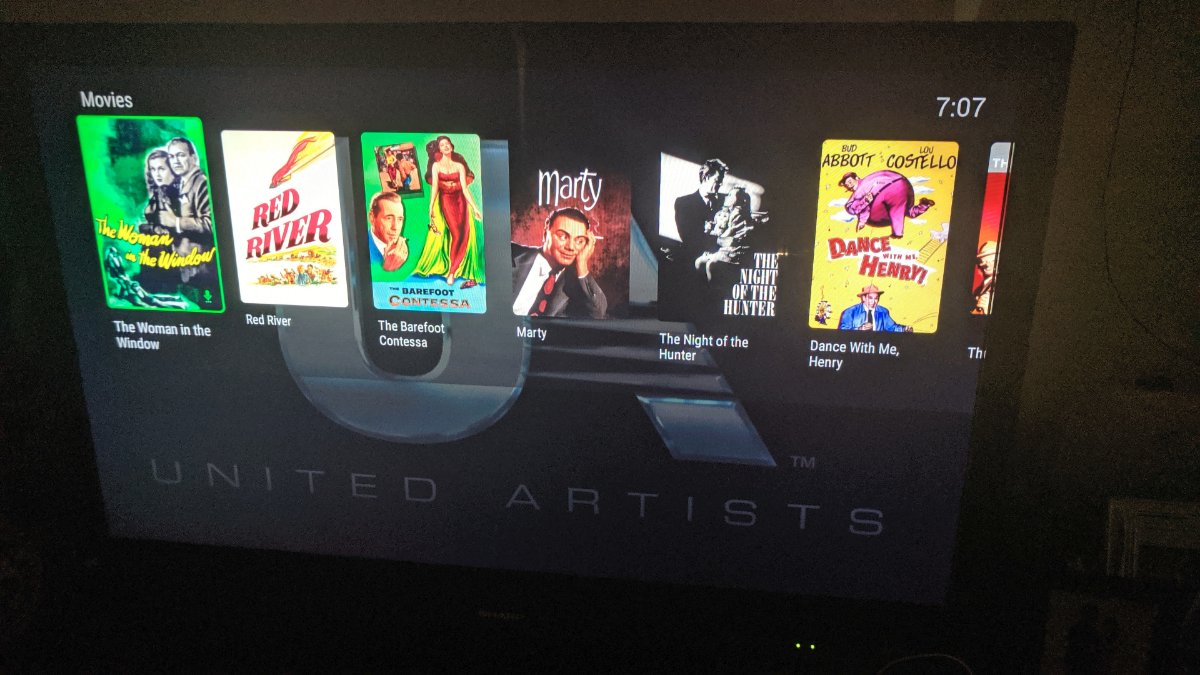
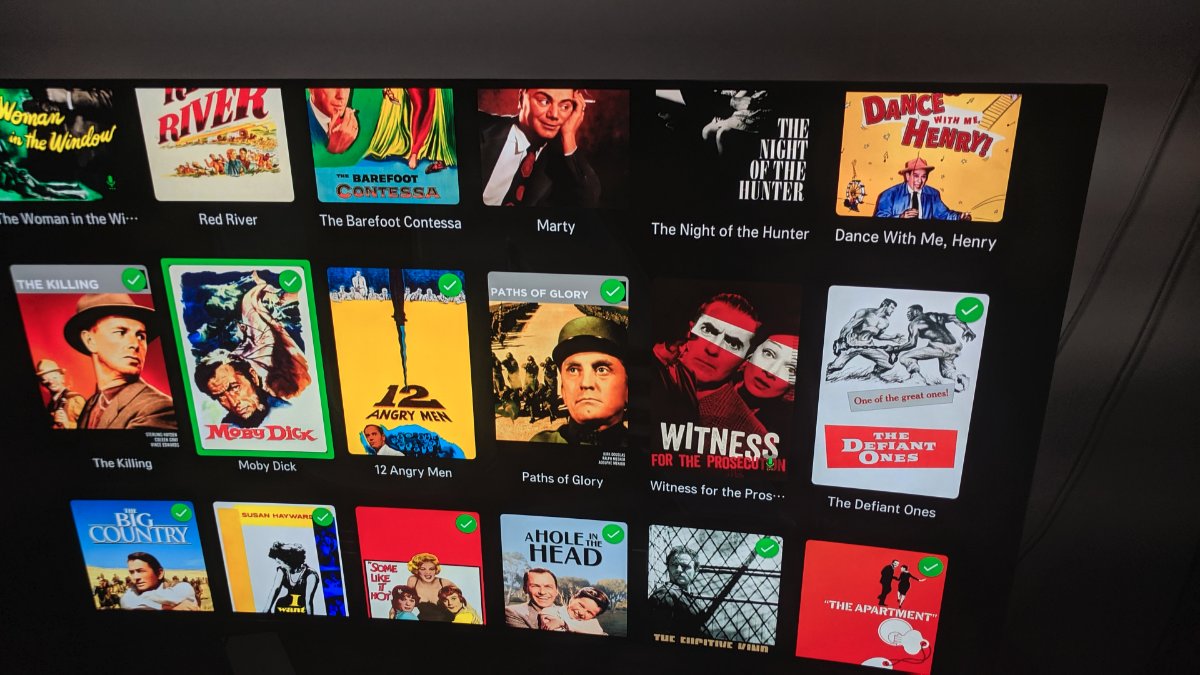
I have a 90-film collection, for my United Artists Prestige Collection DVD box set. Here it is on the Fire, one horizontally-scrolling row: And on my LG TV, vertically scrolling and using the entire screen: It's clearly much, much easier to find a specific film on the LG than on the Fire.
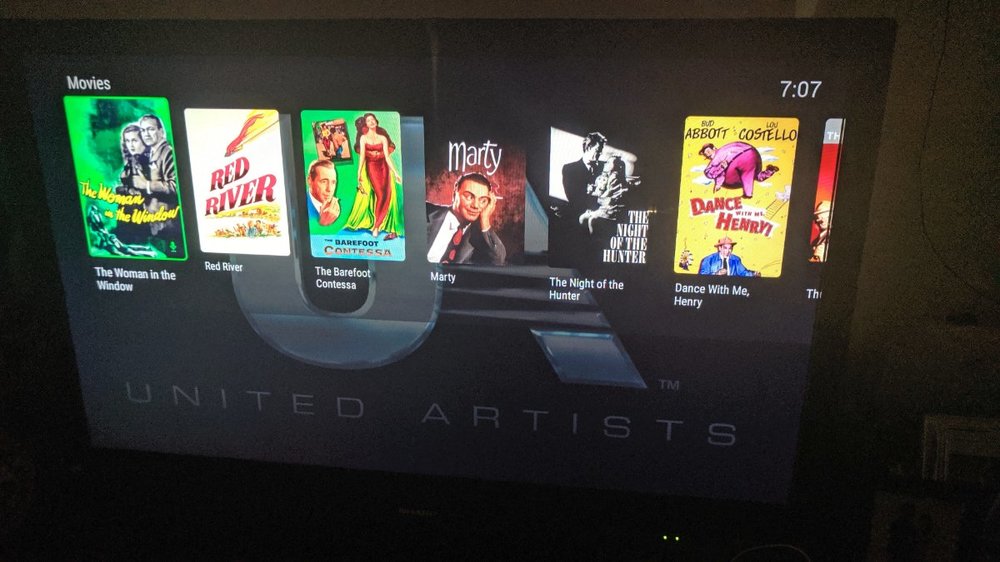
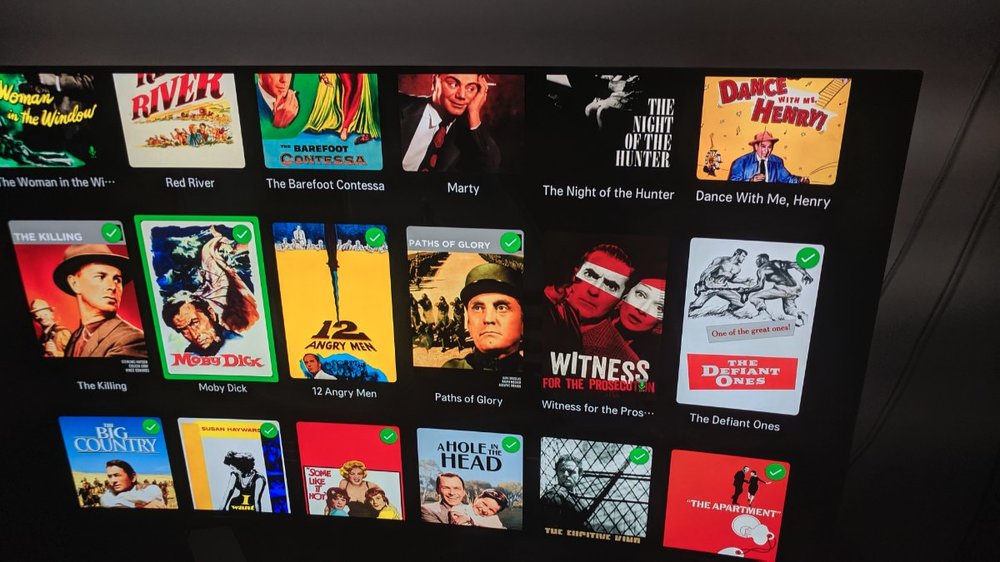 1 point
 -
Actually, having to delete is the norm and very few sets allow you to upgrade from usb. This is on purpose because usb installs are meant for testing only. Installs from the store will always upgrade.1 point
-
Thanks for that. I don't know who's mentioned having Emby tag the original files. Having Emby modify our media is the last thing any of us should want. We just want the ability to change Emby's internal / nfo metadata for more than 1 item at a time. Add a new tag, or change the genre for all of an artist's albums at once. Add tags, people, or locations to a group of photos. As my collection grows and my interests change, the way I organize and identify my collection needs to adapt and change. Actually moving or re-tagging the original media as you've described is both rigid, and flies in the face of proper 'archiving.' The whole purpose of metadata should be so we can change and refine our organizational strategy at any time, without modifying the original files in any way.1 point
-
+1 With tags in place this got even more important imo.1 point
-
To update this, it turns out that Android 11 removes access to your /sdcard/Android/data library folder so now downloading through emby is 100% useless for audiobooks unless you downgrade to A10 (which would not be feasible if you have a device that shipped with 11). - Unless we get the option to download where we wish. But even then I'd rather time be spent on saving local progress than changing download directories if I had my choice.1 point
-
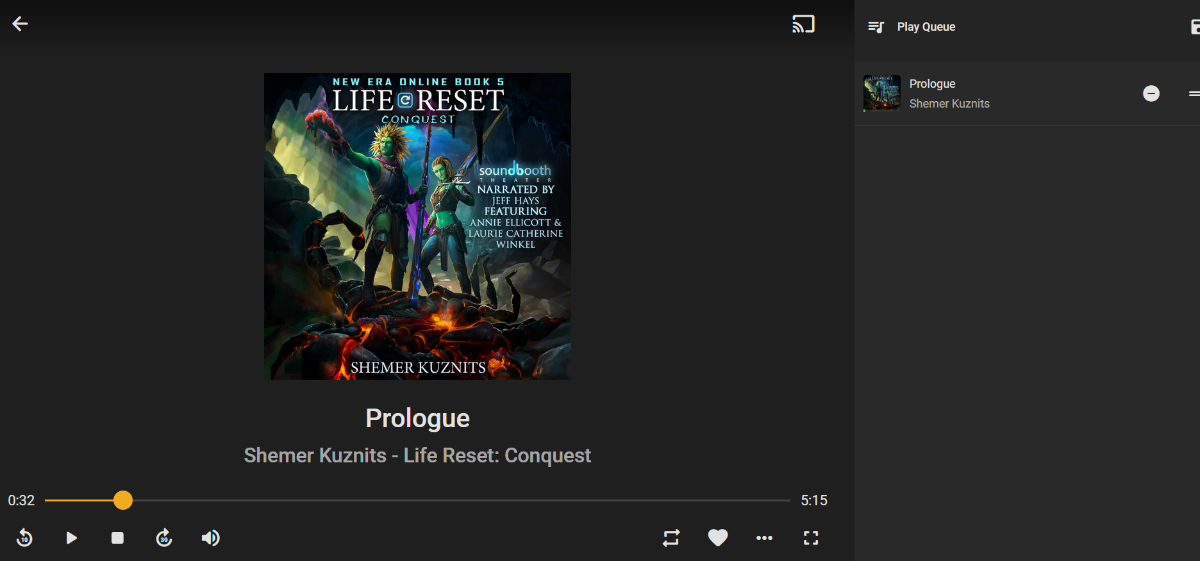
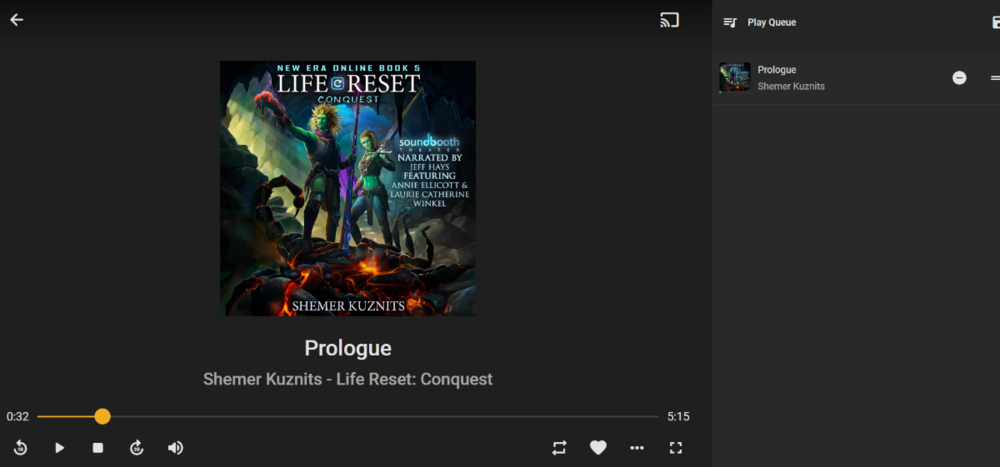
Wait... why is that important? What I want, when I click my current book in Continue Listening, is for it to queue the whole book. It currently only queue's the one track. Displaying track numbers has no impact on that.
 1 point
 -
I've actually been using a project called Stash (which is actually meant for "adult" content) to organize my photos and home videos. Anyone curious just how seamless bulk metadata/tag editing can be deserves to check that project out. Stashapp on github, not going to link for obvious reasons. It uses multi-selection check boxes like are already used in Emby, but gives a robust set of metadata/tagging options to perform on the selected items. It also has the ability to filter your library/search results based on existing/missing tags or metadata. Instantly creating a to-do list of untagged photos/videos. My only regret is there's no baked-in way to export the metadata I'm generating, so I'll likely be starting from scratch again one day.1 point
-
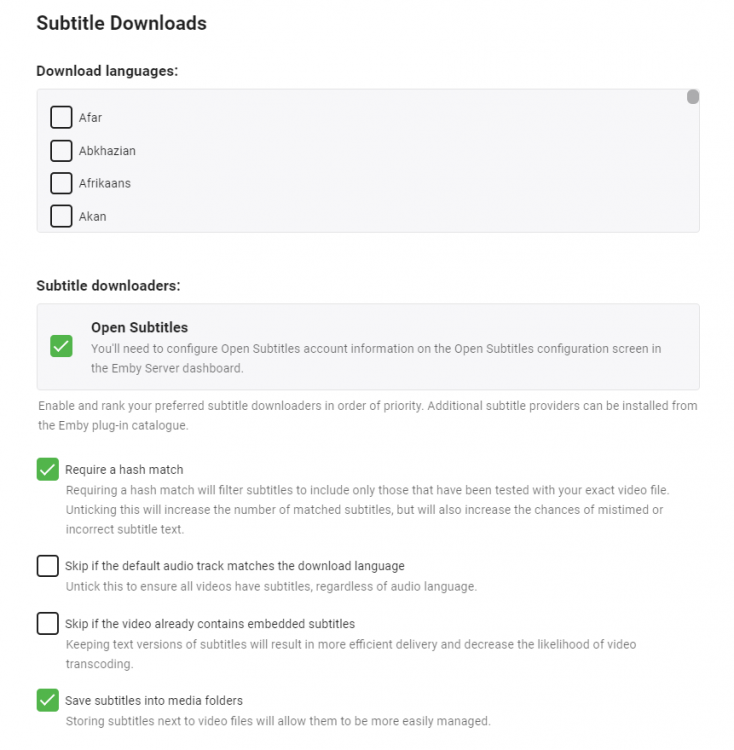
Hi, I have setup the subtitle downloader as part of my library setup - all works great - no issues there. However, for forced subtitles - then the only way to know they exist (usually when you can't understand a part of the movie.. ) is to use the per movie function and select 'Forced Subtitles', but of course the flow of the movie is ruined at this point. Again, this works great - but is there a way to automate grabbing all of these in advance like the primary per library feature above ? It would make sense to add the 'Forced' option used in 'per movie' to the 'per library' advanced settings below ? Thanks !
 1 point
 -
I've put together a list of thoughts I've gathered from my own experience and from other users' input. Some thoughts about what audiobook support is missing in Emby: Top priority features: store album position (not just track position) and when starting the album, go to that track/position instead of track 1 adjustable playback speed (a dealbreaker for me, but some might disagree) when "continue listening" is used, queue up entire album into "now playing" "Nice to have" features (in no particular order): Finish distinguishing media type from Music (still says "latest music" in web, and when downloading on mobile, it puts audiobooks in the "Music" folder, and other similar relics) limit saved progress to one track per album. (That way when you resume an album, there's clearly one place you mean for it to resume from. If you play a few minutes of chapter one, then realize you already finished that chapter and start the next track, you want it to save the progress in track 2, and forget that you played half of chapter 1.) metadata agent for matching artwork and descriptions separate metadata fields for author AND narrator multiple author tags that can allow books to appear under both authors handling of non-square cover art keep track of "in progress" or "continue watching" audiobook albums (add to home screen similar to movies, and create "recently listened books/albums" and "Recently added books/albums" in "Audiobooks" library type, instead of recently added/played tracks as it is now) skip ahead/back in larger (or custom) increments (e.g. 1 minute; currently an app-wide setting) and perhaps separate buttons for small and large jumps (keep 10 second button, but add a new 1 minute or 3 minute button) apply skipping ahead/back to progress in the album, not just the track, i.e. if you're ten seconds into a track and you press "skip back 1 minute" then allow it to go back to before the end of the previous track. Sometimes track boundaries are arbitrary. go back a few seconds automatically when resuming, especially after a long pause or being stopped (restart the word/phrase; could be an optional setting; would be nice for video as well...) sleep timer to stop playback after a given amount of inactivity remember furthest played position in book/album (similar to furthest read position on Kindle) so that if you accidentally start over, or have to jump back for something, you can jump forward to the autosaved furthest location again enable resetting of furthest played position, if you want to start a book over, or accidentally jumped to the end display album duration on album info page show album progress/total duration in playback screen, not just track progress/duration allow shuffling albums, not just tracks somehow account for series of books, perhaps a new tag to account for being in a series and what number in the series. Thus when you finish book one, it can suggest book 2. Perhaps add a "series" view similar to collections. Somehow also account for some books being in multiple series (e.g. book 12 of series A is also book 2 of the spinoff series). Somehow also account for different books in a series having different authors. Just my thoughts, but those top three or four would be enough for me to switch to Emby full time for my audiobook needs. And the rest would take it from "workable" to awesome. Many of these could be summed up as: treat audiobook albums as a single media item for most purposes (showing progress/duration, storing resume position, marking as complete, jumping forward/backward, showing recommendations of albums instead of random tracks, shuffling albums instead of tracks, recently played albums instead of tracks, queue up album instead of track when resuming, etc.)1 point
-
Well, crap. Does no one actually care about developing a streaming media player for audiobooks? Plex doesn't have album-level resume; Emby doesn't have it; Chronicle's dev has been MIA for several months; and a release for Bookcamp is nowhere in sight. This is ridiculous.0 points