Leaderboard




Popular Content
Showing content with the highest reputation on 03/02/21 in Posts
-
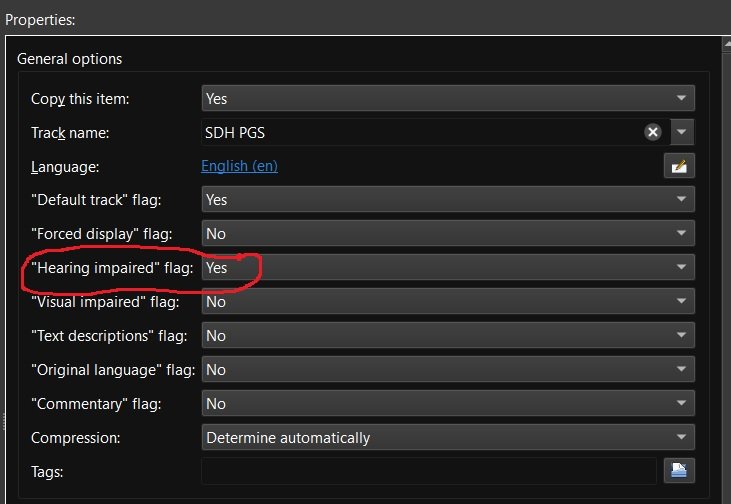
Recently matroska and mkvtoolnix added support for additional subtitle flags including "Hearing impaired" for subtitles for the deaf and hard of hearing (SDH). Request: Emby add some or all of the additional subtitle flags to media info and also as a choice for playback under user user settings. add support for external SDH subtitle naming (ex. moviename.SDH.eng.srt) Reason: my wife and are are getting older and it seems more and more I'm hearing "What did they say" a lot. If I could set certain Emby users to always play the "Hearing impaired" subtitles if available then I wouldn't have to back up and restart playback with SDH subtitles enabled. Other flags like "Commentary" would be nice also as I have several films with those Having this flag would also make it easier to run a script to list which movies have and don't have "Hearing impaired" / SDH subtitles so that I can go out and get the missing ones.
 5 points
 -
Hi there, thanks for the feedback. We are working on improving the store app and unifying the experience between the two.2 points
-
Thanks, I'll review it asap. @all Currently I'm very busy. Mostly I can only work on weekends at the moment, so answers could take a while.2 points
-
With RT shills being as they are, I wouldn't mind seeing user reviews instead, reckon it'd still be a nice feature addition. Edit: Roamed a bit, this one seems decent: https://www.filmcrave.com/api.php Though, I'm a bit unclear what's free and what ain't? Although stated "FilmCrave API is free and allows for commercial use". At least they seem open for collaboration. Edit2: They even have review taglines: Wrong Turn (2021) - "The real Wrong Turn was going into that theatre".2 points
-
This has been marked "in-progress" for a very long time, but it has still not been implemented. It is important to be able to disable camera uploading not on a global level, but on a user level so that I can only allow me and my mom access to it. Any updates on when we can see this implemented?2 points
-
I agree, the performance aspect is not going to win over whomever the product manager is.. like they said, they got more pending matters to attend to than squeak a few microseconds out of the database for 99% of the user base. I believe the parallel servers sharing the same dataset is the most justified use case for this change, now it seems some of the Staff here believe that would be such a rarely implemented feature it'd only be desirable on the "service provider" level. I dont know if their perspective makes them think this a technically complex solution or financially prohibitive solution for the average user, but I'm here to dispel that notion. If implemented it could have dramatic and quick tangible impacts on Emby Admins total operating costs of this service.. If I'm currently tapping out my existing hardware and looking to upgrade, or going to a dedicated computer and proper setup for the first time.. having the option to scale out of your problems cheaper without throwing your existing stuff in the garbage heap will make converting to premium seem and learning how to setup a cluster a heck of a deal. Just sayin.2 points
-
As the title says, why don't we have the "reviews" section when looking at a detail screen anymore? It was kind of a nice feature to have if you wanted to get a little more info aside from a star rating for a title. I didn't even find one single mention of it in the forum, surprisingly.1 point
-
I would love the option to store Emby's database in MySQL - I have a setup that serves around 30 people and I feel that there would be real performance gains by using a proper relational backend over SQLite (I'm presuming). On top of this it would make life easier for me when reporting on watched status a cross users.1 point
-
As I mention in a related post, I love the additional subfolders for Movie Extras (eg, Shorts, Scenes, Interviews, etc.)! It would be awesome to extend this functionality to TV Series as well. Specifically to add support for many/all of the same folders supported for Movie Extras, eg, extras specials shorts scenes featurettes behind the scenes deleted scenes interviews trailers As well as any additional folders that get added in the future (eg, hopefully Galleries). Support Placement of "Extras" Folders Within Each Season Folder, Plus A Naming Scheme to Link A Particular Extras Folder with a Specific Episode (eg, "\Season 1\E1 - Deleted Scenes\" for episode 1 deleted scenes): I want to clarify that it would be great if these various "extras" folder types could reside within each Season folder. So for example, within a Season 1 folder we could then have an "Extras" folder, a "Deleted Scenes" folder, a "Featurettes" folder, etc. And furthermore, that we could designate a particular folder to refer to a specific episode (eg, "\Season 1\E1 - Deleted Scenes\" for episode 1 deleted scenes). See more below, particularly why I think this would be so useful: https://emby.media/community/index.php?/topic/55915-emby-server-theater-additional-extrasspecial-folder-types-for-tv-series-similar-to-movies/&do=findComment&comment=587195 Thanks for your consideration! PS - If this is something you might like to see implemented, be sure to "Like" this top/first post (as well as any subsequent posts in this thread that highlight particular aspects of what you are interested in) -- "Liking" the top/first post helps the Devs to know how much interest there is in a given Feature Request.1 point
-
Please click "Like this" and share it if you want to support this feature. Thank you ! Hello, There is a Kodi addon call "gdrive" from ddurdle who can read videos (original and transcoding version) directly from Google Drive. Why not build on this idea to integrate Google Drive as source directly in Emby Server ? In addition, Emby could generate automatically the STRM files from one or many Drive folders. And transcodings are already available with Drive so no need to transcode with Emby server. What do you think ? ------------- Three reasons why this feature will be useful and awesome: 1. Cloud is the future and today the cost is affordable. I have a Google Drive Unlimited for $50/month (ie $600/year) and I have unlimited space that is secured against crashes. Knowing the cost of hard drive and the cost of power consumption, its a very good deal. 2. Google Drive transcode video file. This provides different stream quality like Youtube (1080p, 720p, 480p and 360p) and the "image quality/compression ratio" is very satisfying. I can play 720p video on my poor 4 Mbits DSL. 3. You don't need to have a big server. Personally, I opted for a little dedicated server (Kimsufi 2G) for the cost and I can leave it run 24/7! Furthermore, me and my friends can watch movies from anywhere! Basics features that should be included: GOOGLE APPS OAUTH2 for activation and permission playing transcoded version (MP4 360p, 480p, 720p & 1080p) directly into Emby's app playing original file (avi, mkv, mp4) directly into Emby's app import embedded subtitles porwerful script module for multiple folder scanning and STRM generating1 point
-
Emby for Windows Store is very light, consumes little battery (about 7% to view a 45-minute video), accepts Windows 10 touch gestures, is fully usable with touch commands but has some problems: No AC3 audio, the video is silent HEVC 720p videos often freeze Emby Desktop is good at displaying videos that Emby Windows Store cannot display smoothly but has some problems: it is very heavy consumes a lot of battery (about 25% to view a 45 minute video) has many problems with touch commands, you have to press several times to get the commands received the only interface that can be used on Surface Pro and Surface Go is that TV, if I use the PC or Tablet / Phone interface, all the text and icons become tiny it overlaps with all other programs and it is not possible to switch from one program to another or close it with touch gestures in Windows 101 point
-
My preferred method for handling podcasts is to add the episodes that I'm interested in to a playlist and at the same time download those episodes to my phone. The playlist removes the clutter of the other episodes that I'm not interested in and downloading them allows me listen to those episodes while offline. The problem I've found is that none of the downloaded podcast episodes show up when navigating the Downloads section in the Emby app. So there's no way to start playing these downloaded episodes if already offline. If I start playing that playlist while still connected to the server, I can then disconnect and everything still works fine. The currently playing episode will continue to play. The other episodes still appear in the queue and I can skip around them just fine. I have to assume that the whole episode is downloaded and not just the streaming link for that episode, since well, they work fine without any sort of data connection. I tried to poke around the Android file system a bit (hoping I could just play them from there, whether in Emby or another app), but couldn't figure out where these downloaded podcasts are stored. That means, though, that the only barrier to being able to play these episodes while already offline is that they simply aren't listed anywhere in the app. I'm just speculating of course, but if the episodes are already stored on my phone somewhere, I can't imagine it would be too large an effort to list them under Downloads. I understand the focus on personal media, it just seems to me like most of the pieces are already there. Perhaps I'm over simplifying the effort, but listing them somewhere seems to be the only piece of the puzzle that's missing. I guess the alternative is if someone can tell where they're stored in the file system. I did also look around at other podcast apps before deciding to give Emby a try. Most had something that turned me off, so I decided to try Emby. Other than this issue, I think it's serving my need pretty well. This also isn't a deal breaker since it's not terribly often that I'm without a data connection. Would just be nice to have an option when I am.1 point
-
Sweet! This worked like a charm! Thank you!1 point
-
Have you used this - html:root { --myblue: #5d7e9b; } html:root { --theme-primary-color: var(--myblue); --theme-accent-text-color: var(--myblue); --theme-primary-color-lightened: var(--myblue); --theme-icon-focus-background: rgba(120, 120, 120, 0.2); } - for overall blue (or whatever) scheme. It does miss some things out though. (From either HappyPlay or PenkethBoy)1 point
-
@Abobader @ebr1 point
-
Thank you once again I do not think this is an issue with KODI i beleive this is the plugin. I do not know if the kodi log will cover the plugin. I will try to runthis tomorrow morning1 point
-
My apologies if there is already a feature request for this, I searched but couldn't find anything. My experience is with the Roku and Android TV apps but it may apply to other apps as well. With the "Up Next" and "Recently Added" rows on the homescreen one almost never needs to dig down deeper to find something to watch. A view I think is missing is a random unwatched movie view which would allow more spontaneous selections when you can't decide what to watch. I am an indecisive person and when given a choice of a 1000 movies I will never decide on one, but give me a choice of 20 movies and I will find something quick. I realize this would be a personal preference having this view so if it could be made an option like how the "Show Premieres Row" currently works in the Android TV app everyone would be satisfied. Yes I am aware of the filtering options but the point is to take as much user intervention out of the process and help one pick a movie they might have not otherwise chosen.1 point
-
Whoops, I swear I looked. Thanks1 point
-
Dashboard > Settings tab, untick "Run server at startup".1 point
-
Hi *, just to close this topic... The problem described in my first posting (Glitches on some (not all) 4K HEVC Remuxes) was solved by the latest LG Firmware Update (6.00.5) and now all 4K Remuxes are running fine Thanks to LG for supporting even old TV models (OLED65C7D)!1 point
-
A flag like this could also be used to automatically increase the centre channel dialogue volume - yes this would mean an audio transcode, but it would certainly be welcomed for those who have hearing difficulties. I believe this could also double as a 'night time' viewing mode where you get to hear clearly what is being said, but without all the background noise waking everybody else up ..1 point
-
Thanks for the SQL @cayars I have no issues streaming the 1080p trailers from Edge on a PC after modifying the path. The trailer details are actually got from https://mediabrowser.github.io/Trailers/listingswithmetadata2.txt when the system is started... So it would be better to just modify the input file (as you can clearly find the 480p references in the above file..) I think this must be a legal issue otherwise this seems like a very easy fix ...1 point
-
GrimReaper76, that was very helpful. I went ahead and for now used some great icons from that thread you mentioned. Hopefully they won't get overwritten soon. I appreciate it.1 point
-
Hel Since i upgrated to kodi 20 i have had s9imilar issues it would not load my movies folder. I just becane stubborn and uninstalled and reinstalled it several time Since i am here, In adding and deleting the emby jails on the truenas server several times when i am in kodi and reinstall emby, it presents me the emby server login screen anhd it now shows mutiple emby server to chose from. is ther a way to clean and edit this screen to show only one emby server? I have truenas 12.0 U2.1 emby jail 12.2-RELEASE-p3 Hodi 20.0 enby plugin 4.1.22 by angelfire05 Thank you all in advance for your help1 point
-
Here's another log. Just woke the Shield and 2 of the changed backdrops from yesterday were black, until I manually refreshed the items. edit 1: I’m on Kodi 19, by the way. edit 2: haven’t checked all of the other content so far so not sure if something’s missing at the moment. Will check later today for sure. kodi.log1 point
-
As a workaround, you can assign Custom genre images, like: https://shaefurr.wixsite.com/fanart/disparity-genre Anyway, there's a lot of that here: https://emby.media/community/index.php?/forum/70-fan-art-videos/ Downside is that you'll have to replace them every now and then as they will be occasionally overwritten, which will hopefully be solved with next server release: In my case, I had TV Show posters thrown into the mix - and my OCD simply couldn't take it, so I went customized road, I suppose for your purpose it will work just as well.1 point
-
Yes, it would also allow for setting it to prefer SDH subs over dialogue-only subs. MovieFileName.en.SDH.srt and MovieFileName.en.HoH.srt are both supported elsewhere for text-based subs. MovieFileName.en.HI.srt is as well I think, but that can be ambiguous as it's the language code for Hindi as well as the abbreviation for 'Hearing Impaired'. And then I could just name my subs that way, instead of having to futz around with MovieFileName.EnglishAlt+255SDH.srt, and Emby would display them properly while also being aware of their language.1 point
-
Not even sure it is even on the table. But we are generating interest! That how the developers can at least see that end users would appreciate this feature.1 point
-
Except for the other dozen reasons in this thread to use something other than SQLite. I absolutely agree with statement here. Maybe someone will take the time to summarize the reasons why it would be useful based on all the previous posts in this and other threads. Performance being an unproven reason. So many good things could come out of it. Looking at Emby as a simple single server application, is not thinking of other possibilities and markets. Just try and take away MySQL from the Kodi users of it, not going to happen.1 point
-
@CondordancerIf you have a hard time to delete a picture, its not like text; you need to look for a small garbage can icon1 point
-
Yes, having those chapter points would likely be the ideal way to detect credits. A database should always be a last resort IMO, as that’s usually very hard to maintain, but is technically doable. I think currently the focus is intros, but once that is further refined I think it would definitely be interesting to experiment with different ways of detecting credits.1 point
-
The local variant being "You can't please everyone and your mom"1 point
-
You have measurements, when undertaking the kind of work that is required in Emby? It cannot be assumed that the more capable package is always faster; sometimes the code necessary to do more advanced things (like transactional stuff) gets in the way of the simple usage and maybe slows things up a bit. Paul1 point
-
And we are currently using a SQL implementation. You just don't like the particular flavor because it isn't designed as its own "server" (because, in our use-case, it isn't needed by most). And that, there, is exactly it. For now, we need to apply our resources to our target demographic. Working on this would mean NOT working on other things that many, many more of our users would benefit from than would from this. I'll say it again. This is a very interesting item for us and we actually designed for it. But it isn't a high enough impact feature at this time for us to take resources away from other tasks.1 point
-
But, are you having an issue that can be directly linked to the internal storage implementation? That is the question. Bright, shiny, new faster and technically "better" things are all good but, if there is no real problem to solve, then they amount to significant effort for not much gain.1 point
-
Completely agree, I've changed my scraping over to the open movie database a couple of weeks ago, it's not as good but I'm not paying for thetvdb, Trakt announced they changed a few weeks ago. Hopefully others will follow Trakt in switching. It would be easier (in terms of coding) no doubt for emby to just 'delete' tvdb as an option, but not great for people who wish to pay for it.1 point
-
I wanted to give an update as I've been trying to figure this out myself. I figured my car deck was too old (it's 7 years old now) as I only get the info for the first song on my head unit, but it never updates as I go to next track manually or the song finishes. I went to a car audio shop and tried a few different models: Sony, Pioneer, and Kenwood. While the interface is faster than mine, it ran into the same problem. Now that I think about it, I don't think I've had issues with the movies or tv shows updating the meta on the screen. I should confirm this. EDIT: It doesn't work for TV Shows either. Movies is fine since it's 1 file at a time and requires a manual selection. When I try to use an external app like VLC to stream the video, I just get the URL + ID instead of the title.1 point
-
A plugin that would enable to watch streams of crunchyroll on emby client.1 point
-
I know this isn't Emby's fault, but is this update ever going to come through?1 point
-
Right I mean we went through this same situation. The difference with us is that we've always been friendlier to our users and I think that's why people took it better.1 point
-
It seems that trakt will switch to TMDB. https://blog.trakt.tv/tmdb-transition-ef3d19a5cf24 I personally prefer TMDB, is the only one that supports multiple versions for each language. And is not a small detail as almost every movie and various series have different names in Spain and Mexico (latin america). And when asked for this feature in thetvdb through their ticket system the answer with a "declined, there is no need for multiple versions of spanish".1 point
-
I've tried to make this easy for windows users. Attached is a zip file that contains 3 files: sqlite3.exe - This is a database editor that runs from the command line FixTrailers.bat - This is a windows batch file that will run this for you in one click FixTrailers.sql - This contains the sql that runs 1. Unzip this file into your main Emby folder. For me this is C:\Users\Administrator\AppData\Roaming\Emby-Server on windows 2. Shutdown Emby 3. Run the batch file. This will likely be very fast and seem like it didn't do anything but it did NOTE: As always it's a good idea to make a copy of the library.db which will be in the programdata\data library.. I would do this at least for the first run to make sure everything is working correctly. Contents of the sql file: UPDATE MediaItems SET Path = replace( Path, 'h480p.mov', 'h1080p.mov') where type=10 and Path like '%h480p%'; This changes the url of trailers that are 480 to 1080. It only adjusts type 10 data which are trailers. Contents of batch file sqlite3.exe .\programdata\data\library.db ".read FixTrailers.sql" This runs the sqlite3 program directing it to edit the library.db and executes the sql mentioned above. It's important to place these files in the proper spot so the script can find the files. If you have your own favorite sqlite editor and know how to run SQL simply use the sql contained in the FixTrailers.sql file. You will need to run this from time to time to update any new URLs that get added to your system. Let me know if you have any questions, Carlo FixTrailers.zip1 point
-
The guide data has some additional features that we can look at utilizing in the future. Thanks1 point
-
You could take it a step further and create a Emby Transcode Client" that monitors resources on each client and the server could send work to each client based on what it is capable of and what resources are being used. I have 3 Nvidia Shields and two are asleep most of the time, My main server is OK but does not have hardware transcoding capability and uses a lot more power than my two shields. I could install the "Emby Transcode Client" on each shield and the server could send the jobs as required.1 point