Leaderboard




Popular Content
Showing content with the highest reputation on 02/16/21 in Posts
-
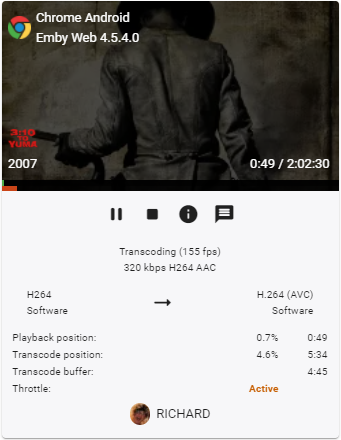
Often times when I see "Reason for transcodng: Media bitrate exceeds limit." in the info I wonder, what kind of internet connection do they have? I know this can cover multiple scenarios like bandwidth limit set for user, server, client side quality setting, as well as AUTO bandwidth detection... Can you PLEASE add to the dashboard the returned client bandwidth capabilities? The value you are getting from the client that tells emby its bandwidth abilities. While you are at it tighten up the spaces between lines on the transcode items, and align the results to the right instead of center.. MAYBE SOMETHING LIKE THIS :6 points
-
Just giving this another bump. With 34 likes, it's gaining traction. 2021-02-16 12:03:50.802 Info App: Bitrate exceeds DirectPlay limit: media bitrate: 9723347, max bitrate: 385000 2021-02-16 12:03:50.802 Info App: Bitrate exceeds DirectStream limit: media bitrate: 9723347, max bitrate: 385000 2021-02-16 12:03:50.802 Info App: RemoteClientBitrateLimit: 15000000, RemoteIp: a.b.c.d, IsInLocalNetwork: False It would also be useful if the reason for the transcode was the remoteClientBitrateLimit - in my case, I have set a 15Mbit limit for this user. In the above example, emby thinks I have 385 Kbit/sec available (!), but on a speedtest, I have 3.5 Mbit/sec available (poor 3G connection). On Client Auto - there is nothing I can do, but if I force the client to 3Mbit - the file plays at 3Mbit/sec just fine. Having this info displayed is so much more important the transcoding position data imo - which frankly, I have never looked at... Thanks.
 3 points
 -
Yes, now I know 100% better. The amount of work that @softworkz has put into the implementation is amazing.3 points
-
3 points
-
1. Search by letter function (A, B C) Currently when selecting "Music" users get their whole library. This is very difficult to navigate, especially while driving! Bizarrely, this function already exists for playlists. When you pull one up in Android Auto that has a lot of tracks, you do get a "Search by letter" function at the top. Why does this not exist for the library as a whole? 2. The option to restrict the library to only those artists that have tracks downloaded This would solve streaming problems and make it easier to navigate the library because it would be a smaller selection of artists. Currently using Embly Server 4.5 and Android Auto 6.0.6153334 and Emby for Android 3.1.73.2 points
-
Fix the cert - see my first post ! This setting is also important - if you allow both http and https connections - then it will show both (should be different ports) - so I would set to secure ONLY and then I believe the external option will disappear, because it is not https - because the cert has failed to load.
 2 points
 -
Not sure which to be more impressed with, the number of items or the fact you actually counted them. LOL2 points
-
That’s a great idea2 points
-
Not sure if there are actually many people using emby that also read a lot of books. However with Ebooks being a hot thing right now this idea popped into my head. I have a lot of ebooks which I generally keep on my normal PC. However this way it has no back-ups cause I only back-up my server to an external location. So I was thinking about switching them to my server and then I thought I can also put them in the emby folder. The request may be a bit out of the ordinary since emby is more for playing files and things rather than reading, but could a reader be implemented at some point in the future? A book library and an implemented reader, specially for mobile devices I guess (phone/tablet), but perhaps for browser/theater? Would help me get rid of yet another app and have all my "media" in the same place Edit: If you liked this also take a look here for ebook expansion https://emby.media/community/index.php?/topic/80398-book-serverreader-incorporation-suggestion/1 point
-
Emby on Android Mobile technically works as a disconnected music player, but without the ability to support playlists it is too limited for my use. Maybe there are settings I am missing, my experience is: - Downloading to Android works great, I can select a playlist of music and have it downloaded to my Android phone when the phone is connected to the Emby server, artwork and artist info is included. - Playlists do not work on Android mobile. When downloading a playlist, the songs are downloaded but not the playlist data. The mobile app has options to add tracks to a playlist but they do not seem to work when disconnected. So I can only select shuffle-all, or albums, or +/- tracks from the queue. - When starting Emby on Android disconnected from the LAN, the app takes about 15 seconds looking for a server before it responds and prompts for downloads. Not a dealbreaker but it would be nice to have the option to go to Downloads while searching for a server. It'd be ideal if there was a companion music player app that used the Emby downloaded media. Any suggestions to make the experience better? My 256gb SD can hold a lot of music and I'd like to use Emby as my primary music player. I'm not interested in Spotify, YT-Music, Tidal, etc.1 point
-
Ya, more options are coming, I've just got to get the first version out the door first.1 point
-
NOW I finally get it, THANK YOU, I was looking at it wrongly all the time, rule-based instead of stream-based. In that case, I reckon at least multiple instances of property "Type" should be allowed (I know you revoked multiple identical properties), which would allow single MediaSource to be targeted by multiple stream conditions combined into one MediaStream rule (resulting in single badge, as opposed to multiple rules separate for each stream which wound exponentially increase false positives, iconizing items that only one out of three rules applies to). Thanks again1 point
-
@GrimReaper76 No, this shouldn't match the rule because according to your description, you don't have any *one* MediaStream that possesses *both* properties of 'DisplayLanguage' containing 'Jap' and 'DisplayTitle' containing 'Eng'.1 point
-
Actually went into the HDHR and set all the working channels to 'favorite', then I readded the HDHR to emby and only imported the favorite channels.1 point
-
Yep - in map channels, you can delete them.
 1 point
 -
Are you not using 'Emby Guide Data' ? I'm reasonably sure that emby moved away from Schedules Direct some time ago - so it may just be a case of setting up the new Guide Provider in the live tv setup.1 point
-
Emby cannot read your pfx/cert for some reason - this is why https is not working for you. 2021-02-16 16:01:44.502 Error App: Error loading cert from C:\ssl\***YOUR_DOMAIN***.pfx *** Error Report *** Version: 4.5.4.0 Command line: C:\Users\Administrator.MICROSERVERGEN8\AppData\Roaming\Emby-Server\system\EmbyServer.dll -noautorunwebapp Operating system: Microsoft Windows 10.0.17763 Framework: .NET Core 3.1.9 OS/Process: x64/x64 Runtime: C:/Users/Administrator.MICROSERVERGEN8/AppData/Roaming/Emby-Server/system/System.Private.CoreLib.dll Processor count: 4 Data path: C:\Users\Administrator.MICROSERVERGEN8\AppData\Roaming\Emby-Server Application path: C:\Users\Administrator.MICROSERVERGEN8\AppData\Roaming\Emby-Server\system Internal.Cryptography.CryptoThrowHelper+WindowsCryptographicException: Internal.Cryptography.CryptoThrowHelper+WindowsCryptographicException: Access denied. at Internal.Cryptography.Pal.CertificatePal.FilterPFXStore(Byte[] rawData, SafePasswordHandle password, PfxCertStoreFlags pfxCertStoreFlags) at Internal.Cryptography.Pal.CertificatePal.FromBlobOrFile(Byte[] rawData, String fileName, SafePasswordHandle password, X509KeyStorageFlags keyStorageFlags) at System.Security.Cryptography.X509Certificates.X509Certificate..ctor(String fileName, String password, X509KeyStorageFlags keyStorageFlags) at System.Security.Cryptography.X509Certificates.X509Certificate2..ctor(String fileName, String password) at Emby.Server.Implementations.ApplicationHost.GetCertificate(CertificateInfo info) Source: System.Security.Cryptography.X509Certificates TargetSite: Internal.Cryptography.Pal.Native.SafeCertContextHandle FilterPFXStore(Byte[], Microsoft.Win32.SafeHandles.SafePasswordHandle, Internal.Cryptography.Pal.Native.PfxCertStoreFlags) Try copying it into the emby root (and tell emby it's new path), or give emby access to the c:\ssl subdirectory perhaps ? edit - removed your domain from the extract...1 point
-
This is a tricky one due to the SG1 in the name (the 1). Try just naming your season folders "Season 1", "Season 2", etc.1 point
-
This one solved the playback issue for me!1 point
-
Nor am i! Of course. But the Refresh Guide task has a default trigger, so maybe it suits for your needs.1 point
-
Okay, so, yes in the individual series view. We'll take care of that. Thanks.1 point
-
Those ain't correct names. Either put those subtitles next to your episode and rename them exactly as your media item (30.Coins.S01E07.SPANISH.1080p.DD5.1.x264.en.srt because atm they are not named correctly, you are missing word SPANISH in subtitle names) or try renaming your folder to "subs" or "subtitles", in which case, IIRC, exact file name might not be that important, haven't used subfolders in a while.1 point
-
1 point
-
100 x Thank you!1 point
-
OK, then this is a known issue related to DirectStreaming. I hope to have this resolved soon1 point
-
Go to the server and enable deletion from all libraries for that user. BTW beta releases are usually discussed in the testing area Need a Collections option under "Allow Media Deletion From" - Page 2 - Emby Server - Emby Community1 point
-
Not good, I received a log from e2zippo and there is a issue in playback code. I hope you all have the same problem as I can see in the log. I'll release a new version asap. @TobyTentakel You reported also a sync issue. can you send me a log file, please.1 point
-
Thank you very much! Worked like a charm!1 point
-
1 point
-
Enable the following on your Shield Settings Device Preferences Storage Transfer files over local network The Shield will then become part of your network places on your Windows PC. Or, you can use explorer to connect to \\Shield (assuming you're using the default) or \\IP Once you see it just drag and drop files from your PC to and folder on your Shield1 point
-
Same here, no sync of latest files, no playback1 point
-
I'm in the same scenario...5.1.16 and unable to play any files....music, shows or movies. Get the loading/buffering icon and it stays there. Also appears that the latest files are not syncing for myself on Windows 10 and Kodi 19 rc1. I'll grab logs tomorrow.1 point
-
Would be nice if you could keep the conversation in English here @quickmic I'm having major problems playing anything now, I just sent you the logs from Kodi, I just rebooted, but I still can't play anything. Edit: Same here, 5.1.161 point
-
The plugin is now obsolete in beta server. It is built into the server now. There is a per library option. https://emby.media/community/index.php?/topic/94475-46020-rework-collections-storage/ This has been brought up in the plugin topic. It is a matter of whether the plugin dev will update the plugin for this beta or wait. Automatic version grouping for movies - Plugins - Emby Community1 point
-
The simple fact is that on TV 'stereo' speakers, unless you use an extremely low bitrate/poor conversion, you are simply not going to notice the difference between a DTS track and a converted AC3 or AAC track. For the majority of people, they just want 'sound' as they currently get silence if the video file only has a DTS audio track. For the Audiophile's out there that can tell the difference, then I largely suspect they are already using an AVR that is natively playing all the sound formats direct anyway...1 point
-
You can start with me, but be warned, I like good single malt Scotch but hate to pay for it. LOL Kidding aside, if you understand the differences between different 4K formats such as HDR10, HDR10+,HDR1000m (HLG, Panasonic & Sony enhancements to HDR), Dolby Vision and have some of these types of media to test with as well as have a 4K display/TV to view difference between raw and tone mapped video send me a PM. You don't need to have or know all this but it's helpful. Let me know your OS, CPU and GPU(s) types, device driver versions for GPUs. Definitely not promising anything but if you fill a gap in some way... If you're a Windows user we probably have this covered well, but could use Linux users soon. We're getting really close so it won't be long anyway before this hits beta. PS not to be a tease or anything (yea right) but I was just testing some stuff while typing and have five 4K HDR streams being transcoded and tone mapped to 1080-8Mb as well as 2 AVC to HEVC conversions in progress. All 5 streams are different full length 4K HDR movies. I'm adding a new clients every 5 minutes just to see how many clients I can stream to but have ran out of hardware clients and now will be using Theater and web browsers. GPU is at 60% and more streams can be transcoded and/or tone mapped. This is a 10 year old first gen i7 (no Quicksync) @ 2.8 Ghz with an Nvidia 1650 (patched to allow more than 3 streams). @softworkz has done a SUPER (not strong enough) job with this implementation and will have the orange and purple guys wondering what just happened, and how the hell did they do that. LOL But to be like all the commercials you see on TV, I'll add your mileage may differ from mine.1 point
-
There is a bug that I noticed for a long time (>1 year) so I might as well report it - the sort criteria for shows and movies is not preserved ... it always resets to Title - Ascending. Could you please save all the sort settings?1 point
-
There's also work going on to enable the clients to request tonemapping or not according to the capabilities of the hardware they have available. That's a bit fiddly, I think. Paul1 point
-
Bonjour, on nous propose un soft qui coute une centaine d'€ avec une licence à vie (ca fait déjà un an que je l'ai), des mises à jours fréquentes, des mises à jour qui foirent des fois (ça arrive partout) MAIS tout reste à vous. Oui plex c'est beau, c'est gratuit sauf qu'à l'époque quand j'avais essayé tous mes médias étaient transférés sur leur serveur, quand c'est gratuit c'est que vous êtes le produit. Au lieu de payer 4€ ou 5€ par mois, prenez à vie, ce sera jamais perdu et c'est vite rentabiliser. Puis le support est super actif, la communauté est cool1 point
-
I recently took a road trip with the Emby mobile app and found that the downloaded content works great and playlists work great but they don't work well together. Or at all for that matter. The easiest way to reproduce my experience is: Create a playlist with a few songs Download the playlist Wait for the downloads to complete Start playing the playlist Turn off data/wifi Eventually the buffer will run out and the song will stop playing. Obviously I have no idea how the application is programmed/designed but ideally it would be great if the application: Cached information from the server (such as playlists) then you could at least see the playlists when data/wifi is off (this may also help with the issue where you can't access your downloads until a connection is made or times out) Preferred local content over remote content (or allowed this to be customized eg. always prioritize local content or only prioritize local content when on mobile data) As the app stands it does a great job but it really falls down when it comes to playlists and offline content. As someone who doesn't have unlimited data and often goes out of service range this is a real bummer as I either can't use my playlists or I have to destroy my data.1 point
-
Hi, it's planned for the future. Hopefully soon.1 point
-
Weird. Oh well, I'll just have to briefly try to act like a grown up...1 point
-
Hi, not currently but it's planned for the future. Thanks.1 point
-
Any chance of being able to insert commercials/bumpers between shows and movies?1 point
-
Why is there still no support for HDR or Dolby vision on Emby for TvOS on Apple TV? The Apple TV can do it with Plex. I'm frustrated that I have to use a Fire stick to watch my movies. The Android app over all is far far superior to TvOS. Does Emby even bother to keep developing for TvOS? A few little updates here and there, but, for example, the TV/DVR Guide on Android is far superior as well as little things like clicking up when watching a film/tv show on Android is so good at adjusting settings on the fly. Even the "stats for nerds" is missing on TvOS. To be honest, the list goes on and on. There is so much more functionality on the Android platform compared to Apple's Emby App. A bit of "swiping" development for Apple TV's remote would be appreciated. I'm trying to move completely away from Plex as I really do like Emby over Plex as Emby is far superior with almost everything except not supporting HDR/Dolby Vision, removing commercials. With Emby's positives, the speed of starting streams, speed of moving through the timeline and the interface is intelligent along with their amazing metadata manager. I love it! Unfortunately Emby for TvOS totally sucks right now. Please put some resources into developing for TvOS.1 point
-
That's a poor shortcoming and a plus for Plex. (Update: see apology in #5) But it only anwers @@amura11 's first point. What about: I had expected that Emby would have this option to use local content at any time, including over wifi. Being able to download content to overcome a sometimes dodgy wifi connection was a raison d'etre for me taking out a Premiere subsription and I'm sadly disappointed. Another plus for Plex.1 point
-
Hi, thanks for the feedback. We haven't yet implemented playlists for downloaded content, but it's planned for the future. Thanks.1 point
-
I've often wondered, why do you care if your competition knows what you are adding to emby? Who cares if they steal the idea and push it out faster than you, they could just pluck the good ideas from the feature request section here anyway right? You are not really losing customers? I mean I don't think emby users are going to rush away from emby to try another server due to a little new feature.1 point
-
The Emby team is extremely small and very active on these forums assisting with issues and responding to requests. The product grown way beyond what I ever expected it to be 6 years ago. I think that they are doing a fantastic job and have Incorporated a lot of feature requests. Kudos! Sent from my SM-G960U1 using Tapatalk1 point
-
One thing I'd like to note... is that a Media folder MUST have execution and read permissions from the emby user. When adding media, there is a notification that reminds you that the emby user must have read access, but this is incomplete and should be corrected.1 point