
Leaderboard




Popular Content
Showing content with the highest reputation on 02/14/21 in Posts
-
You can start with me, but be warned, I like good single malt Scotch but hate to pay for it. LOL Kidding aside, if you understand the differences between different 4K formats such as HDR10, HDR10+,HDR1000m (HLG, Panasonic & Sony enhancements to HDR), Dolby Vision and have some of these types of media to test with as well as have a 4K display/TV to view difference between raw and tone mapped video send me a PM. You don't need to have or know all this but it's helpful. Let me know your OS, CPU and GPU(s) types, device driver versions for GPUs. Definitely not promising anything but if you fill a gap in some way... If you're a Windows user we probably have this covered well, but could use Linux users soon. We're getting really close so it won't be long anyway before this hits beta. PS not to be a tease or anything (yea right) but I was just testing some stuff while typing and have five 4K HDR streams being transcoded and tone mapped to 1080-8Mb as well as 2 AVC to HEVC conversions in progress. All 5 streams are different full length 4K HDR movies. I'm adding a new clients every 5 minutes just to see how many clients I can stream to but have ran out of hardware clients and now will be using Theater and web browsers. GPU is at 60% and more streams can be transcoded and/or tone mapped. This is a 10 year old first gen i7 (no Quicksync) @ 2.8 Ghz with an Nvidia 1650 (patched to allow more than 3 streams). @softworkz has done a SUPER (not strong enough) job with this implementation and will have the orange and purple guys wondering what just happened, and how the hell did they do that. LOL But to be like all the commercials you see on TV, I'll add your mileage may differ from mine.4 points
-
New Version available 5.1.15: You can load from here, or wait till repo is synced. http://embydata.com/downloads/addons/xbmb3c/multi-repo/beta-leia/plugin.video.emby-next-gen/plugin.video.emby-next-gen-5.1.15.zip Fixes: Background sync not paused while playback New: - Known issues: Multiserver not working Dynamic lists slow/artwork Special episodes play index -> Kodi seems to have a bug. Index is one increment off (too low) General info: -2 points
-
I mentioned it in another thread, but thought I'd put it here since this looks like a new section--just for posterity. Would like to have a bulk meta data editor function. For example, if I have 750 videos whose producing studio is the same, I want to select those videos and apply the name of the studio to those videos. Similarly, if there is a custom tag I want to apply to a subset of those movies, I want to be able to select them in bulk and apply the tag to those videos (instead of selecting them one by one).1 point
-
I know the answer to this is probably going to be no..... ...but.... A standalone music player for iOS would be very useful. Trying to get the wife to use the full client for music is just not happening. Something that was simple and intuative and quick and easy to use would be killer, something like spotify. The simpler the app is to use, the better. If all else fails, I have a project that's on the back burner that was an iOS music player for subsonic, but I could always target emby as well. It had an spotify a-like interface. Screenshot from as far as I got with the UI, it was playing back music from the server.1 point
-
... as I was tired of manually grouping all my movie versions into groups after each recreation of the db, I created a plugin to help with that. The use case is having movies, that belong together spread around and not being able to easily match the emby naming conventions, but still having the desire to present them as one item with multiple versions. The plugin works similar to the auto boxsets, but does the "movie versions grouping" - it will group all movies based on their TMDB id into one item, regardless of where they're placed and how they're named. I made that for myself - however, if anybody is interested, attached is a plugin that solves this issue. Attached version is for current 3.6.0.49 beta Server, do NOT use it with stable release! Plugin is alpha state, you should only use it, if you are willing to backup your db (there is no way to revert the changes otherwise!) and manually put the dll in the server plugin directory. Do not use it in your production environment before having tested in a test environment that you're fine with what it does - seriously! ;-). Note: There is a known bug in the web GUI presentation which is described here, which needs to be fixed on emby side. Edit: the mentioned display bug in BoxSets is fixed in Emby now, thanks Luke. AutoCollections-for3-6-0-49-betaServer.zip AutoCollections-for3-6-0-75-betaServer.zip AutoCollections-for-4.1.0.15-betaServer.zip AutoCollections-for-4.2.0.17-betaServer.zip (4.6.0.10 and before) 4.6.4.0 and above (does not require beta server as version number has been surpassed) AutoCollections-for-4.6.0.22-betaServer.zip Note: Original version will cause issue with other new plugins like Top Picks. Updates by community members: v.1.0.0.4 New update thanks to @Cheesegeezer Looks like we've managed to update the plugin, to be current Emby Server 4.7.7 (minimum). Some Changes to be aware of Automatic Library scan and updates are disabled, too many things are triggering library scans at the moment and entering into an endless loop which will crash the server. Moved to a Scheduled task now. Fully Locked item Metadata can be ignored in the Plugin Settings for grouping. (Partial field may have worked before but you need to Lock the item itself now) ".strm" files are ignored from any processing New plugin Graphics with a big nod to MikePlanet This is always Mikes plugin and the work he has done is fantastic. - We only did essential maintenance to keep this alive for you peeps. AutoCollections_1.0.0.4.zip v1.0.0.5 Removed Top Pick Items from the available item list re introduced the auto scanning... this will take place 1 min after an item event is detected re introduced auto run after a library scan tested against top pick plugin and there is no endless looping... but please test fixed the locked items bug. Good luck and let me know how the testing goes. AutoCollections.v1.0.0.5.zip v.1.0.0.9 New update thanks to @Hoptional Added option whether to Merge items across different libraries Compatible with nested folder structures, the "Top Picks", and the "New Releases" plugin Improved logging AutoCollections_1.0.0.9-libraryoption.dll1 point
-
Hi, on themoviedb website you can set your default language and a fallback language for data not translated, it is possible to set that in metadata setup ? Often, title between FR-CA and FR-FR are not the same, i prefer FR-CA but this database is less populated than FR-FR, on moviedb you can complete unpopulated data with FR-FR.1 point
-
My apologies if this has already been requested, but it would be great if—like videos—we could see the format and quality of audio files. I've recently migrated from Subsonic, and it provides this information (see attached image). Some reasons why you might want to see this: When manually "deduplicating" it's nice to know the quality or the format (e.g., FLAC vs. MP3) to ensure you delete the correct file. Thanks to Spotify/Tidal/(insert you favorite streaming service here), I've been purchasing lots of used cheap CDs. I have a *huge* music collection, so in addition to checking to make sure I don't already have an album, it's nice to know the format in case I purchased a lossy version back in the day. Ditto for compilations. For the same reason above, when creating playlists, I prefer to add the highest quality song—eventually I'll deduplicate my collection, so I want to make sure I don't remove the version in the playlist. NOTE: if this has already been requested, kindly point me to the post and I'll "like" it.
 1 point
 -
I suggested in a totally different thread a bit ago about possibly adding Discogs as a meta fetcher... https://emby.media/community/index.php?/topic/79280-duplicate-music-artists-entries-how-to-get-rid-of-them/ That thread has had a few +1 reply posts. As such i figured adding it to the feature requests was the proper way to gauge interest. If you have used MP3tag you should be familiar with Discogs. Its a GREAT alternative to Musicbrainz.1 point
-
Hello, I'd like to have more filter for series: to filter updated series (have all episodes, including the latest) and vise versa to filter series which are not finished (still running) sort by amount of episodes Thanks, would be quiet helpful1 point
-
When watching live TV through Emby, I get some skipping & failures (returns to channel screen, cutting broadcast). About 50% of the time, it's annoying enough to switch to VLC, where it streams flawlessly. Therefore I'm wondering if there is some setting I might be able to adjust to perhaps reduce the bandwidth requirements or otherwise smooth out the stream so I can stick with Emby.1 point
-
I've just created a new account and it's all working perfectly. Happy to close this issue. Thanks everyone for your responses, really appreciate you all trying to help1 point
-
Sorry that I hadn't tried it with another skin before... In fact, it's gone with the other skin. I have already told a skincoder.1 point
-
This looks like Netflix images.1 point
-
All right, THANK YOU ALL for your kind helping hand! Problem solved! I'm used a wireless keyboard, with touchpad that was the problem... (maybe a driver issue, or something) With a wiered keyboard and mouse, the problem dissapeared.1 point
-
They do but Emby currently does not support them (there is a feature request out there). And someone would have to create that order on TMDB. From TMDB Bible We now support alternative orders! The Episode Groups section can be used to create different orders such as the production order, the DVD order, a new order, or country-specific orders.1 point
-
New Version available 5.1.16: You can load from here, or wait till repo is synced. http://embydata.com/downloads/addons/xbmb3c/multi-repo/beta-leia/plugin.video.emby-next-gen/plugin.video.emby-next-gen-5.1.16.zip Fixes: Sync issue fixed: https://emby.media/community/index.php?/topic/90781-embyforkodi-500-preview/page/31/&tab=comments#comment-985696 Not absolute perfect yet, but close New: Transcode info added Known issues: Multiserver not working Dynamic lists slow/artwork Special episodes play index -> Kodi seems to have a bug. Index is one increment off (too low) General info: -1 point
-
Why did u program device access in emby? Thats your answer.1 point
-
Probably to restrict device access to a specific decice. Good thing his not on beta...1 point
-
No PM yet. What's more amazing is orange and purple servers running on my hardware can either not transcode one stream in real time or 1.2x on the other which just barely works. That's of course on my older first gen i7. They don't do better on newer i5 models either (my notebook). A lot of you guys will take for granted how well this does work in Emby (when you get it) without any special drivers (normal current drivers from Intel or Nvidia, not from MS) or configs and won't appreciate how special this really is. The performance difference on my hardware really is stunning but of course your mileage may differ.1 point
-
Issue is fixed with setting Edit metadata -> Display order: Dvd *EDIT* Thought it was fixed but there are still episodes missing even though the episodes are in their folders1 point
-
According to the link below (information is also in your users manual) your TV doesn't support TrueHD audio nor does it passthrough. Smart TV - Build | Samsung Developers However, it's possible that has changed via firmware update and Samsung just hasn't updated the chart. You can try to turn off the audio conversion by going to your user options on the server and turning off "Allow video playback that requires conversion without re-encoding" and then try play TrueHD audio again. If that works please let us know1 point
-
That's great. I also use shield TV and some 4k fire tv sticks so everything I play direct plays on these bar some audio on fire tvs1 point
-
Emby is a Personal media server, not a Streaming platform. You need to install server, populate it with your own media (or use Live TV capabilities), afterwards you access it through a browser interface or any of the numerous client apps, like the Android one you installed.1 point
-
[MovieFileName].en.forced.srt They're called "forced" subtitles. Usually on a Blu-ray they're part of the normal English subtitle track, but individual subtitles within that track can be flagged as "forced" and will display even if subtitles are turned off. When ripping a disc with MakeMKV, this will come out as a second, separate, subtitle track, which then needs to be flagged as "forced" in MKVToolnix. I'm not sure how Emby handles whether to display these or not on various subtitle settings, but I've got mine set to "Smart" and it works perfectly. I get English subs for foreign works, English forced subs are displayed, and for English works without a forced subs track there are no subtitles displayed.1 point
-
You are right, I didn't add this info. I'll re-add it in the next version.1 point
-
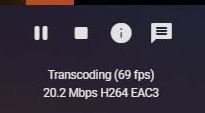
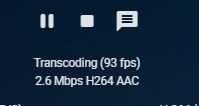
Minor glitch (I think). Emby for Kodi legacy shows an exclamation mark in the interface when transcoding which, when clicked on, tells why transcoding is occurring. Emby for Kodi Next-Gen does not.
 1 point
 -
*Updated* with toggle on/off fix When the page loads the static html shows the toggle as on but will set itself to the correct position quite quickly when the config is loaded as the page renders. let me know if this works or not for you. It works here on my test machine and on my server.1 point
-
Haha no, that's not it. I've actually managed to get it working now, but what I've done is made a little system for my son to play some of his kids shows by placing one of his toys (that corresponds with a particular show) on top of the tv stand (with an NFC reader hidden underneath). When he places the toy there my Echo Show says "Playing (Show Name) on Emby theater" and then turns on the TV and starts the selected show/movie1 point
-
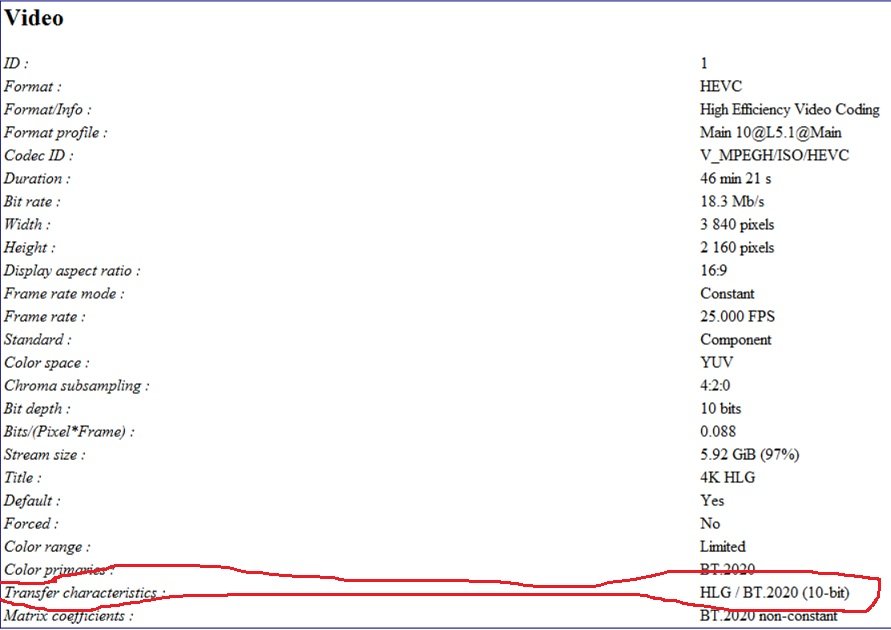
I'm adding HLG HDR to the list since a lot of BBC material uses HLG and not all players support it. This info would be nice to know because the nVidia Shield doesn't support HLG and my Samsung does. When played on the Shield colors are all washed out. If I knew the file was HLG then I could switch to the Samsung app beforehand.
 1 point
 -
Or the autoclean would not activate if there is more than x% difference. or give some kind of warning 'are you sure ....'1 point
-
Weirder things have happened. Try another keyboard/mouse if you have them. Try RDC or Teamview into the server and see if you have a problem using a remote keyboard/mouse.1 point
-
I've having a lot of different codecs and file formats in my library, causing a lot of unnecessary transcoding and wasting space when older codecs are used. I'd like to convert those to modern codecs. I'd like to be able to create various conversion profiles instead of having to set these for every single file, including setting the new name if I select the new files to coexist with the original item. Also I'd like to be able to select multiple files at once and then just select convert from the menu and select the profile I previously created. With my library is probably going to take a year or more to get everything converted, but I believe it will be worth it. @@softworkz If you want any files for testing still, please PM me with what you'd like...1 point















