Leaderboard




Popular Content
Showing content with the highest reputation on 02/12/21 in Posts
-
I suggested in a totally different thread a bit ago about possibly adding Discogs as a meta fetcher... https://emby.media/community/index.php?/topic/79280-duplicate-music-artists-entries-how-to-get-rid-of-them/ That thread has had a few +1 reply posts. As such i figured adding it to the feature requests was the proper way to gauge interest. If you have used MP3tag you should be familiar with Discogs. Its a GREAT alternative to Musicbrainz.2 points
-
How could I ever support beta when it's a ever changing platform? I'd just appreciate a little less of a go when you're not using release versions of software. "It's generally safe to download and test beta software, but be sure that you understand the risks that come with it. Remember that the program or website, or whatever it is that you're beta testing, is in the beta stage for a reason: the bugs need to be identified so that they can be fixed"2 points
-
Soon it will be in the normal beta channel release. We have been doing some private testing of it first with a hand full of users each with different hardware. The UI needs an adjustment or two but the actual conversion with tone mapping itself is working quite well with the right hardware.2 points
-
I would suggest reading the topic. Thanks.2 points
-
You've grown up with watching live tv but on television only runs garbage? You have a big library but don't know what to watch next? Then this for you: "VirtualTV" - my new live tv plugin that allows you to create custom channels based on conditions of your Emby library content. What's missing: Maybe codec conditions Known problems: Needs Emby Premier to work (Playback) Emby's live tv and playback api is very limited, so i've had to make some detours to get things working. The plugin has two general playback modes: "continous" and "playlist" playback. With "continous" mode you can also choose between "live", which bahaves like real live tv or "archive", which plays the videos from the start. In "Continuous" mode multiple videos are queued and concatenated to one big file with the help of ffmpeg. To make this happen every video in the queue has to have some common features (video and audio codec). That's why it often happens that the video also has to be transcoded by ffmpeg. For transcoding the plugin relies on Emby's internal transcoding engine. If there's a problem, not uncommon with hardware acceleration enabled, the plugin also has a problem. Nothing i can do about it. The availability of subtitle tracks is mostly dependant of the Emby user playback settings. In continous playback mode only one (the default) subtitle track can be used and this one has to be burnded into the video (transcoding takes place). In "Playlist" playback mode the videos are pushed as a playlist to the Emby clients. It's like you would play your videos directly from your libraries. This way you get all the features you are used to. Audio and subtitle selection, pause, skipping around and similar things. "Native" playback method was created by the Emby Devs. Similar to Playlist playback it will play the real library videos, but with the big difference that playback is purely initiated by the client app, without any remote command execution. This is why it also works for Roku devices on a WAN network. And although the real videos are played, the whole thing is treated like live TV. This means that channel zapping is possible and no dialogs for playing the next episode are displayed. Unfortunately, the new playback method does not yet support all features. As the name "Archive" suggests, it will currently always start all videos from the beginning. In addition, only very few Emby apps automatically advance to the next video. If you want it to be improved even further, each of you should raise your voice in this thread. To get things started install the plugin via Emby's plugin catalog and restart Emby. Setup your channels with a name and number and choose your playback mode. In the channel conditions you'll have to select an Emby account. This account is used to get library access, respect parental rating, reading watched states and selecting the stream language. At least one textual input field of the conditions has to be filled to get some program data. Fields with an asterisk are either evaluated with an "AND" or "OR" condition among each other. Finally, if you've chosen "Continous Playback" for one of you channels, take a look at the transcoding settings. Save your channel line up and manually trigger a "Guide Refresh". Now have fun! Version History: After a plugin update, always clear your browser cache. If your settings still don't load in the config screen, you have to move the "VirtualTV.xml" out of ...\plugins\configurations and restart Emby. Start from scratch. 2.0.0.0 Unlimited number of channels; New playback method "Native (Archive)"; New security concept for the Export API 2.0.2.0 Performance improvements to Guide Refresh; Preview for Add/Edit Channels; Option to disable Program indicators 2.0.3.0 Fixed missing Playlist sort order for some Content Types; Added support for Seasons with Content Source Collections 2.1.0.0 Selectively enable channels for specific users; Create copies of existing channels; Ordered unwatched episode playback 2.1.5.0 Added option to (auto)enable channels on a specific date range; Bug fixing1 point
-
Feature Request: Have User Groups and all settings applied at the Group Level That way you can just assign users to the appropriate Group and all settings will be inheritated.1 point
-
EmbyStat is a personal web server that can calculate all kinds of statistics from your (local) Emby server. Just install this on your server and let him calculate all kinds of fun stuff. This project is still in Alpha fase, but feel free to test it on your computer. Packages Supported platforms as the moment are: Windows x64 (IIS and Kestrel) Windows x86 (IIS and Kestrel) Docker https://hub.docker.com/r/uping/embystat/ Debian package I will try to support as many platforms as possible. More and more will come in the future! If you have knowledge about building Unix packages please feel free to contact me so I can support as many platforms as possible. Feature request If you have some crazy idea you want to see implemented in EmbyStat you can create a feature request here => https://embystat.featureupvote.com/ Or just go and upvote your favorite features so I have a better idea about what I should build next. Installation Guides Go to https://github.com/mregni/EmbyStat/releases and grab the latest release. The packages are selfcontained so you don't need to install dotnet runtime on your host. Run the server (Kestrel on Windows example) Embystat.exe --port <port> Passing a port is optional, default port is 6555 To host it in a Docker container you can use the following command docker run -p <port>:6555 -v <hostpath>:/app/config uping/embystat:beta Translations Translations are managed with the Crowdin web service. Feel free to help me translate the application in your own language here: https://crowdin.com/project/embystat. If your language is not listed just create a new feature request or ping me. Technology This project is build from scratch with the following technologies: .NET CORE 2.2 LiteDB SignalR NLog Angular 5 Rollbar Roadmap A lot of things need to be done before I can go life with this and publish my first 1.0 release. This will happen when all features from the Emby statistics plugin are implemented in EmbyStat.1 point
-
One thing that I would like to see implemented is the abilty to display lyrics in all of the apps. For those of us who have libraries with lyrics embedded in the actual files, it would be trivial. Simply scrape the lyrics from the lyrics tag and display them. As far as scraping from online lyrics databases, I don't see that working very well as just about every app that I have seen use it either doesn't get the correct lyrics or they are truncated with an add for the website.1 point
-
Don't you hate having your nice library ruined by a stray episode with the title "Episode XX" or "TBA" because that data wasn't available at the time it was scanned in? Well I may have a solution that uses python, emby api, and scripter-x to collect these episodes and automatically refresh their metadata until an actual title is found. Check it out here https://github.com/stummyhurt/noTBA-scripterx1 point
-
Abso-freaking-lutely perfect. Thank you @radeon, @Happy2Play and the others who contributed. It would be cool to know why it doesn't work any more in the configuration I had been using since I started with the plugin but whatever, I will take it. This will probably even work out better as Emby allows for per library language specification for metadata. This is a beautiful sight knowing that it happened automatically:
 1 point
 -
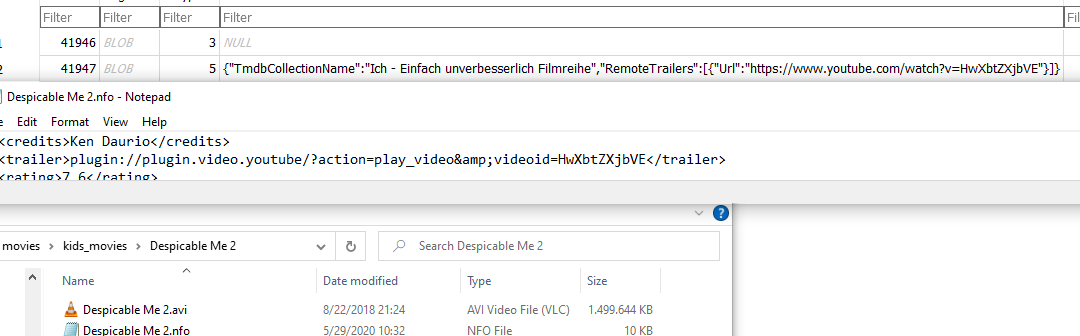
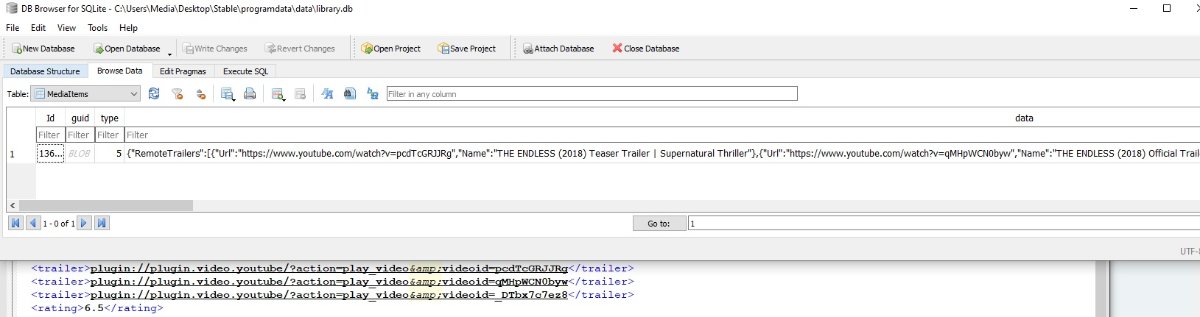
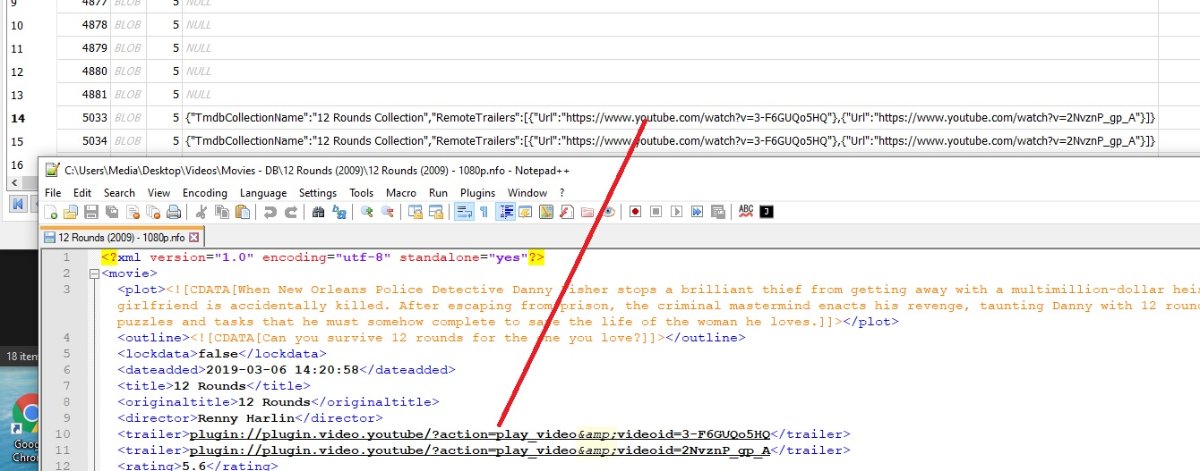
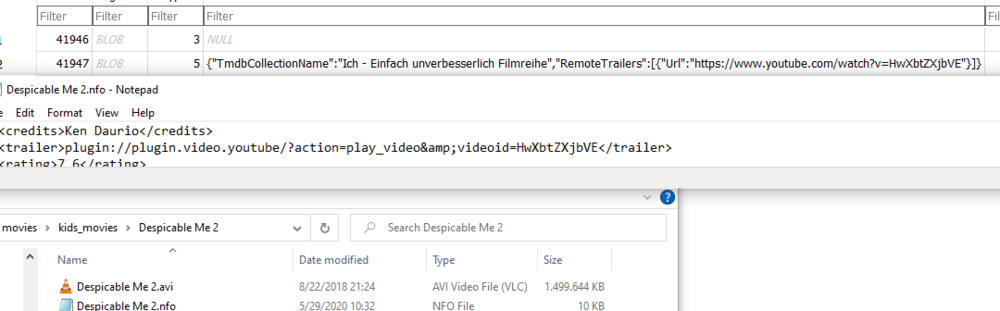
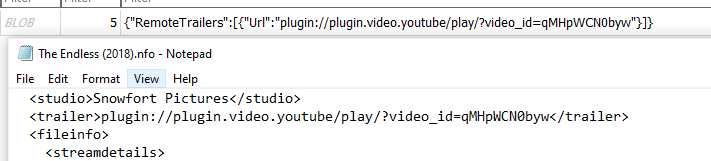
Ok I will try to run through that tomorrow and report back. Thanks for all the help. It definitely seems to be something about how the DB is being populated as the movies the plugin does try to pull the trailers for start with like TMDB ... and then some other text before the link whereas the ones that the plugin doesn't see look like this:
 1 point
 -
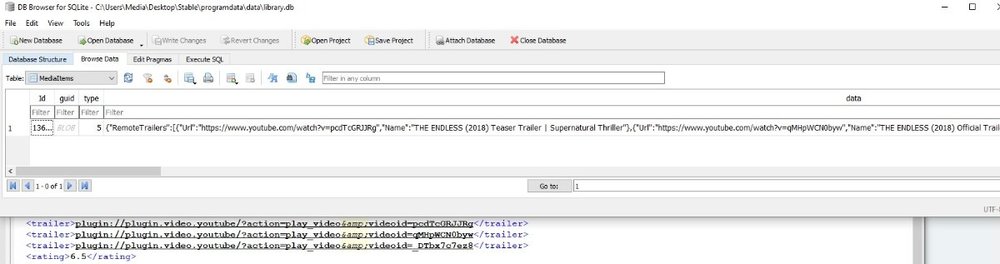
That is the thing thought, Emby write the same in nfo but database has different. From a Emby metadata only standpoint so from a third party standpoint something else is happening. @Lukefrom a import standpoint should Emby import the plugin:// url from the nfo as shown here?
 1 point
 -
Don't enable any metadata options with Radarr (or Sonarr), as they're not needed, with Emby doing it for you and then just enable the nfo option within Emby. Yes, but it's not a problem, if you don't enable metadata options.1 point
-
That's what I mean tho, I don't have any as I don't have emby or radarr creating them. My emby just generates it's data and stores it in the db. I can kick it into generating one of you want but I'm not sure it'll help. For now, why don't you just turn off all radarr emby and Kodi metadata stuff. Delete all your local metadata for that movie. Run a fill library scan, then go into the web UI and tell emby to refresh the metadata, then try the plugin scheduled task/check out your db and see how the URLs look1 point
-
I didn't think about that before! haha. An nfo is an nfo right? lol1 point
-
Hi, we would have to review your plugin to ensure it will not cause our app to violate any store policies. That means at the very least you can't have anything related to money, donations, etc. No links to external domains, no contacting external domains, no display of user generated content or execution of user generated code, etc. List goes on beyond that.1 point
-
Emby doesn't store it along side the files unless you tell it to but we want it to update the database with the correct URLs so it outputting to any files doesn't matter1 point
-
You understand that even the core functionality of Emby might not work in a beta? How can you expect *more* stability from a plugin running inside that experiment than its host promises?1 point
-
Again, there can be more than one thing wrong at a time. One of your problems is/was running a release compatible plugin within an Emby beta.1 point
-
That I had checked already.1 point
-
That could be it also as there is a difference of not used written metadata. Emby could write but never read specific nodes. So a question for a server dev would be is the trailer node read on import from existing metadata? Do you have Emby metadata providers enable or just having Emby attempt to read provided metadata from 3rd party?1 point
-
Just sayin', today was the first time that came out. I have been using ytrailers with the beta for a while and it was never a 'beta' issue until today. So I guess I shouldn't be using any third party plugins with the beta.1 point
-
You showed an error message *today* that indicated a beta incompatibility. That doesn't mean that YouTube api changes haven't broken things in the past, present, or won't again on the future.1 point
-
Why have you decided that only one of those things can happen?1 point
-
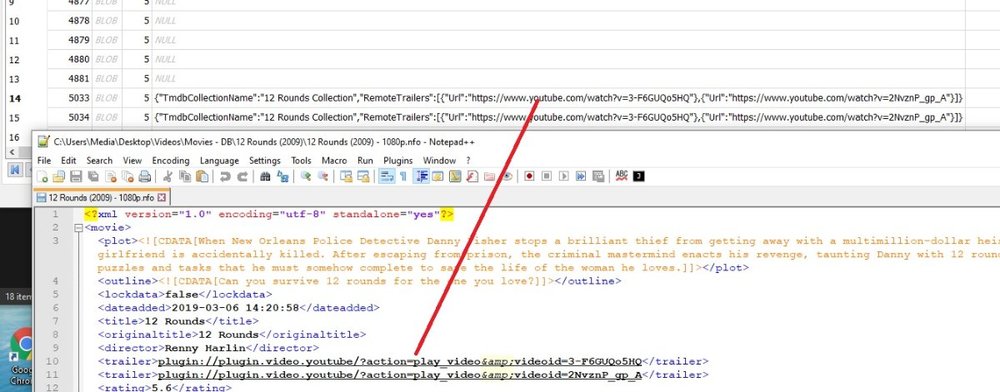
This plugin will read the database. The trailer node from nfo should be populating the database info. If it is not in the database the plugin can not do anything.
 1 point
 -
So the real question is does this actually exist in your database? And is that a proper url in the xml? But specific example and logs would be needed.1 point
-
The plugin will read the database for these item you add to your libraries. If Emby does not have the trailer url from TMDB the the plugin can not provide you anything. Since Emby does not expose this field in the UI you have to look at the nfo file created assuming you write nfo files. If you do not the only way to know would be looking in the library.db directly.1 point
-
yes it has to be in the metadata. Same way MCM works.1 point
-
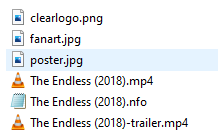
And are those two trailers listed in your movie nfo? The Endless (2018) - Trailers & Videos — The Movie Database (TMDb) (themoviedb.org)1 point
-
yes that's a good idea, thanks.1 point
-
I'll be testing the SP3, I'm just having a few issues with it not re-booting after an update without user interaction, which is not always the best. Thanks for your input, really appreciate it.1 point
-
First I'll say the Shield TV is not the optimal platform for doing this and you're going to spend more time tinkering then you likely want to do. Read through all of this and don't even attempt it unless you understanding everything and willing to risk bricking your Shield. You will need to adjust items as needed but this is just an overview, not something you can specifically copy and paste. I'd prefer you not attempt this but I'm giving you the overview so you have an idea of what's involved. Not for the faint of heart. "Buyer beware" comes to mind! 1) Root the Shield TV https://forum.xda-developers.com/t/guide-root-nvidia-shield-experience-upgrade-v7-2-with-magisk-v18-0.3882254/ 2) Install Termux via Google Play Store https://play.google.com/store/apps/details?id=com.termux&hl=en_US 3) Config as: 3a) pkg install tsu nano rclone ssh 3b) setup ssh 41 (allows ssh -p 8022 your.shield.ip) 3c) nano $PREFIX/etc/ssh/sshd_config and add PermitRootLogin yes (if you put sshd into your startup script below)… I highly recommend you enter these commands through ssh as it makes it way easier than typing stuff into the android keyboard. 3d) if you do not use ssh and instead use termux to enter the commands, be sure to put tsu before all your commands 4) Install fbing https://forum.xda-developers.com/t/magisk-system-2019-1-23-fbind.3621814/ 5) Setup rclone and other directories 5a) nano $HOME/.config/rclone/rclone.conf: (you should probably setup rclone through rclone config and you can do this through ssh or Termux) Copy to clipboard [yourmount] type = drive scope = drive client_id = lient_secret = token = 5b) mkdir /storage/emulated/0/Drive all apps will be able to see this directory as the front for your rclone mount 5c) mkdir /storage/emulated/0/.mount this is your fbind mount point, which is automatically replicated in /data/media/0/.mount and is your ghost mount point that will be bound to the Drive directory… it provides a funnel from the root permissions in /data/media/0/Drive to the readable directory at /storage/emulated/0/Drive 5d) mkdir /storage/emulated/0/temp (optional) 6) Execute and start everything 6a) rclone mount gdrive: /data/media/0/Drive \ --buffer-size 32M \ --vfs-cache-mode minimal \ --vfs-cache-max-size 4G \ --vfs-read-chunk-size 64M \ --dir-cache-time 72h \ --allow-other \ --allow-non-empty \ --fast-list \ --use-mmap \ --log-level INFO \ --log-file=/storage/emulated/0/temp/rclone-mount.log \ --daemon 6b) su fbind -b /data/media/0/.mount /data/media/0/Drive1 point
-
Hi, we plan to add a chapter picker to the video player in upcoming updates.1 point
-
Hi, yes more options are possible for the future. Thanks for the feedback.1 point
-
Are you running Emby server Beta, or Stable? @radeon1 point
-
@Jason'sEmby Thanks for confirm this is a server issue. It shall be corrected. Thanks for hanging with us during the transition. Things will get better.1 point
-
I dont think there is, the only way I found out that my account was locked was when i tried a different trakt app on my phone which threw the 423 error code which is related to the locked account. And when my account was locked, pulls were also still working. https://github.com/trakt/api-help/issues/2281 point
-
The Vera returns "OK" if i replace YOUR_CONTROLLER_IP with my actual Vera ip address1 point
-
Question for you. Do you have a normal backup where you can just restore from a specific path down (Emby Server paths)? Is all you media on other drives or on paths with the same drive letters or UNC paths? If the answer to both are YES I can help you get this re-setup pretty quickly just as it was previously. Not worried about the SSL cert as we would strip and redo this so it would work. I know you're probably close to getting done scanning but if you find errors or things not working correct send me a PM and I can remote in and help you with this from scratch.1 point
-
Assuming you are using the database you copied over, you will run into People issues if said person is not in the /people or /library folder depending on what path is in the database for the person image. As for users the users.db would have all the users and the \Emby-Server\programdata\config\users would have the user configs. But this would have be a good use of Server Configuration Backup plugin.1 point
-
You can stop the refresh people task. That may help the library scan finish quicker.1 point
-
Okay, it looks like i am now getting playback. I didnt change any server settings. I did however lower playback and it plays at 8 pretty successfully on iphone. My friend tested at his house and is getting the full 60fps 1080p at 40mbps. Im just going to pretend like you guys did it all....because its definitely not far from the truth. Your platform is awesome and I love the customizations and plug-ins. Top all that off with the awesome support recieved from you all, ABSOLUTELY PERFECT. Thank you so much!1 point
-
Hi, yes please try lowering the in-app quality setting. Try setting it to 1 mbps, then work your way up from there as you see success.1 point
-
Hi, you're getting that in tv display mode because you enabled the horizontal home screen.1 point
-
Hi. Don't point your library to the individual series. Point it to the parent folder. In your case: mnt/pelis2/series/1 point
-
Updated Builds based on Kodi v19 RC1 posted here Edit: Please remember to delete your previous MyVideos120.db because there has been changes to the database layout. Also remember to install the latest versions of the Emby / Plex media importers because there has been a breaking change in the add-on interface: Emby Media Importer: 0.0.101 point
-
Hello again @roaku I think the previous thread was written in Spanish, I don't know why.... But well it doesn't matter, that's what the translator is for it First of all I would like to thank you again for the replies and listen to the community. Returning to the topic, when do you think version 1.0 will be ready and you will be able to enjoy what you have talked about? And secondly, I would like to contribute something to the project with custom icons of the different types of video qualities, for the community and me to enjoy Thanks again1 point
-
Saludos, va a ser necesaria mas informacion para que te podamos ayudar. Y seguramente te pidan los logs del servidor. Pero de inicio puedes verificar esto: En que formato y contenedor estan tus archivos de video? (aac, mkv, etc...) Pasa con todas tus peliculas o solo con algunas? Si reproduces el mismo archivo en la PC sucede igual? Al reproducir en emby que dicen las "Estadisticas para los nerds"? se esta transcodificando, es reproduccion directa? Es muy raro tu problema, pero creo que tiene que ver mas con tus archivos en si que con el servidor.1 point
-
I found out why it didn't work, I had to put the words in the language I use. Now it worked. thx dude1 point
-
The fix for this is dual files (HDR & SDR) 4K/HDR for those ONLY who can direct play the media and 1080/720 for those who can't play 4K/HDR files. Many of us with 4K media keep them in a 4K Movie Library just like we do 3D Movies with other movies in "Movies" which are normal 2D SDR. Access to the 3D and 4K libraries are granted to only those users with 4K playback and adequate sound and video equipment to make use of the file properly. HDR and SDR use different color spaces so they will look different. If you transcode an HDR file you're going to get the washed out looking video. Without dedicated hardware that could shift the colors in real time or better speed wise you don't stand a chance of using these files transcoded. Any type of "tone mapping" or color mapping will put a serious hurting on your CPU beyond just the difference in resolution that 4K brings to the table. AND even if you could do this in real time your resulting file transcoded from 4K would likely be sub par to a good 1080p rip done specifically for that resolution and color space.1 point