
Leaderboard




Popular Content
Showing content with the highest reputation on 02/10/21 in Posts
-
3 points
-
My ability to create youtube videos has much to be desired. Putting my terrible video production abilities aside, I am putting together some tutorials on how to setup a development environment to create plugins for emby, on youtube. This is video 1. Like I say, I'm not very good at video creation, but since the world still doesn't seem to need to employ chefs full time, this seemed like a fun time to try it out.2 points
-
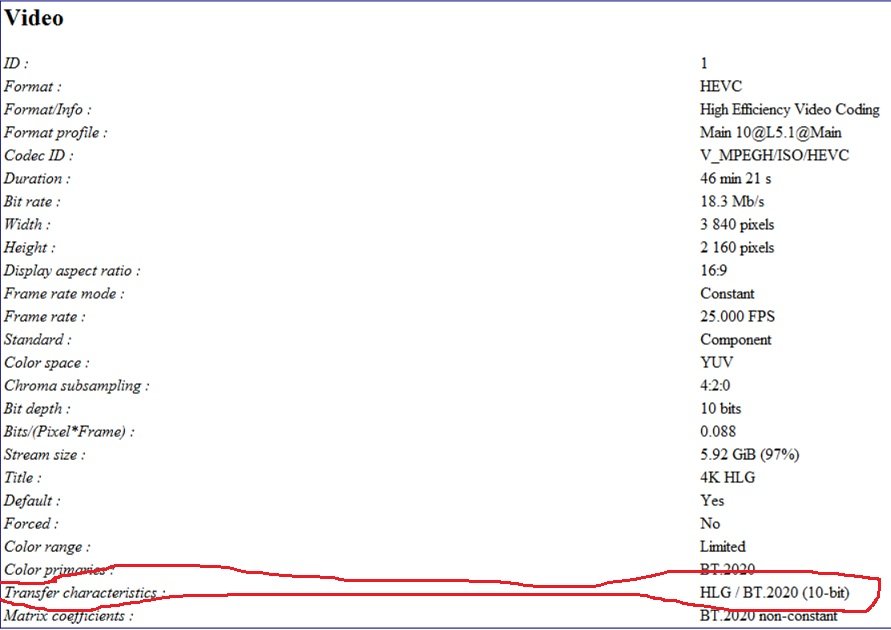
I'm adding HLG HDR to the list since a lot of BBC material uses HLG and not all players support it. This info would be nice to know because the nVidia Shield doesn't support HLG and my Samsung does. When played on the Shield colors are all washed out. If I knew the file was HLG then I could switch to the Samsung app beforehand.
 2 points
 -
Yup, exactly! I want to cut/skip and mute certain parts of a movie without having to modify the original movie file. I am not looking to skip commercials. I use emby for my viewing my library of movies that I ripped and re-encoded on my media center. Thanks!2 points
-
Unless I'm being a bit blind (highly possible!), I'd love a way to hide a couple of the top green navigation items without hacking it in myself. For example, in Movies I don't want the 'Trailers' item to appear for any profile and for TV I don't need the 'Upcoming' nav link. Obviously not a major issue but thought it would be a nice thing to have, perhaps allowing them to be re-ordered like the home page items but again just a nice extra,1 point
-
Some buttons I made for "Base" libraries. Included in the zip are the images seen below, an image with more icons, a blank background button to make more or change colors, as well as the PSD file that contains all of the ones shown. Also included in pink are buttons for Smart home devices and status. MediaButtons.zip1 point
-
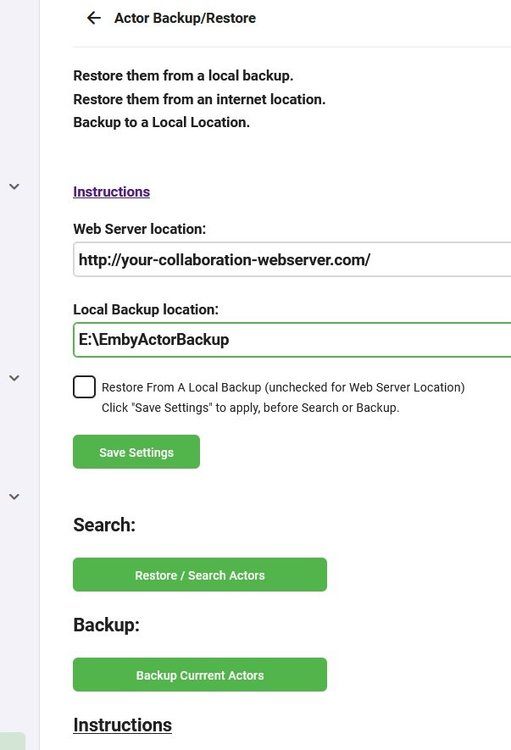
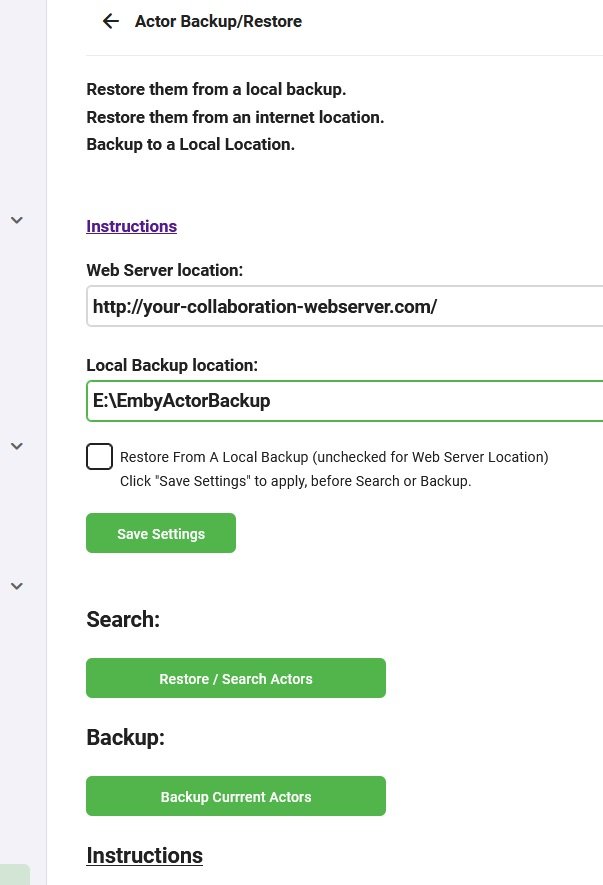
The original plugin has ceased development, a new plugin is in development futher on in this thread. (re-using the thread as the plugin now does this and much more) Please go to the latest post for the newest updates Backup / Restore Actors - Beta with local or web based restore. This is by no means meant to replace the other addon for backing up Actors, it is simply an alternative with a different goal. I'm looking for a couple of testers (up to 50), I can supply my web based restore url for my actor database, so you can try restoring from mine and see if it adds any people to you collection. IT IS NOT A WEB SCRAPER!! It is ideally suited for an online collaboration, backup to your hdd/ssd drive , ftp them folder structure online some where, add to it via other peoples backups use a single url for downloads between the collaborators. You can use either a local disk to restore from, a web based server or a NAS. With a NAS you have more than 1 option. You can use it as a local backup/restore server. You can enable http services in your NAS, open the ports and allow others to restore their images directly from your NAS via your ip address. http://<yourip>:port/ , http://<your noip/dyndns>/, http://<your noip/dyndns>:port/ Backup to Local Drive (any that your machine can write to including smb) Restore from Local Backup Location Restore from Internet Location , ie a http:// location. The restore function will check your file/actor integrity and delete/repair corrupt files and associations even if it doesn't replace the image. if you use the restore function with a valid path but no backup, the app will run the integrity check and fix corrupt actors and placeholders, without restoring any images. Use / Share backups online to increase your Actors via collaboration Extracts into an IMDB structured folder Extracts into an TMDB structured folder Extracts unknowns in to Actors Folder Extracts Movie Titles into Folders with Actor Names Extracts TV Shows into folders with Actor Names Currently there is no stop button, or progress indicator other than minimal log output. However if you do NOT navigate away from the page it will update when its done. You must click "Save Settings" after changing anything to update the server. There is no liability offered or accepted, use completely at your own risk. Built with netstandard2.0 Its not been tested in any other environment than win 10 x64, but: It should be Linux compatible and It should work on all systems Emby runs on, linux or windows based. Still in development. Currently has not tested on any other machine than mine. Open to suggestions.
 1 point
 -
Request that Emby server store Dolby Vision (including profile), Dolby Atmos, DTS:X, HDR10+ (smpte2094) and HLG for appropriate video in the db and use it for display in the media info and track selection sections of movie/episode details screen. This information once in the db can then also be used in numerous other areas like: Mediainfo Cover Art, Stats for Nerds, Distinguishing different DV profiles for hardware support and tone mapping Example Mediainfo app display of HDR10+ ffmpeg patch for HDR10+ https://patchwork.ffmpeg.org/patch/11491/ Related requested that may require DV profile information in order to prevent unneeded TM1 point
-
I would like to see a search bar added to EPG Mapping. When using a list with 1000 channels it takes 20 times as long to scroll through and search for channels instead of typing in a search bar.1 point
-
I believe a judgement call, but still looking. But using the plugin would/should alleviate the issue. Automatic version grouping for movies - Plugins - Emby Community1 point
-
I will have to find the other topic, but yes there is a limit.1 point
-
Buenas noches. Acabo de instalar esta nueva versión y observo los siguientes errores: Imposible cambiar los temas. Solo puede utilizarse el tema Dark. Imposible modificar la calidad de reproducción en todos sus apartados. Se queda por defecto en auto Imposible modificar los tipos de subtitulos En todos estos casos al seleccionar una opción, se queda en blanco Saludos..1 point
-
Hi, yes I can see this regression. We'll get a 1.0.91 update out to resolve this. Thanks.1 point
-
Hi Both Luke and cayars, Thank you so much for your help I checked what you suggested and (no) the port was not open! I couldn't see what was wrong so I asked a technician to come and have a look Apparently I had not enabled an added security switch in my modem. So job done, it's all working now. I'll recommend Emby every time Cheers!1 point
-
I believe this must have been mentioned many times already. In a large, multi-thousands items library, say you're at item 2134/13000 and click a media item, and then use Emby back button, you're crudely brought back to the very top of library, instead of the library area you were looking at just before. The back button is acting as library home button instead of an actual back button. I am guessing Emby cannot "remember" if you had previously scrolled down 10, 100 or a 1000 pages down. I'm wondering why the back button displayed whithin a specific media item can't be coded to bring you back to around that specific item in the list. If once in a media page, there would be a "forth" arrow (next to back arrow) so you can "jump" from one media item to the next media item without even needing to go back to whole library and having to scroll all the way back down. At least that would be some form of workaround.1 point
-
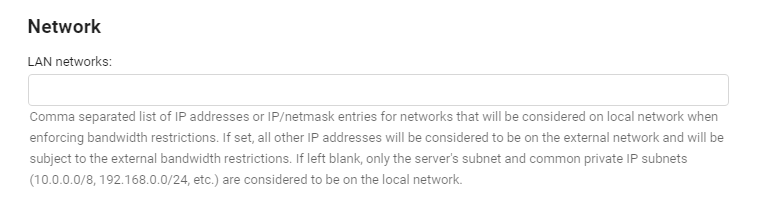
I would explore the Emby Server network settings that can help you configure what addresses are considered in network and out of network.1 point
-
Maybe you could describe what isn't working?1 point
-
My Plugin will indeed fix corrupt Actors / placeholders and invalid associations, and also remove invalid files (some may be image headers with no data payload) - so they work normally again. Just run it without a backup, put a path to an empty folder in the config and run restore, it'll go through the integrity checks and repair without replacing any actors with images. There is output in the logs in that plugin. When it has done this just going to the movie or tv show should reload valid actor images if they exist. You might also want to try the Person Provider Plugin of mine: here its best that you read the thread so you understand which is which and what they do, how they work. That will find Actors in a lot of cases that are not on tmdb or tvdb (obiviously not all). The other plugin, the Actor web scraper is the first incarnation of this, and although it isn't as handy and is clunky, it does have a useful ouput - again to the logs and shows where actor metadata may be invalid, thus preventing the fetching of those actors. TVDB is a big culprit of this, some tv shows update and have Actors all in one placeholder. Again read the thread and you'll "maybe" understand what is meant by that. When you are happy remove the plugins you don't need anymore. Its a few clicks, as apposed to hours worth of work , again trying them is up to you.1 point
-
If Emby is wrong (not sure here) - you can overwrite what it thinks is 'local' on the network config page below. 10.0.0.0/8 172.16.0.0/12 192.168.0.0/16 The above are RFC1918 addresses - so if you add these to the page below - it SHOULD make anything outside these addresses as 'remote'.
 1 point
 -
no, sonarr should only read the files unless you explicitly tell it to do something like rename them or delete them. as long as it can access the path there should be no problems1 point
-
in sonarr under the Series header choose Library import and that should show you the path(s) you have configured in sonarr plus any unmapped folders. by clicking on the path sonarr should try to match what it finds on disk to shows it knows from tvdb. add all unmapped shows and sonarr should then know what you have and what is missing1 point
-
HAHA... you know they'd be doing that too!1 point
-
well unless you have permissions set properly in your fstab file, you will lose whatever permissions you set manually after each reboot...1 point
-
This is the first glimpse of hope I've had with this issue, thank you ! ! !1 point
-
I've had similar (or same?) issue as well, best described as an "empty image" placeholder on top of actor image, not the usual "missing image" one but plain, dark gray/blackish image instead. And same like you, went to sort it actor by actor - which got tedious VERY quickly, so I just gave up and updated few images every now and then when need arose (or my OCD went ballistic). However, as far as I can tell, @mickle026's relatively recent plugin: actually sorted those out, at least I didn't see ANY "blank" images for the last 2 weeks, which is amazing, as far as I'm concerned. What worked for me was install plugin, enter valid EMPTY folder path in "Local backup location" and run "Restore/Search Actors". And that was it, no more blanks. As a bonus, Log shows actual number of missing actor images (I'm currently at 6,000+). After that, any subsequent Detail view would auto-populate number of images, or leave standard "missing image" placeholders. You might wanna give it a shot, it might help.1 point
-
Yeah, that too.1 point
-
If F5 detail view breaks back button, it might very well break an eventual forth button as well.1 point
-
Don't really know if that's quite feasible, if Emby "forgets" your Library position after F5 (as it looks like), I don't think it would know where to point you, as different items would be "next" in the list depending on your Sort method or various Filters applied, not really sure there's such granularity embedded. Good idea, tho.1 point
-
Right again, F5 is culprit that "break" back button. Hence my FR to have back and forth* arrows in media page (detail view) * forth as in next media item detail view1 point
-
Ok, what DOES produce same result is Detail view > Refresh Metadata > F5 Detail page > Back, returns to the top of the Library. Edit: Same result even without Metadata refresh: Detail view > F5 > Back - top of the Library.1 point
-
Hi, ich nutze den Emby Beta Server, läuft für mich sehr gut. Spiele aktuell noch meine Sammlung neu von CD ein und achte dabei das die Infos, sowie die Cover korrekt sind. Nutze dazu dbpoweramp, mit der kann man auch sauber nachträglich ein paar ID Tags bearbeiten und ganz easy die Cover nachträglich einfügen. Emby übernimmt das bisher zu 100% korrekt. Sollte aber diese Musiksammlung lediglich aus dem Dateinamen bestehen und keine weiteren Infos in der Datei selbst hinterlegt sein, entweder die Musik löschen, oder Zeit in Picard investieren1 point
-
Are you using a vpn? To me the first playback thinks you are on your local network "IsInLocalNetwork: True" so limit is not applied and the second shows you are not "IsInLocalNetwork: False".1 point
-
No lag for me1 point
-
@quickmic, I am not sure if this a bug, at the start of my rebuilt of the DB, the addon promted to enable Webserver service for unknown reason I skip, the addon went ahead to sync then finished as usual with no issue. However, each time the system restart it will pop up wit "Enable the webserver service in the kodi settings to allow artwork caching" I can seem to find this option in Kodi, But, I do see an option in E4K enable artwork cache" as many times that enable this option it never seem to registered, the next time Kodi restart the same message will pop up1 point
-
One or two other users already reported something similar, but I've never seen the emby log that corresponds to the error. @speechles wanted to have a look. The problem is not the plugin or the server, it's the Roku app that doesn't react like every other Emby app does. I can only tell you how the plugin works: When the user starts playing a live tv channel and the server asks the live tv plugin for a channel stream, the plugin returns the path to a local one minute long mp4 file and all the mediainfo of that file. The plugin then listens for session events for client playback start of the live tv channel. If that happens the plugin tells the server to send a remote play command with a list of videos to the client app. That's it! Works in browsers, Theater on windows, both Android apps and also with LG tv's.1 point
-
Hi, we work very hard on Emby and we thank you for your support.1 point
-
Is there any further progress on this? I bought a Fire Stick Lite to ”upgrade“ a Samsung TV which ran Orsay. I have noticed that some HEVC videos will direct stream and others will transcode, just like has been detailed in this thread. Looking on the supported codec and profiles for the Fire Stick Lite (and 3rd gen Fire Stick) it would seem it supports 10bit HEVC. https://developer.amazon.com/docs/fire-tv/device-specifications-fire-tv-stick.html?v=ftvsticklite From this link it would seem that the newer ones support 10bit, whereas the older ones don't. Is is that all Fire Sticks are being treated the same?1 point
-
@Luke It now works perfectly thnaks. And thanks all your work.1 point
-
thats what recursive means1 point
-
Hi, if you check your firewall do you have ports forwarded to your Emby Server? If so, what happens when you go to canyouseeme.org and test? Does it show the same IP address that your Emby Dashboard shows for remote use? When you fill in the port (ie 8096) and run the test on cannyouseeme what status does it give you?1 point
-
Liked and adding my support. In my opinion, this is the one item that would make Emby the perfect media server.1 point
-
is there a way to add custom links to go with the nave menu currently on the home screen the nav menu is Home and favourites would it be possible to add another item up there such as contact ?1 point
-
$5 for a month should give you enough time to test it1 point
-
I’m not saying that Emby is trying to spy on me. I’m saying that Google will try to make use of any info that gets sent to them. I’ll leave it blocked until something breaks. So far with my limited use (no remote users), everything seems to be working fine. Thanks1 point
-
My Emby dev time right now is focused on wrapping up and releasing my Iconic plugin, but I could take a look in a couple of weeks. Would this be a good starting point @Luke? https://github.com/MediaBrowser/Emby.Notification.Slack And this looks like the service: https://element.io/1 point
-
Great news ! Thanks @Luke @FrostByte (the OP) incase you were not aware ..1 point
-
I am not holding my breath. Revamped TV has literally been announced for years. (yes, years with plural 's').1 point
-
I'm going to add my support for this feature as well. While Extras may be able to go into Specials for most series, cracks start to show with a series like Doctor Who (1963). This series has multiple DVD releases per season each with a handful of features, and each with a multitude of Extras relating specifically to those episodes. One four-episode story may have ten or more extras, with sometimes close to ten stories in a season. It just becomes completely unmanageable. This is compounded with a DVD release like the TV Movie - a special which is listed as S00E60 on the TV database. As it is already a special, there is no way to associate the extras with the episode in Emby. The solution seems obvious to me. Have each episode in its own folder that acts like a Movie folder: Doctor Who (1963)\Season 00\Doctor Who (1963) S00E60\Doctor Who (1963) S00E60.mkv Doctor Who (1963)\Season 00\Doctor Who (1963) S00E60\Extras\Paul McGann Interview.mkv Now on the episodes information page, the extras will be displayed just as they would be in movies. Additionally, you need to be able to be able to add extras to Seasons: Doctor Who (1963)\Season 01\Extras\Theme Music Video.mkv These could be displayed at the bottom of the season. Something like the mockup attached.
.thumb.png.d6b8bc6ce8e3a6d910fd04ba5b5a5a25.png) 1 point
1 point -
It stays blocked until I see that I can’t use Emby without it, then I’ll decide what to do. My preference is to avoid anything google. Thanks again1 point
-
Hi. As noted by the message the issue is with the container, not the codec - although only Roku TVs can support mpeg2. None of them can take a raw .ts container. And then, once you convert the container to HLS, then mpeg2 is no longer a supported codec. https://developer.roku.com/docs/specs/media/streaming-specifications.md0 points
























.png.f2500dbaa32d2b8415f7be138d6bfadd.png)
