Leaderboard




Popular Content
Showing content with the highest reputation on 01/26/21 in Posts
-
There is an updated version of the NextPVR addon for Emby. You will need to go to settings to activate it by acknowledging that you have read about donating for NextPVR. How much you donate depends on you but some of you require NextPVR for Live TV via the addon or via an m3u file so the fact you consider Emby subscriptions worthwhile should be motivation enough. The second change in setup is a new option to pass the filename of recordings to Emby rather than an http link. If you are on a shared server or if files are recorded to a share with common naming this is the new recommended method compatible with future security enhancements in NextPVR. The streaming mode is the same as in previous versions and you will need to tweak the server in the next version of NextPVR to continue to use this method. There is a third potential mode for streaming but I am not sure that Emby supports it and unfortunately the API Developer support sub-forum isn't active these days. Speaking of support if anyone can tell me how to make Emby rescan the NextPVR recording library that would be useful. The only method I found was delete the entire library which is not very user friendly. To install the plugin simple unzip it into you Emby plugins folder. https://raw.githubusercontent.com/wiki/sub3/NextPVR/utilities/downloads/LiveTV.Plugins.NextPVR-3.7.0.zip Martin4 points
-
In the main UI we will have on/off for hw tone mapping and separate on/off for cpu tone mapping. Algorithm selection and parameter selection will be possible via Diagnostics plugin (but no saving across restarts). That's how it will be in the initial beta, then we will see where to go from there.3 points
-
Edit: This would only be for on the Detail screen of an item, as that is where I think it would make the most intuitive sense. It would be nifty in Emby Theater to have some way to select the Poster and enlarge it for better viewing. Perhaps we could be able to select the Poster itself, and then press Enter to Enlarge? Personally, I'd be interested in a two-stage method: Activating Enlarging makes the Poster fill the screen; then pressing Enter a 2nd time (while Poster is filling the screen) Enlarges Poster to full size (if it is not already at full size); a 3rd Enter press then restores the Poster back to normal. In my old custom system I had this functionality (the two-stage method), and I appreciated it for certain really detailed posters. However, I realize other's may not care about that level of detail, and so I could be content with just having a method to Enlarge the Poster to fill the screen (or to go as big as it can in given the original file size, while staying within the bounds of the screen). PS-If this is something you might like to see implemented, be sure to "Like" this top/first post (as well as any subsequent posts in this thread that highlight particular aspects of what you are interested in) -- "Liking" the top/first post helps the Devs to know how much interest there is in a given Feature Request.3 points
-
I know the answer to this is probably going to be no..... ...but.... A standalone music player for iOS would be very useful. Trying to get the wife to use the full client for music is just not happening. Something that was simple and intuative and quick and easy to use would be killer, something like spotify. The simpler the app is to use, the better. If all else fails, I have a project that's on the back burner that was an iOS music player for subsonic, but I could always target emby as well. It had an spotify a-like interface. Screenshot from as far as I got with the UI, it was playing back music from the server.2 points
-
working like a charm @bakes82 I think this is what you mean2 points
-
Someone is asking to restart it in the first log. In the second someone asked to shut it down. The user is using this device on your server to do this: Mi 10T Lite2 points
-
-= PLEASE UP VOTE & PROMOTE THIS REQUEST IF YOU WOULD LIKE THIS FEATURE =- DO THIS BY CLICKING THE "LIKE" BUTTON ON THIS POST REQUEST: Properly pool multiple M3u IPTV sources, so when adding more than one with the exact same M3u emby treats them as one source with however many "Concurrent Streams" you set for each. https://emby.media/community/index.php?/topic/63725-multiple-iptv-tuners-double-channels/?p=636718 https://emby.media/community/index.php?/topic/59607-duplicate-channels-one-tuner/?p=607031 https://emby.media/community/index.php?/topic/57420-multiple-identical-m3u-tuners-without-duplicate-channels/?p=560949 Basically once M3u #1 has used all 5 of its tuners, I then need to start using the login info that is within M3u #2... once those 5 tuners are used (now all 10 tuners), then emby issues "no tuners available". This is how emby treats HDhomeruns today, so it can't be to difficult. @@snodrog742 @@manolodf @@robrhedrick @@cayars1 point
-
Pretty simple suggestion. I have multiple users for my Emby server. If I want to do continuous maintenance on the media, I have to tell everyone. some of them are harder to reach than others ( i.e. no Facebook or Skype chat etc. ) It would be great if say... on the admin panel, I could hit a check box that enables 'maintenance mode', where the server still runs does everything as normal, but instead of the login screen it displays a maintenance page saying the server is unavailable. Even better if I were able to directly put a reason in a text box that would then display on the login screen as well. Not really sure what others would think of this, but for me it would be quite helpful. mostly if I want to make sure no one is trying to access content I know won't work until I've done a full library scan again. Thanks for reading. -Kyle1 point
-
Also, It would be cool if we have various m3u lists and have the option to choose/assign each m3u list for each user.. Example. In user settings we can choose which library to give them for VOD so this shouldnt be hard enough to do it for live tv too no? USER 1 - Playlist 1 - Playlist 2 - Playlist 3 USER 2 - Playlist 3 USER 3 - Playlist 1 - Playlist 3 Etc etc.... *** Delete this message from another topic I opened because I posted it by accident there1 point
-
While Emby already has recommendations built in based on previously watched items I find they are not all that helpful. They seem to be based on genre only, for example, because you watched a comedy here are other comedies in your library. I do like how the also directed by/appear in recommendations work though. What would be great is if Emby could incorporate Trakt's recommendations as they are much more sophisticated. Trakt's recommendations are not only based off of what you have previously watched but also what your Trakt friends and other Trakt users have watched. It takes user ratings and trending/popular media into account. Ideally Emby would include full Trakt integration allowing users to rate media after watching, view lists and recommendations, and view upcoming media all from within Emby but for now I think recommendations would be a nice addition. Trakt has the potential to give Emby that community feel and allow users to discover new media, find something to watch, and recommend media to other users. http://docs.trakt.apiary.io/#reference/recommendations1 point
-
** UPDATE ** There are two seperate plugins on this page - you will need to read the thread to see which one (or both) is best for you. The original plugin (Actor Web Scraper) works at the server dashboard, it cannot be used or accessed by clients. This is my first proper working attempt at this. Its a bit clumsy but works. I may revisit this one and update it, but for now it is what it is. The newer plugin (Custom Person Provider) is internal and works when you click an Actor card, it is also triggered by clients. (but configured from the dashboard which they cannot access). This plugin can quickly be turned on/off in the config page. ----------------------------------------------------- This is the first working beta release - special thanks to @roaku for their help getting the javascript on the webui working It only scrapes one actor at a time, im not going to do one that hits these websites continuously for the whole lot in one go so don't ask. Please feel free to try it, test it whatever. Built with net standard 2.0, so should be compatible with most emby releases. I have added linux support but have no way to test it - so let me know if it works Feel free to suggest anything it lack or improvements that could be made. Enjoy There is another plugin lower down in this thread, "custompersonprovider" which uses the internal Actor image system, its in Alpa stage, and it works seperately from this one. Please read the blub if you are going to try it. As always the blurb: I accept no liability for anything - use at your own risk Custom Poster Provider ** Updated 5 feb 2021 *** Added a few more scrapers, but also added the ability to pull images from other Emby servers ** UPDATE 25 JAN 2021 WITH FIXES ** *** NEW 3rd Feb 2021 *** Added Internal Image Search Scraper Plugin. This is seperate to the Actor Web Scraper. This is Called Custom Person Provider because it works when you click the actor image inside Emby. Try not to use all the scrapers as it will actually slow down load times for your clients who click on Actors that DO NOT have an image already. I have added a config page so that scrapers can be turned on /off. Trakt images are webp , they work well but may cause image processing error in the log from emby when it tries to resize it as it acesses it. I am currently not sure if all "client" app support it either, all of my tests do, but thats not all devices. ActorWebScraper.zip ActorWebScraper-server 4.6.0.20.zip CustomPersonProvider.zip
.thumb.png.cb53c1371d991ad20af7d0f079169261.png)
.png.9166297e244c1890d029d1d82ca9a6f6.png)
.thumb.png.6cb9880f042f4e910b35029e52faf997.png)
.thumb.png.c70ea02b6794b681fa810e37688aba41.png)
.thumb.png.319417685fb83dc7af37c76436395b5a.png)
.thumb.png.0cd3bb536bed155dddec60ddea97c840.png)
.png.41015b52e97ef688ee401ad8a5643b7c.png) 1 point
1 point -
Hello denniseSRI, Please wait for someone from staff support or our members to reply to you. It's recommended to provide more info, as it explain in this thread: Thank you. Emby Team1 point
-
Turning off hardware acceleration made a huge difference in video quality with the more aggressive compression settings. This comes in handy as I have a couple of first gen AFTVs that don't support hevc (in addition to 2nd gen models that do). The Kodi/Embycon bandaid sidesteps the mpeg transcode issue, but then craps out on hevc files on the 1st models. Hopefully the coding gurus will figure out why the AFTV client is transcoding supported files and this problem will eventually go away Thanks for the insight on the HW acc setting. With the Premiere account it was on by default.1 point
-
Ive seen pictures of people running up to 6, 4k transcodes on Plex at one time using Rosetta on an M1 mac mini. I've got to assume Rosetta can easily handle Emby running in the background until native m1 support is available from Emby. @Luke this is awesome news though and I can't wait to see this happen!!1 point
-
You can use MCEBuddy to remove commercials, compress to HEVC and put in any library you like or you can point Emby to the library(ies) created by ChannelsDVR. It'd be nice if Emby would natively support TVE though. BTW, for locals you can use locast in a similar manner as this if locast is available in your area.. or use a good old fashioned antenna and an HDHomeRun Connect Quatro tuner.1 point
-
Funny you should ask.. I did too. https://community.getchannels.com/t/use-channels-dvr-as-a-tuner-for-emby/22486/971 point
-
Hi, It would follow a similar pattern to the M3U file. Try http://${DVR}:8089/devices/ANY/guide/xmltv?duration=1209600 Note: 1209600 = 14 days1 point
-
No, chapter thumbnails: Look at Groot tone mapped:

 1 point
 -
Sorry, can't help you out with that (although the Yatse dev is very active on the Yatse forums). I can say though that the app is well worth the $5 upgrade or whatever it costs. If you can't get the trial to work, you always have the return window for Google play to fiddle around and play with it.1 point
-
Just out of curiosity why not just make some basic ones where people just check off like Year, Resolution, Audio or Video Codec etc, Then the plugin just adds a tag w/out this config unless they want to do custom stuff? Like the Year one would just write the year of the movie as a tag, or the resolution, doesnt need to be overly complex, then if you want "custom" things you can do Year >= 1980 <= 1988 tag = 80s.1 point
-
Let us know. I could put together a SQL executable and the SQL for you quite quickly so all you'd have to do is shut down Emby so the database isn't locked and then run a batch file that will pull the info for you. I'd just need to know the file name as stored on disc.1 point
-
I'm like many of you...transcended the time of only 3 network OTA channels back in the late 60s and 70s to today. I went through the Betamax/VHS wars, then the DVD/HDDVD/BluRay wars and now to hard drive based and streaming media today. I too was an avid WMC7 user during its time. Which is how I ended up on Emby. I fell into WMC after having tried BeyondTV, SageTV, MediaPortal and many other 10ftUIs. The quest started after all that I wanted to do was replace my NTSC hard drive DVR with an ATSC one. Hardly anyone was making an ATSC DVR at first except for TiVO, DirecTV and the cablecos. I wanted to ween off of pay TV and just go OTA. I had already been through the pocket gouging bundles of both cable and satellite (and then TiVO wanted you to pay for their service on top of that). I just wanted something that would record OTA ATSC signals with minimal fuss and a remote control. It eventually came down to WMC (at the time on XP and Vista). Then finally the cable gods opened up the OCUR standard and let us get cable card for the masses. It was finally enough to convince me to sign back up for a cable package/bundle. So by way of WMC7 and all of that forever seeking the best eye-candy experience we could get I went through MyMovies and settled on Media Browser. Media Browser became Emby and moved to the server/client model. Then 3 years ago we physically moved (sold our house). The new digs did not have service for cable TV and for once I was glad to tell the cable TV company to get lost. Here in the sticks we can only get DirecTV, OTA and 25mbit 2-wire AT&T broadband. I'd already lost the taste in my mouth for DirecTV/Dish so I signed up for streaming service (AT&T TV Now, YouTube TV trial previously). So with Emby to take care of all of my owned media (personal and commercial) and streaming accounts with AT&T TV, Netflix and Disney+, an HDHomeRun OTA, A Channels DVR account to get my streaming channels into Emby and Android TV boxes and Rokus throughout the house, I think I'm pretty much set for the foreseeable future. At least until something NEW comes along, of course (haha)1 point
-
We work very hard on Emby and we thank you for your support.1 point
-
The source for the format actually varies. My machine is set to English-UK, and the metadata editor follows this whatever; but if I specify English-US in the Emby server settings, although the metadata editor is unaffected, the dashboard shows dates in US format. Paul1 point
-
This is a totally valid point though - thanks - multi-instance here for the reason you say - one step forward, one step back as they say ... Grr....1 point
-
Yes Im aware how to do it, its how I have mine setup in Emby lol. Im saying there way more work involved when you have large scale systems. Lets says I have 4 radarrs for movies, 1080p, 4k,4k remux, and 4k dolby vision (The DVk and remux will be combined eventually now that the DV has HDR fallback). Each radarr needs its own path to store the files, so in Emby its "easier" to just keep everything in its own library/folder and merge. Thats all Im saying. If you are just doing small scale and doing it manually do whatever you want. But tags will also case extra strain on the DB as its not setup properly for multi tags to be found efficiently. So in my case adding a tag or denying a "library" the both result in the same outcome and take the same number of steps, except you now need a special plugin to run to make tags, where you go the library way you dont. So actually the library way is better as there is less overhead and future updates "shouldnt" cause anything to break. Or if @chef wins the lotto and retires and doesnt update the plugin.1 point
-
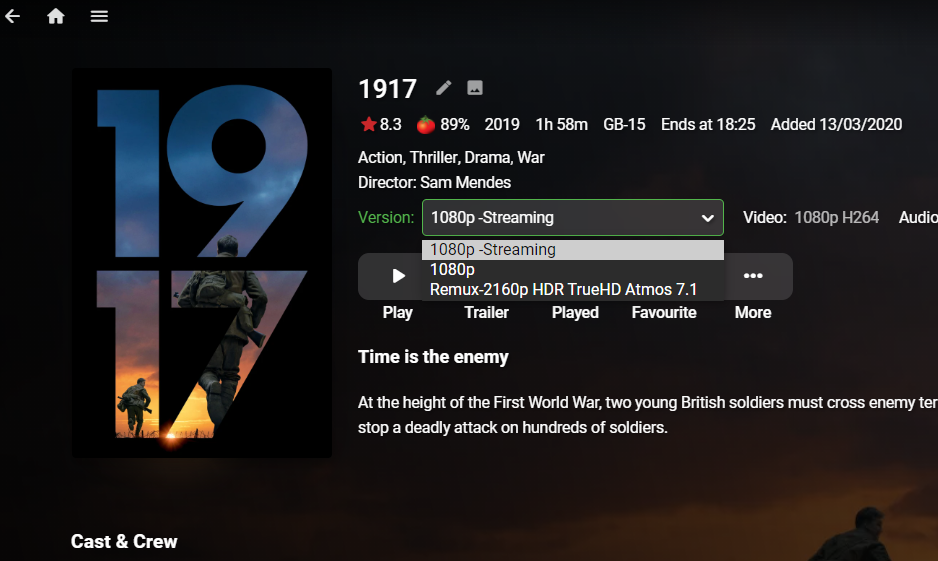
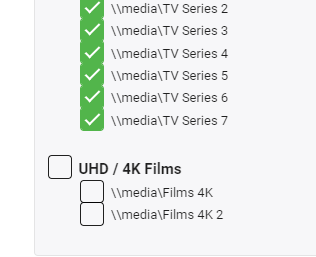
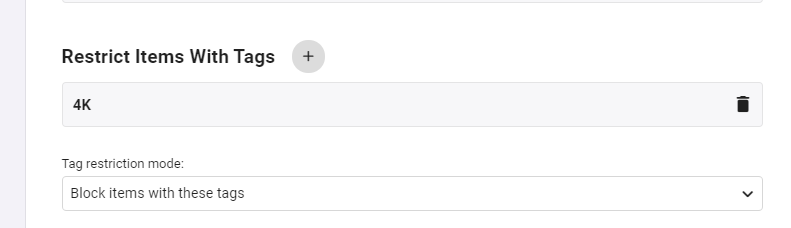
You cannot use tag's today to block resolution based content - that is what I am saying. Maybe an example would help me to explain .. lol I have 3 versions of 1917 - 1) 1080p low bitrate streaming, 2) 1080p High Quality and 3) a 4K remux. I don't want any remote user using the 4K version regardless of what bandwidth I/they have available. I cannot apply a 4K tag on it - because it will apply to all versions. So I put the 4K version in it's own library ... and deny the user that way. Works fine but it's 'messy' and I'd rather keep all the versions together in the same folder if I can. If I can tag just the 4K version with a 4K Tag - then I can do the permissioning at a User level - which is much more flexible imo.
 1 point
 -
You get an 'auto-collection' now based on that actor as @speechles said above - I don't see how having a collection based on every actor is even remotely feasible ? If you don't know what movies that actor has been in to find them in the first place - then just search for them using the main search and then click on them to get the list of their movies etc. If you REALLY wanted to - you can then manually select all the movies and create a collection if you so wish - but a) this is not automatic and b) you can get this anytime you like with a few key presses anyway.
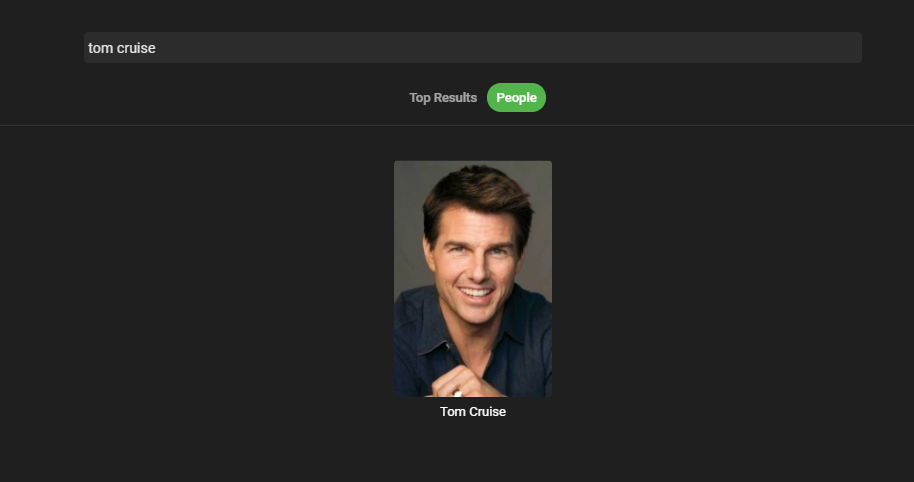
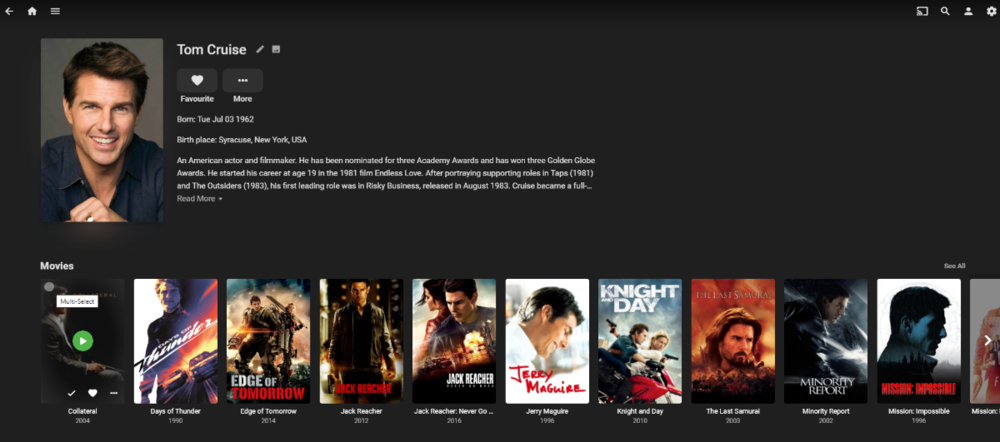 1 point
 -
If your server needs to transcode for another reason (audio or subtitle support, usually), then the transcoded bitrate may well be higher than the original file. This could account for some surprising stats. Paul1 point
-
If you direct play then 160Mb is the MAX it will allow. If the media itself is 15Mb then that's what will be used.1 point
-
Hi, yes that is correct.1 point
-
This! And I was able to get My 4k movie blocked in a users library while still allowing 1080p. So... Onwards! I have to write code to remove the tag values, and then we should try it to make sure it doesn't do anything ... Unexpected.1 point
-
@riverboat2001 here you go.1 point
-
LOL oh gawd.. im sorry man.1 point
-
I have updated the Original Post to include a new lighter, and more simple .PSD and instructions on how to create your own custom icons without Photoshop using online editors.1 point
-
correct, thats what happens when you merge them the manage ui screen doesnt show the nested ones, just whatever one shows in the list first. Why Im saying the tagging stuff isnt fully implemented yet They assure us it read the nested values though, but could change at any time I guess.1 point
-
Great, glad you got it working! Percervience is good!1 point
-
OK just did the above all went good. Just did a restart and tested and still looks great. Thanks ever so much for all the help, greatly appreciated.1 point
-
No need to PM that it's a private IP address. OK so in a browser try this URL http://10.0.0.86:8096 Does that open Emby in a browser?1 point
-
http://www.birtles.org.uk/xmltv/wiki/index.php/UK_Digi how you can get an xmltv file from digiguide. used this for years1 point
-
@jch thank you for your continued assistance...greatly appreciated. I have a couple additional questions...if you don't mind.are you using? What Reverse Proxy are you using? (i.e. HAProxy or something else)? Is this a custom build that you put together from scratch? If so, what components besides 4 NICs & 8GB RAM did you use. If you started with an old PC, what model did you use? Would a HP Elite 8300 Ultra Small Slim High Performance Business Computer PC meet the needs: Intel Core i5-3470s, 2.9 GHz 3rd Generation Processor, 6M cache, Turbo up to 3.6GHz. 8GB DDR3 Ram HDD 120GB NIC: Intel 82579LM Gigabit Network Connection I'm assuming this will work, but wanted to confirm. I would like to reapply this in my setup. Can you please share what edits you made or point me to the resource you followed? Thank you for confirming!!! That's what I was thinking as well. Yes, Emby is and has been my go to media player as well. So looking forward to learning more and tinker with Pfsense. Thanks to you and @sooty234 for your help and guidance!!!1 point
-
Sooty234 has answered most of your questions but I’ll add my two cents. I run a VPN server (OpenVPN on port 443) and a reverse proxy on my pfSense in addition to its regular firewall duties. (I run a cloud server and a calendar server on my NAS – also through the reverse proxy) I have a small footprint i3 fanless computer with 4 NICs and 8G RAM that I installed pfSense on. Yes, an Intel NIC is apparently essential though I haven’t tried any NIC except Intel. My wifi gear runs in AP mode so there is no conflict. (Spectrum Modem -> pfSense -> network switches -> wifi AP gear) Using pfSense and reverse proxy will (after some editing of the OpenVPN config file) allow use of port 443. I needed this to connect from my office where 1194 is blocked. 5) I do not have remote users go through VPN. While doing so provides another layer of security I think (my opinion) the reverse proxy and SSL layer are good enough. 6) There are many up to date videos on how to set up and configure pfSense. Lawrence Technologies, as suggested by sooty234, is an excellent resource. Good luck with your launch into pfSense. You’ll find it is flexible and will allow you to do many things if you like to tinker. And just a note regarding Emby. I run Plex off of the same storage folder on my NAS at home and I have found a number of instances where Emby will play files that Plex throws its arms up in the air and refuses. It has become my goto media player for that reason.1 point
-
Its alive! It will tag whatever "resolution" is in the rule... if resolution exists. It is fast too. foreach (var rule in rules) { Log.Info(rule.Profile.Type); Log.Info(rule.Profile.Container); var internalItemQuery = new InternalItemsQuery(); if (!string.IsNullOrEmpty(rule.Profile.AudioCodec)) internalItemQuery.AudioCodecs = new[] {rule.Profile.AudioCodec}; if (!string.IsNullOrEmpty(rule.Profile.Container)) internalItemQuery.Containers = new[] {rule.Profile.Container}; if (!string.IsNullOrEmpty(rule.Profile.Rating)) internalItemQuery.OfficialRatings = new[] {rule.Profile.Rating}; if (!string.IsNullOrEmpty(rule.Profile.VideoCodec)) internalItemQuery.VideoCodecs = new[] {rule.Profile.VideoCodec}; internalItemQuery.IncludeItemTypes = new[] { rule.Profile.Type }; internalItemQuery.Recursive = true; var itemQuery = LibraryManager.GetItemsResult(internalItemQuery); Log.Info($"Query has {itemQuery.TotalRecordCount} items."); Parallel.ForEach(itemQuery.Items,new ParallelOptions() { MaxDegreeOfParallelism = 4}, (item, state) => { if (cancellationToken.IsCancellationRequested) { state.Break(); } if (string.IsNullOrEmpty(rule.Profile.Resolution)) return; //Parallel fors return, they don't continue. var videoStreams = item.GetMediaStreams(); foreach (var stream in videoStreams) { if (string.IsNullOrEmpty(stream.DisplayTitle)) continue; if (stream.DisplayTitle.ToLowerInvariant().Contains(rule.Profile.Resolution)) { //Tag this item.InternalId - it matches the "resolution" // It should also match all other rule conditons because of the query } } //Here is rule results when the rule hasn't got a resolution. }); } It looks like we can target HDR and SDR the same way in the future, if we want, although it is pretty much the same as 1080p and 4k... from what I can see. I shall continue LOL! Note: Year hasn't been added yet, because Year is an "int", and is a reference type, and always has a value. Year will be 0 if left empty in the config. This means the "internalItemQuery" has to have a condition, or else the query will try to return everything with Year 0. Should be straight forward.1 point
-
You're accessing the https port (443) using an IP address, not a domain name. Your security certificate should specify a domain name, and you should use that to connect with (if you have no certificate, then post 443 won't work anyway). If you do not have a DNS entry for it somewhere, you may be able to test by putting an entry in a "hosts" file, but you may find getting a DNS entry easier... Also, you're using your local network address - that's fine if you are wi-fi at home, but won't work elsewhere. The requirements are set out here: https://support.emby.media/support/solutions/articles/44001849007-connectivity Paul1 point
-
Hi, not yet. We are working on m1 support.1 point
-
pfsense is a complete firewall/gateway. You install it like you would install an OS. It doesn't use a lot of power, unless you really want to run max security, which you won't. Almost any mini PC will work (not things like R-Pi). If you don't have an old PC laying around, you can pick up a cheap Chinese one on ebay. Mine is actually far more than I need. I had an old i5 6500 with MB and a dual port 10G NIC laying around, so I put them to work. You can create interfaces and clients quite easily. I haven't tried a split tunnel, but there are videos like this one; I also read recently, that the next version of pfsense will support wireshark. So that's exciting! I don't use a VPN at the moment, but I still have the interface and client setup. Maybe I'll tinker with wireshark split tunneling when it gets integrated.1 point
-
I like the suggestion sooty234 made; pfsense. I’ve used pfSense for a few years now. I have a reverse proxy set up in the router and only have 2 ports open to the world (80 and 443). I have domains set up (ex, emby.mydomain.com). So a remote end user can go to https://emby.mydomain.com and then the reverse proxy takes over routing the connection internally to 192.168.1.13:8096 (the emby server on my Synology NAS). I have a SSL certificate set up on the router as well to keep the connection secure. I can VPN to the home network (I use OpenVPN which certainly will support 443) but I don’t need VPN to securely connect to my Emby set up. There are lots of ways to accomplish what you want!1 point
-
@ecs0set I have the same questions and had a similar reaction to their email. I don't recall ever being notified to get off of SD by Emby. I renew my subscription annually and never saw any type of warning on the SD web site. I do get annual subscription notification emails from them but that's the only communication I've gotten previously.1 point
-
I have a request for a couple library photos.(all in black) 1. Nederlandse Films 2. Films Français 3. Filmi Italiani 4. Peliculas Españolas 5.Filmes Portugeses 6.Deutsche Filme Would be great mate. Thanks!1 point
-
Luke, anything in the pipeline to have an app like 'PlexAmp' with the Emby Premiere Subscription?? Emby Music possibly?1 point










.png.fcf8e6f34a3ba4b4aa03c647343d2353.png)
.png.50b9f3b8d82cc36d56ab656cf7a72625.png)
.png.93b11e0d91c2bde645fcfd5de83e4bfb.png)
.png.07e8150d68ec98c7db334dda8fcf2d5e.png)
.png.a5cf24dcb5c9f922d8ed05c0ad9179be.png)