Leaderboard




Popular Content
Showing content with the highest reputation on 01/16/21 in Posts
-
When multi-selecting (movies, for example), I would like to see "Tags" in the menu items list so that I can tag multiple [movies] with the same tag at once. Please and thank you.2 points
-
Kodi 19 Release Candidate 1 (RC1) has been released: https://kodi.tv/article/kodi-19x-matrix-release-candidate This is usually where things start to get serious with a stable release just around the corner so I would expect releases like libreelic etc to have a build in the next few weeks with kodi 19. It looks like all three main plugins are in good shape for Kodi 19, we have beta for EmbyCon and the new emby-next-gen plus the Media import project still being worked on so you have plenty of options. If you are testing and find issues it would be best to start a new thread so we can better track the issues. Have fun testing.2 points
-
You won't say this anymore once you get to see it..2 points
-
I just want to note for the casual reader that this is a random conclusion .2 points
-
Hi, this will be revamped in Emby Server 4.6. It will follow the user's remote control permissions. If they don't have permission to control other user's devices, then they won't be able to download to them either. Thanks for the feedback.2 points
-
ability to be able to add a collection into another collection. ie: Spiderman Collection into a SuperHero Collection. like i could with mediabrowser with shortcuts. TIA1 point
-
Can we have an option to flatten series if there are XX episodes or less. Just provides the ability to eliminate one frustrating click. I wouldn't want it on my 1,000+ episode Looney Tunes series. However, when you only have one or two seasons in a series, it helps drill down easier.1 point
-
Is it possible to add a bitrate for users that are direct(whatever) something? It's good info, and readily available. Thanks1 point
-
My apologies if there is already a feature request for this, I searched but couldn't find anything. My experience is with the Roku and Android TV apps but it may apply to other apps as well. With the "Up Next" and "Recently Added" rows on the homescreen one almost never needs to dig down deeper to find something to watch. A view I think is missing is a random unwatched movie view which would allow more spontaneous selections when you can't decide what to watch. I am an indecisive person and when given a choice of a 1000 movies I will never decide on one, but give me a choice of 20 movies and I will find something quick. I realize this would be a personal preference having this view so if it could be made an option like how the "Show Premieres Row" currently works in the Android TV app everyone would be satisfied. Yes I am aware of the filtering options but the point is to take as much user intervention out of the process and help one pick a movie they might have not otherwise chosen.1 point
-
Hi, I want to download a video from my server (for offline viewing) that has external subtitles (srt). From my web browser, I navigate to the video, go to "...More" > Download. Video file is downloaded just fine. However I cannot find anywhere how to download the srt subtitles from the server. Am I missing something here or is not really possible?1 point
-
Hello, I would like to have an Icon in the OSD (on client apps that have it), that indicates the playback of the current item as "Direct Play", "Direct Stream" or "Transcode". Why have this when there is "Stats for nerds"? Well I use a wide variety of clients and it's sometmes hard to predict what item is going to be supported so I always check. Going into "stats for nerds" gets tiresome if you do it often since it's so many clicks, so having this icon would show this little information right away. Maybe a number behind that icon that indicates the stream bitrate could be added as well so it says "Transcode 8" for 8 mbits or "Direct Play 52" for 52 mbits and so on. I could understand if someone could feel this would become too cluttered so I'd be fine with just the Icon. Cheers.1 point
-
Nuc 7I5DNKElibreelec 9.2.6Kodi 18.9 estuary mod v2 kodi18Addon1 point
-
I guess you could go into the API and change the hidden daily "Cache file cleanup" task trigger to say 180 day interval instead of every 24hrs or disable it but that will leave bloat behind if items are ever deleted/moved around. So from 864000000000 to 1555200000000001 point
-
PC Windows 10 Pro 32bit and 64bit Kodi 19 B1/B2/RC1 Native1 point
-
You know you can still click the Movie header displayed in your image above. See all is just an addition header doing the exact same thing. But you can target just the home screen. div.homeSectionsContainer a.sectionSeeAllButton {display: none;}1 point
-
PC Windows 10 Pro Kodi 19 RC1 Native1 point
-
Could also be due to some windows networking or edge settings being reset after a windows update. I recently had to redo some of my windows network options following a recent windows update.1 point
-
There is a scroll section limit set to 12 and you have to click the movie header button to see all movies of said person. This is set in the *\Emby-Server\system\dashboard-ui\item\item.js. You will see each IncludeItemTypes has a limit of 12 I would assume eventually virtual scrolling will be expanded everywhere.1 point
-
Minix U9-H CoreElec 8.2.5Kodi 18.9Addon1 point
-
PC Win 10 Kodi 18.9 Addon1 point
-
Raspi 3B+OSMC 2020.11-1Kodi 18.9Addon1 point
-
Yes I certainly wouldn't use it for core ffmpeg transcoding, but it plays all the ATSC 3.0 samples I have which is why I created a HDHR-4K specific input addon. With a known source the main hack private stream 6 being forced to AC-4 probably isn't as bad as with unknown sources. Martin1 point
-
Yes, super simple to use and I bet some of the guys that have wanted groups from M3U files will still use it to change the "default" groups to personalized groups that fit their own use vs what a provider decides is a group.1 point
-
Sorry this is so late, so this is my wife's account and on the TV, when she hits the more info dots, there's a delete option, but on her phone there's not. I haven't had time but what I will try next is create a backup of the file and have her try to delete it and see if it goes forward or not.1 point
-
Apps don't like HTTP redirects . Does using host and port in the app setup make a difference? With 301s in the global section that might be throwing the apps a response they don't like. Since you also mentioned CloudFlare are you using it for anything other than DNS? And your public port settings in Emby should match your entry point (proxy) ports.1 point
-
@chef- i had a few thoughts a while back re a metadata editor plugin - at the time my thoughts on the interface were that it would need something very similar to the smartplaylist plugin - i.e. something users can pick criteria from and then apply might also be worth a look at the virtualtv plugin as that has some similarities etc for just Tags on thir own might be overkill but its a rabbithole - for whats on the face of it simple to "do"1 point
-
A quick read of this thread points me to believe the issue is not network related, but client capability related. Emby for Kodi is effectively using Kodi as the client - which we all know can play pretty much anything - all emby is doing is passing it the data. Many of the emby clients can play these direct streams as well - Android, Roku etc. However - A web browser is very restricted - and cannot play HEVC for starters and is also very limited on Audio codec as well. It cannot be compared to Kodi, VLC or any other 'Fat' Client (incl Emby Fat Clients). To play the vast majority of 4K 'non-web based' content in a browser - it will need emby to transcode it first - which, depending on your hardware, may not be up to the job.1 point
-
nope both wrong1 point
-
LOL, that's funny! I feel exactly like that some times.1 point
-
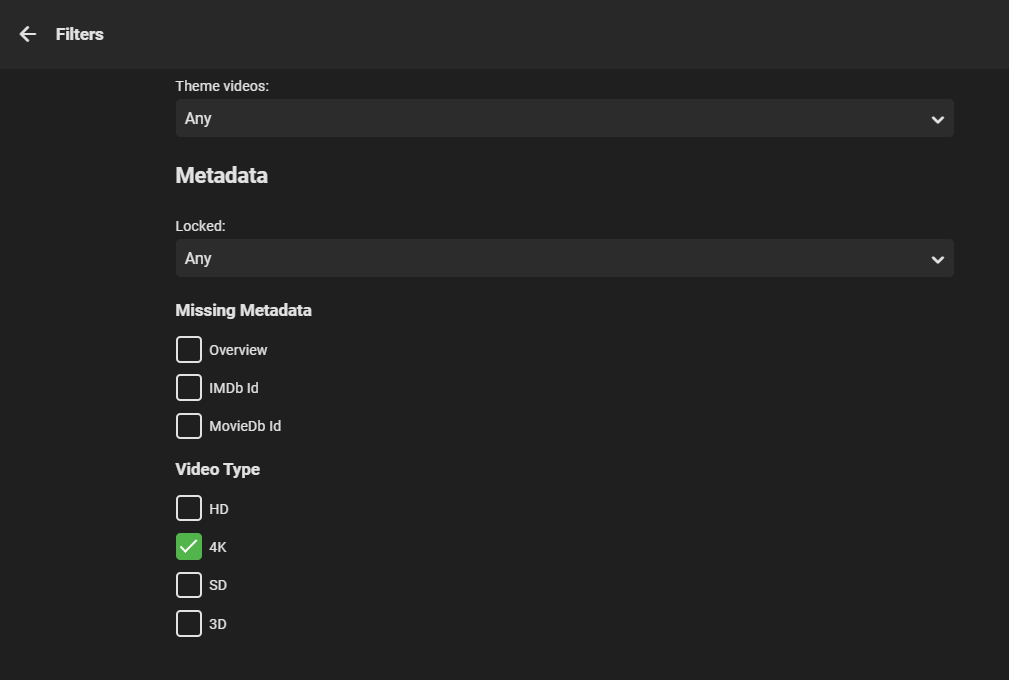
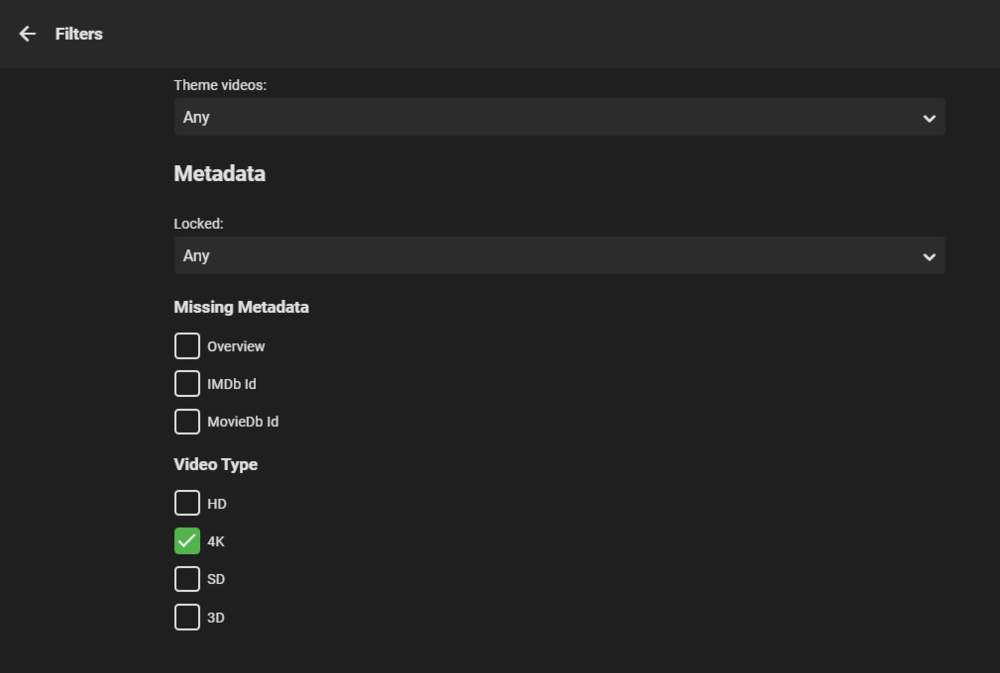
Possibly - I certainly don't wait to de-rail what you have done. The 'filter' option in emby is effectively what I think we need to build on. So as an example - I want to tag all the 4K movies - so I pick '4K' and all my 4K movies appear - great - I now want to tag them all or maybe have the option to only tag individual items - not sure here. The 'filter' options we have are currently limited - but if your code could present expanded options (HD Audio as an example), then I think this is how people want to mass tag ? I could be totally wrong lol - need some more input here from others !
 1 point
 -
New Version available 5.1.6: You can load from here, or wait till repo is synced. http://embydata.com/downloads/addons/xbmb3c/multi-repo/beta-leia/plugin.video.emby-next-gen/plugin.video.emby-next-gen-5.1.6.zip Fixes: Context menu -> delete option native mode smb issue for music multiple fixes in sync code and redesign code structure Minor issue in player New: - Known issues: Multiserver not working Sleep mode1 point
-
Forget it. I got it working. Thank You for getting back to me so fast!1 point
-
OK, so I just had the opportunity to test with my neighbours receiver and eARC from the TV is not working with that either (works perfectly from his TV). I can only assume at this stage that it's a faulty HDMI port on my TV. I think that's my first course of action - get this confirmed and if necessary get the TV replaced. Once it's working with ARC, my hope/expectation is that audio from Emby will be 5.1!! Fallback will be an Nvidia Shield. Thanks everyone for your input - it's been really helpful. If anything, it's got me wanting a Shield once again!!1 point
-
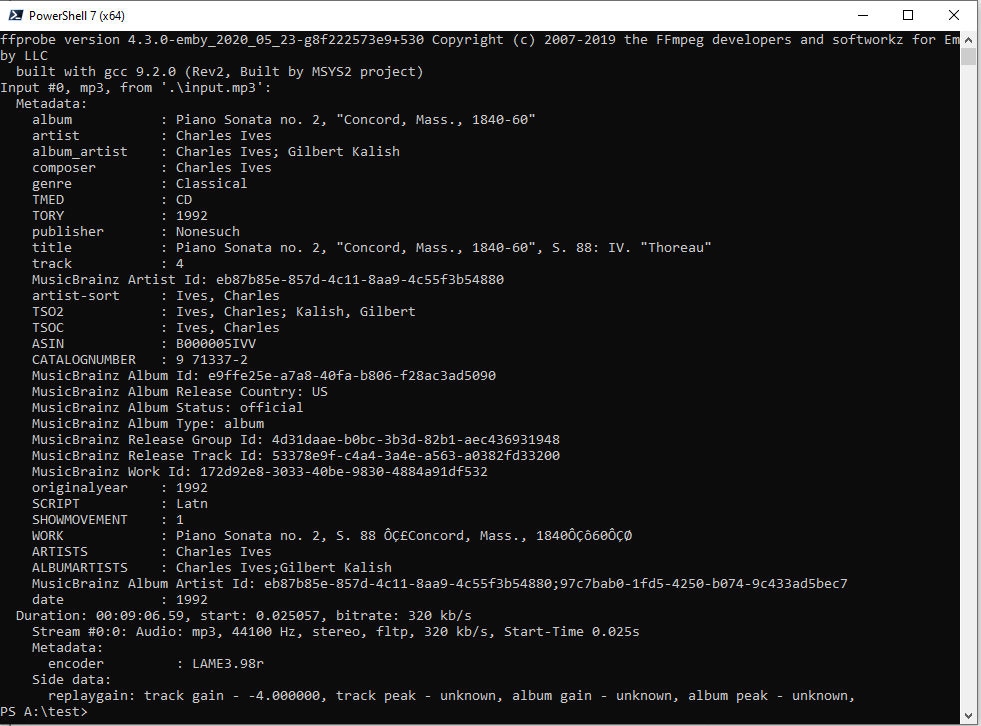
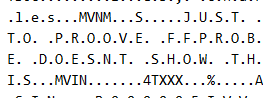
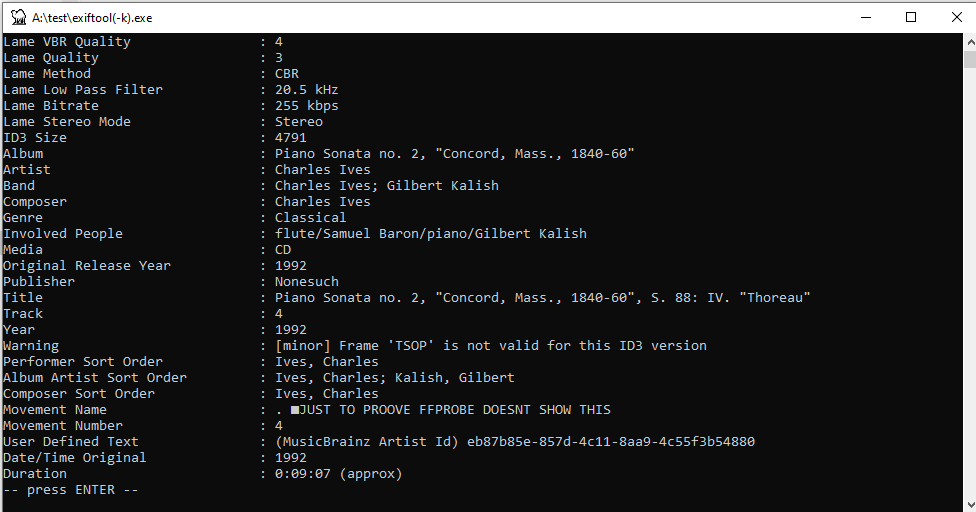
@Luke @Jägs mp3tag tags point of view Re Movement it seems that there are movement fields built into ID3v2.3 and 2.4** Picards work and movement plugin, seems to conform to mp3tag's understanding of the standard. Re: Work For mp3 mp3tag and picard just seems to use a custom tag TXXX_WORK (FFPROBE see as WORK) Itunes may use TIT1 (not sure what ffprobe would see, anyone with an itunes file may be able to embed 'work' and share for analysis.) **it seems that FFPROBE chooses not to extract the ID3v2.X movement tags. whilst other tools do see Movement Name / MVNM id3 tag not the first time that ffprobe has come up short for music. Given that there is a standard for movement tags, reading the standard seems like the only practical way to go, if support for movement were to be introduced.


 1 point
 -
Keep the questions coming if it helps you understand. I certainly don't mind. https://support.emby.media/support/solutions/articles/44001173099-emby-premiere-feature-matrix This will make it clear if you want to check and count the devices. For example some devices like android need to be unlocked or have a Premiere license for full playback. Other devices like browsers or Rokus do not need an unlock or Premiere license for full playback BUT WOULD need a Premiere license for Live TV or anything that's a Premiere feature. You mention you have 45 devices but mention you have 53 listed in the device section. I recently cleaned my device list out but have 35 devices showing currently but still only use the 25 count basic license. So some of these devices are browsers I've connected and played back a tv show or movie (no license needed). Now something to understand. Devices will stay on the device list until your remove them or clean them up. Just because a device is listed here does NOT mean it will use a premiere license. First thing to keep in mind is Emby will only use a license if the client needs it for full playback and it hasn't been unlocked OR if you use a premiere feature. Then it will require a license. This license is "rolling" and by that I mean if a device hasn't been used requiring a Premiere License in a week it fall off the count (but will shows on your server device menu). So once a device uses a Premiere License slot it will get freed up a week after it's last use. So if you have a bunch of devices not hooked up all the time but are broke out to play with from time to time you want to keep this in mind as you won't need a "perpetual" license for it. If I were you I'd start with the normal Premiere license and upgrade if/when you have to. You might get by fine with the 25 licenses depending on your use. You will get a warning message when you get close to your limit and will get a message if you exceed your license count so there won't be an issue knowing about it. LOL1 point
-
Remote access would be a totally different issue then Emby being unable to communicate with external domains. As you logs shows failed connections with three different domains. Possible proxy, vpn, ipv6 issue.1 point
-
Hi, Once you get this other issue solved you can setup Emby to work externally. Check out this knowledge base article with setup instructions: https://support.emby.media/support/solutions/articles/44002137137-remote-setup1 point
-
Hi. Usually a firewall or other security software.1 point
-
I just posted this info in other thread but it may be of help here as well: IceTV - Australia $3.99 per Month https://www.icetv.com.au/xmltv-setup/ EPGDATA.COM (many European countries) EUR 17.95 Annual Subscription DE / Germany: http://www.epgdata.com/?action=newSubscription&iLang=de&iCountry=de&iOEM=VDR FR / France: http://www.epgdata.com/?action=newSubscription&iLang=fr&iCountry=fr&iOEM=VDR IT / Italia: http://www.epgdata.com/?action=newSubscription&iLang=it&iCountry=it&iOEM=VDR NL / The Netherlands: http://www.epgdata.com/?action=newSubscription&iLang=nl&iCountry=nl&iOEM=VDR AT / Austria: http://www.epgdata.com/?action=newSubscription&iLang=at&iCountry=at&iOEM=VDR CH / Switzerland: http://www.epgdata.com/?action=newSubscription&iLang=ch&iCountry=ch&iOEM=VDR BE / Belgium: http://epgdata.com/index.php?action=newSubscription&iLang=en&iOEM=vdr&iCountry=be&popup=0 EPG.BEST (many Countries) https://epg.best/ Monthly and Annual Subscriptions starting at $0.99 a month Subscriptions based on # of channels used List of Countries Albania Armenia Angola Argentina Austria Australia Azerbaijan Bosnia and Herzegovina Belgium Bulgaria Benin Brunei Darussalam Bolivia (Plurinational State of) Brazil Belarus Canada Switzerland Chile China Colombia Costa Rica Cuba Curaçao Cyprus Czech Republic Germany Denmark Dominican Republic Algeria Ecuador Estonia Egypt Spain Finland France United Kingdom of Great Britain and Northern Ireland Georgia Greece Guatemala Hong Kong Honduras Croatia Haiti Hungary Indonesia Ireland Israel India Iraq Iran (Islamic Republic of) Iceland Italy Jamaica Jordan Japan Kenya Kyrgyzstan Korea (Republic of) Kuwait Kazakhstan Lebanon Lithuania Luxembourg Latvia Morocco Moldova (Republic of) Montenegro Macedonia, the former Yugoslav Republic of Myanmar Mongolia Macao Malta Mauritius Mexico Malaysia Mozambique Nigeria Nicaragua Netherlands Norway New Zealand Panama Peru Philippines Pakistan Poland Portugal Paraguay Qatar Romania Serbia Russian Federation Saudi Arabia Solomon Islands Sweden Singapore Slovenia Slovakia El Salvador Syrian Arab Republic Thailand Tunisia Turkey Trinidad and Tobago Taiwan (Province of China) Tanzania, United Republic of Ukraine United Arab Emirates United States of America Uruguay Venezuela (Bolivarian Republic of) Viet Nam South Africa1 point
-
edit them with Musicbrainz picard - much simpler and permanent - future can be 3 1/2 yrs or more in emby time1 point
-
Hallo, ja das ist genau richtig. Bitte lassen Sie uns wissen, ob dies hilft. Vielen Dank !1 point
-
I would hate that so very, very, very much. If this were implemented it should default to off. The setting should be hidden. You should have to manually create a complex, machine-specific text file and put it in a directory that the installer doesn't create in order to enable it! I jest a bit, but it's seriously awful and should be off by default if it were implemented.1 point
-
@softworkz's Making Emby Great Again (MEGA)1 point
-
LOL - What should I say... I'm just adapting. Over the past 4 years, I've learned that this is the way to talk to you Americans1 point
-
Just being funny, I'm excited... But I don't like waiting..
 1 point
 -
Hi, It would be helpful if you add collections to search results. If you have a few hundred collections, it become a chore to find what you are looking for by sorting through them manually. The same argument could be made for Genres, specially with genre cleaner plugin and Emby's ability to handle custom genres. Optional: If polluting the results is an issue then perhaps a search syntax could be added that you can type in the search box to make the results more specific. example; collections: search-query (only returns the results from collection) genres: search-query (only returns the results from genres) custom-media-library: search-query (only return the results from that specific library) Thanks,1 point
-
Hi. There are already feature requests for things like this. I believe most of them will be covered when we are able to create smart playlists/views.1 point
-
I created some new library icons this weekend that are meant to follow a similar color scheme as the web client with backdrops turned off. I think they turned out rather nicely and thought maybe someone else would find these useful. I have plans for doing movie genre images in a similar style followed by music genres. DOWNLOAD LINK1 point
-
The answer for this is simple, allow or disallow dynamic collection images, allowing either pulls from ALL content ratings, OR a specific highest rated limit collection.. OR users are simply warned, There are no content rating checks on dynamic content images for collections IF they choose to use them. End of story, problem solved. Please put them back, I have a really lame looking collections icon and Movies and TV have cool looking Dynamic images.1 point
-
Not sure I see the problem. When my kids were of an age where I didn't want them to see certain films, I just created them their own folder or create a "Family" folder. In Emby the non family folders could just be removed on a profile you create. It will be a shame to lose the dynamic view completely.1 point