Leaderboard




Popular Content
Showing content with the highest reputation on 01/13/21 in Posts
-
I think we are waiting for the next Beta of Emby that will have the chromaprint mux built into the ffmpeg that ships with Emby. This way we can do away with fpcalc.4 points
-
Sorry if this is on another thread. Was wondering if there could be an option for watched media to not have a green check. Just an eye candy issue but I'd like the media cover art not to be covered with it. I'd just prefer to use the filter to see what is watched and unwatched. Thanks for all you do! I switched from Plex to Emby and found it to be a more beautiful and stable client!3 points
-
probably because the names are wrong e.g. empire strikes back2 points
-
would really like an option to disable the indicator completely server-wide...2 points
-
When multi-selecting (movies, for example), I would like to see "Tags" in the menu items list so that I can tag multiple [movies] with the same tag at once. Please and thank you.1 point
-
I can see it - I had to scroll right, and it was in the "Channels" section (and the "Top Plugins" section). Paul
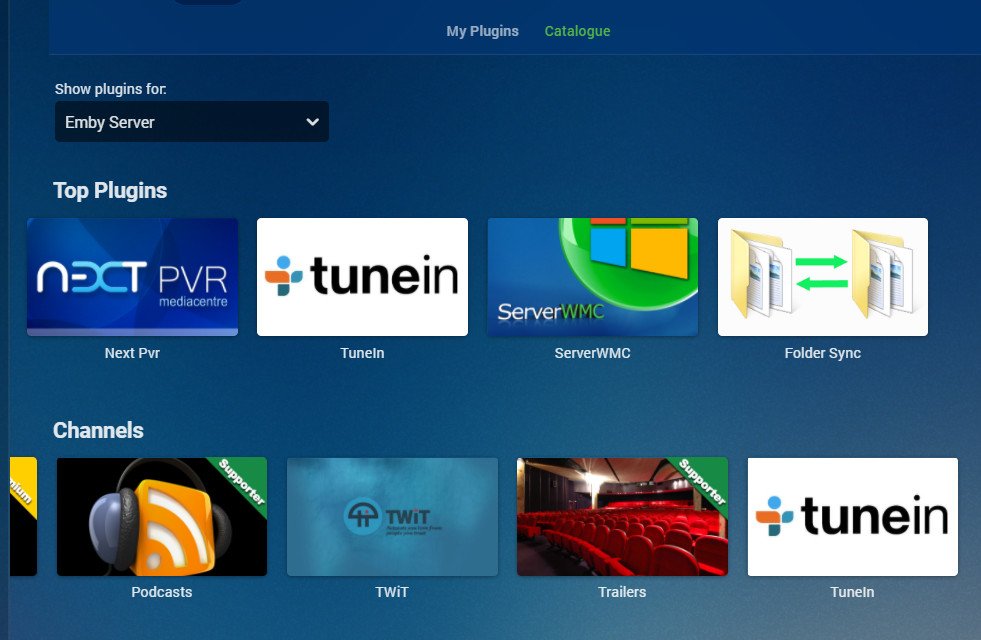 1 point
 -
@Tandhruil this is resolved in our DSM 7 package that we're currently testing. Thanks.1 point
-
OTA isn't bad in major especially if you like reality TV. If you are bilingual since that can double the choice and you get most of the major network shows from the US and Canada If you are near the border you can get the American networks and the sub channels stations too. If you want sports, movies, new drama, cable new etc you want cable. Martin1 point
-
Hi there, yes we can certainly look at improving the reports plugins, and these are good suggestions. Thanks for the feedback.1 point
-
If you have installed the HD HomeRun application - then you can reset all the tuners via the CLI below. "c:\Program Files\Silicondust\HDHomeRun\hdhomerun_config.exe" <HDHomeRunID> set /sys/restart self I know this is not the fix, but maybe easier to reset the tuners than to restart emby to release them..1 point
-
yep - must have been a blip as GET responses are now error free. Very odd .. maybe they did some maintenance during the out of hours (US) peak time. It's good that it is back - it is definitely more accurate with TV series than the other providers.1 point
-
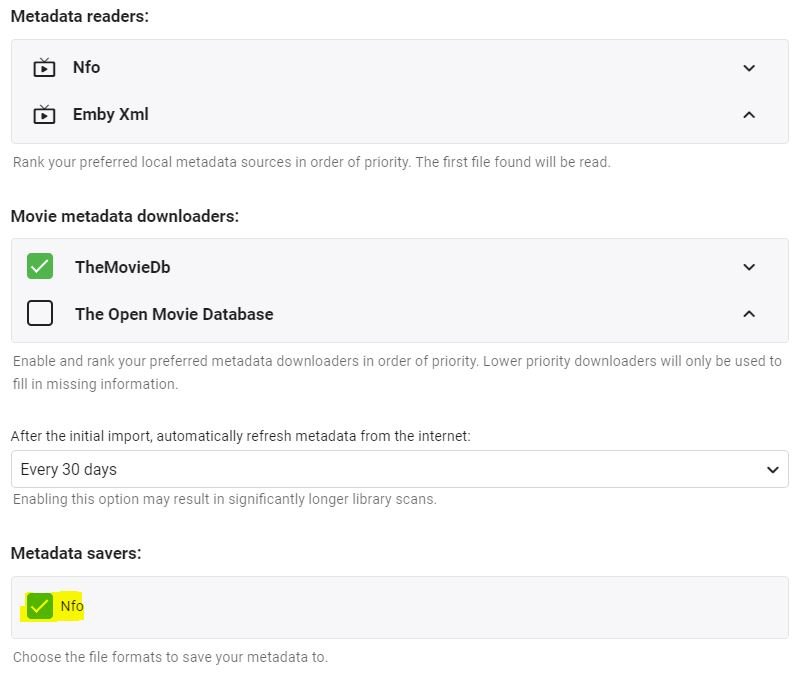
Hi Cayars, Ok, I think you're right, I had an issue in my movie library: I forgot to tick "Nfo" in "Metadata savers"... so that's why the .nfo file was not updated after changing the Metadata manually. And as "Nfo" was ticked on the opposite in "Metadata readers", I believe that every time I was refreshing the metadata, Emby was reading the existing .nfo file that was in English! Hence never keeping the updates... Looks like my issue is solved! Thank you all!
 1 point
 -
Nope, you're right but, from web browser, you can sync to any known devices.1 point
-
The "proper" way to exit Live TV on any client is to "GO BACK". In a browser for example you can move the mouse to bring up the OSD. There is a left arrow top left. Click it. On a client such as Roku or Android hit the back button on the remote. Doing it this way will IMMEDIATELY notify Emby you have stopped watching that channel and it can free up the tuner.
 1 point
 -
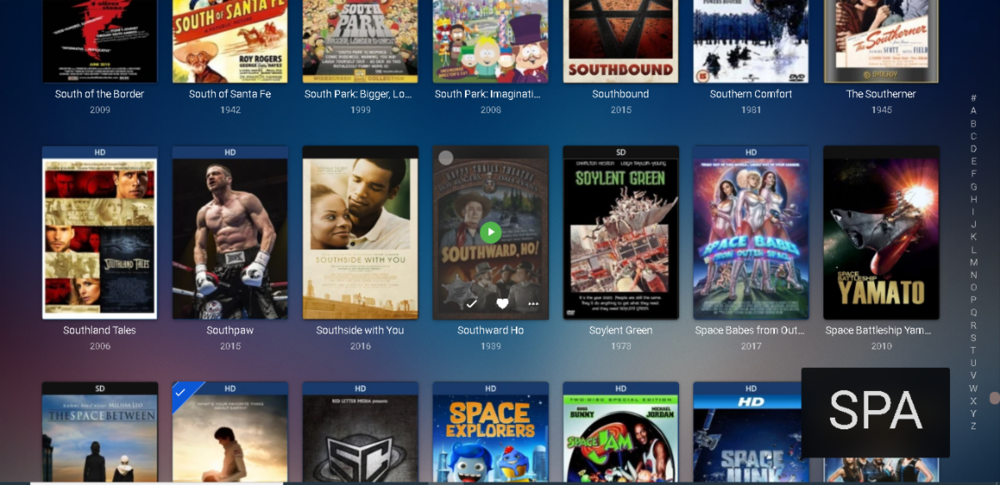
I've had Emby for don't know how long. I thought I'd look up Spartacus in Movies so I clicked S on the keyboard and it went to Movies beginning with S. Then thought, wonder if I can get it to go to movies beginning with SP, so I typed SP and lo and behold, thats where it went. Amazing. Goes to show what you find when you move your hand from the mouse to the keyboard occasionally. I think this is the kind of thing thats obvious to everyone and their dog, but not me. So compliments to Devs and Dev-in-chief...1 point
-
Hey don't worry my dog didn't know about this either but one of my cat's showed me something cool: If you type quickly a box appears lower right showing you what you typed and what it will seek to. Just goes to show, some cats are smarter than dogs. LOL PS I'm glad you posted about this because I bet a lot of people reading this aren't aware you can do this.
 1 point
 -
Some cool work. What sort of performance did you experience, your approach of using frame based vectors and sequence matching is probably the most accurate way of doing this but man is it going to take a while to process a library of 6K+ episodes on a low powered NAS server1 point
-
But this is controversial as codecs and bitrate will be different. The log only show two big hiccups that I can see. 2021-01-10 14:21:09.376 Info Server: http/1.1 Response 206 to x.xxx.xxx.xxx. Time: 27185ms. http:// 2021-01-10 14:21:19.164 Info Server: http/1.1 Response 206 to x.xxx.xxx.xxx. Time: 33054ms. http://1 point
-
OK, thanks for confirming. Thanks for your help.1 point
-
No seeing any issues in stable or beta on my systems.1 point
-
Good things are happening1 point
-
Hi guys, I actually open-sourced the code for a graduation project where the goal was exactly to detect recaps, previews and opening&closing credits. You can check it out here: https://github.com/nielstenboom/recurring-content-detector I figured maybe it can be of use! Would have to port it somehow, as it is python based. Cheers!1 point
-
Luke is getting it added to the actual Synology store also, but the approval process is going slower than usual. For now this is the only way.1 point
-
I was also unable to get multi-part movies to play seamlessly (in this case, a 2-sided DVD). However, I found this really simple way to merge my two files using FFMEG that ships with emby (i.e. it's fast, free, and doesn't require installing any other software): K:\Movies\Robin Hood Prince of Thieves (1991)>"C:\Users\Family\AppData\Roaming\MediaBrowser-Server\ffmpeg\20160410\ffmpeg.exe" -i "Robin Hood Prince of Thieves (1991)-dvd1.m4v" -c copy -bsf:v h264_mp4toannexb "part1.ts" K:\Movies\Robin Hood Prince of Thieves (1991)>"C:\Users\Family\AppData\Roaming\MediaBrowser-Server\ffmpeg\20160410\ffmpeg.exe" -i "Robin Hood Prince of Thieves (1991)-dvd2.m4v" -c copy -bsf:v h264_mp4toannexb "part2.ts" K:\Movies\Robin Hood Prince of Thieves (1991)>"C:\Users\Family\AppData\Roaming\MediaBrowser-Server\ffmpeg\20160410\ffmpeg.exe" -i concat:"part1.ts|part2.ts" -c copy -bsf:a aac_adtstoasc "Robin Hood Prince of Thieves (1991).m4v"1 point
-
Thats understandable. On/Off toggle in settings could work for all.1 point
-
And as the OP said, from an eye candy standpoint I would prefer movie posters not be covered in checks.1 point
-
I personally only am interested in what I haven't watched.1 point
-
Appreciate the work of the devs here but please make this happen. Switched to Emby a few months ago and really like it besides this. The green checks all over are really obnoxious imo and I have been back to using Plex due to it.1 point
-
+1 would be nice to have it for music as well.1 point
-
Definitely would love to see this as an option (or even as default, though I understand some may prefer the existing way) - for the following reasons: As posters above have noted, it avoids impinging on the presentation of whole screen-fulls of poster images in large (& mostly watched) libraries. The green dots tend to 'draw the eye' - and it seems more relevant/useful to be highlighting unwatched rather than already-watched media. Most importantly - the current approach in Emby is actually inconsistent! For example, I'm looking at my home screen with the row of "latest tv shows" just above the "latest movies"... the green dot (with a tick) on a movie poster indicates watched status, but the green dot (with a number) on a tv show poster indicates unwatched status! Re #3: Similarly, when I'm looking at a set of tv shows in a library, or looking at the set of seasons in a show, the presence of a green dot (with number) indicates unwatched episodes, but when I then navigate into a specific season the presence of a green dot (with tick) changes meaning again and now means watched instead. I think it'd be much preferable if 'green dot' always indicated the same thing (i.e. unwatched).1 point
-
Thanks! I'm using the LSIO letsencrypt image and it didn't like some of the config, but I switched out what I could. It complained about worker_processes, events, the http section and the swagger line. I removed TLS 1/1.1, added 1.3, I'm not running ipv6 and I prefer to redirect to https rather than serve over http. I've tried out some direct streams (including an mp4) as well as transcodes and it seems to be working fine (will need additional testing). Thanks again for the suggestions. This is what I'm running right now. server { listen 80; server_name emby.domain.tld; return 301 https://$server_name$request_uri; } server { listen 443 ssl http2; ## Listens on port 443 IPv4 with http2 and ssl enabled server_name emby.domain.tld; ## enter your service name and domain name here example emby.domainname.com add_header Strict-Transport-Security "max-age=31536000"; ssl_session_timeout 30m; ssl_protocols TLSv1.2 TLSv1.3; ssl_certificate /config/keys/letsencrypt/fullchain.pem; ssl_certificate_key /config/keys/letsencrypt/privkey.pem; ssl_dhparam /config/nginx/dhparams.pem; ssl_ciphers 'ECDHE-RSA-AES128-GCM-SHA256:ECDHE-ECDSA-AES128-GCM-SHA256:ECDHE-RSA-AES256-GCM-SHA384:ECDHE-ECDSA-AES256-GCM-SHA384:DHE-RSA-AES128-GCM-SHA256:DHE-DSS-AES128-GCM-SHA256:kEDH+AESGCM:ECDHE-RSA-AES128-SHA256:ECDHE-ECDSA-AES128-SHA256:ECDHE-RSA-AES128-SHA:ECDHE-ECDSA-AES128-SHA:ECDHE-RSA-AES256-SHA384:ECDHE-ECDSA-AES256-SHA384:ECDHE-RSA-AES256-SHA:ECDHE-ECDSA-AES256-SHA:DHE-RSA-AES128-SHA256:DHE-RSA-AES128-SHA:DHE-DSS-AES128-SHA256:DHE-RSA-AES256-SHA256:DHE-DSS-AES256-SHA:DHE-RSA-AES256-SHA:AES128-GCM-SHA256:AES256-GCM-SHA384:AES128-SHA256:AES256-SHA256:AES128-SHA:AES256-SHA:AES:CAMELLIA:DES-CBC3-SHA:!aNULL:!eNULL:!EXPORT:!DES:!RC4:!MD5:!PSK:!aECDH:!EDH-DSS-DES-CBC3-SHA:!EDH-RSA-DES-CBC3-SHA:!KRB5-DES-CBC3-SHA'; ssl_prefer_server_ciphers on; ssl_session_cache shared:SSL:10m; client_max_body_size 0; location / { proxy_pass http://192.168.0.178:8096; proxy_hide_header X-Powered-By; ## Hides nginx server version from bad guys. proxy_set_header Range $http_range; ## Allows specific chunks of a file to be requested. proxy_set_header If-Range $http_if_range; ## Allows specific chunks of a file to be requested. proxy_set_header X-Real-IP $remote_addr; ## Passes the real client IP to the backend server. proxy_set_header Host $host; ## Passes the requested domain name to the backend server. proxy_set_header X-Forwarded-For $proxy_add_x_forwarded_for; ## Adds forwarded IP to the list of IPs that were forwarded to the backend server. ## ADDITIONAL SECURITY SETTINGS ## ## Optional settings to improve security ## ## add these after you have completed your testing and ssl setup ## add_header 'Referrer-Policy' 'origin-when-cross-origin'; add_header Strict-Transport-Security "max-age=15552000; preload" always; add_header X-Frame-Options "SAMEORIGIN" always; add_header X-Content-Type-Options "nosniff" always; add_header X-XSS-Protection "1; mode=block" always; ## WEBSOCKET SETTINGS ## Used to pass two way real time info to and from emby and the client. proxy_http_version 1.1; proxy_set_header Upgrade $http_upgrade; proxy_set_header Connection $http_connection; } }1 point
-
Hi there. I use avidemux to join multi part files, into 1 file.1 point
-
Upvote. Would rather see an indicator for unwatched media rather than watched.1 point