Leaderboard




Popular Content
Showing content with the highest reputation on 01/07/21 in Posts
-
You apparently don't even remember what you are asking about even with your comments on this page.. You were constantly asking about remuxing a profile 7 to a profile 5, NOT the other way around. Remuxing a dual layer to a single layer is currently only supported by 1 program, and that support was only added a few months ago. And as for how DolbyVision works, it is all proprietary and hidden behind massive back doors. Serious licensing efforts would have to be made. Since you're too cheap to go beyond a free trial, I highly doubt you would be for paying an increased price for DolbyVision licensing. You clearly do not understand anything surrounding this and are not only confused, but feel entitled. Luke and company have already answered your demand, and you feel that their honest answer was not good enough. If you want DolbyVision support, rip your own discs with makemkv and stop downloading encodes. Plain and simple. The fact you think that because Android doesn't give the proper supported profile information is the fault of the Emby Dev Team, just shows how out to lunch you are. Bye Felicia.2 points
-
Why doesn't Emby support user integration in Organzr V2? It looks like the functionality was removed last year with promise of some sort of new method. Was that changed? Having a front-end for sever management so users can request movies (Ombi), access Emby and other server options all in one place makes sense. It's much more convenient than having to have multiple logins/accounts for all of the different interfaces and it is logical to have all of this stem from the Emby user account. Any update on this?1 point
-
Hi Forum, I finally convinced my wife and her mother to cut the cord. I have plex and emby - but everyone prefers emby. I have three smart TVs (1 LG and two Samsungs) all streaming my live TV from an HD Homerun Prime. My server is running Win 10 (x64) with 16GB ram. This PC is a dedicated media server. My issue is with Live TV. We're experiencing buffering and audio drops rather frequently. the audio is usually restored by rewinding 10sec. but the buffering is a real problem. I started checking the logs, and I found something interesting regarding FFmpeg. Server response is usually a few ms. When the buffering starts, it really jumps. See below: 2021-01-06 20:44:06.317 Info Server: http/1.1 Response 200 to 127.0.0.1. Time: 110647ms. http://127.0.0.1:8096/LiveTv/LiveStreamFiles/fd47b92bae4749b299658bcdceee0602/stream.ts 2021-01-06 20:44:06.338 Info App: AppendExtraLogData - Read graph file: C:\Users\admin\AppData\Roaming\Emby-Server\programdata\logs\ffmpeg-transcode-03445ff4-7b61-44cb-8035-0aeca363320c_1graph.txt 2021-01-06 20:44:06.339 Info App: AppendExtraLogData - Deserialized GraphData fileStream: {0:n} bytes Graph Count: 0 2021-01-06 20:44:06.339 Info App: AppendExtraLogData - File Deleted 2021-01-06 20:44:06.339 Info App: ProcessRun 'StreamTranscode 03445f' Process exited with code 1 2021-01-06 20:44:06.383 Error Server: Error processing request *** Error Report *** Version: 4.5.4.0 Command line: C:\Users\admin\AppData\Roaming\Emby-Server\system\EmbyServer.dll -noautorunwebapp Operating system: Microsoft Windows 10.0.18363 Framework: .NET Core 3.1.9 OS/Process: x64/x64 Runtime: C:/Users/admin/AppData/Roaming/Emby-Server/system/System.Private.CoreLib.dll Processor count: 8 Data path: C:\Users\admin\AppData\Roaming\Emby-Server\programdata Application path: C:\Users\admin\AppData\Roaming\Emby-Server\system System.Exception: System.Exception: Error starting ffmpeg at Emby.Server.MediaEncoding.Api.BaseStreamingService.StartFfMpeg(StreamState state, String outputPath, CancellationTokenSource cancellationTokenSource, Boolean acquireResources) at Emby.Server.MediaEncoding.Api.Hls.BaseHlsService.ProcessRequest(StreamRequest request) at Emby.Server.Implementations.Services.ServiceController.GetTaskResult(Task task) at Emby.Server.Implementations.Services.ServiceHandler.ProcessRequestAsync(HttpListenerHost appHost, IRequest httpReq, IResponse httpRes, RestPath restPath, String responseContentType, CancellationToken cancellationToken) at Emby.Server.Implementations.HttpServer.HttpListenerHost.RequestHandler(IRequest httpReq, ReadOnlyMemory`1 urlString, ReadOnlyMemory`1 localPath, CancellationToken cancellationToken) Source: Emby.Server.MediaEncoding TargetSite: Void MoveNext() 2021-01-06 20:44:06.383 Info Server: http/1.1 Response 500 to 10.0.0.60. Time: 220654ms. http://10.0.0.33:8096/emby/videos/1170046/live.m3u8?DeviceId=a58fecbc-9bb0-4eb2-911a-452861d10764&MediaSourceId=native_d39298c6fe85cc70bdd70a4878d2330e_310fcbdc01b3e881a362e3787d2e8a32&PlaySessionId=63aeba593d2c4bb693cced08cb4c1680&LiveStreamId=06044cf0e6f93cdae5f285c9ecfaaeb4_01413a525b3a9622ce6fdf19f7dde354_native_d39298c6fe85cc70bdd70a4878d2330e_310fcbdc01b3e881a362e3787d2e8a32&VideoCodec=h264,h265,hevc&AudioCodec=ac3,eac3,aac,mp3,opus&VideoBitrate=139616000&AudioBitrate=384000&MaxWidth=4096&AudioStreamIndex=1&TranscodingMaxAudioChannels=6&SegmentContainer=ts&MinSegments=1&BreakOnNonKeyFrames=False&ManifestSubtitles=vtt&h264-profile=high,main,baseline,constrainedbaseline,high10&h264-level=51&TranscodeReasons=DirectPlayError&allowVideoStreamCopy=false 2021-01-06 20:44:06.418 Info App: ProcessRun 'StreamTranscode b4b391' Execute: C:\Users\admin\AppData\Roaming\Emby-Server\system\ffmpeg.exe -loglevel +timing -y -print_graphs_file "C:\Users\admin\AppData\Roaming\Emby-Server\programdata\logs\ffmpeg-transcode-b4b391de-f398-4153-ba4c-b0b9dd7bebe7_1graph.txt" -copyts -start_at_zero -analyzeduration 3000000 -f mpegts -c:v:0 h264 -hwaccel:v:0 d3d11va -hwaccel_device:v:0 0 -i "http://127.0.0.1:8096/LiveTv/LiveStreamFiles/fd47b92bae4749b299658bcdceee0602/stream.ts" -map 0:0 -map 0:1 -sn -c:v:0 libx264 -g:v:0 180 -maxrate:v:0 8000000 -bufsize:v:0 16000000 -sc_threshold:v:0 0 -keyint_min:v:0 180 -pix_fmt:v:0 yuv420p -preset:v:0 veryfast -profile:v:0 high -level:v:0 3.2 -x264opts:v:0 "subme=0:me_range=4:rc_lookahead=10:me=dia:no_chroma_me:partitions=none" -crf:v:0 23 -c:a:0 copy -metadata:s:a:0 language=eng -disposition:a:0 default -fflags +discardcorruptts+fillwallclockdts -max_delay 5000000 -avoid_negative_ts disabled -f segment -map_metadata -1 -map_chapters -1 -segment_format mpegts -segment_list "C:\Users\admin\AppData\Roaming\Emby-Server\programdata\transcoding-temp\A1C8AC.m3u8" -segment_list_type m3u8 -segment_time 3 -segment_list_entry_prefix hls/A1C8AC/ -segment_start_number 0 -individual_header_trailer 0 -write_header_trailer 0 -segment_write_temp 1 "C:\Users\admin\AppData\Roaming\Emby-Server\programdata\transcoding-temp\A1C8AC_%d.ts" 2021-01-06 20:44:06.719 Info Server: http/1.1 GET http://10.0.0.33:8096/emby/LiveTv/Channels?userId=338f38795e7641879f13cfe68e06b9c7&limit=1&ImageTypeLimit=1&EnableTotalRecordCount=false&EnableImages=false&EnableUserData=false&X-Emby-Client=Emby for Samsung&X-Emby-Device-Name=Samsung Smart TV (UN55TU7000FXZA)&X-Emby-Device-Id=a58fecbc-9bb0-4eb2-911a-452861d10764&X-Emby-Client-Version=1.0.88. UserAgent: Mozilla/5.0 (SMART-TV; LINUX; Tizen 5.5) AppleWebKit/537.36 (KHTML, like Gecko) 69.0.3497.106/5.5 TV Safari/537.36 Any ideas as to what the issue is, and how it can be addressed? I do not want to go back to renting cable boxes. Today's embyserver.txt log is attached. Thanks in advance. embyserver.txt1 point
-
Were you possibly recording the channel that would not direct play? Make sure the above option says YES.1 point
-
That fixed it, and actually I really appreciate how it just shows the format and not the entire title. Thanks for the help.1 point
-
Yup it a bit work. Yes it still need or multiple steam tuner will not work right with out it1 point
-
Hi, we're looking into it but yes you are correct that the Roku video player developer api is not as robust as other platforms, so we're going to be limited by that.1 point
-
Luke could this be interlaced related?1 point
-
I am currently using addon mode. I have not updated my embi for kodi add on yet, just the Android TV beta. I just wasn't sure if the functionality was also available through that add on. I will try updating that.1 point
-
Hi, that's great, thanks ! Just jump in on OneSky.1 point
-
the <br> is the element (not an entity there is no entity for carriage return) for html. The reason to encapsulate it into a self-closing tag is so the parser for the XML can consume it without error. If it were within CDATA it would not need self closing as the CDATA is to encapsulate HTML inside XML.1 point
-
Try with just <br> rather than the self-closing <br/> or <br />. The self-closing tags are meant for XHTML.1 point
-
So the reason it is transcoding is the web app (or any browser for that matter) cannot natively play True-HD, AC3 or DTS sound - they will only play AAC or MP3. ALL clients except the Nvidia Shield cannot natively play Tru-HD (the first audio track). If you chose the AC3 track instead, your web device would have a much easier job on the conversion (AC3>AAC or MP3). The roku should natively play AC3 just fine - resulting in a 'Direct Play' - with no transcoding necessary. Have a play with the other Audio tracks and report back - but stay away from Tru-HD and DTS-HD (both only available on Blu-Ray media - the DVD Audio standard did not cater for HD Audio).1 point
-
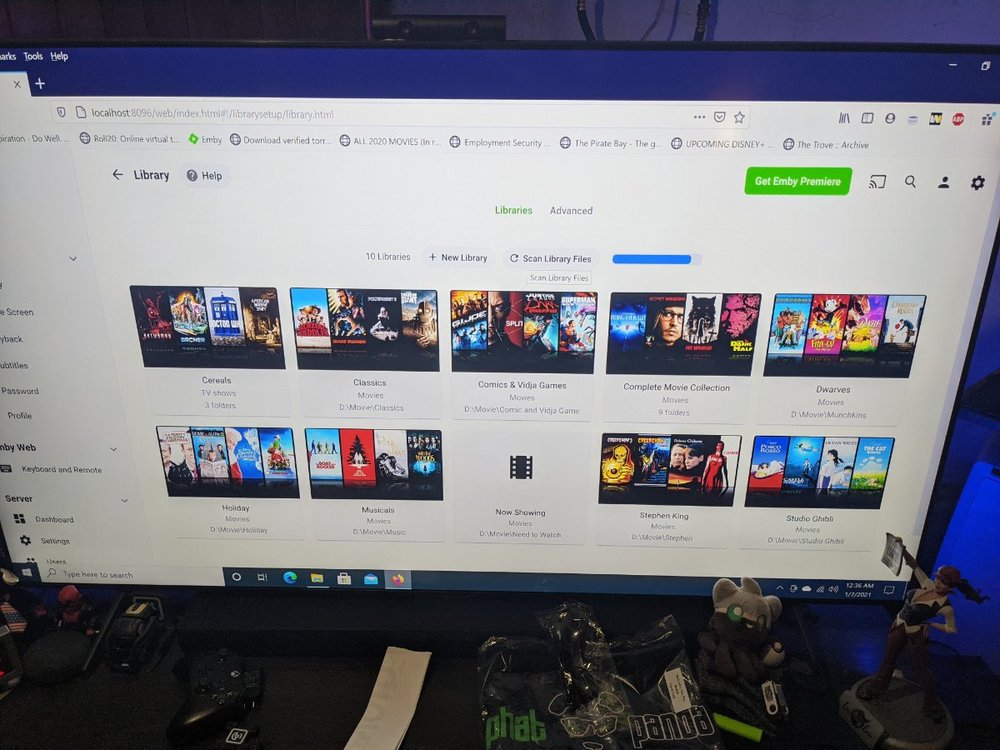
Problem solved, I guess in the past instead of selecting the overarching drive I've also individually selected folders in the past. It appears in my tired hazy set up of the server this time I attempted the shortcut overarch instead. I have gone back and adjusted and now once the scan completes everything will once again be as it was in the Past
 1 point
 -
No as a mkv, mp4 or avi actually contain audio and video codecs. A strm file is just a file containing a path to actual media ie the mkv, mp4 or avi file. So in short a strm file is considered the same as a shortcut file.1 point
-
It's probably due to the video being interlaced. You could try using the Emby convert media feature to convert it to a more streaming friendly format.1 point
-
What Happy2Play said. You can delete the image manually and force it to recreate them if you don't happen to like the choice it made. I had what I'd call an inappropriate image made once or twice that shouldn't have been used on a system with parental ratings being used. I had a box cover with a topless girl and it was used. I think an option to use only X rating box covers would be a welcome addition. So for example you could choose PG-13 to eliminate box covers like R, X, Unrated from being used. But there are some great graphics here that can be used instead that might be even better for many people. https://emby.media/community/index.php?/forum/70-fan-art-videos/1 point
-
Dynamic images should be updating weekly.1 point
-
23:21:48.102 /mnt/media/1. Movies/E-G/Flight Plan/FLTLP2W1.Title14.mkv: No such file or directory See the error in the ffmpeg log. Either the file has gone missing, or emby server is being denied access to it.1 point
-
Already working, just sync theme media under manage libraries.1 point
-
My modem had fubar DNS which is what was causing my issue to obtain an IP address via IPV6. No matter what I would use for name servers it had serious lag and would time out. At that point I knew my modem was a POS and exchanged it.1 point
-
The Emby Beta for Roku cannot be found on the Roku store. It is a private channel made for users who wish to test features and new additions early. You also get bug fixes and other things earlier with the Beta than you would on the Store version. The Store version must be approved by Roku. The private channel (Beta) can be updated by us at any time as it does not require any approval from Roku. Only applications approved by Roku can be found by searching on your Roku. You can get the Emby Beta for Roku at this link: https://my.roku.com/account/add?channel=EmbyBeta The Store and Beta versions of the application can both occupy your home screen. You can tell them apart as one will have "beta" on the icon. You do not have to use DLNA ever again. You are welcome.1 point
-
I had this happen when my ISP was having issues granting IP addresses. You can tell if your Roku has a flashing white light on it. The Roku TV and Roku devices will flash a white light when they cannot reach roku.com and see if updates are available. If during this time your Roku is blinking it does not see internet and you might just need to wait it out. I had internet fail for 5 hours and turns out it was my ADSL2+ modem needed replacing.1 point
-
I would try lowering the in-app quality setting and see if this helps. Most likely the bitrate is just too high.1 point
-
Any updates here?1 point
-
Right but we've never claimed to support it either. That's essentiality like saying that every feature we haven't built yet is broken.1 point
-
Hi @Keyboardcowboy -- We'll need more info here. Do you mean the Favorites tab from the home screen? I can confirm that I have many different types of favorites here on my setup. This is an enhancement we haven't gotten in the Apple TV app but I'll get it into our next beta.1 point
-
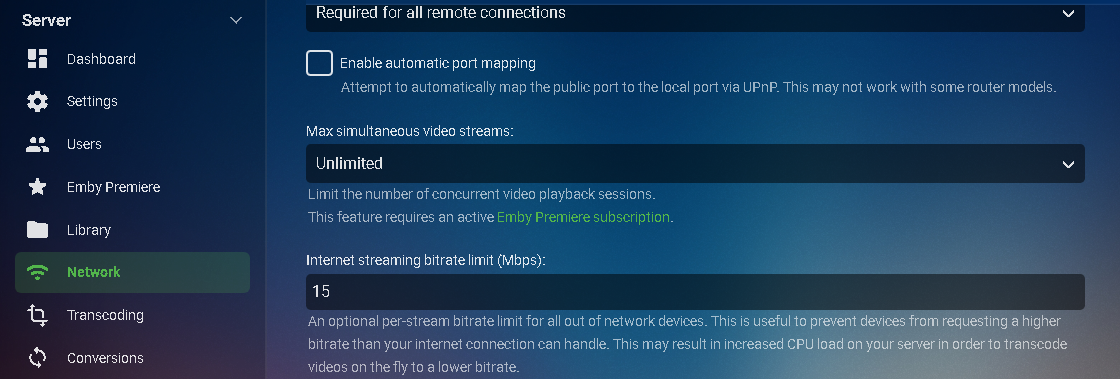
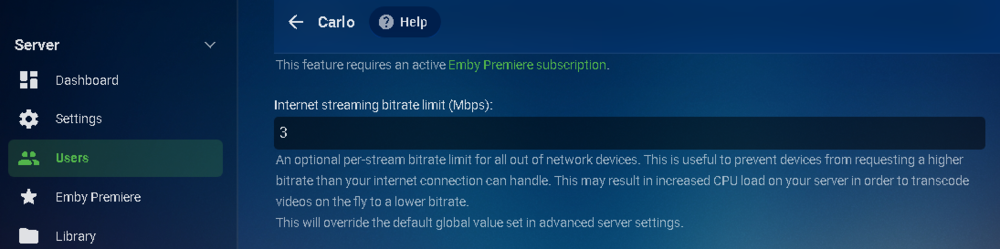
Hi, The bitrate can be enforced on both the server and the client. On the server you can adjust this per user: You can also set the maximum remote stream on the server: Since I only have usable upload bandwidth of 17 Mbps I setup Emby to never exceed 15 here in the network. In the above picture I set myself to 3Mbps just to show up. Then on each client there are bitrate settings. If the client is set to "Auto" you may want to set it manually higher or at the max setting for testing. So when Emby tries to playback a video it checks these 3 things. Obviously the lowest number dictates how much bandwidth Emby can use for that client/user.
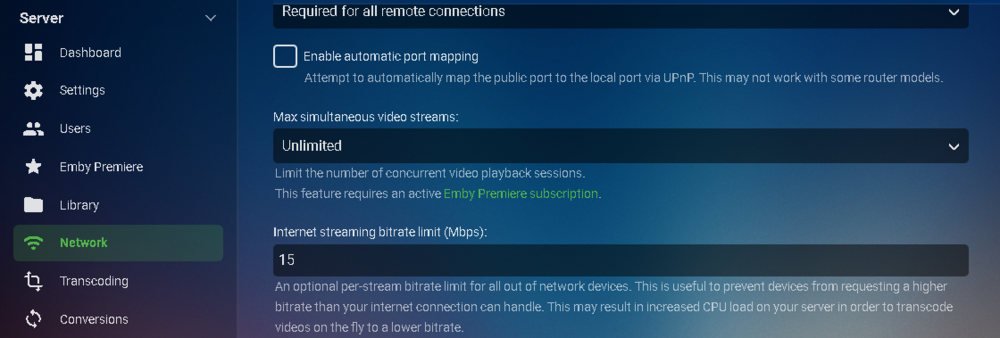 1 point
 -
I believe we've identified the conditions that cause this and we'll have a fix added to the server soon so that you won't have to worry about this. Thanks for reporting.1 point
-
Ok, worked it out. In docker, first stop then export your docker configuration for your Emby container. Then rename the docker container to something like emby-old. Edit the exported .json file. Change the line that reads "devices" : null, to: "devices" : [ { "CgroupPermissions": "rwm", "PathInContainer": "/dev/dri/renderD128", "PathOnHost": "/dev/dri/renderD128" } ], Make sure that the UID, GID and GIDLIST match your system's Emby user or admin. Save the file. Import it into back into docker and you are good to go. You can now enable VAAPI in the docker instance of Emby.1 point
-
If you are interested in this feature please like the post. Many photo enthusiast use RAW files when they take pictures; they come in a lot of different flavors and extensions. Here from WIkipedia: .3fr (Hasselblad) .ari (Arri_Alexa) .arw .srf .sr2 (Sony) .bay (Casio) .cri (Cintel) .crw .cr2 .cr3 (Canon) .cap .iiq .eip (Phase_One) .dcs .dcr .drf .k25 .kdc (Kodak) .dng (Adobe) .erf (Epson) .fff (Imacon/Hasselblad raw) .mef (Mamiya) .mdc (Minolta, Agfa) .mos (Leaf) .mrw (Minolta, Konica Minolta) .nef .nrw (Nikon) .orf (Olympus) .pef .ptx (Pentax) .pxn (Logitech) .R3D (RED Digital Cinema) .raf (Fuji) .raw .rw2 (Panasonic) .raw .rwl .dng (Leica) .rwz (Rawzor) .srw (Samsung) .x3f (Sigma) It would be a nice addition to be able to manage and display these in the Photo library ! I have checked and my Nikon .nef are not handled by Emby1 point
-
Heya sorry for barging in this thread, has been dead for a little while. And I don't need any details, for the mechanism. My question is more like; Will it include the ability for third party apps to pass the requested Auth back to Emby? I ask this because I'm not entirely sure what you meant by "Emby connect dual username confusion" but seems to me that you are talking about local usernames vs embyconnect usernames. Where in the OP is asking for SSO from third party sources, which has the benefit to eliminate the double logins when using awesome front ends like Causefx's Organizr app. Tbf this has been on my list for at least 3 years now, and I had a weak moment just looking at plex in combination with organizr for SSO just for better user experience. But Emby is where my heart is. And if it is only 1 extra login I still can live with that, but sometimes have to remind friends and family that they didn't type their passwords in wrong, it's just normal to have a double authentication, once for Organizr and then again for Emby. (They always look at me funny) Bit weird though from a programmer standpoint giving the option to use Emby's internal users and password to a thirdparty app and then not have the option to login to Emby from that same thirdparty that just requested a login. Hope this all makes sense and sorry for my rambling, this has been on my mind for a while, and venting is sometimes good for the soul :) Still love all the work you do and Emby has given me countless nights of streaming pleasure. Keep up the good work!1 point