Leaderboard




Popular Content
Showing content with the highest reputation on 01/04/21 in Posts
-
It seems to me that Emby has progressively removed features over the years. I discovered recently that I can no longer view my movies by Studio (this seems to be a recent change). Viewing by Actor was removed quite some time ago (https://emby.media/community/index.php?/topic/26944-missing-a-menu-option/). Can these features please be re-implemented? And can y'all PLEASE put in the changelog when a feature has been disabled or removed so that the end user can determine if upgrading will remove functionality previously depended on? Thx!2 points
-
Hi, I’d love that audio and subtitles choice would be saved per show, according to what you select on the last episode you watched. The main audio/subtitles parameters is a good point but there are many cases it is not enough and you need to adjust audio and subtitles at the beginning of every episodes. For example i like to watch Casa de Pale in Spanish with french subtitles, The Big Bang Theory in English with french subtitles, French TV shows in french without subtitles, ....1 point
-
Now that MKVMaker is is able to get a playable DV layer when ripping a UHD, It'd be great if we could get an overlay that would indicate either HDR or DV. (would at least be really helpful for me to quickly figure out which movies I need to rerip to get a working DV MKV.) Any chance of this happening in the future?1 point
-
Please read this post first. I was wondering if it would be possible to add something that would allow you to skip the intro to shows automatically while binge watching. When watching Netflix it does this for some shows, and im not sure if thats a feature of Netflix itself or a Chrome extension i use called "Flix Assist" but it would be a nice feature to have within Emby as well. and possibly even create a custom timed skip for specific shows1 point
-
Hello, I spent 3 days trying to figure this out and still can't make it work. Here is my problem : - I installed OMV 5 on a Raspberry Pi 4, then Docker and Portainer (embedded with OMV) - went to this address : https://hub.docker.com/r/linuxserver/emby to get the docker-compose configuration, set to my needs. Emby logs seems to say there is permissions problems - did research and found that NTFS file system my cause problems - formatted and switched to EXT4 my 3 disks - retried install of emby from scratch Emby log is the same : [s6-init] making user provided files available at /var/run/s6/etc...exited 0. [s6-init] ensuring user provided files have correct perms...exited 0. [fix-attrs.d] applying ownership & permissions fixes... [fix-attrs.d] done. [cont-init.d] executing container initialization scripts... [cont-init.d] 01-envfile: executing... [cont-init.d] 01-envfile: exited 0. [cont-init.d] 10-adduser: executing... ------------------------------------- _ () | | ___ _ __ | | / __| | | / \ | | \__ \ | | | () | |_| |___/ |_| \__/ Brought to you by linuxserver.io ------------------------------------- To support LSIO projects visit: https://www.linuxserver.io/donate/ ------------------------------------- GID/UID ------------------------------------- User uid: 1002 User gid: 100 ------------------------------------- [cont-init.d] 10-adduser: exited 0. [cont-init.d] 30-config: executing... [cont-init.d] 30-config: exited 0. [cont-init.d] 40-gid-video: executing... [cont-init.d] 40-gid-video: exited 0. [cont-init.d] 99-custom-scripts: executing... [custom-init] no custom files found exiting... [cont-init.d] 99-custom-scripts: exited 0. [cont-init.d] done. [services.d] starting services [services.d] done. I can't log to emby web page which indicates a ERR_CONNECTION_REFUSED Note that I'm quite new to Linux environment.1 point
-
Although i've disabled the Network option "Allow remote connections to this Emby server" i can still login, browse and play everthing from a remote connection when there's proxy server in use. I've even put my IP/netmask in the LAN networks option field. It doesn't matter. The strange thing is, Emby sees the remote IP and even states "IsInLocalNetwork: False" in the log file! As a reverse proxy i've tested caddyserver and nginx with the config file of @pir8radio Without a reverse proxy it works as expected - access forbidden.

 1 point
 -
Upon adding a new library, Emby generates a thumbnail using four images from the pool of artwork within the library. I think it would be nice if after a minute or so, the apps could begin scrolling through some the different artwork in that library. Add some toggles so users who may not want the feature aren't forced and perhaps some settings to enable things like delays and animation, like slide up and down or sideways, that type of thing... I think it would make the home screen a bit more appealing. Sorry if this has been requested before...1 point
-
Emby Live TV pause buffer filled up C: drive - Live TV - Emby Community1 point
-
The Cetons use the Windows DRI UPnP interface not Windows BDA for digital tuners. Martin1 point
-
That statement contradicts itself. Are we to read them exactly as they are or are we to apply some sort of intelligence to it and allow better organization within the product? We aren't a simple file browser. There are other products for that. In order for us to do all of the things we do with things like TV shows, we have to be sure we understand exactly what everything is and only ingest items that make sense for what the product provides. The basic issue here appears to be that you feel there should be a difference between a "special" and an "extra" for TV shows. Emby has never understood any such distinction so that is not something we currently support. It is possible it could be supported in the future but it would be a new "feature" of the system so a FR is warranted (although, I seem to think there may already be one...).1 point
-
a bit late but after being used quite a bit during the holidays it seems to be working pretty good. Cheers1 point
-
We are still working on it.1 point
-
Ok, got it. Thank you. Also, satellite boxes require some sort of the power management support and zapping... I probably do it as a part of my transcoding service, and switch to the Live TV solution as soon as it is ready.1 point
-
Thank you ! Sorry i didn't see it before1 point
-
Hi. You can do what I suggested above and give it any image you wish.1 point
-
Trag "Die drei ***" mal zusätzlich beim Albuminterpret ein und stell sicher, dass nur ID3v2 Tags vorhanden sind und nicht zusätzlich noch ID3v1.1 point
-
It doesn't. This project was intended to try and make old, but still functioning Ceton stand-alone tuners work with Emby. I looked at several of the locast2plex forks and selected the fHDHR series for a couple of reasons. It is not intended to be an alternative to any other project, except Cetonpoxy which while fine, depends on a Windows platform being available. 1. It had a web GUI for channel management, so disabling unwanted channels before they got imported to Emby was possible 2. The code was cleanly separated, with the HDHR emulation in one set of files and the media source files in another. Which made writing the small number of functions to support the Ceton relatively easy.1 point
-
Hi @Keyboardcowboy -- We'll need more info here. Do you mean the Favorites tab from the home screen? I can confirm that I have many different types of favorites here on my setup. This is an enhancement we haven't gotten in the Apple TV app but I'll get it into our next beta.1 point
-
The way mpv uses gapless mode is from a playlist, and best with setting it to yes. The default is weak. It works holding the audio device on and applying the same audio options for the first track, to all of them without resetting. Emby doesn't do this. It's feeding one track at a time, which makes the player restart for each track. I haven't checked the mpv log on this in a while. I should take a closer look at that. But this is why you're seeing that 100ms gap. It's definitely better than it was, but it still isn't implemented correctly, by the looks of it.1 point
-
I made a beginner mistake: I solved it by manually logging in where indicated. I tried before inserting the ip and I had negative results, so it didn't seem the right way. Fortunately I was wrong. Now I use the android TV app and everything is working. Thanks for your help.1 point
-
Subtitle offset (external subs only) is available in the current beta. You can download and sideload it from here.1 point
-
The latest version of Exoplayer with DV support is in the beta. There are many people playing DV profile 7 rips using a Shield 2019, etc and triggering DV on their TVs.1 point
-
My apologies guys - I've just tried the above video and went back to my other VP9/Opus (non HDR) videos and none of them play without transcoding on the LG client. It was the Nvidia Shield Pro where they play direct without issue - but not the above video - that does not direct play either. I think this maybe something to do with the VP9 profile used as it's 4K 60fps. I'll look at the logs shortly and raise in the appropriate Android forum, I don't want to derail this LG thread.1 point
-
Thanks quicmic. Seamless upgrade so far : i like how you ask to upgrade and then as part of the upgrade you disable the old addon and upgrade the db. Well designed. Will let you know how it goes when I start using the actual addon. Cheers1 point
-
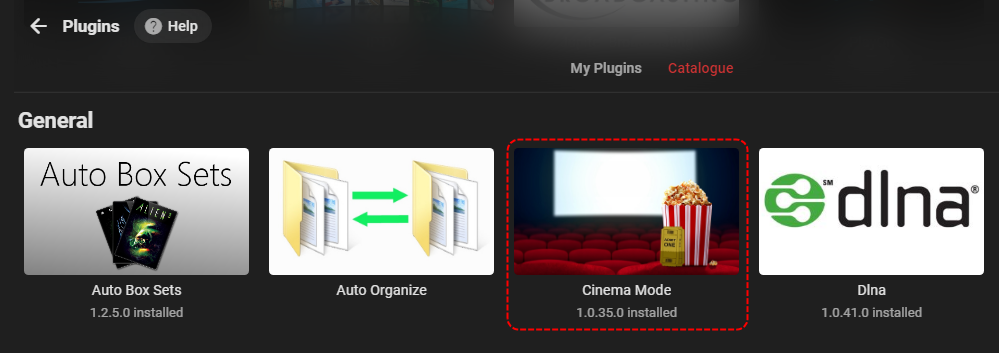
Hi, can you see it as an available plugin to install? Just like you've installed the 'Addic7ed' plug-in, you might need to install the Cinema Mode one as well.
 1 point
 -
Apologies for the disruption. You can turn it off in the android/iOS mobile app settings for the device that is doing the upload. We are trying to chase this issue down. Thanks.1 point
-
@FrostByte thank you! I tried searching but didn’t find anything. This is just what I was looking for.1 point
-
@tomnjerry74 - thank you so much for your help. NAS Newbies: if you have used Windows 10 & a Reverse Proxy Server ( i.e. Nginx, Caddy) and have moved to the Synology NAS I believe you will find the built in Reverse Proxy, Certs, etc so much easier to get up and running. Enjoy!1 point
-
Interesting - I've played .webm 4K VP9/Opus files on my C8 without issues (have never tried HDR though) - so this is maybe related to what the 'B' model LG TV is reporting ? If you need logs from a C8 model @SamES then please let me know as I'm always happy to help in the development / testing of the LG client1 point
-
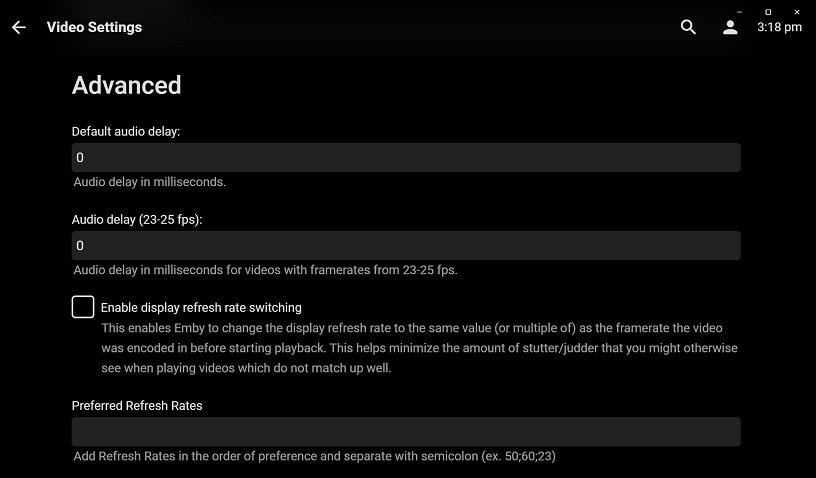
If it's been that long since you used Theater, then you wouldn't know that it's using an entirely different player, mpv. It has a great many abilities. There are many advanced options you can use, but some of the things you mention are already in the UI settings.
 1 point
 -
Ok we'll take a look at it, thanks.1 point
-
Hi there, thanks for reporting. We'll take a look.1 point
-
Well, that worked. Thank you. Dave1 point
-
Thanks, I will appreciate it with a for life subscription.1 point
-
I'm pretty sure that in the "license chain" we will find some limitations to share the data. Or it could be limited to the free of charge sharing only etc. Another aspect - EPG data is pretty heavy (let say few MB per the 100 channels bouquete / per week), someone should pay for the servers / traffic. The service (or if Emby integrates it into the core) works with the user's own devices that doesn't break any licenses.1 point
-
Is there a $5 unlock option for the LG TV app?1 point
-
I think I figured it out. I added the channel number to the beginning of the channel name and it seems to then do exactly what I want.1 point
-
All I did was add the .strm files to the appropriate library. For example if I wanted to add say the Mandalorian I would create a folder in the appropriate library folder (E:\Tv Shows\T\The Mandalorian) then season folders. Add the .strm files to the appropriate season folder and either wait to let Emby scan the info or do a manual scan. It was that simple for me. Movies are do in similar fashion.1 point
-
@Luke Hey, is there any ETA for the next update? I am not able to watch anything since a Month yet. I would appreciate it if you can give us an ETA or at least if its going to be released by the end of the month.1 point
-
We are working on getting a release through the LG review process. Thanks.1 point
-
I was wondering how feasible it would be to create an additional option (icons to show) under the Indicator Overlays option for MEdiaInfo and to add "HDR Options". I think it would be helpful if i could see at a glance what movies in my library were encoded with HDR capability. THen, i could create a 'badge' overlay that would say HDR on the cover. see attch
 1 point
 -
I do not want to see any "movie" type of animation on hover. However I would like something much simpler. I would lie to see the synopsis in a popup on hover over a movie tile. I will create a separate feature request for this as it is different. It might be good to, at some point, give a choice as to what you see by a setting. I find animations irritating but I really would like more info about a movie than just a title without having to click on the movie and then having to click back to go to the next movie.1 point
-
I think I'm interested in creating a emby connected service which looks at poster art and attempts to apply the effect posted above. I make no promises, but Im willing to try.1 point
-
Hey @@G1zm0 Thanks so much for the super detailed step-through! More than I was expecting, thanks for taking the time really helped for a linux novice like myself!! Just a few corrections to the above should @Marchel1808 or anyone else wish to also do this. Step 3: I needed to add a -R option to get it to copy cp -R /volume1/@appstore/EmbyServer/var/data/ /volumeUSB1/usbshare/Emby/data/ Step 5: I needed to remove the / at the end to link the folder ln -s /volumeUSB1/usbshare/Emby/data /volume1/@appstore/EmbyServer/var/data Step 6: Slight typo in the user chown -R embysvr /volumeUSB1/usbshare/Emby/data/ Everything is up and running, and hopefully I now see a performance improvement Cheers mate, Dewey1 point
-
@Dewey80 @Marchel1808 Ok, this is a little tricky of you are not so familiair with command line interfaces. In general this is what I did: 1. Shutdown Emby Server on your Synology from the Package Centre should be easy 2. Login with Putty on your NAS. This is the difficult part. Enable SSH on your NAS. Control Panel -> Teminal & SNMP -> Enable SSH service In Putty typ the Hostname (or IP address) of your NAS Port is default 22, but I have a different one for security reasons. When logged in elevated your acces with sudo -iYou'll be asked for the root password. That is the password for the "admin" account.This account should be disabled (for security), but you can use it like this. Go to the folder cd /volume1/@appstore/EmbyServer/var/data/3. Copy the folder to the USB-stick Make sure you know the correct path!!, this can vary for every USB-stick. It can be /volumeUSB2/usbshare/ or /volumeUSB-1/usbshare/, check this! I created a folder named "Emby" on the stick, that is were I've put the data-folder in. This is the copy command cp -R /volume1/@appstore/EmbyServer/var/data/ /volumeUSB1/usbshare/Emby/data/Be aware, this folder is BIG, it can take a while!4. Rename the old folder mv /volume1/@appstore/EmbyServer/var/data /volume1/@appstore/EmbyServer/var/data_old5. Create a symlink to the folder on the USB-stick ln -s /volumeUSB1/usbshare/Emby/data /volume1/@appstore/EmbyServer/var/data6. Give Emby rights to the folderchown -R embysvr /volumeUSB1/usbshare/Emby/data/7. Restart Emby on your Synology from the Package Centre8. If everything works remove old folder rm -rf /volume1/@appstore/EmbyServer/var/data_oldEspecially the trick logging in your NAS using SSH is difficult if you've never done this before.Google this first, watch some tutorials on YouTube. Be carefull, you can mess up your complete NAS of you don't know what you are doing. I don't take responsibility If I made a mistake somewhere. edit: fixed some typo's by suggestion from @@Dewey801 point
-
i seem to be doing something wrong... is there any tutorial on to give emby the permissions to access any drive? ntfs or otherwise?1 point
-
@@Luke, could this parental tag control be used with hiding collections? So all those collections that show movies a user shouldn't be able to access could be tagged not to show? Edit - answer = yes I have 2 customers that will be VERY pleased about this. It may be manual, but it works, and they'll be happy with it. In case anyone needs to know how,you can exclude a Collection from a specfic users view by - 1) Go into your collections with an Management level account (able to edit). 2) Choose a collection to edit in the Metadata Manager. 3) Scroll down to the tag section, and add a tag you can exclude. I've simply used "nobox". Don't forget to hit the + symbol after entering your tag AND hit the save button. 4) Go to the dashboard - users - parental control 5) Scroll down to the Block items with Tag section and add your tag; again don't forget to hit save. 6) Run a library scan, and you should find any collection you've tagged no longer viewable in the specified users library.1 point