Leaderboard




Popular Content
Showing content with the highest reputation on 12/30/20 in Posts
-
Hi, it's planned for the future. Thanks.3 points
-
I'd really like to have 2 Factor Authentication added to the login screen. It's just this (optional) extra layer of security to help secure the server (which, especially if people use camera uploads) contains pretty private data. There are for every type of programming language quite a few libraries available, so implementation on a server shouldn't be too hard to realise2 points
-
Hello, Perhaps I am not the first one to ask this question but it will be very cool if this feature could be implemented. I have 2 servers one at home and the other at work. ( and soon a third one...) So I have a movies library called movies on each server. I would like to see all the movies from a single 'virtual server location' when I use the app (ios or android ) where I will see only one movies library containing movies informations from the movie library at work and the movie library at home. It's an aggregation of movies informations from the movie library at work and the movie library at home. In fact when a user have multiple servers it will be perfect if another choice in the server list called "all servers" for example appears automatically with a merge of media informations from librairies with the same name on different servers.2 points
-
Specials in continue watching/next up will be supported in Emby Server 4.6.2 points
-
-= PLEASE UP VOTE & PROMOTE THIS REQUEST IF YOU WOULD LIKE THIS FEATURE =- DO THIS BY CLICKING THE "LIKE" BUTTON ON THIS POST REQUEST: Properly pool multiple M3u IPTV sources, so when adding more than one with the exact same M3u emby treats them as one source with however many "Concurrent Streams" you set for each. https://emby.media/community/index.php?/topic/63725-multiple-iptv-tuners-double-channels/?p=636718 https://emby.media/community/index.php?/topic/59607-duplicate-channels-one-tuner/?p=607031 https://emby.media/community/index.php?/topic/57420-multiple-identical-m3u-tuners-without-duplicate-channels/?p=560949 Basically once M3u #1 has used all 5 of its tuners, I then need to start using the login info that is within M3u #2... once those 5 tuners are used (now all 10 tuners), then emby issues "no tuners available". This is how emby treats HDhomeruns today, so it can't be to difficult. @@snodrog742 @@manolodf @@robrhedrick @@cayars1 point
-
As I'm transitioning from Volumio and Plex to Emby to centralize my usage to one app, the one thing I'm missing the most is gapless playback. This is particulary annoying when listening to albums like "Dark Side of the Moon" by Pink Floyd. I'm experiencing a buffer of about 1 second in between songs, which really ruins the immersion. Would be awesome if this would be implemented in both the Chromecast, and web player.1 point
-
Hi, I would like to have an option to choose H265 instead of H264 in the Transcode option. It will be smaller for all bad bandwidth (2~5Mbit ADSL), but will have a great quality. Mobile phone can benefit of it greatly too with the 4G and the limitation of download.1 point
-
Pretty simple suggestion. I have multiple users for my Emby server. If I want to do continuous maintenance on the media, I have to tell everyone. some of them are harder to reach than others ( i.e. no Facebook or Skype chat etc. ) It would be great if say... on the admin panel, I could hit a check box that enables 'maintenance mode', where the server still runs does everything as normal, but instead of the login screen it displays a maintenance page saying the server is unavailable. Even better if I were able to directly put a reason in a text box that would then display on the login screen as well. Not really sure what others would think of this, but for me it would be quite helpful. mostly if I want to make sure no one is trying to access content I know won't work until I've done a full library scan again. Thanks for reading. -Kyle1 point
-
I am switching over from a Win7 box running MBC to Chromecast dongles. With the Win7 box I had a HDMI to Cat6 setup that allowed me to stream to up to 4 displays/TVs simultaneously. It was great while it lasted, but involved stapling cables to the ceiling to run it from room to room - plus it has borked Can there be an option to multi-cast to several receivers at once? i.e. simultaneously play to Chromecast dongles in my office and living room and kitchen simultaneously so i can walk from room to room without stopping and restarting the movie or show all the time? I realize that bandwidth could POTENTIALLY be an issue, but i have a fill gigabit network and a multi-port NAS so that really is the least of my worries... Thank you!1 point
-
One thing that I would like to see implemented is the abilty to display lyrics in all of the apps. For those of us who have libraries with lyrics embedded in the actual files, it would be trivial. Simply scrape the lyrics from the lyrics tag and display them. As far as scraping from online lyrics databases, I don't see that working very well as just about every app that I have seen use it either doesn't get the correct lyrics or they are truncated with an add for the website.1 point
-
Hello pals, I'm using short term Emby server to serve my Movie and Music collection and I'm fully satisfied. After installed XMLTV server plugin I can watch and my TVHeadend IPTV received TV programs. Now I've though (just an idea because don't look at server plugins in depth) - if the XMLTV plugin uses ffmpeg or avconv to cast TV channels is it possible to make choose second channel and produce resultant stream from both channels with Picture in Picture. I know with FFMpeg is relatively easily like ffmpeg -i pipInput1.flv -i pipInput2.flv -filter_complex "[1]scale=iw/5:ih/5 [pip]; [0][pip] overlay=main_w-overlay_w-10:main_h-overlay_h-10" -profile:v main -level 3.1 -b:v 440k -ar 44100 -ab 128k -s 720x400 -vcodec h264 -acodec libfaac PIP_output1.mp4 or more simple ffmpeg -i master_video.mp4 -vf "movie=second_video.mp4, scale=800:-1 [inner]; [in][inner] overlay=70:70 [out]" completed.mp4 ffmpeg -i rtsp://serer/mp4:1.mov -i http://serer2/sample-video2.mp4 -filter_complex “[1]scale=iw/4:ih/4 [pip]; [0][pip] overlay=main_w-overlay_w-10:main_h-overlay_h-10″ -ar 44100 -f flv rtmp://localhost:1935/Stream etc more variants. Could be possible to be created such PiP IPTV plugin server side ? Thanks to anyone in advance.1 point
-
Hi.. I am trying to install emby server on my ASUS RT-AC86U which is armhf based . I keep getting the following error when trying to install any version. The service does not appear to be available and I am not sure what is missing. Any help or ideas? root@tsunami:/mnt# dpkg -i emby-server-deb_4.2.1.0_armhf.deb (Reading database ... 16943 files and directories currently installed.) Preparing to unpack emby-server-deb_4.2.1.0_armhf.deb ... emby-server: unrecognized service Unpacking emby-server (4.2.1.0) over (3.4.1.0) ... Setting up emby-server (4.2.1.0) ... Installing new version of config file /etc/emby-server.conf ... usermod: no changes emby-server: unrecognized service dpkg: error processing package emby-server (--install): installed emby-server package post-installation script subprocess returned error exit status 1 Processing triggers for libc-bin (2.28-10) ... Errors were encountered while processing: emby-server ... root@tsunami:/mnt# uname -r 4.1.27 root@tsunami:/mnt# cat /etc/os-release PRETTY_NAME="Debian GNU/Linux 10 (buster)" NAME="Debian GNU/Linux" VERSION_ID="10" VERSION="10 (buster)" VERSION_CODENAME=buster ID=debian HOME_URL="https://www.debian.org/" SUPPORT_URL="https://www.debian.org/support" BUG_REPORT_URL="https://bugs.debian.org/"1 point
-
It would be useful if the server (or perhaps clients) could cache most (if not all) content images (posters, backdrops, logos, etc) for movies, TV series and seasons. This would mainly be of benefit when a portion of someone's content is offline but the users would still like to view the content to know what exists. I think caching on the server would be preferable, then all clients could make use of the same cached images. if you think this would be a useful feature, please click the "Like This" button on this post.1 point
-
Feature Request. A present I have several user accounts setup for family members. When we sit down together to watch a movie we currently log into one account (Mostly mine), so obviously only this account gets the watched status. What happens then is everyone uses my account because there's isn't up-to date and it's "just easier". This results in my account telling me I've watched something when I haven't... I would like the ability to log into my account and select/deselect which other users are present so that when a movie/TV episode is watched together, their watched statuses are updated accordingly? The next time you log in again all other users would have been deselected. It could be implemented so each user account can do this, or only select user accounts can. Even a special "Family" user account, or multiple viewers button as long as everyone's watched status is correct. Even just ticking the users present on the login screen before login into an account.1 point
-
It would be nice if MBS could incorporate a Commercials.XML file generated from Comskip or ShowAnalyzer and use this to automatically skip over commercials in the web client. Ideally, I'd like to see this work like DVRMSToolbox's DTBAddin. You would have a setting in LiveTV for commercials location. During a media scan, it would match the .XML file name to a recorded TV file and generate the appropriate commercial markers based in the commercials files. When streaming from the web client, it would use this data to automatically bypass the commercials, but allow the user to go back if section was marked incorrectly. Option 1: Translate the commercials file into the chapter/scene markers. Users could manually skip to the next scene. Option 2: Make special commercial markers and automatically skip like DTBAddin Maybe this could expand later where you could have MBS scan files as well.1 point
-
This is more of a "wouldnt it be cool if it did this...." It would be nice to keep the live tv stream active in a small picture in the corner of the screen and view the channel guide in full screen. For instance, I am watching a live show and want to look at what comes on next or on another channel without closing the show I am currently watching. Sent from my VS988 using Tapatalk1 point
-
Yes, I will install Kodi again and try again from scratch. If there will be further issues, I could send another kodi.log. Many thanks for the quick support!1 point
-
If you continue to have stability problems with the Mi Box then consider doing a factory reset.1 point
-
Perhaps it is something else on the system that is causing the failure...?1 point
-
Great thanks. I've been using the latest version for the last day or so and I've encountered no other bugs. Even the upgrade from 4.x to 5.x was very smooth. Great work!1 point
-
Will be fixed in next version.1 point
-
My MiBox is also on 3139 and no such issues so far. Latest ATV beta + .8 server beta1 point
-
Have you tried creating one?1 point
-
Woo Hoo! I just came across an ASUS branded version of the GTX 1650 at Newegg for $190 and ordered it. ASUS TUF Gaming GeForce GTX 1650 TUF-GTX1650-O4GD6-P-GAMING Video Card - Newegg.com Though I was perfectly happy with how everything worked before I started having the audio sync transcode issues, I'm looking forward to seeing how much better everything is with a dedicated card. I never would have messed with it if the issue hadn't cropped up.. Just took the approach - if it ain't broke, don't fix it. Especially since I didn't really ever get into the nuts and bolts of codecs and transcoding and such - everything just worked as is. But in a way - it is good this happened - I now know more than I did before! It wasn't quite as complicated as I thought it would be, and I don't seem to have made anything worse in the process! Thanks again for your help Luke and Cayars! I'll update once the thing is installed and transcoding away. (Knock on wood!) Expected delivery is around Jan. 6th.1 point
-
Not at this time. We are a private company.1 point
-
No. We do not collect any data about your media or what you watch etc.1 point
-
They are showing an error for the titles you mentioned (tenet in this case). It says 'time out' but that doesn't really point to the root cause. I would use an external program (such as MKVExtract, 'EAC3to -demux' or something like that to manually demux the files to see if the source file does indeed have a problem. If they don;t, then simply extract the command line from the log and try and manually try it (on the command line) to see what it does. ie <your path to ffmpeg here> ffmpeg -i file:"/volume1/Emby Libraries/Movies 4K/T/Tenet (2020)/Tenet (2020) - 4K HDR.mkv" -map 0:3 -an -vn "/volume1/Emby/test.vtt" If this successfully runs (and you get a 'test.vtt' file) then 'something else' is causing the timeout. If it fails, then it should at least give you a more descript error message. --- 2020-12-24 18:41:02.894 Error SubtitleEncoder: Error running ffmpeg-subtitle_extract -i file:"/volume1/Emby Libraries/Movies 4K/T/Tenet (2020)/Tenet (2020) - 4K HDR.mkv" -map 0:3 -an -vn "/volume1/Emby/cache/subtitles/4/415e6542ffa0bb952eb0166bd2a7bee4_637444011752721094_3_0_0_False.vtt" *** Error Report *** Version: 4.6.0.10 Command line: /volume1/@appstore/EmbyServer/system/EmbyServer.dll -programdata /volume1/Emby -ffdetect /var/packages/EmbyServer/target/bin/ffdetect -ffmpeg /var/packages/EmbyServer/target/bin/ffmpeg -ffprobe /var/packages/EmbyServer/target/bin/ffprobe -nolocalportconfig -ignore_vaapi_enabled_flag -updatepackage emby-server-synology_{version}_x86_64.spk Operating system: Linux version 4.4.59+ (root@build2) (gcc version 4.9.3 20150311 (prerelease) (crosstool-NG 1.20.0) ) #25426 SMP PREEMPT Wed Jul 8 03:18:11 CST 2020 Framework: .NET Core 3.1.8 OS/Process: x64/x64 Runtime: volume1/@appstore/EmbyServer/system/System.Private.CoreLib.dll Processor count: 4 Data path: /volume1/Emby Application path: /volume1/@appstore/EmbyServer/system System.TimeoutException: System.TimeoutException: Operation timed out after 600,000ms at Emby.Server.MediaEncoding.Subtitles.SubtitleEncoder.ExtractTextSubtitleInternal(String inputPath, String inputSubtitleCodec, Int32 subtitleStreamIndex, String outputCodec, String outputPath, Int64 startTimeTicks, Int64 endTimeTicks, Boolean preserveOriginalTimestamps, CancellationToken cancellationToken) Source: Emby.Server.MediaEncoding TargetSite: Void MoveNext()1 point
-
Yes, you have to setup an m3u tuner in Emby: Emby Live TV Setup : Emby M3U Tuners : Emby1 point
-
Hi TeamB, i have cheked in EmbyCon addon settings and the "Group movies into collections" was on ON. Now i have turned it on OFF and it shows me all 921 movies. Thank you1 point
-
The sample is too short, but if you start playback and hit rewind at the 3 second mark (just after the vocals) it will give it time for the renderer to load. You might have to hit back about 8 times (it can take up to 20 seconds for subs to start) but I was able to playback with subs and without transcoding I also get a different description of the audio track compared to yourself, so maybe there is a difference in this sample compared to the original? Feel free to send me a PM to a link with the original file (I know it's big, so it will depend on if you have the online space and bandwidth to upload it)1 point
-
In the EmbyCon addon settings1 point
-
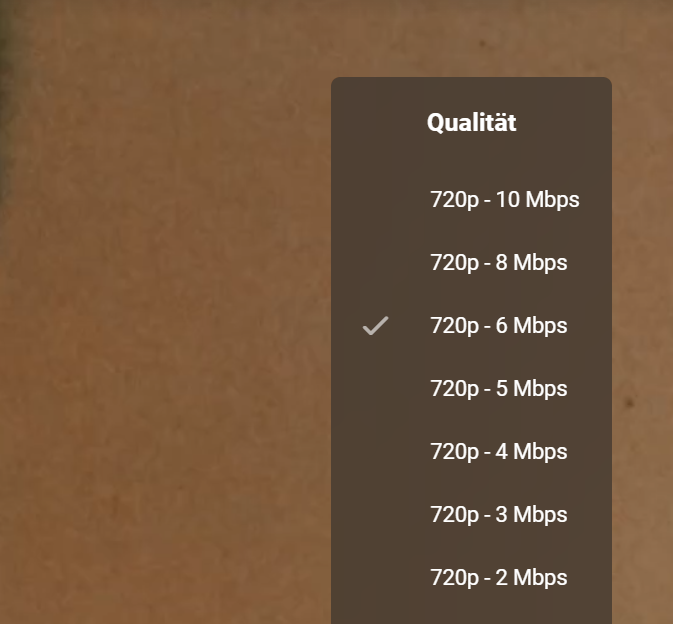
I did a further analysis on the 'Deadfall' movie. During playback, I only see bitrate options to set with max 720p 10 mbit. I choosed 720p 10 mbit. Here are some lines from ffmpeg-transcode log: 18:25:34.042 encoder : libebml v1.2.2 + libmatroska v1.3.0 18:25:34.042 creation_time : 2013-12-05T07:03:53.000000Z 18:25:34.042 Duration: 01:59:51.26, start: 0.000000, bitrate: 11756 kb/s 18:25:34.042 Stream #0:0: Video: h264 (High), yuv420p(progressive), 1792x1080, SAR 1:1 DAR 224:135, Level 41, 23.98 fps, 23.98 tbr, 1k tbn, 47.95 tbc (default) 18:25:34.043 Stream #0:1(ger): Audio: ac3, 48000 Hz, stereo, fltp, 640 kb/s (default) 18:25:34.043 Metadata: 18:25:34.043 title : German 18:25:34.043 Stream #0:2(eng): Audio: ac3, 48000 Hz, stereo, fltp, 640 kb/s 18:25:34.043 Metadata: 18:25:34.043 title : English 18:25:34.296 Stream mapping: 18:25:34.296 Stream #0:0 -> #0:0 (h264 (h264_cuvid) -> h264 (h264_nvenc)) 18:25:34.296 Stream #0:1 -> #0:1 (ac3 (native) -> mp3 (libmp3lame)) 18:25:34.296 Press [q] to stop, [?] for help 18:25:34.432 Output #0, segment, to 'v:\transcoding-temp\81D384_%d.ts': 18:25:34.432 Metadata: 18:25:34.432 encoder : Lavf58.35.100 18:25:34.432 Stream #0:0: Video: h264 (h264_nvenc) (High), cuda, 1792x1080 [SAR 1:1 DAR 224:135], q=-1--1, 9360 kb/s, 23.98 fps, 90k tbn, 23.98 tbc (default) 18:25:34.432 Metadata: 18:25:34.432 encoder : Lavc58.62.100 h264_nvenc 18:25:34.432 Side data: 18:25:34.432 cpb: bitrate max/min/avg: 9360000/0/9360000 buffer size: 18720000 vbv_delay: N/A 18:25:34.433 Stream #0:1(ger): Audio: mp3 (libmp3lame), 48000 Hz, stereo, fltp, 192 kb/s (default) then I choosed 720p 6 mbit. Here are some lines from ffmpeg-transcode log: 10:44:27.878 encoder : libebml v1.2.2 + libmatroska v1.3.0 10:44:27.878 creation_time : 2013-12-05T07:03:53.000000Z 10:44:27.878 Duration: 01:59:51.26, start: 0.000000, bitrate: 11756 kb/s 10:44:27.879 Stream #0:0: Video: h264 (High), yuv420p(progressive), 1792x1080, SAR 1:1 DAR 224:135, Level 41, 23.98 fps, 23.98 tbr, 1k tbn, 47.95 tbc (default) 10:44:27.879 Stream #0:1(ger): Audio: ac3, 48000 Hz, stereo, fltp, 640 kb/s (default) 10:44:27.879 Metadata: 10:44:27.879 title : German 10:44:27.879 Stream #0:2(eng): Audio: ac3, 48000 Hz, stereo, fltp, 640 kb/s 10:44:27.879 Metadata: 10:44:27.879 title : English 10:44:28.236 Stream mapping: 10:44:28.236 Stream #0:0 -> #0:0 (h264 (h264_cuvid) -> h264 (h264_nvenc)) 10:44:28.236 Stream #0:1 -> #0:1 (ac3 (native) -> mp3 (libmp3lame)) 10:44:28.236 Press [q] to stop, [?] for help 10:44:28.477 Output #0, segment, to 'v:\transcoding-temp\758BCE_%d.ts': 10:44:28.477 Metadata: 10:44:28.477 encoder : Lavf58.35.100 10:44:28.477 Stream #0:0: Video: h264 (h264_nvenc) (High), cuda, 1792x1080 [SAR 1:1 DAR 224:135], q=-1--1, 5360 kb/s, 23.98 fps, 90k tbn, 23.98 tbc (default) 10:44:28.477 Metadata: 10:44:28.477 encoder : Lavc58.62.100 h264_nvenc 10:44:28.478 Side data: 10:44:28.478 cpb: bitrate max/min/avg: 5360000/0/5360000 buffer size: 10720000 vbv_delay: N/A 10:44:28.478 Stream #0:1(ger): Audio: mp3 (libmp3lame), 48000 Hz, stereo, fltp, 192 kb/s (default) it looks like, the 720p from the 'quality menu' is ignored, but the bitrate is set properly.
 1 point
 -
Hi, please ensure you are following the supported naming and folder structure for use with Emby https://support.emby.media/support/solutions/articles/44001159110-tv-naming1 point
-
Okay. I think I was able to figure out how I had things setup before. Also after two days of messing around and experimenting with this, I think that i have improved my setup as well. After some testing today, I believe this is how my "working" setup was configured in the past: 1. Cloudflare had an A record setup for media.mydomain.com that pointed to my public IP. I was not using the Cloudflare proxy and just had this setup as DNS Only. 2. On Cloudflare SSL was turned off. 3. On my Sophos firewall, I configured a Real Web Server with the following settings: a. Name: Emby b. Host: Unraid Server <internal IP> c. Type: HTTPS d. Port: 8920 3. On my Sophos firewall, I had a Virtual Web Server setup. This was configured with the following settings: a. Name: Emby VWS b. Interface: External WAN c. Type: Encrypted (HTTPS) d. Port: 8920 e. Certificate: Let's Encrypt - Emby f. Real Web Server: Emby Note: The "Let's Encrypt - Emby" certificate was created within the Sophos firewall. It is managed and renewed automatically within the Sophos firewall. The certificate was not installed on the Emby server. From my testing this worked fine and I could connect to my Emby server outside of the network by going to emby.mydomain.com. I was not sure if this was the best setup or not but it seemed to work. So, after two days of messing with this, I have learned a bit more and changed my setup to the following: 1. Cloudflare had an A record setup for media.mydomain.com that pointed to my public IP. I have the record setup to use the Cloudflare proxy. 2. On Cloudflare SSL is turned on to Full (Strict). 3. On my Sophos firewall, I configured a Real Web Server with the following settings: a. Name: Emby b. Host: Unraid Server <internal IP> c. Type: HTTP d. Port: 8096 3. On my Sophos firewall, I have a Virtual Web Server setup. This was configured with the following settings: a. Name: Emby VWS b. Interface: External WAN c. Type: Encrypted (HTTPS) & Redirect (NOTE: this redirects any http:// requests to https://) d. Port: 443 e. Certificate: Let's Encrypt - Emby f. Real Web Server: Emby I have setup all of my other programs, such as Sonarr, Radarr, NZBGet, etc., the same way as I noted above....with all the Virtual Web Servers using port 443 and a Let's Encrypt SSL certificate created for each Virtual Web Server. I can now go to emby.mydomain.com, sonarr.mydomain.com, nzbget.mydomain.com, etc. from outside my my network and I will be taken to the correct application and the Sophos firewall will also redirect the browser to the https version so everything is encrypted. In addition, I was able to setup Reverse Authentication for these Virtual Web Servers within the Sophos Firewall. I configured the Virtual Web Servers to use Two Factor Authentication. Therefore, when I go to emby.mydomain.com, I am presented with the Sophos splash screen containing a login form. I login with my username and password for an account that exists within the Sophos firewall. My Sophos firewall syncs with my on-prem Windows Active Directory. Therefore, I login with my domain username. The password is my domain password, plus the random 6 digits from my authentication app appended to the password for 2FA purposes. Once, I get through the Sophos login, I am then taken to my Emby server. I then need to log into Emby to access my media and settings. Obviously, everything is encrypted along the way. I am not in the process of playing around with running Organizr as a docker. That way, I can simply go to organizr.mydomain.com and have a portal to all of my applications. The only "downside" that I am finding is that within Organizr, when I click on Emby, NZBGet, or any of my other applications, I am first presented with the Sophos 2FA login screen within the iFrame. I have to log in using the Sophos credentials and then I am taken to the actual application to log into. It's a little bit cumbersome but I guess that extra layer of security comes at a slight price. With having reverse authentication turned on, which requires someone to know my domain username / password + 6 random digits from authentication app for 2FA purposes, plus then having to know my username / password for each web application, plus everything being encrypted, do you see any glaring security risks to exposing all my applications to the web?1 point
-
seems Plex uses lyricfind LyricFind | Home1 point
-
I've always just associated the box set level extras with the first movie in the box set. I don't know if there's a better way.1 point
-
I added a NOTE section to that page with this tip!1 point
-
I was going to post about the same issue. Some episodes have cast, but most do not. The last time I checked, IMDB listed the cast for each episode that was not showing on my devices. And, you are correct there was no information about the cast members in the metadata. So, the question, how do you get the data to populate the metadata for the episode cast members?1 point
-
Resolved for next release. Thanks.1 point
-
Happy Holidays to All1 point
-
Apologies for my complete lack of activity, my Docker installation got corrupted (along with all my volumes) and I lost mostly everything besides my Emby which is the only service that doesn't reside on docker due to hardware transcoding limitations (I'm on Windows), and I didn't have the time nor motivation to fix everything up. Hopefully after Christmas I'll upgrade my hardware, get all of my Emby mods and services working again, and finally take a look at the issues people are having and help to resolve them. I haven't added any media besides music which has been working fine, so maybe something changed in the new betas that broke some stuff. I might end up rewriting this plugin entirely since the code is quite a mess.1 point
-
Emby Server 4.5.4 is currently rolling out to address a few small issues with the previous release. Here are the highlights: Fix regression in 4.5.3 causing slow browsing and search performance in certain situations Fix regression in 4.5.2 causing incorrect items to be queued to conversion tasks Fix Nvidia HEVC level detection View the full article1 point
-
Emby Server 4.5.3 is currently rolling out. Here are the highlights. New Search Experience New search for mobile and desktop layouts. Improvements over previous search: There's now a Top Results section which provides a truly global search, something we didn't have before You can see all the different types of items that matched the search, and filter by type The type categories are now ordered by search relevance, whereas previously they were just hard-coded Mobile version: Download Subtitles During Video Playback There's a new search for subtitles option in the subtitles menu of the video player: Click that and you'll get the subtitle search dialog that you're already accustomed to: Select one to download and the dialog will close, and your new subtitles will show up immediately and also embedded into the subtitle menu: Add to Playlists and Collections with Drag and Drop This should make adding to collections and playlists a little more fun. You'll notice that collections and playlists are now in the sidebar: If you pin the sidebar to make it always visible, now you can drag and drop content to add them to your collections and playlists: You can drag just about anything, from posters, to list items, to individual text links such as the artist name underneath a song: And this will add everything for that artist. This should help make building your holiday playlists and collections more fun than ever, and it all works with touch input as well. Add to Play Queue with Drag and Drop Just drag something onto the now playing bar such as a poster: As soon as you hover over, you'll see this: But you can drag logs of other things too, such as list items: Or even text links from posters or list items. For example, drag the whole item to queue that item, or drag one of the text links to queue the artist, album, etc.: And most important of all, it works with touch input. Other Improvements Support clicking individual text items in list items Support add to play queue with drag and drop Support add to playlists and collections with drag and drop Add profile checking for MP2Video hardware decoders Improve subtitle track selection when always show subtitles is selected Prevent ffmpeg hw processing of 10bit when device doesn't support it Add Nvidia NVDEC decoder variant for HEVC VAAPI: Use color formats from detection Improve detail screen backdrop display Reduce messaging from server to android and iOS apps causing the app background processes to run Show songs on artist detail screen Support downloading subtitles during video playback Update same time recording threshold to 15 minutes Improve ability of other devices to discover emby server New search interface for mobile and desktop Add top results section to search Improve searching for songs using album name Expand artist split whitelist Add http version to server log Bug Fixes Fix play all/shuffle on collections comprised of folders Various fixes for codec level detection Fix interlaced video being incorrectly stream copied with HLS Fix remote play of playlists being sorted by name Fix webp image support not being used in certain cases Fix repeated subtitle downloads of .sub format Fix undefined dlna display name Fix channel logos intermittently disappearing while scrolling the guide in Firefox Fix incorrect iOS scroll after cancelling context menu Fix artists added to collections not showing View the full article1 point
-
I mean its only been a year, Maybe in 15 it might be available. Plex webhooks has it already.1 point
-
These are videos, not songs. The folder structue is \Artist\Video.mp4. The library type is 'Music Videos. There are no metadata downloaders selected. Where is the incorrect titles coming from? My music library is fine.1 point
-
Thanks for the fast response. I tried to remove the package and install 4.3.0.14, which looks to be the latest beta. I get the same or similar output: root@tsunami:/mnt# dpkg -r emby-server (Reading database ... 13503 files and directories currently installed.) Removing emby-server (4.2.1.0) ... emby-server: unrecognized service Processing triggers for libc-bin (2.28-10) ... root@tsunami:/mnt# root@tsunami:/mnt# root@tsunami:/mnt# dpkg -i emby-server-deb_4.3.0.14_armhf.deb Selecting previously unselected package emby-server. (Reading database ... 11938 files and directories currently installed.) Preparing to unpack emby-server-deb_4.3.0.14_armhf.deb ... Unpacking emby-server (4.3.0.14) ... Setting up emby-server (4.3.0.14) ... usermod: no changes emby-server: unrecognized service dpkg: error processing package emby-server (--install): installed emby-server package post-installation script subprocess returned error exit status 1 Processing triggers for libc-bin (2.28-10) ... Errors were encountered while processing: emby-server1 point
-
While your at it, audio needs naming correctly. Always see TrueHD, when it fact it is Dolby Atmos.1 point
-
Adding my support - Along these lines can we also show this information in the main 'Video:' section after the codec detail ? so 'Video: 4K HEVC' becomes 'Video: 4K HEVC HDR' for example ? Can we extend to show Dolby Vision too - also easily identifiable by the codec tag being 'dvhe' in the DV stream. Thanks.1 point
-
Give the following a try? Also, what do you get back when you run the other command? sudo apt-get remove emby-server1 point
-
Try responding to user questions for a day and see if you still feel that way1 point