Leaderboard




Popular Content
Showing content with the highest reputation on 12/18/20 in Posts
-
While Emby already has recommendations built in based on previously watched items I find they are not all that helpful. They seem to be based on genre only, for example, because you watched a comedy here are other comedies in your library. I do like how the also directed by/appear in recommendations work though. What would be great is if Emby could incorporate Trakt's recommendations as they are much more sophisticated. Trakt's recommendations are not only based off of what you have previously watched but also what your Trakt friends and other Trakt users have watched. It takes user ratings and trending/popular media into account. Ideally Emby would include full Trakt integration allowing users to rate media after watching, view lists and recommendations, and view upcoming media all from within Emby but for now I think recommendations would be a nice addition. Trakt has the potential to give Emby that community feel and allow users to discover new media, find something to watch, and recommend media to other users. http://docs.trakt.apiary.io/#reference/recommendations4 points
-
That's why anime, at least, is broadcast strictly in spring, summer, autumn, and winter seasons. Paul2 points
-
@sooty234 Apparently you live alone in your house (probably with good reason). Comfort and convenience are necessarily evils for those of us who cohabitate with others, especially when we volunteer our free time as tech support for said persons. Enjoy your solitude though, I'm sure many of us are jealous! Beyond that, there are a number of situations where a small appliance (streaming device) is better than a general-purpose computer (HTPC) for the single task of providing content to your screen. Are they as flexible.......no, but you have to make compromises in all things.2 points
-
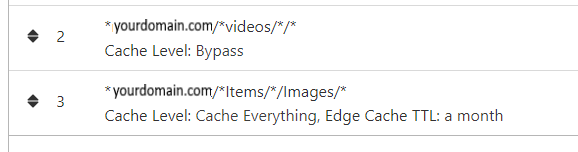
NGINX and emby Config Version 1.0.4 Last Update 1-1-2024 Update by Pir8Radio Why Use NGINX reverse proxy ahead of my application servers like emby? With NGINX or any reverse proxy ahead of an application server you have more control over your setup. You can do things the application servers were not built to handle, have better control over your security and logging, replace lines of code without editing the application server code, better control of caching, etc, etc.... One of the main reasons is so that you don't have to open a new port on your firewall for every application server you host, all you really need to open is 80 & 443 and the internet can reach all of your different servers through one entrance. Will NGINX work on my OS? Most likely, you can find various versions of NGINX for most OS's and they come in different flavors, with options baked in, or just the bare NGINX that you need to compile. See below for download links to get you started. Will NGINX break things on emby? Absolutely if you don't configure it correctly! I HIGHLY suggest when choosing a scheme to setup your domain URL you choose SUB-DOMAIN and NOT sub-directory, more below. Also if you come to the emby forum with things not working, or issues you have and you use a Reverse Proxy, PLEASE make sure that is one of the first things you mention in your forum post. ESPECIALLY if emby works on one platform or client, but not another. So many times people complain "but it works on chrome, so I didn't think it was the reverse proxy". Mention you have a Reverse Proxy please. If the reverse proxy is setup correctly it should be totally transparent to the user and the application server (emby). I'm not going to go into how to purchase and setup a domain name. Lots of how-to's on that out there. Once you have a domain name and its pointed to your IP address, you can go to that domain name and hit your server then continue on.... Sub-Domain vs Sub-Directory: Lets say your domain name is: domain.com there are two main ways you can direct traffic from the internet to your backend application servers like emby. One is sub-directory, something like domain.com/emby or domain.com/other-server This is doable in nginx, but there are some catches and you need to know how your reverse proxy and application server work in detail.. This often breaks different features in emby and other application servers.. To keep with our "Totally Transparent" goal sub-directory doesn't work well, it requires a lot of rewriting and work-arounds to make it work smoothly, if you choose sub-directory you will run into issues you will need to address. The other option is Sub-Domain, this is the cleanest, most transparent, easiest to setup and maintain, it's also what I highly suggest you setup. A sub-domain looks like: emby.domain.com or other-server.domain.com The below config is based on Sub-Domain I will include a sub-directory example as well. NGINX Downloads: Official nginx downloads(LINUX): nginx.org Official nginx downloads(Windows): nginx.org WINDOWS users I suggest this version: nginx-win.ecsds.eu download links are at the bottom of the page. This Windows version has lots of cool features compiled into it already, and is optimized for windows. They keep up with updates, its a FREE (for non-commercial) third party build that I highly recommend. Additional Links: Content Security Policy info (CSP) (For Advanced Users): A CSP WILL break your server if you don't know what you are doing, I suggest reading up, lots of googleing, and understand what a CSP's function is and is not prior to venturing into this area Example NGINX Reverse Proxy Config: 3-29-2020 - ADDED A LINE FOR CLOUDFLARE USERS SO THAT THE X-REAL-IP HEADER IS CORRECTED. THIS ONLY EFFECTS Cloudflare USERS. 4-11-2020 (V1.0.1) - MOVED proxy_buffering off; FROM LOCATION BLOCK TO SERVER BLOCK 12-18-2020 (V1.0.2) - ADDED 301 SERVER SECTION TO FORCE ALL TRAFFIC TO SSL. 9-23-2021 no nginx config change, but cloudflare changed how they cache video files, so emby users that use Cloudflare now need to add a rule like below to make sure video is seekable and playable. 8-18-2022 - added a line for photo sync to cover large uploads of videos and images. (client_max_body_size 1000M;) 1-1-2024 - changed http2 setting per @weblesuggestion in this thread post # 1309363. ** The below "Page Rules" are only needed for Cloudflare CDN users, otherwise ignore. worker_processes auto; error_log logs/error.log; events { worker_connections 8192; } http { include mime.types; default_type application/octet-stream; server_names_hash_bucket_size 64; server_tokens off; ## The below will create a separate log file for your emby server which includes ## userId's and other emby specific info, handy for external log viewers. ## Cloudflare users will want to swap $remote_addr in first line below to $http_CF_Connecting_IP ## to log the real client IP address log_format emby '$remote_addr - $remote_user [$time_local] "$request" ' '$status $body_bytes_sent "$http_referer" ' '"$http_user_agent" "$http_x_forwarded_for" $request_time $server_port "$http_x_emby_authorization"'; log_format default '$remote_addr - $remote_user [$time_local] "$request" ' '$status $body_bytes_sent "$http_referer" ' '"$http_user_agent" "$http_x_forwarded_for" $request_time $server_port'; sendfile off; ## Sendfile not used in a proxy environment. gzip on; ## Compresses the content to the client, speeds up client browsing. gzip_disable "msie6"; gzip_comp_level 6; gzip_min_length 1100; gzip_buffers 16 8k; gzip_proxied any; gzip_types text/plain text/css text/js text/xml text/javascript application/javascript application/x-javascript application/json application/xml application/rss+xml image/svg+xml; proxy_connect_timeout 1h; proxy_send_timeout 1h; proxy_read_timeout 1h; tcp_nodelay on; ## Sends data as fast as it can not buffering large chunks, saves about 200ms per request. ## The below will force all nginx traffic to SSL, make sure all other server blocks only listen on 443 server { listen 80 default_server; server_name _; return 301 https://$host$request_uri; } ## Start of actual server blocks server { listen [::]:443 ssl; ## Listens on port 443 IPv6 ssl enabled listen 443 ssl; ## Listens on port 443 IPv4 ssl enabled http2 on; ## Enables HTTP2 proxy_buffering off; ## Sends data as fast as it can not buffering large chunks. server_name emby.domainname.com; ## enter your service name and domain name here example emby.domainname.com access_log logs/emby.log emby; ## Creates a log file with this name and the log info above. ## SSL SETTINGS ## ssl_session_timeout 30m; ssl_protocols TLSv1.2 TLSv1.1 TLSv1; ssl_certificate ssl/pub.pem; ## Location of your public PEM file. ssl_certificate_key ssl/pvt.pem; ## Location of your private PEM file. ssl_session_cache shared:SSL:10m; location ^~ /swagger { ## Disables access to swagger interface return 404; } location / { proxy_pass http://127.0.0.1:8096; ## Enter the IP and port of the backend emby server here. client_max_body_size 1000M; ## Allows for mobile device large photo uploads. proxy_hide_header X-Powered-By; ## Hides nginx server version from bad guys. proxy_set_header Range $http_range; ## Allows specific chunks of a file to be requested. proxy_set_header If-Range $http_if_range; ## Allows specific chunks of a file to be requested. proxy_set_header X-Real-IP $remote_addr; ## Passes the real client IP to the backend server. #proxy_set_header X-Real-IP $http_CF_Connecting_IP; ## if you use cloudflare un-comment this line and comment out above line. proxy_set_header Host $host; ## Passes the requested domain name to the backend server. proxy_set_header X-Forwarded-For $proxy_add_x_forwarded_for; ## Adds forwarded IP to the list of IPs that were forwarded to the backend server. ## ADDITIONAL SECURITY SETTINGS ## ## Optional settings to improve security ## ## add these after you have completed your testing and ssl setup ## ## NOTICE: For the Strict-Transport-Security setting below, I would recommend ramping up to this value ## ## See https://hstspreload.org/ read through the "Deployment Recommendations" section first! ## add_header 'Referrer-Policy' 'origin-when-cross-origin'; add_header Strict-Transport-Security "max-age=15552000; preload" always; add_header X-Frame-Options "SAMEORIGIN" always; add_header X-Content-Type-Options "nosniff" always; add_header X-XSS-Protection "1; mode=block" always; ## WEBSOCKET SETTINGS ## Used to pass two way real time info to and from emby and the client. proxy_http_version 1.1; proxy_set_header Upgrade $http_upgrade; proxy_set_header Connection $http_connection; } } }

 1 point
 -
It would be cool to allow Emby server users to comment what they think about a media piece. This could be shown on the top portion of a media info's page. Perhaps right under description, to encourage more user engagement.1 point
-
It would be useful to have a "scroll-to-top" button present universally for any given page of the web ui. If you need an example of what this means, scroll down on any page of these forums. After a certain point, you will see the button fade-in on the bottom-right of your screen. I can see this request being countered with "this can already be achieved by using the alphabet selector on the side". However, this is not present in many places where a scroll-to-top button would still prove to be incredibly useful. For instance, when viewing a full library with sorting options set to anything other than 'Title'.
 1 point
 -
Would love to see the option to add the Locast service as a tuner device. Would really add value to Emby. On my Nvidia Shield I can use Fitzy to view Locast and to integrate that into a single guide with Youtube TV and other streaming providers and integrate them into a single ui/guide/dvr. The problem is that if you want to dvr with Fitzy you have to subscribe to their service for $200 a tear. When you install Fitzy it is promoting Locast and directing you to go signup so I assume they have some sort of partnership and it would be great if there was a partnership and integration with Emby as well.1 point
-
Already thought it would be that way. Just wanted to make sure it is doing what it should. Thank you for checking and confirming!1 point
-
@neik - Thanks for the log. In fact, throttling gets active as can be seen in the log. Our throttling works in a way that it doesn't completely stop processing in ffmpeg. If we would do so, this might trigger internal (or depending on the source also external) timeouts. That's why throttling "only" (but strongly) slows down the processing - as the actual goal is to save server-side resources. In your case, the processing rate with throttling active is at about 10% of the video playback speed. In the future - with systems becoming more powerful - we may probably need to increase the throttling "strength" or make it configurable.1 point
-
Buenas noches, te recomiendo que las unas con Mkvtoolnix en una sola. Te llevará un minuto y la subes a Emby. Te quedará genial. Saludos...1 point
-
Nice work! Glad you figured something out. After looking back, my original code could definitely use some tidying up, as it's pretty "unoptimized". All of the styling should be done with the custom css sheet.1 point
-
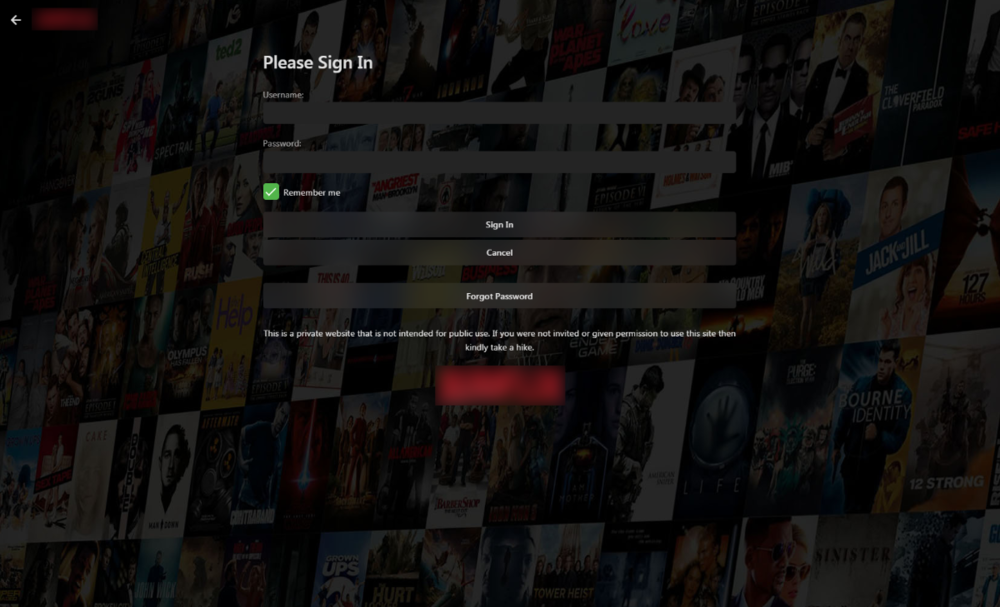
Don't mean to hijack but I'm using Emby docker in Unraid and wasn't able to locate the manuallogin.html file. So I found a way to do it using custom css only. The downside is that this will also change the background image on all of your settings screens which I personally do not mind too much. Just change the settings theme to one that works with your background ("dark" theme works well with the background in my example below). Backgrounds on the homepage, categories and movies/shows are not affected if you have them turned on. Feel free to use my background image (not mine but I modified it to look "netflixy"). /* Background image on Login screen */ .backgroundContainer{ background-image: url(https://i.imgur.com/dXB5cfN.jpg)!important; } Image Links: 15% Opacity: https://i.imgur.com/pMZxedJ.jpeg 15% Opacity w/ Large Fade: https://i.imgur.com/YPnzXwJ.jpg 15% Opacity w/ Small Fade: https://i.imgur.com/dXB5cfN.jpg 10% Opacity: https://i.imgur.com/qLSkLYB.jpg
 1 point
 -
This will be resolved in Emby Server 4.6. Thanks.1 point
-
** I didn't originally do this because some people still wanted HTTP only, not SSL, but SSL is so mainstream these days, I updated Post#1 config to include the below info. add_header Strict-Transport-Security "max-age=15552000; preload" always; will tell the client to only use SSL going forward, AFTER their first visit to the SSL version, this is already included in the base config in post #1 But add this in as the first server block: server { listen 80 default_server; server_name _; return 301 https://$host$request_uri; } *none of your other server blocks should contain "default_server", well they shouldn't in a somewhat normal config that is.. lol with the above server block you will need to REMOVE (the below listen directives) from all of your other server blocks.. So all of your server blocks should only listen on your ssl port which is usually 443. this way none of your servers blocks are listening on 80, so any request to any domain name or ip address on port 80 will fall into the above trap, then get redirected to the SSL version which WILL match your other server blocks that are only listening on 443, then the client will pick up the Strict-Transport directive and not need a redirect going forward. listen [::]:80; ## Listens on port 80 IPv6 listen 80; ## Listens on port 80 IPv4 Yes its true mine tests to a B Because I enable TLS 1 and weaker 128 bit cyphers for compatibility reasons.. If you are not worried about that you can force higher security encryption.1 point
-
1 point
-
Hi in Video conversion you should add a audio bypass to keep the original audio codec's intact like dolby atmos and dts audio1 point
-
@Luke Thanks. I can confirm the conversion jobs are working as expected for top level folder/Library. Do you know if Emby will link each movie with the previously downloaded/converted versions that sits on another drive if I create the sync job exactly as it was before and point to the directory with all the optimized files?1 point
-
As topic says, its simply not showing anymore. Server is working fine. Please advise?1 point
-
Maybe I'm misunderstanding the OP's concern, but anything the *client side* could do to obfuscate the password before sending it to the server could be undone by anyone who bothered to peer into the javascript doing the obfuscating. So, the exercise is pointless. Only TLS or another transport encryption scheme can provide protection at that point. The security issues come in in failing to transmit securely or the server *storing* the passwords in plaintext instead of salted/one way encrypted with only the ability to check for password matches by test encrypting the incoming text.1 point
-
Or use Extension/Add-in for your browser of choice, I'm using one for Edge Chromium for exactly that purpose.1 point
-
If you restore the users,yes.1 point
-
Es muy fácil gracias a este estupendo Team.... Metes los archivos en un pendrive (FAT32), lo pinchas en el TV y te sale un mensaje pidiendo la instalación... Tan fácil como eso... Te dejo el enlace al tutorial y los archivos para instalar. Si necesitas ayuda, dímelo. Samsung Tizen SmartTV (2015 - Present) Beta app Install from USB - Samsung Smart TV - Emby Community EDITO: Se me olvidaba comentarte que lo pruebes, porque es una maravilla lo bien que funciona Emby. Un saludo, Rubén.1 point
-
It is because you need to check the advanced tab of your TV library. At the top will be what you want to change. Change this from use file creation date to use date scanned into the library.1 point
-
I used it for another reason. I have YouTube TV which I love for live TV. But I happen to love using Emby as DVR instead of YouTube's DVR. Just wish I could skip through commercials on either in a faster fashion. Commercial free hulu has me spoiled!!1 point
-
@vdatanetWorked like a charm, thank you!1 point
-
Add to Play Queue while 'casting' from the web client, is not queuing the item, it is playing the item immediately replacing anything alreadly playing.1 point
-
Is Emby able to see your directories now? If you didn't add the michael user to the emby group you may want to do so with this command: sudo usermod -a -G emby michael The reason I suggest doing would be to allow you to delete files and/or folders created by Emby, should you wish to do so, such as old TV Series folders and such.1 point
-
Hi, we're looking into this. Thanks for reporting.1 point
-
Ah, i found it, i was forwarding to the Qnap but i had to forward to the Windows server of course! This seems to work, however, it seems Nginx is not switching to https by itself, so Emby is accessible unsecured...1 point
-
With additional tabs being added to content types, every content type library needs a Landing/Default screen option on Home Screen settings. Needed Default screen options Mixed Content Home video and photos1 point
-
Emby Server 4.5.4 is currently rolling out to address a few small issues with the previous release. Here are the highlights: Fix regression in 4.5.3 causing slow browsing and search performance in certain situations Fix regression in 4.5.2 causing incorrect items to be queued to conversion tasks Fix Nvidia HEVC level detection View the full article1 point
-
Why does that need to be done? It does not matter if something transcodes or not as long as the hardware you have can handle it? As long as I am happy with the final result then what I have is at least in the running for the "best" hardware for me and what others think or believe does not matter at all. Media playback is only meaningful to those that are watching it. As with "beauty" "best" is in the eye of the beholder.1 point
-
This analogy would only be relevant if you used a 1970 MG instead of a Corolla because it would always be breaking down, you'd always be looking for parts or troubleshooting some obscure issue, it would be missing most of the newer items you want to access and it would be difficult to drive1 point
-
I'm assuming you're recommending the Roku Ultra 2020 -- currently $79 at Amazon. Or even the Roku Ultra LT at $65. The thing I like about these Roku's and the more expensive Shield/AppleTV is that they have an actual Ethernet port and don't have to rely on Wifi. Just out of curiosity, what HTPC hardware do you use. It'll almost have to be more expensive than the Shield but I'm curious what CPU/GPU and other hardware specs actually work.1 point
-
Forget it. This has been "in development" for 2 years. Not going to happen.0 points