Leaderboard




Popular Content
Showing content with the highest reputation on 12/17/20 in Posts
-
I'd really like to have 2 Factor Authentication added to the login screen. It's just this (optional) extra layer of security to help secure the server (which, especially if people use camera uploads) contains pretty private data. There are for every type of programming language quite a few libraries available, so implementation on a server shouldn't be too hard to realise1 point
-
Be able to create playlist based on a certain criteria, like genre and or year, in order to create a dynamic playlist that it refreshes automatically when new content is added. This way you can for example, create a tv comedy playlist from the 90's, or a new sci-fi Movies playlist. Some other criteria for rules could be the rating, watched/unwantched, score, tags, language, audio codec, etc The possibilities could be endless1 point
-
Pretty simple suggestion. I have multiple users for my Emby server. If I want to do continuous maintenance on the media, I have to tell everyone. some of them are harder to reach than others ( i.e. no Facebook or Skype chat etc. ) It would be great if say... on the admin panel, I could hit a check box that enables 'maintenance mode', where the server still runs does everything as normal, but instead of the login screen it displays a maintenance page saying the server is unavailable. Even better if I were able to directly put a reason in a text box that would then display on the login screen as well. Not really sure what others would think of this, but for me it would be quite helpful. mostly if I want to make sure no one is trying to access content I know won't work until I've done a full library scan again. Thanks for reading. -Kyle1 point
-
Feature Request: Have User Groups and all settings applied at the Group Level That way you can just assign users to the appropriate Group and all settings will be inheritated.1 point
-
It would be great if i could set the server to delete certain shows after a user has watched it. I happen to watch "The Daily Show with Jon Stewart" and "The Colbert Report", everyday, and with "News"ish type shows, there is no need to keep the episodes around. So i would like to set MB to auto delete those 2 shows, 3 days after one user has watched it.1 point
-
Hello, Perhaps I am not the first one to ask this question but it will be very cool if this feature could be implemented. I have 2 servers one at home and the other at work. ( and soon a third one...) So I have a movies library called movies on each server. I would like to see all the movies from a single 'virtual server location' when I use the app (ios or android ) where I will see only one movies library containing movies informations from the movie library at work and the movie library at home. It's an aggregation of movies informations from the movie library at work and the movie library at home. In fact when a user have multiple servers it will be perfect if another choice in the server list called "all servers" for example appears automatically with a merge of media informations from librairies with the same name on different servers.1 point
-
This post contains status info on the 4 Kodi add-ons that support Emby playback in Kodi. Kodi Media Source Info There are two main ways for Kodi to display media items: From its internal database using native c/c++ (Syncing) As a list of ListItems generated by an add-on in Python querying an external server (Dynamic) There are advantages and disadvantages with both of there when dealing with external sources. From the internal DB (Syncing) Pros Uses the native Kodi internal display mechanisums Fast access and display, as fast as it is ever going to get All local data from the local DB Other Kodi add-ons can use the data form the DB Cons Can be problematic to sync data to and from external sources Keeping data in sync, data can get out of sync Large data changes or constantly changing data on the external source will cause lots of sync triggers Getting syncing correct is not trivial As a list of ListItems generated by an add-on (Dynamic) Pros No DB sync task is needed Data is loaded from external source when it is needed (like a web page) Data will always be the latest from the external source Changes on the external source show up immediately on next request Cons Add-on (Python) data processing is not as fast or local DB and c++ code External server query speed becomes part of the delay in displaying items Other add-ons can not access items Add-ons use different approaches: EmbyCon :- uses only dynamic add-on generated views Emby for Kodi :- uses a combination of DB sync and dynamic Emby Next Gen :- uses a combination of DB sync and dynamic Kodi MediaImport :- uses only syncing Add-On status: EmbyCon Status : Maintained by community members (TeamB) Kodi 18 : Stable Kodi 19 : Stable Source : https://github.com/faush01/plugin.video.embycon Emby for Kodi Status : Not supported, end of life Kodi 18 : Stable Kodi 19 : Not Supported Source : https://github.com/MediaBrowser/plugin.video.emby Emby Next Gen Status : Maintained by Team Emby (quickmic) Kodi 18, 19 : Not Supported Kodi 20, 21 : Stable and Beta Source : https://github.com/MediaBrowser/plugin.video.emby/tree/next-gen-dev-python3 Kodi MediaImport Status : Maintained by Kodi team and Emby community (Montellese, LongMan) Kodi 18: Not Supported Kodi 19: Beta, under active development from Kodi team member Source : https://github.com/Montellese/mediaimporter.emby1 point
-
A checkbox in the server settings somewhere to hide the domain and IP address in log files so they can be uploaded for troubleshooting without needing to be edited.1 point
-
While Emby already has recommendations built in based on previously watched items I find they are not all that helpful. They seem to be based on genre only, for example, because you watched a comedy here are other comedies in your library. I do like how the also directed by/appear in recommendations work though. What would be great is if Emby could incorporate Trakt's recommendations as they are much more sophisticated. Trakt's recommendations are not only based off of what you have previously watched but also what your Trakt friends and other Trakt users have watched. It takes user ratings and trending/popular media into account. Ideally Emby would include full Trakt integration allowing users to rate media after watching, view lists and recommendations, and view upcoming media all from within Emby but for now I think recommendations would be a nice addition. Trakt has the potential to give Emby that community feel and allow users to discover new media, find something to watch, and recommend media to other users. http://docs.trakt.apiary.io/#reference/recommendations1 point
-
It would be useful if the server (or perhaps clients) could cache most (if not all) content images (posters, backdrops, logos, etc) for movies, TV series and seasons. This would mainly be of benefit when a portion of someone's content is offline but the users would still like to view the content to know what exists. I think caching on the server would be preferable, then all clients could make use of the same cached images. if you think this would be a useful feature, please click the "Like This" button on this post.1 point
-
Hi, On the Server you can currently see active devices on the dashboard, and consequently which users are watching what on what media. However, there's no way to abort these active devices to either conserve bandwidth, conserve server CPU, or simply to stop a renegade process. One use case that would be particularly helpful is when you're casting from the phone app to ChromeCast. If the phone gets interrupted, you lose control over the stream so that the TV stops showing whatever you were watching, and there's no way to stop it or regain control over it. Instead of having to stop and start the entire server, it would be nice to just click on that particular activity on the dashboard and press KILL (or perhaps a less dramatic word - cancel?) Food for thought? -Florux1 point
-
Please read this post first. I was wondering if it would be possible to add something that would allow you to skip the intro to shows automatically while binge watching. When watching Netflix it does this for some shows, and im not sure if thats a feature of Netflix itself or a Chrome extension i use called "Flix Assist" but it would be a nice feature to have within Emby as well. and possibly even create a custom timed skip for specific shows1 point
-
I would like to be able to mark individual media items or even perhaps entire libraries to be excluded from media scans. If I have retrieved all the metadata and images I want for a particular TV series or Music collection and I know that the files will never change and the metadata should never change, I would like to be able to exclude it from scans to a ) reduce scan time b ) decrease the likelihood of unwanted changes being made c ) reduce network utilization I've noticed that even with series that have not had any new episodes in years (and no changes have been made in my filesystem) there is still information being downloaded from metadata providers. I suppose that is to check to make sure it is current/complete, but it is a waste of my network resources which are not plentiful. Perhaps this could be implemented by adding the option to not rescan media that has been marked as locked.1 point
-
No not really. I typically just load up the guide in Emby I want to use. For M3U files I'll typically use a DISH/SAT provider since the typically have the most channels and east/west feeds. I'll then go their site to get the channel number and name of channel and cross reference everything. I too use a spreadsheet for this type of thing.1 point
-
We're looking into supporting the new M1 devices. Thanks for the feedback.1 point
-
Hi, I suppose it's possible. Perhaps a floating button that only appears once you've scrolled down a certain amount.1 point
-
I have 4 accounts on my Emby server, which runs on a separate Raspberry Pi than any of the clients. My account is the administrator and has most privileges. I have an account for my parents, my sister, and my nephew and niece that are users only, so I don't want them to change settings in the server. When I log in via Emby for Kodi, My account was able to add permanent users, but the other 3 couldn't. Clicking on Permanent Users did not display the popup for them. After playing with settings in the server, I was able to get the popup and add Permanent Users only after I enabled "Allow this user to manage the server" on all accounts. I want make my sister's account a permanent user on her children's account, so movies she watches with them will be marked as watched on her account. This behavior is consistent on three different devices that are running Kodi (2 Raspberry Pi and 1 Windows 10). I already had a Kodi profile to show my watched status, but share that through Permanent Users to my parent's account when we watch together, but it worked because my account already had "Allow this user to manage the server" enabled. Why is "Allow this user to manage the server" required for an Emby For Kodi user to add a Permanent User?1 point
-
Not bad at all. You do have to do a manual install through the Synology web interface at the moment though and figuring out which of the Synology builds works for your model can be a little confusing. But the installer will tell you the package is incompatible, so you can just keep trying until one works. Apparently Synology is slow to approve 3rd party packages right now while they're rolling out their new OS.1 point
-
Hi, please provide an example. Thanks.1 point
-
I found a good way. Paying cheaper ... .. i took a VPS. ( Very good price). And i reinstall all my server on it . -. Im using it with google drive and it is working really good .. ( linux - ubuntu ) I appreciate the time you take to talk me .... Thanks1 point
-
As a Brit I know exactly what Chalklands is getting at, but I think it's a lost cause to be honest! When I was at school a billion meant a million million (a thousand million was a "milliard") and who remembers that today... So I live with Seasons1 point
-
Yep guss you got me wrong. I am aware that that button is kodi stock.1 point
-
From what I remember about audiobooks support in E4K, Angelblue once implemented it via plugin listing, so without database sync due to the fact that Kodi's database doesn't support resume positions for audio at all. But this was removed later because of Emby's general lack of support for audiobooks. But what I tested at that time was better than nothing, resuming worked (limited by Emby server's resuming capabilities for audiobooks). So maybe it's worth to examine this approach again...?1 point
-
fyi, next version will requrie a complete database resync. I had to add addition info in the DB to get srt subtitles working.1 point
-
Thanks for the info, I will then create a new library with type "music" in Emby and put my audiobooks there so I can sync them for Kodi. I never saw any difference between these two library types in practical use anyway! Looking forward to testing the new version once it is ready. At the moment, I can only use the debug version you sent me, the build afterwards (735 I think) just stalls and I can't play files (no entries in log).1 point
-
You are right after reading and setting the marks it works1 point
-
No, wasn't supported in 4.x and isn't in 5.x. If Kodi supports Audiobooks native, it should not be that hard to sync it too. I put it on the todo list, but for now I leave it as it is. Currently I'm stabilizing the alpha version bringing it to a beta state and check it in to repo. I'll release a new version in the next days for final alpha tests. My target date is beta repo check in before Xmas, but depends on the final tests...1 point
-
Is it possible to play music stored on the phone in the android app? I tried to add it as a library, but it doesn't give me the option to browse the phone, only the PC.1 point
-
With additional tabs being added to content types, every content type library needs a Landing/Default screen option on Home Screen settings. Needed Default screen options Mixed Content Home video and photos1 point
-
Up next is also iffy for me on the shield pro. Sometimes it plays thext video after a delay and other times kodi just kinda freezes1 point
-
The OP might like to remove his external IP from the images. Paul1 point
-
So, checked next up addon. The popup appears but when I select play now KODI will crash and gets closed. The Shield mainmenu appears. Not shure if it is a Shield, up next addon, embyforkodi or even KODI 19 issue.1 point
-
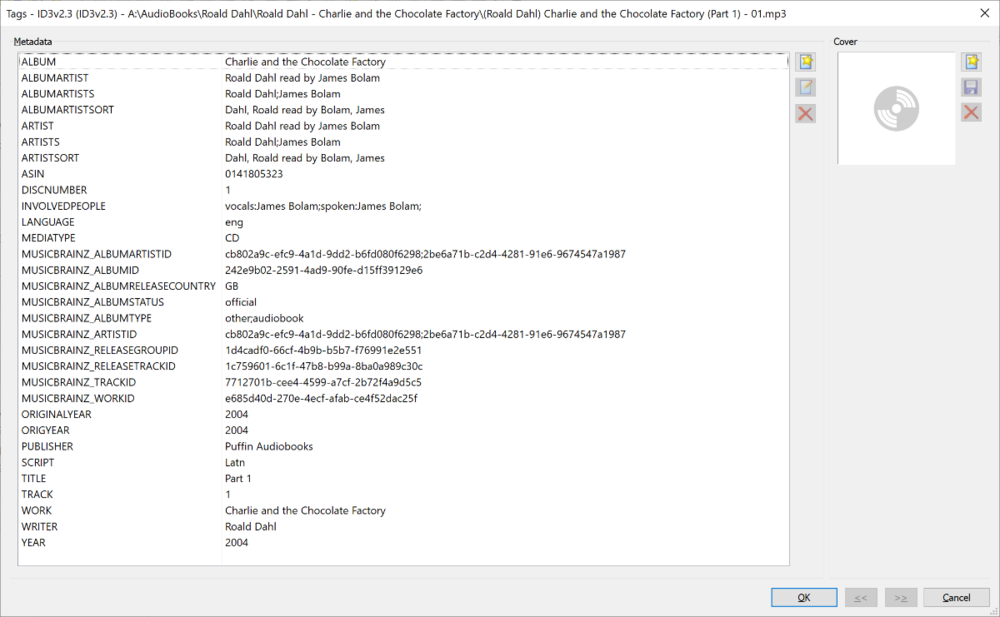
thought it might help to show how Picard tags an audio book looks like author and reader is stored in ALBUMARTISTS and ARTISTS, author first, readers 2nd +, alternatively for extra detail looks like if present author (writer) is also in WRITER and readers(performers) are also in INVOLVEDPEOPLE along with their role (mbzids would have to be derived from [position in] ARTISTS tag still, if even possible) PUBLISHER is akin to studio for movies/tv Maybe if audiobooks and their libraries get a makeover at some point, they might show (as a suggestion) Author (Like Albumartist), Performers aka readers (Like Artists) ,Work (Like Album ), Publisher (Like Studio )
 1 point
 -
I found your article on media file naming and renamed the files according to TheTVDB and the first file as S01E01E02 and the re-scan aligned them up correctly. Thanks for having the KB article published.1 point
-
This is awesome, thanks for posting. I've been using your nginx config since you first posted it way back when you had a guide on how to setup your own subdomain on namecheap. Still working perfectly today with the tweaks you've made along the way.1 point
-
Thanks. That worked well, 1062 devices down to 15 !1 point
-
Emby Server 4.5.4 is currently rolling out to address a few small issues with the previous release. Here are the highlights: Fix regression in 4.5.3 causing slow browsing and search performance in certain situations Fix regression in 4.5.2 causing incorrect items to be queued to conversion tasks Fix Nvidia HEVC level detection View the full article1 point
-
I have tested the new decoder in 4.5.4.0. This has solved the issue for me as well. Thanks :)1 point
-
Personally, I think the blue background accents our color in the logo much better. Our logo is supposed to be that color. That is what we have copyrighted so changing the color on it is a no go. Fine for you to use personally though.1 point
-
To gauge interest... What if you had the ability to "Forget" a series for the purposes of Next Up display. That is, it would no longer show in Next Up - unless you watched another episode. Sometimes you maybe watch a series for a while and, even though there is more of it or more is made later, maybe it isn't as good as the earlier seasons or maybe you just don't have time for it anymore. So you'd like it to quit showing up in your Next Up list so it is less cluttered and you can focus on the series you are actually watching now. If you start watching it again, the "forget" would be forgotten and it would start to show up in Next Up again.1 point
-
Would be great to see lyrics (even just embedded) at this point... There are many quick and painless ways one can go about embedding lyrics into their music files.1 point
-
Hi, not currently but it's planned for the future. Thanks.1 point