Leaderboard




Popular Content
Showing content with the highest reputation on 12/16/20 in Posts
-
NGINX and emby Config Version 1.0.4 Last Update 1-1-2024 Update by Pir8Radio Why Use NGINX reverse proxy ahead of my application servers like emby? With NGINX or any reverse proxy ahead of an application server you have more control over your setup. You can do things the application servers were not built to handle, have better control over your security and logging, replace lines of code without editing the application server code, better control of caching, etc, etc.... One of the main reasons is so that you don't have to open a new port on your firewall for every application server you host, all you really need to open is 80 & 443 and the internet can reach all of your different servers through one entrance. Will NGINX work on my OS? Most likely, you can find various versions of NGINX for most OS's and they come in different flavors, with options baked in, or just the bare NGINX that you need to compile. See below for download links to get you started. Will NGINX break things on emby? Absolutely if you don't configure it correctly! I HIGHLY suggest when choosing a scheme to setup your domain URL you choose SUB-DOMAIN and NOT sub-directory, more below. Also if you come to the emby forum with things not working, or issues you have and you use a Reverse Proxy, PLEASE make sure that is one of the first things you mention in your forum post. ESPECIALLY if emby works on one platform or client, but not another. So many times people complain "but it works on chrome, so I didn't think it was the reverse proxy". Mention you have a Reverse Proxy please. If the reverse proxy is setup correctly it should be totally transparent to the user and the application server (emby). I'm not going to go into how to purchase and setup a domain name. Lots of how-to's on that out there. Once you have a domain name and its pointed to your IP address, you can go to that domain name and hit your server then continue on.... Sub-Domain vs Sub-Directory: Lets say your domain name is: domain.com there are two main ways you can direct traffic from the internet to your backend application servers like emby. One is sub-directory, something like domain.com/emby or domain.com/other-server This is doable in nginx, but there are some catches and you need to know how your reverse proxy and application server work in detail.. This often breaks different features in emby and other application servers.. To keep with our "Totally Transparent" goal sub-directory doesn't work well, it requires a lot of rewriting and work-arounds to make it work smoothly, if you choose sub-directory you will run into issues you will need to address. The other option is Sub-Domain, this is the cleanest, most transparent, easiest to setup and maintain, it's also what I highly suggest you setup. A sub-domain looks like: emby.domain.com or other-server.domain.com The below config is based on Sub-Domain I will include a sub-directory example as well. NGINX Downloads: Official nginx downloads(LINUX): nginx.org Official nginx downloads(Windows): nginx.org WINDOWS users I suggest this version: nginx-win.ecsds.eu download links are at the bottom of the page. This Windows version has lots of cool features compiled into it already, and is optimized for windows. They keep up with updates, its a FREE (for non-commercial) third party build that I highly recommend. Additional Links: Content Security Policy info (CSP) (For Advanced Users): A CSP WILL break your server if you don't know what you are doing, I suggest reading up, lots of googleing, and understand what a CSP's function is and is not prior to venturing into this area Example NGINX Reverse Proxy Config: 3-29-2020 - ADDED A LINE FOR CLOUDFLARE USERS SO THAT THE X-REAL-IP HEADER IS CORRECTED. THIS ONLY EFFECTS Cloudflare USERS. 4-11-2020 (V1.0.1) - MOVED proxy_buffering off; FROM LOCATION BLOCK TO SERVER BLOCK 12-18-2020 (V1.0.2) - ADDED 301 SERVER SECTION TO FORCE ALL TRAFFIC TO SSL. 9-23-2021 no nginx config change, but cloudflare changed how they cache video files, so emby users that use Cloudflare now need to add a rule like below to make sure video is seekable and playable. 8-18-2022 - added a line for photo sync to cover large uploads of videos and images. (client_max_body_size 1000M;) 1-1-2024 - changed http2 setting per @weblesuggestion in this thread post # 1309363. ** The below "Page Rules" are only needed for Cloudflare CDN users, otherwise ignore. worker_processes auto; error_log logs/error.log; events { worker_connections 8192; } http { include mime.types; default_type application/octet-stream; server_names_hash_bucket_size 64; server_tokens off; ## The below will create a separate log file for your emby server which includes ## userId's and other emby specific info, handy for external log viewers. ## Cloudflare users will want to swap $remote_addr in first line below to $http_CF_Connecting_IP ## to log the real client IP address log_format emby '$remote_addr - $remote_user [$time_local] "$request" ' '$status $body_bytes_sent "$http_referer" ' '"$http_user_agent" "$http_x_forwarded_for" $request_time $server_port "$http_x_emby_authorization"'; log_format default '$remote_addr - $remote_user [$time_local] "$request" ' '$status $body_bytes_sent "$http_referer" ' '"$http_user_agent" "$http_x_forwarded_for" $request_time $server_port'; sendfile off; ## Sendfile not used in a proxy environment. gzip on; ## Compresses the content to the client, speeds up client browsing. gzip_disable "msie6"; gzip_comp_level 6; gzip_min_length 1100; gzip_buffers 16 8k; gzip_proxied any; gzip_types text/plain text/css text/js text/xml text/javascript application/javascript application/x-javascript application/json application/xml application/rss+xml image/svg+xml; proxy_connect_timeout 1h; proxy_send_timeout 1h; proxy_read_timeout 1h; tcp_nodelay on; ## Sends data as fast as it can not buffering large chunks, saves about 200ms per request. ## The below will force all nginx traffic to SSL, make sure all other server blocks only listen on 443 server { listen 80 default_server; server_name _; return 301 https://$host$request_uri; } ## Start of actual server blocks server { listen [::]:443 ssl; ## Listens on port 443 IPv6 ssl enabled listen 443 ssl; ## Listens on port 443 IPv4 ssl enabled http2 on; ## Enables HTTP2 proxy_buffering off; ## Sends data as fast as it can not buffering large chunks. server_name emby.domainname.com; ## enter your service name and domain name here example emby.domainname.com access_log logs/emby.log emby; ## Creates a log file with this name and the log info above. ## SSL SETTINGS ## ssl_session_timeout 30m; ssl_protocols TLSv1.2 TLSv1.1 TLSv1; ssl_certificate ssl/pub.pem; ## Location of your public PEM file. ssl_certificate_key ssl/pvt.pem; ## Location of your private PEM file. ssl_session_cache shared:SSL:10m; location ^~ /swagger { ## Disables access to swagger interface return 404; } location / { proxy_pass http://127.0.0.1:8096; ## Enter the IP and port of the backend emby server here. client_max_body_size 1000M; ## Allows for mobile device large photo uploads. proxy_hide_header X-Powered-By; ## Hides nginx server version from bad guys. proxy_set_header Range $http_range; ## Allows specific chunks of a file to be requested. proxy_set_header If-Range $http_if_range; ## Allows specific chunks of a file to be requested. proxy_set_header X-Real-IP $remote_addr; ## Passes the real client IP to the backend server. #proxy_set_header X-Real-IP $http_CF_Connecting_IP; ## if you use cloudflare un-comment this line and comment out above line. proxy_set_header Host $host; ## Passes the requested domain name to the backend server. proxy_set_header X-Forwarded-For $proxy_add_x_forwarded_for; ## Adds forwarded IP to the list of IPs that were forwarded to the backend server. ## ADDITIONAL SECURITY SETTINGS ## ## Optional settings to improve security ## ## add these after you have completed your testing and ssl setup ## ## NOTICE: For the Strict-Transport-Security setting below, I would recommend ramping up to this value ## ## See https://hstspreload.org/ read through the "Deployment Recommendations" section first! ## add_header 'Referrer-Policy' 'origin-when-cross-origin'; add_header Strict-Transport-Security "max-age=15552000; preload" always; add_header X-Frame-Options "SAMEORIGIN" always; add_header X-Content-Type-Options "nosniff" always; add_header X-XSS-Protection "1; mode=block" always; ## WEBSOCKET SETTINGS ## Used to pass two way real time info to and from emby and the client. proxy_http_version 1.1; proxy_set_header Upgrade $http_upgrade; proxy_set_header Connection $http_connection; } } }

 5 points
 -
I wasn't "my" topic I was the second poster, we both had two different kind of configs posted for different situations. I was piggy-backing off of another users post.. But I think this is better to have them broken out now anyway... I'll keep up with my post to make sure its up to date... no worries... I just wanted to make sure it didnt get deleted for some policy reason.. Thx guys.2 points
-
Thanks for the prompt responses everyone..2 points
-
Stupid Arris modem that didn't allow port forwarding to work even though it was setup correctly because of other firewall blocking settings the took priority over port forwarding. Kind of have the wrong order of processing for those options. But regardless, we got it fixed, open and working for remote use.2 points
-
Great. I'm going to report this to them. This just gives us the perfect amount of info to give them. Thanks so much to both of you!2 points
-
@grbharatiand @cayars you can use the channels below for guide data. BT Sport 1 - 867 BT Sport 2 - 868 BT Sport 3 - 869 If your looking for Sky Sports Mix as well that moved to 895 I use this site for finding the channel numbers now, then I manually map them in Emby: https://www.sky.com/tv-guide/20201216/4101-12 points
-
Unfortunately I'm not sure that we can do this. When we submit the app to the store, we indicate the app needs access to certain things, for example, network services to discover emby server on your local network, internet access to be able to communicate with your emby server away from home, or use our Emby Connect feature. Enabling those things is what triggers the windows platform to require the Xbox live sign in.2 points
-
It would be great to be able to configure channel groups in LiveTV, which can be selected in the guide view (maybe as tabs) so that we can more quickly navigate to preferred channels using the d-pad. Perhaps start with Favorites by default, but be able to add custom groups (similar to collections) which we can add channels to (Network, Premium, Basic Cable, Kids, News etc.).1 point
-
As I mention in a related post, I love the additional subfolders for Movie Extras (eg, Shorts, Scenes, Interviews, etc.)! It would be awesome to extend this functionality to TV Series as well. Specifically to add support for many/all of the same folders supported for Movie Extras, eg, extras specials shorts scenes featurettes behind the scenes deleted scenes interviews trailers As well as any additional folders that get added in the future (eg, hopefully Galleries). Support Placement of "Extras" Folders Within Each Season Folder, Plus A Naming Scheme to Link A Particular Extras Folder with a Specific Episode (eg, "\Season 1\E1 - Deleted Scenes\" for episode 1 deleted scenes): I want to clarify that it would be great if these various "extras" folder types could reside within each Season folder. So for example, within a Season 1 folder we could then have an "Extras" folder, a "Deleted Scenes" folder, a "Featurettes" folder, etc. And furthermore, that we could designate a particular folder to refer to a specific episode (eg, "\Season 1\E1 - Deleted Scenes\" for episode 1 deleted scenes). See more below, particularly why I think this would be so useful: https://emby.media/community/index.php?/topic/55915-emby-server-theater-additional-extrasspecial-folder-types-for-tv-series-similar-to-movies/&do=findComment&comment=587195 Thanks for your consideration! PS - If this is something you might like to see implemented, be sure to "Like" this top/first post (as well as any subsequent posts in this thread that highlight particular aspects of what you are interested in) -- "Liking" the top/first post helps the Devs to know how much interest there is in a given Feature Request.1 point
-
http://www.zimuku.la PLZ1 point
-
I Think adding Karaoke and CD Graphics support to Emby would be great for parties :) What do you think ?1 point
-
Well, Roku is back to being a complete package for my streaming habits. That was a tough 7 months or whatever of me thinking about buying an Amazon stick thing but instead just tolerating the PCM stereo my old Chromecast pumped out for HBOMax... https://variety.com/2020/digital/news/hbo-max-launch-roku-warnermedia-1234864416/1 point
-
Thank you FrostByte for pointing out the Emby Theater for Android beta. I was looking for a better client for nVidia Shield and this was a huge improvement. Only issue is I am using a Logitech remote via a USB dongle on the shield and I'm getting double keys on the arrow keys. Never seen it fail on any other app. I don't mind using the Shield remote. This has improved my Android TV experience immensely.1 point
-
Seems you haven't read carefully enough. UNC paths need to be prefixed as well in a way like this: \\?\UNC\server\share Example: \\mystorageserver\libraries\music ==>> \\?\UNC\mystorageserver\libraries\music1 point
-
@arrbee991 point
-
so go find the ombi dev. this has nothing to do with emby.1 point
-
@chef created a plugin to do that1 point
-
Well my guess that been removed for some KB matters or by mistake, really I tried to trace the logs, but it dead end for it. You did not get notify about it?1 point
-
I have pinned your new thread.1 point
-
Yes, 54 is the latest Stable. You can sideload the latest beta if you know how to.1 point
-
Yes, .55 was the first beta version this round. You could load the latest beta apk without joining the beta if you want the fix1 point
-
Yes, but is fixed in the latest beta releases since 54 was released.1 point
-
I don't recall seeing any reports of a problem with that button in .54, but there is a hotkey for the stats. Doing a long press of the Enter button will toggle the stats screen. ebr might need you to send him logs.1 point
-
Hi there, thank you for the response.. I have Roku's and a Shield TV Pro.. I know the issue with the Roku's where you need to back out of Live TV stream, but even if done correctly, there still seems to sometimes be an issue if there is a "buffering" situation during playback or if it needs to correct a bitrate issue.1 point
-
I use WIN 10, V2004, opt-in enabled long paths reg. MS docs I read the Information from microsoft, but it does not help solving our problem. I double-checked it again. I always use UNC-Pathes. And the FFPROBE problem appears when the path incl. filename exceeds 259 characters. No ifs and buts. Emby is NOT THE PROBLEM. Generelly Emby works fine with long paths >259. The API seems to be fine. But it uses FFPROBE to collect the information about the files. And FFPROBE does not work >259. An error code is generated. Maybe your windows-versions work different. Mine not. I shortend all paths. To make this shorting easy I coded an action with MP3TAG, which counts the characters and shortens the path. Not too bad, but better would be an update of ffprobe. @pmac You don't need to see the path. I created test paths for this operation like \\Audiobooks\Folder1Folder1Folder1Folder1Folder1\Folder2Folder2Folder2Folder2\Folder3 very long Folder3 very long Folder3 very long Folder3 very long Folder3 very long Folder3 very long Folder3 very long Folder3 very long Folder3 very long Folder\test.mp3 Little by little I reduced the path until FFPROBE does not generate an error code (259) @cayarsThanks for the note.1 point
-
@cayars has resolved the issue and I can now access it outside the network. Thank you for your help!1 point
-
I just deleted and rebuilt the folder. It is working correctly now. Not sure what the issue was.1 point
-
Step away from the keyboard1 point
-
Have you pulled up the Resource Monitor and investigated what it is? It is under the performance tab of your task manager. Then a link to it is down at the bottom. Perhaps Emby isn't consuming more resources than before but your hardware is slowly dying and access to the drives is slower? Is it perhaps that updates to your other softwares have increase the load they put on the CPU which leaves very little room for Emby to run inside without causing the problem? Have you identified some area of concern where Emby is shown consuming more resources than it should and dragging your machine down which will cause the other programs running on said machine to experience difficulties? We can make conjecture and say it isn't Emby. Emby is just doing what it always has. Then you can show us where we need to investigate. The best place to start to check is the Resource Monitor1 point
-
Okay never mind I'm so sorry, plugged in the ethernet cable and problem was gone. Thank you so much1 point
-
Best is always subjective. You cannot equate the best to what would play the media in the most beautiful way. Especially if best means.. boots up immediately and has all your apps easily accessible. What is best? Does best mean picture quality and sound? Does best mean easiest to use? Does best mean how simple the remote control is? Does best mean how easily streaming services can be accessed from it? The thread in itself is ambiguous as there is no real basis for the best unless you qualify the statement which best you mean. The best hardware is the one you find yourself coming back to when you have others available. The best hardware is what you always defend when others point out flaws with it. The best hardware is what is best for you. We cannot really help you except give you ideas what we think is best and our opinion on why. You are the best guess of what is the best hardware for your use case. We are just noise in your ear.1 point
-
mediainfo from UHD w/ DoVi level 7 HDR format : Dolby Vision, Version 1.0, dvhe.07.06, BL+EL+RPU, Blu-ray compatible / SMPTE ST 2086, HDR10 compatible mediainfo from streaming service w/ DoVi level 5 HDR format : Dolby Vision, Version 1.0, dvhe.05.06, BL+RPU1 point
-
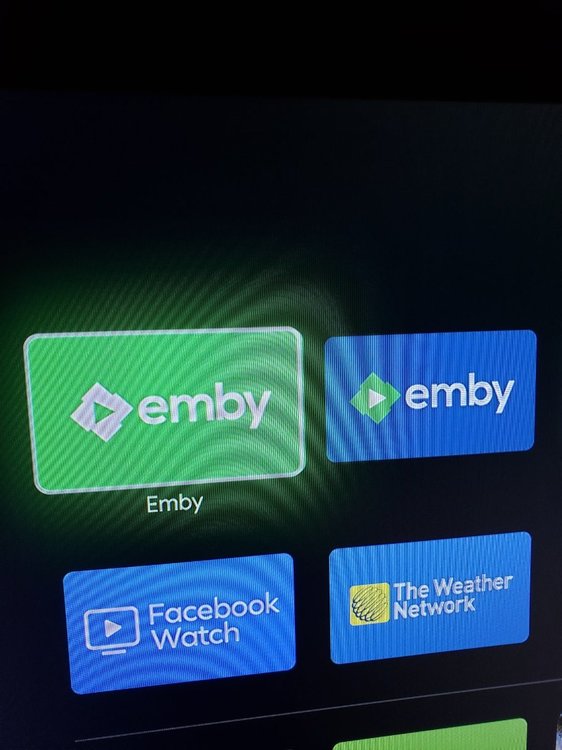
Hi guys! I recently bought the new Chromcast with Google TV (Android TV) and it was a blast! The system fluidity speed is amazing. I just decided to give a better look at the app banner of Emby so I generated a APK launcher for the Emby Android TV app and I think it's a better fit in my opinion. I'm a graphic designer since 7 years now so if you need something else just ask!✌ PS: I have the Emby logo in vector, that's why. The app banner size is 1280px × 720px and the green color is the same as the Emby symbol logo. Cheers!
 1 point
 -
That looks like any individual image will only ever get processed once. If the media changes, then your plug-in will never re-process it. Your cache key needs to be based on whether or not the processor should be run. So, for instance, if you are putting an overlay for audio type on the image, then the cache key should incorporate the specific audio type being displayed. That way, if it ever changes, your processor will automatically re-render the overlay.1 point
-
Changing request to be more broad. Really thought this request already existed but couldn't find it.1 point
-
of course it works, I was modifying the 'Colections' part of the scrpt by mistake, thanks for answering1 point
-
Still works. You may need to clear the cache/cookies from the last hour. That's what I do and then it works1 point
-
Thanks very much for your kind efforts.1 point
-
Aha! I tried 4:3 and 1:1. That definitely made a difference. For fun, I tried 3840:1600, but that got me back to square one. At a guess "auto" is just the native monitor resolution. And you were right, setting a ratio different from the screen just stretches the video. I guess I'll just have to live with it. Or watch on the TV. Thanks for the efforts!1 point
-
Seems there went something wrong while installation. I haven't tested migration from 4.x to 5.x yet, so probably there are some issues. It should be fixed by the next update. Currently I recommend, wipe the kodi userfolder before you install 5.x btw, that's one of the reasons, why it's not in the beta repo yet.1 point
-
The Windows install failed at building Levenshtein -- Wheel was not installed. Installed wheel via pip as it was not included in default package. (pip install wheel) -- Next Error message "error: Microsoft Visual C++ 14.0 is required." so I Installed Windows 10 SDK & C++ x64/x86 build tools from Microsoft Visual C++ 14.0 - Check out this article for specifics - https://www.scivision.dev/python-windows-visual-c-14-required/ The install then completed. Still working on - path to config file. Seems to be not working with any of the conventions for converting from a Linux path to Windows path, but I got it to work from command line. - XML TV Guide from locast, it doesn't seem to be populating so I'm using the Emby guide A little testing required, but it is working.1 point
-
Sorry, had to go grab groceries (food is important!). Installed 1.0.87 using USB - and it is reporting just a single client, and it seems to be working. I can remote control the session, and jump using the seek bar. Should I expect this to be the norm? Does the USB-installed process have a different resource conservation model?1 point
-
lol, its a Christmas mystery?1 point
-
Haha I did obscure it and my IPTV links... My first thought too Thor.21 point
-
I can confirm that the m2ts files when muxed to MKV stop transcoding TrueHD.1 point
-
hey. Don't make fun of my Corolla. man! My custom stereo in it is worth more than the car!1 point
-
I went through and removed all the .tbn files and refreshed the library. Looking a lot better. Still confirming this was the fix, but so far so good.1 point
-
Hi. The "Recordings" tab in Live TV is designed as a quick access list of individual items. For what you want, open your recordings library instead.1 point
-
It's possible for the future, thanks.1 point
-
2021. The year we get a vaccine, a new American president, and additional extras/special folder types for TV series. Here's a suggested timeline: January: Biden March: additional extras/special folder types for TV series May: vaccine It's gonna be a great year.1 point