Leaderboard




Popular Content
Showing content with the highest reputation on 12/13/20 in Posts
-
New version available: https://kodi.emby.media/Public testing/next-gen-ALPHA-build730.zip Fixes: Remote control Kodi via EmbyUI is working again Media Themes are working ...and lot's of code optimization Known issues: LiveTV not working in certain conditions Pending: Changelog Native mode Update from 4.x tests Local Trailers SRT Subtitle tests3 points
-
One of the nice things about MBC is that empty TV folders (after the latest show is deleted) are hidden. This makes Emby look very smart. I know @@ebr wants to get rid of this feature from MBC as he sees that this is better as a server feature that can be applied to all clients. I agree. So what does it take to get this useful feature into the Emby server? I'm hoping that asking nicely is enough, I'm also hoping that enough other users consider this feature useful enough ot include in the server. How about it, @@Luke?2 points
-
From a single item standpoint all you need is the Folder name as Emby identifies off of Folder name not filename. But as you read the rules for multi-version you see each item must have foldername.2 points
-
You need to edit manualy and with each update these files in root directory (change 'Emby' to 'YouDomain' i.e. in several places): index.html appheader.js manifest.json Beside fvaicon you also might be interested in changing the Emby splashscreen by changing these files to your own: logodark.png logowhite.png After that, remove cache and refresh the page2 points
-
Indeed2 points
-
You could use ffmpeg. Or ffmpeg batch Map – FFmpeg2 points
-
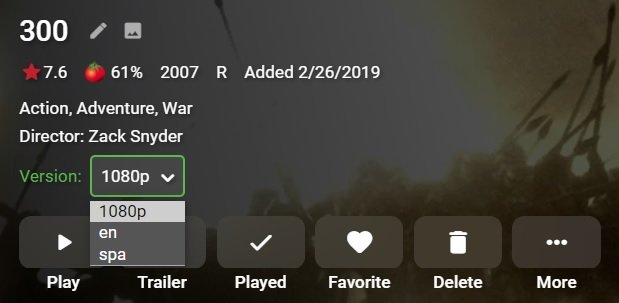
Is there a reason one file can not contain both audio tracks? But to your question would be multiversion rule per the kb. Each version must begin with the folder name, followed by " - ". example 300 (2006) 300 (2006) - en.mp4 300 (2006) - spa.mp4 300 (2006) - 1080p.mp4
 2 points
 -
Looks like this might be a duplicate of In that thread we seem to have concluded the issue is triggered by a movie having 4+ hours duration and a need for ffmpeg transcoding for any reason.2 points
-
In my house, I would like to see a User Profile selection similar to Netflix. Using my single logon, I would like my family to choose between who is watching. That way each of us can watch shows without marking it watched for someone else. In this scenario, I would have a 4 users in a Family Group using the same username/password.1 point
-
Also, It would be cool if we have various m3u lists and have the option to choose/assign each m3u list for each user.. Example. In user settings we can choose which library to give them for VOD so this shouldnt be hard enough to do it for live tv too no? USER 1 - Playlist 1 - Playlist 2 - Playlist 3 USER 2 - Playlist 3 USER 3 - Playlist 1 - Playlist 3 Etc etc.... *** Delete this message from another topic I opened because I posted it by accident there1 point
-
I'd like to have the option to clear 'alerts' in the dashboard. I realize that they go away on their own, but if I can clear them then it's more obvious IF a new alert comes through.1 point
-
Now that MKVMaker is is able to get a playable DV layer when ripping a UHD, It'd be great if we could get an overlay that would indicate either HDR or DV. (would at least be really helpful for me to quickly figure out which movies I need to rerip to get a working DV MKV.) Any chance of this happening in the future?1 point
-
Hi all, I spent some time on a new project: locast2dvr. It's somewhat of a rewrite of locast2plex with added functionality. Obviously massive thanks to the folks that wrote locast2plex! I decided to rewrite since I wanted to add functionality: Automatically downloads FCC facilities for station matching Ability to not only act as a HDHomerun tuner, but also as an m3u tuner, Ability to provide EPG data from Locast as XMLTV Run multiple instances in order to stream from multiple Locast locations Multiplex multiple instances in order to have Emby connect to only one server and one EPG Any todo's are captured as Github issues, but any feedback is welcome!1 point
-
Since some people will have their server accessible from the internet to facilitate remote streaming (E.g on mobile/away from home) is it possible to implement someone kind of brute-force detection blocking that could temporarily lock the account or ban the offending IP for a short time?1 point
-
Exactly. The part before the space can be 2, 3, or 4 characters long, but you have no need to know the format within that. But if you just can't hold back, here's the full detail. In effect, the first part of the code (the "outcode", which is the part you need) designates the sorting office the mail will go to for delivery, and the second gives the delivery round it will go out on. Paul1 point
-
But renaming the folder requires the equivalent renaming of the files to maintain those requirements. So just renaming the folder breaks things, which is expected, but renaming the files to match repairs things again. My earlier musing was because it hadn't been made clear back then that for this purpose the id is part of the name that must be matched - which has now been confirmed. Until then it could conceivably have been stripped off for separate processing. Paul1 point
-
Can't tell for sure but the double progress bar suggest transcoding, but is this a client or server issue? What does the Nerds Stats show on the client?1 point
-
That Guest dude seems to know some stuff.1 point
-
strm should work. Do you still have issues? About repo: It will be checked in as soon it's in beta state.1 point
-
Well technically there is via the multiversion plugin that groups by providerid no matter folder/naming/library. But with the plugin there is no way to have library exceptions. Automatic version grouping for movies - Plugins - Emby Community No as Luke and Paul mention the kb Multi-version rule applies for Emby to automatically group. Each version must begin with the folder name, followed by " - ".1 point
-
Yes that did help thank you1 point
-
@Popeye2468 A rerun of the Alpha 2 builds can be found here. Media Import Wiki/Downloads1 point
-
That could be. I'll know by tomorrow around 5:40am EST... (the alert shows up once daily at that time). Thanks Luke.1 point
-
It probably wasn't named correctly or doesn't match the download language because if emby server was aware of it then it wouldn't keep trying to download more.1 point
-
This has been discussed in various threads, but this thread is perhaps best suited to continue the discussion about DTS / TrueHD direct playback. The MPV player has received major enhancements such as HDR tone mapping and a substantial improvement in the playback of interlaced content. In my opinion the next step is direct playback of DTS, DTS-MA and TrueHD. The MPV player is fully capable of doing this, so I request client decode to LPCM for these format, especially to avoid direct streaming in favor of direct play.1 point
-
Hi. I think you misunderstood him. The point of this change is for the url shown to be the correct location of the media and not our url. Why do you want it to be different?1 point
-
Right. The UI could trim it at the first space.1 point
-
I surely will, it's okay to leave as is I want to make a webpage for the family to upload there photos and what not so it's best that way1 point
-
Done.
 1 point
 -
@atgomez6555 - What happens when you set CRF to 18 and preset to "very slow" in the transcoding settings?1 point
-
Sorry, I had thought about some German guy in that moment and mixed it up. It's 'Pos1' on German keyboards, but yes of course, it's 'Home' normally.1 point
-
Don't have a 'Pos1' key?1 point
-
mkvtoolnix can accept mp4 on the input side, if you don't mind ending up with mkv on the output side.1 point
-
That is 100% exactly what we are trying to avoid now.1 point
-
Do you guys only get the error when the "Convert Multi-channel AAC" option is set to "Yes"? That's the case for me. When i set that to "No", the error goes away and those 4+ hours movies play fine. Seems like the issue is triggered by the movie length and any need for ffmpeg to transcode ... direct stream bypassing ffmpeg works fine.1 point
-
As odd as it sounds, could this be related to the length of the film? I have 2 movies over 4 hours long and both throw this error. All my other movies are under 4 hours, and none of them have this problem. The Roku device has a setting called "bandwidth saver" which prompts the user after 4 hours of inactivity. I've checked whether changing this setting has any effect on the error, and sadly it does not. Still, perhaps the device is reporting back something related to this to Emby Server and causing a hiccup.1 point
-
I am confused both TVDB and TMDB have that Aired order. The wiki order is somewhat DVD order with the exception of Serenity being one episode.1 point
-
@ebr This has been resolved. Only had to map the SD channel (84), the HD channel (202) was already correctly mapped. Thank you for taking care of this.1 point
-
Hi, what can Emby do about this? You selected MovieDb for episode metadata so you're getting what's on MovieDb, right?1 point
-
Ok, so I think I've figured something out. It seems that Emby was NOT seeing my Roku as being on the local network ... the 4250000 max is what I have set for playback going outside the local network since I have 5 gig upload from my ISP. I increased that to 5 gig, and the playback worked (direct play since it didn't hit that limit). However, the Roku is in fact on the same network (192.168) as my Emby. I even tried setting the local IP on the Network tab to what the Emby server has, and it still thinks the Roku is "IsInLocalNetwork: False". Ultimately, I signed out of EmbyConnect and re-linked (using the Emby.Media/Pin) and now they are both seen as on the local network. Weird. Net-net is the 4.5.3.0 upgrade (or something unrelated?) jacked my Emby Connect from my Roku, causing Emby to treat it as an external device. I'm back to working as expected. 2020-12-12 15:20:24.271 Info SessionManager: Playback start reported by app Roku SG 4.0.4 playing Buffalo Bills vs. San Francisco 49ers. Started at 0 ms 2020-12-12 15:20:24.275 Info Server: http/1.1 Response 204 to 98.213.xxx.xx. Time: 38ms. http://98.213.xxx.xx:8096/emby/Sessions/Playing 2020-12-12 15:20:24.308 Info Server: http/1.1 GET http://98.213.xxx.xx:8096/emby/Items/17/Images/Backdrop?width=275&tag=e901a9eefd168aca7403be9274177bc0&quality=70. UserAgent: Mozilla/5.0 (Windows NT 10.0; Win64; x64) AppleWebKit/537.36 (KHTML, like Gecko) Chrome/87.0.4280.88 Safari/537.36 Edg/87.0.664.57 2020-12-12 15:20:24.310 Info Server: http/1.1 Response 200 to 98.213.xxx.xx. Time: 2ms. http://98.213.xxx.xx:8096/emby/Items/17/Images/Backdrop?width=275&tag=e901a9eefd168aca7403be9274177bc0&quality=70 2020-12-12 15:20:24.421 Info Server: http/1.1 GET http://98.213.xxx.xx:8096/emby/Users/ffb4305cfdac45be817c70d4bf1313ed/Items/4639?fields=Overview. UserAgent: Roku/DVP-9.40 (469.40E04190A) 2020-12-12 15:20:24.426 Info Server: http/1.1 Response 200 to 98.213.xxx.xx. Time: 5ms. http://98.213.xxx.xx:8096/emby/Users/ffb4305cfdac45be817c70d4bf1313ed/Items/4639?fields=Overview 2020-12-12 15:20:24.611 Info Server: http/1.1 POST http://98.213.xxx.xx:8096/emby/Items/4639/PlaybackInfo?UserId=ffb4305cfdac45be817c70d4bf1313ed&isplayback=true&maxstreamingbitrate=110000000&starttimeticks=00000000. UserAgent: Roku/DVP-9.40 (469.40E04190A) 2020-12-12 15:20:25.622 Info App: User policy for chris. EnablePlaybackRemuxing: True EnableVideoPlaybackTranscoding: True EnableAudioPlaybackTranscoding: True 2020-12-12 15:20:25.623 Info App: RemoteClientBitrateLimit: 4250000, RemoteIp: 98.213.xxx.xx, IsInLocalNetwork: False 2020-12-12 15:20:25.623 Info App: Bitrate exceeds DirectPlay limit: media bitrate: 4914672, max bitrate: 4250000 2020-12-12 15:20:25.623 Info App: Bitrate exceeds DirectStream limit: media bitrate: 4914672, max bitrate: 4250000 2020-12-12 15:20:25.624 Info App: RemoteClientBitrateLimit: 4250000, RemoteIp: 98.213.xxx.xx, IsInLocalNetwork: False1 point
-
Ok, now I don't know what the deal is. Everything seems to be working fine again. Bizarre. The only thing I've done in the last 24 hours is to restart the PC for Windows scheduled updates. Maybe just restarting everything did the trick. Sorry to waste your time gents, thanks for trying to help.1 point
-
Hi, This might help get you started for Live TV. https://support.emby.media/support/solutions/articles/44001160415-live-tv-setup1 point
-
What order?1 point
-
How are your files named and organized? What metadata fetchers are enabled on the library and in what order?1 point
-
Hi there, can you please go over a specific example? Thanks.1 point
-
Hi, yes we'll look at improving this. Thanks for the feedback.1 point
-
Thanks for the reply, Luke. I reinstalled WinTV10 and now it's working! Not sure what the problem was, but thanks for the reply! BTW, Emby is awesome. You all are doing really nice work here.1 point
-
I went back for the first time this past week. My daughter and I were the only ones in a large Dolby Vision theater. It was a Tuesday night but I don't see how Theaters can survive like this. The biggest problem is the lack of any new content and that is now a bit of a chicken/egg situation. Hopefully, in six months if the vaccine(s) come to fruition, things will move back to more like normal. Honestly, I don't understand the severe targeting of theaters with huge reclining seats. Certainly more distanced than any of the several airplanes I've been on in the past few months.1 point
-
For right now, you can temporarily remove your Premiere key from your sever, then bring up the app, try to play something and then purchase the unlock. We'll think of a better solution for the future.1 point
-
Agree with Sab39, I would like a feature like this too. When you conect to a remote server and have family members on your house, and the server is accessed by other people that dont live in your house, just remote connection as you do, the only way to see the login screen is via admin unchecking "hide this user from login screens when connected remotely" and also need to have your family members as another set of users on that server, this triggers the result that every other remote user that makes to the login screen can see our login user information, and as a collateral result these others remote users that has the option unchecked (hide from login screen when connected remotely) can be seen via my my own login screen selection.1 point