Leaderboard




Popular Content
Showing content with the highest reputation on 12/07/20 in Posts
-
Yes that should work2 points
-
Incorrect. A remux or direct stream will retain the HDR on a Roku. HLS with HEVC works just fine on Roku. Only when the video stream is transcoded will you lose the HDR. I have tested this exhaustively. On Roku the only problem I found is the Roku TV will incorrectly report support for ATMOS when in fact it only has support for DolbyDigital+ in 6 channels NOT 8. If a Roku TV attempts to play an DolbyDigital+ track with 8 channels it will hang your Roku TV. We will correct that problem. This is a firmware bug on Roku TV with firmware 9.4. When Roku corrects that bug we can remove the work-around for Roku TV for ATMOS. If the Roku TV does NOT display HDR in the top right as the video starts as shown in my screen shots the Roku does not understand the metadata. This is not a fault on Emby. This is a fault of the Roku video player as it interprets the data. We are merely dispatching the stream to the player. What the player does with that stream is where the problem occurs. If you see the same HDR logo I show above when the material begins to play you are seeing HDR on your Roku. Turn on stats-for-nerds and make sure it isn't a subtitle causing transcoding. That will cause the video to not copy and drop the HDR. As long as the video stream show as (Direct) on the stats-for-nerds you are getting the original video stream unmodified in any way.2 points
-
But we will improve this so that it auto logs in and becomes just add seamless.2 points
-
I'd really like to have 2 Factor Authentication added to the login screen. It's just this (optional) extra layer of security to help secure the server (which, especially if people use camera uploads) contains pretty private data. There are for every type of programming language quite a few libraries available, so implementation on a server shouldn't be too hard to realise1 point
-
I'll try to keep this feature request short and simple. When the Emby server needs to transcode audio to make it compatible for the Emby client, it will use a hardcoded value for the bitrate that cannot be changed. For example, if the audio gets transcoded to Dolby Digital AC-3, it will always use a bitrate of 384 kb/s. This value cannot be changed, even though Dolby Digital AC-3 allows a maximum bitrate of 640 kb/s. Although 384 kb/s is a decent compromise between quality and data, it is very compressed and the quality is far from being transparent. The same thing applies to every other audio codec the Emby server may transcode to, such as AAC. So the request is simple, allow users to specify the bitrate that should be used for transcoding audio. Thanks, Charlie1 point
-
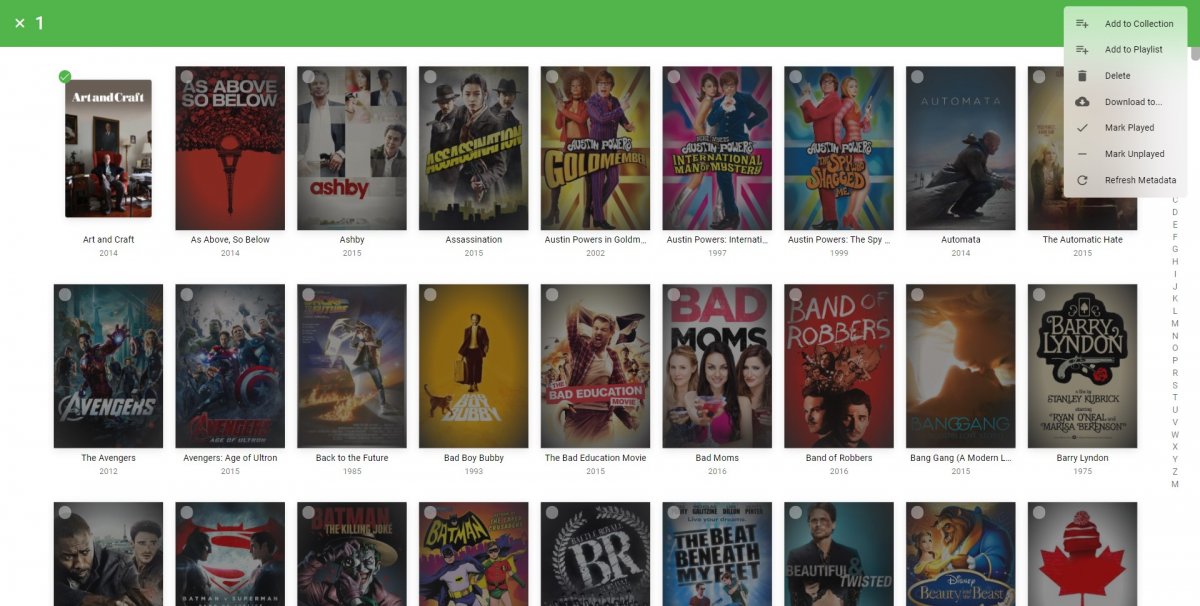
The Mult-Select in the Server web app is super-useful (I'm so grateful to those that introduced me to it!). But given that the Server web app has some excellent filtering functions (eg, in my case I make use of filtering by Tags) it would be very handy to have a "Select All" functionality, so that I can filter down to the results I'm looking for and then easily add them to a Collection (or, when eventually we have Bulk Editing abilities, open a Bulk Edit view on all the Selected items). Thanks! PS - If this is something you might like to see implemented, be sure to "Like" this top/first post (as well as any subsequent posts in this thread that highlight particular aspects of what you are interested in) -- "Liking" the top/first post helps the Devs to know how much interest there is in a given Feature Request.1 point
-
It would be useful if the server (or perhaps clients) could cache most (if not all) content images (posters, backdrops, logos, etc) for movies, TV series and seasons. This would mainly be of benefit when a portion of someone's content is offline but the users would still like to view the content to know what exists. I think caching on the server would be preferable, then all clients could make use of the same cached images. if you think this would be a useful feature, please click the "Like This" button on this post.1 point
-
It would be useful if onedrive folders can be added as a source all my pictures are backed up to onedrive so it would be useful if they can be added to the library. Thank you1 point
-
I've been waiting for this! And Peter Jackson did it right! Perfectly done, with consistency.1 point
-
Yep, the network library being used by the image library cannot decipher the address: 12-07 17:47:36.886 5390 5390 I Glide : java.net.MalformedURLException: For input string: "470:c21f:1::5%5D:10974" I'll see if there is an update for the image library for that OS version.1 point
-
That is not transcoding progress. That is the local player buffer.1 point
-
When you move the complete setup like this you've essentially done a backup/restore operation that is absolutely complete. You'll be moving the configs, databases, cache, metadata, binaries, the whole thing.1 point
-
Yes as Mixed Content type has never grouped episode into a series item with unwatched count. (all clients)1 point
-
Since it's a feature we pay for and we live in a more privacy-aware world these days, there should definitely be an option to have all files that get synced to the cloud encrypted on-the-fly. There are open source standards we can integrate to improve security without giving up functionality. I'd like to hear what you think.1 point
-
My Samsung TV cannot directly play PGS Sub format subtitles (commonly used in blu-ray media), but it can directly play the video and audio. In this scenario the server re-encodes the video track with hard subs... I might be watching a 4K H265 video and just because the subs aren't compatible, the entire video has to be transcoded. From my point of view, that's a load of unnecessary work that we can potentially avoid. Wouldn't it make a lot more sense to try converting the subtitle track to VobSub format, or at least have an checkbox option in the user profile to "Convert incompatible subtitle track to VobSub" if the incompatible subtitle track is the only reason for transcoding? VobSub has much wider support on devices, as is the case with my particular brand of TV. Implementing this would be great for those of us using who enjoy direct streaming blu-ray content to Samsung TVs and other devices that don't support PGSSub subtitles. There might be other subtitle formats I'm not familiar with that could also be converted with this method. It should be very easy to implement, here's a quick example of an ffmpeg command converting pgssub to vobsub: ffmpeg -fix_sub_duration -i "input.mkv" -c copy -c:s dvd_subtitle out.mkv The '-fix_sub_duration' argument is necessary for some reason. Without it, subtitles don't display at all or they display and never disappear.1 point
-
For me it's fixed, because since version 4.6.0.6 there no stream-copied HLS for interlaced content because it's transcoded for deinterlacing.1 point
-
Do you have an Xbox? I did not have an issue with the desktop version playing the file but my slower computer clearly "took more effort" to play the one with 29.976215. I don't really have any way to measure the load on the Gpu of a system like a cpu.1 point
-
There is both ColorSpace and VideoRange. Both of these are required to know HDR versus DolbyVision versus HLG? Maybe both should be there?1 point
-
Those would be great. Thanks for considering this.1 point
-
Entirely possible. Also possible to have "Stream Cards" like Android TV has which appear as a row on the detail screen. There is limited room though on these displays so what appears there must be important. Can also likely get a "transcoding progress" bar to appear on the video player transport bar on the Roku for transcoded progress with blue. Same exact way you see Android TV do this. Same exact way the server display it. Same colors. Same everything. Then you would know by the presence of that blue bar on the Roku that is was transcoding something. Then use stats for nerds to see what exactly is happening.1 point
-
This will be in our next beta release.1 point
-
If you only want 30 to 40 channels what I personally would do is create a custom m3U file. Just copy/paste the channels you want into the new m3U file and place it on your file system. Then instead of of give a URL when setting up the tuner, just give it the file location (ie. c:\m3u\custom.m3u)1 point
-
Thanks. I refresh Plugins and looks like might have been a permission issue with my docker container. Now merged Thanks!1 point
-
Totally agree, it was done right.1 point
-
I watched Fellowship over there weekend. These movies are cinematic legend. And the clarity of the picture is so good.1 point
-
Yes 4k finally, as the Hobbit, been waiting for this for years now.1 point
-
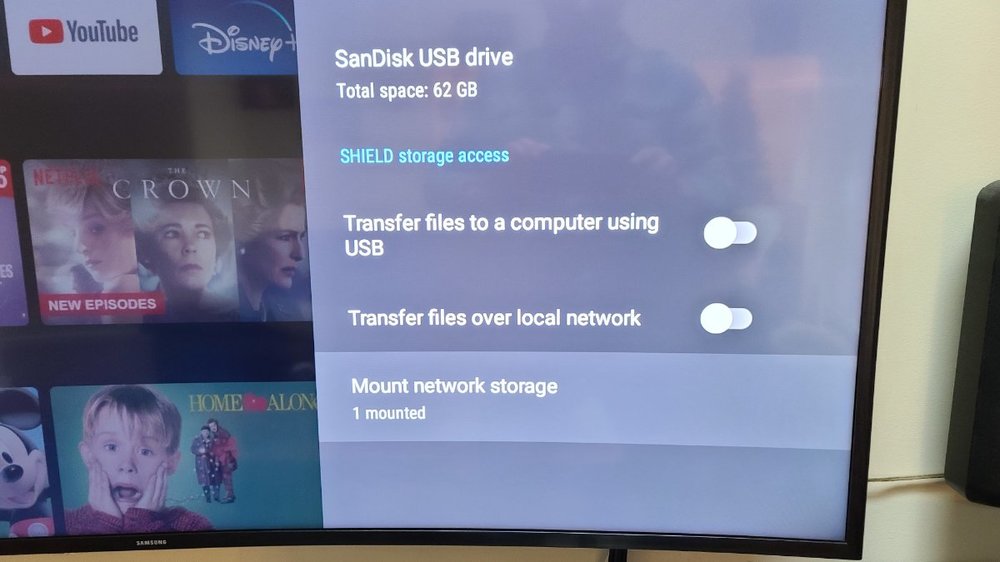
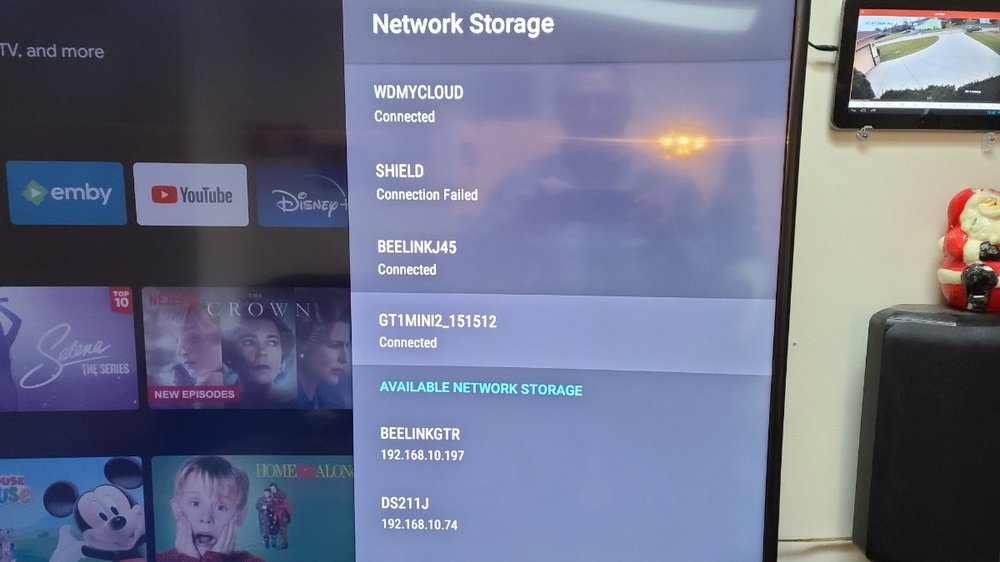
Perhaps you can email Beelink about adding the ability to "mount" the external NAS drives locally. I have previously emailed them a couple of times explaining the NEED for the ability to mount networked drives, like the Nvidia Shield does..... The Shield added this function after it had been out for quite awhile........ Here is their email address, and they will forward the message to their developers..... beelink@bee-link.com If you don't have the Shield, here is the settings that it created to mount the external networked devices.
 1 point
 -
We should have a choice to toggle what works for each of us or even better yet, code to accurately make the choice without user interaction.1 point
-
Yes, It is clear that there are pros and cons in this decision, something that satisfies everyone should be sought.1 point
-
I imagine that was finding our DLNA server.1 point
-
Where has the update originated from - email ? It sounds like a scam - Anybody can view and get your internet IP address. I would ensure you don't have any open ports on your router (other than emby, ideally only SSL/HTTPS). Emby has nothing to do with SNMP, nor have they anything to do with your ISP.1 point
-
Hi, Luke was raising this to my attention to to give you some assistance, but you got in before me. As you have identified, it is not possible to play (or pass-through) TrueHD from the TV to an ATMOS receiver. To provide more clarity, this is not directly a limitation of Emby, or something we can resolve. TV's use the Audio Return Channel (ARC) of your HDMI port to send audio from the TV to the receiver. Unfortunately the ARC has limited bandwidth and cannot handle the high bitrates of lossless audio such as TrueHD/ATMOS. While the latest version of ARC, known as enhanced Audio Return Channel (eARC) can handle these bitrates, it is only supported on LG's more recent models and unfortunately LG has not made it possible for 3rd party applications to utilise this for TrueHD or ATMOS support. Therefore, as you will come to realise, this is a TV hardware limitation that will affect all applications, including Kodi. This is not just an LG TV problem. The only hardware that I am aware of that will allow you to make use of the original TrueHD/ATMOS audio track is nVidia shield (pro version, don't buy the cheaper one as it has known limitations). If you are interested in this path, there are many on this forum who can provide advice on the performance of ATMOS on nVidia shield with Emby. Try posting in here if you have some questions : Android TV / Fire TV - Emby Community For more information on ATMOS playback , review this article. Your question and issue is common and there is a lot of discussion in this LG forum related to ATMOS playback. Why does the Emby App for my LG TV not play the Dolby Atmos TrueHD Audio without Transcoding? : Emby I hope this helps.1 point
-
@JeremyG - Wait for the next beta. Then it will be gone and you'll see a "HEVC CUVID" entry. Bottom line is that CUVID is the old one and NVDEC.Ex is the new one. We have switched the defaults for the next beta and you should just stick to the defaults (CUVID not selected).1 point
-
Support for composers is coming in Emby Server 4.6:1 point
-
@Erik Support for composers is coming in Emby Server 4.6:1 point
-
Roku doesn't even recommend bitrates over 25Mbps. Roku recommends HEVC for UHD encodings. Roku 4K devices support HEVC up to level 5.1 and bitrates up to 25Mbps. and x265 Up to 40Mbps Streaming specifications | Roku Developer That is why Emby offers additional rates to use. But Emby usually uses documented limit on most settings.1 point
-
It turned out to be my ISP and their NAT. I called them, got my account flagged, and everything is good now!1 point
-
Stay tuned:1 point
-
Can confirm this is working great on AppleTV running Kodi 19 beta 1.1 point
-
Exactly. Once you connect to the server on the same local network as the server machine, then it will be allowed.1 point
-
https://kodi.emby.media/Public testing/next-gen-ALPHA-build622.zip Additional sync fix1 point
-
Yes, this is new from Samsung. Their policy has always been that the only official way to get apps is through them and the Samsung store and that usb loading is meant for beta testers only. Before they would allow the 30 day pop-up, now they have become more strict in their policy and require the app to disable itself to prevent what you're trying to do. As described in the instructions the usb is meant for beta testers, but it just happens that it's also the only way to get the app in some locations without changing your region of your TV set1 point
-
Emby Server 4.5.3 is currently rolling out. Here are the highlights. New Search Experience New search for mobile and desktop layouts. Improvements over previous search: There's now a Top Results section which provides a truly global search, something we didn't have before You can see all the different types of items that matched the search, and filter by type The type categories are now ordered by search relevance, whereas previously they were just hard-coded Mobile version: Download Subtitles During Video Playback There's a new search for subtitles option in the subtitles menu of the video player: Click that and you'll get the subtitle search dialog that you're already accustomed to: Select one to download and the dialog will close, and your new subtitles will show up immediately and also embedded into the subtitle menu: Add to Playlists and Collections with Drag and Drop This should make adding to collections and playlists a little more fun. You'll notice that collections and playlists are now in the sidebar: If you pin the sidebar to make it always visible, now you can drag and drop content to add them to your collections and playlists: You can drag just about anything, from posters, to list items, to individual text links such as the artist name underneath a song: And this will add everything for that artist. This should help make building your holiday playlists and collections more fun than ever, and it all works with touch input as well. Add to Play Queue with Drag and Drop Just drag something onto the now playing bar such as a poster: As soon as you hover over, you'll see this: But you can drag logs of other things too, such as list items: Or even text links from posters or list items. For example, drag the whole item to queue that item, or drag one of the text links to queue the artist, album, etc.: And most important of all, it works with touch input. Other Improvements Support clicking individual text items in list items Support add to play queue with drag and drop Support add to playlists and collections with drag and drop Add profile checking for MP2Video hardware decoders Improve subtitle track selection when always show subtitles is selected Prevent ffmpeg hw processing of 10bit when device doesn't support it Add Nvidia NVDEC decoder variant for HEVC VAAPI: Use color formats from detection Improve detail screen backdrop display Reduce messaging from server to android and iOS apps causing the app background processes to run Show songs on artist detail screen Support downloading subtitles during video playback Update same time recording threshold to 15 minutes Improve ability of other devices to discover emby server New search interface for mobile and desktop Add top results section to search Improve searching for songs using album name Expand artist split whitelist Add http version to server log Bug Fixes Fix play all/shuffle on collections comprised of folders Various fixes for codec level detection Fix interlaced video being incorrectly stream copied with HLS Fix remote play of playlists being sorted by name Fix webp image support not being used in certain cases Fix repeated subtitle downloads of .sub format Fix undefined dlna display name Fix channel logos intermittently disappearing while scrolling the guide in Firefox Fix incorrect iOS scroll after cancelling context menu Fix artists added to collections not showing View the full article1 point
-
Just wanted to chime in and say I've been following along this thread and am quite impressed at the collaboration on this effort! Wish I knew more but it is what it is.. Thank you all for working this through. It sounds like things are getting close.1 point
-
Hi there, it will be coming in upcoming updates. thanks.1 point
-
Hi please add support to autopause music and video or if it is in setting where i can turn on. When i turn off my AirPods pro it wont stop it will still play content.1 point
-
While it is good advice to test the TV and then decide it is also generally true that "smart" TVs are generally a bad idea. The first drawback is that TV manufacturers are quite bad at providing updates throughout the life of the TV which is often over 10 years. If you use an attached box then it is much less expensive to keep the streaming hardware up to date. I have a "smart" TV and I use no part of its smarts. I use attached clients and find that very easy. Also a few years ago when my bedroom TV failed I simply got a new TV and hooked up its boxes and there was no other setup to do. If I had been using the TV's smart apps I would have had to setup everything again for the new TV. Many times a "smart" TV is actually cheaper than a dumb one but there is nothing that says you have to use the often inferior smarts in the TV.1 point
-
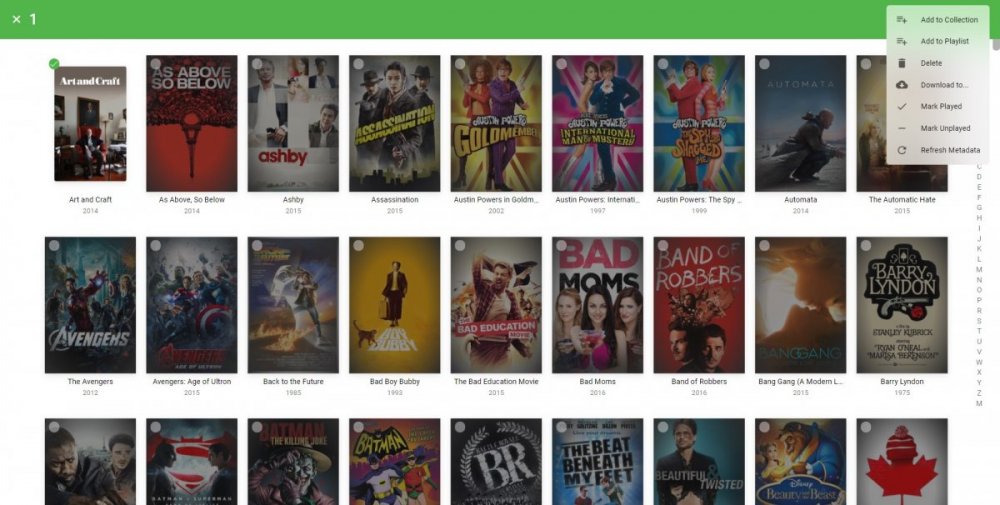
I would recommend adding "Select All" to this menu to have the functionality on mobile as well
 1 point
 -
Hey peeps, Just a quick post as i am new to emby and in the middle of changing over from plex. when starting to add my movies to emby i have noticed that they is no tab for "newly released movies". when showing my family our new emby they all was asking the same and im very shocked this hasn't been already done, i have seen a lot of threads about this but i dont think people know what they are on about to a certain degree. ei sorting movie by date, using a plugin or spotlight etc, as you can see in the photo below from my plex server, i have NEWLY released movie and RECENTLY added movies, im not going to be buying emby just yet as i would like to test it for a bit first to see what its like. i love the amount of customization you can do along with the tv mode, these types of things smash plex outta the water. i would like to have my media server a bit like Netflix and emby is starting to do that very well but little things can go along way and really hope this gets added and maybe movie genres tabs too. ------- EDIT : sorry this was from my thread and have been pointed to this one as this one created first haha ------1 point
-
Good day...It would be nice to have a "select all" feature when adding content to either a collection, playlist, group, etc. I am sure many peeps have a large collection of individual content for instance in a DC Comic or Marvel Movies section that we have to check on each individual box in order to accomplish our needs. So it would be nice to have a feature whereby you click on check all then go about adding that selection into a group, collection or whatever. Nice to have but not necessary I suppose. Cheers...1 point