Leaderboard




Popular Content
Showing content with the highest reputation on 11/26/20 in Posts
-
So "the cache" is actually a big performance hit (besides useless hdd spin up, delay through processing etc) in basically every realistic usage scenario if the metadata is besides the actual media? I can't really make up a scenario (besides ultra power user or tiny collections) where the cache improves here anything. I am also not sure why the cache get dropped every 30 days, makes no sense at all. Kodi for example drops the cache if I force it or it detects a change at the source for the cache. Besides that the cache gets never dropped because it would be, surprise, a major performance hit when scrolling through the collection. There is likely a reason (i have no idea) why the cache is dropped if you get the data from the internet, but there is no real reason to drop it at all if all your media and metadata is local. At kodi I cache a single time, done. A emby I need to cache every time I access something, sounds broken if you ask me. And to be honest 30 days is not enough to ensure you click through the entire collection just to keep the cache.3 points
-
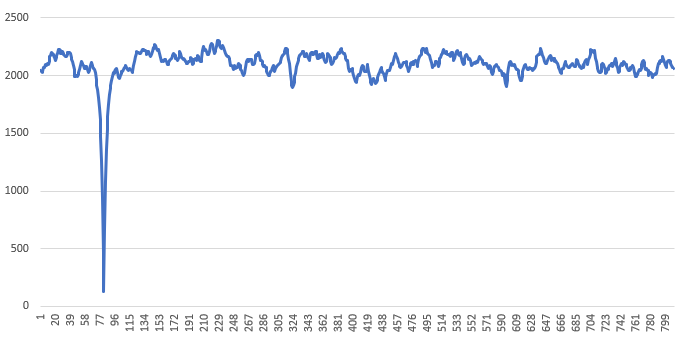
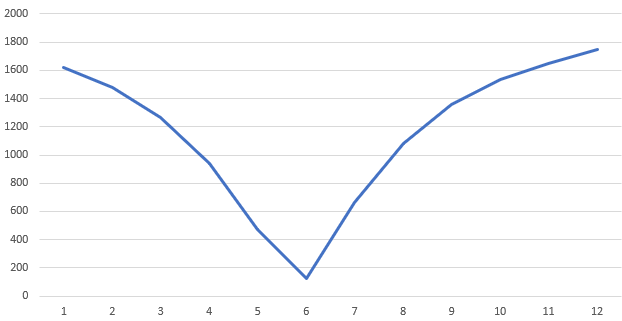
I had a little time today to play with this. I extracted some wav files extract to 10 seconds for theme and 2 min of the episode to compare ffmpeg.exe -i "movie.mkv" -ss 00:00:10 -t 00:00:20 -ac 1 -acodec pcm_s16le -ar 16000 -c:v nul series_theme.wav ffmpeg.exe -i "movie.mkv" -t 00:02:00 -ac 1 -acodec pcm_s16le -ar 16000 -c:v nul episode.wav fpcalc.exe series_theme.wav -raw -json > series_theme.json fpcalc.exe episode.wav -raw -json > episode.json this gave me two json files to play with. then used the following python to slide a comparison along the two dat asets to find the min diff point import json with open("series_theme.json") as f: theme_chromaprint = json.load(f) with open("episode.json") as f: episode_chromaprint = json.load(f) def count_bit_diff(left, right): count = 0 for i in range(0, 32): if ((left >> i) & 1) != ((right >> i) & 1): count = count + 1 return count # find offset theme_fingerprint = theme_chromaprint["fingerprint"] episode_fingerprint = episode_chromaprint["fingerprint"] episode_offset = 0 scores = [] for index_offset in range(0, len(episode_fingerprint) - len(theme_fingerprint) + 1): index_score = 0 for index in range(0, len(theme_fingerprint)): epp_int = episode_fingerprint[index + index_offset] theme_int = theme_fingerprint[index] this_score = count_bit_diff(epp_int, theme_int) index_score += this_score scores.append(index_score) print (scores) min_score = -1 min_score_at = 0 for index in range(0, len(scores)): score = scores[index] if min_score == -1 or score < min_score: min_score = score min_score_at = index print("Min Score : %s at %s" % (min_score, min_score_at)) ended up with With a very nice dip in differences at the point I expected Here is the dip zoomed in so there are a number of data points around the min which shows there is a reasonable amount of tolerance to the chromaprint calculation per int
 3 points
 -
Update: Kodi Matrix migration is complete. I'll perform final tests and possibly release an (alpha) update this weekend.2 points
-
Ahh now it makes sense. 2160p samples are "slightly" bigger than the previous 1080p ones2 points
-
There is this in the library option.xml <SampleIgnoreSize>314572800</SampleIgnoreSize>2 points
-
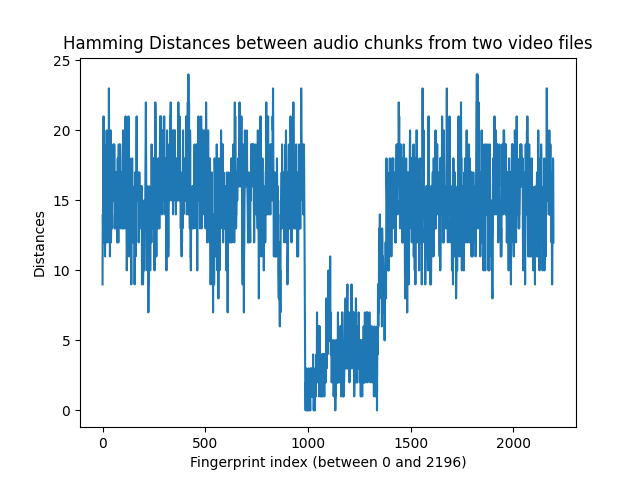
I have done it! After much fiddling with FPCALC and Python, I was able to get functional intro detection between two video files! I tried the script with a few different shows, but in the example output below I've used two episodes from the show Danny Phantom, because I knew the intro started at different times in this show. You can see in the list of Hamming distances that there is a region of low single digits for a bit (that's where the intro is). Starting process... Getting audio tracks from both videos... 50% Done! Converting audio to .wav format... 50% Done! Converting audio to mono... 50% Done! Trimming audio to 5 minutes... 50% Done! Fingerprinting audio... 50% Done! Analyzing fingerprints... The calculated fingerprint offset is -206.0 Done! Hamming distances: [9, 14, 14, 12, 16, 21, 14, 17, 19, 15, 13, 14, 11, 13, 15, 16, 15, 15, 12, 16, 20, 16, 13, 15, 13, 12, 14, 16, 19, 20, 19, 23, 19, 16, 16, 15, 11, 13, 18, 20, 16, 12, 13, 14, 15, 16, 13, 16, 17, 15, 17, 16, 18, 19, 15, 18, 15, 19, 17, 13, 14, 14, 13, 17, 17, 17, 16, 17, 15, 16, 15, 12, 12, 13, 18, 14, 14, 12, 17, 19, 15, 16, 14, 15, 19, 19, 19, 18, 13, 15, 14, 17, 15, 15, 17, 16, 13, 14, 13, 18, 20, 19, 16, 15, 14, 13, 16, 15, 16, 15, 16, 17, 21, 14, 15, 13, 15, 12, 10, 11, 16, 16, 20, 14, 14, 18, 21, 19, 15, 11, 13, 17, 15, 18, 17, 12, 13, 15, 12, 12, 9, 14, 15, 16, 18, 17, 14, 14, 12, 14, 15, 14, 15, 12, 14, 16, 9, 13, 17, 13, 12, 11, 16, 12, 14, 19, 21, 17, 17, 17, 15, 15, 16, 15, 17, 16, 12, 13, 15, 17, 15, 14, 13, 15, 16, 14, 14, 16, 15, 13, 13, 16, 9, 12, 10, 14, 15, 9, 10, 13, 13, 14, 13, 10, 10, 12, 15, 13, 15, 17, 20, 22, 18, 15, 15, 15, 13, 10, 14, 13, 16, 15, 10, 7, 9, 9, 13, 15, 16, 13, 13, 13, 10, 13, 15, 14, 13, 13, 12, 19, 14, 16, 14, 13, 15, 14, 14, 17, 18, 13, 15, 18, 12, 10, 17, 16, 15, 22, 21, 19, 15, 13, 11, 14, 18, 17, 17, 16, 15, 13, 16, 15, 15, 18, 16, 17, 13, 13, 16, 19, 21, 19, 17, 17, 17, 21, 19, 17, 14, 17, 17, 16, 20, 15, 15, 16, 17, 18, 17, 17, 21, 19, 14, 16, 16, 16, 16, 18, 16, 17, 12, 10, 14, 14, 20, 13, 13, 17, 15, 13, 11, 12, 15, 17, 19, 16, 17, 15, 17, 18, 21, 21, 22, 19, 18, 17, 16, 15, 19, 19, 16, 20, 16, 14, 16, 15, 15, 20, 19, 18, 19, 18, 20, 18, 16, 16, 15, 14, 16, 18, 18, 18, 17, 15, 16, 16, 17, 15, 16, 22, 18, 17, 15, 15, 18, 21, 19, 20, 16, 15, 15, 13, 15, 13, 12, 11, 15, 12, 17, 13, 17, 16, 20, 15, 14, 16, 15, 15, 16, 15, 18, 15, 17, 15, 15, 16, 17, 21, 21, 18, 14, 15, 16, 15, 17, 22, 19, 19, 24, 19, 14, 22, 15, 17, 15, 13, 20, 19, 11, 11, 10, 13, 14, 14, 14, 15, 13, 16, 14, 16, 13, 15, 14, 16, 16, 14, 16, 17, 19, 14, 13, 17, 18, 18, 17, 17, 15, 19, 19, 18, 14, 10, 16, 19, 17, 20, 20, 21, 19, 15, 18, 18, 20, 16, 13, 13, 16, 19, 18, 18, 21, 18, 13, 15, 14, 18, 20, 19, 19, 17, 14, 17, 16, 16, 16, 20, 18, 16, 14, 14, 16, 13, 14, 17, 22, 20, 18, 16, 18, 12, 14, 18, 19, 17, 20, 17, 16, 16, 16, 13, 16, 12, 16, 18, 16, 11, 9, 10, 15, 12, 13, 14, 17, 11, 13, 14, 11, 10, 7, 11, 13, 14, 11, 9, 11, 18, 18, 17, 11, 13, 13, 13, 15, 12, 13, 14, 19, 16, 14, 10, 13, 11, 12, 15, 8, 17, 16, 18, 13, 10, 11, 11, 17, 13, 14, 17, 18, 20, 17, 16, 14, 19, 17, 13, 18, 18, 19, 12, 15, 17, 16, 15, 14, 15, 13, 15, 16, 13, 15, 16, 14, 13, 12, 10, 14, 17, 15, 10, 10, 7, 10, 15, 14, 13, 17, 15, 12, 14, 15, 14, 15, 15, 15, 12, 15, 15, 14, 18, 16, 12, 12, 15, 18, 15, 14, 18, 18, 19, 17, 18, 16, 12, 14, 20, 22, 18, 21, 18, 15, 16, 13, 14, 14, 16, 17, 15, 15, 16, 17, 18, 18, 18, 18, 16, 18, 18, 19, 22, 18, 16, 18, 17, 16, 19, 17, 19, 21, 18, 18, 19, 12, 11, 9, 17, 19, 17, 14, 14, 7, 11, 12, 15, 16, 20, 18, 18, 16, 16, 16, 17, 19, 19, 18, 20, 17, 16, 15, 14, 12, 14, 16, 12, 17, 13, 15, 15, 14, 13, 13, 12, 16, 15, 15, 19, 18, 18, 16, 16, 19, 18, 18, 19, 19, 16, 17, 19, 15, 14, 12, 14, 15, 17, 16, 17, 18, 19, 18, 14, 14, 15, 15, 17, 17, 15, 14, 13, 20, 16, 16, 15, 12, 8, 12, 16, 11, 11, 15, 16, 18, 21, 17, 17, 16, 17, 11, 12, 13, 17, 18, 18, 16, 14, 16, 14, 15, 10, 16, 15, 14, 12, 13, 15, 12, 15, 17, 17, 18, 22, 14, 15, 17, 17, 18, 17, 14, 20, 21, 19, 18, 15, 15, 14, 15, 15, 16, 16, 15, 14, 19, 19, 17, 16, 19, 18, 18, 15, 16, 19, 21, 20, 23, 19, 16, 14, 11, 14, 16, 17, 17, 14, 11, 12, 14, 11, 13, 12, 11, 12, 14, 18, 16, 15, 13, 16, 13, 14, 10, 9, 8, 12, 8, 10, 8, 6, 10, 10, 7, 13, 15, 13, 14, 16, 17, 13, 19, 15, 15, 16, 16, 17, 17, 15, 14, 13, 13, 12, 15, 14, 17, 18, 17, 19, 18, 20, 18, 12, 16, 15, 15, 13, 9, 11, 11, 12, 17, 14, 17, 19, 15, 16, 14, 13, 14, 13, 15, 21, 19, 18, 17, 15, 12, 19, 18, 19, 18, 13, 14, 13, 20, 22, 20, 18, 14, 14, 14, 17, 13, 17, 17, 15, 13, 14, 19, 16, 16, 16, 17, 12, 11, 12, 13, 13, 11, 13, 13, 17, 19, 15, 14, 17, 13, 14, 13, 13, 14, 19, 18, 23, 20, 19, 18, 19, 17, 19, 15, 15, 15, 14, 17, 18, 19, 18, 16, 13, 10, 6, 5, 1, 0, 0, 2, 1, 3, 3, 1, 2, 0, 2, 1, 2, 1, 0, 1, 3, 1, 0, 1, 1, 1, 2, 1, 0, 3, 1, 2, 1, 3, 3, 2, 1, 1, 2, 2, 3, 1, 4, 1, 2, 0, 1, 1, 2, 1, 0, 2, 3, 3, 2, 2, 1, 3, 2, 4, 3, 7, 5, 5, 6, 6, 2, 3, 5, 5, 6, 4, 1, 2, 6, 2, 4, 2, 3, 1, 2, 3, 2, 1, 3, 4, 2, 4, 4, 1, 3, 4, 2, 3, 4, 2, 1, 1, 4, 2, 3, 4, 2, 2, 2, 5, 4, 8, 3, 5, 7, 5, 4, 7, 5, 7, 8, 10, 6, 5, 6, 5, 6, 5, 5, 11, 5, 7, 4, 4, 5, 4, 2, 2, 3, 5, 5, 5, 5, 3, 4, 5, 1, 2, 2, 2, 1, 4, 5, 5, 0, 2, 4, 1, 2, 5, 4, 2, 2, 4, 5, 2, 4, 7, 2, 2, 3, 4, 3, 3, 2, 3, 3, 5, 6, 3, 6, 4, 4, 1, 2, 2, 3, 7, 7, 7, 6, 5, 1, 4, 1, 3, 2, 2, 3, 4, 4, 5, 5, 5, 8, 3, 3, 6, 5, 5, 3, 3, 8, 9, 5, 3, 3, 6, 7, 4, 7, 6, 5, 2, 3, 5, 5, 5, 4, 3, 4, 8, 6, 9, 7, 3, 6, 4, 6, 7, 6, 7, 4, 3, 7, 5, 1, 2, 6, 2, 2, 5, 6, 4, 8, 8, 4, 4, 6, 2, 5, 2, 5, 6, 5, 6, 3, 4, 7, 6, 4, 4, 3, 4, 3, 5, 2, 5, 1, 4, 5, 4, 4, 2, 2, 1, 2, 5, 3, 3, 2, 3, 6, 2, 5, 3, 2, 3, 7, 5, 2, 6, 4, 5, 6, 6, 5, 7, 3, 6, 7, 2, 6, 3, 4, 5, 6, 5, 4, 6, 7, 5, 4, 3, 2, 2, 5, 4, 3, 6, 4, 5, 4, 6, 3, 2, 5, 5, 5, 3, 3, 2, 1, 2, 3, 6, 4, 5, 2, 3, 2, 1, 3, 2, 1, 3, 5, 0, 4, 6, 4, 5, 9, 6, 6, 9, 7, 13, 11, 8, 11, 14, 11, 11, 10, 10, 9, 11, 11, 9, 9, 6, 13, 12, 7, 10, 11, 10, 10, 9, 7, 10, 9, 7, 5, 7, 9, 9, 11, 12, 11, 8, 14, 18, 16, 16, 14, 13, 17, 15, 12, 11, 10, 13, 10, 13, 16, 14, 16, 18, 18, 14, 14, 17, 15, 15, 14, 11, 13, 13, 14, 18, 15, 16, 15, 17, 18, 14, 14, 16, 17, 13, 14, 14, 15, 16, 12, 15, 16, 12, 18, 16, 19, 19, 14, 14, 16, 16, 19, 19, 18, 18, 17, 22, 19, 21, 17, 14, 15, 13, 16, 18, 17, 19, 17, 16, 14, 13, 15, 18, 14, 12, 14, 12, 13, 17, 16, 19, 17, 15, 18, 17, 13, 10, 9, 8, 14, 12, 15, 18, 11, 11, 15, 11, 7, 13, 10, 17, 17, 17, 15, 9, 14, 13, 12, 13, 17, 19, 20, 18, 18, 15, 17, 15, 18, 13, 14, 16, 12, 13, 16, 18, 16, 17, 13, 19, 11, 14, 14, 12, 11, 10, 13, 12, 9, 15, 16, 18, 14, 20, 20, 20, 16, 12, 18, 16, 14, 17, 13, 13, 14, 14, 10, 12, 13, 15, 18, 18, 14, 12, 13, 14, 13, 14, 13, 9, 11, 14, 17, 23, 18, 17, 16, 18, 20, 17, 14, 14, 12, 13, 12, 12, 9, 11, 12, 14, 15, 16, 15, 12, 16, 14, 11, 14, 12, 10, 10, 20, 21, 18, 12, 14, 13, 10, 13, 14, 13, 9, 16, 10, 9, 11, 15, 13, 16, 11, 13, 14, 17, 17, 12, 13, 11, 18, 16, 14, 13, 15, 13, 15, 13, 14, 20, 13, 16, 16, 19, 19, 19, 17, 19, 16, 16, 14, 17, 15, 15, 14, 14, 14, 15, 12, 11, 15, 18, 10, 13, 18, 15, 16, 17, 14, 17, 17, 21, 19, 16, 18, 12, 13, 13, 12, 20, 19, 14, 16, 14, 16, 16, 14, 16, 16, 13, 14, 14, 17, 18, 23, 15, 19, 17, 15, 12, 17, 19, 15, 16, 20, 14, 14, 21, 19, 17, 17, 12, 13, 13, 14, 16, 13, 14, 13, 10, 14, 14, 12, 10, 9, 14, 18, 16, 17, 13, 11, 11, 15, 17, 12, 16, 16, 16, 15, 8, 10, 11, 10, 13, 10, 12, 11, 15, 15, 14, 19, 21, 15, 16, 18, 16, 14, 11, 16, 19, 19, 20, 19, 22, 18, 18, 18, 10, 13, 16, 13, 13, 15, 11, 13, 12, 10, 13, 12, 14, 17, 15, 18, 18, 15, 15, 12, 14, 14, 18, 20, 20, 15, 18, 13, 12, 15, 17, 13, 13, 18, 18, 19, 15, 12, 14, 18, 15, 15, 17, 16, 14, 17, 16, 11, 17, 12, 15, 13, 11, 11, 14, 13, 17, 14, 12, 15, 15, 16, 16, 16, 16, 15, 16, 11, 13, 15, 18, 22, 22, 24, 22, 18, 24, 18, 15, 13, 17, 18, 22, 17, 20, 18, 14, 15, 14, 15, 11, 17, 16, 12, 12, 14, 13, 20, 18, 14, 15, 15, 15, 15, 14, 10, 10, 12, 13, 14, 19, 15, 12, 14, 10, 15, 15, 17, 19, 17, 14, 16, 15, 14, 15, 17, 16, 19, 14, 11, 10, 11, 14, 12, 10, 17, 19, 18, 14, 13, 12, 14, 15, 14, 13, 11, 11, 14, 9, 8, 12, 13, 18, 15, 18, 18, 14, 16, 19, 21, 19, 14, 14, 18, 15, 15, 20, 15, 17, 17, 14, 19, 18, 19, 18, 17, 16, 12, 17, 17, 18, 16, 17, 19, 16, 14, 15, 14, 13, 12, 11, 13, 11, 12, 15, 15, 19, 15, 16, 17, 16, 17, 14, 20, 20, 20, 20, 17, 19, 15, 19, 15, 17, 16, 14, 19, 15, 14, 14, 12, 13, 12, 15, 17, 16, 17, 15, 13, 10, 14, 18, 14, 15, 17, 17, 16, 17, 11, 11, 9, 12, 12, 14, 16, 19, 18, 19, 19, 16, 16, 13, 13, 12, 11, 14, 12, 12, 14, 20, 19, 15, 16, 13, 13, 12, 18, 19, 21, 18, 15, 15, 18, 14, 17, 15, 14, 14, 13, 14, 13, 14, 14, 15, 17, 17, 19, 18, 16, 17, 19, 19, 18, 16, 17, 17, 16, 18, 13, 11, 10, 16, 17, 17, 15, 15, 15, 14, 13, 9, 13, 17, 19, 16, 18, 18, 14, 17, 20, 15, 21, 16, 16, 12, 11, 11, 12, 15, 15, 19, 14, 17, 11, 11, 13, 12, 11, 17, 17, 15, 16, 18, 16, 13, 14, 16, 15, 11, 10, 11, 12, 15, 14, 14, 14, 14, 12, 9, 15, 16, 14, 13, 12, 14, 11, 14, 16, 17, 15, 15, 11, 12, 15, 20, 17, 16, 14, 11, 17, 10, 12, 13, 15, 16, 18, 13, 12, 19, 18, 15, 15, 12, 15, 12, 10, 12, 15, 14, 15, 16, 14, 15, 18, 10, 12, 16, 17, 11, 15, 11, 15, 14, 14, 19, 23, 23, 20, 15, 15, 19, 17, 17, 17, 15, 15, 14, 17, 20, 14, 15, 14, 14, 19, 14, 16, 17, 17, 17, 12, 15, 9, 9, 12, 13, 15, 18, 17, 12] Seconds per sample: 0.12489592006661115 Offset in seconds: -25.7285595337219 Common region starts at 123.02248126561199 and ends at 171.3572023313905 Found intro ranges (in seconds) are: First File: [123.02248126561199, 171.3572023313905] Second File: [148.75104079933388, 197.0857618651124] As you can see, the script compares both audio fingerprints to determine the proper offset and then finds the common region by using the Hamming distance algorithm (bit difference). After it finds the common region, it maps the region to both input video files to figure out exactly where the intro starts and stops. As a whole, the script only takes a minute or two on my computer, but most of the execution time is simply getting the audio to my computer (since I was accessing my media via SMB on Wi-Fi). The actual time it takes to compare the fingerprints is under 30 seconds. The script could be further optimized, such as taking a shorter audio clip on shorter shows (I always take a 5 min clip currently), and also modified to take an input folder and find the intros for a whole season at once. Since the script is somewhat long, you can see the script here.
 2 points
 -
I feel this discussion has become quite convoluted, with different views of how the cache actually works. So, for sake of good order, I'll throw my understanding and hoping some of the devs might shed some light if incorrect. Cache is used to hold prerendered artwork (with prerequisite of it being requested in the first place, i.e. library browsing) for serving different clients, regardless whether that artwork is stored locally (database only, metadata folder) or with media. So I absolutely disagree that it doesn't improve anything, in contrary, it speeds up browsing considerably, with lesser gains for local metadata and huge gains with art stored with media. Without it, art from media folders would have to be pulled each and every time it is requested. Issue arises once that cache is dumped, whether by intentional deletion or expiration, and needs to be rebuilt. That goes fast enough for items in local metadata folder, and for art in media folders it has to be pulled from there as there is nowhere else to pull it from. Hence HDD spins and slow rendering times. Still better than doing it every time needed. As @Luke already stated, those 30-day dumps are there to prevent it imploding on itself by growing ever larger. Not all of us use the server in the same way, I personally have no issue with it growing as much as it needs to. But i don't do LiveTV recordings, no home videos, no pictures etc. I understand that lots of ppl do and do a lot of deleting also. Those deleted items should not be referenced in cache, hence the dumps. And as stated above, I would really prefer metadata folder to store ALL artwork and copies to be saved in media folders, with serving logic being Cache>(if art unavailable) fallback to Metadata folder>(if art unavailable) fallback to Media folders. Cheers2 points
-
Yep - and this is exactly why I suggested to change wifi-channels. Wifi 'signal' strength has very little to do do with Wifi 'quality' - and when you are streaming, keeping that buffer filled without a hitch is key. If you change channel - all your devices (should..) automatically tune to the new channel. I had an issue on my Samsung Galaxy Tab where it simply would not stream (any bandwidth) without pausing every 2-3 seconds - I could be literally next to my Ubiquiti AP (ie a decent brand) and it would still do it - but by simply changing to a different channel, the issue was resolved 100%. Other devices were fine - so a combination of factors I guess.2 points
-
well you have the choice to not store with your media - and all images will be in the local metadata folder or dont spin down your disks - its not saving you much power cost and HDD are designed to be on all the time - spinning up and down actually wears them out quicker as its the highest strain on the mechanical parts2 points
-
Guys, The ebook side of Emby/MediaBrowser has been long stalled or rather stagnated. I would like to offer up a couple of suggestions. Many people use calibre as an ebook/comic book tool for scraping data and general management of their collection already. This program is absolutely astonishing in its ability to pull metadata from post calibre scans, as well as draw in metadata from the file source and/or directory structure. http://vaemendis.net/ubooquity/ Its a self contained .jar server/reader combination. And honestly I am very impressed by it's small footprint and wide range of abilities. The other option is COPS , which was written specifically with calibre in mind. It is open source, so making it work with emby I would think would be fairly easy. https://blog.slucas.fr/projects/calibre-opds-php-server/ Ever since the original release of MediaBrowser's bookshelf I have always wanted something that would allow me to 'read' my collection, rather than being basically nothing more than a place-set for images of books I own. I am sure that those who mainly have audiobooks are thrilled with bookshelf , but it's nothing more than an extension of the music library IMHO, not new features. We can have both right? Here I give you two suggestions free of charge.. Just because I love you, and Emby Personally I plan on running the Ubooquity Server along side of Emby from now on, just because of it's massive functionality and tiny footprint. But I sure hope that someone decides -- "yeah, ebook support should be in here too" and do something about it - rather than allow this now very very ancient issue to continue to remain an issue. And so I don't have to have 20 different ports open, some with SSL support - some not, because Emby isn't delivering the 'complete package'. (Please take some of this with humor, I know you have your hands full with improvements/bugs/suggestions/requests)1 point
-
Hi there, Currently testing Emby and have to say: Good Alternative to Plex. There are two things im missing: 1: Photo Timeline. A View of all photos not sorted by folders. A Scrollable Timeline would to navigate. 2: Show Photos by specific days: In Amazon photos i have a great function, that changed my behaviour for watching photos: Watch photos that were taken exactly 1 year ago or 2 or 3 or.... Both Requests offer the ability to not only browse photos by browsing folders. You get photo recommendations. Whats better than watching photos of your kids 3 years ago? From my understanding it could be done by making a Select Statement each day that dynamically updates the year folders. I think it would be Great!1 point
-
Currently if you're part way through a multi version movie, and go back to it, the default version is whatever the default version would normally be. It ought to default to the version that's in progress.1 point
-
I know this feature has been mentioned a couple of times before some with positive reaction (https://emby.media/community/index.php?/topic/17250-share-link-in-web-client/) some with negative (https://emby.media/community/index.php?/topic/23482-temporary-file-sharing-link/) What I am looking for is an easy way to temporarily share something with a friend or family member. Now I understand there can be some concern on copyright material - but at the end of the day there is no way for the EMBY admins to control that 100%, and there are both legitimate and illegal ways to use EMBY. I sync my phone & my wifes phones etc to emby, and have LiveTV configured - so I have legitimate reasons to want to share media on a non-ongoing basis. The Home Photo/Video thing - if needed I have just downloaded the file and sent manually - but there have been a couple of occasions where my father or close friend could benefit from my libraries live tv capability but I cant share without creating an account. I understand I can create accounts - but I don't want these people to access my library all the time. To be completely honest - the people I want to share with aren't that computer literate (hence not using some other techniques for photos etc such as google photos) - I just want to provide a simple streaming link that they could stream by clicking the link. As I said - can understand the illegitimate uses for this - but there are some legitimate ones too. Any way we could have something like this implemented - even if its off by default and you need to enable it - accepting that the EMBY community are not responsible for the type of content you share in doing so? Really useful for me to share a home video or live tv stream to a family member who is not technically minded. One-Click links1 point
-
I love listening to my music using my android phone with Emby android app, but currently the app lacks support for internal equalizers, my phone has one and I would like to take advantage of it.1 point
-
HDR accurate color mapping1 point
-
Hi Carlo, Many thanks for pointing me in the right direction. I've found a python script that converts tv shows mu3u entry to strm files and working really well in Emby. I'm going to add the functionality into my jave software and run it as a service to update my new Emby library when a change in the m3u is detected. Once again, thank you1 point
-
My tests are done using the latest Plex beta with support for tone-mapping during transcoding. Keep in mind that I do not want to advertise Plex, I am a 100% Emby user, I just want to provide data to be taken into account.1 point
-
But keep in mind that tone mapping requires more processing. So how this holds up is something we'll have to re-test.1 point
-
Anyway I think it is proven that a quantum computer is not necessary to transcode with tone-mapping, obviously we cannot do it with a Pi, we need a decent CPU.1 point
-
I've not tested this, but my 1st gen TR will probably do at least 6. I might test that at some point. Processor at 100% doesn't necessarily mean it can't do more. Four transcodes on my TR will push it to 100%, but It can do 10 with ease.1 point
-
That's true, I've also tested disabling hardware acceleration, just one transcoding sessions takes about 100% CPU and the CPU is KO1 point
-
Well, if you have the space then that's ok. I don't have enough room for that much storage. And I would think most people don't have that kind of storage, either. So tone mapping is essential.1 point
-
When transcoding, if there is an SDR version available, the server should ignore the existence of the HDR version. But for me, tone mapping is essential. I have a lot of (and growing) HDR shows. Multi-versioning so many videos would be insane. It would cost a small fortune in hard drives. Resolution is irrelevant. Transcoding 4k is easy, it's just decoding. That doesn't take a lot, the encoding is the heavy lifting, but it's getting knocked down to 1080 or 720, that's not a lot of work. The server will never encode to 4k, so that's not a concern. A lot of my HDR shows are 1080. We need the tone mapping.1 point
-
Let's say you have a 3 tuner setup be it hardware or m3u. That will allow any 3 channels to be viewed at one time (3 streams). You have this "tuner" setup in Emby. Person 1 is watching CNN (1 stream in use). Person 2 is watching Fox News (2 streams in use). DVR kicks in and records show on CNN (still 2 streams in use). Person 3 is watching Fox News (still 2 streams in use). DVR starts recording a show in CBS (now 3 streams in use). Person 4 starts watching CNN (still 3 streams in use) Person 5 starts watching CBS (still 3 streams in use) Person 6 TRYs to watch ABC (fails as no more streams are available). This person can however tune to CNN, Fox News or CBS and share the stream Emby already has open. Did that help?1 point
-
I'm familiar with that policy....and the only exception to it I'm aware of is the one Roku made for its own Roku Media Player app. Fittingly, that exception along with realizing that Roku does not and will never fully support Roku Media Player is what led me to finally try out Emby in the first place. I really appreciate the attentiveness you guys have shown, particularly you @speechles with the Roku app-endage. When my budget allows, I'll become a lifetime premiere member because of it.1 point
-
Well done! So you can now find the intro finger print, use that fingerprint to capture all the data for the entire season. That is amazing work! Very impressive! How do we implement that into Emby? My python is not strong, it took me an hour to translate TeamBs code to c#. I think it needs to be c# to create the scheduled task.1 point
-
@cayars No rush I know it is Turkey Time! I just know not enough people know we support this as fully as the Roku Channel itself has. Everything they can do we can do too. I do not think people are using that microphone button inside the Emby Roku app. Instead they pound buttons to rewind 15 minutes. When they could just speak into the microphone their desire. Which is easier? Pound buttons or press one button and speak an intent? It isn't up to us to decide. We just need users to understand they have choice. They do not always need to pound buttons while a movie plays and invoke an OSD. Just speak it and this will avoid the OSD as well as any UI and cleanly move you to where you want to go. This works as well with music as it does with video. It is also possible to say "Go ahead one hour five minutes and twenty seconds" and it will jump precisely 1h 5m 20s.1 point
-
Hi, this is something we'll be looking at improving in upcoming updates. Thanks for the feedback.1 point
-
There's an open discussion here: Same issue spanning accross multiple threads, let's try to compact it. Cheers1 point
-
emby uses TCP over the internet.1 point
-
Hmmm - I don't necessarily agree with that logic - and I think it needs to be smarter than that. It should use the 'better' quality version as opposed to the 'best' quality version - saving on cpu, disk I/O etc. If I had a 90 Mbit/sec 4K remux and could only stream at 5 Mbit, why on earth would I use this as the source if I had a 10Mbit 1080p version available to transcode from ?...1 point
-
Yes, my opinion would change if auto selection worked at 100%. I only have 1080p and 4K versions, both bluray rips. Let's say I have a 1080p version at 25 Mbps and a 4K version at 50 Mbps. If bandwidth limit is set at 20 Mbps, instead of transcode 1080p version, it transcodes 4K version.1 point
-
i'm not the one making huge sweeping assumptions you are misleading people with some of your statements1 point
-
If Emby correctly chose the most suitable version - would your opinion change ? I'm not 100% sure how Auto selection works - but I do know that for my remote users (bandwidth limited), emby chooses the 720p or 1080p low bandwidth (what I call my 'Streaming Copy') over an available higher bandwidth 1080p version. Remote users don't have the option of 4K - there is little point imho - given the bandwidth they have. On the LAN - of course you should not be bandwidth restricted, but I'm not sure if emby THEN looks at the device capability to pick the most suitable copy ? If it doesn't (and relies on bandwidth alone) then I guess this is actually the source of the problem ... I will do some more digging ....1 point
-
Mine has started working again. Hopefully just a glitch1 point
-
yep its cross platform now even Mac is supported1 point
-
Back link to a related thread where this feature was misidentified as a potential bug1 point
-
I'm using Ubuntu Linux 18.04 - rock solid. Sorry, I don't use Windows so PowerShell is not an option I'm nearly there to be fair, but if you read this thread you can see where I am up - just a few more tweaks and I am done. Cheers!1 point
-
Assuming I am not happy for users to cause arbitrary disk spins or bypass the fast local metadata folder to call art from remote slow/links disks simply by casually scrolling in Emby (which no one should be OK with TBH) I am left with two options: Stop using in place fanart completely Minimise the impact by forcing all in place art onto a single remote NAS side helper disk The second option is possible for me but probably not for most users and it really just does "badly" what the Emby `metadata` folder should be doing. To the casual observer this long thread may all seem like an edge case but essentially what we are saying is anyone that uses in place fanart does so at a hidden unavoidable performance cost which is funnily what many will be using in place fanart to try and avoid in the first . I strongly recommend this is addressed at the architectural level.1 point
-
https://www.dropbox.com/s/qiz93c210drepm6/Deleted Scene with Rudy Behlmer Commentary.mkv?dl=01 point
-
Could be a old database issue or changes in current beta 4.6.0.6, but dropped the album in a Queen folder within my test music library and had no issues. Artists and Album Artist shows one entry for Queen. With the beta branch adding songs to artist view this should be easier to identify. musicbrainz and audiodb metadata enabled. Devs still need to comment why Android app provides different results then the web client.1 point
-
@GrimReaper76 thank you. This matches exactly what I detected as unexpected behaviour and assumed was a bug. I am going to have to radically re think how I use Emby as this hurts a lot. I cant have clients that are simply browsing spinning up an arrays of disks to retrieve a few of images.1 point
-
what is the purpose that the cache is redone every 30 days ? the typical data is likely never change at all and very less likely in a 30day span my "old" data for example is static for now 5+ years recaching is nice and all but at big collections its a real pain1 point
-
If a movie has multiple versions (1080p, 4k, director's cut, etc) it would be nice if the resume feature automatically chooses the version that needs resuming, not just resetting back to default.1 point
-
Hi, there currently is no way but it's planned for future. Thanks.1 point
-
We're hoping to get the test version released this week. Thanks guys.1 point
-
@Luke Hey, is there any ETA for the next update? I am not able to watch anything since a Month yet. I would appreciate it if you can give us an ETA or at least if its going to be released by the end of the month.1 point
-
Emby for iOS 1.9.9 has been released. Here are the highlights. New Apple CarPlay Support This is a treat for our Emby Premiere users. Now you can take advantage of Apple CarPlay while you're on the road. Other Improvements Improved HDR playback Support in-app AV1 decoding Added camera upload photo folder selection Support playback speed and subtitle offset selection Media Info display is now TV mode friendly Brighter detail screen backdrop when used on larger screens Support downloading subtitles during video playback (requires Emby Server 4.5.1+) View the full article1 point
-
For those with the DTS problem, the best solution is to simply add a non DTS track to the original media. That way, the issues goes away and you now have a file that can be played by any system - you can opt to play the DTS Audio if you can - this script does not replace it. Go to your emby server system directory and find ffmpeg Then at a command window use the following to ADD an AC3 track and make it the default track :- ffmpeg.exe -i input.mkv -map 0:v -map 0:a:0 -map 0:a -map 0:s? -c:v copy -c:s copy -c:a copy -c:a:0 ac3 -disposition:a:0 default -disposition:a:1 0 output.mkv It copies all the existing tracks (original quality) and just adds an AC3 track, derived from the 1st Audio track. This will work on any mkv file incl 4K - it will not touch the original 'input.mkv' file.1 point
-
Both have been asked and declined for various reasons. So i have all of them on my web page, animated movie posters and animated backgrounds. There are over 400 animated movie posters i have resized and have online.1 point