Leaderboard




Popular Content
Showing content with the highest reputation on 11/22/20 in Posts
-
Is it really safe to have all those wires going straight into your plumbing ?2 points
-
ByStreamBufferSize is how it has always been until a few weeks ago => This controls throttling based on the playback position that the clients report to the server . BySegmentRequest is what is currently being tested in the betas => Throttling is based on the HLS segments that a client is requesting This may help in cases when the playback position reporting doesn't work for some reason But it fails in cases where a client simply downloads all segments it can get. Then there's no throttling effect.2 points
-
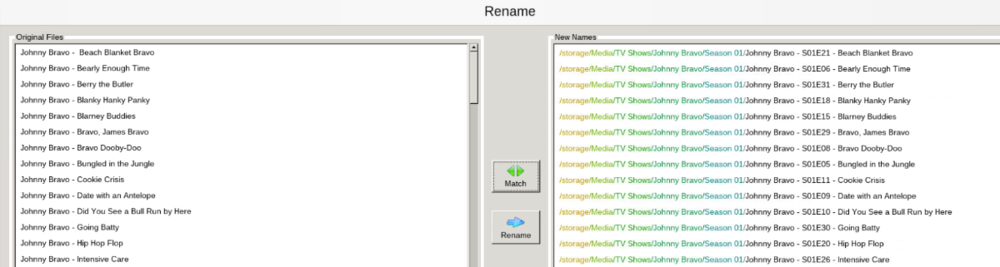
Actually, based on that information. It was easier to just remove all the numbering and have filebot fix them up;
 2 points
 -
We do now2 points
-
Well, over all it was pretty cool learning how some features of ffmpeg work. It'll only readout over command line on the error output. It has the ability to scan video files for parts that have no image or sound. Pretty cool stuff. This means that Emby not only has a huge API, but it also has a whole bunch of untapped abilities, that I'm sure we'll see in the future. Very cool stuff.2 points
-
I've been dying to know if this has garnered enough interest to be worked on. I found Emby (MediaBrowser 3 at the time) and its bookshelf plugin while I was searching for something that was like Plex for comics. Plex doesn't do this (and probably never will), Kodi doesn't have what I'm looking for either, and ComicRack seems to be dead at the moment. Unfortunately the bookshelf plugin doesn't work the way I had hoped. I was dissappointed to see it only offer a download to the file to which I can open it to the program of my choosing. Even browsing through the books I only had the option of going through folder-like directories and couldn't browse by author like the people section in the other media types. I would love for it to be fully integrated into Emby where I can open and read a comic right on my phone and tablet or even my web browser as I could with my movies and tv shows. Also, I hope to god somone is working on the "Games launching in android" feature you mentioned on your up-for-grabs blog post. That would be awesome!1 point
-
As I'm transitioning from Volumio and Plex to Emby to centralize my usage to one app, the one thing I'm missing the most is gapless playback. This is particulary annoying when listening to albums like "Dark Side of the Moon" by Pink Floyd. I'm experiencing a buffer of about 1 second in between songs, which really ruins the immersion. Would be awesome if this would be implemented in both the Chromecast, and web player.1 point
-
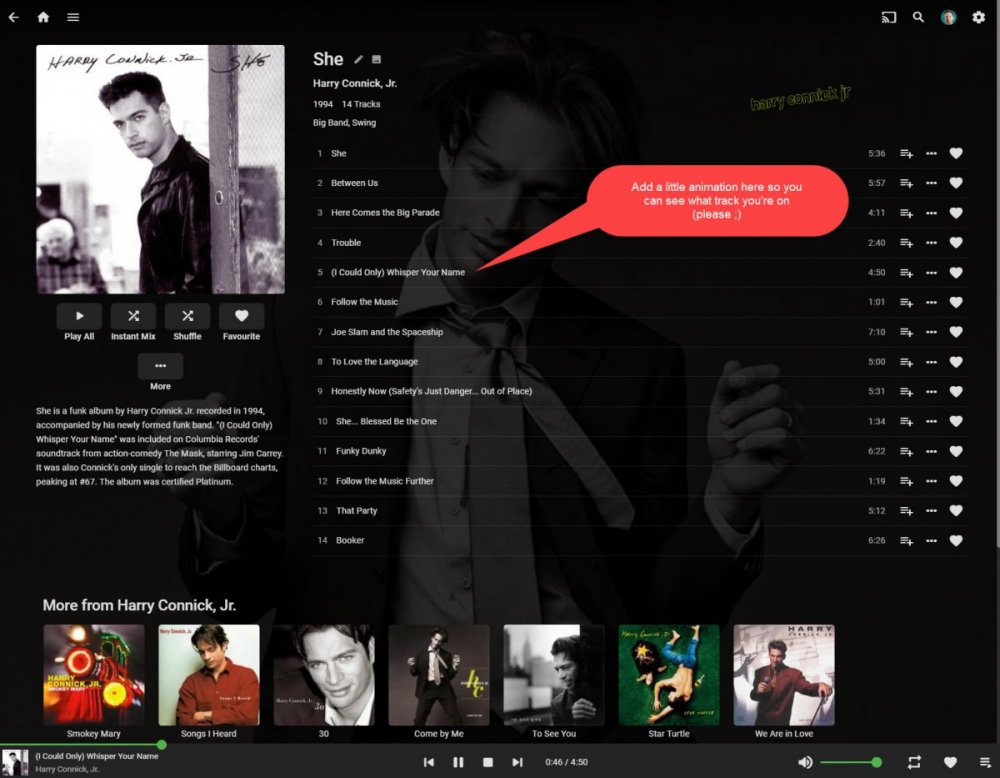
Hi there! It would be great if you could indicate the currently playing on the album track list (like it does on the play queue with the animated equaliser bars) This seems to be pretty common functionality and is means you don't have to scan through track names to work out how far through and album you are.
 1 point
 -
Hello, I already have a Movies library for 1080p content however, I would like to add another Movies library for UHD (4K) content. Currently, if I create another Movies library with the title, UHD Movies, each UHD movie that also has an identically titled counterpart in the original Movies library for 1080p content shares the same play status progress and subsequently, 2 thumbnail images are displayed on the homescreen under the Continue Watching heading. One which is linked to the 1080p movie, and another for the UHD movie. Is there any way to disassociate the movie libraries by creating a library content type for us called 4K Movies or UHD Movies that will contain it's own unique play state information? Or, allow us to name our own content type to create the split which we will also then select it's parent content type from the existing list. Many thanks1 point
-
If a movie has multiple versions (1080p, 4k, director's cut, etc) it would be nice if the resume feature automatically chooses the version that needs resuming, not just resetting back to default.1 point
-
I'm totally onboard with the initial premise of this thread - i.e. DV via Emby on the Shield. I have an LG OLED and a TCL 6-series and I'm looking forward to this feature. However, since we've gone off the rails a bit, I'd like to note that the OP seems to have missed one important fact when poo-pooing the live TV feature of Emby. In many locales in the U.S., where cable Internet is either a) the fastest option, or b) the only option, purchasing streaming services in lieu of cable TV, but maintaining cable Internet is actually more expensive than simply having cable TV/Internet. I've done the math many times. I've also, simply out of spite, cancelled my Comcast TV and tried all the streaming services with OTA for sports (I'm in an average OTA area). In the end, though I didn't like to admit it, I faced a couple of harsh realities: For all of the "future" talk these streaming services like to throw around, not one of them can offer all of the channels Comcast did in one of their mid-tier packages at a reasonable price. Nor do they really offer any thing remotely close to true al la carte. It's the same crap sandwich with a new spin on it. I tried, Sling, Vue, Hulu, and YouTube at various times. I had ridiculous spreadsheets, with complete channel lineups, so I could realistically compare options. Now, if I wanted to shell out some real stupid money, I could have purchased multiple streaming services and, with lots of redundancy, equaled Comcast's lineup. I wasn't in love with streaming quality. Compression artifacts and banding were prevalent. Now, this will improve over time but quite simply OTA, in many cases, provides the best quality "TV" experience. The DVR options were meh, at best. Maybe they've gotten better in the last year, but they don't touch Emby. With Emby, I have a 3-tuner HD Homerun Prime, plus a 2-tuner HD Homerun Connect. I can watch one network station and record 4. I can buy another HD Homerun and record even more if the disk subsystem can handle it (and mine can =o) Oh, and the DVR'd shows are in my library. And they stay there forever if want. And I can cut the commercials out if I want. And I can add as much storage as I want. And they're unencrypted. I can go on. For the talk about STBs and Cable, guess who doesn't pay for a cable box from Comcast at all. That's right, this guy. The HD Homeruns replace all of that nonsense, and are remotely installed in an equipment rack, completely out of sight. I pay less than $3/month for a cable card. That's it. Don't even talk about, "well, I can stream sports to my 5" screen, or my tablet, or my Roku." Yup, so can I, all from a single, well-designed interface, where I can also get my local media. In my case, the facts are as follows: It's $95/month for reasonably fast Internet from Comcast. It's $119.65/moth for the same Internet plus hundreds of channels (that's a non-introductory rate, it was ~$99/mo during the first year). I'm paying the $95/month regardless. Now, show me a streaming service that offers the same channel lineup for $25, with unlimited DVR, including ALL of my locals, and I'll bow down and acknowledge the wisdom of streaming. Until then, and as much as I hate Comcast, the math simply does not lie. I'm not an Emby fan-boy either, though I am a convert from Plex. Quite simply, I've tried them all, and then determined what offered the greatest functionality at the most reasonable price.1 point
-
Yep, had to apply your code and look at the element but you have duplicate. Remove this. /* granice miedzy Moje Media */ body > div.mainAnimatedPages.skinBody > div.view.flex.flex-direction-column.withTabs.page > div.tabContent.flex.flex-grow.is-active > div > div.scrollSlider.flex-grow.padded-top-page.sections.scrollSliderY.homeSectionsContainer > div.verticalSection.section0 > div.padded-top-focusscale.padded-bottom-focusscale.emby-scroller.emby-scrollbuttons-scroller > div.itemsContainer.scrollSlider.focuscontainer-x.padded-left.padded-right.itemsContainer-finepointerwrap.scrollX.hiddenScrollX.scrollSliderX.emby-scrollbuttons-scrollSlider > div > div {margin: 0.5em;}1 point
-
Hi, this should be resolved for the next update to the iOS app. Thanks.1 point
-
While I do not know if it is related to the problem you are having "Smart" TVs are notoriously unreliable clients in many cases and Samsungs seem to often have problems. The first thing I would suggest is trying to use a client like Roku or Fire TV or Shield TV or any of a number of Android devices connected to your TV and see if that reduces or eliminates the problem. Personally, in your case and given that they are on special right now I would try a Fire stick. I think you can get the 4K model for $29.95 or so right now on pre-Black Friday specials on Amazon. hey, both Amazon and Emby, have fixed most of the problems the sticks once had. If you get a stick I recommend a short HDMI extension cable to get it away from the back or side of the TV. TVs are often quite electronically noisy and that can interfere with wireless signals. Rokus are also a good choice. I use Rokus (Ultras) for 80-90% of my streaming. @Luke asked for an example but, in this case, I doubt it will do much good as the nature of the problem, from your description, is that it is very intermittent and your usage of that TV is also intermittent. One question I have that I think you mostly answered in your original post is: "Do you have other devices that work well with your server?" Lastly: Your most reliable device would be something like a Roku Ultra hooked up wired to your router as that avoids any problems with wireless interference and such.1 point
-
Is TVDB your first metadata provider? If so, you should specify the date as 1993 and the season as 6, because that's how they have it. Paul1 point
-
Seems like it, yes1 point
-
Here is a couple pics I took this morning of my setup for Emby1 point
-
Yes, the problem is down to low memory in the first place, that is correct, it is not a leak, "just" high memory requirements. The problem is with devices with low memory, like the Pi 2 or 3, which usually only have 500-700MB after a clean reboot, this won't be enough to handle a sync with the server, it will crash after a short while, so the whole plugin is unusable here. A short-term solution is to create a swapfile on the SD card to temporarily increase memory size, although that is usually so slow that the sync process can take ages. The better solution is within the plugin to wait with new requests until the current ones have been processed, so they don't get queued in memory.1 point
-
I hope they incorporate it soon because listening to Pink Floyd's Dark Side of the Moon with gaps is sacrilege.1 point
-
No, but glad your figured it out......1 point
-
There is no limit of the cache. It will be what ever size it needs to be to hold the images of your system. Typically settings in the OS you are using or on the drive itself (some drives). I also run a program on Windows called KeepAliveHD which can read and/or write to a drive every X period of time therefore keeping the drive from going to sleep. I try to avoid external drives but instead use higher quality "internal/NAS" drives but these days the differences in drives is not as much as it once was. A good case IMHO is the best way to avoid vibrations.1 point
-
Correct just a episode number change in this specific case.1 point
-
Thanks1 point
-
This thread for feedback about the forum update, requests, and if something not work as it should be ... etc. So I see no reasons to lock it my friend, I will only lock it if we do another update. I fully understand the issue here, but let us keep it in open mind if things do not go the way we like sometimes. You doing great as always, keep it up buddy.1 point
-
Yes now I see have the option "Mark as Solution".1 point
-
How about now?1 point
-
Strange, I thought they fixed that bug when updating, normally it disable the "Solved" option, thanks for the head up, I enable it back to all forums. Does "Mark as Solution" only apply to the Author? As I only see the option on Topic I have started.1 point
-
@cayars - spot on with your solution. Kind of makes sense to start from fresh but you deserve maximum points! Much appreciated and many thanks.1 point
-
yes. its currently running on my unraid server. its kinda gross looking... i prefer comicrack for windows machines. great for scraping metadata with a plugin! - comicvine scraper - it auto scraped 2/3 of my 30K book comic collection.... and just not easy to use/access for the other members of my emby family... most of whom do not reside on the same side of Canada as I do.1 point
-
Thank you, MediaMogal. That does confirm that you are using the default settings.I do have all the downloaders enabled on mine. Luke, I will try switching to the default downloader settings. Unfortunately, it will be some time before I can test the results. The first season episodes are over, and I will have to wait for the second season I suppose. Thanks to both of you for your help. I will report the result when I am able to get one.1 point
-
I hadn’t thought of that, but it makes sense to prioritize features that would benefit the most amount of users. Well, there’s always hope for this feature in the future when a better solution is found.1 point
-
Yep, your option and attempting to find issue in database, New libraries, or new database. movie not being added to collection - General/Windows - Emby Community Depending on how many items you are looking at I would probably remove those items from Emby then ensure all traces were removed in the database, then re-add items.1 point
-
yep its a database/emby bug @Happy2Playcan post a link or two to the thread where we discussed it and there is a solution but its not for the novice as it involves some db editing and getting it wrong..... Its fixed in newer databases created in say the last couple of months - but there was no release notes regarding it - so not sure which version of emby has the fix but although fixed in version x - the db needs either rebuilding or editing.....1 point
-
As I mentioned before, without an accurate method of identifying the exact start of the intro, this would not be a good approach.1 point
-
also i would assume that a large proportion of peoples libraries are not recorded TV - for the vast majority so dont think commercials are that big a problem as you have comskip for that so you might for livetv - have to do two processes one to find the commercials (not 100% either) then look for the intro - or vice versa again the fingerprint method would be a better solution i suspect in the long run1 point
-
1 point
-
just get a firestick or build a pi lol1 point
-
Added in 1.0.44.0.1 point
-
I am pretty sure this is the closest way of getting this feature to work with a scan. I am currently doing some more testing with ffmpeg to see how close I can get with random episodes from random series. I'll definitely put my results here and if it works enough to implement, then yeah.1 point
-
After some further testing, I can confirm that these silence breaks in the audio do correspond with and can be used to estimate intros. For instance, in the log below we see a timestamp of 8 seconds in the fifth silence break of the stream: which corresponds perfectly to a proper break in one of the episodes intros (seen below when the episode shows a second of nothing before the episode starts). Also, a clip doesn't have to be extracted from the episode (like I had initially thought). The silence command will scan the entire episode in a matter of a second. Which means, if we get this correct, we could scan all episodes in an entire library in a couple seconds.1 point
-
OH MY! It works... So... ... wow. This is the command line in ffmpeg to scan the clip (and it works on video files): private static string ScanSilence(string input) { return $"-i {input} -af silencedetect=noise=-30dB:d=0.5 -f null -"; }1 point
-
@Luke did you know that ffmpeg has a silence detect option for audio? http://underpop.online.fr/f/ffmpeg/help/silencedetect.htm.gz#:~:text=Detect silence in an audio,duration are expressed in seconds. Does Emby have this option? Because I think this could be the answer. ffmpeg -i VIDEO_AUDIO.aac -af silencedetect=n=-50dB:d=1 What if: 1. Make a scheduled task that would search Episode types in the library 2. Using the information from the SVT PDF Neural Network AI Scan paper above, we clip a 1 min piece of an episode file using ffmpeg 3. Scan that 1 minute piece of audio for the first time silence is detected (this is the end of the intro sequence), mark the end 4. Movie the time-stamp back 35.6s (or closest duration available) and mark the beginning. It doesn't have to be perfect. We don't scan the first episode of a season, because it will almost always contain either a longer intro, or recap, and we should show the user the intro anyway. We only have to scan the second episode of each season, because there is an 86% chance that each following episode will follow suit. If its not perfect... well ... then it will, most always, be 86% good enough. LOL.1 point
-
Ok thanks for the feedback.1 point
-
I don't disagree. This is something I didn't even care about until a few days ago. I spent several days ironing out a way to automatically download & organize podcasts, intending to replace my Android podcast app with Emby. Should I have tested it before wasting hours of time? Yes. Does it provide me some amount of comfort to know others care about this feature, as well? Also yes. I'm content to keep using Doggcatcher, for now, and have it be a nice surprise when this functionality is improved.1 point
-
@Glenn apologies for not getting back sooner, things have been a bit crazy on my end (and usually Emby forum alerts aren’t from people asking me questions!). To make sure that I understand where you’re at, this is how I interpreted your current situation: - you have an LXC container - inside said container you have the docket host/engine running - you’re trying to pass through the igpu dri device to the lxc container so that docker containers can access it - sounds like you installed vaapi on the main proxmox host? I am not too sure about getting the docker part working as I don’t use it anymore & never have passed through the igpu dri when I did. But if I understand correctly you’ll need to pass through the igpu device to the LXC container (and probably will want to install the vaapi stuff in the LXC too? I’m not sure if that’s needed or not with a docker container... maybe just the container needs to have it installed?). For passing the dri device over to an LXC container (assuming the docker host is running inside an LXC container): - within the pve LXC config file I have added (one of the first two lines probably isn’t needed & might actually be the graphics device from the motherboard chipset/bcmu): *** note: these paths are for the graphics hardware on my machine & may be slightly different on yours. I would log into the proxmox host itself and go to the /dev/dri directory to see what the names are on your machine *** lxc.cgroup.devices.allow: c 226:0 rwm lxc.cgroup.devices.allow: c 226:1 rwm lxc.cgroup.devices.allow: c 226:128 rwm lxc.cgroup.devices.allow: c 29:0 rwm lxc.autodev: 1 lxc.hook.autodev: /var/lib/lxc/102/mount_hook.sh (102 is the number for the container in question. this points to a script that is used to mount up the dri device) and I would think you probably would want to make sure that the config also has: features: mount=1,nesting=1 The mount_hook.sh file contains the following (relates to the devices mentioned in the config file): mkdir -p ${LXC_ROOTFS_MOUNT}/dev/dri mknod -m 666 ${LXC_ROOTFS_MOUNT}/dev/dri/card0 c 226 0 mknod -m 666 ${LXC_ROOTFS_MOUNT}/dev/dri/card0 c 226 1 mknod -m 666 ${LXC_ROOTFS_MOUNT}/dev/dri/renderD128 c 226 128 mknod -m 666 ${LXC_ROOTFS_MOUNT}/dev/fb0 c 29 0 If I’m missing any instructions you should be able to Google some of the above and get an answer. As for installing the VA-API bits using make there are some instructions on the VA-API website (might have to do some other googling to fully understand how everything works, but it will get you started). It’s kind of annoying to find: https://01.org/linuxmedia/quickstart/linux-vaapi-videostack-environment I’m currently using my phone so I’m not sure if it’s this exact location, but when I was looking through this recently (just got a Dell XPS 13 & was looking through the VA-API & Intel driver documentation to see if they had made changes to support the new iGPU), but there was a menu on the left that let you choose the type of installation you were doing (ie vaapi free/open drivers, using the Intel media kit drivers, etc). Selecting the appropriate one would yield instructions for that software stack. I am far from an expert with building/making software installs, but I suppose one key thing to note is that when building the install file it’s normal to make a ‘build’ folder within the folder containing the downloaded files. And when you run the make command you will need to reference the directory with the make files (which in these cases is the one above) thus the reference to variables for source directory and root install directory. hope this helps1 point
-
Hello, Alors attention, si tu souhaites que plusieurs utilisateurs, chez toi, puissent lire les contenus que tu partages, le fait d'Unlock l'App ne va pas te convenir. En gros, tu pourras lire les contenu depuis ton application (par exemple sur ton téléphone si t'as Unlock l'application sur téléphone). Si tu souhaites que plusieurs personnes puissent lire les médias, il faudra plutôt t'orienter vers Emby Première (côté serveur donc). Ainsi, tous les utilisateurs pourront visualiser tes médias, sans avoir à Unlock l'app sur leur device. Mick1 point
-
I just discovered digital comics.... I would LOVE this to be added to emby. DEV NOTE... CBR and CBZ files are RAR and ZIP files full of JPEGS. ..and PDFs... are PDFs... thats it. If i were smarter id figure this could be done in a plugin... There are many other requests: could you add a comic/manga media type? - Feature ... - Emby Comics and E-books - Feature Requests - Emby Community Comics/Ebooks - Feature Requests - Emby Community FR: MB Bookshelf - Comics - Feature Requests - Emby ... CBR/CBZ/PDV Online Reader - Feature Requests - Emby ... Comicvine Scraper for Comics - Feature Requests - Emby ... Calibre (famous free book manager) plugin !!! - Feature ...1 point
-
Download: https://emby.media/emby-theater-xboxone.html 1.1.210 Enable vertical home screen by default Add new Blue Radiance theme Minor updates to Live TV screens 1.1.209 Resolve issues related to multi-version video support 1.1.208 Support picture in picture 1.1.207 Fix scroll in various settings screens 1.1.206 Add fixes related to downloading media 1.1.171 Add spooky Halloween theme 1.1.97 Address defects based on store crash reports 1.1.90 Switch secondary sections to vertical layouts 1.1.78 Add offline support Direct play mpeg2 video files 1.1.58 Update design of Live TV screens Add dedicated Play/Resume buttons 1.1.53 Fix fast-forward button with Live TV Improve video OSD on smaller screens Support changing video quality during playback 1.1.51 Support seeking Live TV 1.1.49 Resolve issues when seeking with transcoding, or changing audio/subtitle tracks 1.1.47 Support HD Audio pass-through on supported devices (except Xbox One for now). 1.1.40 Full support for system media controls, including Cortana, lock screen. remote control, and more.1 point