Leaderboard




Popular Content
Showing content with the highest reputation on 11/21/20 in Posts
-
Woot woot! Working! (I put music to the video because otherwise, it's boring...)4 points
-
I received the new tv yesterday, and I got to say that I'm impressed thus far as how flawless it is working. Everything is direct playing and the interface is really quick. For the time being, I don't think I need to buy the Nvidia Shield3 points
-
As I mentioned before, without an accurate method of identifying the exact start of the intro, this would not be a good approach.2 points
-
also i would assume that a large proportion of peoples libraries are not recorded TV - for the vast majority so dont think commercials are that big a problem as you have comskip for that so you might for livetv - have to do two processes one to find the commercials (not 100% either) then look for the intro - or vice versa again the fingerprint method would be a better solution i suspect in the long run2 points
-
@chef The work apps would have to do to support it would not be difficult. An overlay showing "Skip Intro?" with a button [ OK ] [ NO ] . Once you click OK in the app and it knows you did once it never asks again and skips the intro on them all ever after. As long as all have the same intro length which most of a series do. A few special episodes will differ though. But for the majority it would skip the intro correctly on episodes and the apps would only have to ask once and then do that same thing on subsequent episodes during playback. It is no more difficult than Up Next at the end of a show during credits to ask if the user wants to play the next immediately or sit through the credits. This would be the opposite of that. To skip that intro (rather than the credit outro). Emby needs this. That is the point I am getting to.2 points
-
I got the Sony x900h 55inch. Pretty good for the price I think. I have an apple tv on my other tv, and for my experience, Emby is way better on Android. I'm really satisfied. I have using Plex a couple month ago, I happy to have made the switch.2 points
-
Today's beta includes an option for switching, but it's not in the UI yet. To change the option, you need to: Got to the server dashboard >> Transcoding Just click "Save" without changing anything In your local file system, navigate to Emby's 'config' folder Open the file 'encoding.xml' Find the 'ThrottlingMethod' element Replace 'BySegmentRequest' with 'ByStreamBufferSize' Restart Emby Server2 points
-
Reporting this issue fixed in 4.6.0.6 thanks guys
 2 points
 -
@chef Cool weekend project2 points
-
This has already been fixed. The fix will be in the next beta.2 points
-
Hey Everyone, My journey from Plex to Emby has been pretty smooth with the exception of setting up SSL encryption. There are lots of great posts on this forum and elsewhere on how to do this, and I consider myself pretty computer literate. But I'll be honest, this was a bit overwhelming for me as I have no experience at all in hosting web servers, DNS, or encryption certificates. After many hours, I've got it all working, so I thought I'd share what I've learned. I'm going to try to write this for the newbie, so don't be offended if it seems like I'm explaining lots of simple stuff. That's really what I needed a week ago, so maybe it'll help someone else in my shoes. Also, this is for Windows, although most of it applies to any OS. There's lots of text, but it's really very easy. Let me also say, I understand that a reverse proxy gives you lots of benefits and flexibility for securing your server. But that was a step too far for me. If you want a reverse proxy this post is not for you, but there are many posts in this forum to help you. If you want to access your Emby server from outside your home network you will want to require secure connection mode for all remote connections (see "Network" tab in Emby server configuration). To do this you need an SSL certificate. To get an SSL certificate you must have your own registered domain name. Here's a step-by-step. Domain Name Registration A domain name is the readable text part of a web address. So emby.media, or google.com, or media.yourdomain.net. Most home users don't have one, but you need one to get an encryption certificate. While (Edit:)There are many options for purchasing a domain (godaddy.com being very popular), I chose to buy my domain from domains.google. It cost me $12/year, and this is the only cost to getting your Emby server working with encryption. Go to https://domains.google, pick a domain, pay your money, and you're ready to go. For the rest of this discussion let's say you registered the domain name yourdomain.net. Now you need to associate your new domain with your home IP address. Most home users get their IP address assigned to them by their internet provider and it is "dynamic," meaning it can change. So you need to be able to tell your domain provider what your address is and update it when it changes. This can be done automatically, and is called dynamic DNS (DDNS). (Edit:) Before obtaining a domain, ensure the provider supports Dynamic DNS. Google domains supports this easily, here is the help page explaining how to set it up. Fortunately, my ASUS router has this capability built in so it was easy, but it's easy even if your router doesn't (follow google's directions). (Edit:) In case you have a static IP (obtained from your ISP), DDNS support is not mandatory. That's it for domain name registration. Now yourdomain.net points to your home network IP address. SSL Certificate Now you need to get an SSL certificate. This has the encryption keys you need, and must be issued by a recognized certificate authority or it gets blocked by your browser. Lets Encrypt will give you a free SSL certificate but it has to be renewed every 90 days. This was the part I was most confused by, but it's actually really easy. The part to understand is that Lets Encrypt must have some way of proving you own your domain name before they can issue you a certificate. There are two options, 1) they give you a little text file to place on your web server in a certain location. I don't have a web server so this is a no-go. 2) They give you a text string to add to your DNS registration in what is called a "TXT Record." You do this with google domains, it's very easy. To get a certificate you need an ACME client program that knows how to talk to the lets encrypt server. They recommend certbot, but it doesn't work in windows. Dig enough and you'll find ZeroSSL, they have a nice downloadable program that does it all and is really easy. Download here. Make a directory on your computer (I used c:\ZeroSSL). Put the le64 (or 32) exe in this directory. A single command will create your certificate. I think the easiest way to do this is create a text file in the same folder as the program, call it "get_cert.bat" and put the following three lines of text in the file. Edit the second line to have your actual domain name (instead of "yourdomain.net"), and to have your actual password for your PFX file (whatever you want it to be, just replace "yourpasswordhere" in the code below. @[member="Echo"] off le64 --key account.key --csr domain.csr --csr-key domain.key --crt certificate.csr --domains "yourdomain.net" --generate-missing --handle-as dns --export-pfx “yourpasswordhere” --live pause Save the text file as get_cert.BAT and then double click it to run. This runs the le64 program, creates the public/private key pair, asks lets encrypt to generate a certificate, saves that certificate, and converts it to a PFX file format that Emby requires. All in one command! When you run this, a command window will appear and you can see what it's doing. After a few seconds it'll pause and ask you to place the TXT record in your domain. It gives you a name and value, the name will be something like _acme-challenge.yourdomain.net, and the value will be a bunch of random letters and numbers. The program pauses here for you to put this into your domain. So now you just log in to your google domain again, go to "DNS" on the left menu, scroll all the way down and enter a "Custom Resource Record." The type is TXT, the name and value are what le64 gave you. Put them in, wait a few minutes for the change to take effect (took just a couple of minutes for me). Then go back to the command window where le64 is running and press enter to continue. It'll then verify your TXT record is there and issue your certificate. You'll find a file certificate.pfx in the le64 directory, that's it! Emby Setup Now log in to your Emby server setup. Go to "Network," in the field "External Domain" you put your domain name, so yourdomain.net or whatever you chose. For "Custom SSL certificate path," browse to the .pfx file that was created by the le64 program. In the "Certificate Password" field put whatever password you used in the .BAT file above when you created your certificate. Then for "Secure Connection Mode" I recommend you choose "Required for all remote connections." You also have to log in to your home router and forward port 8920 to the computer running your Emby server. I'm not going to give directions on how to do this, it depends on your router, but it's super easy. That's it. You need to restart your Emby Server, and then you're done! You can now access your server remotely and securely at https://yourdomain.net:8920. Certificate Renewal Now, I mentioned before that the Lets Encrypt certificates are only good for 90 days. So every 90 days you have to renew the certificate. Take that "get_cert.bat" file you made earlier and make a copy of it called renew_cert.bat. At the end of the second line, just add the text "--renew 20" (without the double quotes). When you are within 20 days of your expiration date run this file, it'll renew your certificate. I believe it'll ask you to place a new TXT record in your domain, so certificate renewal cannot be made fully automatic. You'll have to run it manually and add this TXT record into your google domain just like when you created the certificate in the first place. But it takes just a few minutes and then your certificate is renewed. You'll have to restart your Emby server for it to take. The file locations all stay the same, so you don't have to update anything in the Emby setup, just restart Emby. That's it! Well, I hope this helps someone. Sorry for the long post. I would have benefited from this level of detail a week ago, so maybe it'll be good for someone. If anyone sees something wrong here, feel free to correct me.1 point
-
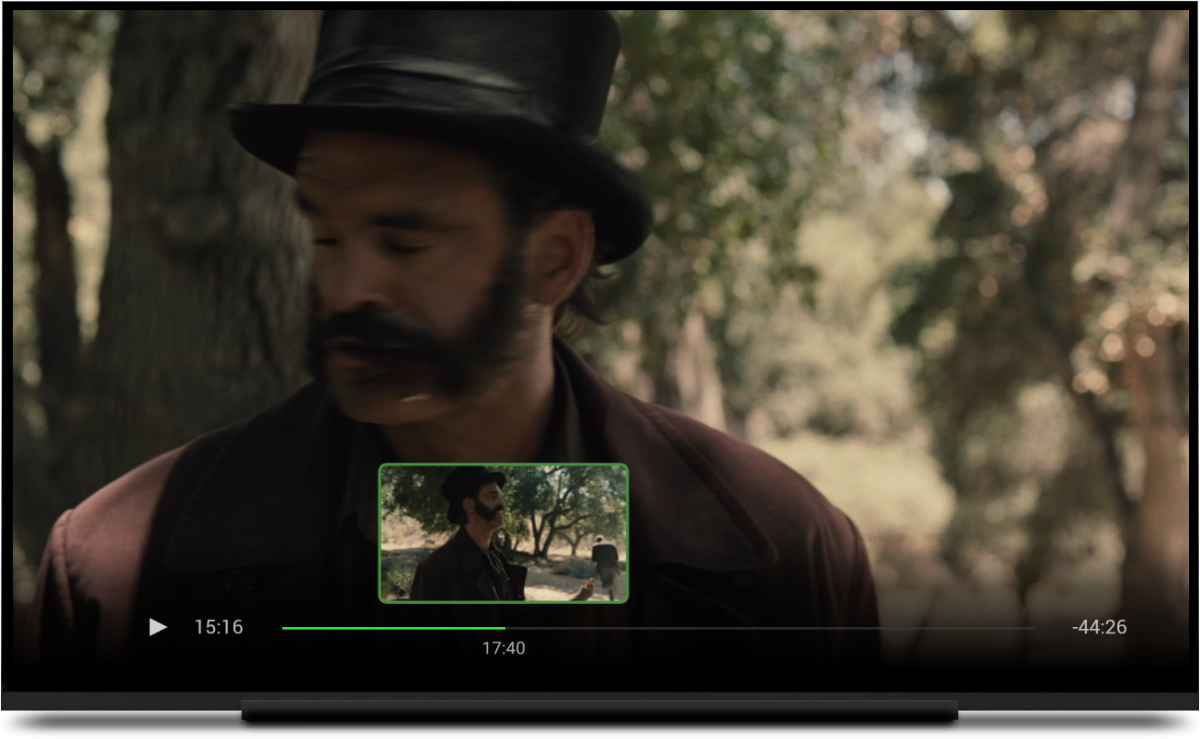
Request: Add a visual seeking method with progress bar using thumbnails from chapter markers or the 10 second thumbnail generator (as defined by the users server options) for skipping. Now that the >> << are remapped to next and previous items in a list there is no way to conveniently skip chapters during playback. Exiting and going back to the details page to select the next chapter is inconvenient and so is clicking skip forward 50 times at 30 seconds a pop to get to where you want to be. The ATV chapter skipping and visual seeking methods are good examples of a way to advance/reverse on the progress bar using thumbnails . Click the UP key could bring up a slider where you can select chapter images and/or the newer bif images. Then you can use the left and right arrow to scroll through the images Currently the UP and DOWN keys are both mapped to bring up the OSD, so the UP should be free for other things like a chapter skipping slider1 point
-
Sometimes when searching for a movie to watch I will set numerous filter criteria (Unplayed - Action - 2014 - PG13) for example. After Ive found what Im looking for its sort of cumbersome to have to go back in and unselect all the above individually. Any chance we can get a "clear all" button of some sort to get you back to viewing your entire library unfiltered? Plex does this and its very convenient. Thanks!1 point
-
Could the alternate order option please be added? Right now, DVD order and absolute order can be selected, but Alternate is missing. Below is an example of a show on TVDB with an alternate order. Thanks!
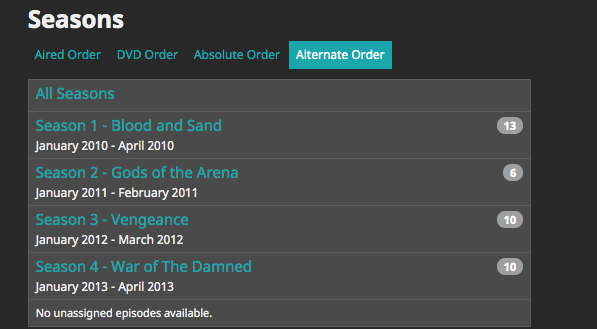 1 point
 -
I would like to be able to mark individual media items or even perhaps entire libraries to be excluded from media scans. If I have retrieved all the metadata and images I want for a particular TV series or Music collection and I know that the files will never change and the metadata should never change, I would like to be able to exclude it from scans to a ) reduce scan time b ) decrease the likelihood of unwanted changes being made c ) reduce network utilization I've noticed that even with series that have not had any new episodes in years (and no changes have been made in my filesystem) there is still information being downloaded from metadata providers. I suppose that is to check to make sure it is current/complete, but it is a waste of my network resources which are not plentiful. Perhaps this could be implemented by adding the option to not rescan media that has been marked as locked.1 point
-
Well, over all it was pretty cool learning how some features of ffmpeg work. It'll only readout over command line on the error output. It has the ability to scan video files for parts that have no image or sound. Pretty cool stuff. This means that Emby not only has a huge API, but it also has a whole bunch of untapped abilities, that I'm sure we'll see in the future. Very cool stuff.1 point
-
MakeMKV es tu amigo, te permite convertir los Blurays y UHD Blurays a MKV sin ninguna perdida de calidad ni de audio ni de video. Eso si tendras un hermoso MKV que pesara entre 30-50GB. Lo único es que si es algo tedioso convertirlos.1 point
-
Hi. If a long press isn't working for you, just use the "cog" button on the OSD and turn off the "Stats for Nerds".1 point
-
Hey, it is the same problem as in the linked thread from Happy2Play. You can also close the thread. Sorry for the circumstances that I didn't encounter the existing problem right away.1 point
-
Yo intentaría evitar esos formatos, no son streaming-amigables.1 point
-
I thought of one more possibility. It would also be possible for the saved track to be not what you expect if you actually changed the media between when it was played and now. For instance, the media was played at a time when track 1 was German and then, at a later time, you replaced the episode with one where track 1 is now English. I'm not positive if the system will wipe out the saved state in this exact situation.1 point
-
If a manual process by the user is required then it would not be a good application of developer resources to put this functionality into all the apps because the number of people who would be able to take advantage of it would just be too small.1 point
-
Yes, that's what I meant, I guess... but then with a manual control part of it...1 point
-
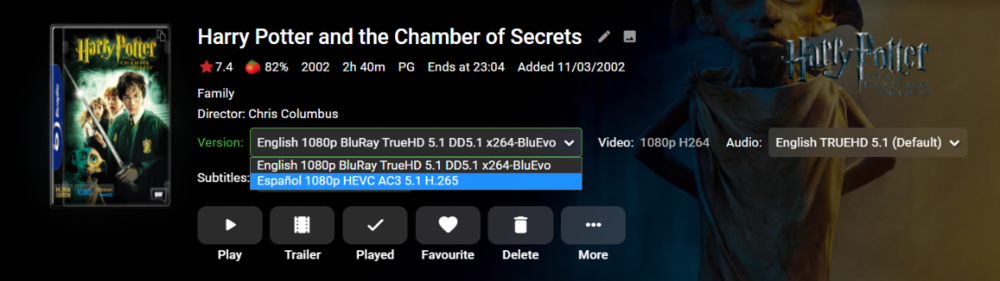
Mira: y lo puedes selectionar:

 1 point
 -
Afaik they are overhauling the whole Live TV functionality. So, stay tuned! I am looking forward to it as well.1 point
-
How are you determining that all 279 episodes default to English audio if they haven't been watched?1 point
-
Puedes eliminar esa película de la colección, no se borrara de tu servidor, tienes que ir a botón "mas" en la dentro de colecciones i en la película que quieres quitar i eliminar desde colección. Son los 3 puntitos. Espero que te sirva de ayuda. No se otra manera1 point
-
But why do you need to extract them in the first place? When you rip one of these discs the subs just come along with it as internal.1 point
-
Since finding the start of the intro with this method is dicey at best, I would think we'd need to have a way for the user to initiate the skip without needing any sort of special button appearing on the screen. Because, if they have to sit through potentially 15 seconds of the intro to be able to skip it, that really doesn't do much. Therefore, if this technique were used, I would think some sort of use of chapters would be the way to go. Also, there may not be an intro at all. You may just be finding the first commercial break.1 point
-
Here is the entire Scheduled Task code to see how it works (currently only having to utilize "blackdetect" in ffmpeg) the code needs a bit of refactoring for certain. Take note of the thresholds of ffmpeg's "blackdetect" command line Also another interesting fact is that ffmpeg doesn't send standard output... Instead it sends data on the StandardError... WTF?? Took me a while to figure that out. using System; using System.Collections.Generic; using System.Diagnostics; using System.Linq; using System.Threading; using System.Threading.Tasks; using MediaBrowser.Controller.Entities; using MediaBrowser.Controller.Library; using MediaBrowser.Model.Logging; using MediaBrowser.Model.Tasks; using VideoIntroMaker.Configuration; namespace VideoIntroMaker { public class IntroDetectionScheduleTask : IScheduledTask, IConfigurableScheduledTask { private static ILogger Log { get; set; } private ILibraryManager LibraryManager { get; } private static double Step = 0.0; public IntroDetectionScheduleTask(ILogManager logManager, ILibraryManager libMan) { Log = logManager.GetLogger(Plugin.Instance.Name); LibraryManager = libMan; } private IntroData DetectIntroData(BaseItem episode, IProgress<double> progress) { var blackFrames = DetectBlackFrame(episode.Path, progress); var introBlackFrame = blackFrames.FirstOrDefault(i => i.time != ""); if (introBlackFrame != null) { Log.Info("INTRO DETECT HAS " + introBlackFrame.time); return new IntroData() { Id = episode.InternalId, HasIntro = true, IntroEnd = CalculateIntroEndTime(introBlackFrame.time), IntroStart = CalculateIntroStartTime(CalculateIntroEndTime(introBlackFrame.time)) }; } return new IntroData() { Id = episode.InternalId, HasIntro = false, IntroStart = TimeSpan.MinValue, IntroEnd = TimeSpan.MinValue }; } private static List<Detection> DetectBlackFrame(string input, IProgress<double> progress) { var blackness = new List<Detection>(); var ffmpegPath = "ffmpeg.exe"; progress.Report(Step + 1.0); var procStartInfo = new ProcessStartInfo(ffmpegPath,$"-t 00:05:00 -i \"{input}\" -vf \"blackdetect=d=0.5:pix_th=0.00\" -f null -") { RedirectStandardOutput = true, RedirectStandardError = true, UseShellExecute = false, CreateNoWindow = true, }; var process = new Process {StartInfo = procStartInfo}; process.Start(); string processOutput = null; while ((processOutput = process.StandardError.ReadLine()) != null) { try { if (processOutput.Contains("blackdetect")) { Log.Info("FFMPEG INTRO SCAN: " + processOutput.Split(':')[1].Split(' ')[0]); blackness.Add(new Detection() { time = processOutput.Split(':')[1].Split(' ')[0] }); } } catch { } } return blackness; } public async Task Execute(CancellationToken cancellationToken, IProgress<double> progress) { //For now we will test by saving data to a plugin configuration XML //In the future this can be edited to save the three data points to the episodes .nfo/.xml metadata file var config = Plugin.Instance.Configuration; var tempIntroList = new List<IntroData>(); if (config.Intros.Any()) { foreach (var item in config.Intros) { var episode = LibraryManager.GetItemById(item.Id); var introData = DetectIntroData(episode, progress); //<-- Here is out intro detection routine progress.Report(Step + 1.0); tempIntroList.Add(introData); } config.SavedIntros.AddRange(tempIntroList); config.Intros.Clear(); Plugin.Instance.UpdateConfiguration(config); } progress.Report(100.0); } public IEnumerable<TaskTriggerInfo> GetDefaultTriggers() { return new[] { new TaskTriggerInfo { Type = TaskTriggerInfo.TriggerInterval, IntervalTicks = TimeSpan.FromHours(24).Ticks } }; } private TimeSpan CalculateIntroEndTime(string blackFrameDetect) { //Format the seconds found into a TimeSpan for easy conditioning (converting to Ticks) later on return TimeSpan.Parse($"00:00:{Math.Round(Convert.ToDouble(blackFrameDetect))}"); } private TimeSpan CalculateIntroStartTime(TimeSpan introEnd) { //Here is our calculation to figure out the intro start time return (introEnd - TimeSpan.FromSeconds(35.6)) < TimeSpan.FromSeconds(15.7) ? TimeSpan.FromSeconds(2) : introEnd - TimeSpan.FromSeconds(35.6); } public string Name => "Detect Episode Intro Skip"; public string Key => "Intro Skip Options"; public string Description => "Detect start and finish time of episode title sequences to allow for a 'skip' option"; public string Category => "Detect Episode Intro Skip"; public bool IsHidden => false; public bool IsEnabled => true; public bool IsLogged => true; } }1 point
-
Thanks for the replies and help with this everyone who contributed. The inotify issue is resolved. As for the 2 movies that do not appear in the library. One I have added with a folder & file name of AKA Movie. It has added to the library so at least I can watch it. It even pulled down a random poster image! The other was a sequel to an exisitng movie in the library - so I may use the naming convention to allow different qualities within one folder so at least i can get to watch that one too!1 point
-
While the discussion about line spacing after hitting enter has been beaten to death and it has been made quite clear that the, what I believe is correct, functionality of having a single line space after enter will not be returning this thread has a lot more to it than just that small feature and I do not believe it should be locked just because we will not get what we want and are dissatisfied at that result. I think this thread should remain open for other discussion.1 point
-
Thank you!!1 point
-
app.emby.media is basically the same web interface that loads from your server. It often times is a newer version of the web interface that more or less matches the beta server version. This web interface is the "Emby Connect" for web that's built into all apps. There is also another web interface https://tv.emby.media/ This one focuses on TV UI sizing and is what is used on PS4 for example. Both app and tv dot emby.media are strictly optional and NOT needed if you log into your server from your home LAN assuming your server is also local. Let us know what is clear and what isn't clear with documentation as maybe we can add to it to make this more clear.1 point
-
Unless you use UPNP portmapping, see the connectivity kb. I always disable UPNP. Emby Connectivity : Emby But as long as your server is accessible externally the online web client allows users with Connect Accounts to remote connect to your server without needing to know your IP/DDNS.1 point
-
@RaptorCentauri - Let's not mix issues. This is always confusing for other readers. Please create a new topic for 2) Thanks for reporting that this issue is fixed now. We will eventually make this the default when there won't be any regressions.1 point
-
Does this help? Emby Connect : Emby1 point
-
Also fixed for me. Thanks @softworkz!
 1 point
 -
Glad to hear you got it working! Yep a bit of learning curve but well worth it for sure!1 point
-
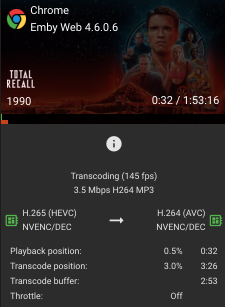
Issue appears fixed, thanks guys!
 1 point
 -
Hi there, yes we can look at adding this. Thanks for the feedback.1 point
-
Hi MediaMogal, You can see the metadata fetcher setting by going to the server dashboard, selecting Library, clicking on the 3 dots for a particular library, selecting Edit and scrolling down to see the Metadata Downloaders options. I believe the default is always to have at least some of them on. So it looks like you are not turning off metadata fetching, and you are not having my problem anyway. So Luke, do you know how that fits with the theory of the problem. Thanks1 point
-
Am I missing it, where is the Best Answer option?1 point
-
Thanks Luke. I didn't know that existed prior to doing my server move. That guide talks about changing paths to media files, but since I moved the whole VirtualMachine containing Emby (and Docker), all paths have remained unchanged: "/data/movies/______".1 point
-
Yes, it will be coming to all of our apps.1 point
-
About 18 months ago.1 point
-
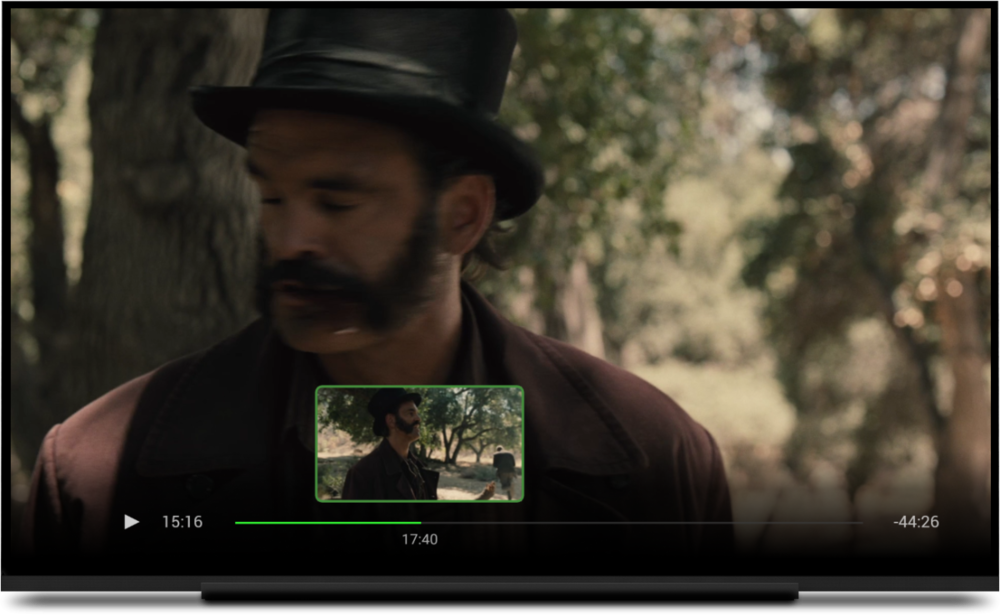
Yes. We've had this implemented there for a while.
 1 point
 -
FYI @Jdiesel Forget a series in Next Up now has over 100 Likes and should be moved up accordingly. The following have tipped over 40 Likes now too Multi-Cast Support Down for maintenance Auto Delete Watched after "N" Days Recommend movies or shows to other users ...there are probably many more, I didn't go through the whole list though.1 point
-
Hi, i'd love that search engine look for tags in complement with the filenames. For example i'd like to tag all my family "ski" videos so when i search for the work "ski" they are listed. Or is there an alternative to do that with the actual features ? Regards1 point
-
it has always been based on name, but we plan to improve it in the future and incorporate other characteristics such as path. thanks !1 point