Leaderboard




Popular Content
Showing content with the highest reputation on 11/17/20 in Posts
-
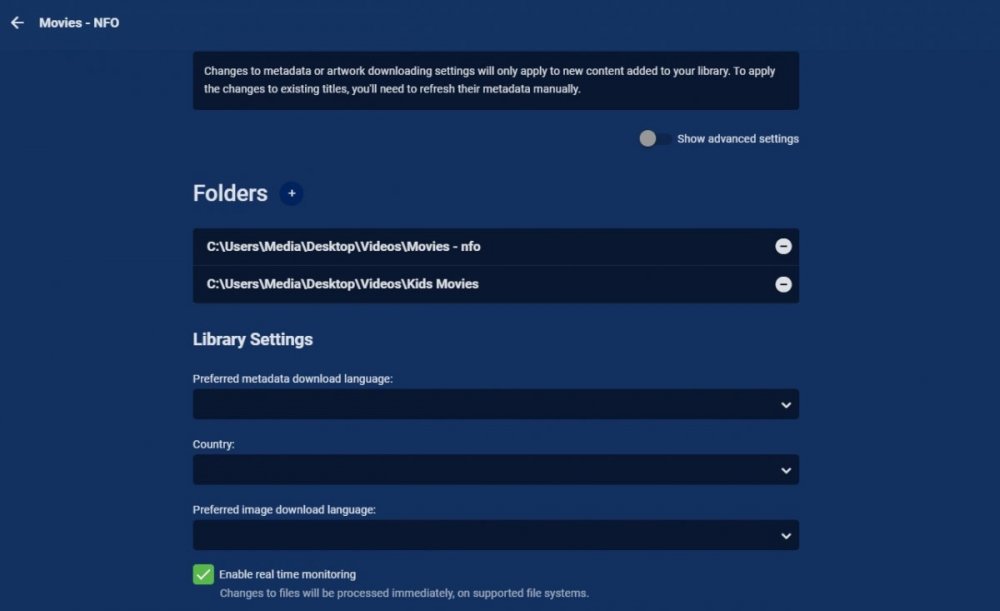
It is still a per library setting. Sound like the other Synology RTM not working topics. Either a inotify or database issue. Please post a server log.
 2 points
 -
While it is good advice to test the TV and then decide it is also generally true that "smart" TVs are generally a bad idea. The first drawback is that TV manufacturers are quite bad at providing updates throughout the life of the TV which is often over 10 years. If you use an attached box then it is much less expensive to keep the streaming hardware up to date. I have a "smart" TV and I use no part of its smarts. I use attached clients and find that very easy. Also a few years ago when my bedroom TV failed I simply got a new TV and hooked up its boxes and there was no other setup to do. If I had been using the TV's smart apps I would have had to setup everything again for the new TV. Many times a "smart" TV is actually cheaper than a dumb one but there is nothing that says you have to use the often inferior smarts in the TV.2 points
-
I know the answer to this is probably going to be no..... ...but.... A standalone music player for iOS would be very useful. Trying to get the wife to use the full client for music is just not happening. Something that was simple and intuative and quick and easy to use would be killer, something like spotify. The simpler the app is to use, the better. If all else fails, I have a project that's on the back burner that was an iOS music player for subsonic, but I could always target emby as well. It had an spotify a-like interface. Screenshot from as far as I got with the UI, it was playing back music from the server.1 point
-
It would be nice if MBS could incorporate a Commercials.XML file generated from Comskip or ShowAnalyzer and use this to automatically skip over commercials in the web client. Ideally, I'd like to see this work like DVRMSToolbox's DTBAddin. You would have a setting in LiveTV for commercials location. During a media scan, it would match the .XML file name to a recorded TV file and generate the appropriate commercial markers based in the commercials files. When streaming from the web client, it would use this data to automatically bypass the commercials, but allow the user to go back if section was marked incorrectly. Option 1: Translate the commercials file into the chapter/scene markers. Users could manually skip to the next scene. Option 2: Make special commercial markers and automatically skip like DTBAddin Maybe this could expand later where you could have MBS scan files as well.1 point
-
Hi Guys, I recently moved from Kodi with MySQL for lack of proper multi user management and server side support, I have to say I'm impressed with Emby. Together with the Kodi Plugin it really takes the solution to a whole new level, count me in among the supporters! One feature I would like to see is the ability to recommend movies or shows to other users: I share my Library with close friends and family but it is a big library so they are always calling me to recommend them a movie to watch. It would be really cool if after watching a movie I can click a Recommend button and choose the users I think would like the movie, then it is displayed on their suggested movies at the top with the name of the user who recommended it... Sorry if there is something like this is already there, I am new to the interface and don't fully know it but could not find such feature... Thanks!1 point
-
Good day, We update our forum, great work from our admins (John/Ebr/Luke), let us know if you find any issue or suggestion. Thanks all. My best1 point
-
Introduction When i am away from home, I like to have my Emby NextUp playlist downloaded to my mobile. However I needed more episodes against each series, in case i wanted to watch 2 or more whilst away from home. This script creates a version of Emby NextUp Continue Watching as a playlist (NextupPlusX) with more episodes included. By synchronising this playlist to a device, you can ensure you always have the next X episodes available locally without relying on an internet connection. issues/suggestions welcome. Installation copy files to a folder Schedule NextupPlusX eg hourly, ensure you are using pwsh v7.0+ Update config.ps1 for your requirement/environment. (pointers in the config file) emby url + api key userid + playlistname + lookaheaddepth Configure your playlist to sync, suggest you tick 'download unwatched videos only' 'automatically download new content' By instancing and scheduling multiple copies of this script, each with a unique playlist name, you can support multiple users. System Requirements Powershell 7, Should be Windows, QNAP, Linux agnostic (anything that has Pwsh7) Changelog v0.0.0.2 references the newer 4.6+ Continue Watching ribbon which can contain movies v0.0.0.1 its alive! tested on Pwsh 7.1, not tested to destruction, wonder what will happen if the playlist is updated, whilst the device is downloading. Downloads NextupPlusX v0.0.0.2.zip NextupPlusX v0.0.0.1.zip1 point
-
I would like to be able to mark individual media items or even perhaps entire libraries to be excluded from media scans. If I have retrieved all the metadata and images I want for a particular TV series or Music collection and I know that the files will never change and the metadata should never change, I would like to be able to exclude it from scans to a ) reduce scan time b ) decrease the likelihood of unwanted changes being made c ) reduce network utilization I've noticed that even with series that have not had any new episodes in years (and no changes have been made in my filesystem) there is still information being downloaded from metadata providers. I suppose that is to check to make sure it is current/complete, but it is a waste of my network resources which are not plentiful. Perhaps this could be implemented by adding the option to not rescan media that has been marked as locked.1 point
-
Just received Shield Experience 8.2.1. https://www.nvidia.com/en-us/geforce/forums/shield-tv/9/408656/shield-experience-upgrade-821released-11162020/1 point
-
It would be great if we could open the on screen live tv guide by the dedicated guide action with every video, not only when we watch live tv. With dedicated guide action i don't mean the "Up" button, but the "Options" or "Guide" button we can already use on some remotes or in case of Amazon devices the "Menu" button. Currently these buttons will open the standard osd when playing library items. That's redundant because we can do this already by pressing "Down" or "Info". So when we get the possibility to open the osd guide we won't loose but gain a feature. And for people that don't have those extra buttons on their remote, they won't miss anything.1 point
-
There is a iNotify issue, so the first thing I would do is the inotify script 2020-11-17 00:11:32.925 Error LibraryMonitor: Error in Directory watcher for: /volume1/Media/TV Shows *** Error Report *** Version: 4.6.0.5 Command line: /volume1/@appstore/EmbyServer/system/EmbyServer.dll -programdata /volume1/Emby -ffdetect /var/packages/EmbyServer/target/bin/ffdetect -ffmpeg /var/packages/EmbyServer/target/bin/ffmpeg -ffprobe /var/packages/EmbyServer/target/bin/ffprobe -nolocalportconfig -ignore_vaapi_enabled_flag -updatepackage emby-server-synology_{version}_x86_64.spk Operating system: Linux version 3.10.105 (root@build4) (gcc version 4.9.3 20150311 (prerelease) (crosstool-NG 1.20.0) ) #25426 SMP Wed Jul 8 03:12:51 CST 2020 Framework: .NET Core 3.1.7 OS/Process: x64/x64 Runtime: volume1/@appstore/EmbyServer/system/System.Private.CoreLib.dll Processor count: 4 Data path: /volume1/Emby Application path: /volume1/@appstore/EmbyServer/system System.IO.IOException: System.IO.IOException: The configured user limit (8192) on the number of inotify watches has been reached, or the operating system failed to allocate a required resource. Source: TargetSite: No Stack Trace Available https://emby.media/community/index.php?/topic/90708-real-time-monitoring-seems-broken/&do=findComment&comment=9398571 point
-
ok, thanks for the info, so i will try to set it up. That emby do all the things.1 point
-
Once you get it you may have to reboot the Internet router for it to take. But once done I think things may just start working. If not send me a PM and I can remote back in and help you get it working rather quickly.1 point
-
With NextPVR plug-in Emby only make a req to NextPVR Schedule then NextPVR take care of rest of it, but if NextPVR is setup as IPTV Stream then all NextPVR dose pass the stream over to Emby on it req where Emby take care of all of the Schedule and other things.1 point
-
Dolby immediately disputed that claim from Cerny. It seems more like a combination of factors. By implementing their own audio processing system Sony both avoids paying licenses and creates opportunity for differentiation from Microsoft with exclusive audio tech. Considering most modern TVs already support Atmos/Dolby Vision, there's not much of a penalty here. Except, of course, if you run a home media library like we do. I've been reading a bit and it seems more and more like Emby works best with a dedicated device like the Nvidia Shield. The PS5 won't do Dolby tech. The Xbox Series X will, but audio passthrough from internal apps is still unclear. It's also one of the devices affected by Panasonic's HDMI 2.1 woes, meaning you might have to avoid connecting it to the AVR lest you lose some HDMI 2.1 functionality. That means relying on e-ARC (assuming your TV and AVR have that). This leads to the final issue of LG and Samsung dropping DTS on their newest TVs, which means the TV can't even passthrough DTS audio. It's a minefield out there. So the Shield Pro 2019 seems like the way to get HDR (HDR10, Dolby Vision) and uncompressed high-def audio with TrueHD and Dolby Atmos for your home library. I think it's still Low Latency Dolby Vision, but at least it checks all the boxes. My biggest concern with Dolby Vision is with streaming services and there's always the option of using the TV for those if you really want fully-fledged Dolby Vision.1 point
-
That same exact behavior is also on Roku. Hold down OK while something is playing. After 1 second stats for nerds appears. Hold down OK again for a full second. Stats for nerds will disappear. Hold down OK for less than a second and release and it will display the OSD. There is some consistency evolving. There are also "Stream Cards" shown on the items detail screen of Android TV if you have enabled debug information. Those stream cards show the streams as rows of cards with the media details (codecs, etc) displayed within. Roku needs those "Stream Cards" too.1 point
-
So just tested with browser in wan and it is ok !1 point
-
stats window is a PIA - slows down page load - provides little if any useful info - and does not scroll with window so 90% you cant see it anyway1 point
-
yes please. get rid1 point
-
@FrostByte @ebr I'm suggesting you either go 'technical' or you go 'non-technical' - there is no way to know what level somebody is and of course everyone is different. Ideally of course, it should 'just work' without selecting anything - that's what your 'non-technical' user will hope to use - in that case, displaying it's 1080p H264 or whatever is not relevant either - so why show that ? For those that are technically aware of all the possible settings to maximise their AV experience - THEN display as much as possible to help them with that decision - bitrate included. If we could control what users see on a per user basis, then that would be great - but I guess that is not possible at this time.1 point
-
Hi, I believe I recall one or two users in the qnap section mentioning that they used an add in card and that is was working for them.1 point
-
Yes, please have an option to turn off the stats window on certain threads. It seems like it's only coming up on popular threads, but it's also nothing I care about and takes up a lot of screen real estate1 point
-
1. They come from Emby server for sure. Its TheMoviedb's scraper provides youtube links for trailers stored as <trailer> into the .nfo files. E4K v4.x handled it as I expected. If you have local trailers, they were favored over the remote trailers stored in the .nfo files. Didn't check your alphas about that yet. 2. Cinema mode's default configuration (server side) does not include trailers (local or youtube) for your own movies. It just shows trailers for new and upcoming movies, but you can optionally configure it to include your own local trailers iirc, but this won't work for the youtube trailers stored in .nfo files. I'd suggest to keep it as it was with a slight adjustment: In E4K 4.x cinema mode was enabled by default, but there was also a setting to ask whether it should play trailers on playback start which was disabled by default. I'd suggest to also enable this on default settings. I had some very confused ppl didn't understand what's happening at all when cinema mode triggered first for them 3. Could you tell me one of those plugins? I'd like to check those out. I guess you need to keep in mind that cinema mode is a premier feature so "I would prefer Kodi takes care about the playback" is probably not in Luke's intention1 point
-
@Abobader Any way of getting rid of the TOP POSTERS table on the right of threads that you've participated in ? This is from the Emby for Android 3.1.47 thread, but I am not seeing the same in this thread. What's different please?
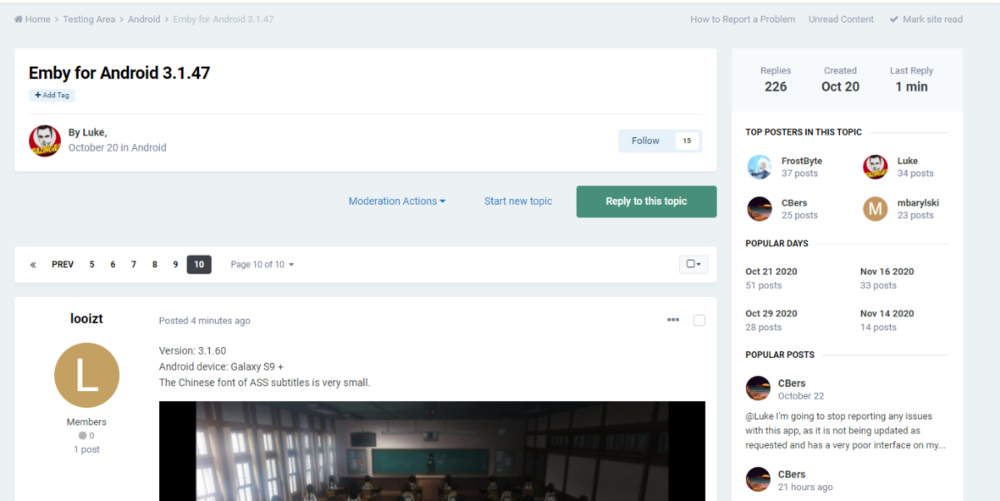
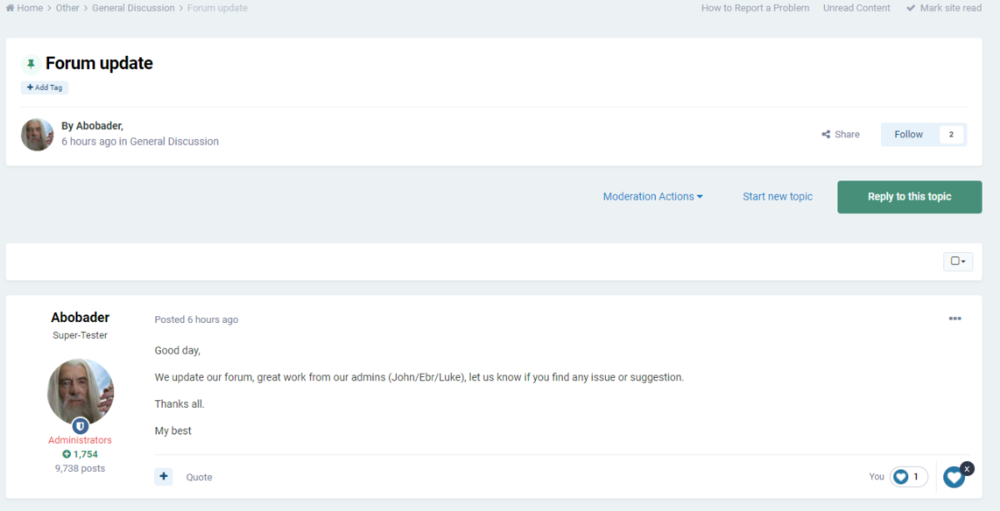 1 point
 -
Thanks for the feedback. Glad you got it working.1 point
-
dts:x - not supported atmos is playing - not sure if HD1 point
-
Perhaps I'm over simplifying this - but why could you not simply map a remote fileshare onto each others emby instances ? You use use a number of tools to achieve this - VPN, Remote Fileshare etc - all you need is a UNC path and you can simply add it into your library - where the storage physically is doesn't really matter. I use multiple 'file servers' now on my current system simply by using <\\server1\filepath> and <\\server2\filepath> in the same library. So as long as you can get a reliable remote fileshare working - then I see no reason why this would not work ... ?1 point
-
Hi Abo forum update looks good Have one issue - with the dark theme - boxes of text like this blah blah are very dark - they used to be much lighter - and now are hard to read - any chance of changing this?1 point
-
This versione works fine now on my q60 2019 TV.. Tks a lot1 point
-
Ohhh yeah I guess. I tend to deal with stateless stuff. So I always forget somethings have a state of more than this one execution lol. I just need to add a serverEntryPoint then it looks like and have the progress and stop methods based on where the list you have referenced is at. I should be able to copy paste this tomorrow1 point
-
Yeah I saw your code, ran it and was like this is crap it doesnt work1 point
-
Where are you hooking in to these events lol? Remember Im no pro to this API, it makes me want to stab my eyes out almost daily, why I do stuff 1 day, wait a week, try again another day wait a week Why couldnt I just query these events from the api? I work in marketing we collect TONS of data so like having button clicks and stuff logged is very normal for me. Shouldnt I also know when the session started, I just feel like there are basic data points I would expect but arent there. You would think in the PlayState it would have a paused duration when paused, or muted, or a list of events, something is triggering that boolean to be set. In the sched task I didnt want to have to store things back to the config to "remember" between each run.1 point
-
You should talk to Luke about this, STRM files are handled in a special way on the server, if they link to an external source vs if they are local files, also the first time a STRM file is accessed using the /PlaybackInfo endpoint the server does some magic to extract some info about the destination file. This is because when STRM files are first scanned into the server the destination file is not scanned or parsed as this would slow the media import to much. You can test this by adding some test STRM file to your system that point to local and remote files for testing, just keep in mind that when they are first imported they and not fully populated with info about the media i.e. a media scan until they are played.1 point
-
Sorry this got a little bit off topic. @Xin0 now that you're able to install, please open a new topic for your issue and we'll be happy to help you there. Thanks !1 point
-
Ok you may need to seek help with ServerWMC on this one, sorry. Stay tuned for upcoming updates in Emby Server where we'll be able to support the ceton tuner without having to use serverwmc.1 point
-
yep - or build you own and give it a proper cpu with some grunt - remember raid and networking dont come free they need cpu power to work effectively and the more clients you have the worse it can get for just file server duties my 853A providing a 4k movie to a single client - has its cpu at 25-35% - when its not doing anything else but direct playing the file on my tv/shield etc1 point
-
i have a A85 2020 model and its faster than my 2017 shield night and day over my 2015 sony get the tv then decide if you need a shield1 point
-
We're hoping to get the test version released this week. Thanks guys.1 point
-
not sure there is an event for that but the nextup row changes when you finish watching an episode of a series in the row i.e. its fully played so i would do that and review the emby log to see what the app is calling to get the row - to give you a better idea not sure what the actual criteria is for being in next up row as never looked but can guess1 point
-
Hi there, are you connecting to your own Emby Server, or someone else's server?1 point
-
You use either the D-pad and press left to rewind and right to fast-forward. This will put the player into manual seek mode where you can advance to the point you like manually. Or you can press the rewind or fast-forward keys directly. This will put the player into automatic seek mode where it will automatically advance. If you press the button multiple times it will increase the automatic seek time from 1x to 2x to 3x and back to 1x. This allows you to get where you want without needing to press or hold keys repeatedly. Like @Happy2Play mentions if you enable BIF images this will allow you to see thumbnails of the seek points visually as you go. Without the BIF you will just see the last image on screen and a seek bar. There will be no thumbnails during seek without BIF generated.1 point
-
Maintenance Window: 11pm Eastern Time on Nov 16 - 2am Eastern Time on Nov 17 It is time for another back-end system upgrade to keep up with software that we use. All Emby back end systems may be unavailable during the window above. We hope for the actual downtime to be less than one hour but want to provide warning for a larger time frame just in case. This may affect Emby Connect and initial Premiere validations. Most operations will be unaffected. Thanks. View the full article1 point
-
Thanks @vdatanet for the info. Emby for Android, does indeed work with Dolby Vision, I tested on my Shield. Emby for Android TV on the other-hand doesn't, yet. Therefore, may I request that the ExoPlayer be updated to v2.12.0 please?1 point
-
A friendly bump! I installed Pl*xAmp on my wife and eldests phone, and they love it. She just can't handle the full app, it just behaves as you'd expect a music player to work, no getting lost in a video section or somewhere, it's intuitive as a music app because it's just a music app. Luckily I had an unused lifetime pass, so I set up a server which is purely used for music. I've now been able to dump Apple Music and my wife is extremely happy and in love with the music app. For a phone, a standalone music option definitely makes sense in my eyes, something that's set up with the sole purpose of playing music, I'm sure there are plenty of people out there who themselves or who have family members who just don't need the entire app. I've got to say, I'm impressed with it as well, it's installed on my phone as well as my music player.1 point
-
Tested and confirmed. No matter what I do I'm unable to get emby to update the track artwork. I tried every combination I can think of.1 point
-
But if there is an album, I don't really see any good reason for the track art to take precedence over the album art. Anyway, I guess I would be ok with that behaviour, if there was a reliable way to change a track's art. You can always go to 'Edit images' for each, but that will only last until the next metadata refresh, so it's not a solution, not to mention it's a pain to do on each single track. I'm pretty sure this is a bug in emby. If I change a file's metadata tags, I expect emby to pick that up. Which it does: if I modify an artist name, or a track title, or anything else, it happily updates the metadata. But for some reason, the primary art always stays to whatever was in the tags when the track was first imported.1 point
-
Ah! Now I know a little more than I did before. I like the folder view because it shows a typical image of a CD cover I'm used to seeing. I don't really want to have to manually save images for previously "incorrect" and now "fixed" album art. I'm not opposed to blowing away the library and rebuilding it with what I believe to be "corrected" album art. I'd rather do it that way. The latter seems like the most right way to do it. I'd like to think that using the UI of Emby is the also the most right way to do the library blow-away (as opposed to ripping out the rug in the filesystem). And yes, I would agree that this does have to do with folder structure as much as anything else. So it would appear that there is a cached image for the folder in the "Folder" View? What's also throwing me off is that in the "Suggestions" View, the "Recently Played" art is incorrect for Bob Seger (showing James Taylor) there too. To be continued... Just want to say thanks for everyone's and anyone's input1 point
-
Thank you benmoses for bringing this topic up again. I want to confirm that running Replace All with Replace Images does not refresh the album art. The cause of the problem, as stated above by Luke, seems to be that "[...] currently we don't re-extract in this situation because we don't store enough information in the database in order to be able to determine that the image has changed." As I intend to use only the Image Extractor (which I guess will not be triggered to run even in the case of "replace all and replace images") this means that the only way to update/refresh an album cover image is to delete the entire library from emby and adding it again, which is really not a solution but a tedious and time consuming work-around. I had already tested this at the time, but just to reiterate, deleting/moving only the modified album/files from the library, scanning, then adding them back does not update the cover art, Emby still shows the first one that Image Extractor got. About the server log, which specific file do I have to attach? https://i.imgur.com/J23LXnh.png1 point
-
I'd like the ability to have a show record from any channel but only if it's in HD. Currently I have to setup a series recording and specify individual channels. I want to record reruns on some series, but don't want the SD rerun copies. My Guide lists the shows as HD or not, so I'm guessing there's a way to add this functionality rather easily, no?1 point
-
It would be nice to have a sort of internal newsletter system [from server admin to users]. This way, it would make it easier to communicate any type of information.1 point