Leaderboard




Popular Content
Showing content with the highest reputation on 11/09/20 in Posts
-
I'm a plex life time member, but I have been using Emby for over six years continuously, but there is a feature which I have always thought is missing in Emby which I would like and encourage the developer to consider including especially in this dispensation where families can social or commingle due to COVID 19. Today, I received a notification from Plex about it new feature titled Watch together you can read about it here https://support.plex.tv/articles/watch-together/ The feature allows friends and families at distance to watch same movies together instantly, you simply invite all your buddy, once they signed to the system which can be seeing in the server then play and pause as needed, this I think is cool feature should be added to emby. Let's here your though if Emby developer should consider adding this feature to our beloved Emby Media https://www.bing.com/news/search?q=Plex+Watch+Together&qpvt=plex+watch+together&FORM=EWRE1 point
-
It would be great if i could set the server to delete certain shows after a user has watched it. I happen to watch "The Daily Show with Jon Stewart" and "The Colbert Report", everyday, and with "News"ish type shows, there is no need to keep the episodes around. So i would like to set MB to auto delete those 2 shows, 3 days after one user has watched it.1 point
-
I would like to request a sleep timer function for the Emby app. For example, when a song is playing, it should be possible to quickly and easily set a sleep timer to shut off the song after a desired interval. Options could include 5, 10, 15, 20, 30, 45, 60, 120 minutes. If it had this, I would be happy to purchase Premiere.1 point
-
This has been around for a couple of months now. Will it be Emby's christmas gift to his users? Looking forward to it as I plan to use Emby as DVR as well.1 point
-
In case anyone else needs it, the API is horrible, IDs are GUIDs, but then other things use the IDs as strings w/no dashes. Just ridiculous. But you can set the users visibility to a channel on/off this way. var users = UserManager.Users; var channels = LibraryManager.GetItemList(new InternalItemsQuery() { Recursive = true, IncludeItemTypes = new []{ "Channel" } }).Where(x => !string.IsNullOrEmpty(x.Name)).ToList(); var currentChannel = channels.First(x => x.Name == Plugin.Instance.PluginConfiguration.ChannelName).Id.ToString().Replace("-", string.Empty); if (!Plugin.Instance.PluginConfiguration.Enabled) { foreach (var user in users) { user.Policy.EnableAllChannels = false; var enabledChannels = user.Policy.EnabledChannels != null ? user.Policy.EnabledChannels.ToList() : new List<string>(); var disabledChannels = user.Policy.BlockedChannels != null ? user.Policy.BlockedChannels.ToList() : new List<string>(); //Logger.Info("Enabled " + string.Join(",", enabledChannels.Select(x => x.ToString()).ToArray())); //Logger.Info("Blocked " + string.Join(",", disabledChannels.Select(x => x.ToString()).ToArray())); if (!disabledChannels.Contains(currentChannel)) { disabledChannels.Add(currentChannel); //Logger.Info("Added To Disabled " + currentChannel); } if (enabledChannels.Any()) { if (enabledChannels.Contains(currentChannel)) { enabledChannels.Remove(currentChannel); } } else { foreach (var channel in channels.Where(x => x.Name != Plugin.Instance.PluginConfiguration.ChannelName)) { enabledChannels.Add(channel.Id.ToString().Replace("-", string.Empty)); } } user.Policy.EnabledChannels = enabledChannels.ToArray(); user.Policy.BlockedChannels = disabledChannels.ToArray(); //Logger.Info("Enabled " + string.Join(",", enabledChannels.Select(x => x.ToString()).ToArray())); //Logger.Info("Blocked " + string.Join(",", disabledChannels.Select(x => x.ToString()).ToArray())); UserManager.UpdateUser(user); } } else { foreach (var user in users) { user.Policy.EnableAllChannels = false; var enabledChannels = user.Policy.EnabledChannels != null ? user.Policy.EnabledChannels.ToList() : new List<string>(); var disabledChannels = user.Policy.BlockedChannels != null ? user.Policy.BlockedChannels.ToList() : new List<string>(); //Logger.Info("Enabled " + string.Join(",", enabledChannels.Select(x => x.ToString()).ToArray())); //Logger.Info("Blocked " + string.Join(",", disabledChannels.Select(x => x.ToString()).ToArray())); if (disabledChannels.Contains(currentChannel)) { disabledChannels.Remove(currentChannel); } if (enabledChannels.Any()) { if (enabledChannels.Contains(currentChannel)) { continue; } enabledChannels.Add(currentChannel); } else { foreach (var channel in channels) { enabledChannels.Add(channel.Id.ToString().Replace("-", string.Empty)); } } user.Policy.EnabledChannels = enabledChannels.ToArray(); user.Policy.BlockedChannels = disabledChannels.ToArray(); //Logger.Info("Enabled " + string.Join(",", enabledChannels.Select(x => x.ToString()).ToArray())); //Logger.Info("Blocked " + string.Join(",", disabledChannels.Select(x => x.ToString()).ToArray())); UserManager.UpdateUser(user); } }1 point
-
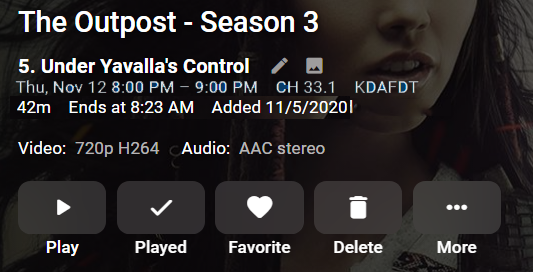
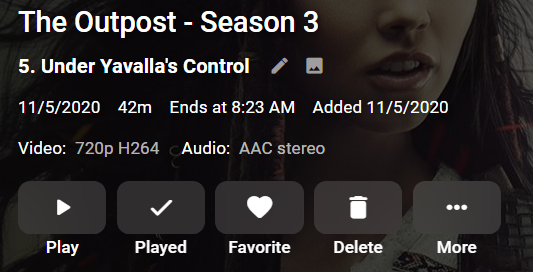
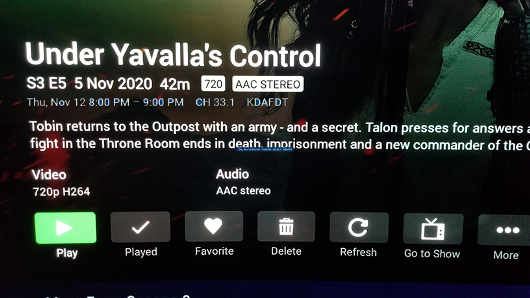
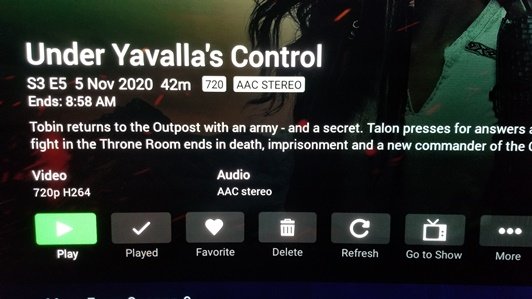
I searched before posting and went back 5 years, buit didn't see anyone making this request. There was one that was kind of similar but not the same nearly 2 years ago. I would love to see an additional line added to Recordings program info screen to include the time the program aired and channel it aired on, as is shown in program info on the Guide and Schedule pages. I have attached screenshots of what is shown now, and what I'm requesting, although I'm sure your team could do a much better job with the aesthetics. CURRENT RECORDING INFO (Web App) REQUESTED INFO CURRENT RECORDING INFO (ANDROID TV) REQUESTED INFO
 1 point
 -
You really need to add this function in the server settings to block the addition of photos from the camera! Thank you1 point
-
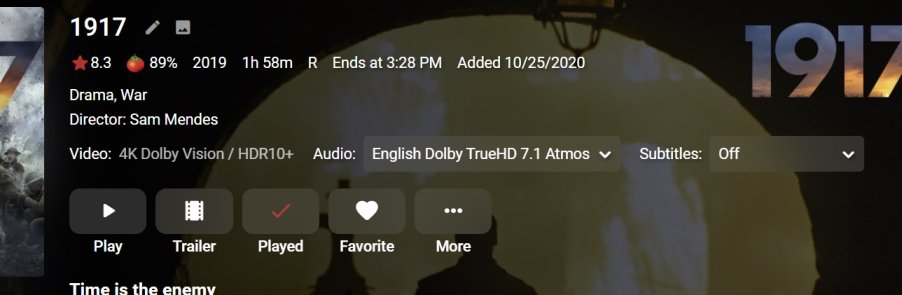
I've done something similar with the video and audio names as Emby doesn't provide the information I want. Could just add the bitrate to the video name
 1 point
 -
Not that I'm aware of. People use it for different things so it would be a bit difficult to document it's use which is likely why even on the dev site for it there is little documentation. I know in the Next Version of Live TV the need for xTeVe is all but eliminated for most people.1 point
-
In the past I used to get the howling on my LG TV too but not this year. Why has it been removed? I loved it, surely scared our cat!1 point
-
Hi, Typically only the current release and beta versions are available as older versions may not work with newer clients and vice versa. If there is a problem in a release version it's better to identify the issue so it can be fixed.1 point
-
LOL - i see now - the AA and A (set it back to Artist) disappear and are not shown - weird even a remove scan and re add does not bring them back! (with or without the nfo) Album is there and AlbumArtist 2 is visible but just as a label not a link Without checking this is a database issue as things are not being cleared/deleted correctly does the same thing happen with a Music library?1 point
-
Ticket can be closed, it was corrected with ebr! thanks !!1 point
-
I wish there is a "Reset Filter" button on Emby Web/ Android version. The Firestick version surprisingly the only one that has clear filters. Also, this actually a related to filters, yet separate feature request. Is there's a way for us to save the filter query (e.g : Genre Action/Adventure, Status : Ended, etc) to a user view/ "Saved List"1 point
-
select all the files from one of the problem albums and do ALT+T to bring up the extended tag dialog box i would guess you will see other tags not in the left hand panel1 point
-
Thanks. I'll take a look at the settings. I'll also check the logs on the other devices that were giving me similar behavior to see if the same error is present there.1 point
-
The patches in dev mode for 4.x are the best I can do. There will be no further improvements. I assume you are referencing to this posting: The newly designed player code, DB improvements etc. are available in 5.X which is currently available as alpha version but only via sideload. It's too early to publish it even as beta.1 point
-
Si con servidores, te refieres a servidores Emby, no existe la consolidación de servidores en uno solo, si tienes dos servidores Emby, o te conectas a uno o te conectas al otro. En cambio si te refieres a servidores de almacenamiento, si, un servidor Emby puede tener los medios distribuidos en varios servidores de almacenamiento, pero en un único servidor Emby. Puedes instalar Emby en un Synology y añadir carpetas compartidas de otro servidor Synology.1 point
-
I also failed there on the weekend. DTS only seems to work if YOU are using a player app, i.e. playing Blurays or DVDs with the Xbox Player app. The error is due to the DTS processing. Bitstream still doesn't work for 3rd apps. but even when I set PCM, the files jerk like crazy. Plex and Emby don't seem to go with it. As a result, the Xbox cannot really be used.1 point
-
From the catalog section on your server.1 point
-
Ok. I poked around a bit more and I think I figured out what I was missing. Not all of the tracks are corrupt/have issues/whatever. And it appears that emby will apply issues it finds in one track to the entire folder (assuming they are all for the same album). So it's not sufficient to just check 1 or 2 tracks, I had to look at the whole folder. I'll work on cleaning things up, and re-try. Thanks1 point
-
Yes I think I'll add native mode again. Seems there are some usescases plugin mode cannot cover. Just checking, you have a local copy of the media files in Kodi? That makes not really sense to me. Nativ mode is not designed for that, even if it technically could work this way Native mode is designed to access the media just via direct path instead of http requests. -> Kodi should have access via same (network) pathes as the emby server has.1 point
-
Cool I'm a wee bit new to Emby but know Kodi for some time now. Yesterday I tested the latest stable version but was dissapointed because no subtitle is shown when using Emby for Kodi if you choose to transcode. How do you set transcoding speed btw, is it through "Home connection speed : xyz mbps"? Can we set it to "Auto" like in the Emby official app1 point
-
These two examples are streaming the original to the browser video player. For some reason the browser video player doesn't like one of them, so that's why forcing the transcode most likely would have resolved it. It's just that it's difficult to do that automatically because the steam looks like something the video player should be able to handle.1 point
-
Are there any extended track metadata, ie the musicbrainz id tags? Technically you can set providers per library. But you have to remember all existing tags will be used so just because you think your tags are correct, the majority of the time Emby will prove you wrong. If may be the way you like it but that does not make it right from a provider standpoint. Most common issue comes from the MusicbrainzAlbumArtist field mismatching to the AlbumArtist field, ie this creates a mismatch within the Database per said tag.1 point
-
OT: But you could use Disk Space plugin and setup notifications as a specific amount of free space. But a 30+ hour stream, I would ensure "Are you Still Watching" is enabled on all clients.1 point
-
+1 Having cached copies of all library images would be fantastic. I have a ton of custom movie posters, wrestling event posters, TV show covers and thumbnails, etc. Because of this I keep all of my images in the media folders in case I have to do a rebuild (and have just lived with the downside of sluggishness from a library browsing perspective as the lesser of two evils). Having copies of all images saved in the media directories saved to cache would be an awesome option to mitigate the downside entirely.1 point
-
On that line I would rather the length of what's already there is expanded. It's already chopping off what I have1 point
-
That is great because your newer version is super nice and having that feature back would be really nice. Thanks for a great program.1 point
-
Emby for iOS 1.9.9 has been released. Here are the highlights. New Apple CarPlay Support This is a treat for our Emby Premiere users. Now you can take advantage of Apple CarPlay while you're on the road. Other Improvements Improved HDR playback Support in-app AV1 decoding Added camera upload photo folder selection Support playback speed and subtitle offset selection Media Info display is now TV mode friendly Brighter detail screen backdrop when used on larger screens Support downloading subtitles during video playback (requires Emby Server 4.5.1+) View the full article1 point
-
I haven't repaired the libraries. I was just checking if the label was updated. I pushed the cancel button both times.1 point
-
Gracias eso haré1 point
-
Have you gotten the link working in a jail? Or is this on the host? Could you share your devfs.rules :)? NVM: In the meantime I found what's needed to create the symlink in the jail: exec.poststart = "cd /usr/jail/emby/dev/dri; ln -s card0 render0";1 point
-
Server side disable/enable camera upload for individual users (or per device even) is a HUGE must have. I have people enabling it on their devices and all of a sudden I'm getting bombarded with photos and videos I don't want and have no way of controlling. Thank you1 point
-
It looks like primarily you changed our logo and branding color - slightly encroaching on the trademark of a rather large company... Is there more I'm missing?1 point
-
It would be very beneficial for dvr users for the detail screen to have the channel name and the time of the recording. If you ask why I want the time that it is recorded the time that it has been recorded tells me the later the show is screened the chances of being taken off air are very high and don't get too hooked on it. In WMC each library displays the information that is relevant for that library so if you go to movies library it will not have the channel name and the time so each screen has the information that is relevant for that library when I requested this before the argument was that every screen should be the same but it shouldn't. It would also be helpful if the pre playback row can be taken off it just makes the screen too busy. In android tv client there is an option and it should be across the board so no one is disadvantaged.1 point