Leaderboard




Popular Content
Showing content with the highest reputation on 10/31/20 in Posts
-
Tienes los temas estacionales automáticos activados y se ha activado el tema Halloween. En breve, volverá tu tema por defecto, si lo prefieres desactiva los temas estacionales automáticos.2 points
-
@@Luke stated in a previous post (https://emby.media/community/index.php?/topic/49933-replaygain-music-support/) adding support for this could easily be done for at least the theater client seeing as the player used already supports replaygain. I'm making this feature request in hopes that this support is added, as I have no dev experience myself1 point
-
One thing that I would like to see implemented is the abilty to display lyrics in all of the apps. For those of us who have libraries with lyrics embedded in the actual files, it would be trivial. Simply scrape the lyrics from the lyrics tag and display them. As far as scraping from online lyrics databases, I don't see that working very well as just about every app that I have seen use it either doesn't get the correct lyrics or they are truncated with an add for the website.1 point
-
I would love the ability to increase the size of subtitles on the different platforms, specially android, chrome and roku... One additional thing that would be great would be the ability to change font color, outline, drop shadow, font background... Thank you1 point
-
Please read this post first. I was wondering if it would be possible to add something that would allow you to skip the intro to shows automatically while binge watching. When watching Netflix it does this for some shows, and im not sure if thats a feature of Netflix itself or a Chrome extension i use called "Flix Assist" but it would be a nice feature to have within Emby as well. and possibly even create a custom timed skip for specific shows1 point
-
I realize you can use Time Lord to do this but this also breaks other sorting options in the app. Since it changes the date added to the release date, the sort by "date added" feature under the library no longer works. It just shows your media sorted by the date it was released. I understand now that this is by design but wouldn't it make more sense to just add the option to show "recently released" on the home screen or at least under suggestions within the library instead of as a sort option? The user could then chose to see media that has been either recently added (latest media) or recently premiered... or both. I just think it would make navigation easier for the end user. For instance, I just added a bunch of movies... I mix of new and old. If I use Time Lord they have to go search for the older movies. If I don't use Time Lord they would have to go search for the newer movie. It seems like it would make more sense to have the option for either or both on the home screen. Searching isn't a big deal but I think having the option for both categories would make things a lot easier. Or maybe this is already possible and I'm just overlooking something?1 point
-
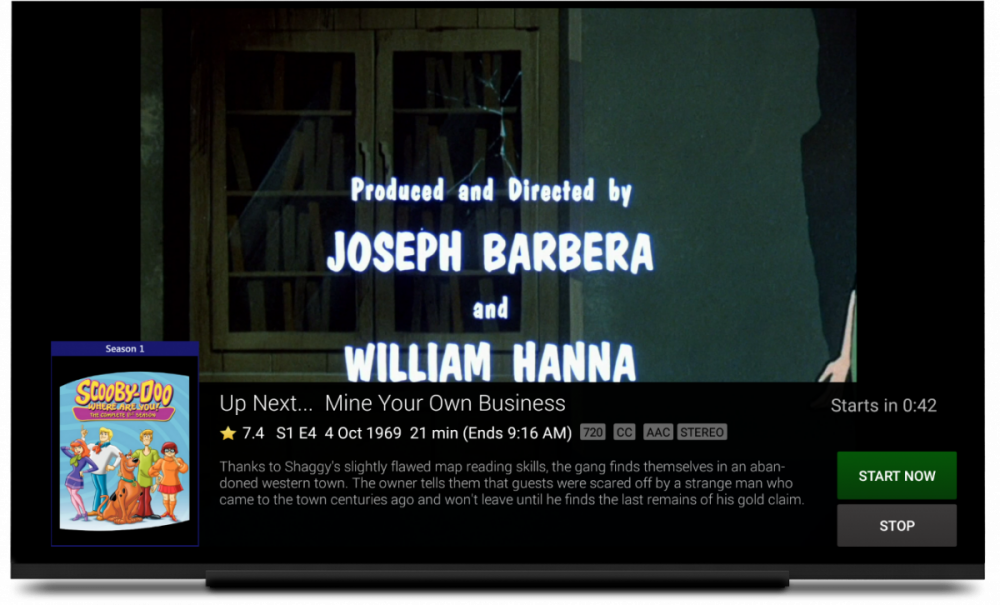
Before the last tvOS update i was able to see the option to skip credits once a show was ending. When the update happened, even the ability to auto start the new episode was lost, then you guys fixed it (thank you) is there a way to put that feature back in? please see attached, not my image, but it looked like that.
 1 point
 -
Looks like a missing file CANNOT LINK EXECUTABLE: library "libembymc.so" not found1 point
-
Thank you all again, please, let me know if I can or have to do anythnig more, to help you. Good night!1 point
-
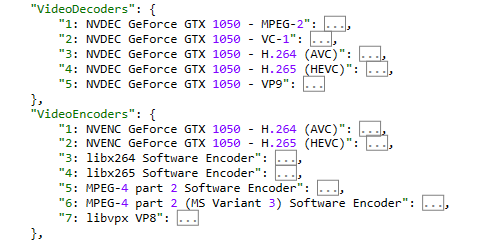
And now I have fixed the issue as well. The device ID had changed by 1 after replacing the GPU, and I had overlooked this.. Wrong: crw-rw-rw- 1 root root 195, 254 Oct 29 21:00 /dev/nvidia-modeset crw-rw-rw- 1 root root 235, 0 Oct 29 18:57 /dev/nvidia-uvm crw-rw-rw- 1 root root 235, 1 Oct 29 18:57 /dev/nvidia-uvm-tools crw-rw-rw- 1 root root 195, 0 Oct 29 18:57 /dev/nvidia0 crw-rw-rw- 1 root root 195, 255 Oct 29 18:57 /dev/nvidiactl lxc.mount.entry: /dev/nvidia0 dev/nvidia0 none bind,optional,create=file lxc.mount.entry: /dev/nvidiactl dev/nvidiactl none bind,optional,create=file lxc.mount.entry: /dev/nvidia-modeset dev/nvidia-modeset none bind,optional,create=file lxc.mount.entry: /dev/nvidia-uvm dev/nvidia-uvm none bind,optional,create=file lxc.mount.entry: /dev/nvidia-uvm-tools dev/nvidia-uvm-tools none bind,optional,create=file lxc.cgroup.devices.allow: c 195:0 rwm lxc.cgroup.devices.allow: c 195:255 rwm lxc.cgroup.devices.allow: c 236:0 rwm lxc.cgroup.devices.allow: c 236:1 rwm Good: crw-rw-rw- 1 root root 195, 254 Oct 29 21:00 /dev/nvidia-modeset crw-rw-rw- 1 root root 235, 0 Oct 29 18:57 /dev/nvidia-uvm crw-rw-rw- 1 root root 235, 1 Oct 29 18:57 /dev/nvidia-uvm-tools crw-rw-rw- 1 root root 195, 0 Oct 29 18:57 /dev/nvidia0 crw-rw-rw- 1 root root 195, 255 Oct 29 18:57 /dev/nvidiactl lxc.mount.entry: /dev/nvidia0 dev/nvidia0 none bind,optional,create=file lxc.mount.entry: /dev/nvidiactl dev/nvidiactl none bind,optional,create=file lxc.mount.entry: /dev/nvidia-modeset dev/nvidia-modeset none bind,optional,create=file lxc.mount.entry: /dev/nvidia-uvm dev/nvidia-uvm none bind,optional,create=file lxc.mount.entry: /dev/nvidia-uvm-tools dev/nvidia-uvm-tools none bind,optional,create=file lxc.cgroup.devices.allow: c 195:* rwm lxc.cgroup.devices.allow: c 235:* rwm Also note that as before, it's not needed to add the card0/renderD128 devices to this configuration. Thanks softworkz, you got me back to the actual issue1 point
-
My bad, I had not loaded my Premier key on the host installation yet... it works now. So the issue appears to be related to the container, that's good to know at least.
 1 point
 -
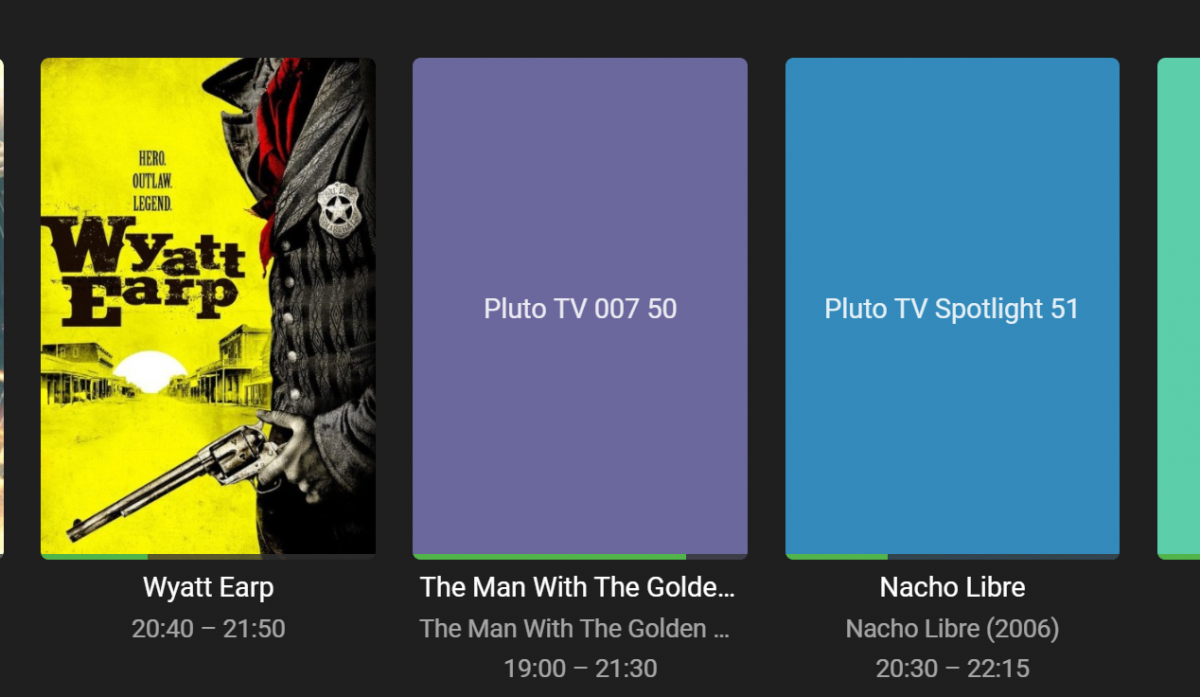
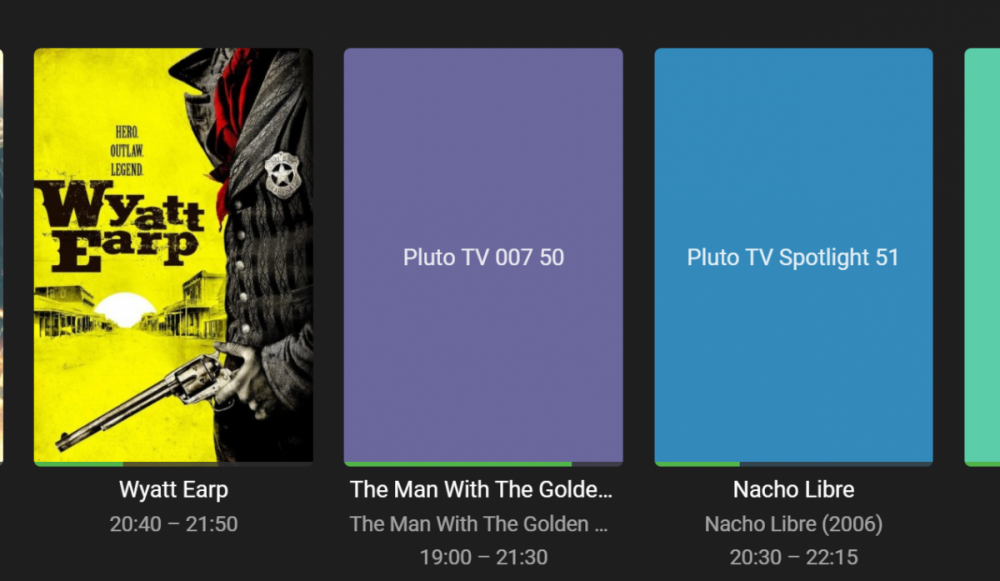
Sorted it now, Subscribed to Emby to test LiveTV and works great with Pluto TV with the m3u and xml EPG linked above. Was hoping to get some more IPTV channels with a working EPG, pointless having loads of channels without an EPG, anyone got any links for some (legal ones of course). One issue and it's not a big issue, but looks nicer if I can, but anyone know how to get the thumbnails showing what is meant to playing or at least a channel logo? Hate the look of coloured thumbs and not the actual cover.
 1 point
 -
Thanks, got it1 point
-
That's an Android device (basically) so if something is on Android TV in general I would expect it on Fire devices.1 point
-
I dislike the idea of Emby developers wasting their time with trivialities like this. However, maybe, if they do it right so that users can make and add themes as they choose and even trigger a theme for a date range, they would get it over with and then actually be able to spend their time working on Emby itself. As long as it can be turned off so that just a simple standard theme is used all the time I don't much care. I do not watch the interface I use Emby to watch content.1 point
-
Or even better, allow custom themes with custom suggestions and on custom dates.1 point
-
I asked in the other thread about themes if we could have the Halloween theme earlier so I could enjoy it longer and ebr posted that you can select the holiday themes when you want them in the app settings. I haven't tried it yet though.1 point
-
No, the Fire should get this capability. I cannot give an ETA though.1 point
-
I appreciate the offer, I will surely seek guidance when I regain the will to setting up the library again. Thank you1 point
-
What you needed to do is "forget"/delete the existing server entry on Android and add it back again because it's now different. I can likely help you remotely get this all working again. If you like, send me a PM and we can make arrangements for a remote session.1 point
-
Thank You @cayars Your To-Do List is succsesful. It Works Nice Weekend1 point
-
and here we are, exactly as expected, its the third year, you are not able the fix a simple color thing thx again for fixing nothing , for not listenening and for not bringing back nor the sounds, nor the 'spooky suggestions' but additionally removing the font too so lets wait for christmas
 1 point
 -
I recently rebuilt my emby server and as part of this changed the default folder locations for transcoding cache amongst other things. I restored a backup that had these paths configured (and they are the same on this new host) but unknown to me the folder permissions were wrong. Emby was able to start but ran painful slow and I kept get the "Check for application updates failed" error. It took me a while but I eventually figured out the folder permissions were wrong and emby could not access the new transcoding folder. I know there is a permissions check for when you change this folder through the GUI and it alerts you if emby doesn't have the right permissions, could we get an alert to show in the dashboard as a secondary check for this circumstance (ie a backup / restore has been done) so that we don't spend ages hunting down a silly issue.1 point
-
If you're missing channels, that means you've lost some of the bandwidth (I used to be a satellite TV installer). We used to have a meter that would test the integrity of the cable, but you don't have that... SO... there are several possibilities why this could happen, but I can tell you that what we did in this situation was, just replace the cable. Don't use splitters, don't connect two cables together. There could be corrosion. A rat might have chewed on the cable...any one of a number of things, and it can be a nightmare and a waste of time trying to fix it. Buy some new RG6 with a solid copper conductor (not copper clad). Buy a cheap compression tool, a two blade stripper (not adjustable) and water tight F type fittings. Here's a cheap kit that will work ok, my stuff cost a couple of hundred bucks. If you do need to couple two cables together, don't connect RG59 to RG6, and don't use 1 GHz connectors, which have the white center, use the blue, they are 3 GHz. Cable companies still use 1 GHz, which only just allows for their bandwidth. So if it corrodes or starts to fail, you start losing channels.1 point
-
Update to clarify I think it was tvg-chno="1234" that I used to assign the channels when I was testing how to get it to map1 point
-
Well, my first try with a smaller file failed. But maybe I needed to do a system restart before I re-patched the profile. I just called to dinner, so I'll be afk for a while, but I'll do some more testing late tonight or tomorrow and report back. ffmpeg-transcode-9b331a8b-c384-4852-b74b-7ffa5055ad3f_1.txt1 point
-
We produce both x86 and x64 versions and the installer will choose the appropriate one.1 point
-
I completely agree, especially on this point. PLEASE, give this dialog some kind of option to show it only once and then dismiss it until the next month. I've bought premiere to not see those advertising popup screens every time I start the emby app anymore and now instead those annoying update popups block the whole app on every start just to make me grind through this manual update process every month for almost no changes to the app.1 point
-
Yeah, and it sucks, because everytime I have to uninstall the old version to install the new one, of course this means, the settings for all users are lost, so I have to re-enter every user in the app and apply the settings by hand, if I do not want to get lynched by my family. And then there is the unnecessary nag screen every month to update the app, even if there is no new app or the old one would still work, as there was no server update. So please, try harder to get the app to the store, there are really some shitty apps there, so it vcan't be that hard! Ciao, Alfred1 point
-
My wife wanted to watch Last Christmas yesterday. I said "No, it's too early" when I really wanted to say "How about after I die?" but didn't1 point
-
Great, thanks.1 point
-
There are a couple of options here. You can turn off the option in the app to transcode ASS subs. If you don't want to do that, you can obtain external subs and try those as, I think, your delay is probably coming from having to extract the internal subs before they can be processed (conjecture). Finally, the mobile app is using a customized version of the player that can render the ASS subs in the app. The store TV app will eventually get this same capability.1 point
-
1.8.43g is the latest beta version of the Android TV app. If you want to try the app that Luke mentioned above, you'll find the APK in post #1 of that thread, which you will have to sideload.1 point
-
Hi. Doesn't that validate that it is working right there?1 point
-
I've also added the alert under the "Alerts" section on the dashboard.1 point
-
For Example - When in the artist home page - it would be nice to have the option to Skip to the next Artist Home page Rather than backing out and clicking on the next artist So a forward and back icon next to the metadata edit and image edit icons at the top would be a good addition - not on the more menu as that adds another click This could be applied to any item type e.g. Movies/Tv Series/Seasons etc and even Albums and Music Videos etc A simple usability addition which would make navigation simpler - especially if you are checking data or comparing data etc - besides the basic nice to have issue and less clicks to get to another items home page etc.1 point
-
For those with the DTS problem, the best solution is to simply add a non DTS track to the original media. That way, the issues goes away and you now have a file that can be played by any system - you can opt to play the DTS Audio if you can - this script does not replace it. Go to your emby server system directory and find ffmpeg Then at a command window use the following to ADD an AC3 track and make it the default track :- ffmpeg.exe -i input.mkv -map 0:v -map 0:a:0 -map 0:a -map 0:s? -c:v copy -c:s copy -c:a copy -c:a:0 ac3 -disposition:a:0 default -disposition:a:1 0 output.mkv It copies all the existing tracks (original quality) and just adds an AC3 track, derived from the 1st Audio track. This will work on any mkv file incl 4K - it will not touch the original 'input.mkv' file.1 point
-
On the bright side Plex adding a feature is usually the signal for Emby to start working on it.1 point
-
Also asked for this some time ago... I still would love to have this even if it would mean to have to edit every single episode/movie. +11 point
-
I have a couple of shows that change the intro on a per-episode level, so that should be configurable as well Basically: Configurable on Series, Season, and Episode level1 point
-
I suppose but I also see that resulting in a lot of troubleshooting for us. I think it would it would have to be a configurable default value along with a per series override.1 point
-
so when should the halloween theme kick in? one day to it and i don't see it on ET, android or web client1 point
-
From a web client perspective there is only one "Halloween". But this question comes up every year, so I would assume it should be documented somewhere. What Seasonal themes do we have and when are they applied and how long they are applied.1 point
-
I know it works/worked previously but just don't know the threshold of when it is applied and removed.1 point
-
I have my 'Theme:' and 'Server dashboard theme:' both set to 'dark', as well as 'allow automatic seasonal themes' enabled but I don't think I have ever seen a seasonal theme come to think of it :/ If I manually change to 'halloween' there is definitely a noticeable change, but automatically applied themes don't seem to be working for me. Android 8.0.0 Emby for android v3.0.851 point
-
You could start an API which people could contribute to. Just set all media items to 30s, then as people contribute to each episode it would be more exact. SeriesName: "string", Season: int, Episode: int, IntroDurationTicks: ?long, IntroStartDurationTicks: ?long Even with diffetent encoding the intros duration is not going to change, and just to be clear Netflix's option to skip the intro does not appear right away. The OSD pops up about 2 seconds after the stream starts, so following that lead, emby should wait two seconds to show the OSD with the option. I think it is possible. The community is large enough to create such an API endpoint. If people submit changes to the API for durations, the API should take the average of what as submitted to make a decision on what it should be. (DurationSubmission + CataloguedData) / submissionsRate Just an idea... Host it in GitHub and let everyone submit... The Wikipedia of intro duration data.1 point
-
There are several possibilities: - A manual tagging of the intro and the end of the episode in collaborative, and for the checksum we can use the exact duration of the video ? - Automatic detection thanks to subtitles and the approximate duration of the introduction ? Btw i highly doubt that netflix will detect introduction automatically.1 point
-
It sounds to me like a value you'd probably have to configure for each series, along with a system-wide default of course.1 point
-
THe only way I see it being possible is to allow a metadata value to be set for a season that is the number of seconds to skip ahead when using this function. I'd then figure out how long the intro is for that season and add it. The real problem is how to access that function on something like a shield. I'm not convinced it's practically possible. I'm definitely convinced I want it to be!1 point
-
Bringing this back from the dead since I just started watching a new show with a really annoying intro Another option besides auto detection would simply be allowing for people to manually set the intro start/end time based on each TV show. A meta value in other words. I'm not sure, but I think that most TV shows have the same intro length carrying over between seasons, so there would probably be no need to set it based on each season ( unless you wanted it to be 100% bulletproof) Set TV show intro: Start: 1m 15s End: 2m 5s Any thoughts on that solution? Would it be tricky to add? I think it would be much appreciated! Especially for shorter TV shows. Can get a bit annoying having to skip forward/backward until you find just the right spot1 point