Leaderboard




Popular Content
Showing content with the highest reputation on 10/30/20 in Posts
-
I think he is referring to the "alpha build" of the add-on he is working on. he is still using Kodi 18 on Libreelec on a Rasp Pi 4 From what I can see @quickmic re-working a lot of the code and bumping to v5 and calling it alpha for now.2 points
-
Be able to create playlist based on a certain criteria, like genre and or year, in order to create a dynamic playlist that it refreshes automatically when new content is added. This way you can for example, create a tv comedy playlist from the 90's, or a new sci-fi Movies playlist. Some other criteria for rules could be the rating, watched/unwantched, score, tags, language, audio codec, etc The possibilities could be endless1 point
-
Hi, Since I am using more and more TMDb, (since tvdb is more and more a mess), I am missing a very important feature. tvdb had the feature of grouping stuff into aired, DVD and absolute, which is supported by emby. TMDb had also this feature. See this example for "La casa de papel" (Money Heist, Haus des Geldes): The Original Order is allways the "aired order" of the original country. "La casa de papel" was originaly released by "Antena 3" and was taken over by Netflix, which results in different episodes ordering, which is a mess. They solved it in episode grouping. This feature is missing from emby, but it's integrated in their API and is allready supported in other apps, like kodi. At least, Banana a TMDb Mod claims it, that it's supported by Kodi: https://www.themoviedb.org/tv/71446-la-casa-de-papel/discuss/5e7032d84f9a99001152704f?page=1#5eb76872ca7ec6001f7c53cb Is it possible to add this feature into emby? It is the last scraping feature, I really really miss for TMDb on emby. It adds much flexibility and is overall a much better solution, than on tvdb with their aired, dvd and absolute order. Another great example is Dragonball Super: As you see, it adds much more flexibility for different regions over the world. It's in my own eyes a must have for emby!

 1 point
 -
I recently rebuilt my emby server and as part of this changed the default folder locations for transcoding cache amongst other things. I restored a backup that had these paths configured (and they are the same on this new host) but unknown to me the folder permissions were wrong. Emby was able to start but ran painful slow and I kept get the "Check for application updates failed" error. It took me a while but I eventually figured out the folder permissions were wrong and emby could not access the new transcoding folder. I know there is a permissions check for when you change this folder through the GUI and it alerts you if emby doesn't have the right permissions, could we get an alert to show in the dashboard as a secondary check for this circumstance (ie a backup / restore has been done) so that we don't spend ages hunting down a silly issue.1 point
-
Yeah, and it sucks, because everytime I have to uninstall the old version to install the new one, of course this means, the settings for all users are lost, so I have to re-enter every user in the app and apply the settings by hand, if I do not want to get lynched by my family. And then there is the unnecessary nag screen every month to update the app, even if there is no new app or the old one would still work, as there was no server update. So please, try harder to get the app to the store, there are really some shitty apps there, so it vcan't be that hard! Ciao, Alfred1 point
-
What I was trying to say was: wherever I was being asked for microphone access, I said „no“ but from what I understood when can stop quibbling as the problem has been identified and solved.1 point
-
Hi, what you might want to do is setup another admin account with access to everything.1 point
-
you understand the word "too" is inclusive?1 point
-
Make a subfolder named "Trailers" under your series folder, put the trailer in there and rescan your library. Cheers. Edit: It doesn't even have to follow same naming convention as movie trailers with no subfolder, all my trailers are named "tvshow-trailer.xyz" and placed in respective folders.1 point
-
Surely if you don't accept the mic permission, then you can't use voice search in the app, just text search, or am I missing something?1 point
-
Yes, the option exists. It is per app.1 point
-
Hi, yes this is something we need to look at improving with dlna. Thanks for reporting.1 point
-
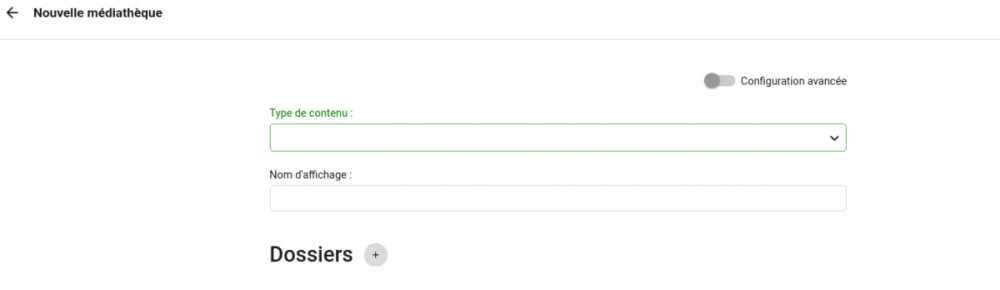
Ce n'est pas bien compliqué pourtant Tu vas dans le panneau d'administration (la roue dentées), puis dans vas dans Médiathèque. Ensuite tu clique sur Nouvelle médiathèque : Tu choisis le type de contenus et tu cliques sur le petit "+" à droite de Dossiers. Là tu pourras "browser" ton FS et mettre le dossier que tu veux. Mick
 1 point
 -
Thanks, but getting a 404 not found on the 64 bit link: https://emby.media/emby-server-synology_{version}_x86_64.spk1 point
-
The old repository isn't being used anymore. You will need to do a manual install after downloading the correct spk file for your NAS. https://emby.media/synology-server.html After you update the next update afterward the dashboard will display the link above instead of saying to use DSM. You can also remove the old repository from DSM.1 point
-
Quizás haya cambiado tu IP pública y los usuarios remotos se conectan usando la IP antigua.1 point
-
Correct, that is fixed in the latest beta. You can now disable the mic and search will still work. You don't need to setup from scratch. To fix search on the current stable versions on the Shield I use following, assume it's somewhat similar for your Android tv box settings apps app permissions microphone enable microphone for Emby1 point
-
Yes, sorry for the confusion, TeamB is absolutely right.1 point
-
Yes it's something that can be improved. Thanks for the feedback.1 point
-
Great, thanks for the info.1 point
-
Considering my emby server is running in an Unraid Docker.... rebooting the system is not something I want to do. This server runs alot more than emby.... Threadripper 1950x on a Zenith Extreme Mobo... 32gb ram, 30 TB storage 86% full. Storage, home automation, media serving, security NVR, network routing via PFsense... Its not a thing that you "reboot"... I guess i could put the script on a cron schedule... but do i want to give some script permission to delete anything on my array? No. Emby docker only has access to its necessary directories... It would be safer to be IN emby.1 point
-
DSM 7 is not out. It's an alpha release. You cannot install Emby on it yet using Package Manager (same applies for Plex). You can install Emby using Docker on DSM 7. Luke and his team are working on it, but I imagine, as DSM 7 is alpha, they are not prioritizing it yet. The have posted a first attempt, but no joy.1 point
-
its back in the catalogue now1 point
-
oh crap sorry I forgot to add it back, I was cleaning up a bunch of stuff and removed it for a while. I will work to have it added back into the catalogue in the next day or so. Until then you can get it as a download and drop it directly into your plugins dir of the server from the GitHub page: https://github.com/faush01/playback_reporting/releases Grab the playback_reporting.zip and extract the dll into your emby server plugin dir.1 point
-
We are working on resolving this issue. Thanks for your feedback.1 point
-
That people continue to put up with all this crap is beyond me. Switched to Plex over 3 years ago now.... and the forum interactions with support is not something I miss. Now let me get my popcorn....1 point
-
Sure you can. Do what I do. I've got 400+ Christmas movies in their own library. This way I can give or take access away.1 point
-
I sense a new feature/request - can we ban/hide certain films to only be played during certain seasons ?1 point
-
Add to Collections and Playlists with Drag and Drop1 point
-
Add to Play Queue with Drag and Drop1 point
-
Support clicking individual text items in list items1 point
-
It does not have the ability to do this at present. In the next version of DVR this will likely be there as we've discussed wild card searching for sports. No reason this couldn't be used for movies as well.1 point
-
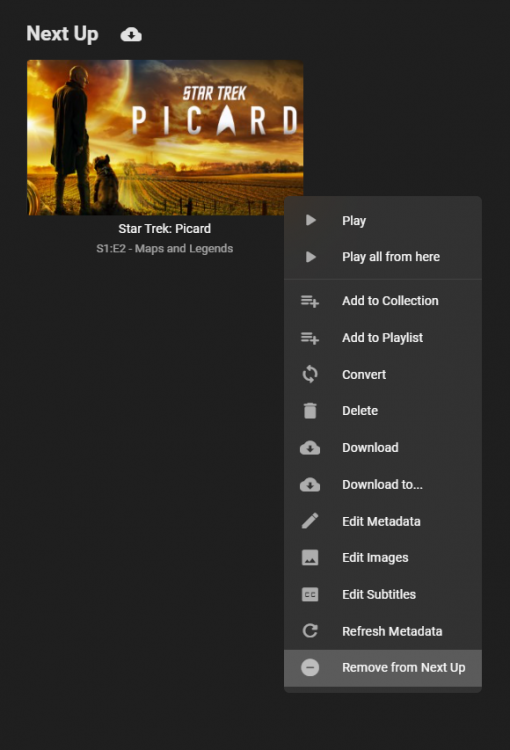
This will be in Emby Server 4.6: Thanks and enjoy.
 1 point
 -
H, yes this will be improved in the next update to the app. Thanks !1 point
-
I have reported it to GN. Thanks.1 point