Leaderboard




Popular Content
Showing content with the highest reputation on 10/26/20 in Posts
-
Now THIS is why Emby is superior!2 points
-
@Dagger if you would like for us to do a remote session with you send me a private message and we'll set this up.2 points
-
Hopefully @cayars is available to do a TeamViewer session with you @Dagger.2 points
-
I'm going to submit an update to them to change it today, but sometimes they take a little time to review them, so any pressure you can apply to speed them up would be great. Thanks.2 points
-
Guys, The ebook side of Emby/MediaBrowser has been long stalled or rather stagnated. I would like to offer up a couple of suggestions. Many people use calibre as an ebook/comic book tool for scraping data and general management of their collection already. This program is absolutely astonishing in its ability to pull metadata from post calibre scans, as well as draw in metadata from the file source and/or directory structure. http://vaemendis.net/ubooquity/ Its a self contained .jar server/reader combination. And honestly I am very impressed by it's small footprint and wide range of abilities. The other option is COPS , which was written specifically with calibre in mind. It is open source, so making it work with emby I would think would be fairly easy. https://blog.slucas.fr/projects/calibre-opds-php-server/ Ever since the original release of MediaBrowser's bookshelf I have always wanted something that would allow me to 'read' my collection, rather than being basically nothing more than a place-set for images of books I own. I am sure that those who mainly have audiobooks are thrilled with bookshelf , but it's nothing more than an extension of the music library IMHO, not new features. We can have both right? Here I give you two suggestions free of charge.. Just because I love you, and Emby Personally I plan on running the Ubooquity Server along side of Emby from now on, just because of it's massive functionality and tiny footprint. But I sure hope that someone decides -- "yeah, ebook support should be in here too" and do something about it - rather than allow this now very very ancient issue to continue to remain an issue. And so I don't have to have 20 different ports open, some with SSL support - some not, because Emby isn't delivering the 'complete package'. (Please take some of this with humor, I know you have your hands full with improvements/bugs/suggestions/requests)1 point
-
As I mention in a related post, I love the additional subfolders for Movie Extras (eg, Shorts, Scenes, Interviews, etc.)! It would be awesome to extend this functionality to TV Series as well. Specifically to add support for many/all of the same folders supported for Movie Extras, eg, extras specials shorts scenes featurettes behind the scenes deleted scenes interviews trailers As well as any additional folders that get added in the future (eg, hopefully Galleries). Support Placement of "Extras" Folders Within Each Season Folder, Plus A Naming Scheme to Link A Particular Extras Folder with a Specific Episode (eg, "\Season 1\E1 - Deleted Scenes\" for episode 1 deleted scenes): I want to clarify that it would be great if these various "extras" folder types could reside within each Season folder. So for example, within a Season 1 folder we could then have an "Extras" folder, a "Deleted Scenes" folder, a "Featurettes" folder, etc. And furthermore, that we could designate a particular folder to refer to a specific episode (eg, "\Season 1\E1 - Deleted Scenes\" for episode 1 deleted scenes). See more below, particularly why I think this would be so useful: https://emby.media/community/index.php?/topic/55915-emby-server-theater-additional-extrasspecial-folder-types-for-tv-series-similar-to-movies/&do=findComment&comment=587195 Thanks for your consideration! PS - If this is something you might like to see implemented, be sure to "Like" this top/first post (as well as any subsequent posts in this thread that highlight particular aspects of what you are interested in) -- "Liking" the top/first post helps the Devs to know how much interest there is in a given Feature Request.1 point
-
I feel the following filter & sort options are lacking the following: * filter by HDR * sort by video bitrate * sort by audio bitrate * sort by filesize * filter by subtitle language * filter by audio channels * filter by audio language Anybody have anything they would like to add to this list?1 point
-
It would be useful if the server (or perhaps clients) could cache most (if not all) content images (posters, backdrops, logos, etc) for movies, TV series and seasons. This would mainly be of benefit when a portion of someone's content is offline but the users would still like to view the content to know what exists. I think caching on the server would be preferable, then all clients could make use of the same cached images. if you think this would be a useful feature, please click the "Like This" button on this post.1 point
-
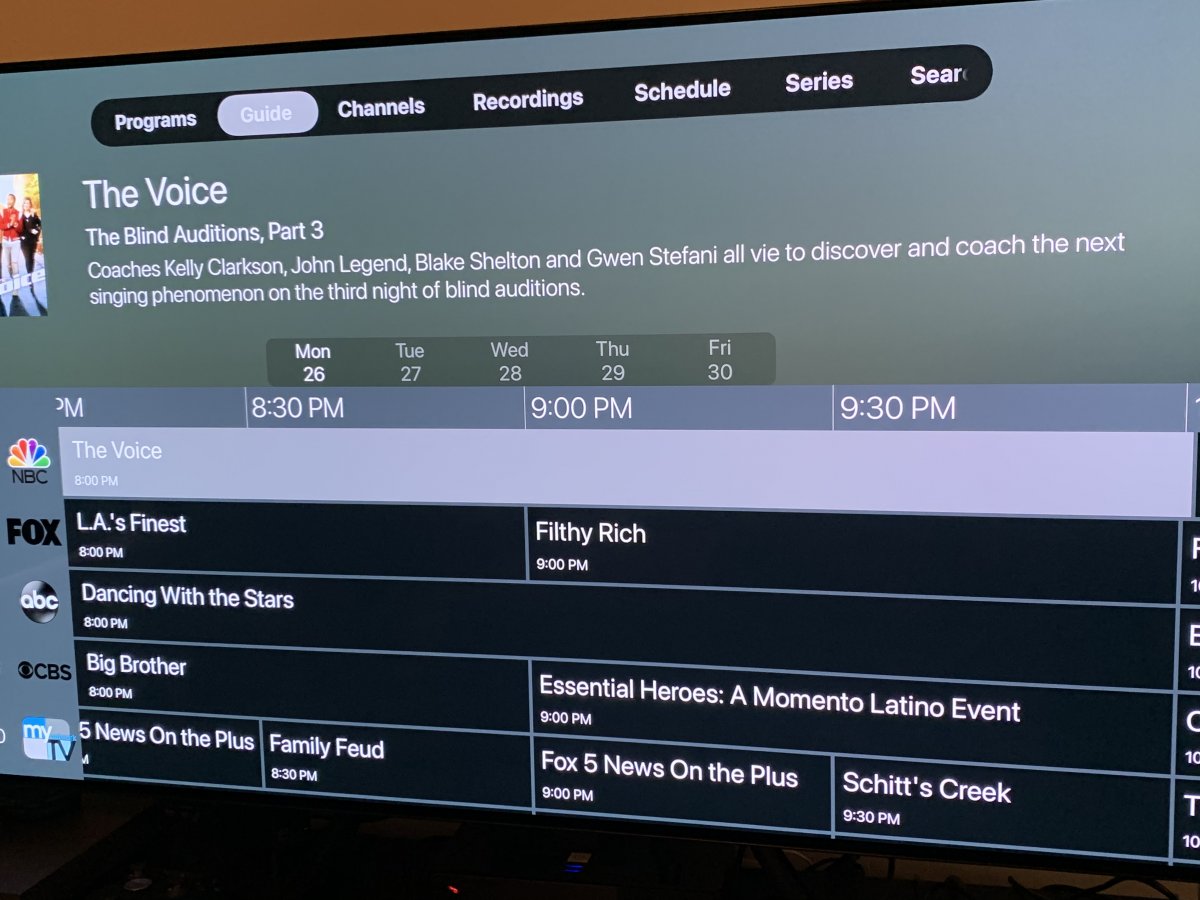
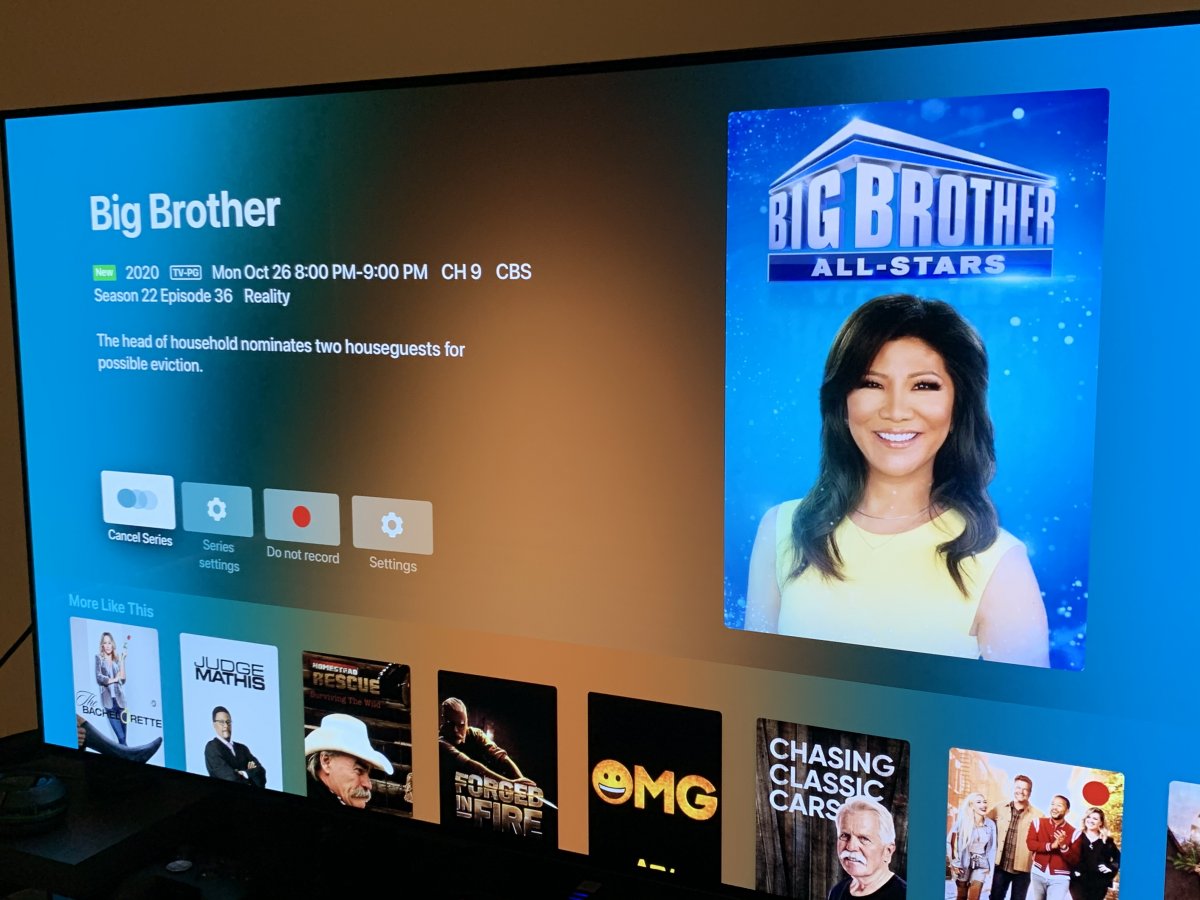
Not sure if I should post this on the Live TV page or here since it’s on an Apple TV device, but when I’m on the live guide, I do not see the three red dots signaling a recording of a series, but when I click on an episode it shows that it’s recording. On my shield pro as well as my roku device in the house, it does show the red dots. I am running the most up to date version of the Apple TV app as well as the server. Just thought with the update I should bring it to your attention. If I need to move it to another category/section of the forums, let me know. Pics are attached for you to see....
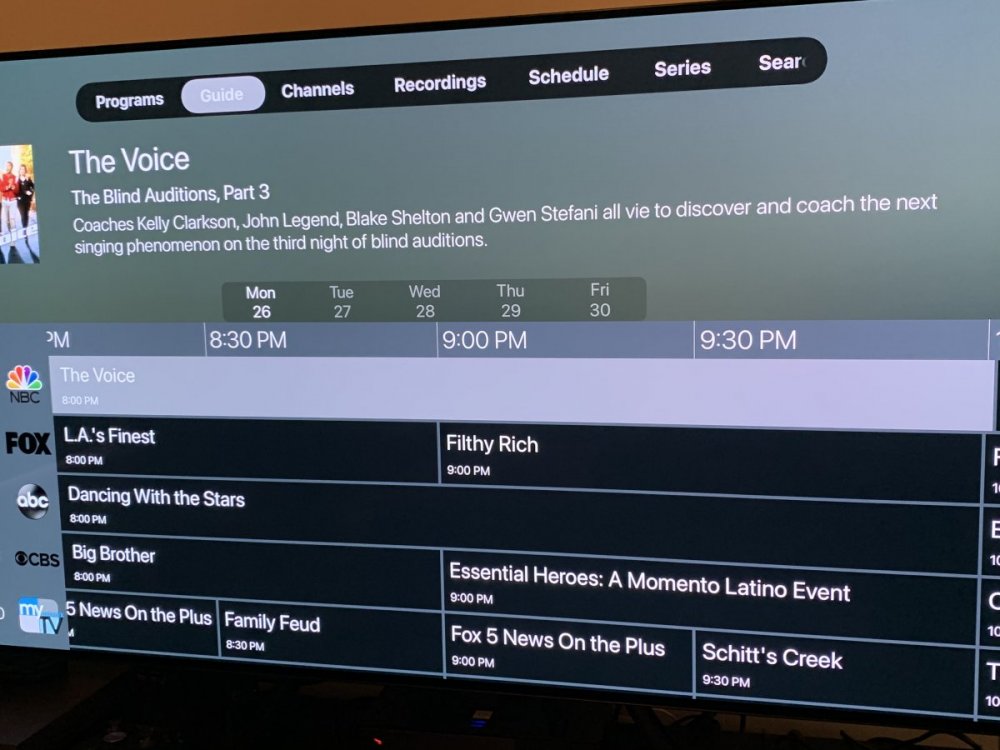
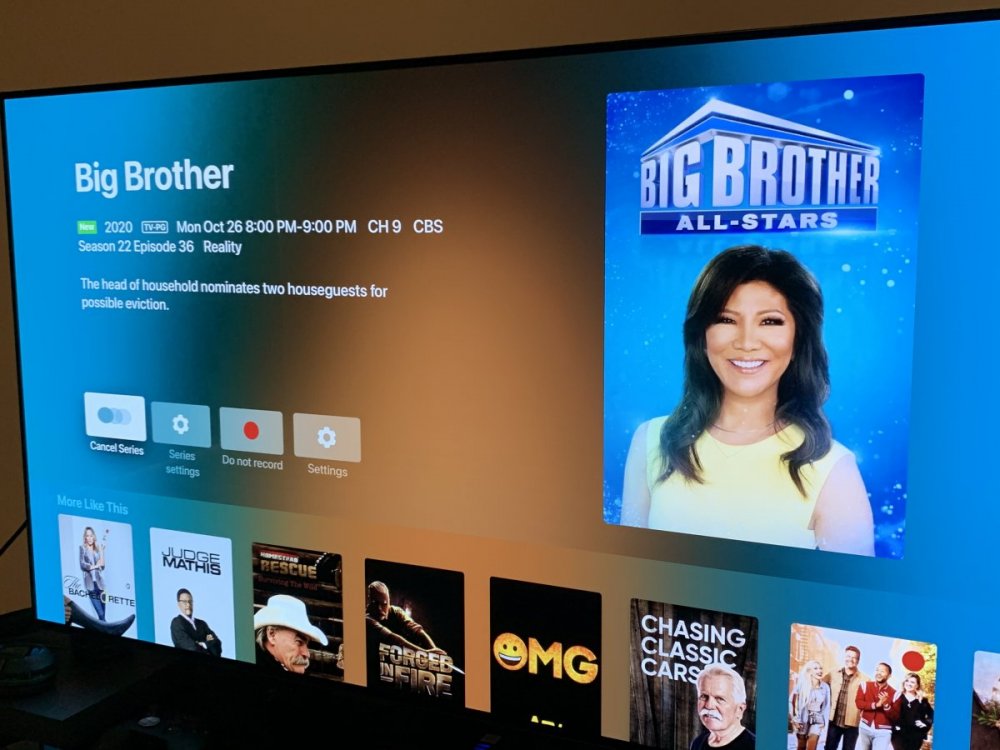 1 point
 -
Is there any way to check if my video is played using Dolby Vision through Emby? My Sony TV detects Dolby Vision and shows the logo on top right of the screen, but there is no way to check it through Emby UI. The stats for nerds simply shows codec HEVC. Is it possible to see this info in Emby? Or maybe add this option as part of the stats feature to display metadata like Dolby Vision, HDR etc. based on the incoming stream?1 point
-
Okay this would appear to be a Chromecast specific issue as I can not reproduce it anywhere else. Log shows "ThrottleBySegmentRequest: Latest request position unknown" @Luke stable and beta Test from iPhone to TV.1 point
-
That's helpful, I didn't think to go through 'My Media' instead. Thanks.1 point
-
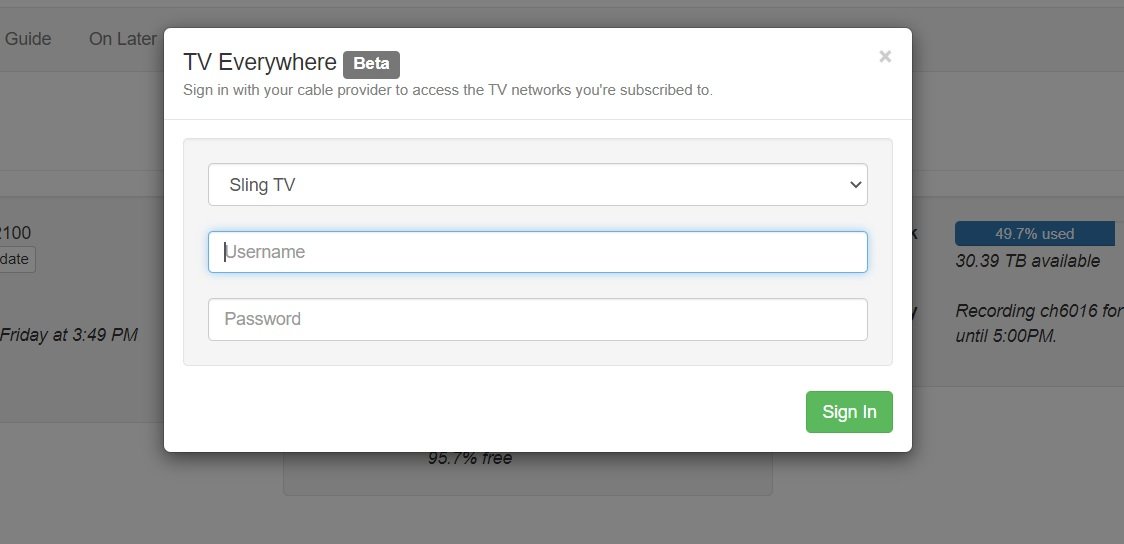
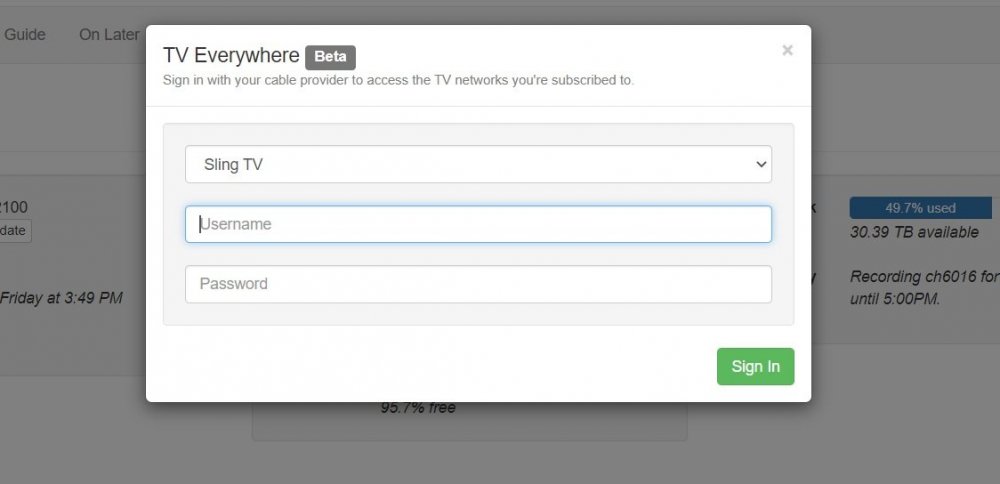
Channels DVR allows SlingTV using TV Everywhere. Maybe something changed? Because I subscribe to that app and have been HOPING Emby or Plex adds the same functionality. Channels DVR works to tune and DVR TV, it even DVRs TVE streams, but otherwise it's abysmal. All sorts of odd behaviors that require restarting the app. No issues with TVE. Just their interface. Really, it's ugly as sin with horrible navigation. Please, PLEASE add the functionality to Emby.
 1 point
 -
@FrostByte - its .ts files.1 point
-
Strange. What format are your DV files? Support for DV mkv files was added with Exoplayer 2.12.0 which isn't in the regular ATV app yet. ET for Android is the only one with the updated Exoplayer that can play DV mkv as of now. I believe the feature request to add the dynamic HDR formats to Emby will have to be done before SFN can be updated. I'm sure that type of data all comes from the same place.1 point
-
Some announcements for Western Digital NAS users: We now have packages for 12 different WD NAS models! Eight of these packages are brand new, so if you'd like to try them out and help test, you can participate here: Additionally, for those waiting on OS 5 support, we now have packages for that as well. You can learn more here: Thanks !1 point
-
Hi, If it's a 4K UHD disc and it transcodes this will happen. If it was direct playing we need to look further.1 point
-
I was just testing this myself and the feature is not working. When enabled ffmpeg logs still show throttle=off @softworkz1 point
-
OS5 builds ready for testing. I haven't had a chance to update the website yet, so just find the .bin file for your model here: https://github.com/MediaBrowser/Emby.Releases/releases/tag/4.6.0.5 Note: If you come to this later and this link is dead, then just follow the instructions on the website: https://emby.media/download1 point
-
Ahhh as simple as leaving the destination folder blank lol. I don't see a "delete original file" option under expert settings. I do see "skip copying original files" though.... am I missing it somewhere? Thanks again for all your help!! ****NEVERMIND I SAW IT LOL*****1 point
-
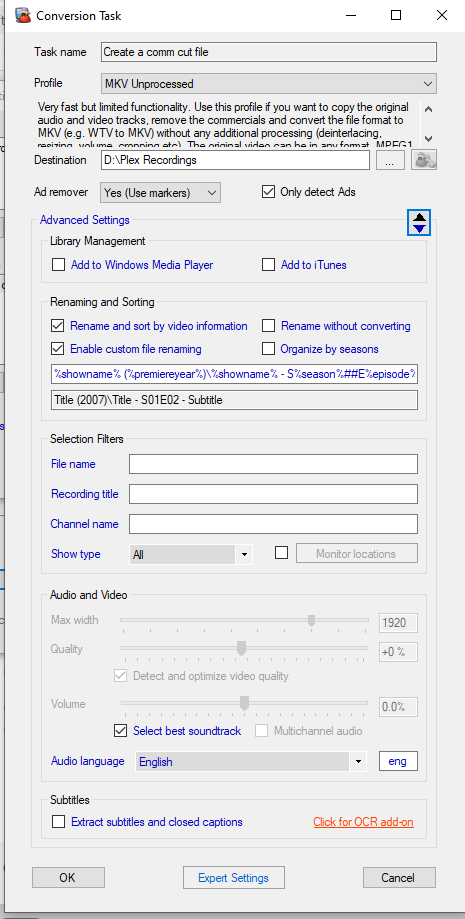
Here are the instructions and a screen shot of the page where I enter how I want the files named: Open MCEBuddy. From the main interface go to Settings. On the next interface highlight whatever you created in the "Conversion Tasks" box and then hit the button underneath and to the right that says "Change". On the next screen that pops up select Advanced Settings. On that screen there is a section titled "Renaming and Sorting". Check the boxes you see in my uploaded image. In the blank box underneath just type in the way you want your files named and MCEBuddy will rename your files after conversion and place it in that folder.
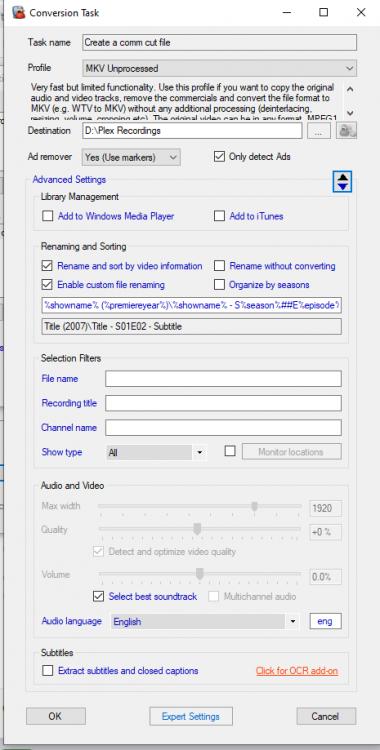 1 point
 -
I loaned a STB to my X for a couple of months and it worked on Verizon FIOS.1 point
-
Hi @sross44 -- There currently isn't support for this in the tvOS app but it's something we can certainly look to add in the future. Thanks for the feedback!1 point
-
Hey regid base you posted it RCN Digitial Cable but you failed to add a zip code to where it at which could Queens, Brooklyn or Manhattan New York or DC Metro, Montgomery County Maryland or Falls Church Virginia or Boston, Framingham, Milton or Stoneham Massachusetts that carrie those channel1 point
-
@sross44 - I use MCEBuddy as well and there is a way to have it move the recordings to it's own folder. For example, you process the tv show Walking Dead and have MCEBuddy dump it into your already existing folder for that show or create it newly if it doesn't already exist. You just have to tell MCEBuddy how you want it all named ahead of time. Like I have mine set up to go into "The Walking Dead (2010)/Season 05/The Walking Dead - S05E10 - Them". I can post a screen shot later and walk you through it if you need that. MCEBuddy is a pretty powerful little program with a lot of options and it's easy to miss some of them.1 point
-
For those with the DTS problem, the best solution is to simply add a non DTS track to the original media. That way, the issues goes away and you now have a file that can be played by any system - you can opt to play the DTS Audio if you can - this script does not replace it. Go to your emby server system directory and find ffmpeg Then at a command window use the following to ADD an AC3 track and make it the default track :- ffmpeg.exe -i input.mkv -map 0:v -map 0:a:0 -map 0:a -map 0:s? -c:v copy -c:s copy -c:a copy -c:a:0 ac3 -disposition:a:0 default -disposition:a:1 0 output.mkv It copies all the existing tracks (original quality) and just adds an AC3 track, derived from the 1st Audio track. This will work on any mkv file incl 4K - it will not touch the original 'input.mkv' file.1 point
-
Yes.. Thanks :-)1 point
-
I only prefer faster conversions with quality. When I finally got hardware acceleration working my conversion times were cut by 75%, so about an hour instead of FOUR. I read there was a small quality hit so I have been testing it for 4 months and keeping all my TS files in archive just in case. Well after thorough testing and lots of movie and DVD watching on Emby I am quite satisfied I can't see a quality difference between software only encoding and hardware accelerated. Not only am I very happy with H.264 hardware accelerated at the moment I am now confident enough to delete all my TS files and gain my hard drive space back. The only TS files I'm keeping in archive are some really super rare hard to find movie favorites.1 point
-
For anyone else here is a quick fix. UPDATE MediaItems SET Images = NULL WHERE type=23 AND Images LIKE 'https://image.tmdb.org%'; This removes good and bad TMDB urls. Then do a Refresh-Search for Missing or Refresh all if you like to repopulate image urls. Don't have a system with bad urls, but modifying a couple to bad urls seemed to work.1 point
-
I put it on the todo list, but priority is still re implement 4.X functions in 5.x Mostly I'm rewriting the player and database code. For the rest, I keep as much as possible as it was in 4.X. Even if there is plenty of room for improvements. But I will not open too many cases at once. Update: Multi Video selection is working. I will release it in a few days. I have to perform more tests and optimize the code.1 point
-
Updated Builds posted Matrix Alpha 21 point
-
Emby for Apple TV 1.4.9 has been released with improved support for HDR ! Here are the highlights: Improved support for HDR Support in-app AV1 video decoding Implement support for tvOS 14 search suggestions On episode detail use the series logo as the hero image. View the full article1 point
-
Wish I knew exactly how to do that lol. It would make my life a lot easier right now haha.1 point
-
In case anyone is looking at this thread and cares apparently WD have not compiled the kernel for OS5 to include all prerequisites for Docker there‘s a guy on the wd newsgroups who maintains docker on wd and he says he has to wait for wd to release os5 officially before he can get further, because at the moment they arent releasing the info so at the moment thats quite bad news really1 point
-
I have FireFox, Chrome, Opera, Tor (based on FireFox) and one or two others that perked my interest from time to time all available. No matter which one I choose to use for a time I always come back to Chrome because it is the fastest and has the fewest glitches. I decided some time ago that I would use a VPN to avoid some of the tracking and then just ignore what that does not prevent as it is nearly impossible to truly prevent being tracked and if someone finds my online presence of enough interest to really track me through my VPN then it is quite clear they find my life of more interest than I do. Chrome just works and it is good enough for me and quite fast and reliable.1 point
-
Funny thing, I thought I would try out different settings and seems I got a hit with the first try. That code looks like it is working on different resolutions and on mobile: @media (min-width:90em){.smallBackdropCard{width:16.6666666666667%;}1 point
-
Yes we will be supporting it. Thanks.1 point
-
Hi - I'd be hugely grateful to anyone that can help resolve this issue for me. I have an issue with playback stuttering (buffering?) when accessing certain iPhone-captured videos on my Emby server on my local network NAS. This seems to occur for H264 and HEVC videos captured on my iPhone 8 (iOS 12.4.1). Other videos captured on my GoPro appear to work absolutely fine. When the video starts, it plays for a second or 2 and then stops briefly; and then plays again for a second or 2 and then stops briefly - this cycle continues for the entire video, i.e. 'stuttering' playback. If I pause the video for a few seconds and then continue playback, playback seems to continue fine for a few seconds and then gets back into the above 'stuttering' cycle again. This behaviour occurs irrespective of how many times I repeat playback of the same file. The above issue only occurs when I access my Emby server via: the Emby sever URL on a laptop (via web browser) via the Emby app on AppleTV via the Emby app on my iPhone The issue does NOT occur when I access the video via: VLC on Apple TV (video is in same location as above on the NAS) VLC on iPhone (via Emby server) via other iPhone video/file utils on iPhone (e.g. QNAP file and video viewers). I don't have a network bandwidth issue (and I'm pretty sure it isn't an issue with NAS processor power as this issue doesn't occur when using a non-Emby client, e.g. VLC). My Emby server environment: QNAP NAS TS-251A (16GB RAM) QTS 4.4.1.1117 Emby Server 4.2.1.0 Having read through many articles in this forum, I have already tried the following (none of which have made any difference): disabling/enabling hardware acceleration disabling/enabling subtitle 'burning in' various custom settings for HWA and threading various settings for playback quality and bit rates It does seem that the Apple TV and iOS apps are trying to use direct playback (so my understanding is that transcoding should not even come into the equation?). I've attached: a PDF of screenshots of my Emby server dashboard showing the tests I've run:pg 1 - attempted Apple TV playback pg 2 - screenshot of log page following ATV test pg 3 - attempted browser-based playback (playback for a number of seconds and the ''buffering") pg 4 - screenshot of log page following ATV test pg 5 - attempted playback via iOS Emby app on iPhone Emby server logs (each of them coincides with the tests I've run as described above - the PDF has an orange 'label' on pages 1, 3 and 5 that 'tags' the test being run and the timestamp) transcoding logs Much appreciation in advance for any help! V. vc - emby issue.pdf embyserver 15h22.txt embyserver 15h28.txt embyserver 15h31.txt embyserver 15h35 - iOS VLC via Emby server.txt ffmpeg-transcode-9486dae8-66bf-4df1-84d4-7374f417cd24_1.txt ffmpeg-transcode-ac8fd98b-f8a6-420c-9c5e-c28a9354858b_1.txt ffmpeg-transcode-c1ae9853-82cb-480b-adea-9eb7dc463b7f_1.txt1 point
-
I would also appreciate an embedded ebook reader. It would be especially useful for ebooks that I use as technical references.1 point
-
Bragger.
 0 points
 -
FYI: We got an email from Terramaster this morning saying they have temporarily removed us from their store because we include Taiwan as an option in the language selection box, and that it's a sensitive political issue for them and non-negotiable. So yes we'll scramble to submit a new one to them, and hopefully they will release it asap, but if you don't like this then please send them your feedback about it.0 points