Leaderboard




Popular Content
Showing content with the highest reputation on 10/18/20 in Posts
-
WHAT does not work? No guide data, no playback, no sugar in your coffee?2 points
-
OMG,amazing,which solves the problem that has plagued me for months Thank you very much.2 points
-
This is a simple one line script to highlight duplicate files - By NAME How to use the script Very briefly - I am assuming you know how to run a PS Script - if you dont Google it. Run this script from the root of say your movies directory via the powershell console window (not the Powershell ISE if using PS5) - script is recursive so will find all movies It may take a few seconds or minutes to look through all directories - depending on the number of files and speed of the pc. File types searched for mkv, mp4, avi and ts - but if necessary you can add others It will produce a txt file called ... drum roll ...Duplicates.txt - the file will be located in the same location as the script file and will get overwritten with each run. If the file is empty after the script completes - then no duplicates found - otherwise it will contain the duplicate movies (by name) example output of a duplicate with a duplicate "count" will be 2 or higher etc - "Group" will attempt to list the paths to each duplicate but if you have many files it will get truncated eventually. If like me you have numerous extras - some are likely to be named the same - e.g. Behind the Scenes - so you will get false positives. I have not filtered the search to exclude trailers, extras directories as you could have genuine duplicates there or misplaced files etc but it can easily be done. Also the search is case insensitive Duplicates.zip Unzip the above and find your duplicates! Have Fun PenkethBoy 15/10/2020

 1 point
 -
Hey guys, i'm new to emby server and couldn't find any clou about automation of adding specific tags to movies. As an example i'd like to add a 4K tag to every movie which has this resolution. I'm aware, that i can search for 4K movies without the tag, but i'd like to prevent certain users from accessing this movies via black listing the tag. This is just an example and i'd like to use this also on audio language or 3d movies aswell. I tested the blacklist and it works great, but some rule based automatic adding of tags would be much appreciated. The only other way i found, was to make different libraries for any different kind of movies (e.g. video resolution), but this makes it impossilbe to put different versions of a movies into the same folder for other users that have access. I'd like to still be able to use 'Multi-version movies' as discribed here https://support.emby.media/support/solutions/articles/44001159102-movie-naming Is there any way to auto tag for this? Thanks in advance, Steve1 point
-
It would be nice if MBS could incorporate a Commercials.XML file generated from Comskip or ShowAnalyzer and use this to automatically skip over commercials in the web client. Ideally, I'd like to see this work like DVRMSToolbox's DTBAddin. You would have a setting in LiveTV for commercials location. During a media scan, it would match the .XML file name to a recorded TV file and generate the appropriate commercial markers based in the commercials files. When streaming from the web client, it would use this data to automatically bypass the commercials, but allow the user to go back if section was marked incorrectly. Option 1: Translate the commercials file into the chapter/scene markers. Users could manually skip to the next scene. Option 2: Make special commercial markers and automatically skip like DTBAddin Maybe this could expand later where you could have MBS scan files as well.1 point
-
I'm looking for a way to select songs from my Emby Server using voice commands on a Google Home device such as the Google Home Mini or the Google Nest. I want to play the music directly on the Google Home device that issues the voice command, rather than routing it to my phone or a DLNA-compatible "player." However, there doesn't seem to be an option to simply play the selected music directly on the Google Home device's speaker. Am I overlooking something? I have successfully installed and configured the Emby for Android app and linked it to my Emby Server using Emby Connect. I can start a session by saying "Hey Google, talk to Emby Home." I can then say "Play <a song title> by <artist name>. Google finds the song on my Emby Server and asks which player I want to use. (Right now there are only two choices—my android phone or a DLNA device that I never use.) To test the feature, I selected my phone and it does play the song as expected, but not on the speaker I would like to use. (If the Emby team wants to pursue improving Emby for Google Home, you might take a look at a product called MyMedia, which is an Amazon Echo "skill." Their approach is elegant and it works flawlessly. The software "watches" and indexes local music folders on a PC to create a lightweight music server that is compatible with Alexa. I wish something similar existed for use with Google Home products.)1 point
-
A couple of my channels are often missing guide data, also live sporting events have channels that are added to the lineup without any guide data. I think it would be useful to select a channel name, and schedule a block of time for it to record. That way, even channels with missing or no guide data can be recorded when the user knows the content is there.1 point
-
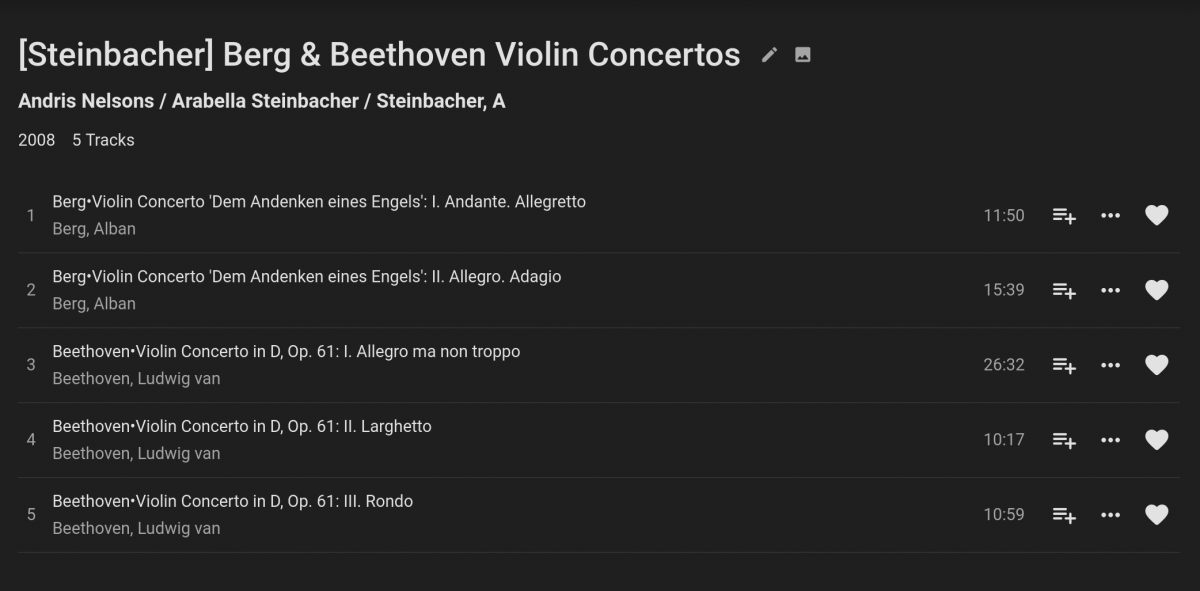
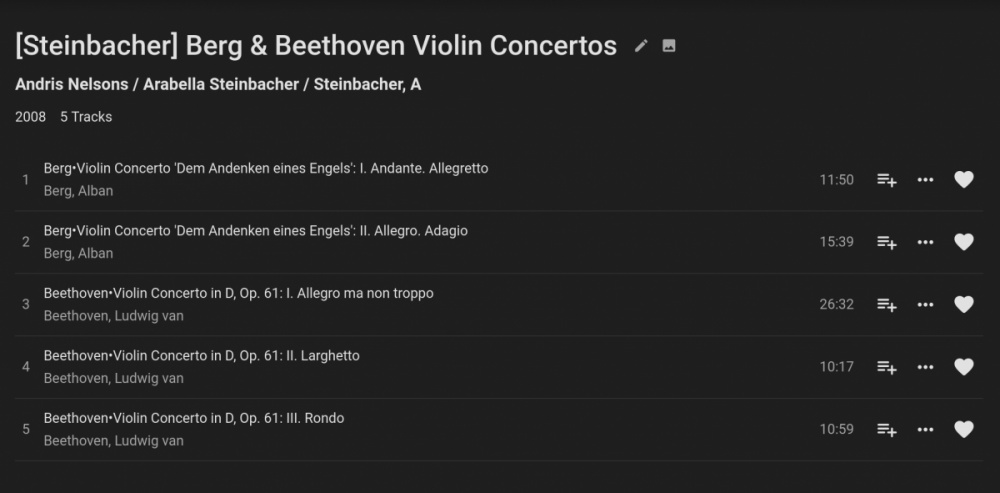
I have tried to put my classical music collection in Emby. It has been a slow trial-and-error process. Emby appears not to use the artist name if the album artists data are available, which is counter-intuitive, but even stranger is that the software does not consistently pick the first name in the album artists. Sometimes it insists on picking a name regardless of order. For example, my album artists for an entire album is "Steinbacher, Arabella/Nelsons, Andris/WDR Sinfonieorchester Koln" (in every FLAC file of the album.) Emby lists Andris Nelsons as the first name regardless of where the name is in the FLAC files' metadata. I tried to put the name last. That didn't work. I modified the FLAC files' metadata to "Steinbacher, A/Nelsons, Andris/WDR Sinfonieorchester Koln" as an experiment and refreshed. The strange result can be seen in the attached screenshot - Arabella Steinbacher is still there alongside with Steinbacher, A. WDR Sinfornieorchester Koln is pushed off the list. It'd be nice to be able to edit and control all the metadata details directly.
 1 point
 -
You do now.1 point
-
/* Google Progress Bars */ progress::-webkit-progress-value { background: #0C57D6 !important; } /* Firefox Progress Bars */ progress::-moz-progress-bar { background: #0C57D6 !important; } https://emby.media/community/index.php?/topic/75856-need-help-with-css-for-slider-color/&do=findComment&comment=769209 Haven't verified other code though as things have changed over time.1 point
-
Because it's not enabled in the settings?!1 point
-
This would have been a great addition for Emby users in the U.S. this year. The combination of the election season and the pandemic means that there are lots of last minute schedule changes. The Emby Guide data for OTA TV is also very unreliable for some channels (e.g. KGW, the NBC affiliate in Portland OR). The only way to actually record some programs is to record and entire morning or afternoon and sort it out afterwards. I suspect that's more the fault of the station than the guide, but the net effect on the user is still missed programs. We don't know when the next pandemic will hit (nor when this one will end), but the original feature request from @taylorbourne has been here since the last presidential election cycle in 2016. It would be nice to have the fix in place in time for the 2022 mid-terms.1 point
-
HI, yes we're looking into the issues with the older armv5 devices. For now what I might do is update the website to point to the older 4.4.3 server release so that you can use that for now.1 point
-
Yeah the older ones only operate when something "casts" to them. The new ones are more like shields and run android tv. Thats why I asked old or new chromecast. @marciodantas If it is a older chromecast is the device that is casting to it in the plugin list?1 point
-
Check the permissions for your Emby user and ensure it has permissions to edit subtitles.1 point
-
I decided to update the port forwarding to the wired IP since most of the time thats how it is. Thank you for your help1 point
-
If you are using an M3U file, which I'm guessing that you are because you said that you rearranged the channels, what you can do is remove that channel from the M3U file and create a new M3U, tuner source and guide data provider for the channel and map to a different provider, just make sure that the guide data providers are associated only with their corresponding tuner sources1 point
-
Have you also enabled Emby in Qboost's application management? Open Qboost > click the three dots underneath the app list > Enable Emby1 point
-
Correct...no audio. Just a video stream. Added the beta channel to a remote roku tv, and both the mp4 and mov file played immediately. Will try the roku stick when I get a chance to get to it. Thank you very much. This has been bugging me for over a year.1 point
-
Do those drone videos have an audio stream? I am guessing these are just a video stream without audio otherwise you just hear rotor whirr. Can you try this with the Emby Beta for Roku and see if the problem still happens. You can have both the Store version and Beta version on your Roku homescreen at the same time. The word Beta will show on the icon so you can tell the two applications apart. The Beta has recent fixes that should correct this issue. Please let us know if the Beta solves this problem or does not. Thanks.1 point
-
Emby does not store userdata by path at all. It is maintained by the medias global id ie IMDB, TMDB, TVDB ids. Now media with no providerids will loose their watched status as the database itemid will change when you move the media. If you are a Premiere users, I would make sure you use the Server Configuration Backup plugin as it will backup all users and userdata and has the ability to restore that data.1 point
-
I PMed you @chef. I intend bringing this back to life.1 point
-
I meant that the other program (tMM) stores collections exactly the same way Emby does except without the [boxset] suffice eg: Emby stores the collection as: ...\emby\data\collections\28 Days Weeks Later Collection [boxset] tMM stores the collection as ...\emby\data\collections\28 Days Weeks Later Collection That means I have two folders containing the same metadata (xml file + several media picture files) for every single collection (hence the doubling up of data). Currently there is no way to alter Emby Autobox and tMM only allows you to edit the pathname manually for each collection (which I have done but it is extremely time consuming).1 point
-
This right here is one of the biggest things I can stress. From a usability standpoint, branding standpoint and marketing standpoint it absolutely makes the most sense. A uniform layout and design across platforms. I know it takes a long time to get there and that it takes a lot of resources. The folks here at Emby do a kick ass job of listening to us, bringing out new features and more.... so I know Emby will just continue to get better and better1 point
-
I didn't think of it until now but user 1 in the users.db will be your admin account unless you created another user later and removed that priviledge from first created user.1 point
-
This should be handled in the update to Live TV that's currently in development.1 point
-
Looks like they refunded me for my original order, so I can retain the purchase I just made and hopefully continues to work.1 point
-
Both would be great. Thanks.1 point
-
You can either PM the server log to @Luke or @ebr to review, or sanitise the log (remove IP address etc.) and post here. The in-app logs would probably be better for @ebr to review.1 point
-
for anyone that doesn't find the link https://github.com/MediaBrowser/Emby.Releases/releases/download/4.5.2.0/emby-server-synology_4.5.2.0_armv7_legacy.spk1 point
-
I do the same for all my non DVR content. So, playback not an issue. The issue I have still is with recording live tv, which several channels are interlaced. Those do not play back well at all. So, I am currently using Infuse instead. Worse is interlaced live TV, huge stutters, unwatchable. I've been using flac for > 5.1 audio so I don't lose back channels.1 point
-
2 lines is your challenge?1 point
-
if you need any help or testing, just gimme a sign glad to help with such a nice goodie1 point
-
thank you I updated to the latest version of emby and now it seems to be working perfectly, the plugin is excellent !!! thanks to the developer !!!!1 point
-
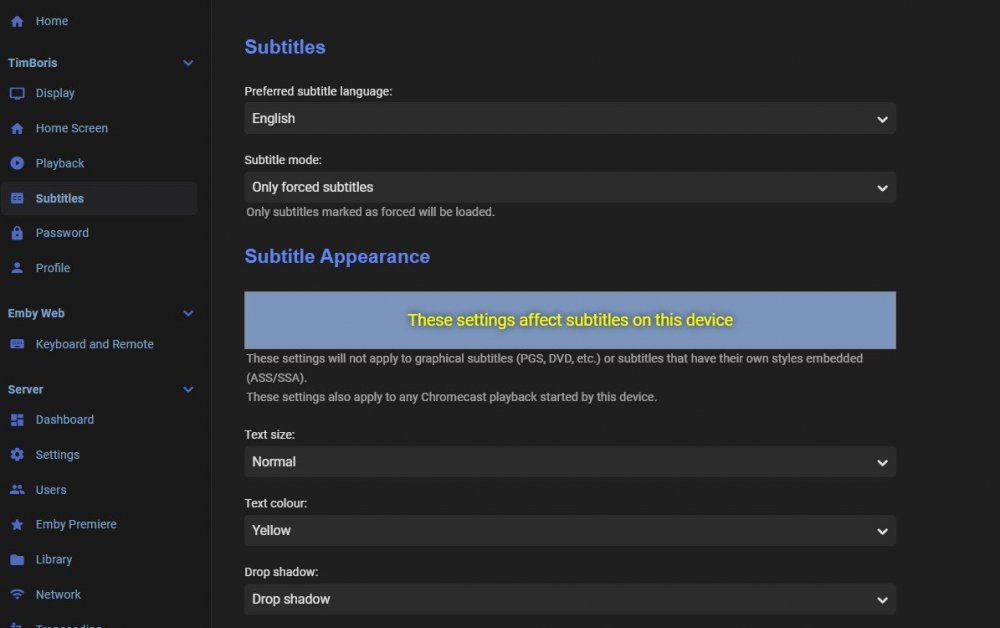
already available - check your user settings via dashboard or with your client app
 1 point
 -
Hi, may be not 100% safe, but simpler css modification for RHS without adding pseudo elements. It works with series and episodes. It does not break movies view or search view. Those I will try later. For Version 4.5.2.0 /* Episode Counter */ .countIndicator { transform: rotate(45deg); width: 75px; height: 25px; } .cardCountIndicator { right: -1.725em; } /* Episode Watched Status Vertical List */ .listItemIndicators { right: -1.4em; border-radius: 100em; box-shadow: 0 2px 2px 0 rgba(0,0,0,.14), 0 1px 5px 0 rgba(0,0,0,.12), 0 3px 1px -2px rgba(0,0,0,.2); transform: rotate(45deg); background: var(--theme-primary-color); } .listItemImageContainer { overflow: hidden; } .listItemIndicators .playedIndicator { width: 75px; box-shadow: none; transform: rotate(-45deg); background: none !important; } /* Movie Watched Status AND Episode Watched Status Within Search AND Episode Watched Status Horizontal List */ button.cardContent-button > i::before{ width: 75px; height: 25px; transform: rotate(45deg); content: ' '; background: var(--theme-primary-color); position: absolute; top: 1.3em; z-index: -1; border-radius: 100em; box-shadow: 0 2px 2px 0 rgba(0,0,0,.14), 0 1px 5px 0 rgba(0,0,0,.12), 0 3px 1px -2px rgba(0,0,0,.2); } button.cardContent-button > i{ width: 75px; height: 75px; top: -1.2em; right: -1.2em; position: absolute; } .cardContent-button .playedIndicator { background: none !important; box-shadow: none !important; } EDIT: Done, I hope it helps someone1 point
-
So that actually worked, thx @CBers I am happy, the root issue still exists ! @Luke FYI1 point
-
Excellent!, will the Video file+subtitle file+offset combination be kept/remembered after alignment?1 point
-
Having read this thread over the last couple of days https://emby.media/community/index.php?/topic/58828-convert-recordings-to-mkv-option-removed/ and wanting to try out the Post Processing option in the Emby DVR, for a while, i spent an hour or so experimenting to come up with a basic working method for people to use and amend for their needs. The current Emby convert feature does not meet my needs and i have several PowerShell scripts i use in conjunction with ffmpeg to process video files. I have use one of my scripts as the basis of the script below with some adjustments/simplifications to work with Emby's Post Processing option. To make the script work we first have to setup the Post Processing options. Powershell can be called directly without needing to provide its full path. The command line arguments are to tell Powershell (PS) 1. A command line of arguments is coming -command "& .... " 2. Where to find the PS Script '<path to file>' 3. Where to find the video file to be processed -oldVideo '{path}' 4. Additional parameters defined in the PS Script -InType ts -OutType mkv -DelFile NOTE: the double and single quotes are important don't forget to use them correctly as shown The parameters -oldVideo, -InType, -OutType and -DelFile are defined in the PS script - see top of the script file 5a. -InType ts -Intype is the parameter and 'ts' is one of the types of file the script can accept - for Emby Post Processing thats going to be ts 5b. -OutType mkv -OutType is the parameter and 'mkv' is one of two file types the script can accept - as written The only parameter that is optional is -DelFile - if provided it will delete the video file after processing by ffmpeg - if omitted the "old" video file will remain. [CmdletBinding()] param( # Parameters [parameter(Mandatory=$True)] [string]$oldVideo, [parameter(Mandatory=$True)][ValidateSet("mp4","mkv","ts")] [string]$InType, [parameter(Mandatory=$True)][ValidateSet("mp4","mkv")] [string]$OutType, [parameter(Mandatory=$False)] [switch]$DelFile ) <#============================================================================= EmbyCMD v0.1.0 - 09/09/2018 Script that can be run from Emby Post Processing DVR Created by PenkethBoy =============================================================================#> # Amend if in and out file type the same If ($InType -eq $OutType) { $OutExt = "-1."+$OutType } else { $OutExt = "."+$OutType } # New Video name and ext $newVideo = Join-Path (Split-Path -path $oldVideo) ((Get-ChildItem -Path $oldVideo).BaseName + $OutExt) # Declare the command line arguments for ffmpeg.exe - in this case a reencode of video and audio, ignore subtitles(remove) and remove chapters # replace with your chosen ffmpeg switches between "{0}" and "{1}" $ArgumentList = '-i "{0}" -profile:v high -level:v 4.1 -c:a aac -strict experimental -b:a 128k -ac 2 -map_chapters -1 "{1}"' -f $oldVideo, $newVideo; # Kick off ffmpeg - with ffmpeg at least stderr and stdout appear reversed! # Will generate a txt file named the same as newvideo with ffmpeg output within i.e. -RedirectStandardError "$newVideo.txt" # This will run as a hidden window i.e. -WindowStyle Hidden # Replace the ffmpeg path with your path to ffmpeg or other application - make sure its in the "" Start-Process -FilePath "F:\Video\ffmpeg\bin\ffmpeg.exe" -ArgumentList $ArgumentList -Wait -RedirectStandardError "$newVideo.txt" -WindowStyle Hidden If ($DelFile) { Remove-Item -Path $oldVideo -Force } Exit Save the script above as a text file with a .ps1 extension and call it what you like. The only amendment necessary to the script for it to run is to amend the ffmpeg path to your environment. The script comes with an ArgumentsList for ffmpeg - in this case a re-encode of the original file. If this is not what you want - change the arguments to your preference and follow the notes in the script ! The script will create a txt file with all the ffmpeg output in the same location as the original file - unsurprisingly it looks very similar to an Emby transcode log file. The new video file is also located alongside the original file with the extension you provided for the -OutType parameter The original will be deleted if you provided the -DelFile parameter. The script can also be used directly in a PS console window outside of Emby and is why you have the -InTYpe and -OutType parameters. Notes on Powershell Powershell 5.1 is available for Windows 7 SP1 and up so that should accommodate 99% of people. Search for "Windows Management Framework 5.1" and follow the instructions to install. Powershell Core 6/6.1 is available for Linux and MacOS and the script should run fine as its not doing anything Windows specific. For those of you new to Powershell you will need to set your Powershell Execution Policy for either the machine or the windows user who will "run" the scripts. The Execution Policy sounds all grand and pompous but remember this is Microsoft speak for protecting you from a dumbass mistake - i.e. running a script by mistake by double clicking it. What its not is some virus or security protection measure that's worth anything. Its up to you what you are happy with, so set the Execution Policy at the appropriate level for you, after you have read up on it. Me? I have it unrestricted but make your own choice. Search for "Powershell Execution Policy". Depending on what Execution Policy you choose may affect the running of the script - dont be too restrictive as it needs to run unattended. Emby Logs When the Post Processing is initiated by Emby - you will see in the log a line like this Info App: Running recording post processor powershell -command "& 'd:\Temp\embyCMD.ps1' -oldVideo 'Z:\Recordings\Series\Thomas and Friends Dinos & Discoveries\Season 19\Thomas and Friends Dinos & Discoveries S19E02 Timothy & The Rainbow Truck.ts' -InType ts -OutType mkv -DelFile" And another like this Info App: Recording post-processing script completed with exit code 0 If the Exit code is 1 - PS had an issue and likely the script failed you need to investigate. If you want to modify the script as it is very basic - go ahead and play you may even learn something Think that's about it Good Luck PenkethBoy1 point
-
This thread will be closed soon as a new tthread will be started soon......1 point
-
i think this points to not having the latest powershell installed https://github.com/PowerShell/PowerShell/releases (go to assets section) are you on Windows? edit and you need to launch with latest version of powershell..on windows this may mean launching pwsh.exe first and calling fron there (as opposed to double clickkng) or perhaps associating .ps1 with pwsh.exe edit https://docs.microsoft.com/en-us/powershell/scripting/install/installing-powershell-core-on-windows?view=powershell-7 suggests you should get a new open with pwsh when right clicking.1 point
-
Hi there, yes we are working on improving our google home features. thanks for the feedback.1 point
-
Let me see what I can do.1 point
-
Hi, we don't currently have any automated tagging features but this would be a nice plugin idea. @@chef might be interested.1 point
-
The manual subtitle download feature really MUST be implemented!!!! The auto download feature may be a great idear on paper, but in reality it’s REALLY not! In fact it’s a really bad idea ;O( 1: If you have IPTV and add a set STRM files based on a M3U link with 10000 + links..you may never watch more that a show or 2..but you are asking Emby to download a HUGE number of subs, perhaps even in more that one languige. Your account will be blocked very fast. 2: It’s not uncommon that a subtitle is out of sync. In kodi this is not a problem. You just download another one..and check the sync The NUMBER ONE reason that I DONT use EMBY as my main media center solution...and still run KODI (even though I have a premiere license) the total lack of subtitle support and control in EMBY. You cannot download the subtitle for your choise, place it on the screen where you like it to be (black bar), set size or fond or color or…set a delay = NO subtitle control In a media center solution ano 2020…what is going on! The feature to either download all or none...makes not sense at all. It must as a minium be enhanced with a manual download interface.1 point
-
If chef says its wonderful, it makes me wish I used subtitles1 point
-
Latest Stable version of Server and latest version of Theatre Title says it all really - I was watching the TV Series Grantchester and this has a Christmas Special at the end of series 2/start of series 3. The special episode is stored in the specials folder and if you navigate to the season folders under the TV series - the episode is displayed in the both the specials season and at the start of season 3. However, if you use the Play Next Up button, the special is not listed - it jumps from season 2 episode 6 to season 3 episode 1. the episodes are all correctly identified and labelled, it's just an inconsistency between the season view and the play order for Play Next up1 point
-
Hi, we're happy to help. Please see how to report a problem. Thanks.0 points