Leaderboard




Popular Content
Showing content with the highest reputation on 10/17/20 in Posts
-
Currently, my file names hold extra info that is not in the SQL dB - especially on HD Sound formats - Atmos, DTS-X etc and also HDR coding method, DV, HDR 10+ etc . Once the SQL dB caters for all of this automatically, then I will agree that SQL is the probably the better option, but currently, for me anyway, searching by filename for specific items is actually more accurate.2 points
-
Yep. Same issue here. But that mode does start playback. Using "Playlist" will not start playback it will fail. But wait.. it will start up again and play the wrong item id entirely. So something is off on playlist when the app intercepts or something.. I can dig deeper into this today.2 points
-
Hi, please follow along here: We are looking into it. Thanks.1 point
-
Which is fine because the web hooks users have been asking for enhancements anyway.1 point
-
For TV extras you really should name everything following the same naming conventions as other TV episodes. The ideal format fr this will be something like E:\media\TV\Battlestar Galactica (2003)\Season 00\Battlestar Galactica (2003) S00E101 Deleted Scenes Series 1.m4v. When the extra exists on thetvdb.com, use their episode numbering s you get metadata automatically. When it doesn't I recommend starting with a numbering scheme of <season number>01 or <season number>001 so a season 2 extra would be S00E201 or S00E2001. That keeps things in reasonable order with all your extras grouped together by the season they're relevant to.1 point
-
When using continuous playback it does work but then gets stuck on the loading screen at the end of episodes. It'll happen 90%+ of the time, but then there are occasions where I'll get a good few hours of playback with several episodes... Most of the time though I'll get stuck on loading screens at the end of episodes1 point
-
I know this is off topic but, I'll have you know we fully respect software licenses. If you had the code up, but had a license that didn't allow anyone to freely use the code, we wouldn't.1 point
-
I would use the Emby guide data if we have it available in your country.1 point
-
I will test as soon as I get home1 point
-
Hi, well yes storing both would allow changing back and forth at anytime.1 point
-
Paul, I too just update my QNAP and got the same message. However, I was able to start Qboost, then click on Application Management and you should see Emby Server listed. It will be enabled, so click Enable and it will start. After starting, it will once again appear in the Main Menu and you can Open the application. I quess PLEX has paid-off QNAP in order to have their app "favored", but I use both media server platforms and emby is the only one of the two that lets me play .mkv files without issues.1 point
-
A first alpha version is available. Before you even think about testing, BACKUP THE COMPLETE KODI folder! e.g. /home/quickmic/.kodi/ If you don't know, how to do that and possibly restore it manually, STOP HERE! Next step, wipe the complete Kodi folder (we start from scratch as a test!) rm /home/quickmic/.kodi/* -R Now you can sideload the alpha version from here: https://kodi.emby.media/Public testing/next-gen-ALPHA-build192.zip When you sync you database, DON'T USE ARTWORKCACHE! This feature was and is still broken. What is working: regular filestreams Transcoding (with limited options) No audiostream selection, not subtitle selection. What is not working: Almost all Playbackoptions in the settings menu are ignored beside network speed adjustment (based on that setting) Transcoding will be enabled Multiserver support (most likely not working) Contextmenu not working (even if available, don't use it!) What is not tested: Kodi 17 Apple TV Multiprocessing is disabled for Android and Windows: For Android (low power CPUs): Don't use autoplay next movie. Actually you can use it, but it's a problem if Kodi generates playlist over a certain amount of recordsets. e.g. several thousands recordsets will stall Kodi and the local websocket will also stall! For Windows it's quite likely that it will work too. Actually it depends on the CPU performance for Android and Windows. If you are using custom skins, don't preview Photos on mainmenu Widgets. It works, but at the moment unstable. This first version should only verify, if the Database sync and the regular filestreams are working. Please, no feature requests at the moment, only bugreports. I'll add all the features after the playback modes are working perfectly.1 point
-
Yes depends where you are starting from If you are part of the unwashed you have files named in a random manner and dont do any cleanup (seeding/use whatever the ...arr saves the file as etc) - via filebot or other methods so you have standard naming - then its a crapshoot. Also without cleanup you get a few emby miss identified Movies etc - then the Name matching via SQL wont work until/if a user actual engages and corrects it. If you do a bit of work on files as they "arrive" then you dont get inconsistent results - i.e. file names other than a genuine error/ cockup Then your Top Gun example does not apply as changing the "name" to "basename" in my ps script will ignore the file extension1 point
-
sorry not for me they should be separate as different media etc1 point
-
Put on your reading glasses and read about all the dev work being done. LOL Love and respect your posts on the forums, but think you missed the boat on this one. You can complain this type of thing wasn't done a year ago and I won't argue that position and might agree, but now that it's in active development, in alpha testing and nearing beta testing I don't concur at all. There is nothing more any Emby team person can say, except this deliverable is not a customer wish lists, it's not only an idea, not just a plan, not just a design spec, not just a dev guide, but has been developed and is in alpha testing with about a dozen fellow users selected from the forums with "unique requirements" to push and test features who are testing and have been for a few months. Yes there are non employees actively testing both the UI and the playback pipeline. The team is trying to cover many issues people have had. Feedback is taken, software adjusted, restesting happens. This will CONTINUE until the devs and users think we have a very powerful system that is easy to setup and use.1 point
-
No one is trying to "heckle" anyone. We're just letting you know that many new things for Live TV/DVR are coming in the near future (can't say when yet) and are in VERY ACTIVE development. This includes tons of new features and functionality that people have asked for. This isn't something that's a good idea and will be added in the future as the future is now. The point of letting you know and commenting on certain things is to let you know we realize the issues and are currently taking steps to handle those things better with the next Live TV release in development.1 point
-
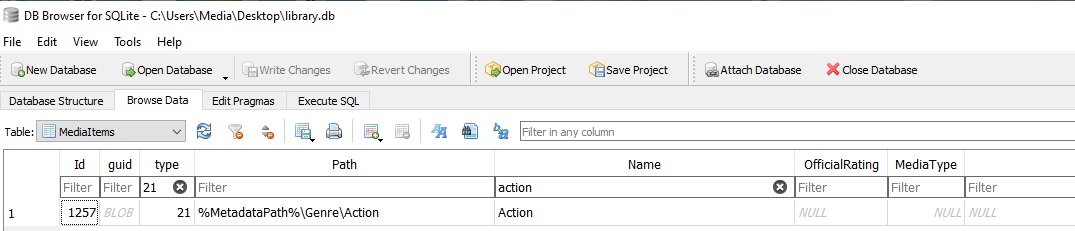
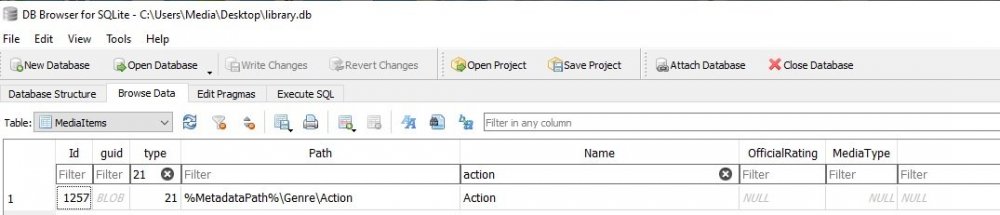
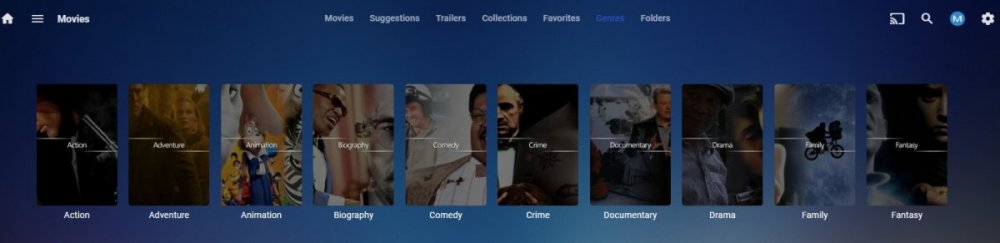
Currently the only way for custom genre images is to provide a path for every genre in the database. This example it for Genre type 21, but MusicGenre is type 14 if you want to do the same for MusicGenre. Always maintain a backup copy of the library.db if you are going to poke around. Create a Genre folder in your Emby server metadata folder Create a folder with each genre name Open the database (sqlite database editor of your choice) and go to MediaItems table and filter type column with 21 Apply the path for each genre folder to the correct genre entry in the database (example put %MetadataPath%\Genre\Action path column for Action seen in the name column). Steps will be slightly different if you use a custom metadata path. Hide some column and filtered name to make easier to see. If the folder has a image in it Emby will start using it, if not then when you customize it, it will be saved into that folder. But this will need to be done with every NEW database.
 1 point